


WSAEnumProtocols: Enumerating Installed Windows Socket Protocols
WSAEnumProtocols(枚举通信协议举例):枚举windows操作系统通信协议举例
Posted: 发表与 Friday January 02, 2009
Updated: 更新 Monday December 26, 2011
Applies to: 申请于 VB4-32, VB5, VB6
Developed with: 发展于VB6, Windows XP
OS restrictions: 适用平台 Windows 2000 or later
Author: 作者 VBnet - Randy Birch
Related: WSAEnumProtocols: Additional Data from Enumerated Windows Socket Protocols
关系:WSAEnumProtocols:数据来自列举的Windows Socket协议
The WSAEnumProtocols function is used to discover information about the collection of transport protocols and protocol chains installed on the local computer.
这种WSAEnumProtocols函数被用来搜集那些适用的通信协议和在本能地计算机上的协议链的信息。
Since layered protocols are only usable by applications when installed in protocol chains, information on layered protocols is not included in lpProtocolBuffer.
由于分层协议只是用于在协议链中应用,在分层协议中的信息不包括在lpProtocolBuffer缓冲区(一种轻便高效的结构化数据存储格式)中。
The lpiProtocols parameter can be used as a filter to constrain the amount of information provided.
这中lpiProtocols能被当作用来过滤器来提取大量提供的信息。
Often, lpiProtocols will be specified as a NULL pointer that will cause the function to return information on all available transport protocols and protocol chains.
在所有可用的通信协议和协议链中lpiProtocols经常被当作一个空指针来指向一个能返回信息的一个函数。
A WSAPROTOCOL_INFO structure is provided in the buffer pointed to by lpProtocolBuffer for each requested protocol.
WSAPROTOCOL_INFO结构是由针对每一个请求协议指向lpProtocolBuffer缓冲区的缓冲区指针提供。
If the specified buffer is not large enough (as indicated by the input value of lpdwBufferLength ), the value pointed to by lpdwBufferLength will be updated to indicate the required buffer size.
如果这个指定缓冲区不够大(在输入值传递到WSCEnumProtocols lpProtocolBuffer缓冲区的大小),这个值会因为lpdwBufferLength更新指向所需要的缓冲区大小。
The application should then obtain a large enough buffer and call WSAEnumProtocols again.
这种应用会获得大量的足够的缓冲区并再一次返回WSCEnumProtocols。
The order in which the WSAPROTOCOL_INFO structures appear in the buffer coincides with the order in which the protocol entries were registered by the service provider using the WS2_32.DLL, or with any subsequent reordering that occurred through the Windows Sockets application or DLL supplied for establishing default TCP/IP providers.
这种SAPROTOCOL_INFO结构在缓冲区出现的命令与那些被服务器使用WS2_32.DLL注册,或者
在windows套接制通信应用中后来的再排序或者DLL提供用来建立默认TCP/IP协议的命令相同。
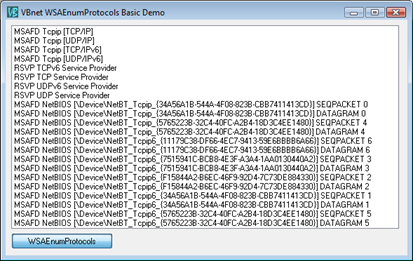
This demo simply returns the names of the installed protocols. The demo at WSAEnumProtocols: Additional Data from Enumerated Windows Socket Protocols adds to this code by providing additional information.
这个例子只是简单地返回一些已经安装的协议。其中WSAEnumProtocols: Additional Data from Enumerated Windows Socket Protocols这句话加到这个代码中来提供额外的信息。
Option Explicit
''''''''''''''''''''''''''''''''''''''''''''''''''''''''''''''''
' Copyright ©1996-2011 VBnet/Randy Birch, All Rights Reserved.
' Some pages may also contain other copyrights by the author.
''''''''''''''''''''''''''''''''''''''''''''''''''''''''''''''''
' Distribution: You can freely use this code in your own
'               applications, but you may not reproduce
'               or publish this code on any web site,
'               online service, or distribute as source
'               on any media without express permission.
''''''''''''''''''''''''''''''''''''''''''''''''''''''''''''''''
Private Const WS_VERSION_REQD As Long = &H101
Private Const MAX_PROTOCOL_CHAIN As Long = 7
Private Const IP_SUCCESS As Long = 0
Private Const WSABASEERR As Long = 10000
Private Const WSAENOBUFS As Long = WSABASEERR + 55
Private Const WSAPROTOCOL_LEN As Long = 255
Private Const MAX_WSADescription As Long = 256
Private Const MAX_WSASYSStatus As Long = 128


Private Type WSAPROTOCOLCHAIN
   ChainLen As Long    'the length of thechain
                       'length = 0 means layered protocol
                       'length = 1 means base protocol
                       'length > 1 means protocol chain
   ChainEntries(0 To MAX_PROTOCOL_CHAIN - 1) As Long  'a list of dwCatalogEntryIds
End Type

Private Type WSAPROTOCOL_INFO
   dwServiceFlags1 As Long
   dwServiceFlags2 As Long
   dwServiceFlags3 As Long
   dwServiceFlags4 As Long
   dwProviderFlags As Long
   ProviderId(0 To 15)  As Byte
   dwCatalogEntryId As Long
   ProtocolChain As WSAPROTOCOLCHAIN
   iVersion As Integer
   iAddressFamily As Long
   iMaxSockAddr As Long
   iMinSockAddr As Long
   iSocketType As Long
   iProtocol As Long
   iProtocolMaxOffset As Long
   iNetworkByteOrder As Long
   iSecurityScheme As Long
   dwMessageSize As Long
   dwProviderReserved As Long
   szProtocol(0 To WSAPROTOCOL_LEN - 1) As Byte
End Type

Private Type WSADATA
   wVersion   As Integer
   wHighVersion  As Integer
   szDescription(0 To MAX_WSADescription) As Byte
   szSystemStatus(0 To MAX_WSASYSStatus) As Byte
   wMaxSockets   As Integer
   wMaxUDPDG  As Integer
   dwVendorInfo  As Long
End Type

Private Declare Function WSAStartup Lib "WSOCK32" _
  (ByVal wVersionRequired As Long, _
  lpWSADATA As WSADATA) As Long

Private Declare Function WSACleanup Lib "WSOCK32" () As Long

Private Declare Function WSAEnumProtocols Lib "ws2_32.dll" _
   Alias "WSAEnumProtocolsA" _
  (ByVal lpiProtocols As Long, _
   lpProtocolBuffer As Any, _
   lpdwBufferLength As Long) As Long


Private Sub Form_Load()

   Command1.Caption = "WSAEnumProtocols"

End Sub


Private Sub Command1_Click()

   Dim cbBuff As Long
   Dim numEntries As Long
   Dim lpBuff() As WSAPROTOCOL_INFO
   Dim ret As Long
   Dim cnt As Long

  'initialize Ws2_32.dll
   If SocketsInitialize() Then

      List1.Clear

     'create a buffer too small to hold
     'the results of the call
      ReDim lpBuff(0) As WSAPROTOCOL_INFO

      ret = WSAEnumProtocols(0&, lpBuff(0), cbBuff)

     'the error indicates the buffer passed
     'was insufficient, and cbBuffs specifies
     'the size of the buffer required to retrieve
     'all data
      If ret = -1 And Err.LastDllError = WSAENOBUFS Then

        'number of entries is buffer divided
        'by size of one WSAPROTOCOL_INFO type
         numEntries = (cbBuff) \ LenB(lpBuff(0))

        'dimension to 0-base
         ReDim lpBuff(0 To numEntries - 1) As WSAPROTOCOL_INFO

        'and call again
         If WSAEnumProtocols(0&, lpBuff(0), cbBuff) > 0 Then

           'add the retrieved items to a listbox
            For cnt = 0 To numEntries - 1
               List1.AddItem StrConv(lpBuff(cnt).szProtocol, vbUnicode)
            Next

         End If  'WSAEnumProtocols

     End If  'ret = -1

   End If  'SocketsInitialize

   SocketsCleanup

 End Sub


Private Function SocketsInitialize() As Boolean

   Dim WSAD As WSADATA

   SocketsInitialize = WSAStartup(WS_VERSION_REQD, WSAD) = IP_SUCCESS

End Function


Private Sub SocketsCleanup()

   If WSACleanup() <> 0 Then
       MsgBox "Windows Sockets error occurred in Cleanup.", vbExclamation
   End If

End Sub

 浙公网安备 33010602011771号