
Gin框架使用
开启go mod 设置代理
go env -w GO111MODULE=on
go env -w GOPROXY=https://goproxy.cn,direct
安装Gin
mkdir gin
cd gin
go mod init HelloGin
go get -u github.com/gin-gonic/gin
main.go
package main

import (
    "github.com/gin-gonic/gin"
)

func main() {
    // 创建路由
    r := gin.Default()
    //2.路由绑定
    // gin.Context,封装了request and response

    r.GET("/ping", func(c *gin.Context) {
        // 返回简单的字符串
        //c.String(http.StatusOK, "Hello Gin!")
        // 返回json
        c.JSON(200, gin.H{
            "message": "Hello Gin",
        })
    })
    // 默认端口8080
    //r.Run() // listen and serve on 0.0.0.0:8080 (for windows "localhost:8080")
    r.Run(":8000") // 自定义端口
}
run
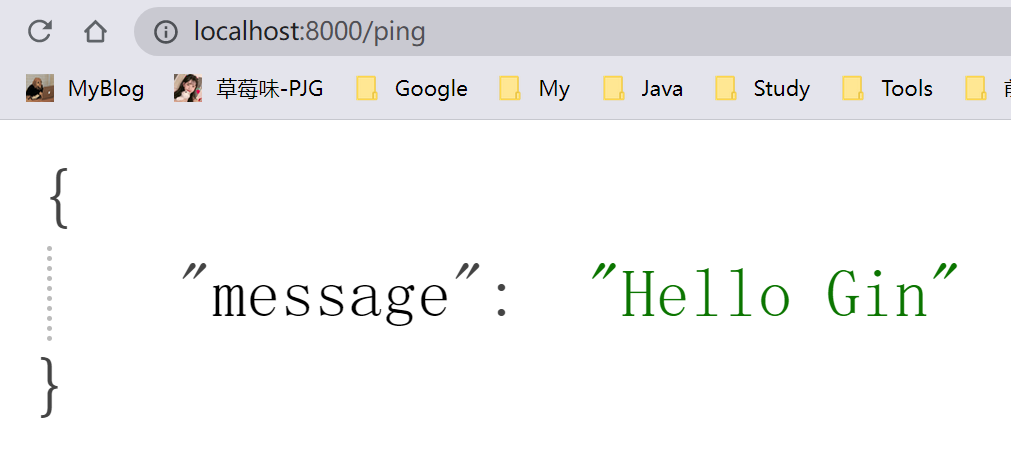
Demo
package main

import (
    "github.com/gin-gonic/gin"
    "net/http"
)

func main() {
    // 创建路由
    r := gin.Default()
    //2.路由绑定
    // gin.Context,封装了request and response

    r.GET("/ping", func(c *gin.Context) {
        // 返回简单的字符串
        //c.String(http.StatusOK, "Hello Gin!")
        // 返回json
        c.JSON(200, gin.H{
            "message": "Hello Gin",
        })
    })
    // 自定义绑定回调函数
    r.GET("/userList", getUser)

    // 通过API接收参数
    //http://localhost:8000/user/gjh
    r.GET("/user/:name", func(c *gin.Context) {
        name := c.Param("name")
        // 返回简单的字符串
        c.String(http.StatusOK, name) //打印name:gjh
    })
    // URL接收参数 http://localhost:8000/welcome?name=gjh
    r.GET("/welcome", func(c *gin.Context) {
        name := c.DefaultQuery("name", "我是默认值")
        c.String(http.StatusOK, name) //gjh
    })

    //r.GET("/red", func(c *gin.Context) {
    //    fmt.Println(1211)
    //    c.Redirect(http.StatusMovedPermanently, "https://www.baidu.com/")
    //})

    // 默认端口8080
    //r.Run() // listen and serve on 0.0.0.0:8080 (for windows "localhost:8080")
    r.Run(":8000") // 自定义端口
}

func getUser(c *gin.Context) {
    c.String(http.StatusOK, "获取用户列表成功")
}
package main

import (
    "net/http"

    "github.com/gin-gonic/gin"
)

func main() {
    //fmt.Println("Hello Gin")
    r := gin.Default()
    //  先加载这个 渲染页面之前
    r.LoadHTMLGlob("templates/*")

    // 如果访问的地址错误 默认个404页面
    r.NoRoute(func(c *gin.Context) {
        c.HTML(http.StatusNotFound, "404.html", nil)
    })

    //2.路由绑定
    // gin.Context,封装了request  response
    r.GET("/", func(c *gin.Context) {
        // 返回JSON格式
        c.JSON(200, gin.H{
            "msg": "Hello Gin",
        })
        //c.String(200, "Hello Gin !") //返回字符串
    })
    // 自定义绑定回调函数
    r.GET("/userList", getUser)

    // 渲染页面
    r.GET("/home", func(c *gin.Context) {
        c.HTML(http.StatusOK, "index.html", gin.H{
            "title": "我是后端传来的title参数",
        })
    })

    //路由分组
    user := r.Group("/user")
    //localhost:8080/user/info
    user.GET("/info", func(c *gin.Context) {
        c.JSON(http.StatusOK, gin.H{
            "name": "Rust",
            "age":  20,
        })
        /*
            {
                "age": 20,
                "name": "gjh"
            }
        */
    })
    // 重定向
    r.GET("/test", func(c *gin.Context) {
        c.Redirect(http.StatusMovedPermanently, "https://www.gorust.icu")
    })

    r.Run(":8080") //http://localhost:8080/ping  默认端口:8080
}
func getUser(c *gin.Context) {
    // 返回字符串类型
    //c.String(http.StatusOK, "获取用户列表成功")
    // 获取请求的字段名  "/userList?name=rust&age=19"
    name := c.Query("name")
    age := c.Query("age")
    // 返回JSON 格式
    c.JSON(http.StatusOK, gin.H{
        "name":   name,
        "age":    age,
        "status": 200,
    })
    /*
        {
            "age": "19",
            "name": "rust",
            "status": 200
        }
    */
}

 浙公网安备 33010602011771号