
IDEA 的 Maven 配置
IDEA 的 Maven 配置
IDEA 中也自带 Maven 插件,而且我们也可以给子代的 Maven 插件进行配置,所以我们可以使用自带的 Maven,也可以使用我们安装的 Maven 核心程序。
当 IDEA 自带的 Maven 版本不满足当前需求的时候,我们可以安装自己的 Maven 核心程序。
自己配置的 Maven,在后期维护起来,也会比较清晰方便。
配置自己的 Maven 插件
IDEA 自带的 Maven 在 IDEA 的安装目录的 plugins 目录中
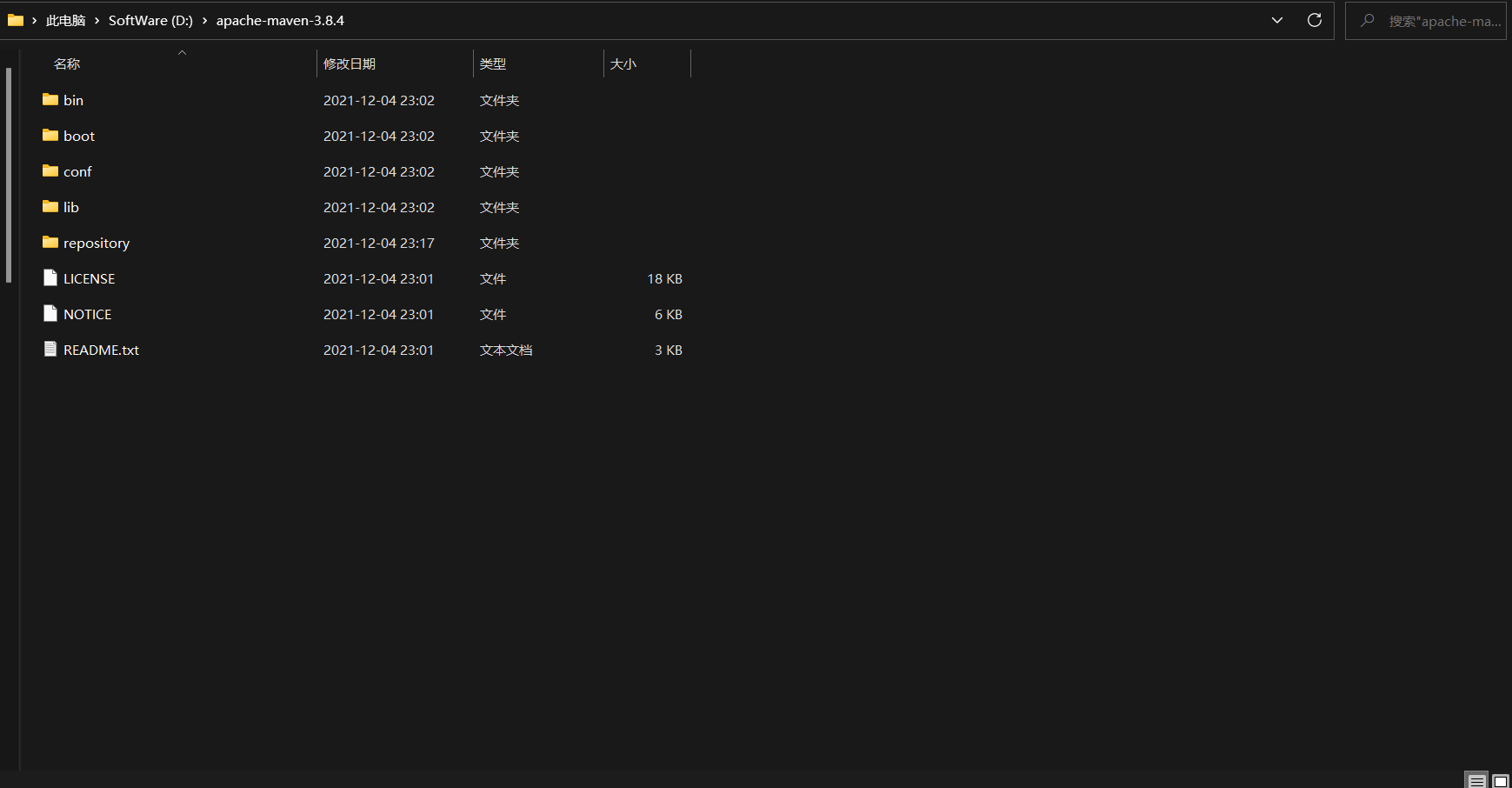
可以在 conf 文件夹下的 setting.xml 文件中配置本地仓库、镜像、以及 maven 的 java 编译版本
setting.xml文件的配置
本地仓库的配置 
镜像的配置 
maven编译版本的配置 在 IDEA 中配置 Maven

在这里采用的是自己下载的 Maven 非 IDEA 自带 配置自带的原理相同
pom.xml文件标签<project xmlns="http://maven.apache.org/POM/4.0.0" xmlns:xsi="http://www.w3.org/2001/XMLSchema-instance"
xsi:schemaLocation="http://maven.apache.org/POM/4.0.0 http://maven.apache.org/xsd/maven-4.0.0.xsd">
<!-- 指定了当前POM的版本 -->
<modelVersion>4.0.0</modelVersion>
<!-- 项目坐标信息 -->
<!-- 项目主标识,用于定义当前项目属于的实际项目,格式与项目创建的包是一样的,公司域名反写-->
<groupId>com.jsun.demo</groupId>
<!-- 项目名或模块名或项目名+模块名组成 -->
<artifactId>demo-maven01</artifactId>
<!-- 当前项目版本号,一般由三个数字组成,第一个0表示大版本号,第二个0表示分支版本号,第三个1表示小版本号 -->
<!-- SNAPSHOT代表当前版本类型为快照版本,还有alpha内部版本、beta公测版本、release发布版本、ga正式版本等 -->
<version>0.0.1-SNAPSHOT</version>
<!-- maven打包方式,默认为jar,还有:pom,maven-plugin,war,rar,zip -->
<!-- web项目打包成war包 -->
<packaging>jar</packaging>
<!-- 用在子模块中,实现对父模块的继承 -->
<parent>
<groupId>org.springframework.boot</groupId>
<artifactId>spring-boot-starter-parent</artifactId>
<version>1.2.5.RELEASE</version>
</parent>
<!-- 聚合多个maven项目,同时对所有聚合项目进行编译 -->
<modules>
<module></module>
</modules>
<!-- 项目描述名,url,详细描述,产生项目文档使用 -->
<name>Maven01</name>
<url>http://maven.apache.org</url>
<description>测试maven项目</description>
<!-- 开发人员列表,项目发布使用 -->
<developers>
<!-- 某个项目开发者的信息 -->
<developer>
<!-- 项目开发者的唯一标识符 -->
<id>001</id>
<!-- 项目开发者的全名 -->
<name>jsun</name>
<!-- 项目开发者的email -->
<email> jsun@163.com </email>
<!-- 项目开发者的主页的URL -->
<url />
<!-- 项目开发者在项目中扮演的角色,角色元素描述了各种角色 -->
<roles>
<role>developer</role>
</roles>
<!-- 项目开发者所属组织 -->
<organization>com-jsun</organization>
<!-- 项目开发者所属组织的URL -->
<organizationUrl> http://demo.jsun.com/jsun</organizationUrl>
</developer>
</developers>
<!-- 许可证信息, -->
<licenses>
<license>
<name></name>
<!-- 官方的license正文页面的URL -->
<url></url>
<!-- 项目分发的主要方式:repo,可以从Maven库下载,manual,用户必须手动下载和安装依赖 -->
<distribution></distribution>
<!-- 关于license的补充信息 -->
<comments></comments>
</license>
</licenses>
<!-- 项目所属组织信息 -->
<organization>
<name></name>
<url></url>
</organization>
<!-- 属性列表,相当于定义的公共常量,引用方式比如:${project.build.sourceEncoding} -->
<properties>
<project.build.sourceEncoding>UTF-8</project.build.sourceEncoding>
<junit.version>3.8.1</junit.version>
</properties>
<!-- 依赖列表 -->
<dependencies>
<!-- 具体依赖项,下面主要包含依赖的坐标、类型、范围等信息 -->
<dependency>
<groupId>org.springframework</groupId>
<artifactId>spring-core</artifactId>
<version>1.2.6</version>
<!-- 依赖的类型 -->
<type>jar</type>
<!-- 项目如果要使用某个框架或依赖,需要把相关jar包引用到classpath中,maven项目提供了三个classpath:编译、测试、运行 -->
<!-- 依赖的范围用于控制依赖于三种classpath关系的,包括:compile、provided、runtime、test、system、import -->
<!--
compile:默认范围,编译、测试、运行都有效
provided:编译和测试有效,最后运行不会被加入
runtime:在测试和运行的时候有效,编译不会被加入,比如jdbc驱动jar
test:测试阶段有效,比如junit
system:与provided一致,编译和测试阶段有效,但与系统关联,可移植性差
import:导入的范围,它只是用在dependencyManagement中,表示从其它的pom中导入dependency的配置
-->
<!-- 表示当前依赖只能在测试代码中引用使用,在主代码中引用使用则报错 -->
<scope>test</scope>
<!-- 排除依赖传递列表,比如A依赖B,B依赖C,但是A并没有使用C的功能,可以把C排除-->
<exclusions>
<exclusion></exclusion>
</exclusions>
</dependency>
<dependency>
<groupId>org.springframework.boot</groupId>
<artifactId>spring-boot-configuration-processor</artifactId>
<!-- 主动设置禁止自己被传递,只在当前项目中使用 -->
<optional>true</optional>
</dependency>
<dependency>
<groupId>net.sf.json-lib</groupId>
<artifactId>json-lib</artifactId>
<!-- 在相同版本下针对不同的环境或者jdk使用的jar,如果配置了这个元素,则会将这个元素名在加在最后来查找相应的jar,
具体解释查看:http://www.cnblogs.com/lovingprince/archive/2010/09/19/2166273.html -->
<classifier>jdk15</classifier>
<version>2.4</version>
</dependency>
</dependencies>
<!-- 使用dependencyManagement标签管理依赖,实际管理的是依赖的版本号,让
所有子项目中引用对应依赖而不用显式的列出版本号;
依赖并不会在当前项目引入 -->
<dependencyManagement>
<dependencies>
<dependency>
<groupId>junit</groupId>
<artifactId>junit</artifactId>
<version>${junit.version}</version>
</dependency>
</dependencies>
</dependencyManagement>
<!-- 构建插件 -->
<build>
<!--
Maven定制化打包后的包名
Maven默认的包名为:<finalName>${project.artifactId}-${project.version}</finalName>
定制化想要的包名,如加上时间戳:<finalName>${project.artifactId}-${maven.build.timestamp}</finalName>
-->
<finalName>myProject</finalName>
<!-- 将src/main/java目录下src/main/resources目录下适配通配符的文件也打包打进去.因为默认src/main/java下打包时只有class文件,src/main/resources下打包时将各种xml,properites,xsd文件等打包jar或者war里面,防止遗漏部分文件,可以在下面的标签设置 -->
<resources>
<resource>
<directory>src/main/java</directory>
<includes>
<include>**/*.properties</include>
</includes>
</resource>
<resource>
<directory>src/main/resources</directory>
<includes>
<include>**/*.*</include>
</includes>
</resource>
</resources>
<!-- 插件列表 -->
<plugins>
<!-- Source attach plugin 发布的包或者打包的时候会将源码也同时打出来 -->
<plugin>
<groupId>org.apache.maven.plugins</groupId>
<artifactId>maven-source-plugin</artifactId>
<version>2.4</version>
<executions>
<execution>
<id>attach-sources</id>
<phase>package</phase>
<goals>
<goal>jar</goal>
</goals>
</execution>
</executions>
</plugin>
<!-- 指定maven编译的jdk版本,如果不指定,maven3默认用jdk 1.5 maven2默认用jdk1.3 -->
<plugin>
<groupId>org.apache.maven.plugins</groupId>
<artifactId>maven-compiler-plugin</artifactId>
<configuration>
<!-- 一般而言,target与source是保持一致的,但是,
有时候为了让程序能在其他版本的jdk中运行(对于低版本目标jdk,源代码中不能使用低版本jdk中不支持的语法),
会存在target不同于source的情况 -->
<source>1.8</source> <!-- 源代码使用的JDK版本 -->
<target>1.8</target> <!-- 需要生成的目标class文件的编译版本 -->
<encoding>UTF-8</encoding><!-- 字符集编码 -->
<skipTests>true</skipTests><!-- 跳过测试 -->
<verbose>true</verbose>
<showWarnings>true</showWarnings>
<fork>true</fork><!-- 要使compilerVersion标签生效,还需要将fork设为true,用于明确表示编译版本配置的可用 -->
<executable><!-- path-to-javac --></executable><!-- 使用指定的javac命令,例如:<executable>${JAVA_1_4_HOME}/bin/javac</executable> -->
<compilerVersion>1.3</compilerVersion><!-- 指定插件将使用的编译器的版本 -->
<meminitial>128m</meminitial><!-- 编译器使用的初始内存 -->
<maxmem>512m</maxmem><!-- 编译器使用的最大内存 -->
<compilerArgument>-verbose -bootclasspath ${java.home}\lib\rt.jar</compilerArgument><!-- 这个选项用来传递编译器自身不包含但是却支持的参数选项 -->
</configuration>
</plugin>
<!-- The configuration of maven-assembly-plugin; 其中设计的package.xml和pom.xml是同级目录结构文件,文件内容见下面的package.xml文件 -->
<plugin>
<groupId>org.apache.maven.plugins</groupId>
<artifactId>maven-assembly-plugin</artifactId>
<executions>
<execution>
<id>make-assembly-platform</id>
<phase>package</phase>
<goals>
<goal>single</goal>
</goals>
<configuration>
<descriptors>
<descriptor>package.xml</descriptor>
</descriptors>
<finalName>patch</finalName>
<appendAssemblyId>false</appendAssemblyId>
</configuration>
</execution>
</executions>
</plugin>
<!-- findbugs -->
<plugin>
<groupId>org.codehaus.mojo</groupId>
<artifactId>findbugs-maven-plugin</artifactId>
<configuration>
<!-- <excludeFilterFile>tools/findbugs/findbugs-exclude.xml</excludeFilterFile> -->
<threshold>High</threshold>
<effort>Default</effort>
<findbugsXmlOutput>true</findbugsXmlOutput>
<findbugsXmlOutputDirectory>target/site/findbugs</findbugsXmlOutputDirectory>
</configuration>
</plugin>
</plugins>
<!-- 插件管理列表,与dependencyManagement标签作用相似,管理插件版本号,让子项目继承使用 -->
<pluginManagement>
<plugins>
<plugin>
<artifactId>maven-compiler-plugin</artifactId>
<!-- 插件扩展配置 -->
<!-- 更详细的例子:http://my.oschina.net/zh119893/blog/276090 -->
<configuration>
<!-- 源代码编译版本 -->
<source>1.7</source>
<!-- 目标平台编译版本 -->
<target>1.7</target>
<!-- 设置编译字符集编码 -->
<encoding>${project.build.sourceEncoding}</encoding>
</configuration>
</plugin>
</plugins>
</pluginManagement>
</build>
</project>可能出现的问题
编译 JAVA 版本不匹配
解决方案:
    // 可以在pom.xml文件中 配置如下代码
    <properties>
        <!--指定Java版本-->
        <maven.compiler.source>13</maven.compiler.source>
        <maven.compiler.target>13</maven.compiler.target>
    </properties>
Maven 的 GAV 机制
Maven 坐标(GAV)的查找详解
1、在平面几何中坐标(x,y)可以标识平面中唯一的一点。在 maven 中坐标就是为了定位一个唯一确定的 jar 包。 2、Maven 世界拥有大量构建,我们需要找一个用来唯一标识一个构建的统一规范,拥有了统一规范,就可以把查找工作交给机器 3、Maven 坐标主要组成(GAV) -确定一个 jar 在互联网位置:
groupId:定义当前 Maven 组织名称artifactId:定义实际项目名称version:定义当前项目的当前版本查看一些常用的仓库对标 GAV 坐标体系
[Maven Repository: Search/Browse/Explore (mvnrepository.com)](https://mvnrepository.com/)


在 IDEA 的 Maven 项目中的 GAV 配置


 浙公网安备 33010602011771号