
MapReduce框架原理之Join应用
MapReduce 框架原理之 Join 应用
Reduce Join
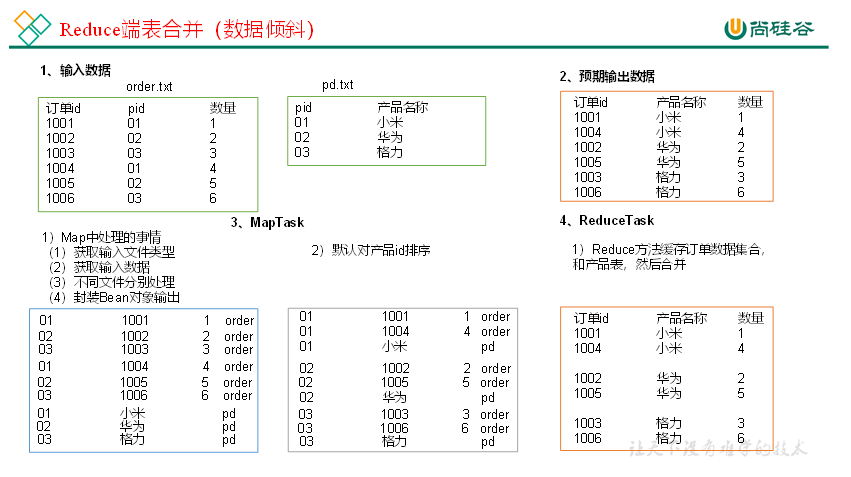
Map 端的主要工作:为来自不同表或文件的 key/value 对,打标签以区别来自不同来源的记录。然后用连接字段作为 key,其余部分和新加的标志作为 value,最后进行输出。
Reduce 端的主要工作:在 Reduce 端以连接字段作为 key 的分组已经完成,我们只需要在每一个分组当中将那些来源于不用文件的记录(在 Map 阶段已经打标志)分开,最后进行合并就 OK 了。
Reduce Join 案例实操
需求
1001 01 1 1002 02 2 1003 03 3 1004 01 4 1005 02 5 1006 03 6
id pid amount 1001 01 1 1002 02 2 1003 03 3 1004 01 4 1005 02 5 1006 03 6 pid pname 01 小米 02 华为 03 格力 将商品信息表中数据根据商品 pid 合并到订单数据表中。
「最终形式」
id pname amount 1001 小米 1 1004 小米 4 1002 华为 2 1005 华为 5 1003 格力 3 1006 格力 6 需求分析
通过将关联条件作为 Map 输出的 key,将两表满足 Join 条件的数据并携带数据所来源的文件信息,发往同一个 ReduceTask,在 Reduce 中进行数据的串联。
代码实现
创建商品和订单合并后的 JoinBean 类
package com.atguigu.mapreduce.joinBase;

import org.apache.hadoop.io.Writable;

import java.io.DataInput;
import java.io.DataOutput;
import java.io.IOException;

/**
 * @author: fxl
 * @Description:
 * @Data:Create in  2021-11-09
 * @Modified By:
 */
public class joinBean implements Writable {
    //    1001 01 1
    //    01 小米
    private String id;//订单的id
    private String pid;//产品的id
    private int amount;//产品的数量
    private String pname;//产品标志
    private String flag; //判断是订单表还是pd表

    //构造器
    public joinBean() {
    }

    public joinBean(String id, String pid, int amount, String pname, String flag) {
        this.id = id;
        this.pid = pid;
        this.amount = amount;
        this.pname = pname;
        this.flag = flag;
    }

    public String getId() {
        return id;
    }

    public void setId(String id) {
        this.id = id;
    }

    public String getPid() {
        return pid;
    }

    public void setPid(String pid) {
        this.pid = pid;
    }

    public int getAmount() {
        return amount;
    }

    public void setAmount(int amount) {
        this.amount = amount;
    }

    public String getPname() {
        return pname;
    }

    public void setPname(String pname) {
        this.pname = pname;
    }

    public String getFlag() {
        return flag;
    }

    public void setFlag(String flag) {
        this.flag = flag;
    }

    @Override
    public String toString() {
        return id + "\t" + pname + "\t" + amount;
    }

    @Override
    public void write(DataOutput dataOutput) throws IOException {
        dataOutput.writeUTF(id);
        dataOutput.writeUTF(pid);
        dataOutput.writeInt(amount);
        dataOutput.writeUTF(pname);
        dataOutput.writeUTF(flag);
    }

    @Override
    public void readFields(DataInput dataInput) throws IOException {
        this.id = dataInput.readUTF();
        this.pid = dataInput.readUTF();
        this.amount = dataInput.readInt();
        this.pname = dataInput.readUTF();
        this.flag = dataInput.readUTF();
    }
}
编写 joinMapper 类
package com.atguigu.mapreduce.joinBase;

import org.apache.hadoop.io.LongWritable;
import org.apache.hadoop.io.Text;
import org.apache.hadoop.mapreduce.InputSplit;
import org.apache.hadoop.mapreduce.lib.input.FileSplit;
import org.apache.hadoop.mapreduce.Mapper;

import java.io.IOException;

/**
 * @author: fxl
 * @Description:
 * @Data:Create in  2021-11-09
 * @Modified By:
 */
public class JoinMapper extends Mapper<LongWritable, Text, Text, joinBean> {
    private String filename;
    private Text outK = new Text();
    private joinBean outV = new joinBean();

    @Override
    protected void setup(Mapper<LongWritable, Text, Text, joinBean>.Context context) throws IOException, InterruptedException {
        //获取对应文件名称
        InputSplit split = context.getInputSplit();
        FileSplit fileSplit = (FileSplit) split;
        filename = fileSplit.getPath().getName();
    }

    @Override
    protected void map(LongWritable key, Text value, Mapper<LongWritable, Text, Text, joinBean>.Context context) throws IOException, InterruptedException {
        //获取一行
        String line = value.toString();
        //判断是那个文件,然后针对文件进行不同的操作
        if (filename.contains("order")) {
            //针对订单表的处理
            String[] split = line.split("\t");
            //封装outK
            outK.set(split[1]);
            //封装outV
            outV.setId(split[0]);
            outV.setPid(split[1]);
            outV.setAmount(Integer.parseInt(split[2]));
            outV.setPname("");
            outV.setFlag("order");
        } else {
            //对商品表进行处理
            String[] split = line.split("\t");
            //封装outK
            outK.set(split[0]);
            //封装outV
            outV.setId("");
            outV.setPid(split[0]);
            outV.setAmount(0);
            outV.setPname(split[1]);
            outV.setFlag("pd");
        }
        //写出KV
        context.write(outK, outV);
    }
}
编写 joinReducer 类
package com.atguigu.mapreduce.joinBase;

import org.apache.commons.beanutils.BeanUtils;
import org.apache.hadoop.io.NullWritable;
import org.apache.hadoop.io.Text;
import org.apache.hadoop.mapreduce.Reducer;
import org.codehaus.jackson.map.util.BeanUtil;

import java.io.IOException;
import java.lang.reflect.InvocationTargetException;
import java.util.ArrayList;


/**
 * @author: fxl
 * @Description:
 * @Data:Create in  2021-11-09
 * @Modified By:
 */
public class JoinReduce extends Reducer<Text, joinBean, joinBean, NullWritable> {

    @Override
    protected void reduce(Text key, Iterable<joinBean> values, Reducer<Text, joinBean, joinBean, NullWritable>.Context context) throws IOException, InterruptedException {
        ArrayList<joinBean> orderBeans = new ArrayList<>();
        joinBean pdBean = new joinBean();
        for (joinBean value : values) {
            //判断数据来自那个表
            //创建临时表对象接收value
            if ("order".equals(value.getFlag())) {
                joinBean tmpjoinBean = new joinBean();
                try {
                    BeanUtils.copyProperties(tmpjoinBean, value);
                } catch (Exception e) {
                    e.printStackTrace();
                }
                orderBeans.add(tmpjoinBean);
            } else {
                try {
                    BeanUtils.copyProperties(pdBean, value);
                } catch (IllegalAccessException | InvocationTargetException e) {
                    e.printStackTrace();
                }
            }
            //遍历集合orderBeans,替换掉每个orderBean的pid为pname,然后写出
        }
        for (joinBean orderBean : orderBeans) {
            orderBean.setPname(pdBean.getPname());
            //写出修改后的orderBean对象
            context.write(orderBean, NullWritable.get());
        }
    }
}
编写 joinDriver 类
package com.atguigu.mapreduce.joinBase;

import org.apache.hadoop.conf.Configuration;
import org.apache.hadoop.fs.Path;
import org.apache.hadoop.io.NullWritable;
import org.apache.hadoop.io.Text;
import org.apache.hadoop.mapreduce.Job;
import org.apache.hadoop.mapreduce.lib.input.FileInputFormat;
import org.apache.hadoop.mapreduce.lib.output.FileOutputFormat;

import java.io.IOException;

/**
 * @author: fxl
 * @Description:
 * @Data:Create in  2021-11-09
 * @Modified By:
 */
public class JoinDriver {
    public static void main(String[] args) throws IOException, ClassNotFoundException, InterruptedException {
        Job job = Job.getInstance(new Configuration());

        job.setJarByClass(JoinDriver.class);
        job.setMapperClass(JoinMapper.class);
        job.setReducerClass(JoinReduce.class);

        job.setMapOutputKeyClass(Text.class);
        job.setMapOutputValueClass(joinBean.class);

        job.setOutputKeyClass(joinBean.class);
        job.setOutputValueClass(NullWritable.class);

        FileInputFormat.setInputPaths(job, new Path("E:\\MyFiles\\尚硅谷-大数据\\2-尚硅谷大数据技术之Hadoop3.x\\资料\\11_input\\inputtable"));
        FileOutputFormat.setOutputPath(job, new Path("E:\\outputinputtable"));

        boolean b = job.waitForCompletion(true);
        System.exit(b ? 0 : 1);
    }

}
测试
运行程序查看结果
1004 小米 4
1001 小米 1
1005 华为 5
1002 华为 2
1006 格力 6
1003 格力 3
总结
缺点:这种方式中,合并的操作是在 Reduce 阶段完成,Reduce 端的处理压力太大,Map 节点的运算负载则很低,资源利用率不高,且在 Reduce 阶段极易产生数据倾斜。
解决方案:Map 端实现数据合并。
Map Join
使用场景
Map Join 适用于一张表十分小、一张表十分大的场景。
优点
思考:在 Reduce 端处理过多的表,非常容易产生数据倾斜。怎么办?
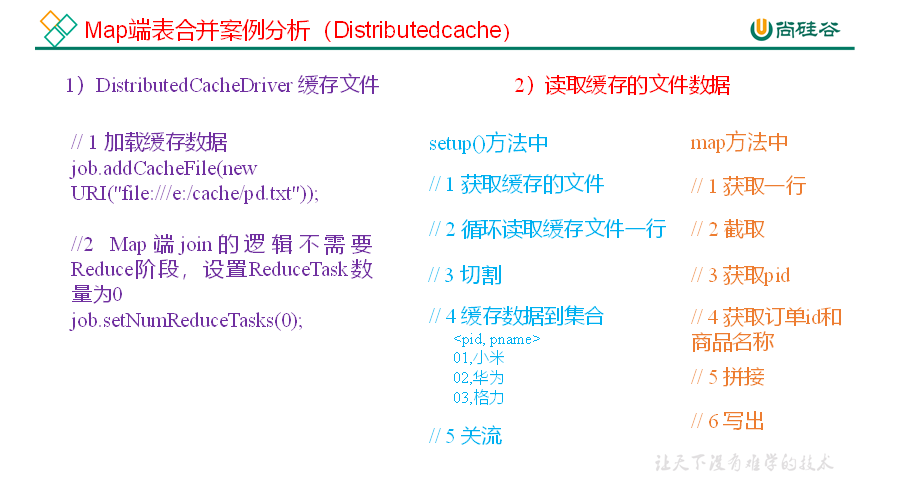
在 Map 端缓存多张表,提前处理业务逻辑,这样增加 Map 端业务,减少 Reduce 端数据的压力,尽可能的减少数据倾斜。
具体办法:采用 DistributedCache
在 Mapper 的 setup 阶段,将文件读取到缓存集合中。 在 Driver 驱动类中加载缓存。
//缓存普通文件到 Task 运行节点
job.addCacheFile(new URI("file:///e:/cache/pd.txt"));
//如果是集群运行,需要设置 HDFS 路径
job.addCacheFile(new URI("hdfs://hadoop102:8020/cache/pd.txt"));
Map Join 案例实操
需求
id pid amount 1001 01 1 1002 02 2 1003 03 3 1004 01 4 1005 02 5 1006 03 6 pid pname 01 小米 02 华为 03 格力 将商品信息表中数据根据商品 pid 合并到订单数据表中。
id pname amount 1001 小米 1 1004 小米 4 1002 华为 2 1005 华为 5 1003 格力 3 1006 格力 6 需求分析
MapJoin 适用于关联表中有小表的情形。
实现代码
先在 MapJoinDriver 驱动类中添加缓存文件
package com.atguigu.mapreduce.mapjoin;

import org.apache.hadoop.conf.Configuration;
import org.apache.hadoop.fs.Path;
import org.apache.hadoop.io.NullWritable;
import org.apache.hadoop.io.Text;
import org.apache.hadoop.mapreduce.Job;
import org.apache.hadoop.mapreduce.lib.input.FileInputFormat;
import org.apache.hadoop.mapreduce.lib.output.FileOutputFormat;

import java.io.IOException;
import java.net.URI;
import java.net.URISyntaxException;

/**
 * @author: fxl
 * @Description:
 * @Data:Create in  2021-11-09
 * @Modified By:
 */
public class MapJoinDriver {

    public static void main(String[] args) throws IOException, URISyntaxException, ClassNotFoundException, InterruptedException {

        // 1 获取job信息
        Configuration conf = new Configuration();
        Job job = Job.getInstance(conf);
        // 2 设置加载jar包路径
        job.setJarByClass(MapJoinDriver.class);
        // 3 关联mapper
        job.setMapperClass(MapJoinMapper.class);
        // 4 设置Map输出KV类型
        job.setMapOutputKeyClass(Text.class);
        job.setMapOutputValueClass(NullWritable.class);
        // 5 设置最终输出KV类型
        job.setOutputKeyClass(Text.class);
        job.setOutputValueClass(NullWritable.class);

        // 加载缓存数据
        job.addCacheFile(new URI("file:///E:/inputtable/pd.txt"));
        // Map端Join的逻辑不需要Reduce阶段,设置reduceTask数量为0
        job.setNumReduceTasks(0);

        // 6 设置输入输出路径
        FileInputFormat.setInputPaths(job, new Path("E:\\MyFiles\\尚硅谷-大数据\\2-尚硅谷大数据技术之Hadoop3.x\\资料\\11_input\\inputtable2"));
        FileOutputFormat.setOutputPath(job, new Path("E:\\outputtable"));
        // 7 提交
        boolean b = job.waitForCompletion(true);
        System.exit(b ? 0 : 1);
    }
}
在 MapJoinMapper 类中的 setup 方法中读取缓存文件
package com.atguigu.mapreduce.mapjoin;

import org.apache.commons.lang.StringUtils;
import org.apache.hadoop.fs.FSDataInputStream;
import org.apache.hadoop.fs.FileSystem;
import org.apache.hadoop.fs.Path;
import org.apache.hadoop.io.IOUtils;
import org.apache.hadoop.io.LongWritable;
import org.apache.hadoop.io.NullWritable;
import org.apache.hadoop.io.Text;
import org.apache.hadoop.mapreduce.Mapper;

import java.io.BufferedReader;
import java.io.IOException;
import java.io.InputStreamReader;
import java.net.URI;
import java.util.HashMap;
import java.util.Map;

/**
 * @author: fxl
 * @Description:
 * @Data:Create in  2021-11-09
 * @Modified By:
 */
public class MapJoinMapper extends Mapper<LongWritable, Text, Text, NullWritable> {

    private Map<String, String> pdMap = new HashMap<>();
    private Text text = new Text();

    //任务开始前将pd数据缓存进pdMap
    @Override
    protected void setup(Context context) throws IOException, InterruptedException {

        //通过缓存文件得到小表数据pd.txt
        URI[] cacheFiles = context.getCacheFiles();
        Path path = new Path(cacheFiles[0]);

        //获取文件系统对象,并开流
        FileSystem fs = FileSystem.get(context.getConfiguration());
        FSDataInputStream fis = fs.open(path);

        //通过包装流转换为reader,方便按行读取
        BufferedReader reader = new BufferedReader(new InputStreamReader(fis, "UTF-8"));

        //逐行读取,按行处理
        String line;
        while (StringUtils.isNotEmpty(line = reader.readLine())) {
            //切割一行
//01 小米
            String[] split = line.split("\t");
            pdMap.put(split[0], split[1]);
        }

        //关流
        IOUtils.closeStream(reader);
    }

    @Override
    protected void map(LongWritable key, Text value, Context context) throws IOException, InterruptedException {

        //读取大表数据
//1001 01 1
        String[] fields = value.toString().split("\t");

        //通过大表每行数据的pid,去pdMap里面取出pname
        String pname = pdMap.get(fields[1]);

        //将大表每行数据的pid替换为pname
        text.set(fields[0] + "\t" + pname + "\t" + fields[2]);

        //写出
        context.write(text, NullWritable.get());
    }
}

 浙公网安备 33010602011771号