

MapReduce之概述
MapReduce 概述
MapReduce 定义
MapReduce 是一个分布式运算程序的编程框架,是用户开发“基于 Hadoop 的数据分析应用"的核心框架。
MapReduce 核心功能是将用户编写的业务逻辑代码和自带默认组件整合成一个完整的分布式运算程序,并发运行在一个 Hadoop 集群上。
MapReduce 优缺点
优点
MapReduce 易于编程
它简单实现的一些接口,就可以完成一个分布式运行程序,
这个分布式程序可以分布到大量廉价的 PC 机器上运行。也就是说你写一个分布式程序,跟写简单的串行程序是一模一样的。就是因为这个特点是的 MapReduce 编程变得非常流行。
良好的拓展性
当你的计算资源不能得到满足的时候,你可以通过简单的增加机器来拓展他的计算能力。
高容错性
MapReduce 涉及的初衷就是使程序能够部署在廉价的 PC 机器上,这就要求它具有很高的容错性。比如其中一台机器怪挂了,它可以把上面的计算任务转移到另外一个节点上运行,不至于这个任务运行失败,而且这个过程不需要人工的参与,而完全是由 Hadoop 内部完成的。
适合 PB 级以上的海量数据的离线处理
可以实现上千台服务器集群并发工作,提供数据处理能力。
缺点
不擅长实时计算
MapReduce 无法像 MySQL 一样,在毫秒或者秒级内返回结果
不擅长流式计算
流式计算的输入数据是动态的,而 MapReduce 的输入集是静态的,不能动态变化。这是因为 MapReduce 自身的设计特点决定的数据源必须是静态的。
不擅长 DAG(有向无环图)计算
多个应用程序存在依赖关系,后一个应用程序的输入为前一个的输出。在这种情况下,MapReduce 并不是不能做,而是使用后,每个 MapReduce 作业的输出结果都会写入到磁盘,会造成大量的磁盘 IO,导致性能非常低下。
MapReduce 核心思想
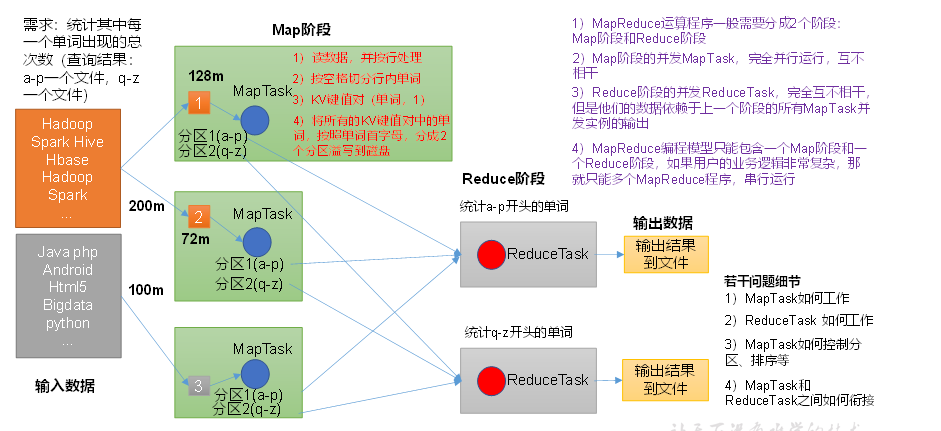
分布式的运算程序往往需要分成至少 2 个阶段
第一个阶段的 MapReduce 并发实例,完全并行运行,互不相干
第二个阶段的 ReduceTask 并发实例互不相干,但是他们的数据依赖于上一个阶段的所有 MapTask 并发实例的输出。
MapReduce 编程模型智能包含一个 Map 阶段和一个 Reduce 阶段,如果用户的业务逻辑非常复杂,那么就只能多个 MapReduce 程序,串行运行。
总结:分析 WordCount 数据流走向深入理解 MapReduce 核心思想。
MapReduce 进程
一个完整的 MapReduce 程序在分布式运行时由三类实例进程:
MrAppMaster: 负责整个程序的过程调度以及状态协调。
MRAppMaster 是 MapReduce 的 ApplicationMaster 实现,它使得 MapReduce 计算框架可以运行于 YARN 之上。在 YARN 中,MRAppMaster 负责管理 MapReduce 作业的生命周期,包括创建 MapReduce 作业,向 ResourceManager 申请资源,与 NodeManage 通信要求其启动 Container,监控作业的运行状态,当任务失败时重新启动任务等。
MapTask: 负责 Map 阶段的整个数据处理流程。
ReduceTask: 负责 Reduce 阶段的整个数据处理流程
官方 WordCount 源码
采用反编译工具反编译源码,发现 WordCount 案例有 Map 类、Reduce 类和驱动类。而且数据的类型是 Hadoop 自身封装的序列化类型。
package org.apache.hadoop.examples;

import java.io.IOException;
import java.io.PrintStream;
import java.util.StringTokenizer;
import org.apache.hadoop.conf.Configuration;
import org.apache.hadoop.fs.Path;
import org.apache.hadoop.io.IntWritable;
import org.apache.hadoop.io.Text;
import org.apache.hadoop.mapreduce.Job;
import org.apache.hadoop.mapreduce.Mapper;
import org.apache.hadoop.mapreduce.Mapper.Context;
import org.apache.hadoop.mapreduce.Reducer;
import org.apache.hadoop.mapreduce.Reducer.Context;
import org.apache.hadoop.mapreduce.lib.input.FileInputFormat;
import org.apache.hadoop.mapreduce.lib.output.FileOutputFormat;
import org.apache.hadoop.util.GenericOptionsParser;

public class WordCount
{
  public static void main(String[] args)
    throws Exception
  {
    Configuration conf = new Configuration();
    String[] otherArgs = new GenericOptionsParser(conf, args).getRemainingArgs();
    if (otherArgs.length < 2) {
      System.err.println("Usage: wordcount <in> [<in>...] <out>");
      System.exit(2);
    }
    Job job = Job.getInstance(conf, "word count");
    job.setJarByClass(WordCount.class);
    job.setMapperClass(TokenizerMapper.class);
    job.setCombinerClass(IntSumReducer.class);
    job.setReducerClass(IntSumReducer.class);
    job.setOutputKeyClass(Text.class);
    job.setOutputValueClass(IntWritable.class);
    for (int i = 0; i < otherArgs.length - 1; i++) {
      FileInputFormat.addInputPath(job, new Path(otherArgs[i]));
    }
    FileOutputFormat.setOutputPath(job, new Path(otherArgs[(otherArgs.length - 1)]));

    System.exit(job.waitForCompletion(true) ? 0 : 1);
  }

  public static class IntSumReducer extends Reducer<Text, IntWritable, Text, IntWritable>
  {
    private IntWritable result = new IntWritable();

    public void reduce(Text key, Iterable<IntWritable> values, Reducer<Text, IntWritable, Text, IntWritable>.Context context)
      throws IOException, InterruptedException
    {
      int sum = 0;
      for (IntWritable val : values) {
        sum += val.get();
      }
      this.result.set(sum);
      context.write(key, this.result);
    }
  }

  public static class TokenizerMapper extends Mapper<Object, Text, Text, IntWritable>
  {
    private static final IntWritable one = new IntWritable(1);
    private Text word = new Text();

    public void map(Object key, Text value, Mapper<Object, Text, Text, IntWritable>.Context context) throws IOException, InterruptedException
    {
      StringTokenizer itr = new StringTokenizer(value.toString());
      while (itr.hasMoreTokens()) {
        this.word.set(itr.nextToken());
        context.write(this.word, one);
      }
    }
  }
}
常用数据序列化类型
| Java 类型 | Hadoop Writable 类型 |
|---|---|
| Boolean | BooleanWritable |
| Byte | ByteWritable |
| Int | IntWritable |
| Float | FloatWritable |
| Long | LongWritable |
| Double | DoubleWritable |
| String | Text |
| Map | MapWritable |
| Array | ArrayWritable |
| Null | NullWritable |
MapReduce 编程规范
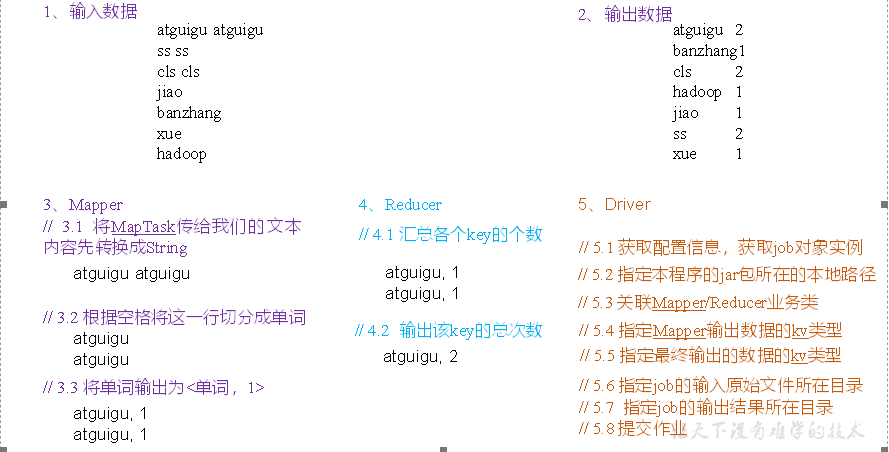
用户编写的程序分成三个部分:Mapper、Reducer 和 Driver
1.Mapper 阶段
用户自定义的 Mapper 要继承自己的父类
Mapper 的输入数据是 KV 对的形式(KV 的类型可自定义)
Mapper 中的业务逻辑写在 map()方法中
Mapper 的输出数据是 KV 对的形式(KV 的类型可自定义)
map()方法(MapTask)进程对每一个<K,V>调用一次
2.Reducer 阶段
用户自定义的 Reducer 要继承自己的父类 Reducer 的输入数据类型要对应 Mapper 的输出数据类型,也是 KV Reducer 的业务逻辑卸载 reduce 方法中 ReduceTask 进程对每一组想用 k 的<k,v>调用一次 reduce()方法
3.Driver 阶段
相当于 YARN 集群的客户端,用于提交我们整个程序到 YARN 集群,提交的是封装了 MapReduce 程序相关运行参数的 job 对象
WordCount 案例实操
本地测试
需求
在给定的文本文件中统计输出每一个单词出现的总次数
输入数据
一些文本文件
hadoop
...
...
期望输出数据
hadoop 1
...
...
需求分析
按照 MapReduce 编程规范,分别编写 Mapper、Reduce、Driver
官方案例 环境准备
新建 Maven 工程,MapReduceDemo
在 pom.xml 文件中添加如下依赖
<dependencies>
    <dependency>
        <groupId>org.apache.hadoop</groupId>
        <artifactId>hadoop-client</artifactId>
        <version>3.1.3</version>
    </dependency>
    <dependency>
        <groupId>junit</groupId>
        <artifactId>junit</artifactId>
        <version>4.12</version>
    </dependency>
    <dependency>
        <groupId>org.slf4j</groupId>
        <artifactId>slf4j-log4j12</artifactId>
        <version>1.7.30</version>
    </dependency>
</dependencies>
在项目的 src/main/resources 目录下,新建一个文件,命名为“log4j.properties”,在文件中填入。
log4j.rootLogger=INFO, stdout
log4j.appender.stdout=org.apache.log4j.ConsoleAppender
log4j.appender.stdout.layout=org.apache.log4j.PatternLayout
log4j.appender.stdout.layout.ConversionPattern=%d %p [%c] - %m%n
log4j.appender.logfile=org.apache.log4j.FileAppender
log4j.appender.logfile.File=target/spring.log
log4j.appender.logfile.layout=org.apache.log4j.PatternLayout
log4j.appender.logfile.layout.ConversionPattern=%d %p [%c] - %m%n
创建包名:
com.atguigu.mapreduce.wordcount
编写程序
编写 Mapper 类
package com.atguigu.mapreduce.wordcount;
import java.io.IOException;
import org.apache.hadoop.io.IntWritable;
import org.apache.hadoop.io.LongWritable;
import org.apache.hadoop.io.Text;
import org.apache.hadoop.mapreduce.Mapper;

public class WordCountMapper extends Mapper<LongWritable, Text, Text, IntWritable>{

 Text k = new Text();
 IntWritable v = new IntWritable(1);

 @Override
 protected void map(LongWritable key, Text value, Context context) throws IOException, InterruptedException {

  // 1 获取一行
  String line = value.toString();

  // 2 切割
  String[] words = line.split(" ");

  // 3 输出
  for (String word : words) {

   k.set(word);
   context.write(k, v);
  }
 }
}
编写 Reducer 类
package com.atguigu.mapreduce.wordcount;
import java.io.IOException;
import org.apache.hadoop.io.IntWritable;
import org.apache.hadoop.io.Text;
import org.apache.hadoop.mapreduce.Reducer;

public class WordCountReducer extends Reducer<Text, IntWritable, Text, IntWritable>{

int sum;
IntWritable v = new IntWritable();

 @Override
 protected void reduce(Text key, Iterable<IntWritable> values,Context context) throws IOException, InterruptedException {

  // 1 累加求和
  sum = 0;
  for (IntWritable count : values) {
   sum += count.get();
  }

  // 2 输出
         v.set(sum);
  context.write(key,v);
 }
}
编写 Driver 驱动类
package com.atguigu.mapreduce.wordcount;
import java.io.IOException;
import org.apache.hadoop.conf.Configuration;
import org.apache.hadoop.fs.Path;
import org.apache.hadoop.io.IntWritable;
import org.apache.hadoop.io.Text;
import org.apache.hadoop.mapreduce.Job;
import org.apache.hadoop.mapreduce.lib.input.FileInputFormat;
import org.apache.hadoop.mapreduce.lib.output.FileOutputFormat;

public class WordCountDriver {

 public static void main(String[] args) throws IOException, ClassNotFoundException, InterruptedException {

  // 1 获取配置信息以及获取job对象
  Configuration conf = new Configuration();
  Job job = Job.getInstance(conf);

  // 2 关联本Driver程序的jar
  job.setJarByClass(WordCountDriver.class);

  // 3 关联Mapper和Reducer的jar
  job.setMapperClass(WordCountMapper.class);
  job.setReducerClass(WordCountReducer.class);

  // 4 设置Mapper输出的kv类型
  job.setMapOutputKeyClass(Text.class);
  job.setMapOutputValueClass(IntWritable.class);

  // 5 设置最终输出kv类型
  job.setOutputKeyClass(Text.class);
  job.setOutputValueClass(IntWritable.class);

  // 6 设置输入和输出路径
        // 注意 本地测试和提交到集群上测试是不同的路径
  FileInputFormat.setInputPaths(job, new Path(args[0]));
  FileOutputFormat.setOutputPath(job, new Path(args[1]));

  // 7 提交job
  boolean result = job.waitForCompletion(true);
  System.exit(result ? 0 : 1);
 }
}
4.本地测试
需要首先配置好 HADOOP_HOME 变量以及 Windows 运行依赖
在 IDEA/Eclipse 上运行程序
提交到集群测试
集群上测试
用 maven 打 jar 包,需要添加的打包插件依赖
<build>
    <plugins>
        <plugin>
            <artifactId>maven-compiler-plugin</artifactId>
            <version>3.6.1</version>
            <configuration>
                <source>1.8</source>
                <target>1.8</target>
            </configuration>
        </plugin>
        <plugin>
            <artifactId>maven-assembly-plugin</artifactId>
            <configuration>
                <descriptorRefs>
                    <descriptorRef>jar-with-dependencies</descriptorRef>
                </descriptorRefs>
            </configuration>
            <executions>
                <execution>
                    <id>make-assembly</id>
                    <phase>package</phase>
                    <goals>
                        <goal>single</goal>
                    </goals>
                </execution>
            </executions>
        </plugin>
    </plugins>
</build>
注意:如果工程上显示红叉。在项目上右键->maven->Reimport 刷新即可。
将程序打成 jar 包
修改不带依赖的 jar 包名称为 wc.jar,并拷贝该 jar 包到 Hadoop 集群的/opt/module/hadoop-3.1.3 路径。
开启集群
执行 jar 包
hadoop jar wc.jar com.atguigu.mapreduce.wordcount.WordCountDriver /input /output
- END -注意执行集群模式的时候 使用的 HDFS 文件系统 不然可能执行 MapReduce 任务时 出现
File is not exists问题 还要注意输入的是资源所在的文件夹

 浙公网安备 33010602011771号