

k8s 安装kubernetes-dashboard

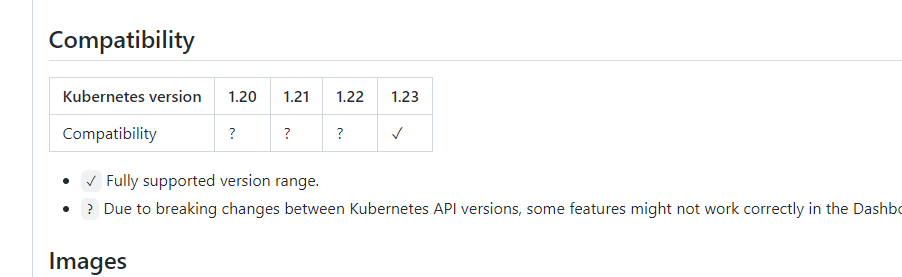
https://github.com/kubernetes/dashboard/releases/tag/v2.5.0
wget https://raw.githubusercontent.com/kubernetes/dashboard/v2.5.0/aio/deploy/recommended.yaml
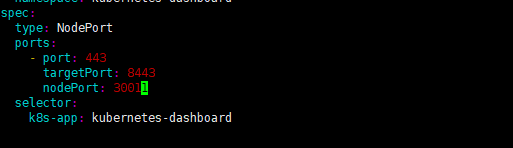
vim recommended.yaml
----
spec:
ports:
- port: 443
targetPort: 8443
nodePort: 30011
type: NodePort
selector:
k8s-app: kubernetes-dashboard
----
#创建dashboard管理用户
[root@k8s-master01 k8s]# kubectl create serviceaccount dashboard-admin -n kube-system
serviceaccount/dashboard-admin created
#绑定集群角色
[root@k8s-master01
k8s]# kubectl create clusterrolebinding dashboard-cluster-admin
--clusterrole=cluster-admin --serviceaccount=kube-system:dashboard-admin
clusterrolebinding.rbac.authorization.k8s.io/dashboard-cluster-admin created
#查看sa是否创建成功
[root@k8s-master01 k8s]# kubectl -n kube-system get serviceaccounts |grep dashboard
dashboard-admin 0 56s
#创建token 可以设置token过期时间 --duration 参数
[root@k8s-master01 k8s]# kubectl -n kube-system create token dashboard-admin
kubectl -n kube-system create token admin-user
另外一种方法:
wget https://raw.githubusercontent.com/cby-chen/Kubernetes/main/yaml/dashboard.yaml
wget https://raw.githubusercontent.com/cby-chen/Kubernetes/main/yaml/dashboard-user.yaml
kubectl apply -f dashboard-adminuser.yaml
[root@k8s-master01 k8s]# cat dashboard-user.yaml
apiVersion: v1
kind: ServiceAccount
metadata:
name: admin-user
namespace: kubernetes-dashboard
---
apiVersion: rbac.authorization.k8s.io/v1
kind: ClusterRoleBinding
metadata:
name: admin-user
roleRef:
apiGroup: rbac.authorization.k8s.io
kind: ClusterRole
name: cluster-admin
subjects:
- kind: ServiceAccount
name: admin-user
namespace: kubernetes-dashboard
kubectl edit svc kubernetes-dashboard -n kubernetes-dashboard
  type: NodePort
kubectl -n kubernetes-dashboard create token admin-user
参考:https://github.com/kubernetes/dashboard/blob/master/docs/user/access-control/creating-sample-user.md
posted on 2022-10-21 10:14 FLOWERS_WAN 阅读(114) 评论(0) 收藏 举报

 浙公网安备 33010602011771号