
Python爬虫 #020 Scrapy中间件
Scrapy中间件分为下载器中间件,Spider中间件,本文主要介绍下载器中间件Downloader MiddleWare
1. Downloader MiddleWare
-
下载器中间件是引擎和下载器之间的桥梁,引擎发送request请求给下载器,就可以在中间件中设置有关数据如:随机请求头,ip代理池等,等常见的反爬虫手段
-
使用中间件时,需要在
setting.py中设置,例如启用自己创建的UserAgentDownloadMiddleware,其中后面的数值越小,则优先调用。DOWNLOADER_MIDDLEWARES = { 'useragent.middlewares.UseragentDownloaderMiddleware': 543, 'useragent.middlewares.UserAgentDownloadMiddleware': 100, }
2. Downloader MiddleWare 设置
2.1 设置随机请求头
-
创建scrapy项目:
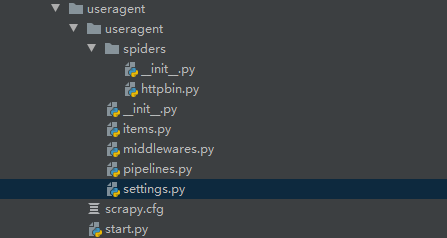
-
修改
setting.py:注意注释默认的中间件# -*- coding: utf-8 -*- # Scrapy settings for useragent project # # For simplicity, this file contains only settings considered important or # commonly used. You can find more settings consulting the documentation: # # https://docs.scrapy.org/en/latest/topics/settings.html # https://docs.scrapy.org/en/latest/topics/downloader-middleware.html # https://docs.scrapy.org/en/latest/topics/spider-middleware.html BOT_NAME = 'useragent' SPIDER_MODULES = ['useragent.spiders'] NEWSPIDER_MODULE = 'useragent.spiders' # Crawl responsibly by identifying yourself (and your website) on the user-agent #USER_AGENT = 'useragent (+http://www.yourdomain.com)' # Obey robots.txt rules ROBOTSTXT_OBEY = False # Configure maximum concurrent requests performed by Scrapy (default: 16) #CONCURRENT_REQUESTS = 32 # Configure a delay for requests for the same website (default: 0) # See https://docs.scrapy.org/en/latest/topics/settings.html#download-delay # See also autothrottle settings and docs #DOWNLOAD_DELAY = 3 # The download delay setting will honor only one of: #CONCURRENT_REQUESTS_PER_DOMAIN = 16 #CONCURRENT_REQUESTS_PER_IP = 16 # Disable cookies (enabled by default) #COOKIES_ENABLED = False # Disable Telnet Console (enabled by default) #TELNETCONSOLE_ENABLED = False # Override the default request headers: DEFAULT_REQUEST_HEADERS = { 'Accept': 'text/html,application/xhtml+xml,application/xml;q=0.9,*/*;q=0.8', 'Accept-Language': 'en', "user-agent": "Mozilla/5.0 (Windows NT 10.0; WOW64) AppleWebKit/537.36 (KHTML, like Gecko) Chrome/70.0.3538.25 Safari/537.36 Core/1.70.3756.400 QQBrowser/10.5.4039.400" } # Enable or disable spider middlewares # See https://docs.scrapy.org/en/latest/topics/spider-middleware.html #SPIDER_MIDDLEWARES = { # 'useragent.middlewares.UseragentSpiderMiddleware': 543, #} # Enable or disable downloader middlewares # See https://docs.scrapy.org/en/latest/topics/downloader-middleware.html DOWNLOADER_MIDDLEWARES = { # 注释原来的,改为自定义的 # 'useragent.middlewares.UseragentDownloaderMiddleware': 543, 'useragent.middlewares.UserAgentDownloadMiddleware': 543, } # Enable or disable extensions # See https://docs.scrapy.org/en/latest/topics/extensions.html #EXTENSIONS = { # 'scrapy.extensions.telnet.TelnetConsole': None, #} # Configure item pipelines # See https://docs.scrapy.org/en/latest/topics/item-pipeline.html #ITEM_PIPELINES = { # 'useragent.pipelines.UseragentPipeline': 300, #} # Enable and configure the AutoThrottle extension (disabled by default) # See https://docs.scrapy.org/en/latest/topics/autothrottle.html #AUTOTHROTTLE_ENABLED = True # The initial download delay #AUTOTHROTTLE_START_DELAY = 5 # The maximum download delay to be set in case of high latencies #AUTOTHROTTLE_MAX_DELAY = 60 # The average number of requests Scrapy should be sending in parallel to # each remote server #AUTOTHROTTLE_TARGET_CONCURRENCY = 1.0 # Enable showing throttling stats for every response received: #AUTOTHROTTLE_DEBUG = False # Enable and configure HTTP caching (disabled by default) # See https://docs.scrapy.org/en/latest/topics/downloader-middleware.html#httpcache-middleware-settings #HTTPCACHE_ENABLED = True #HTTPCACHE_EXPIRATION_SECS = 0 #HTTPCACHE_DIR = 'httpcache' #HTTPCACHE_IGNORE_HTTP_CODES = [] #HTTPCACHE_STORAGE = 'scrapy.extensions.httpcache.FilesystemCacheStorage' -
编写
item.py:# -*- coding: utf-8 -*- # Define here the models for your scraped items # # See documentation in: # https://docs.scrapy.org/en/latest/topics/items.html import scrapy class UseragentItem(scrapy.Item): # define the fields for your item here like: # name = scrapy.Field() pass -
编写
httpbin.py:# -*- coding: utf-8 -*- import scrapy class HttpbinSpider(scrapy.Spider): name = 'httpbin' allowed_domains = ['httpbin.org'] # 改开始的网址 start_urls = ['http://httpbin.org/user-agent'] def parse(self, response): print(response.text) # scrapy 对同一网址发出请求后不会再一次请求(去重) # dont_filter=True 表示不去重 yield scrapy.Request(self.start_urls[0], dont_filter=True) -
编写
middlewares.py:################ 自定义中间件 ################ import random class UserAgentDownloadMiddleware(object): USER_AGENTS = [ 'Mozilla/5.0 (Windows NT 10.0; Win64; x64) AppleWebKit/537.36 (KHTML, like Gecko) Chrome/70.0.3538.77 Safari/537.36', 'Mozilla/5.0 (Windows NT 6.2; WOW64) AppleWebKit/537.36 (KHTML like Gecko) Chrome/44.0.2403.155 Safari/537.36', 'Mozilla/5.0 (Windows NT 6.1) AppleWebKit/537.36 (KHTML, like Gecko) Chrome/41.0.2228.0 Safari/537.36', 'Mozilla/5.0 (Macintosh; Intel Mac OS X 10_10_1) AppleWebKit/537.36 (KHTML, like Gecko) Chrome/41.0.2227.1 Safari/537.36', 'Mozilla/5.0 (X11; Linux x86_64) AppleWebKit/537.36 (KHTML, like Gecko) Chrome/41.0.2227.0 Safari/537.36', ] def process_request(self, request, spider): # 随机选择 user_agent = random.choice(self.USER_AGENTS) # 把请求头换为随机的 request.headers['User-Agent'] = user_agent # setting中要打开中间件(56行) -
编写
pipeline.py:# -*- coding: utf-8 -*- # Define your item pipelines here # # Don't forget to add your pipeline to the ITEM_PIPELINES setting # See: https://docs.scrapy.org/en/latest/topics/item-pipeline.html class UseragentPipeline(object): def process_item(self, item, spider): return item
2.2 设置随机ip
-
中间过程基本同上,注意在
setting.py中启用自己定义的中间件DOWNLOADER_MIDDLEWARES = { # 'proxy.middlewares.ProxyDownloaderMiddleware': 543, 'proxy.middlewares.IPProxyDownloadMiddleware': 543, } -
编写
middlewares.py######################## 自定义中间件 ############################### import random class IPProxyDownloadMiddleware(object): # 代理需可用才行,不可用会报错(长时间连接) PROXYS = [ "http://39.137.95.73:8080", "http://222.95.144.231:3000", "http://121.237.149.156:3000", "http://121.237.148.251:3000" ] def process_request(self, request, spider): proxy = random.choice(self.PROXYS) request.meta['proxy'] = proxy # setting 激活中间件,并改为自定义的中间件
2.3 设置selenium
-
在Downloader MiddleWare中使用selenium,可以截获scrapy发出的请求,通过Chromedrive发送
把网页源代码封装成response对象,返回给爬虫,解析数据,可用来访问动态加载的页面。
-
其他过程基本同上,需要在爬虫文件中设置要爬取的网址,且
setting.py中启用自定义中间件。DOWNLOADER_MIDDLEWARES = { # 注释原来的 # 'jianshu_spider.middlewares.JianshuSpiderDownloaderMiddleware': 543, 'jianshu_spider.middlewares.SeleniumDownloadMiddleware': 543, } -
编写
middlewares.py########################### 自定义中间件 ############################ from scrapy import signals from selenium import webdriver import time from scrapy.http.response.html import HtmlResponse class SeleniumDownloadMiddleware(object): def __init__(self): self.driver = webdriver.Chrome() # 截获scrapy发出的请求,通过Chromedrive发送,获得返回数据 def process_request(self, request, spider): self.driver.get(request.url) time.sleep(3) # 网页源码 source = self.driver.page_source # 把网页源代码封装成response对象,返回给爬虫 ## current_url即当前的url, response = HtmlResponse(url=self.driver.current_url, body=source, request=request, encoding='utf-8') return response
本文来自博客园,作者:{枫_Null},转载请注明原文链接:https://www.cnblogs.com/fengNull/articles/16663385.html

 浙公网安备 33010602011771号