
myBatis-05 ResultMap
1、体验例子
如果要映射如下的复杂语句:
<!-- 非常复杂的语句 -->
<select id="selectBlogDetails" resultMap="detailedBlogResultMap">
  select
       B.id as blog_id,
       B.title as blog_title,
       B.author_id as blog_author_id,
       A.id as author_id,
       A.username as author_username,
       A.password as author_password,
       A.email as author_email,
       A.bio as author_bio,
       A.favourite_section as author_favourite_section,
       P.id as post_id,
       P.blog_id as post_blog_id,
       P.author_id as post_author_id,
       P.created_on as post_created_on,
       P.section as post_section,
       P.subject as post_subject,
       P.draft as draft,
       P.body as post_body,
       C.id as comment_id,
       C.post_id as comment_post_id,
       C.name as comment_name,
       C.comment as comment_text,
       T.id as tag_id,
       T.name as tag_name
  from Blog B
       left outer join Author A on B.author_id = A.id
       left outer join Post P on B.id = P.blog_id
       left outer join Comment C on P.id = C.post_id
       left outer join Post_Tag PT on PT.post_id = P.id
       left outer join Tag T on PT.tag_id = T.id
  where B.id = #{id}
</select>
映射代码:Blog实体类中也需要包含关联的相关属性。
<!-- 非常复杂的结果映射 -->
<resultMap id="detailedBlogResultMap" type="Blog">
  <constructor>
    <idArg column="blog_id" javaType="int"/>
  </constructor>
  <result property="title" column="blog_title"/>
  <association property="author" javaType="Author">
    <id property="id" column="author_id"/>
    <result property="username" column="author_username"/>
    <result property="password" column="author_password"/>
    <result property="email" column="author_email"/>
    <result property="bio" column="author_bio"/>
    <result property="favouriteSection" column="author_favourite_section"/>
  </association>
  <collection property="posts" ofType="Post">
    <id property="id" column="post_id"/>
    <result property="subject" column="post_subject"/>
    <association property="author" javaType="Author"/>
    <collection property="comments" ofType="Comment">
      <id property="id" column="comment_id"/>
    </collection>
    <collection property="tags" ofType="Tag" >
      <id property="id" column="tag_id"/>
    </collection>
    <discriminator javaType="int" column="draft">
      <case value="1" resultType="DraftPost"/>
    </discriminator>
  </collection>
</resultMap>
2、语法结构介绍
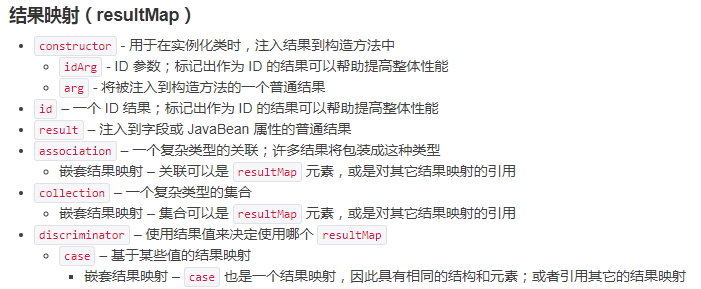
resultMap标签可以使用extends属性,继承另一个resultMap的映射数据。
2.1、constructor
用来完成对构造函数的参数的传值。
例如:
public class User {
   //...
   public User(Integer id, String username, int age) {
     //...
  }
//...
}
配置:
<constructor>
   <idArg column="id" javaType="int"/>
   <arg column="username" javaType="String"/>
   <arg column="age" javaType="_int"/>
</constructor>
2.2、id & result
id 和 result 元素都将一个列的值映射到一个简单数据类型(String, int, double, Date 等)的属性或字段。
这两者之间的唯一不同是,id 元素对应的属性会被标记为对象的标识符,在比较对象实例时使用。 这样可以提高整体的性能,尤其是进行缓存和嵌套结果映射(也就是连接映射)的时候。
| 属性 | 描述 |
|---|---|
property |
映射到列结果的字段或属性。如果 JavaBean 有这个名字的属性(property),会先使用该属性。否则 MyBatis 将会寻找给定名称的字段(field)。 无论是哪一种情形,你都可以使用常见的点式分隔形式进行复杂属性导航。 比如,你可以这样映射一些简单的东西:“username”,或者映射到一些复杂的东西上:“address.street.number”。 |
column |
查询结果中的列名。一般情况下,这和传递给 resultSet.getString(columnName) 方法的参数一样。 |
javaType |
一个 Java 类的全限定名,或一个类型别名(关于内置的类型别名,可以参考上面的表格)。 如果你映射到一个 JavaBean,MyBatis 通常可以推断类型。然而,如果你映射到的是 HashMap,那么你应该明确地指定 javaType 来保证行为与期望的相一致。 |
jdbcType |
JDBC 类型,所支持的 JDBC 类型参见这个表格之后的“支持的 JDBC 类型”。 只需要在可能执行插入、更新和删除的且允许空值的列上指定 JDBC 类型。这是 JDBC 的要求而非 MyBatis 的要求。如果你直接面向 JDBC 编程,你需要对可以为空值的列指定这个类型。 |
typeHandler |
我们在前面讨论过默认的类型处理器。使用这个属性,你可以覆盖默认的类型处理器。 这个属性值是一个类型处理器实现类的全限定名,或者是类型别名。 |
2.3、关联association
当某个类内部包含另一个类时,要一起赋值,则需要通过关联完成映射配置。
需要指定类内部的属性名和属性类型,内部配置关联类属性和查询字段的对应关系。
<association property="author" javaType="Author">
  <id property="id" column="author_id"/>
  <result property="username" column="author_username"/>
</association>
2.3.1、嵌套结果查询
通过表关联查询来同时查询多个表内的数据。
| 属性 | 描述 |
|---|---|
property |
主Bean关联另一个Bean的属性名。 |
javaType |
映射后的类型 |
resultMap |
引用外部定义的ResultMap映射,外部定义的映射可以被重复使用。 |
columnPrefix |
当连接多个表时,你可能会不得不使用列别名来避免在 ResultSet 中产生重复的列名。指定 columnPrefix 列名前缀允许你将带有这些前缀的列映射到一个外部的结果映射中。 详细说明请参考后面的例子。 |
notNullColumn |
默认情况下,在至少一个被映射到属性的列不为空时,子对象才会被创建。 你可以在这个属性上指定非空的列来改变默认行为,指定后,Mybatis 将只在这些列非空时才创建一个子对象。可以使用逗号分隔来指定多个列。默认值:未设置(unset)。 |
autoMapping |
如果设置这个属性,MyBatis 将会为本结果映射开启或者关闭自动映射。 这个属性会覆盖全局的属性 autoMappingBehavior。注意,本属性对外部的结果映射无效,所以不能搭配 select 或 resultMap 元素使用。默认值:未设置(unset)。 |
例子:
<select id="selectBlog" resultMap="blogResult">
  select
    B.id            as blog_id,
    B.title         as blog_title,
    B.author_id     as blog_author_id,
    A.id            as author_id,
    A.username      as author_username,
    A.password      as author_password,
    A.email         as author_email,
    A.bio           as author_bio
  from Blog B left outer join Author A on B.author_id = A.id
  where B.id = #{id}
</select>
通过定义多个resultMap,可重用映射配置:
<resultMap id="blogResult" type="Blog">
  <id property="id" column="blog_id" />
  <result property="title" column="blog_title"/>
  <association property="author" column="blog_author_id" javaType="Author" resultMap="authorResult"/>
</resultMap>

<resultMap id="authorResult" type="Author">
  <id property="id" column="author_id"/>
  <result property="username" column="author_username"/>
  <result property="password" column="author_password"/>
  <result property="email" column="author_email"/>
  <result property="bio" column="author_bio"/>
</resultMap>
在上面的例子中,你可以看到,博客(Blog)作者(author)的关联元素委托名为 “authorResult” 的结果映射来加载作者对象的实例。
id 元素在嵌套结果映射中扮演着非常重要的角色。你应该总是指定一个或多个可以唯一标识结果的属性。 虽然,即使不指定这个属性,MyBatis 仍然可以工作,但是会产生严重的性能问题。 只需要指定可以唯一标识结果的最少属性。显然,你可以选择主键(复合主键也可以)。
现在,上面的示例使用了外部的结果映射元素来映射关联。这使得 Author 的结果映射可以被重用。 然而,如果你不打算重用它,或者你更喜欢将你所有的结果映射放在一个具有描述性的结果映射元素中。 你可以直接将结果映射作为子元素嵌套在内。这里给出使用这种方式的等效例子:
不可重用映射配置:
<resultMap id="blogResult" type="Blog">
  <id property="id" column="blog_id" />
  <result property="title" column="blog_title"/>
  <association property="author" javaType="Author">
    <id property="id" column="author_id"/>
    <result property="username" column="author_username"/>
    <result property="password" column="author_password"/>
    <result property="email" column="author_email"/>
    <result property="bio" column="author_bio"/>
  </association>
</resultMap>
如果一个博客允许有两个作者如何处理:
查询语句:
<select id="selectBlog" resultMap="blogResult">
  select
    B.id            as blog_id,
    B.title         as blog_title,
    A.id            as author_id,
    A.username      as author_username,
    A.password      as author_password,
    A.email         as author_email,
    A.bio           as author_bio,
    CA.id           as co_author_id,
    CA.username     as co_author_username,
    CA.password     as co_author_password,
    CA.email        as co_author_email,
    CA.bio          as co_author_bio
  from Blog B
  left outer join Author A on B.author_id = A.id
  left outer join Author CA on B.co_author_id = CA.id
  where B.id = #{id}
</select>
映射配置:
由于结果中的列名与结果映射中的列名不同。你需要指定 columnPrefix 以便重复使用该结果映射来映射 co-author 的结果。
<resultMap id="blogResult" type="Blog">
  <id property="id" column="blog_id" />
  <result property="title" column="blog_title"/>
  <association property="author"
    resultMap="authorResult" />
  <association property="coAuthor"
    resultMap="authorResult"
    columnPrefix="co_" />
</resultMap>
<resultMap id="authorResult" type="Author">
  <id property="id" column="author_id"/>
  <result property="username" column="author_username"/>
  <result property="password" column="author_password"/>
  <result property="email" column="author_email"/>
  <result property="bio" column="author_bio"/>
</resultMap>
2.3.2、嵌套Select查询
内部关联对象通过另一个单独的Select查询获取数据,不通过表关联查询。
| 属性 | 描述 |
|---|---|
column |
主查询结果集中的列名。用来给子查询传入参数值。 注意:在子查询有多个参数时,需要使用 column="{prop1=col1,prop2=col2}" 这样的语法来指定多个传递给嵌套 Select 查询语句的列名。这会使得 prop1 和 prop2 作为参数对象,被设置为对应嵌套 Select 语句的参数。 |
select |
用于加载复杂类型属性的映射语句的 ID,它会从 column 属性指定的列中检索数据,作为参数传递给目标 select 语句。 具体请参考下面的例子。注意:在使用复合主键的时候,你可以使用 column="{prop1=col1,prop2=col2}" 这样的语法来指定多个传递给嵌套 Select 查询语句的列名。这会使得 prop1 和 prop2 作为参数对象,被设置为对应嵌套 Select 语句的参数。 |
fetchType |
可选的。有效值为 lazy 和 eager。 指定属性后,将在映射中忽略全局配置参数 lazyLoadingEnabled,使用属性的值。 |
例子:这种方式被称为1+N查询,执行的数据库操作太多,性能不好。
如果需要延迟加载,需要采用这种方式。
<resultMap id="blogResult" type="Blog">
  <association property="author" column="author_id" javaType="Author" select="selectAuthor"/>
</resultMap>

<select id="selectBlog" resultMap="blogResult">
  SELECT * FROM BLOG WHERE ID = #{id}
</select>

<select id="selectAuthor" resultType="Author">
  SELECT * FROM AUTHOR WHERE ID = #{id}
</select>
2.3.3、多结果集
从版本 3.2.3 开始,MyBatis 提供了另一种解决 N+1 查询问题的方法。
某些数据库允许存储过程返回多个结果集,或一次性执行多个语句,每个语句返回一个结果集。 我们可以利用这个特性,在不使用连接的情况下,只访问数据库一次就能获得相关数据。
存储过程getBlogsAndAuthors,一次执行多个查询:
SELECT * FROM BLOG WHERE ID = #{id}
SELECT * FROM AUTHOR WHERE ID = #{id}
映射配置:在映射语句中,必须通过 resultSets 属性为每个结果集指定一个名字,多个名字使用逗号隔开。
<select id="selectBlog" resultSets="blogs,authors" resultMap="blogResult" statementType="CALLABLE">
  {call getBlogsAndAuthors(#{id,jdbcType=INTEGER,mode=IN})}
</select>
现在我们可以指定使用 “authors” 结果集的数据来填充 “author” 关联:
<resultMap id="blogResult" type="Blog">
  <id property="id" column="id" />
  <result property="title" column="title"/>
  <association property="author" javaType="Author" resultSet="authors" column="author_id" foreignColumn="id">
    <id property="id" column="id"/>
    <result property="username" column="username"/>
    <result property="password" column="password"/>
    <result property="email" column="email"/>
    <result property="bio" column="bio"/>
  </association>
</resultMap>
2.4、集合collection
一个类内部包含另一个类的集合变量。
一个博客包含多篇文章:
private List<Post> posts;
和关联的用法基本差不多。
2.4.1、嵌套结果映射
合并查询:
<select id="selectBlog" resultMap="blogResult">
  select
  B.id as blog_id,
  B.title as blog_title,
  B.author_id as blog_author_id,
  P.id as post_id,
  P.subject as post_subject,
  P.body as post_body,
  from Blog B
  left outer join Post P on B.id = P.blog_id
  where B.id = #{id}
</select>
映射配置:
<resultMap id="blogResult" type="Blog">
  <id property="id" column="blog_id" />
  <result property="title" column="blog_title"/>
  <collection property="posts" ofType="Post">
    <id property="id" column="post_id"/>
    <result property="subject" column="post_subject"/>
    <result property="body" column="post_body"/>
  </collection>
</resultMap>
可重用的映射配置:
<resultMap id="blogResult" type="Blog">
  <id property="id" column="blog_id" />
  <result property="title" column="blog_title"/>
  <collection property="posts" ofType="Post" resultMap="blogPostResult" columnPrefix="post_"/>
</resultMap>

<resultMap id="blogPostResult" type="Post">
  <id property="id" column="id"/>
  <result property="subject" column="subject"/>
  <result property="body" column="body"/>
</resultMap>
这里使用 “ofType” 属性设定映射的类型。这个属性非常重要,它用来将 JavaBean(或字段)属性的类型和集合存储的类型区分开来。
所以你可以按照下面这样来阅读映射: “posts 是一个存储 Post 的 ArrayList 集合”
2.4.2、嵌套Select查询
分开查询,性能不好。
首先,让我们看看如何使用嵌套 Select 查询来为博客加载文章。
<resultMap id="blogResult" type="Blog">
  <collection property="posts" javaType="ArrayList" column="id" ofType="Post" select="selectPostsForBlog"/>
</resultMap>

<select id="selectBlog" resultMap="blogResult">
  SELECT * FROM BLOG WHERE ID = #{id}
</select>

<select id="selectPostsForBlog" resultType="Post">
  SELECT * FROM POST WHERE BLOG_ID = #{id}
</select>
2.4.3、多结果集
存储过程getBlogsAndAuthors,一次执行多个查询:
SELECT * FROM BLOG WHERE ID = #{id}
SELECT * FROM AUTHOR WHERE ID = #{id}
映射配置:在映射语句中,必须通过 resultSets 属性为每个结果集指定一个名字,多个名字使用逗号隔开。
<select id="selectBlog" resultSets="blogs,authors" resultMap="blogResult" statementType="CALLABLE">
  {call getBlogsAndAuthors(#{id,jdbcType=INTEGER,mode=IN})}
</select>
映射配置:我们指定 “posts” 集合将会使用存储在 “posts” 结果集中的数据进行填充
<resultMap id="blogResult" type="Blog">
  <id property="id" column="id" />
  <result property="title" column="title"/>
  <collection property="posts" ofType="Post" resultSet="posts" column="id" foreignColumn="blog_id">
    <id property="id" column="id"/>
    <result property="subject" column="subject"/>
    <result property="body" column="body"/>
  </collection>
</resultMap>
2.5、鉴别器discriminator
根据某个字段的不同值返回不同的映射结果。根据不同值映射不同的车辆类型。
类内部变量需要是所有类型的父类,每个不同的子类有自己个性化的属性需要进行值映射。
<resultMap id="vehicleResult" type="Vehicle">
  <id property="id" column="id" />
  <result property="vin" column="vin"/>
  <result property="year" column="year"/>
  <result property="make" column="make"/>
  <result property="model" column="model"/>
  <result property="color" column="color"/>
  <discriminator javaType="int" column="vehicle_type">
    <case value="1" resultType="carResult">
      <result property="doorCount" column="door_count" />
    </case>
    <case value="2" resultType="truckResult">
      <result property="boxSize" column="box_size" />
      <result property="extendedCab" column="extended_cab" />
    </case>
    <case value="3" resultType="vanResult">
      <result property="powerSlidingDoor" column="power_sliding_door" />
    </case>
    <case value="4" resultType="suvResult">
      <result property="allWheelDrive" column="all_wheel_drive" />
    </case>
  </discriminator>
</resultMap>
MyBatis 会从结果集中得到每条记录,然后比较它的 vehicle type 值。 如果它匹配任意一个鉴别器的 case,就会使用这个 case 指定的结果映射。 这个过程是互斥的,也就是说,剩余的结果映射将被忽略(除非它是扩展的,我们将在稍后讨论它)。 如果不能匹配任何一个 case,MyBatis 就只会使用鉴别器块外定义的结果映射。
3、自动映射
在简单的场景下,MyBatis 可以为你自动映射查询结果。
通常数据库列使用大写字母组成的单词命名,单词间用下划线分隔;而 Java 属性一般遵循驼峰命名法约定。为了在这两种命名方式之间启用自动映射,需要将 mapUnderscoreToCamelCase 设置为 true。
甚至在提供了结果映射后,自动映射也能工作。在这种情况下,对于每一个结果映射,在 ResultSet 出现的列,如果没有设置手动映射,将被自动映射。在自动映射处理完毕后,再处理手动映射。 在下面的例子中,id 和 userName 列将被自动映射,hashed_password 列将根据配置进行映射。
<select id="selectUsers" resultMap="userResultMap">
  select
    user_id             as "id",
    user_name           as "userName",
    hashed_password
  from some_table
  where id = #{id}
</select>
手动映射:
<resultMap id="userResultMap" type="User">
  <result property="password" column="hashed_password"/>
</resultMap>
有三种自动映射等级:
NONE- 禁用自动映射。仅对手动映射的属性进行映射。PARTIAL- 对除在内部定义了嵌套结果映射(也就是连接的属性)以外的属性进行映射FULL- 自动映射所有属性。

 浙公网安备 33010602011771号