
myBatis-01 基本使用
介绍项目中如何使用myBais完成数据库的访问
0、项目文件结构
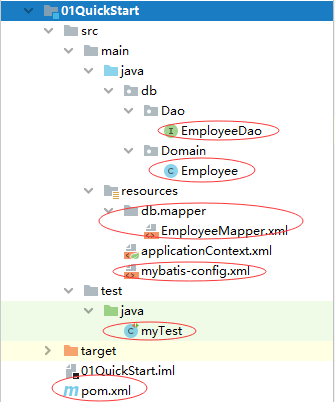
1、pom.xml配置
引入myBatis包
<?xml version="1.0" encoding="UTF-8"?>
<project xmlns="http://maven.apache.org/POM/4.0.0"
         xmlns:xsi="http://www.w3.org/2001/XMLSchema-instance"
         xsi:schemaLocation="http://maven.apache.org/POM/4.0.0 http://maven.apache.org/xsd/maven-4.0.0.xsd">
    <modelVersion>4.0.0</modelVersion>

    <groupId>org.rui</groupId>
    <artifactId>01QuickStart</artifactId>
    <version>1.0-SNAPSHOT</version>
    <build>
        <plugins>
            <plugin>
                <groupId>org.apache.maven.plugins</groupId>
                <artifactId>maven-compiler-plugin</artifactId>
                <configuration>
                    <source>7</source>
                    <target>7</target>
                </configuration>
            </plugin>
        </plugins>
    </build>

    <dependencies>
        <!-- https://mvnrepository.com/artifact/org.springframework/spring-context -->
        <dependency>
            <groupId>org.springframework</groupId>
            <artifactId>spring-context</artifactId>
            <version>5.3.0</version>
        </dependency>

        <!-- https://mvnrepository.com/artifact/org.springframework/spring-aop -->
        <dependency>
            <groupId>org.springframework</groupId>
            <artifactId>spring-aop</artifactId>
            <version>5.3.0</version>
        </dependency>

        <!-- https://mvnrepository.com/artifact/org.springframework/spring-aspects -->
        <dependency>
            <groupId>org.springframework</groupId>
            <artifactId>spring-aspects</artifactId>
            <version>5.3.0</version>
        </dependency>

        <!--jdbcTemplate-->
        <!-- https://mvnrepository.com/artifact/org.springframework/spring-jdbc -->
        <dependency>
            <groupId>org.springframework</groupId>
            <artifactId>spring-jdbc</artifactId>
            <version>5.3.0</version>
        </dependency>

        <!--MySQL连接的依赖包-->
        <!-- https://mvnrepository.com/artifact/mysql/mysql-connector-java -->
        <dependency>
            <groupId>mysql</groupId>
            <artifactId>mysql-connector-java</artifactId>
            <version>8.0.11</version>
        </dependency>

        <!-- https://mvnrepository.com/artifact/org.mybatis/mybatis -->
        <!-- https://mybatis.org/mybatis-3/getting-started.html -->
        <dependency>
            <groupId>org.mybatis</groupId>
            <artifactId>mybatis</artifactId>
            <version>3.5.6</version>
        </dependency>

        <!--单元测试-->
        <!-- https://mvnrepository.com/artifact/junit/junit -->
        <dependency>
            <groupId>junit</groupId>
            <artifactId>junit</artifactId>
            <version>4.13</version>
            <scope>test</scope>
        </dependency>

        <!--日志输出-->
        <!-- https://mvnrepository.com/artifact/log4j/log4j -->
        <dependency>
            <groupId>log4j</groupId>
            <artifactId>log4j</artifactId>
            <version>1.2.17</version>
        </dependency>

    </dependencies>

</project>
2、Mybatis主配置文件
在main/Resources跟目录下创建mybatis-config.xml文件,内容如下:
<?xml version="1.0" encoding="UTF-8" ?>
<!DOCTYPE configuration
        PUBLIC "-//mybatis.org//DTD Config 3.0//EN"
        "http://mybatis.org/dtd/mybatis-3-config.dtd">
<configuration>
    <environments default="development">
        <environment id="development">
            <transactionManager type="JDBC"/>
            <dataSource type="POOLED">
                <property name="driver" value="com.mysql.cj.jdbc.Driver"/>
                <property name="url" value="jdbc:mysql://47.100.229.xxx:3306/springStudy?useSSL=false&serverTimezone=UTC"/>
                <property name="username" value="root"/>
                <property name="password" value="xxx"/>
            </dataSource>
        </environment>
    </environments>
    <!-- 引入表的Mapper文件 -->
    <mappers>
        <mapper resource="db/mapper/EmployeeMapper.xml"/>
    </mappers>
</configuration>
3、单个表对应的内容
3.1、模型类
根据表接口定义模型类,属性名和字段名保持统一
package db.Domain;

import org.springframework.stereotype.Component;

import java.sql.Date;

@Component(value = "employee")
public class Employee {
    private String emplId;
    private String name;
    private String gender;
    private Date hireDate;
    private int salary;

    public String getEmplId() {
        return emplId;
    }
    public void setEmplId(String emplId) {
        this.emplId = emplId;
    }
    public String getName() {
        return name;
    }
    public void setName(String name) {
        this.name = name;
    }
    public String getGender() {
        return gender;
    }
    public void setGender(String gender) {
        this.gender = gender;
    }
    public Date getHireDate() {
        return hireDate;
    }
    public void setHireDate(Date hireDate) {
        this.hireDate = hireDate;
    }
    public int getSalary() {
        return salary;
    }
    public void setSalary(int salary) {
        this.salary = salary;
    }

    @Override
    public String toString() {
        return "Employee{" +
                "emplId='" + emplId + '\'' +
                ", name='" + name + '\'' +
                ", gender=" + gender +
                ", hireDate=" + hireDate +
                ", salary=" + salary +
                '}';
    }
}
3.2、数据接口类
根据业务需求定义所需要的相关数据操作方法
package db.Dao;

import db.Domain.Employee;
import org.apache.ibatis.annotations.Param;

import java.util.List;

//数据访问接口
public interface EmployeeDao {

    //查询单个对象,单个参数时@Param可以省略
    public Employee queryByEmplId(@Param("emplId") String empId);

    //查询多个对象,多个参数时需要通过@Param声明
    public List<Employee> queryListBySalary(@Param("start") int start,@Param("end") int end);

    //新增数据
    public int insert(Employee emp);

    //更新数据
    public int update(Employee emp);

    //删除数据
    public void delete(@Param("emplId") String empId);
}
3.3、Mapper文件
文件保存在main/Resources/db/Mapper/目录内
右击:Resource选择创建目录,输入“db/Mapper”即可。
根据接口类内部的方法定义Mapper内的相关操作映射
<?xml version="1.0" encoding="UTF-8" ?>
<!DOCTYPE mapper PUBLIC "-//mybatis.org//DTD Mapper 3.0//EN" "http://mybatis.org/dtd/mybatis-3-mapper.dtd">

<!--命名空间对应接口类-->
<mapper namespace="db.Dao.EmployeeDao">
    <!--主键查询-->
    <select id="queryByEmplId" resultType="db.Domain.Employee">
        select * from Employee where emplId=#{emplId}
    </select>
    <!--条件查询-->
    <select id="queryListBySalary" resultType="db.Domain.Employee" >
        select * from Employee where salary BETWEEN #{start} and #{end}
    </select>
    <!--新增-->
    <insert id="insert" parameterType="db.Domain.Employee">
        insert into employee(emplId,`name`,gender,hireDate,salary) values(#{emplId},#{name},#{gender},#{hireDate},#{salary})
    </insert>
    <!--修改-->
    <update id="update" parameterType="db.Domain.Employee">
        update employee set `name`=#{name},gender=#{gender},salary=#{salary} where emplId=#{emplId}
    </update>
    <delete id="delete">
        delete from employee where emplId=#{emplId}
    </delete>
</mapper>
3.4、主配置文件引用Mapper文件
通过resource属性指向表的Mapper文件
见2内红色标注代码:

3.5、测试代码
import db.Dao.EmployeeDao;
import db.Domain.Employee;
import org.apache.ibatis.io.Resources;
import org.apache.ibatis.session.SqlSession;
import org.apache.ibatis.session.SqlSessionFactory;
import org.apache.ibatis.session.SqlSessionFactoryBuilder;
import org.junit.Test;

import java.io.IOException;
import java.io.InputStream;
import java.sql.Date;
import java.util.List;

public class myTest {
    @Test
    public void TestMyBaisc() throws IOException {
        //1 读取配置文件
        String resource = "mybatis-config.xml";
        InputStream inputStream = Resources.getResourceAsStream(resource);
        //2 构建SqlSessionFactory
        SqlSessionFactory sqlSessionFactory = new SqlSessionFactoryBuilder().build(inputStream);
        //3 构建SqlSession,并执行mapper内操作
        try (SqlSession session = sqlSessionFactory.openSession()) {
            //获取接口代理实现
            EmployeeDao dao = session.getMapper(EmployeeDao.class);
            //单数据查询
            {
                System.out.println("==单数据查询");
                Employee empl = dao.queryByEmplId("001");
                System.out.println(empl.toString());
            }
            //数据删除
            {
                dao.delete("004");
                session.commit();
            }
            //数据新增
            {
                System.out.println("==数据新增");
                Employee empl = new Employee();
                empl.setEmplId("004");
                empl.setName("李晓明");
                empl.setGender("男");
                empl.setHireDate(new Date(2020,10,10));
                empl.setSalary(2000);
                int result = dao.insert(empl);
                session.commit();
                System.out.println("行数:"+result);
            }
            //多数据查询
            {
                System.out.println("==多数据查询 - 新增后");
                List<Employee> list = dao.queryListBySalary(20,5000);
                for (Employee item : list) {
                    System.out.println(item.toString());
                }
            }
            //数据修改
            {
                System.out.println("==数据修改");
                Employee empl = new Employee();
                empl.setEmplId("003");
                empl.setName("刘超");
                empl.setGender("男");
                empl.setHireDate(new Date(2020,10,10));
                empl.setSalary(2000);
                int result = dao.update(empl);
                session.commit();
                System.out.println("行数:"+result);
            }
            //多数据查询
            {
                System.out.println("==多数据查询 - 修改后");
                List<Employee> list = dao.queryListBySalary(20,5000);
                for (Employee item : list) {
                    System.out.println(item.toString());
                }
            }
        }
        System.out.println("测试完成1");
    }
}

 浙公网安备 33010602011771号