
2025-08-16-Sat-T-Drools规则引擎
规则引擎 Drools
1. 简介
业务规则引擎,业务规则管理系统, BRMS。
规则引擎的主要思想是将应用程序中的业务决策部分分离出来,并使用预定义的语义模块编写业务决策(业务规则),由用户或者开发者在需要时进行配置管理。
规则引擎并不是一个具体的技术框架,而是指一类系统,即业务规则管理系统。市面上常见产品有drools,VisualRules,iLog等
规则引擎实现了将业务规则从程序代码中分离出来,接收数据输入,解释业务规则,并根据业务规则做出业务决策。
1.1 优点
- 业务规则和系统代码解耦,实现业务规则的集中管理
- 在不重启服务的情况下,可随时对业务规则进行扩展和维护(热更新)
- 可以动态修改业务规则,从而快速响应业务方的需求变更,大大提高了生产效率。
1.2 应用场景
- 风控系统:风险贷款、风险评估
- 反欺诈项目:银行贷款、征信验证
- 决策平台:财务计算
- 促销平台:满减、打折
1.3 快速案例
- 引入maven依赖
<!--drools-->
<dependency>
    <groupId>org.drools</groupId>
    <artifactId>drools-compiler</artifactId>
    <version>7.50.0.Final</version>
</dependency>

<dependency>
    <groupId>org.drools</groupId>
    <artifactId>drools-mvel</artifactId>
    <version>7.50.0.Final</version>
</dependency>
- 定义Entity
package com.learning.drools.entity;

import lombok.Data;

@Data
public class Order {
    private Double originalPrice;
    private Double realPrice;
}
- 定义kmodule.xml
在resources/META-INF文件夹下创建kmodule.xml文件
<?xml version="1.0" encoding="UTF-8" ?>

<kmodule xmlns="http://www.drools.org/xsd/kmodule">
    <!--name:指定kbase名称,任意但必须唯一, packages:规则文件的目录(在resources目录下), default: 指定当前kbase是否为默认-->
    <kbase name="myKbase1" packages="rules" default="true">
        <!--name: 指定session名称,任意但必须唯一, default: 当前session是否为默认-->
        <ksession name="ksession-rule" default="true"/>
    </kbase>
</kmodule>
- 定义drl规则文件
在resource下的rules文件夹下定义discountRules.drl文件
package rules
import com.learning.drools.entity.Order // 引入entity


// 第一条规则: 所购图书少于100元,没有优惠
rule "rule_discount_1"
    when
        $order:Order(originalPrice < 100)  // 模式匹配,到规则引擎中(工作内存)查找Order对象,查找originalPrice < 100 的对象; $order是对这个对象的别名

    then
        $order.setRealPrice($order.getOriginalPrice());
        System.out.println("规则1:没有优惠");
    end

// 规则二: 价格在100 - 200 优惠20元

rule "rule_discount_2"
    when
        $order:Order(originalPrice >=100 && originalPrice < 200)
    then
        $order.setRealPrice($order.getOriginalPrice() - 20);
        System.out.println("规则2:价格在100 - 200, 优惠20元");
    end

// 规则三: 价格在200 - 300 优惠50元

rule "rule_discount_3"
    when $order:Order(originalPrice >=200 && originalPrice < 300)
    then
        $order.setRealPrice($order.getOriginalPrice() - 50);
        System.out.println("规则三:价格在200 - 300, 优惠50元");
    end

// 规则四: 价格在300 以上优惠100元

rule "rule_discount_4"
    when $order:Order(originalPrice >= 300)
    then $order.setRealPrice($order.getOriginalPrice() - 100);
        System.out.println("规则四: 价格在300以上, 优惠100元");
    end
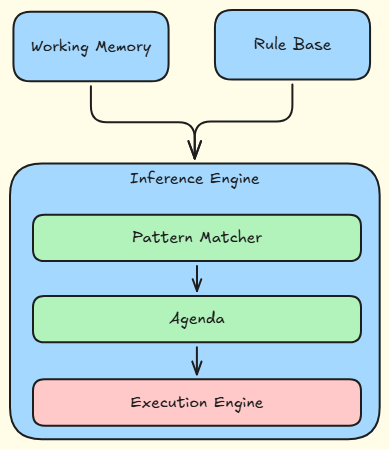
1.4 规则引擎的构成
- Working Memory(工作内存)
- Rule Base(规则库)
- Inference Engine(推理引擎)
- Pattern Matcher(匹配器) // 匹配符合条件的规则,将其加入到议程中
- Agenda(议程) // 即将执行的规则就在议程中
- Execution Engine(执行引擎)
1.5 规则引擎相关概念说明
1.5.1 Working memory
工作内存: drools会从工作内存中获取数据并和规则文件中定义的规则进行模式匹配,所以我们开发的应用程序只需要将我们的数据插入到working Memory中即可。 例如kiesession.insert(order)
1.5.2 Fact
事实: 是指在drools规则应用中,将一个普通的Java Bean 插入到工作内存中后的对象就是Fact对象。
1.5.3 Rule Base
规则库: 在规则文件中定义的规则都会被加载到规则库中。
1.5.4 Pattern Matcher
匹配器: 将Rule Base中的规则与工作内存中的Fact对象进行匹配,成功匹配的规则放入Agenda中。
1.5.5 Agenda
议程:用于存放通过匹配器进行模式匹配后被激活的规则
1.5.6 Execution Engine
执行引擎: 执行Agenda中被激活的规则。
1.6 规则引擎执行的过程
- 将初始数据(Fact)输入到工作内存中
- 使用匹配器将规则库中的规则和Fact比较
- 如果执行规则存在冲突,即同时激活了多个规则,将冲突的规则放入冲突集合
- 解决冲突,将激活的规则按照顺序放入Agenda
- 执行Agenda中的规则,重复2~5,直到执行完Agenda中所有的规则。
1.7 Kie介绍
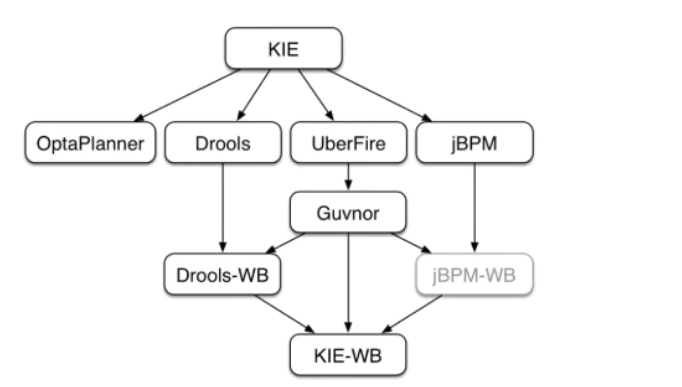
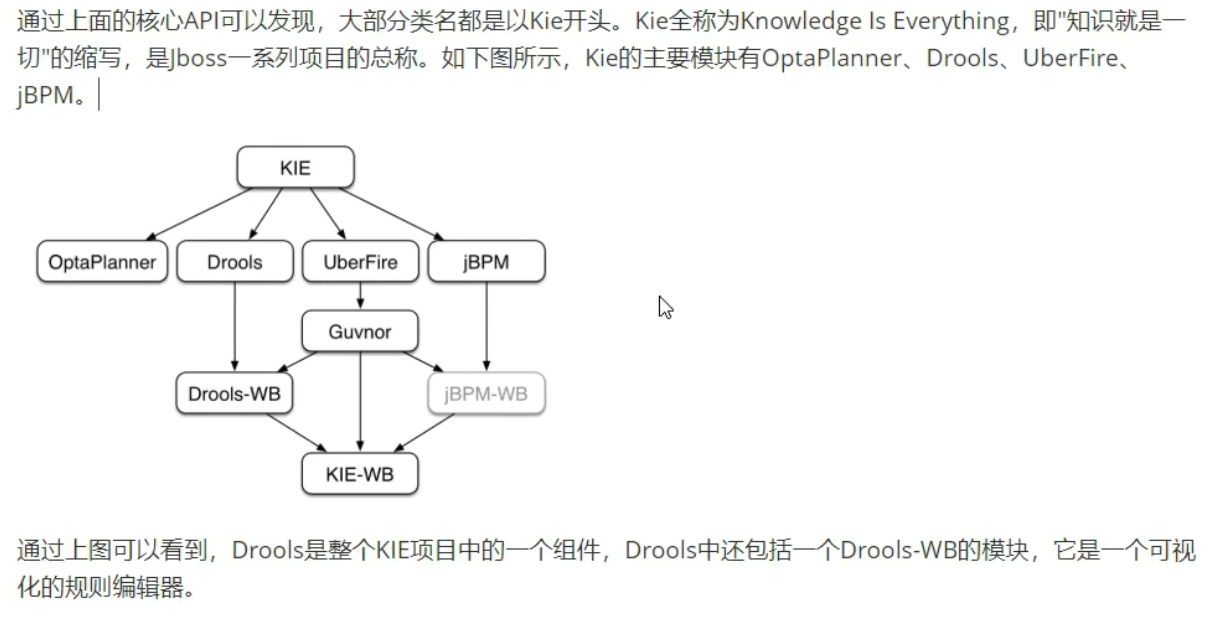
KIE(Knowledgek Is Everything)
2. Drools基础语法
2.1 关键字
- package:包名,只限于逻辑上的管理,同一个包名下的查询或者函数可以直接调用
- import:用于导入类或者静态方法
- global:全局变量
- function: 自定义函数
- query: 查询
- rule end : 规则体
Drools支持的规则文件,除了drl形式,还有excel 文件类型的。
2.2 规则体语法结构
规则体是规则文件内容中的重要组成部分,是进行业务规则判断,处理业务结果的部分。
规则体语法结构如下:
rule "rule_name"
	attributes
	when
		LHS(Left hand side) // 为空的话,默认为true
    then
    	RHS(Right hand side)
end
2.3 注释
- 单行:
// - 多行:
/* */
2.4 Pattern 模式匹配
Pattern语法结构为: 绑定的变量名: Object(Field约束)
官方建议绑定的变量名使用$开头
例如: $order:Order(originalPrice < 100) // 需要满足工作内存中存在Order对象, 并且这个Order对象的orginalPrice属性的值小于100
LHS部分可以定义多个pattern,多个pattern可以使用and或者or连接,例如:
rule "rule_discount_2"
    when
        $order:Order(originalPrice >=100 && originalPrice < 200) and
        $order:Order(originalPrice == 200) or
        $order:Order(realPrice == 1000)
    then
        $order.setRealPrice($order.getOriginalPrice() - 20);
        System.out.println("规则2:价格在100 - 200, 优惠20元");
end
2.5 比较操作符
| 符号 | 说明 |
|---|---|
| > | |
| < | |
| >= | |
| <= | |
| == | |
| != | |
| contains | 检查一个Fact对象的某个属性值是否包含一个指定的对象值 |
| not contains | 检查一个Fact对象的某个属性值是否不包含一个指定的对象值 |
| memberOf | 判断一个Fact对象的某个属性是否在一个或多个集合中 |
| not memberOf | 判断一个Fact对象的某个属性是否不在一个或多个集合中 |
| matches | 判断一个Fact对象的属性是否与提供的标准Java正则表达式进行匹配 |
| not matches |
语法
// contains | not contains
Object(Field[Collection/Array] contains value)
Object(Field[Collection/Array] not contains value)

// memeberOf | not memberOf
Object(feild memberOf value[Collection/Array])
Object(feild not memberOf value[Collection/Array])

// matches | not matches
Object(feild matches "正则表达式")
Object(feild not matches "正则表达式")
案例
- 创建一个Java实体类Fact
package com.learning.drools.entity;
import lombok.Data;
import java.util.List;

@Data
public class ComparisonOperatorEntity {
    private String names;
    private List<String> list;
}
- 定义
drl文件
package rules
import com.learning.drools.entity.ComparisonOperatorEntity

// 测试contains
rule "rule1"
    when
        ComparisonOperatorEntity(names contains "judy") //后面没有用到,所以不用绑定变量名
        ComparisonOperatorEntity(list contains  names) // 不写or或者and默认为and关系
    then
        System.out.println("规则1触发:contains");
end

// 测试memberOf
rule "rule2"
    when
        ComparisonOperatorEntity("tome" memberOf list)
    then
        System.out.println("规则2: memberOf");
end

// 测试matches

rule "rule3"
    when
        ComparisonOperatorEntity(names matches "ju.*")
    then
        System.out.println("规则3: matches");
end
- 测试
@Test
void  testOperator(){
    //获取kieService
    KieServices kieServices = KieServices.Factory.get();
    //获取container
    KieContainer kContainer = kieServices.newKieClasspathContainer();
    // 获取session
    KieSession kieSession = kContainer.newKieSession();

    ComparisonOperatorEntity fact = new ComparisonOperatorEntity();
    fact.setNames("judy");
    fact.setList(new ArrayList<>(){
        {
            add("judy");
            add("tome");
            add("张三");
        }
    });

    kieSession.insert(fact);
    kieSession.fireAllRules();
    kieSession.dispose();
}
2.6 执行指定的规则
- 指定规则触发条件:rule name
@Test
void  testCertainRule(){
    //获取kieService
    KieServices kieServices = KieServices.Factory.get();
    //获取container
    KieContainer kContainer = kieServices.newKieClasspathContainer();
    // 获取session
    KieSession kieSession = kContainer.newKieSession();

    ComparisonOperatorEntity fact = new ComparisonOperatorEntity();
    fact.setNames("judy");
    fact.setList(new ArrayList<>(){
        {
            add("judy");
            add("tome");
            add("张三");
        }
    });

    kieSession.insert(fact);
    // kieSession.fireAllRules();
    // kieSession.fireAllRules(new RuleNameEqualsAgendaFilter("rule1"));  // 按照名称选择规则执行
    // kieSession.fireAllRules(new RuleNameMatchesAgendaFilter("rule[1-2]")); // 按照正则表达式执行
    kieSession.fireAllRules(new RuleNameStartsWithAgendaFilter("rule")); // 按照以rule开头的规则名选择执行
    kieSession.dispose();
}
2.7 Drools内置方法
规则文件的RHS部分的主要作用是通过插入,删除或者修改工作内存中的Fact数据,来达到控制规则引擎执行的目的。
Drools提供了一些方法可以用来操作工作内存中的数据,操作完成后规则引擎会重新进行相关规则的匹配。原来没有匹配成功的规则在此修改之后有可能就会匹配成功了。
- 创建实体类
package com.learning.drools.entity;

import lombok.Data;
@Data
public class Student {
    private int id;
    private String name;
    private int age;
}
- 创建规则文件
- 常见内置方法
- update:更新fact,导致重新匹配规则
- insert:插入一个fact对象到工作内存,导致规则重新匹配
- retract:删除工作内存中的数据,导致规则重新匹配
- 常见内置方法
package rules

import com.learning.drools.entity.Student

// 测试update内置方法
rule "stu_rule1"
    when
        $s:Student(age >= 14 && age < 18)
    then
        $s.setAge(18);
        update($s); // update 更新了Fact对象,会导致规则重新匹配。所以之后stu_rule2也会执行。如果没有update,age = 15 触发了rule1但是不会触发rule2规则
        System.out.println("规则1触发:" + $s);
end

// 测试update内置方法,
rule "stu_rule2"
    when
        $s:Student(age >= 18)
    then
        $s.setName("成年人:" + $s.getName());
        System.out.println("规则2触发:" + $s);
end

// 用于测试insert
rule "stu_rule3"
    when
        $s:Student(id == 3 || name == "tom")
    then
        Student jerrySon = new Student();
        jerrySon.setAge(18);
        insert(jerrySon);
        System.out.println("规则3执行" + jerrySon);
end


// 用于测试retract
rule "stu_rule4"
    when
        $s:Student(id == 3 || name == "tom")
    then
        retract($s);
        System.out.println("规则4执行");
end

// 用于测试retract
rule "stu_rule5"
    when
        $s:Student(id == 3 || name == "tom") // 由于stu_rule4在工作内存中删除了这个fact,因此此规则匹配失败
    then
        retract($s);
        System.out.println("规则5执行");
end
- 测试
    @Test
    void testFunction(){
        KieServices kieServices = KieServices.Factory.get();
        KieContainer kContainer = kieServices.newKieClasspathContainer();
        KieSession kieSession = kContainer.newKieSession();

        Student student = new Student();
        student.setId(1);
        student.setName("tom");
        student.setAge(15);

        kieSession.insert(student);
        kieSession.fireAllRules();
        kieSession.dispose();
    }
3. 规则属性
规则体的构成如下:
rule "rule_name"
	attributes
	when
		LHS
    then
    	RHS
end
Drools提供的属性如下表
| 属性名 | 说明 |
|---|---|
| salience | 指定规则的执行优先级,salience 10, 数字越大,优先级越高,越先执行 salience 11 |
| dialect | 指定规则使用的语言类型,取值为Java或mvel dialect java |
| enabled | 指定规则是否启用 enabled true |
| date-effective | 指定规则生效的时间 data-effective 'yyyy-MM-dd HH:mm:ss' Java代码中设置System.setProperty("drools.dateformat","yyyy-MM-dd HH:mm:ss"); |
| date-expires | 指定规则失效时间 date-expires 'date' |
| activation-group | 激活分组,具有相同分组名称的规则只能有一个规则触发 activation-group 'group1' |
| agenda-group | 议程分组,只有获取焦点的组中的规则才有可能触发 agenda-group 'group2' 获取焦点: java 代码或规则文件 kieSession.getAgenda().getAgendaGroup("group2").setFocus(); auto-focus true |
| timer | 定时器,指定规则触发的时间: 方式一: timer(int: t1 t2) t1表示几秒后执行,t2表示每隔几秒执行一次,t2是可选参数 timer(3s 2s)方式二: timer(cron: 秒分时日月周[年]) timer(cron: 0/1 * * * * ?) |
| auto-focus | 自动获取焦点,一般结合agenda-group一起使用 auto-focus true 组内只要有一个规则配置了,其他规则也会生效 |
| no-loop | 防止死循环 no-loop true |
4. Drools高级语法
- package:包名,只限于逻辑上的管理,同一个包名下的查询或者函数可以直接调用
- import:用于导入类或者静态方法
- global:全局变量
- function: 自定义函数
- query: 查询
- rule end : 规则体
Drools支持的规则文件,除了drl形式,还有excel 文件类型的。
4.1 Global 全局变量
global关键字用于在规则文件中定义全局变量, 语法结构为 global 对象类型 对象名称
注意事项:
- 对于包装类型,在一个规则中修改了global的值,只针对该规则生效
- 如果是集合类型或者Java Bean时,在一个规则中修改了global的值,对于Java代码和所有的规则都生效。
global java.lang.Integer count
4.2 query查询
query查询提供了一种查询工作内存中符合约束条件的Fact对象的简单方法。它仅包含规则文件中的LHS部分,不用指定when 和then并且以end结束。语法结构如下:
query "查询名称"
	LHS
end
例子
// test query

package rules
import com.learning.drools.entity.Student


query "query_1"
    $s:Student(age == 18)
end

query "query_2" (String studentName)
    $s:Student(age < 18 && studentName == "张三")
end
void testQuery() throws InterruptedException {

    System.setProperty("drools.dateformat","yyyy-MM-dd HH:mm:ss");
    KieServices kieServices = KieServices.Factory.get();
    KieContainer kContainer = kieServices.newKieClasspathContainer();
    KieSession kieSession = kContainer.newKieSession();
    //kieSession.setGlobal("num",1);
    kieSession.setGlobal("name","张三");
    Student student = new Student();
    student.setId(1);
    student.setName("tom");
    student.setAge(18);
    kieSession.insert(student);
    System.out.println(kieSession.getQueryResults("query_1").size());
    System.out.println("==================");
    Student student1 = new Student();
    student1.setId(2);

    student1.setName("张三");
    student1.setAge(15);
    kieSession.insert(student1);
    System.out.println(kieSession.getQueryResults("query_2", "张三").size());

    kieSession.dispose();
}
4.3 function 函数
function关键字可以在规则文件中定义函数,就相当于Java类中的方法一样。可以在规则体中调用定义的函数。使用函数的好处使可以将业务逻辑集中放置到一个地方,根据需要可以对函数进行修改。函数定义的语法结构如下:
function 返回值类型 函数名(可选参数){
	//逻辑代码
}
例子:
package rules
import com.learning.drools.entity.Student

function String sayHello(String name){
    System.out.println("函数调用");
    return "hello" + name;
}


rule "rule_function"
    when
        $s:Student(age > 60)
    then
        String res = sayHello($s.getName());
        System.out.println("规则 then内容 : " + res);
end
4.4 LHS加强
4.4.1 复合值限制in / not in
类似于SQL中的in
$s:Student(name in ("张三","李四","王五"));
$s:Student(name not in ("张三","李四","王五"));
4.4.2 条件元素eval
eval用于规则体的LHS部分,并返回一个Boolean类型的值。
eval(true)
eval(false)
eval(1 == 1)
4.4.3 条件元素 not
not用于判断工作内存中是否存在某个Fact对象,如果不存在则返回true,如果存在则返回false。
rule "lhs_not"
    when
        not Student(age < 38)
    then
        System.out.println("大于38");
end
4.4.4 条件元素exists
与not相反
rule "lhs_not"
    when
        exists Student(age < 38)
    then
        System.out.println("小于38");
end
使用exists与不使用exists区别
exists Student() //只会触发一次
Student() //可能触发多次
4.4.5 规则继承
规则之间可以使用extends关键字进行规则条件部分的继承,类似于Java类之间的继承
例如
package rules
import com.learning.drools.entity.Student

rule "ext_1"
    when
        Student(age < 50)  // # 只有when部分会被继承
    then
        System.out.println("规则1触发"); // # then部分不会被继承
end

rule "ext_2" extends "ext_1" // # 继承了ext_1, 所以只有ext_1条件满足时才会执行ext_2
    when
		Student(age > 40)
    then
        System.out.println("规则2触发");
end
4.5 RHS 加强
RHS是规则体的重要组成部分,当LHS部分的条件匹配成功后,对应的RHS部分就会触发执行。一般在RHS部分中需要进行业务处理。
在RHS部分Drools为我们提供了一个内置对象,名称就是drools。本小节介绍几个drools对象提供的方法
4.5.1 halt
halt方法用于立即终止后面所有规则的执行
rule "rhs_halt1"
    when
    then
        System.out.println("halt1规则触发");
        drools.halt(); // 当前方法执行后,后续规则终止执行
end

rule "rhs_halt2"
    when
    then
        System.out.println("halt2规则触发");
end
4.5.2 getWorkingMemory
getWorkingMembory方法用于返回工作内存对象
rule "rhs_getWM"
    when
    then
        System.out.println("工作内存对象:" + drools.getWorkingMemory().getFactCount());
end
4.5.3 getRule
getRule方法的作用是返回规则对象本身
rule "rhs_getRule"
    when
    then
        System.out.println("规则本身" + drools.getRule().getName());
end
4.6 规则编码规范
- 所有的规则文件(drl)应统一放在一个规定的文件夹中,如何/rules文件夹
- 书写的每个规则应尽量加上注释。注释要清晰明了,言简意赅
- 同一个类型的对象尽量放在一个规则文件中,如所有Student类型的对象尽量放在一个规则文件中
- 规则结果部分(RHS)尽量不要有条件语句,如(if...)。尽量不要有复杂的逻辑和深层的嵌套语句
- 每个规则最好都加上salience属性,明确执行顺序
- Drools默认dialect为java,避免使用mvel
5. SpringBoot整合Drools
- pom
<?xml version="1.0" encoding="UTF-8"?>
<project xmlns="http://maven.apache.org/POM/4.0.0" xmlns:xsi="http://www.w3.org/2001/XMLSchema-instance"
         xsi:schemaLocation="http://maven.apache.org/POM/4.0.0 https://maven.apache.org/xsd/maven-4.0.0.xsd">
    <modelVersion>4.0.0</modelVersion>
    <parent>
        <groupId>org.springframework.boot</groupId>
        <artifactId>spring-boot-starter-parent</artifactId>
        <version>3.5.5</version>
        <relativePath/> <!-- lookup parent from repository -->
    </parent>
    <groupId>com.learning.drools</groupId>
    <artifactId>drools</artifactId>
    <version>0.0.1-SNAPSHOT</version>
    <name>drools</name>
    <description>drools</description>
    <url/>
    <licenses>
        <license/>
    </licenses>
    <developers>
        <developer/>
    </developers>
    <scm>
        <connection/>
        <developerConnection/>
        <tag/>
        <url/>
    </scm>
    <properties>
        <java.version>17</java.version>
    </properties>
    <dependencies>
        <dependency>
            <groupId>org.springframework.boot</groupId>
            <artifactId>spring-boot-starter-web</artifactId>
        </dependency>


        <!--drools-->
        <dependency>
            <groupId>org.drools</groupId>
            <artifactId>drools-compiler</artifactId>
            <version>7.50.0.Final</version>
        </dependency>

<!--        <dependency>-->
<!--            <groupId>org.drools</groupId>-->
<!--            <artifactId>drools-mvel</artifactId>-->
<!--            <version>7.50.0.Final</version>-->
<!--        </dependency>-->
<!--        -->
        <dependency>
            <groupId>org.drools</groupId>
            <artifactId>drools-core</artifactId>
            <version>7.50.0.Final</version>
        </dependency>

        <dependency>
            <groupId>org.drools</groupId>
            <artifactId>drools-templates</artifactId>
            <version>7.50.0.Final</version>
        </dependency>

        <dependency>
            <groupId>org.kie</groupId>
            <artifactId>kie-api</artifactId>
            <version>7.50.0.Final</version>
        </dependency>

        <dependency>
            <groupId>org.kie</groupId>
            <artifactId>kie-spring</artifactId>
            <exclusions>
                <exclusion>
                    <groupId>org.springframework</groupId>
                    <artifactId>spring-tx</artifactId>
                </exclusion>
                <exclusion>
                    <groupId>org.springframework</groupId>
                    <artifactId>spring-beans</artifactId>
                </exclusion>
                <exclusion>
                    <groupId>org.springframework</groupId>
                    <artifactId>spring-core</artifactId>
                </exclusion>
                <exclusion>
                    <groupId>org.springframework</groupId>
                    <artifactId>spring-context</artifactId>
                </exclusion>
            </exclusions>
            <version>7.50.0.Final</version>
        </dependency>

        <dependency>
            <groupId>org.springframework.boot</groupId>
            <artifactId>spring-boot-starter-test</artifactId>
            <scope>test</scope>
        </dependency>
        <dependency>
            <groupId>org.projectlombok</groupId>
            <artifactId>lombok</artifactId>
            <scope>annotationProcessor</scope>
        </dependency>

    </dependencies>

    <build>
        <plugins>
            <plugin>
                <groupId>org.springframework.boot</groupId>
                <artifactId>spring-boot-maven-plugin</artifactId>
            </plugin>
        </plugins>
    </build>

</project>
- config
package com.learning.drools.config;

import org.kie.api.KieBase;
import org.kie.api.KieServices;
import org.kie.api.runtime.KieContainer;
import org.springframework.boot.autoconfigure.condition.ConditionalOnMissingBean;
import org.springframework.context.annotation.Bean;
import org.springframework.context.annotation.Configuration;

@Configuration
public class DroolsConfig {

    private final KieServices kieServices = KieServices.Factory.get();

    @Bean
    @ConditionalOnMissingBean // 先查找再创建
    public KieBase kieBase(){
        System.setProperty("drools.dateformat","yyyy-MM-dd HH:mm:ss");

        KieContainer kContainer = kieServices.newKieClasspathContainer();
        return kContainer.getKieBase();
    }

    @Bean
    @ConditionalOnMissingBean // 先查找再创建
    public KieContainer kieContainer(){
        return kieServices.newKieClasspathContainer();
    }
}
- service
@Service
public class RuleService {
    @Autowired
    private KieBase kieBase;
    public void rule(){
        KieSession kieSession = kieBase.newKieSession();
        kieSession.fireAllRules(new RuleNameStartsWithAgendaFilter("hello"));
        kieSession.dispose();
    }
}
- controller
@RestController
public class RuleController {

    @Autowired
    private RuleService ruleService;

    @GetMapping("/rule")
    public String rule() {
        ruleService.rule();
        return "success";
    }

}
6. WorkBench
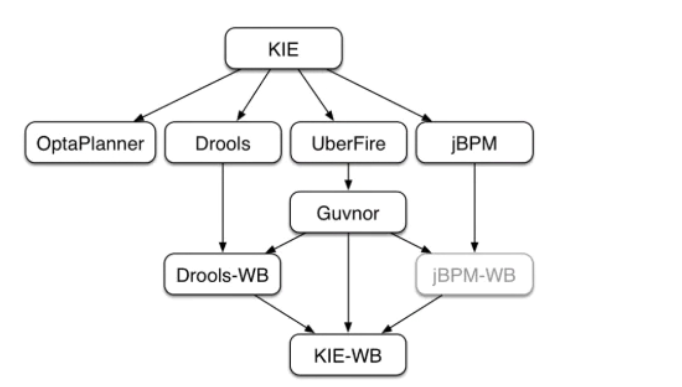
Drools是整个KIE项目中的一个组件,Drools还包括一个Drools-WB的模块,它是一个可视化的规则编辑器。
使用workbench可以在浏览器中创建数据对象,创建规则文件,创建测试场景并将规则部署到maven仓库供其他应用使用。
docker pull jboss/business-central-workbench:7.52.0.Final
docker run -p 8080:8080 -p 8001:8001 -d --name workbench jboss/business-central-workbench:7.50.0.Final
- 创建用户
# 进入bin,为Kie-Server添加一个具有kie-server角色的用户
./add-user.sh -a -u kieserver -p kieserver1! -g kie-server

./add-user.sh -a -u workbench -p workbench! -g admin,kie-server,rest-all
# 默认角色有
  ROLE        DESCRIPTION
  *************************************************
  admin       The administrator
  analyst     The analyst
  kiemgmt     KIE management user
  rest-all    Rest API permissions
  Accounting  Accounting role
  PM          Project manager role
  HR          Human resources role
  sales       Sales role
  IT          IT role
6.1 使用方式
- 创建空间、项目
- 创建数据对象
- 创建DRL规则文件
- 创建测试场景
- 设置KieBase和KieSession
kieBase的软件包就是drl的package地址
kiesession有两种状态
-
stateful
-
stateless
- 编译、构建、部署
- 在项目中使用部署的规则
7. 案例
7.1 个人所得税计算
7.1.1 计算规则
| 规则编号 | 名称 | 描述 |
|---|---|---|
| 1 | 计算应纳税所得额 | 税前工资 - 5000 |
| 2 | 设置税率,应纳税所得额 <= 1500 | 税率0.03, 速算扣除数为0 |
| 3 | 设置税率,应纳税所得额 <= 4500 | 税率0.1, 速算扣除数为105 |
| 4 | 设置税率,应纳税所得额 <= 9000 | 税率0.2, 速算扣除数为555 |
| 5 | 设置税率,应纳税所得额 <= 35000 | 税率0.25, 速算扣除数为1005 |
| 6 | 设置税率,应纳税所得额 <= 55000 | 税率0.3, 速算扣除数为2755 |
| 7 | 设置税率,应纳税所得额 <= 80000 | 税率0.35, 速算扣除数为5505 |
| 8 | 设置税率,应纳税所得额 > 80000 | |
| 9 | 计算税后工资 | 扣税额 = 应缴纳税所得额*税率 - 速算扣除数 税后工资 = 税前工资 - 扣税额 |
7.1.2 编写drl
package rules

import com.learning.drools.owntax.entity.Calculation

rule "r1"

    when
    then
        System.out.println("ok");
end

// 第一类: 计算应纳税所得额
// 第二类: 计算税
// 第三类: 计算税后工资

/**
    private double wage; // 税前工资
    private double wageMore;  // 应纳税所得额
    private double cess;// 税率
    private double preMinus; //速算扣除数
    private double wageMinus; // 扣税额
    private double actualWage; //税后工资
*/
rule "计算应纳税所得额"
    salience 100
    date-effective "2022-09-01"
    no-loop true // 防止更改后发生死循环
    when
        $cal:Calculation(wage > 5000)
    then
        $cal.setWageMore($cal.getWage() - 3500);
        update($cal); // 工作内存中更新
end

rule "设置税率,应纳税所得额 <= 1500"
    salience 99
    date-effective "2022-09-01"
    activation-group "SetCessGroup" // 保证计算税率的规则只能有一个规则被触发
    no-loop true
    when
        $cal:Calculation(wageMore > 0 && wageMore <= 1500)
    then
        $cal.setCess(0.03);
        $cal.setPreMinus(0);
        $cal.setWageMinus($cal.getWageMore() * $cal.getCess() - $cal.getPreMinus());
        update($cal); // 工作内存中更新
end

rule "设置税率,应纳税所得额 <= 4500"
        salience 98
        date-effective "2022-09-01"
        activation-group "SetCessGroup" // 保证计算税率的规则只能有一个规则被触发
        no-loop true
        when
            $cal:Calculation(wageMore > 1500 && wageMore <= 4500)
        then
            $cal.setCess(0.1);
            $cal.setPreMinus(105);
            $cal.setWageMinus($cal.getWageMore() * $cal.getCess() - $cal.getPreMinus());
            update($cal); // 工作内存中更新
end

rule "设置税率,应纳税所得额 <= 9000"
        salience 97
        date-effective "2022-09-01"
        activation-group "SetCessGroup" // 保证计算税率的规则只能有一个规则被触发
        no-loop true
        when
            $cal:Calculation(wageMore > 4500 && wageMore <= 9000)
        then
            $cal.setCess(0.2);
            $cal.setPreMinus(555);
            $cal.setWageMinus($cal.getWageMore() * $cal.getCess() - $cal.getPreMinus());
            update($cal); // 工作内存中更新
end

rule "设置税率,应纳税所得额 <= 35000"
        salience 96
        date-effective "2022-09-01"
        activation-group "SetCessGroup" // 保证计算税率的规则只能有一个规则被触发
        no-loop true
        when
            $cal:Calculation(wageMore > 9000 && wageMore <= 35000)
        then
            $cal.setCess(0.25);
            $cal.setPreMinus(1005);
            $cal.setWageMinus($cal.getWageMore() * $cal.getCess() - $cal.getPreMinus());
            update($cal); // 工作内存中更新
end

rule "设置税率,应纳税所得额 <= 55000"
        salience 95
        date-effective "2022-09-01"
        activation-group "SetCessGroup" // 保证计算税率的规则只能有一个规则被触发
        no-loop true
        when
            $cal:Calculation(wageMore > 35000 && wageMore <= 55000)
        then
            $cal.setCess(0.3);
            $cal.setPreMinus(2755);
            $cal.setWageMinus($cal.getWageMore() * $cal.getCess() - $cal.getPreMinus());
            update($cal); // 工作内存中更新
end

rule "设置税率,应纳税所得额 <= 80000"
        salience 94
        date-effective "2022-09-01"
        activation-group "SetCessGroup" // 保证计算税率的规则只能有一个规则被触发
        no-loop true
        when
            $cal:Calculation(wageMore > 55000 && wageMore <= 80000)
        then
            $cal.setCess(0.5);
            $cal.setPreMinus(5505);
            $cal.setWageMinus($cal.getWageMore() * $cal.getCess() - $cal.getPreMinus());
            update($cal); // 工作内存中更新
end

rule "计算税后工资"
        salience 93
        date-effective "2022-09-01"
        no-loop true
        when
            $cal:Calculation(wage > 0)
        then
            $cal.setActualWage($cal.getWage() - $cal.getWageMinus());
            update($cal); // 工作内存中更新
end
7.1.3 配置
@Configuration
public class DroolsConfig {
    private final KieServices kieServices;

    DroolsConfig(){
        System.setProperty("drools.dateformat","yyyy-MM-dd");
        kieServices = KieServices.Factory.get();

    }

    @Bean
    @ConditionalOnMissingBean
    public KieBase kieBase() {
        KieContainer kieContainer = kieServices.newKieClasspathContainer();
        return kieContainer.getKieBase();
    }

}
<!--resource/META-INF/kmodule.xml-->
<kmodule xmlns="http://www.drools.org/xsd/kmodule">
    <!--name:指定kbase名称,任意但必须唯一, packages:规则文件的目录, default: 指定当前kbase是否为默认-->
    <kbase name="myKbase1" packages="rules" default="true">
        <!--name: 指定session名称,任意但必须唯一, default: 当前session是否为默认-->
        <ksession name="ksession-rule" default="true"/>
    </kbase>
</kmodule>
7.1.4 java代码
- controller
@RestController
public class OwnTaxController {


    @Autowired
    private OwnTaxService ownTaxService;

    @GetMapping("/calc/{wage}")
    public Calculation calc( @PathVariable Double wage) {
        return ownTaxService.CalculateOwnTax(wage);
    }
}
- service
@Service
public class OwnTaxService {


    @Autowired
    private KieBase kieBase;

    public Calculation CalculateOwnTax(Double wage) {
       // Calculation calculation = Calculation.builder().wage(wage).build();
        Calculation calculation = new Calculation();
        calculation.setWage(wage);

        KieSession kieSession = kieBase.newKieSession();
        kieSession.insert(calculation);
        kieSession.fireAllRules();
        kieSession.dispose();
        return calculation;
    }
}
- entity
package com.learning.drools.owntax.entity;
import lombok.Data;

@Data
public class Calculation {
    private double wage; // 税前工资
    private double wageMore;  // 应纳税所得额
    private double cess;// 税率
    private double preMinus; //速算扣除数
    private double wageMinus; // 扣税额
    private double actualWage; //税后工资
}
7.2 信用卡申请
7.2.1 计算规则
- 合法性检查
| 规则编号 | 名称 | 描述 |
|---|---|---|
| 1 | 检查学历与薪水 | 如果申请人没房没车,同时学历大专以下,月薪少于5000,那么不通过 |
| 2 | 检查学历与薪水 | 如果申请人没房没车,同时学历大专或本科,并且月薪少于3000,那么不通过 |
| 3 | 检查学历与薪水 | 如果申请人没房也没车,同时学历为本科以上,并且月薪少于2000,同时之前没有信用卡的,那么不通过 |
| 4 | 检查申请人已有的信用卡数量 | 如果申请人现有的信用卡数量大于10,那么不通过 |
- 信用卡额度
| 规则编号 | 名称 | 描述 |
|---|---|---|
| 1 | 规则1 | 如果申请人有房有车,或者月收入在20000以上,那么额度为15000 |
| 2 | 规则2 | 没房没车,收入在10000 ~ 20000,额度为6000 |
| 3 | 规则3 | 没房没车,收入在10000以下,额度为3000 |
| 4 | 规则4 | 有房没车或者有车没房,收入在10000以下,额度为5000 |
| 5 | 规则5 | 有房没车或者有车没房,收入在10000~20000,额度为8000 |
7.2.2 配置
    <dependencies>
        <dependency>
            <groupId>org.springframework.boot</groupId>
            <artifactId>spring-boot-starter-web</artifactId>
        </dependency>

        <dependency>
            <groupId>org.projectlombok</groupId>
            <artifactId>lombok</artifactId>
            <optional>true</optional>
        </dependency>
        <dependency>
            <groupId>org.springframework.boot</groupId>
            <artifactId>spring-boot-starter-test</artifactId>
            <scope>test</scope>
        </dependency>

        <!--drools-->
        <dependency>
            <groupId>org.drools</groupId>
            <artifactId>drools-compiler</artifactId>
            <version>7.50.0.Final</version>
        </dependency>

        <dependency>
            <groupId>org.drools</groupId>
            <artifactId>drools-core</artifactId>
            <version>7.50.0.Final</version>
        </dependency>

        <dependency>
            <groupId>org.drools</groupId>
            <artifactId>drools-templates</artifactId>
            <version>7.50.0.Final</version>
        </dependency>

    </dependencies>
<?xml version="1.0" encoding="UTF-8" ?>
<!--resource/META-INF/kmodule.xml-->
<kmodule xmlns="http://www.drools.org/xsd/kmodule">
    <!--name:指定kbase名称,任意但必须唯一, packages:规则文件的目录, default: 指定当前kbase是否为默认-->
    <kbase name="myKbase1" packages="rules" default="true">
        <!--name: 指定session名称,任意但必须唯一, default: 当前session是否为默认-->
        <ksession name="ksession-rule" default="true"/>
    </kbase>
</kmodule>
@Configuration
public class DroolsConfig {
    private final KieServices kieServices;

    DroolsConfig(){
        System.setProperty("drools.dateformat","yyyy-MM-dd");
        kieServices = KieServices.Factory.get();

    }

    @Bean
    @ConditionalOnMissingBean
    public KieBase kieBase() {
        KieContainer kieContainer = kieServices.newKieClasspathContainer();
        return kieContainer.getKieBase();
    }

}
7.2.3 编写drl
package rules
import com.learning.drools.owntax.entity.Person


// 合法性检查
rule "检查学历或薪水1"
    salience 100
    activation-group "credit_check"
    no-loop true
    when
        $person:Person(!hasHouse && !hasCar && salary < 5000 && educationCode < 1)
    then
        $person.setHasCredit(false);
        update($person)
        drools.halt(); // 审核不通过直接退出
end

rule "检查学历或薪水2"
    salience 99
    activation-group "credit_check"
    no-loop true
    when
        $person:Person(!hasHouse && !hasCar && salary < 3000 && (educationCode == 1 || educationCode == 2))
    then
        $person.setHasCredit(false);
        update($person)
        drools.halt(); // 审核不通过直接退出
end

rule "检查学历或薪水3"
    salience 98
    activation-group "credit_check"
    no-loop true
    when
        $person:Person(!hasHouse && !hasCar && salary < 2000 && educationCode > 2 && creditCardNum <= 0)
    then
        $person.setHasCredit(false);
        update($person)
        drools.halt(); // 审核不通过直接退出
end

rule "检查学历或薪水4"
    salience 97
    activation-group "credit_check"
    no-loop true
    when
        $person:Person(creditCardNum > 10)
    then
        $person.setHasCredit(false);
        update($person)
        drools.halt(); // 审核不通过直接退出
end

// 信用卡额度

rule "信用卡额度规则1"
    salience 90
    activation-group "credit_quota"
    no-loop true
    when
        $person:Person( hasCredit && (hasCar && hasHouse || salary > 20000) )
    then
        $person.setQuota(15000.0);
        update($person)
        System.out.println($person);
end

rule "信用卡额度规则2"
    salience 89
    activation-group "credit_quota"
    no-loop true
    when
        $person:Person( hasCredit && (!hasCar && !hasHouse && (salary >= 10000 && salary <= 20000)) )
    then
        $person.setQuota(6000.0);
        update($person)
end

rule "信用卡额度规则3"
    salience 88
    activation-group "credit_quota"
    no-loop true
    when
        $person:Person( hasCredit && (!hasCar && !hasHouse && salary < 10000) )
    then
        $person.setQuota(3000.0);
        update($person)
end

rule "信用卡额度规则4"
    salience 87
    activation-group "credit_quota"
    no-loop true
    when
        $person:Person( hasCredit && (hasCar || hasHouse) && salary < 10000)
    then
        $person.setQuota(5000.0);
        update($person)
end

rule "信用卡额度规则5"
    salience 86
    activation-group "credit_quota"
    no-loop true
    when
        $person:Person( hasCredit && (hasCar || hasHouse) && ( salary > 10000 && salary <= 20000))
    then
        $person.setQuota(8000.0);
        update($person)
end
7.2.4 Java代码
@Service
public class CredCardService {

    @Autowired
    private KieBase kieBase;

    public Person executeRule(Person person){
        KieSession kieSession = kieBase.newKieSession();
        kieSession.insert(person);
        kieSession.fireAllRules();
        kieSession.dispose();
        return person;
    }
}
7.3 保险产品准入规则
7.3.1 决策表
Drools除了支持drl形式的文件外,还支持xls格式的文件(即,excel文件)。这种xls格式的文件通常称为决策表(decision table)。
决策表是一个“精确而紧凑的”表示条件逻辑的方式,非常适合商业级别的规则。决策表与现有的drl文件可以无缝替换。Drools提供了响应的API可以将xls文件编译为drl格式的字符串。
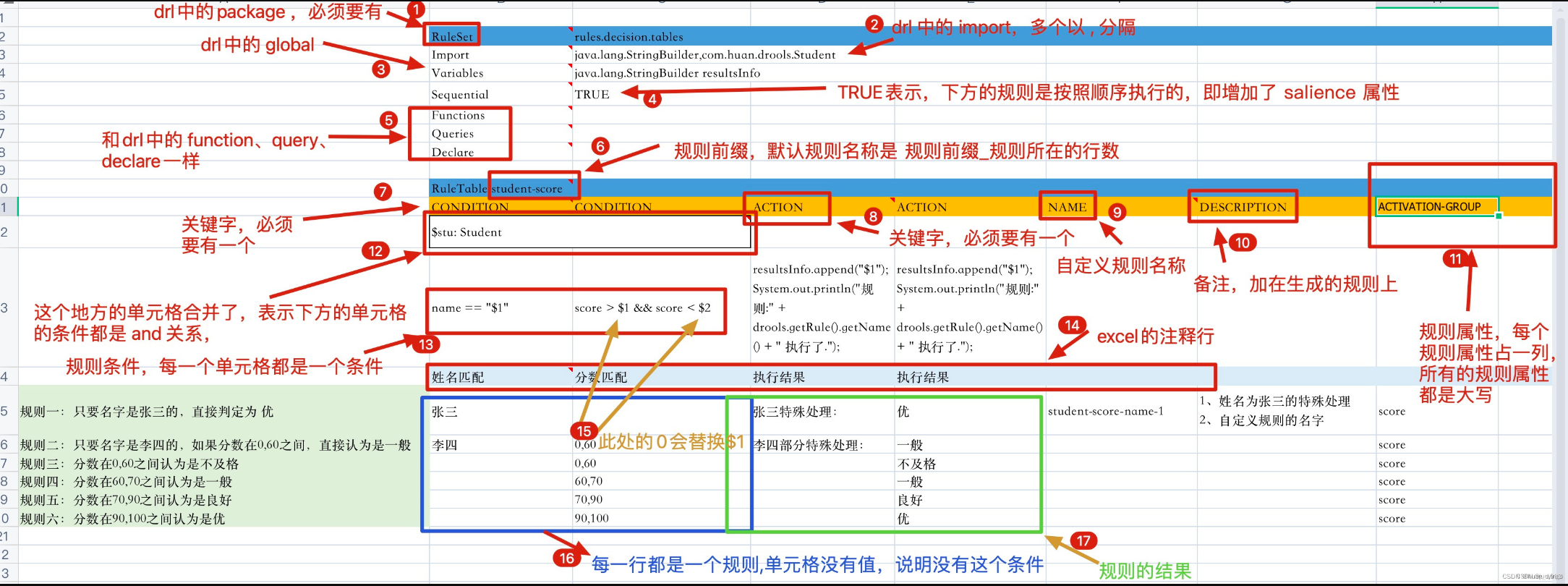
决策表语法:
| 关键字 | 说明 | 是否必须 |
|---|---|---|
| RuleSet | 相当于drl文件中的package | 必须,只能有一个。如果没有设置RuleSet对应的值,则使用默认rule_table |
| Sequential | 取值为Boolean,true表示规则从上到下顺序执行,false表示乱序 | 可选 |
| Import | 相当于drl中的import,用逗号分隔 | 可选 |
| Variables | 相当于drl 中的global,如果有多个全局变量则中间用逗号分隔 | 可选 |
| RuleTable | 它指示了后面将会有一批rule,RuleTable的名称将会作为以后生成rule的前缀 | 必须 |
| CONDITION | 规则条件关键字,相当于drl文件中的when。下面两行则表示LHS部分,第三行为注释行,从第四行开始,每一行代表一条规则 | 每一个规则至少有一个 |
| ACTION | 相当于drl中的then | 每个规则至少一个 |
| NO-LOOP | 可选 | |
| AGENDA-GROUP | 议程分组,只有获取焦点的组中的规则才有可能触发 agenda-group 'group2' 获取焦点: java 代码或规则文件 kieSession.getAgenda().getAgendaGroup("group2").setFocus(); auto-focus true |
可选 |
在决策表中经常使用到占位符,语法为$number,用于替换每条规则中设置的具体值。
7.3.2 测试案例
- 准备决策表
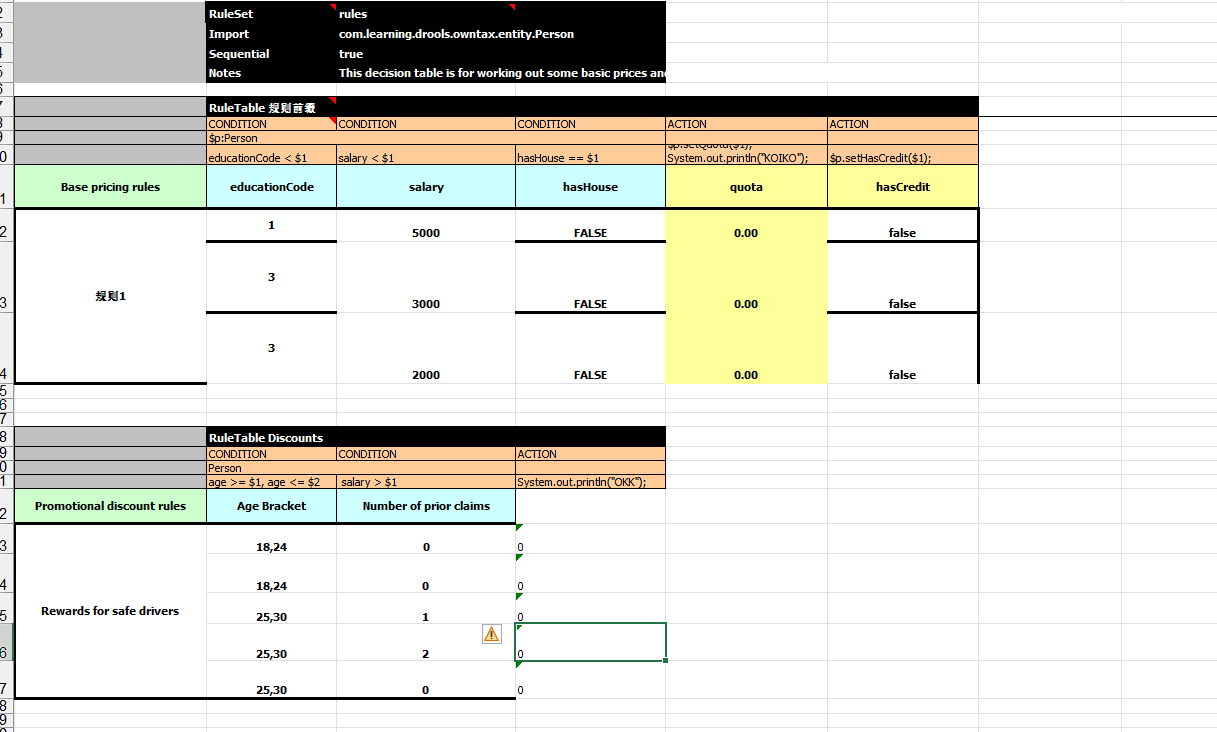
- 格式转换
public static KieSession getKieSessionByXML(String realPath) throws FileNotFoundException {
    File file = new File(realPath);
    FileInputStream fileInputStream = new FileInputStream(file);
    SpreadsheetCompiler compiler = new SpreadsheetCompiler();
    String compile = compiler.compile(fileInputStream, InputType.XLS);
    System.out.println(compile);

    KieHelper kieHelper = new KieHelper();
    kieHelper.addContent(compile, ResourceType.DRL);
    return kieHelper.build().newKieSession();
}
- 测试
@Test
void contextLoads() throws FileNotFoundException {

    KieSession kieSessionByXML = KieSessionUtils.getKieSessionByXML("D:\\Users\\fei\\gitrepo\\owntax\\src\\main\\resources\\rules\\decisionTable.xls");
    Person person = new Person();
    person.setAge(20);
    person.setSalary(34.0);
    kieSessionByXML.insert(person);
    kieSessionByXML.fireAllRules();
    kieSessionByXML.dispose();

}
7.3.3 规则说明
以下规则全部满足才能准入成功
| 规则编号 | 说明 |
|---|---|
| 1 | 保险公司是:PICC |
| 2 | 销售区域是:北京、天津 |
| 3 | 投保年龄是:0 ~17 岁 |
| 4 | 保险期间是:20,25,30年 |
| 5 | 缴费方式是:一次性交清或年缴 |
| 6 | 保险期与缴费期规则一:保险期间为20年,缴费期间最长10年缴费,且不能选择一次性交清 |
| 7 | 保险期与缴费期规则一:保险期间为25年,缴费期间最长15年缴费,且不能选择一次性交清 |
| 8 | 保险期与缴费期规则一:保险期间为30年,缴费期间最长20年缴费,且不能选择一次性交清 |
| 9 | 被保人要求:(投保年龄 + 保险期间)不得大于40周岁 |
| 10 | 保险金额规则:投保时约定,最低5万元,超过的部分必须为1000元的整数倍 |
| 11 | 出单基本保额限额规则:线上出单基本保额限额62.5万元,超过62.5万元需要配合转线下出单 |
本案例中规则文件是一个excel文件,业务人员可以直接更改这个文件中指标的值,系统不需要做任何变更
7.3.4 配置
同上
7.3.5 编写决策表
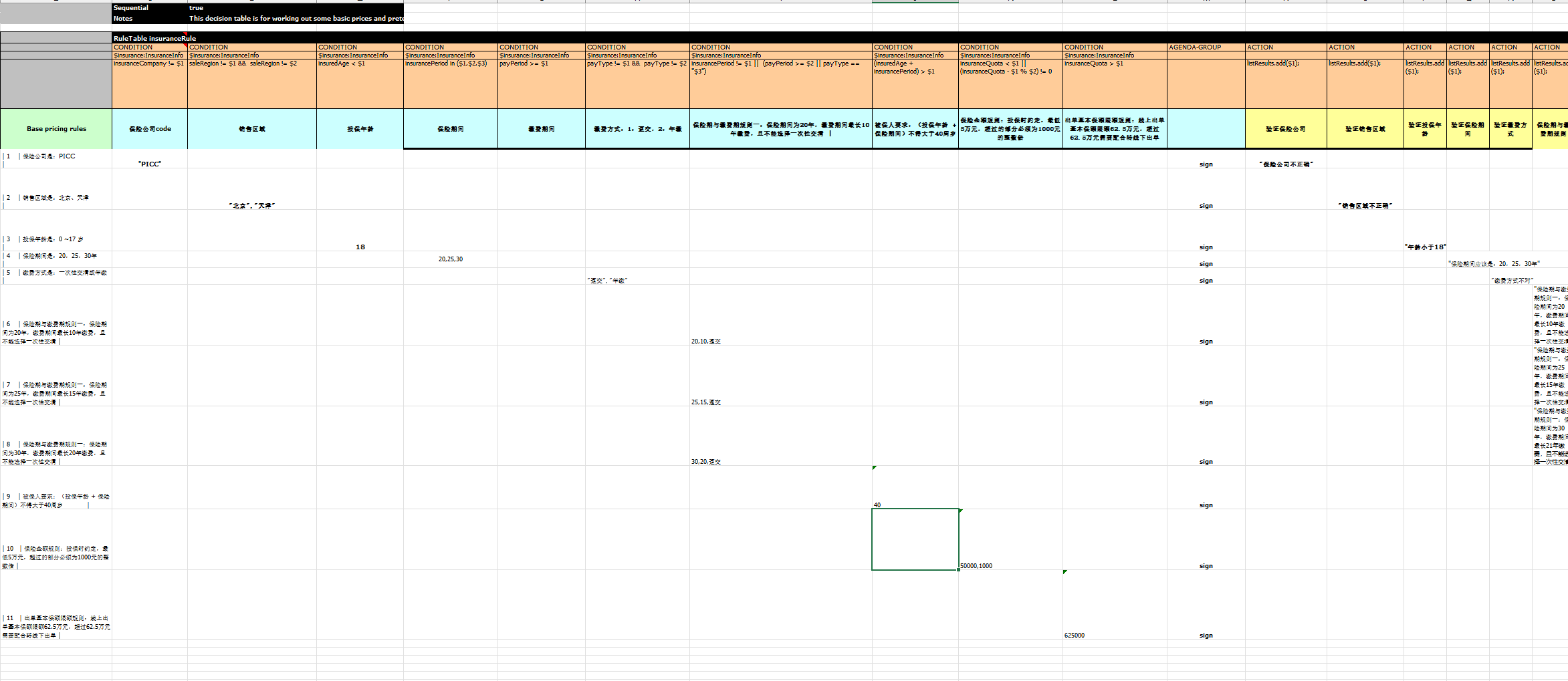
7.3.6 Java代码
- utils
public static KieSession getKieSessionByXML(String realPath) throws FileNotFoundException {
    File file = new File(realPath);
    FileInputStream fileInputStream = new FileInputStream(file);
    SpreadsheetCompiler compiler = new SpreadsheetCompiler();
    String compile = compiler.compile(fileInputStream, InputType.XLS);
    System.out.println(compile);

    KieHelper kieHelper = new KieHelper();

    kieHelper.addContent(compile, ResourceType.DRL);
    Results verify = kieHelper.verify();
    if(verify.hasMessages(Message.Level.ERROR)) {
        System.out.println("规则文件语法异常 Errors found: " + verify.getMessages(Message.Level.ERROR));
    }
    return kieHelper.build().newKieSession();
}
- service
public List<String> insuranceInfoCheck(InsuranceInfo insuranceInfo) throws Exception {
    KieSession kieSession = KieSessionUtils.getKieSessionByXML("D:\\Users\\fei\\gitrepo\\owntax\\src\\main\\resources\\rules\\insurance.xls");
    kieSession.getAgenda().getAgendaGroup("sign").setFocus();
    kieSession.insert(insuranceInfo);
    ArrayList<String> listRules = new ArrayList<>();
    kieSession.setGlobal("listResults", listRules);
    kieSession.fireAllRules();
    return listRules;
}

 浙公网安备 33010602011771号