
position(定位)属性
<!DOCTYPE html>
<html lang="en">
<head>
    <meta charset="UTF-8">
    <meta http-equiv="X-UA-Compatible" content="IE=edge">
    <meta name="viewport" content="width=device-width, initial-scale=1.0">
    <title>position(定位)属性</title>
    <style>
        .container{
            background-color: #868686;
            width: 100%;
            height: 300px;
        }
        .content{
            background-color: yellow;
            width: 100px;
            height: 100px;

            /*
                默认值。没有定位,元素出现在正常的流中(忽略 top, bottom, left, right 或者 z-index 声明)。
            */
            position: static;
        }

        .content_0{
            background-color: yellow;
            width: 100px;
            height: 100px;
        }
        .content_1{
            background-color: red;
            width: 100px;
            height: 100px;
            /*
                生成相对定位的元素,相对于其正常位置进行定位。
            */
            position: relative;/* 这里使用了relative  */
            left: 12px;
            top: 10px;
        }
        .content_2{
            background-color: black;
            width: 100px;
            height: 100px;
        }

        .content_3{
             background-color: red;
             width: 100px;
             height: 100px;
             position: absolute;
             top: 1000px;
             left: 12px;
        }

        .content_4{
             background-color: red;
             width: 100px;
             height: 100px;
             position: fixed;
             bottom: 120px;
             right: 12px;
        }
    </style>
</head>
<body>
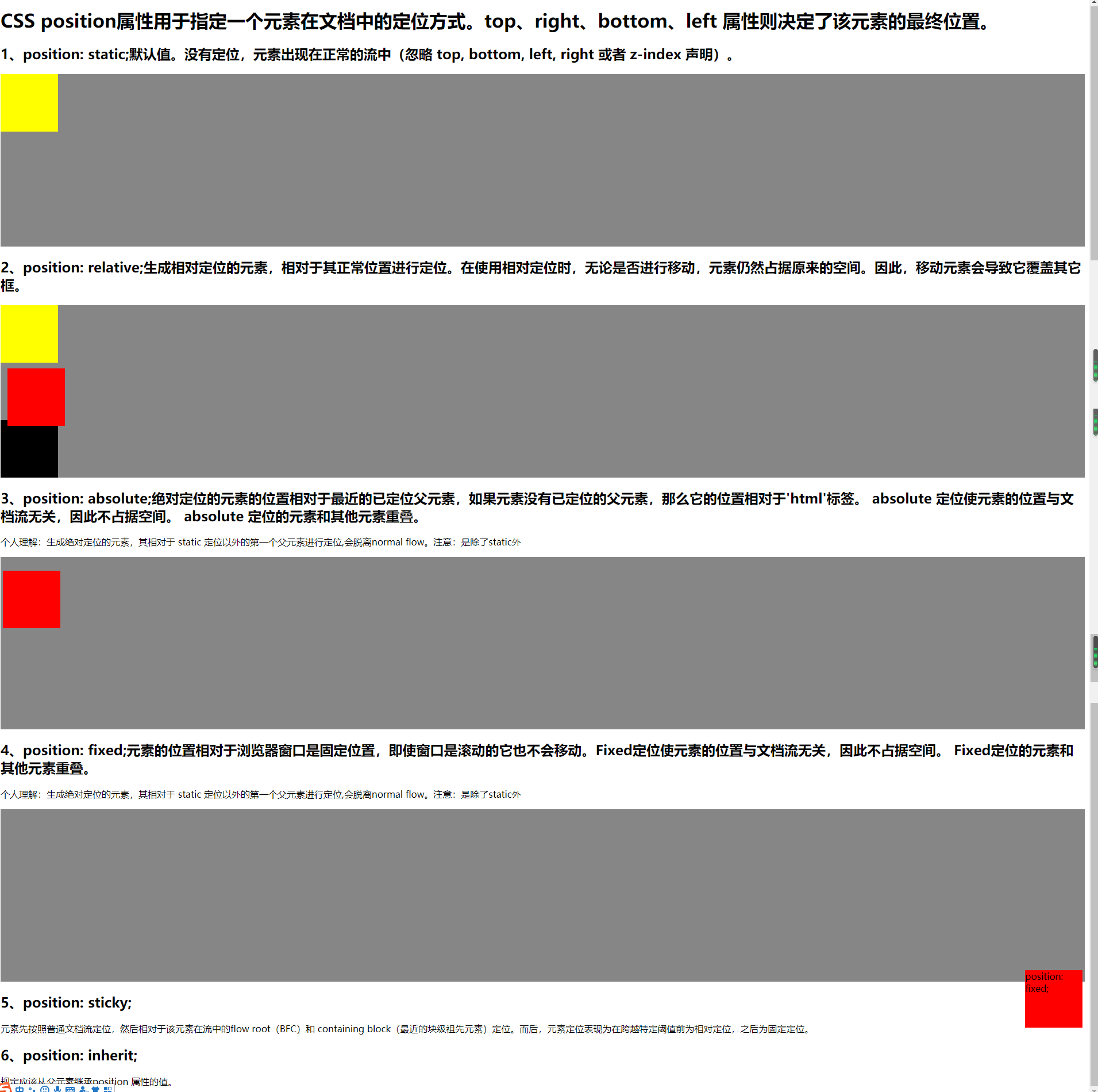
    <h1>CSS position属性用于指定一个元素在文档中的定位方式。top、right、bottom、left 属性则决定了该元素的最终位置。</h1>

    <h2> 1、position: static;默认值。没有定位,元素出现在正常的流中(忽略 top, bottom, left, right 或者 z-index 声明)。</h2>
    <div class="container">
        <div class="content">
        </div>
    </div>

    <h2> 2、position: relative;生成相对定位的元素,相对于其正常位置进行定位。在使用相对定位时,无论是否进行移动,元素仍然占据原来的空间。因此,移动元素会导致它覆盖其它框。</h2>
    <div class="container">
        <div class="content_0"> </div>
        <div class="content_1"> </div>
        <div class="content_2"></div>
    </div>

    <h2> 3、position: absolute;绝对定位的元素的位置相对于最近的已定位父元素,如果元素没有已定位的父元素,那么它的位置相对于'html'标签。 absolute 定位使元素的位置与文档流无关,因此不占据空间。 absolute 定位的元素和其他元素重叠。</h2>
    <p>个人理解:生成绝对定位的元素,其相对于 static 定位以外的第一个父元素进行定位,会脱离normal flow。注意:是除了static外</p>
    <div class="container">
        <div class="content_3">
        </div>
    </div>

    <h2> 4、position: fixed;元素的位置相对于浏览器窗口是固定位置,即使窗口是滚动的它也不会移动。Fixed定位使元素的位置与文档流无关,因此不占据空间。 Fixed定位的元素和其他元素重叠。</h2>
    <p>个人理解:生成绝对定位的元素,其相对于 static 定位以外的第一个父元素进行定位,会脱离normal flow。注意:是除了static外</p>
    <div class="container">
        <div class="content_4">
            position: fixed;
        </div>
    </div>

    <h2> 5、position: sticky;</h2>
    <p>元素先按照普通文档流定位,然后相对于该元素在流中的flow root(BFC)和 containing block(最近的块级祖先元素)定位。而后,元素定位表现为在跨越特定阈值前为相对定位,之后为固定定位。</p>

    <h2> 6、position: inherit;</h2>
    <p>规定应该从父元素继承position 属性的值。</p>
</body>
</html>
示例:

 浙公网安备 33010602011771号