


常用数量加减器(购物数量加减)(点击加减号加减数量)
只实现了常规加减有需要根据可以根据自己添加限制条件
先来效果图
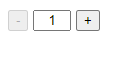
HTML代码
<!-- 快速实现数量加减 -->
<!DOCTYPE html>
<html>
<head>
    <meta charset="utf-8">

</head>
<body>
    <input id="min" name="" type="button" value="-" />
    <input id="text_box" name="" type="text" value="1" style="width:30px;text-align: center" />
    <input id="add" name="" type="button" value="+" />
</body>
</html>
js
<script src="http://libs.baidu.com/jquery/1.10.2/jquery.min.js"></script>
    <script>
        $(document).ready(function () {
            //获得文本框对象
            var t = $("#text_box");
            //初始化数量为1,并失效减
            $('#min').attr('disabled', true);
            //数量增加操作
            $("#add").click(function () {
                // 给获取的val加上绝对值,避免出现负数
                t.val(Math.abs(parseInt(t.val())) + 1);
                if (parseInt(t.val()) != 1) {
                    $('#min').attr('disabled', false);
                };
            })
            //数量减少操作
            $("#min").click(function () {
                t.val(Math.abs(parseInt(t.val())) - 1);
                if (parseInt(t.val()) == 1) {
                    $('#min').attr('disabled', true);
                };
            })
        });
    </script>
全部
<!-- 快速实现数量加减 -->


<!DOCTYPE html>
<html>
<head>
    <meta charset="utf-8">
    <script src="http://libs.baidu.com/jquery/1.10.2/jquery.min.js"></script>
    <script>
        $(document).ready(function () {
            //获得文本框对象
            var t = $("#text_box");
            //初始化数量为1,并失效减
            $('#min').attr('disabled', true);
            //数量增加操作
            $("#add").click(function () {
                // 给获取的val加上绝对值,避免出现负数
                t.val(Math.abs(parseInt(t.val())) + 1);
                if (parseInt(t.val()) != 1) {
                    $('#min').attr('disabled', false);
                };
            })
            //数量减少操作
            $("#min").click(function () {
                t.val(Math.abs(parseInt(t.val())) - 1);
                if (parseInt(t.val()) == 1) {
                    $('#min').attr('disabled', true);
                };
            })
        });
    </script>
</head>
<body>
    <input id="min" name="" type="button" value="-" />
    <input id="text_box" name="" type="text" value="1" style="width:30px;text-align: center" />
    <input id="add" name="" type="button" value="+" />
</body>
</html>

 浙公网安备 33010602011771号