web前端开发3
百度网页的基本构建
接下了我们来完成百度首页的构架
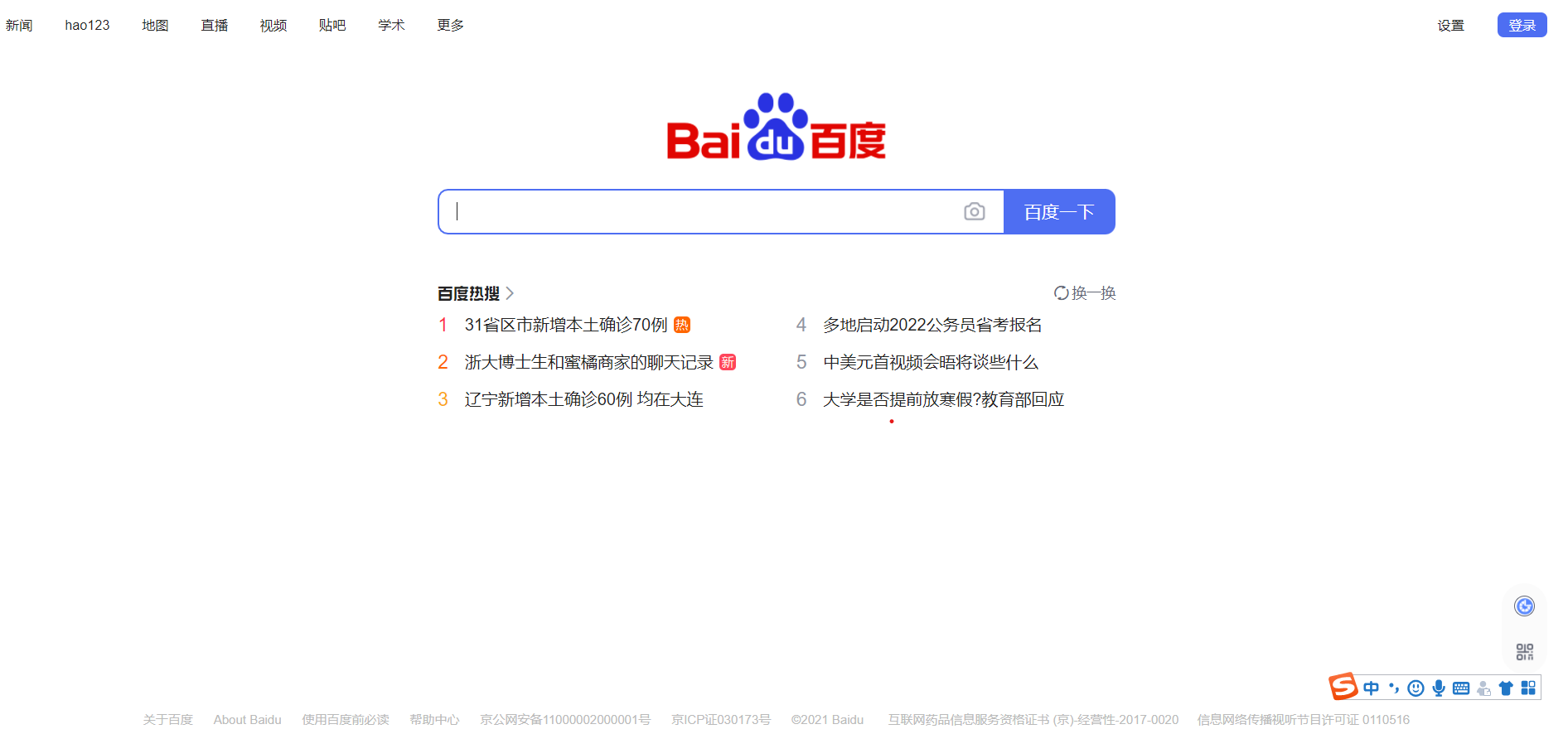
根据图片,我们先构建它的基本框架,即插入盒子固定它在网页的位置,以确保当网页变化时,不会影响盒子位置的变化.
我们一般用div来定义盒子,只是它比较好用,并不代表只有它才是盒子(所有的标签都是盒子).
我们可以先构建3个盒子上面一个直接写,不用改变位置.它会默认居于左上角
因为div为块标签,独占一行,可调节宽高.
第二个盒子自动居于上一个盒子下面,我们可以用定位.相对定位可以改变位置,但它依然占据原来的位置,可能会影响后面的一些效果,不推荐使用.
绝对定位更适合,但因为它是相对于已定位的父级标签定位,一直到窗口.所以我们在上面的标签内加入相对定位,就可以定位了.
当然也可以直接用margin:0 auto;直接让盒子居中(最优).
下面还有一个小盒子,可以用第二个盒子的方法,这样整体的框架基本就完成了.
下面我们根据完整的代码来一步步分析
<!DOCTYPE html>
<html>
<head>
    <meta charset="utf-8">
    <meta name="viewport" content="width=device-width, initial-scale=1">
    <title></title>
    <style type="text/css">
        input{margin: 0;
            padding: 0;}
        #header{
            min-width: 800px;
            position: relative;
        }
        #nav{
            width: 600px;
            height: 30px;
            /*background: lightblue;*/
            list-style: none;
            margin: 0;
            padding: 0;
            font-size: 14px;
            display: flex;
            justify-content: space-around;
            /*justify-content: space-around;文字两边居中*/
            /*justify-content: space-between;文字靠两侧排列*/
            /*弹性布局*/
            line-height: 30px;
        }
        #nav a{
            color: #000;
            text-decoration: none;
        }
        #nav>li{
            /*display: inline-block;
            margin: 0 21px;*/

        }
        /*子代选择器*/
        #topRight{
            width: 140px;
            height: 30px;
            /*background: lightgreen;*/
            position: absolute;
            right: 10px;
            top: 5px;
            display: flex;
            justify-content:space-between;
        }
        #topRight>input{
            background: #fff;
            border: 0;
            font-size: 13px;
            height: 24px;
            cursor: pointer;
            /*鼠标指向该位置,变为小手*/
        }
        #topRight>#login{
            width: 48px;
            background: #38f;
            color: #fff;
            border-radius: 6px;
        }
        /*权重  权值
        行内1000 id100 class10 tag1*/
        #center{
            width: 600px;
            height: 250px;
            margin: 150px auto 0;
            /*background: lightgreen;*/
        }
        #imgBox{
            width: 220px;
            margin: 0 auto;
            /*background: lightcoral;*/
        }
        #imgBox>img{
            width: 100%;
        }
        #iptBox{
            width: 600px;
            height: 44px;
            /*background: lightblue;*/
            border: 1px solid lightgray;
            border-radius:10px;
        }
        #iptBox>input[type='text']{
            width: 500px;
            height: 100%;
            float: left;
            border: 0;
            border-radius: 10px 0 0 10px;
        }
        #iptBox>input[type='button']{
            width: 100px;
            height: 100%;
            float: left;
            border: 0;
            border-radius:;
            background: #38f;
            color: #fff;
            border-radius: 0 10px 10px 0;
            cursor: pointer;
        }
        /*属性选择器*/
        #footer{
            position: fixed;
            width: 80%;
            left: 10%;
            list-style: none;
            bottom: 0;
            color: #bbb;
            display: flex;
            justify-content:space-between;
            min-width: 760px;
        }
        #footer a{
            text-decoration: none;
            color: #000;
        }

    </style>
</head>
<body>
    <div id="header">
    <ul id="nav">
        <li><a href="">新闻</a></li>
        <li><a href="">hao123</a></li>
        <li><a href="">新闻</a></li>
        <li><a href="">新闻</a></li>
        <li><a href="">新闻</a></li>
        <li><a href="">新闻</a></li>
        <li><a href="">新闻</a></li>
        <li><a href="">新闻</a></li>
    </ul>
    <div id="topRight">
        <input type="button" name="" value="设置">
        <input type="button" id="login" name="" value="登录">
    </div>
    </div>
    <div id="center">
        <div id="imgBox">
            <img src="https://www.baidu.com/img/PCtm_d9c8750bed0b3c7d089fa7d55720d6cf.png">
        </div>
        <div id="iptBox">
            <input type="text" name="">
            <input type="button" name="" value="百度一下">
        </div>
    </div>
    <div>
        <ul id="footer">
        <li><a href="">gdhgdhfgh</a></li>
        <li><a href="">hao123</a></li>
        <li><a href="">srgdghdhf</a></li>
        <li><a href="">sgdhfgnf</a></li>
        <li><a href="">sgvsgdh</a></li>
        <li><a href="">gdghytjyj</a></li>
        <li><a href="">sgsdafs</a></li>
        <li><a href="">sfasf</a></li>
        <li><a href="">fafa</a></li>
        </ul>
    </div>
</body>
</html>
之前我们说了css样式有 外部样式,头部样式,行内样式
我们这个就是头部样式,所以代码有点长.qwq
.
.
我们构建完3个盒子后会发现,一些盒子两边并没有紧靠网页,这可能是内外边距,body等标签有自带的大小,通过检查我们将这些标签设置为0,这样就可以解决了
input{
      margin: 0;
      padding: 0;
}
由百度网页可以知道最上面盒子有2个部分
我的思路是在这个盒子内插入2个小盒子,一个靠左,一个靠右
左边的小盒子我们用列表,因为列表默认竖着排列,所以我们还要用弹性盒子让它水平排列,也可以调节内容是水平均匀分布,还是靠两侧均匀分布.如果想让文字再盒子内垂直居中可以用line-height属性,使它与该盒子的高度相同.
右边的小盒子里插入2个input标签改变它们的边框颜色,就可以了.
 #nav{
            width: 600px;
            height: 30px;
            /*background: lightblue;*/
            list-style: none;
            margin: 0;
            padding: 0;
            font-size: 14px;
            display: flex;
            justify-content: space-around;
            /*justify-content: space-around;文字两边居中*/
            /*justify-content: space-between;文字靠两侧排列*/
            /*弹性布局*/
            line-height: 30px;
        }
        #nav a{
            color: #000;
            text-decoration: none;
        }
        #nav>li{
            /*display: inline-block;
            margin: 0 21px;*/

        }
        /*子代选择器*/
        #topRight{
            width: 140px;
            height: 30px;
            /*background: lightgreen;*/
            position: absolute;
            right: 10px;
            top: 5px;
            display: flex;
            justify-content:space-between;
        }
        #topRight>input{
            background: #fff;
            border: 0;
            font-size: 13px;
            height: 24px;
            cursor: pointer;
            /*鼠标指向该位置,变为小手*/
        }
        #topRight>#login{
            width: 48px;
            background: #38f;
            color: #fff;
            border-radius: 6px;
        }
        /*权重  权值
        行内1000 id100 class10 tag1*/
下面的2个盒子与上面的思路都差不多,可以按照上面的思路慢慢写

 浙公网安备 33010602011771号