
20补充之Ajax
Ajax
1简介
- AJAX = Asynchronous JavaScript and XML(异步的 JavaScript 和 XML)
- AJAX 是一种在无需重新加载整个网页的情况下,能够更新部分网页的技术
- Ajax 不是一种新的编程语言,而是一种用于创建更好更快以及交互性更强的Web应用程序的技术
- 传统的网页(即不用ajax技术的网页),想要更新内容或者提交一个表单,都需要重新加载整个网页
- 使用ajax技术的网页,通过在后台服务器进行少量的数据交换,就可以实现异步局部更新
- 使用Ajax,用户可以创建接近本地桌面应用的直接、高可用、更丰富、更动态的Web用户界面
2jQuery.ajax
2.1介绍
- 纯JS原生实现Ajax我们不去讲解这里,直接使用jquery提供的,方便学习和使用,避免重复造轮子,有时间可以去了解下JS原生XMLHttpRequest
- Ajax的核心是XMLHttpRequest对象(XHR)。XHR为向服务器发送请求和解析服务器响应提供了接口。能够以异步方式从服务器获取新数据
- jQuery 提供多个与 AJAX 有关的方法
- 通过 jQuery AJAX 方法,您能够使用 HTTP Get 和 HTTP Post 从远程服务器上请求文本、HTML、XML 或 JSON – 同时您能够把这些外部数据直接载入网页的被选元素中
- jQuery 不是生产者,而是大自然搬运工
- jQuery Ajax本质就是 XMLHttpRequest,对他进行了封装,方便调用
jQuery.ajax(...)
      部分参数:
            url:请求地址
            type:请求方式,GET、POST(1.9.0之后用method)
        headers:请求头
            data:要发送的数据
    contentType:即将发送信息至服务器的内容编码类型(默认: "application/x-www-form-urlencoded; charset=UTF-8")
          async:是否异步
        timeout:设置请求超时时间(毫秒)
      beforeSend:发送请求前执行的函数(全局)
        complete:完成之后执行的回调函数(全局)
        success:成功之后执行的回调函数(全局)
          error:失败之后执行的回调函数(全局)
        accepts:通过请求头发送给服务器,告诉服务器当前客户端可接受的数据类型
        dataType:将服务器端返回的数据转换成指定类型
          "xml": 将服务器端返回的内容转换成xml格式
          "text": 将服务器端返回的内容转换成普通文本格式
          "html": 将服务器端返回的内容转换成普通文本格式,在插入DOM中时,如果包含JavaScript标签,则会尝试去执行。
        "script": 尝试将返回值当作JavaScript去执行,然后再将服务器端返回的内容转换成普通文本格式
          "json": 将服务器端返回的内容转换成相应的JavaScript对象
        "jsonp": JSONP 格式使用 JSONP 形式调用函数时,如 "myurl?callback=?" jQuery 将自动替换 ? 为正确的函数名,以执行回调函数
2.2简单使用
- 配置web.xml
<?xml version="1.0" encoding="UTF-8"?>
<web-app xmlns="http://xmlns.jcp.org/xml/ns/javaee"
         xmlns:xsi="http://www.w3.org/2001/XMLSchema-instance"
         xsi:schemaLocation="http://xmlns.jcp.org/xml/ns/javaee http://xmlns.jcp.org/xml/ns/javaee/web-app_4_0.xsd"
         version="4.0">

    <!--1.注册servlet-->
    <servlet>
        <servlet-name>SpringMVC</servlet-name>
        <servlet-class>org.springframework.web.servlet.DispatcherServlet</servlet-class>
        <!--通过初始化参数指定SpringMVC配置文件的位置,进行关联-->
        <init-param>
            <param-name>contextConfigLocation</param-name>
            <param-value>classpath:application-config.xml</param-value>
        </init-param>
        <!-- 启动顺序,数字越小,启动越早 -->
        <load-on-startup>1</load-on-startup>
    </servlet>

    <!--所有请求都会被springmvc拦截 -->
    <servlet-mapping>
        <servlet-name>SpringMVC</servlet-name>
        <url-pattern>/</url-pattern>
    </servlet-mapping>

    <filter>
        <filter-name>encoding</filter-name>
        <filter-class>org.springframework.web.filter.CharacterEncodingFilter</filter-class>
        <init-param>
            <param-name>encoding</param-name>
            <param-value>utf-8</param-value>
        </init-param>
    </filter>
    <filter-mapping>
        <filter-name>encoding</filter-name>
        <url-pattern>/</url-pattern>
    </filter-mapping>
</web-app>
- 配置springmvc配置文件,application-config.xml
<?xml version="1.0" encoding="UTF-8"?>
<beans xmlns="http://www.springframework.org/schema/beans"
       xmlns:xsi="http://www.w3.org/2001/XMLSchema-instance"
       xmlns:context="http://www.springframework.org/schema/context"
       xmlns:mvc="http://www.springframework.org/schema/mvc"
       xsi:schemaLocation="http://www.springframework.org/schema/beans
       http://www.springframework.org/schema/beans/spring-beans.xsd
       http://www.springframework.org/schema/context
       https://www.springframework.org/schema/context/spring-context.xsd
       http://www.springframework.org/schema/mvc
       https://www.springframework.org/schema/mvc/spring-mvc.xsd">


    <context:component-scan base-package="com.fao.controller"/>
    <mvc:default-servlet-handler />
    <mvc:annotation-driven />


    <bean class="org.springframework.web.servlet.view.InternalResourceViewResolver"
          id="internalResourceViewResolver">
        <property name="prefix" value="/WEB-INF/jsp/" />
        <property name="suffix" value=".jsp" />
    </bean>

     <!--  JSON乱码问题配置 只有用了jackson就能用这个  -->
    <mvc:annotation-driven>
        <mvc:message-converters register-defaults="true">
            <bean class="org.springframework.http.converter.StringHttpMessageConverter">
                <constructor-arg value="UTF-8"/>
            </bean>
            <bean class="org.springframework.http.converter.json.MappingJackson2HttpMessageConverter">
                <property name="objectMapper">
                    <bean class="org.springframework.http.converter.json.Jackson2ObjectMapperFactoryBean">
                        <property name="failOnEmptyBeans" value="false"/>
                    </bean>
                </property>
            </bean>
        </mvc:message-converters>
    </mvc:annotation-driven>
</beans>
- 编写一个AjaxController
@Controller
public class AjaxController {

    @RequestMapping("/a1")
    public void a2(String name, HttpServletResponse response) throws IOException {
        System.out.println("a1:param=>"+name);
        if ("fao".equals(name)){
            response.getWriter().print("true");
        }else{
            response.getWriter().print("false");
        }
    }

}
- 导入jquery,可以使用在线的CDN,也可以下载导入
<script src="https://code.jquery.com/jquery-3.1.1.min.js"></script>
 <script src="${pageContext.request.contextPath}/statics/js/jquery-3.6.0.js"></script>
- 编写index.jsp测试
<%@ page contentType="text/html;charset=UTF-8" language="java" %>
<html>
<head>
  <title>$Title$</title>

  <script src="${pageContext.request.contextPath}/statics/js/jquery-3.6.0.js"></script>
  <script>
    function a1(){
      $.post({
        url:"${pageContext.request.contextPath}/a1",
        data:{'name':$("#txtName").val()},
        success:function (data,status) {
          alert(data);
          alert(status);
        }
      });
    }
  </script>
</head>
<body>

<%--onblur:失去焦点触发事件--%>
用户名:<input type="text" id="txtName" onblur="a1()"/>

</body>
</html>
- 启动tomcat测试!打开浏览器的控制台,当我们鼠标离开输入框的时候,可以看到发出了一个ajax的请求!是后台返回给我们的结果!测试成功!
2.3进阶一
- 编写实体类user
@Data
@AllArgsConstructor
@NoArgsConstructor
public class User {

    private String name;
    private int age;
    private String sex;
}
- 获取一个集合对象,展示到前端页面
 @RequestMapping("/a2")
    public List<User> a2(){
        List<User> userAList = new ArrayList<>();

        //添加数据
        userAList.add(new User("fao",20,"男"));
        userAList.add(new User("aoao",22,"男"));
        userAList.add(new User("lala",10,"女"));

        return userAList;
    }
- 前端页面
<%@ page contentType="text/html;charset=UTF-8" language="java" %>
<html>
<head>
    <title>Title</title>
    <script src="${pageContext.request.contextPath}/statics/js/jquery-3.6.0.js"></script>
    <script>

        $(function (){
            $("#btn").click(function (){
                //简写$.post(url,param(可以省略),success)
                $.post("${pageContext.request.contextPath}/a2",function (data){
                    console.log(data);
                    var html="";

                    for (let i=0;i<data.length;i++){
                        html+="<tr>"+
                            "<td>"+data[i].name+"</td>"+
                            "<td>"+data[i].age+"</td>"+
                            "<td>"+data[i].sex+"</td>"+
                            "</tr>"
                    }
                    $("#content").html(html);
                })
            })
        })

    </script>
</head>
<body>

    <input type="button" value="加载数据" id="btn">
    <table>
        <tr>
            <td>姓名</td>
            <td>年龄</td>
            <td>性别</td>
        </tr>
        <tbody id="content">
            <%--  数据,后台   --%>
        </tbody>
    </table>


</body>
</html>
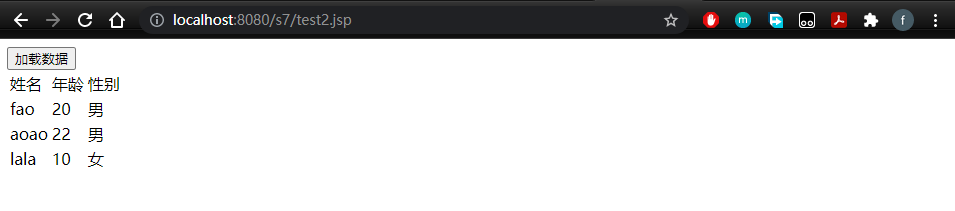
- 测试

2.4进阶二:注册提升效果
- controller
  @RequestMapping("/a3")
    public String ajax3(String name,String pwd){
        String msg = "";
        //模拟数据库中存在数据
        if (name!=null){
            if ("admin".equals(name)){
                msg = "OK";
            }else {
                msg = "用户名输入错误";
            }
        }
        if (pwd!=null){
            if ("123456".equals(pwd)){
                msg = "OK";
            }else {
                msg = "密码输入有误";
            }
        }
        return msg; //由于@RestController注解,将msg转成json格式返回
    }
- 前端页面login.jsp
<%@ page contentType="text/html;charset=UTF-8" language="java" %>
<html>
<head>
    <title>ajax</title>
    <script src="${pageContext.request.contextPath}/statics/js/jquery-3.6.0.js"></script>
    <script>

        function a1(){
            $.post({
                url:"${pageContext.request.contextPath}/a3",
                data:{'name':$("#name").val()},
                success:function (data) {
                    if (data.toString()=='OK'){
                        $("#userInfo").css("color","green");
                    }else {
                        $("#userInfo").css("color","red");
                    }
                    $("#userInfo").html(data);
                }
            });
        }
        function a2(){
            $.post({
                url:"${pageContext.request.contextPath}/a3",
                data:{'pwd':$("#pwd").val()},
                success:function (data) {
                    if (data.toString()=='OK'){
                        $("#pwdInfo").css("color","green");
                    }else {
                        $("#pwdInfo").css("color","red");
                    }
                    $("#pwdInfo").html(data);
                }
            });
        }

    </script>
</head>
<body>
<p>
    用户名:<input type="text" id="name" onblur="a1()"/>
    <span id="userInfo"></span>
</p>
<p>
    密码:<input type="text" id="pwd" onblur="a2()"/>
    <span id="pwdInfo"></span>
</p>
</body>
</html>


 浙公网安备 33010602011771号