

Avalonia TreeDataGrid 实现复制当前格的文本
Avalonia TreeDataGrid 实现复制当前格的文本
Avalonia 的 TreeDataGrid 在 Avalonia 的文档中其实没有特别详细,你可能有一些功能想要做,为此特别贴出来。
目标:实现复制当前格的文本
你需要有 https://docs.avaloniaui.net/zh-Hans/docs/reference/controls/treedatagrid/ 的简单使用经验!
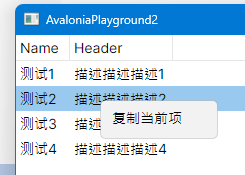
一、效果演示
界面是这个样子。
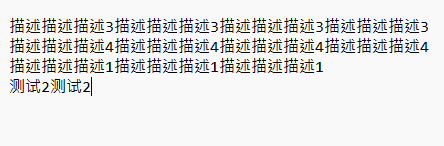
下面是剪贴板的信息。
二、xaml 界面
<Window
    x:Class="AvaloniaPlayground2.Views.MainWindow"
    xmlns="https://github.com/avaloniaui"
    xmlns:x="http://schemas.microsoft.com/winfx/2006/xaml"
    xmlns:d="http://schemas.microsoft.com/expression/blend/2008"
    xmlns:mc="http://schemas.openxmlformats.org/markup-compatibility/2006"
    xmlns:views="using:AvaloniaPlayground2.Views"
    xmlns:vm="using:AvaloniaPlayground2.ViewModels"
    Title="AvaloniaPlayground2"
    d:DesignHeight="450"
    d:DesignWidth="800"
    x:DataType="vm:MainWindowViewModel"
    mc:Ignorable="d">

    <Panel>
        <TreeDataGrid Name="PART_DataGrid" ContextRequested="TreeDataGrid_ContextRequested">
            <TreeDataGrid.ContextMenu>
                <ContextMenu>
                    <MenuItem
                        Name="PART_CopyCurrentItem"
                        Click="PART_CopyCurrentItem_Click"
                        Header="复制当前项" />
                </ContextMenu>
            </TreeDataGrid.ContextMenu>
        </TreeDataGrid>
        <Button
            HorizontalAlignment="Right"
            VerticalAlignment="Bottom"
            Click="Button_Click"
            Content="加载数据" />
    </Panel>
</Window>
三、C# 代码
using Avalonia.Controls;
using Avalonia.Controls.Models.TreeDataGrid;
using Avalonia.Interactivity;
using System.Collections.Generic;
namespace AvaloniaPlayground2.Views
{
    public class TestItemViewModel
    {
        public string Name { get; set; }
        public string Desciption { get; set; }

        public TestItemViewModel(string name, string description)
        {
            Name = name;
            Desciption = description;
        }
    }

    public partial class MainWindow : Window
    {
        private FlatTreeDataGridSource<TestItemViewModel> _source;

        public MainWindow()
        {
            InitializeComponent();
        }

        private void Button_Click(object? sender, RoutedEventArgs e)
        {
            var list = new List<TestItemViewModel>()
            {
                new TestItemViewModel("测试1", "描述描述描述1"),
                new TestItemViewModel("测试2", "描述描述描述2"),
                new TestItemViewModel("测试3", "描述描述描述3"),
                new TestItemViewModel("测试4", "描述描述描述4"),
            };
            _source = new FlatTreeDataGridSource<TestItemViewModel>(list)
            {
                Columns =
                {
                    new  TextColumn<TestItemViewModel, string>("Name", i=>i.Name),
                    new TextColumn<TestItemViewModel, string>("Header", i=>i.Desciption)
                }
            };

            PART_DataGrid.Source = _source;
        }

        private void TreeDataGrid_ContextRequested(object? sender, ContextRequestedEventArgs e)
        {
            var textBlock = e.Source as TextBlock;
            if (textBlock is null) return;

            PART_CopyCurrentItem.Tag = textBlock.Text;
        }

        private async void PART_CopyCurrentItem_Click(object? sender, Avalonia.Interactivity.RoutedEventArgs e)
        {
            var button = sender as MenuItem;
            var tag = PART_CopyCurrentItem.Tag as string;
            if (string.IsNullOrEmpty(tag))
            {
                await Clipboard.ClearAsync();
            }
            else
            {
                await Clipboard.SetTextAsync(tag);
            }

        }
    }
}
四、省流总结
- ContextRequested 可以在右键菜单创建前触发,我的思路是在右键菜单打开前,读取当前格子的信息并且塞到复制按钮的Tag中,其实你也完全可以放到别的地方。
- TreeDataGrid_ContextRequested 的
e.Source会直接来自当前控件,多亏了路由事件的机制,我们可以得到当前右键聚焦的控件是谁,e.Source 一般而言会是当前的 TextBlock ,如果没有文本块,按照我的经验会拿到 Border。 - Clipboard 可以在 Window 中拿到,如果你当前的不在 Window 这个地方,你如果在 ViewModel,或者子 View 上,那你可能需要一些依赖注入或者全局 static 实例的技巧!

 浙公网安备 33010602011771号