
Avalonia 复杂渐变动画与炫酷的卡片示例
 Avalonia 实现炫酷的卡片渐变动画效果
Avalonia 复杂渐变动画与炫酷的卡片示例
本示例参考自 https://codepen.io/gayane-gasparyan/pen/jOmaBQK ,并没有完全的复刻,因为这边代码实现的实在是太长了。
下面就是开源代码,如果想要直接看跑的效果,欢迎移步我的仓库:https://gitee.com/fanbal/avalonia-magic-card
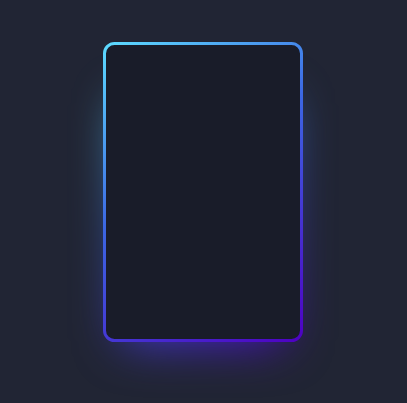
先放一张效果图,以免你没有兴趣读下去:
零、实现上的缺陷和要解决的问题
由于 Avalonia 中无法按照角度创建渐变色,为此我们需要手写一个这样的轮子,以便我们之后旋转动画的进行。
一、根据控件尺寸进行支持角度(弧度制)的旋转的实现
/// <summary>
/// 设置渐变色的角度。
/// </summary>
/// <param name="visual"></param>
/// <param name="linearGradientBrush"></param>
/// <param name="rotation"></param>
/// <exception cref="Exception"></exception>
public static void SetGradientRotation(Visual visual, LinearGradientBrush linearGradientBrush, double rotation)
{
    var borderRect = new Rect(visual.Bounds.Size);
    SetGradientRotation(borderRect, linearGradientBrush, rotation);
}

/// <summary>
/// 设置渐变色的角度。
/// </summary>
/// <param name="visual"></param>
/// <param name="linearGradientBrush"></param>
/// <param name="rotation"></param>
/// <exception cref="Exception"></exception>
public static void SetGradientRotation(Rect borderRect, LinearGradientBrush linearGradientBrush, double rotation)
{
    var m = Math.Tan(rotation);

    double Normalize(double rotation)
    {
        return rotation % (2 * Math.PI);
    }

    bool IsP90(double nrotation)
    {
        if (nrotation == (Math.PI / 2)) return true;
        return false;
    }
    bool IsN90(double nrotation)
    {
        if (nrotation == (Math.PI / 2 + Math.PI)) return true;
        return false;
    }
    bool IsP180(double nrotation)
    {
        return nrotation == Math.PI;
    }
    bool IsP0(double nrotation)
    {
        return nrotation == 0 || nrotation == Math.PI * 2;
    }

    double GetY(double x)
    {
        return m * (x - borderRect.Center.X) + borderRect.Center.Y;
    }

    double GetX(double y)
    {
        return (y - borderRect.Center.Y) / m + borderRect.Center.X;
    }

    Point GetFollowDirectionInsectionCore(double nrotation)
    {
        if (nrotation > 0 && nrotation < Math.PI / 2)
        {
            var bottomY = borderRect.Height;
            var bottomX = GetX(bottomY);

            var rightX = borderRect.Width;
            var rightY = GetY(rightX);

            if (bottomY < rightY) return new Point(bottomX, bottomY);
            else return new Point(rightX, rightY);
        }
        else if (nrotation > Math.PI / 2 && nrotation < Math.PI * 1)
        {
            var bottomY = borderRect.Height;
            var bottomX = GetX(bottomY);

            var leftX = 0;
            var leftY = GetY(leftX);

            if (bottomY < leftY) return new Point(bottomX, bottomY);
            else return new Point(leftX, leftY);
        }
        else if (nrotation > Math.PI * 1 && nrotation < Math.PI * 3d / 2d)
        {
            var topY = 0;
            var topX = GetX(topY);

            var leftX = 0;
            var leftY = GetY(leftX);

            if (topY > leftY) return new Point(topX, topY);
            else return new Point(leftX, leftY);
        }
        else if (nrotation > Math.PI * 3d / 2d && nrotation < Math.PI * 2)
        {
            var topY = 0;
            var topX = GetX(topY);

            var rightX = borderRect.Width;
            var rightY = GetY(rightX);

            if (topY > rightY) return new Point(topX, topY);
            else return new Point(rightX, rightY);
        }
        throw new Exception("GetFollowDirectionInsection 角度不在定义域内,定义域不包括 0 90 180 270");
    }

    Point GetReverseDirectionInsectionCore(double nrotation)
    {
        var vrotation = (nrotation + Math.PI) % (Math.PI * 2);
        return GetFollowDirectionInsectionCore(vrotation);
    }

    Point GetFollowDirectionInsection(double nrotation)
    {
        var point = GetFollowDirectionInsectionCore(nrotation);
        return new Point(point.X / borderRect.Width, point.Y / borderRect.Height);
    }
    Point GetReverseDirectionInsection(double nrotation)
    {
        var point = GetReverseDirectionInsectionCore(nrotation);

        return new Point(point.X / borderRect.Width, point.Y / borderRect.Height);
    }

    void SetPoint(Point startPoint, Point endPoint)
    {
        linearGradientBrush.StartPoint = new RelativePoint(startPoint, RelativeUnit.Relative);
        linearGradientBrush.EndPoint = new RelativePoint(endPoint, RelativeUnit.Relative);
    }

    var nrotation = Normalize(rotation);

    Point startPoint, endPoint;

    if (IsP90(nrotation))
    {
        startPoint = new Point(0.5, 0);
        endPoint = new Point(0.5, 1);
        SetPoint(startPoint, endPoint);
    }
    else if (IsN90(nrotation))
    {
        startPoint = new Point(0.5, 1);
        endPoint = new Point(0.5, 0);
        SetPoint(startPoint, endPoint);
    }
    else if (IsP0(nrotation))
    {
        startPoint = new Point(0, 0.5);
        endPoint = new Point(1, 0.5);
        SetPoint(startPoint, endPoint);
    }
    else if (IsP180(nrotation))
    {
        startPoint = new Point(1, 0.5);
        endPoint = new Point(0, 0.5);
        SetPoint(startPoint, endPoint);
    }
    else
    {
        startPoint = GetReverseDirectionInsection(nrotation);
        endPoint = GetFollowDirectionInsection(nrotation);
        SetPoint(startPoint, endPoint);

    }

}
一、关于 axaml 的部分的创建
<Panel>
    <Border
        Width="{Binding ElementName=PART_MainBorder, Path=Width}"
        Height="{Binding ElementName=PART_MainBorder, Path=Height}"
        BorderThickness="0"
        CornerRadius="{Binding ElementName=PART_MainBorder, Path=CornerRadius}">
        <Border.Background>
            <LinearGradientBrush StartPoint="0%,0%" EndPoint="100%,100%">
                <LinearGradientBrush.GradientStops>
                    <GradientStop Offset="0" Color="#5ddcff" />
                    <GradientStop Offset="0.43" Color="#3c67e3" />
                    <GradientStop Offset="1" Color="#4e00c2" />
                </LinearGradientBrush.GradientStops>
            </LinearGradientBrush>
        </Border.Background>

        <Border.Effect>
            <BlurEffect Radius="100" />
        </Border.Effect>

        <Border.RenderTransform>
            <TransformGroup>
                <ScaleTransform ScaleX="0.80" ScaleY="0.80" />
                <TranslateTransform X="0" Y="30" />
            </TransformGroup>
        </Border.RenderTransform>

    </Border>
    <Border
        Name="PART_MainBorder"
        Width="200"
        Height="300"
        Background="#191c29"
        BorderThickness="3"
        CornerRadius="10"
        IsVisible="true">
        <Border.BorderBrush>
            <LinearGradientBrush StartPoint="0%,0%" EndPoint="100%,100%">
                <LinearGradientBrush.GradientStops>
                    <GradientStop Offset="0" Color="#5ddcff" />
                    <GradientStop Offset="0.43" Color="#3c67e3" />
                    <GradientStop Offset="1" Color="#4e00c2" />
                </LinearGradientBrush.GradientStops>

            </LinearGradientBrush>
        </Border.BorderBrush>

    </Border>
</Panel>
二、关于渐变色和旋转的实现
我们将上面的弧度制的线性填充放到了控件的部分。你需要加入这样的一块内容。
/// <summary>
/// 线性渐变的画刷帮助。
/// </summary>
public class LinearGradientBrushHelper
{
    /// <summary>
    /// RotateAngle AttachedProperty definition
    /// indicates ....
    /// </summary>
    public static readonly AttachedProperty<double> RotateAngleProperty =
        AvaloniaProperty.RegisterAttached<LinearGradientBrushHelper, StyledElement, double>("RotateAngle", coerce: OnRotateAngleChanged);

    private static double OnRotateAngleChanged(AvaloniaObject @object, double arg2)
    {
        if (@object is Border border)
        {
            SetGradientRotation(border, border.BorderBrush as LinearGradientBrush, arg2);
        }
        return arg2;
    }

    /// <summary>
    /// Accessor for Attached property <see cref="RotateAngleProperty"/>.
    /// </summary>
    /// <param name="element">Target element</param>
    /// <param name="value">The value to set  <see cref="RotateAngleProperty"/>.</param>
    public static void SetRotateAngle(StyledElement element, double value) =>
        element.SetValue(RotateAngleProperty, value);

    /// <summary>
    /// Accessor for Attached property <see cref="RotateAngleProperty"/>.
    /// </summary>
    /// <param name="element">Target element</param>
    public static double GetRotateAngle(StyledElement element) =>
        element.GetValue(RotateAngleProperty);

    /// <summary>
    /// 设置渐变色的角度。
    /// </summary>
    /// <param name="visual"></param>
    /// <param name="linearGradientBrush"></param>
    /// <param name="rotation"></param>
    /// <exception cref="Exception"></exception>
    public static void SetGradientRotation(Visual visual, LinearGradientBrush linearGradientBrush, double rotation)
    {
        var borderRect = new Rect(visual.Bounds.Size);
        SetGradientRotation(borderRect, linearGradientBrush, rotation);
    }

    /// <summary>
    /// 设置渐变色的角度。
    /// </summary>
    /// <param name="visual"></param>
    /// <param name="linearGradientBrush"></param>
    /// <param name="rotation"></param>
    /// <exception cref="Exception"></exception>
    public static void SetGradientRotation(Rect borderRect, LinearGradientBrush linearGradientBrush, double rotation)
    {
        var m = Math.Tan(rotation);

        double Normalize(double rotation)
        {
            return rotation % (2 * Math.PI);
        }

        bool IsP90(double nrotation)
        {
            if (nrotation == (Math.PI / 2)) return true;
            return false;
        }
        bool IsN90(double nrotation)
        {
            if (nrotation == (Math.PI / 2 + Math.PI)) return true;
            return false;
        }
        bool IsP180(double nrotation)
        {
            return nrotation == Math.PI;
        }
        bool IsP0(double nrotation)
        {
            return nrotation == 0 || nrotation == Math.PI * 2;
        }

        double GetY(double x)
        {
            return m * (x - borderRect.Center.X) + borderRect.Center.Y;
        }

        double GetX(double y)
        {
            return (y - borderRect.Center.Y) / m + borderRect.Center.X;
        }

        Point GetFollowDirectionInsectionCore(double nrotation)
        {
            if (nrotation > 0 && nrotation < Math.PI / 2)
            {
                var bottomY = borderRect.Height;
                var bottomX = GetX(bottomY);

                var rightX = borderRect.Width;
                var rightY = GetY(rightX);

                if (bottomY < rightY) return new Point(bottomX, bottomY);
                else return new Point(rightX, rightY);
            }
            else if (nrotation > Math.PI / 2 && nrotation < Math.PI * 1)
            {
                var bottomY = borderRect.Height;
                var bottomX = GetX(bottomY);

                var leftX = 0;
                var leftY = GetY(leftX);

                if (bottomY < leftY) return new Point(bottomX, bottomY);
                else return new Point(leftX, leftY);
            }
            else if (nrotation > Math.PI * 1 && nrotation < Math.PI * 3d / 2d)
            {
                var topY = 0;
                var topX = GetX(topY);

                var leftX = 0;
                var leftY = GetY(leftX);

                if (topY > leftY) return new Point(topX, topY);
                else return new Point(leftX, leftY);
            }
            else if (nrotation > Math.PI * 3d / 2d && nrotation < Math.PI * 2)
            {
                var topY = 0;
                var topX = GetX(topY);

                var rightX = borderRect.Width;
                var rightY = GetY(rightX);

                if (topY > rightY) return new Point(topX, topY);
                else return new Point(rightX, rightY);
            }
            throw new Exception("GetFollowDirectionInsection 角度不在定义域内,定义域不包括 0 90 180 270");
        }

        Point GetReverseDirectionInsectionCore(double nrotation)
        {
            var vrotation = (nrotation + Math.PI) % (Math.PI * 2);
            return GetFollowDirectionInsectionCore(vrotation);
        }

        Point GetFollowDirectionInsection(double nrotation)
        {
            var point = GetFollowDirectionInsectionCore(nrotation);
            return new Point(point.X / borderRect.Width, point.Y / borderRect.Height);
        }
        Point GetReverseDirectionInsection(double nrotation)
        {
            var point = GetReverseDirectionInsectionCore(nrotation);

            return new Point(point.X / borderRect.Width, point.Y / borderRect.Height);
        }

        void SetPoint(Point startPoint, Point endPoint)
        {
            linearGradientBrush.StartPoint = new RelativePoint(startPoint, RelativeUnit.Relative);
            linearGradientBrush.EndPoint = new RelativePoint(endPoint, RelativeUnit.Relative);
        }

        var nrotation = Normalize(rotation);

        Point startPoint, endPoint;

        if (IsP90(nrotation))
        {
            startPoint = new Point(0.5, 0);
            endPoint = new Point(0.5, 1);
            SetPoint(startPoint, endPoint);
        }
        else if (IsN90(nrotation))
        {
            startPoint = new Point(0.5, 1);
            endPoint = new Point(0.5, 0);
            SetPoint(startPoint, endPoint);
        }
        else if (IsP0(nrotation))
        {
            startPoint = new Point(0, 0.5);
            endPoint = new Point(1, 0.5);
            SetPoint(startPoint, endPoint);
        }
        else if (IsP180(nrotation))
        {
            startPoint = new Point(1, 0.5);
            endPoint = new Point(0, 0.5);
            SetPoint(startPoint, endPoint);
        }
        else
        {
            // 关于起点和终点的配置,哪个是起点,哪个是终点?
            startPoint = GetReverseDirectionInsection(nrotation);
            endPoint = GetFollowDirectionInsection(nrotation);
            SetPoint(startPoint, endPoint);

        }

        Debug.WriteLine($"{startPoint} {endPoint}");

    }
}
播放动画请看此处:
private void Button_Click(object? sender, Avalonia.Interactivity.RoutedEventArgs e)
{
    var gradientBrush = new LinearGradientBrush()
    {
        StartPoint = new RelativePoint(0, 0, RelativeUnit.Relative),
        EndPoint = new RelativePoint(1, 1, RelativeUnit.Relative)
    };

    var color0 = ColorToHexConverter.ParseHexString("#5ddcff", AlphaComponentPosition.Leading)!.Value;
    var color1 = ColorToHexConverter.ParseHexString("#3c67e3", AlphaComponentPosition.Leading)!.Value;
    var color2 = ColorToHexConverter.ParseHexString("#4e00c2", AlphaComponentPosition.Leading)!.Value;

    var gradientStop0 = new GradientStop(color0, 0);
    var gradientStop1 = new GradientStop(color1, 0.43);
    var gradientStop2 = new GradientStop(color2, 1);

    gradientBrush.GradientStops.AddRange([gradientStop0, gradientStop1, gradientStop2]);

    PART_MainBorder.BorderBrush = gradientBrush;

    var anim = new Animation() { Duration = TimeSpan.FromSeconds(2), IterationCount = IterationCount.Infinite };

    var keyframe0 = new KeyFrame() { Cue = new Cue(0) };
    keyframe0.Setters.Add(new Setter(LinearGradientBrushHelper.RotateAngleProperty, 0d));
    var keyframe1 = new KeyFrame() { Cue = new Cue(1) };
    keyframe1.Setters.Add(new Setter(LinearGradientBrushHelper.RotateAngleProperty, Math.PI * 2));

    anim.Children.Add(keyframe0);
    anim.Children.Add(keyframe1);

    anim.RunAsync(PART_MainBorder);

}
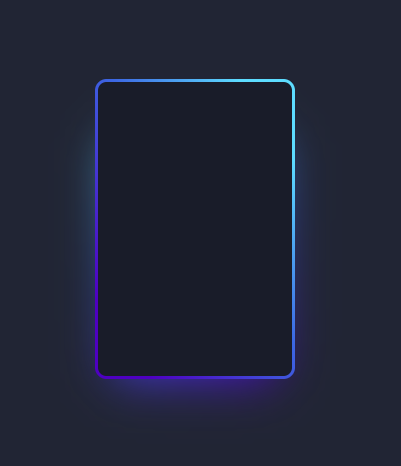
三、总而言之最终的效果
它确实动了,不信你和上面的比较一下看看,从浅蓝色的部分就可以看出不一样了好吧。

 浙公网安备 33010602011771号