
团队冲刺(7)
今天完成:
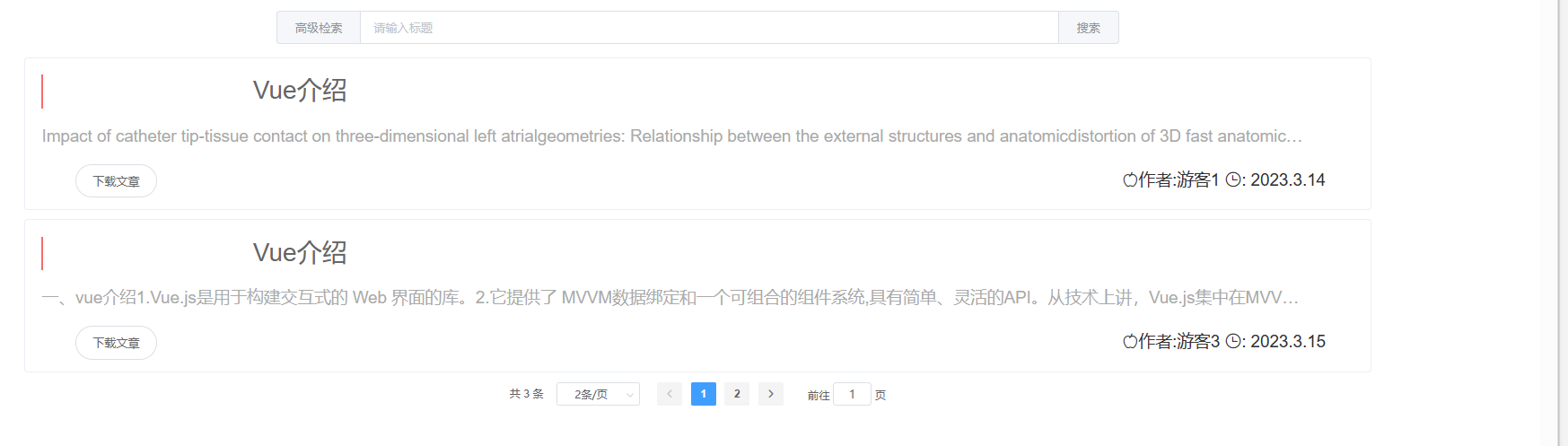
优化搜索过程,优化数据展示, 加标题条超链接 , 优化分页功能
  1 <template>
  2 <div >
  3     <!-- 查询框部分 -->
  4     <el-row>
  5         <el-col :span="12" :offset="6" style="margin-top: 25px;">
  6
  7             <el-input type="text" placeholder="请输入标题" v-model="keyword" >
  8                 <el-button slot="prepend" type="primary" @click="gohighSearch">高级检索</el-button>
  9                 <el-button slot="append" type="primary" @click="search" >搜索</el-button>
 10             </el-input>
 11         </el-col>
 12     </el-row>
 13 <br />
 14
 15  <div class="showlist">
 16      <!-- <el-row class="art-item" v-model="bookList"  v-for="userblog in searchList.content"> -->
 17     <el-row class="art-item" v-model="bookList"  v-for="userblog in bookList">
 18       <el-card shadow="hover" style="height: 180px">
 19         <el-row class="art-info d-flex align-items-center justify-content-start">
 20           <div class="d-flex align-items-center">
 21             <div class="art-title">
 22               <a :href="'view?url='+userblog.url+'&name=userblog.document.title&type=inline'">{{userblog.title}}</a>
 23               <!-- {{userblog.title}} -->
 24             </div>
 25           </div>
 26         </el-row>
 27         <el-row class="art-body">
 28           <div class="side-abstract">
 29             <div class="art-abstract">
 30               {{userblog.Abstract}}
 31             </div>
 32           </div>
 33         </el-row>
 34         <el-row class="art-floor">
 35             <div class="art-more">
 36                  <!--?url=userblog.document.url&name=userblog.document.title&type=inline <router-link :to="{name: 'view?url=Document . url&name=...', params:{'url':userblog.url} }" tag="span"> -->
 37                  <!-- <router-link :to="{name: 'bookMore2', params:{'title':userblog.title} }" tag="span"> -->
 38                  <!-- <button ><a :href="'view?url='+userblog.url+'&name=userblog.document.title&type=inline'">查看文章</a></button> -->
 39                  <!-- <el-button style="border-radius: 200px; margin-top: 50px; margin-left: 500px" @click="toDown(userblog.url)">下载文章</el-button> -->
 40                 <!--    .document -->
 41                 <!-- <el-button style="border-radius: 200px; margin-top: 50px"><a :href="'view?url='+userblog.url+'&name=userblog.document.title&type=inline'">查看文章</a></el-button> -->
 42                   <el-button style="border-radius: 200px;"><a :href="'view?url='+userblog.url+'&name=userblog.document.title&type=attachment'">下载文章</a></el-button>
 43
 44               </div>
 45               <div class="art-time">
 46                    <i class="el-icon-apple"></i>作者:</i>{{userblog.author}}
 47                    <i class="el-icon-time"></i>: {{ userblog.date }}
 48               </div>
 49         </el-row>
 50       </el-card>
 51     </el-row>
 52
 53     <!-- 分页插件部分 -->
 54     <el-row>
 55         <el-col :span="16" :offset="4">
 56             <el-pagination
 57                     background
 58                     @size-change="handleSizeChange"
 59                     @current-change="handleCurrentChange"
 60                     :current-page="currentPage"
 61                     :page-sizes="[1, 2, 50, 100]"
 62                     :page-size="pageSize"
 63                     layout="total,sizes, prev, pager, next, jumper"
 64                     :total="total">
 65             </el-pagination>
 66         </el-col>
 67     </el-row>
 68     </div>
 69 </div>
 70 </template>
 71
 72 <script>
 73 import { mapState } from "vuex";
 74
 75 export default {
 76
 77   //自动派发
 78   // mounted() {
 79   //   //派发action,通知vuex发请求
 80   //   this.$store.dispatch("getBookList");
 81   // },
 82   // computed: {
 83   //   ...mapState({
 84   //     bookList: (state) => state.book.bookList,
 85   //     searchList: (state) => state.item.searchList,
 86   //   }),
 87   // },
 88   data(){
 89     return{
 90        currentPage: 1, // 初始页码
 91        pageSize: 1, // 每页的数据   searchList.size
 92        total:  0, // 总记录数      searchList.totatotalElementslPages
 93        keyword: "", // 关键词
 94         bookList: [],  // content:[]
 95     }
 96   },
 97   // mounted() {
 98   //   //在发请求之前:整理用户搜索的参数
 99   //   //组件挂载完毕发一次请求
100   //   this.getData();
101   //   //获取用户信息
102   // },
103   methods: {
104     toDown(url) {
105       window.open(url);
106     },
107     toView(url) {
108       window.open(url);
109     },
110     gohighSearch() {
111       this.$router.push("/highSearch");
112     },
113     // 每页大小变更处理函数
114     handleSizeChange: function (size) {
115       this.pageSize = size;
116       console.log("每页大小:" + this.pageSize); //每页下拉显示数据
117       this.search();
118     },
119     // 页码变更处理函数
120     handleCurrentChange: function (currentPage) {
121       this.currentPage = currentPage;
122       console.log("当前页码:" + this.currentPage); //点击第几页
123       this.search();
124     },
125     search () {
126       //  this.$store.dispatch("getSearchList", this.keyword , this.currentPage , this.pageSize);
127       this.$store.dispatch("getBookList");
128       let data=JSON.parse(JSON.stringify(this.$store.state.book.bookList))
129        this.bookList = data.splice(
130         (this.currentPage - 1) * this.pageSize,
131         this.pageSize
132       ),
133       this.total=this.$store.state.book.bookList.length
134     },
135     // 查询类型变更时,当前页码改为1
136     //  typeChange: function () {
137     //   this.currentPage = 1;
138     // },
139   },
140     created() {
141     this.search();
142   },
143 };
144 </script>
145
146 <style scoped>
147 .showlist {
148   margin-left: 10%;
149   width: 80%;
150 }
151 /* 查询类型选择框宽度和背景色设置 */
152 .el-select .el-input {
153   width: 150px;
154 }
155
156 .input-with-select .el-input-group__prepend {
157   background-color: #fff;
158 }
159
160 /*标题和内容的字体等设置*/
161 .title {
162   font-size: 24px;
163   cursor: pointer;
164 }
165
166 .content {
167   margin-bottom: 4px;
168   color: #8a8a8a;
169   font-size: 14px;
170   line-height: 24px;
171 }
172 .art-item {
173   margin-bottom: 10px;
174   position: relative;
175 }
176 .art-time {
177   margin-left: 20px;
178   font-size: 20px;
179   display: inline-block;
180 }
181 .art-more{
182     display: inline-block;
183     margin-top: 0px;
184     margin-right: 1100px;
185     width: 150px;
186 }
187 .art-abstract {
188   flex: 1;
189   color: #aaa;
190   white-space: nowrap;
191   width: 1500px;
192   height: 1200px;
193   margin-top: 10px;
194   overflow: hidden;
195   text-overflow: ellipsis;
196   font-size: 20px;
197 }
198 .art-body {
199   display: flex;
200   padding: 10px 0;
201 }
202 .art-floor{
203
204     padding: 10px 0;
205 }
206 .side-abstract {
207   flex: 1;
208   display: flex;
209   flex-direction: column;
210 }
211 .art-title {
212   font-size: 30px;
213   color: #2267c7;
214   border-left: 3px solid #f56c6c;
215   padding-left: 5px;
216   cursor: pointer;
217   width: 600px;
218   height: 40px;
219   overflow: hidden;
220   text-overflow: ellipsis;
221   white-space: nowrap;
222 }
223 .art-title:hover {
224   padding-left: 10px;
225   color: #409eff;
226 }
227 </style>
明日完成:
多文件上传优化:
遇到的问题:
连个div同行展示,
解决方法1:两个div都添加样式 display:inline-block;(如值为inline,设置宽高失效,div靠内容撑起)
解决方法2:两个div都添加样式 float:left;(后面不在同行的div设置 clear:both;清除浮动)

 浙公网安备 33010602011771号