
需求场景优化描述
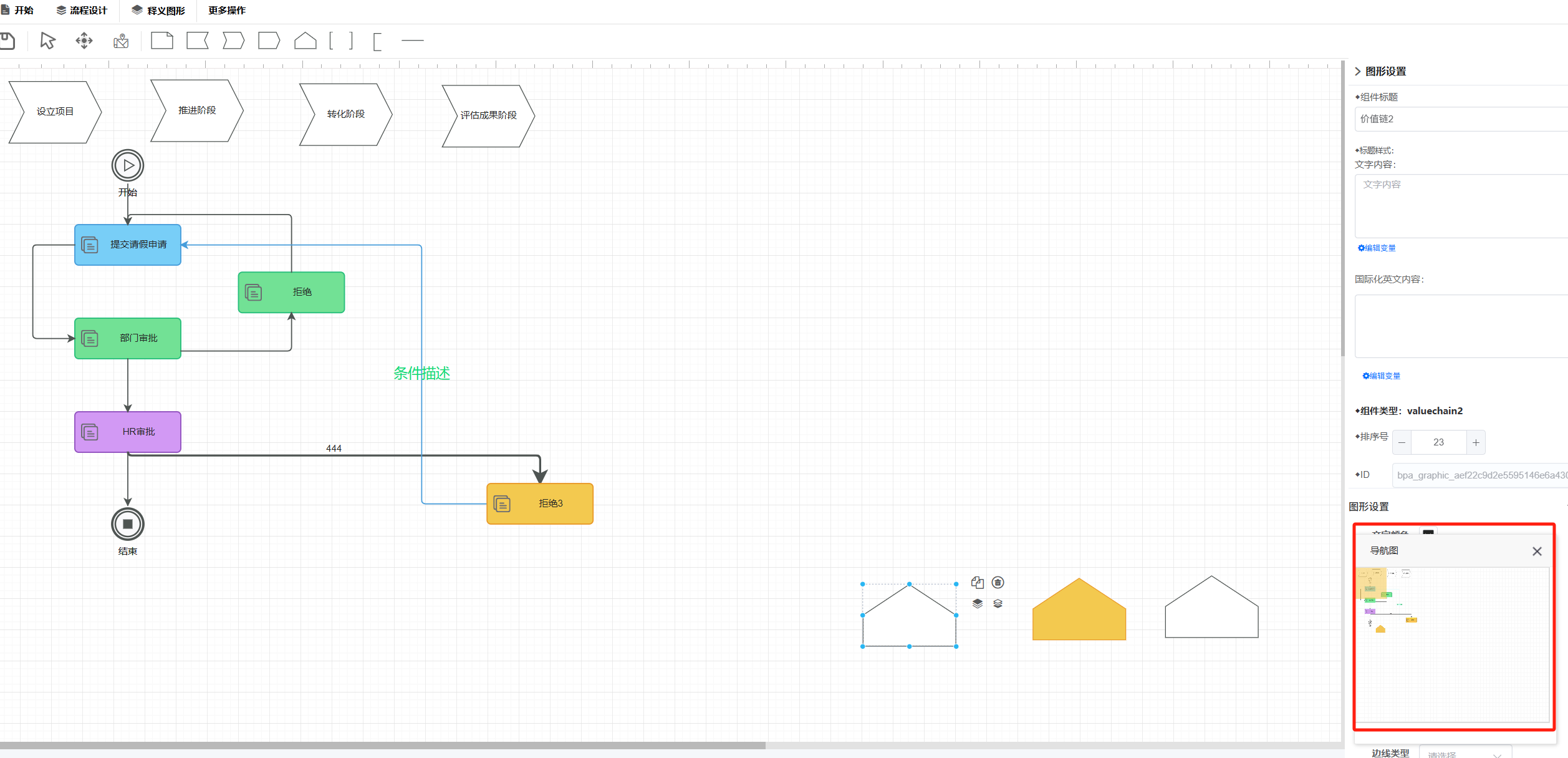
核心目标:通过可移动的导航窗口,解决大型流程图浏览效率低、定位困难的问题,提升用户操作流畅度。
采用浮动式面板设计,支持拖拽移动
缩略图映射:显示流程图全局缩略图,当前视窗区域用高亮框标记
进度指示条:顶部显示水平进度条,点击可快速跳转至指定区域
效果如下图所示
小窗口代码实现
<template>
  <div class="overnone">
    <div class="">
      <div class="drap-plane f2bpm_thumb-navigation-bg" :style="getDrapPlaneStyle">
        <div v-resize="'move'" class="drap"></div>
      </div>
    </div>
  </div>
</template>

<script>
  import html2canvas from 'html2canvas';
  export default {
    data() {
      return {
        imgSrc: "",
        drapPlaneWidth: 250,
        drapPlaneHeight: 200,
        scrollId: "f2bpm_drawing_board",
        scrollLeft: 0,
        scrollTop: 0,
        clientLeft: 0,
        clientTop: 0,
        //内容区域
        scrollHeightLength: 0,
        scrollWidthLength: 0,
        //可能区域
        scrollHeight: 0,
        scrollWidth: 0,
        //拖动块长度
        drapheight: 0,
        drapwidth: 0,
        //比例
        scaleY: 1,
        scaleX: 1,
        loading: false,
        formAction: null,
        treeData: [],
        data: {
          Flag: '1'
        },
        formRules: {
          Flag: [
            { required: true, message: '必填项不能为空' }
          ],
          OpinionContent: [
            { required: true, message: '必填项不能为空' }
          ]
        }
      };
    },
    computed: {
      getDrapPlaneStyle() {
        let that = this;
        let style = 'background-color: #FFFFFF;background-size:300px 240px !important;width:' + that.drapPlaneWidth + 'px;height:' + that.drapPlaneHeight + 'px;background: url(' + that.imgSrc + ');';
        console.info(style);
        return style;
      }
    },
    mounted() {
      var that = this;
      $(window.parent).resize(function () {
        that.initail();
      });
      setTimeout(function () {
        that.buildImg();
      }, 500);
    },
    created: function () {
      var that = this;
      window.myvm = that;
      that.scrollId = Object.toQueryString("scrollId");
      that.initail();
    },
    methods: {
      closeEdit() {
        FUI.Window.closeEdit();
      },
      initail() {
        let that = this;
        let $scroll = $(window.parent.document).find('#' + that.scrollId);
        //可拖动的总长度
        let scrollHeightLength = $scroll.prop('scrollHeight');
        let scrollWidthLength = $scroll.prop('scrollWidth');
        //滚动条可见区高度
        let scrollHeight = $scroll.height();//拿到的高度确实是对的,但拖动的范围确有2700
        let scrollWidth = $scroll.width();
        //拖动块长度
        let drapheight = scrollHeight / (scrollHeightLength / scrollHeight);
        let drapwidth = scrollWidth / (scrollWidthLength / scrollWidth);
        let scaleX = drapwidth / scrollWidth;
        let scaleY = drapheight / scrollHeight;
        that.scaleY = scaleY;
        that.scaleX = scaleX;
        that.drapheight = drapheight;
        that.drapwidth = drapwidth;
        that.scrollHeight = scrollHeight;
        that.scrollWidth = scrollWidth;
        that.scrollHeightLength = scrollHeightLength;
        that.scrollWidthLength = scrollWidthLength;
      },
      setScroll(left, top) {
        let that = this;
        let $scroll = $(window.parent.document).find('#' + that.scrollId);
        $scroll.scrollLeft(left);
        $scroll.scrollTop(top);
      },
      buildImg() {
        let that = this;
        html2canvas(window.parent.document.querySelector(".f2bpmdesigner_inner"), { backgroundColor: '#FFFFFF' }).then(canvas => {
          //0到1之间的取值,主要用来选定图片的质量
          const canvasData = canvas.toDataURL("image/jpeg", 0.1);
          that.imgSrc = canvasData;
        });
      }
    },
    directives: {
      resize(el, binding, vNode) {
        const that = window.myvm;
        el.onmousedown = function (e) {
          const clientX = e.clientX;
          const clientY = e.clientY;
          document.onmousemove = function (me) {
            let drapX = me.clientX;
            let drapY = me.clientY;
            let left = 0;
            let top = 0;
            if (me.clientX < 20) {
              drapX = 20;
            }
            if (me.clientY < 20) {
              drapY = 20;
            }
            if (me.clientX > (that.drapPlaneWidth - 20)) {
              drapX = that.drapPlaneWidth - 20;
            }
            if (me.clientY > (that.drapPlaneHeight - 20)) {
              drapY = that.drapPlaneHeight - 20;
            }
            if (me.clientX < 3 || me.clientY < 3 || me.clientY > (that.drapPlaneHeight - 3) || me.clientX > (that.drapPlaneWidth - 3)) {
              document.onmousemove = document.onmouseup = null;
            }
            //左上角
            left = drapX - 20;
            top = drapY - 20;
            el.style.left = left + 'px';
            el.style.top = top + 'px';
            that.clientLeft = left;
            that.clientTop = top;
            let scrollToLeft = left * ((that.scrollWidthLength - that.drapwidth) / that.drapPlaneWidth);
            let scrollToTop = top * (that.scrollHeightLength / that.drapPlaneHeight);
            that.setScroll(scrollToLeft, scrollToTop);

          };
          document.onmouseup = function (me) {
            document.onmousemove = document.onmouseup = null;
            let $scroll = $(window.parent.document).find('#' + that.scrollId);
            let scrollLeft = $scroll.scrollLeft();
            let scrollTop = $scroll.scrollTop();
            that.scrollLeft = scrollLeft.toFixed(0);
            that.scrollTop = scrollTop.toFixed(0);
          };
          return false;
        };
      }
    }
  }
</script>
<style scoped>
  .drap {
    position: relative;
    display: inline-block;
    width: 40px;
    height: 40px;
    background-color: #f3c23b;
    opacity: 0.5;
    cursor: pointer;
  }

  .drap-plane {
    border-left: solid 1px #ddd;
    border-top: solid 1px #ddd;
    border-right: solid 2px #ddd;
    border-bottom: solid 2px #ddd;
  }
</style>
重点通过自定义指令,然后小窗口移动时,计算父窗口的scrollToLeft进行重置父窗口的滚动条。小窗口的背景使用html2canvas截取父窗口的的图片做为背景图
专注写好每一篇精品博文的热情离不开您的肯定与支持
您认为阅读这篇博客让您有些收获,不妨点击一下右下角的【推荐】按钮。
如果你想及时关注到工作流引擎相关博文,请继续关注我的后续博客,不妨点击正下面【关注我】
您认为阅读这篇博客让您有些收获,不妨点击一下右下角的【推荐】按钮。
如果你想及时关注到工作流引擎相关博文,请继续关注我的后续博客,不妨点击正下面【关注我】
版权声明:本文原创发表于 博客园,作者为 F2BPM工作流引擎 转载时未经作者同意必须保留此段声明,
且在文章页面明显位置给出原文连接,否则视为侵权。

 浙公网安备 33010602011771号