
油猴脚本记录
在浏览器中使用 脚本,需要使用油猴脚本谷歌油猴脚本链接 | FireFox火狐 油猴子链接
脚本编写技巧
元素定位
即使是使用ai辅助,也很难准确进行元素的定位,这需要我们在实际的页面中通过 元素选取 来获得元素路径。
例如想要点击下面的这个按钮
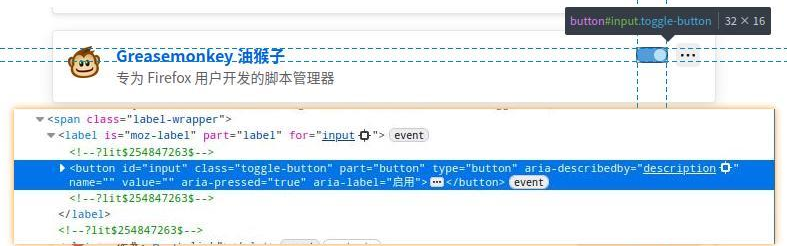
我们可以通过右键点击这个元素,选择 复制 -> CSS选择器
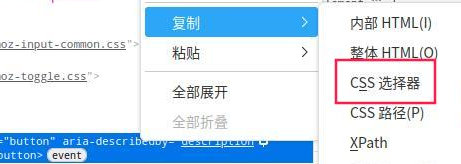
然后通过 document.querySelector('【复制的内容】')来进行查找
元素选取是指
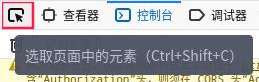
注意:需要确认当前的document确实包含该元素 元素可能是在页面的其他frame中
通过控制台确定元素所在 frame
通过 元素选取 选定元素后,通过控制器的右下角查看该元素所在的frame
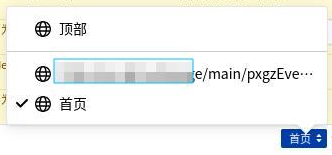
在 查看器 中复制该frame对应数据

然后通过如下代码切换当前的 document
const frame = document.querySelector('iframe[src*="【复制的src】"]');
if(!frame) return console.error('找不到对应frame');
const doc = frame1.contentDocument || frame.contentWindow.document;
完整脚本记录
1. 培训课程信息录入
// ==UserScript==
// @name         批量导入培训课程信息
// @namespace    http://tampermonkey.net/
// @version      1.1
// @description  读取本地 Excel 文件,自动打开录入弹窗并依次填写提交
// @match        http://px.dg/*
// @grant        none
// @require      https://cdnjs.cloudflare.com/ajax/libs/xlsx/0.18.5/xlsx.full.min.js
// @run-at       document-end
// @noframes
// ==/UserScript==

(function() {
  'use strict';

      // 注入文件选择面板
      const panel = document.createElement('div');
      let count = 0; // 记录导入条数
      panel.style.cssText = 'position:fixed;top:10px;right:10px;padding:5px;background:#fff;border:1px solid #ccc;z-index:9999';
      panel.innerHTML = `
      <input type="file" id="tm_import_file" accept=".xlsx,.xls">
      <button id="tm_start_import">开始导入</button>
      `;
      document.body.appendChild(panel);

      document.getElementById('tm_start_import').addEventListener('click', () => {
      const fileInput = document.getElementById('tm_import_file');
      const file = fileInput.files[0];
      if (!file) return alert('请选择 Excel 文件(.xls/.xlsx)');

      // 格式校验:只允许 .xls 或 .xlsx
      const name = file.name || '';
      const ext = name.split('.').pop().toLowerCase();
      if (!['xls', 'xlsx'].includes(ext)) {
        fileInput.value = '';
        return alert('文件格式错误,请选择 .xls 或 .xlsx 格式的 Excel 文件!');
      }
      const reader = new FileReader();
      reader.readAsBinaryString(file);
      reader.onload = evt => {
      const data = evt.target.result;
      const wb = XLSX.read(data, { type: 'binary' });
      const sheet = wb.Sheets[wb.SheetNames[0]];
      const rows = XLSX.utils.sheet_to_json(sheet, { header: 1, defval: '' });
      if (rows.length <= 1) return alert('Excel 没有数据!');

      // 关键列校验
      const headers = rows[1].map(String);
      const required = ['学习培训名称', '学时'];
      const missing = required.filter(h => !headers.includes(h));
      if (missing.length) {
         return alert('缺少必须的列:' + missing.join(',') + ',请确认选择了正确的文件');
	}
      processRows(rows, 2);  // 跳过表头,从第 2 行开始
    };
  });

  // 递归逐行处理
  function processRows(rows, idx) {
    if (idx >= rows.length) {
      return alert('全部导入完成!\n一共导入了'+ count +'条课程');
    }
    const cols = rows[idx];
    if (!cols || cols.length < 11) {
      return processRows(rows, idx + 1);
    }

    // 从列数组中取值
    const name    = String(cols[1] || '').trim();   // 学习培训名称
    const rawTime = cols[3];   // 时间
    const rawCat  = String(cols[6] || '').trim();   // 培训类别原始
    const hours   = String(cols[8] || '').trim();   // 学时
    const number  = String(cols[10]|| '').trim();   // 培训人数

    console.log("格式:"+typeof rawTime+' '+rawTime);

    // 如果没有时间相关信息,说明已到数据尾行,结束导入
    if(typeof rawTime === 'undefined' | rawTime == ""){
      return alert('全部导入完成!\n一共导入了 '+ count +' 条课程');
    }

    // 解析时间
    let begin, end;
    const year = new Date().getFullYear();

    if (typeof rawTime === 'number'){
      const d = XLSX.SSF.parse_date_code(rawTime);
      begin = `${d.y}-${pad(d.m)}-${pad(d.d)}`;
      end = begin;
    } else{
      const timeStr = String(rawTime || '').trim();
      ({ begin, end } = parseDates(timeStr, year));
    }
    // 类别映射
    const catMap = {
      '政治理论教育': '3',
      '政治教育和政治训练': '3',
      '党章党规党纪教育': '2',
      '党的宗旨教育': '2',
      '革命传统教育': '1',
      '形势政策教育': '4',
      '知识技能教育': '6'
    };
    const catValue = catMap[rawCat] || '';

//     document.querySelectorAll('iframe').forEach(f=>console.log(f.src));

    const frame = document.querySelector('iframe[src*="dxNewclassinfoController.do?list&areaType=A&clickFunctionId=402881dd65120d970165123005410004"]');
    if(!frame) return alert("错误:未处于【自主培训】页面\n找不到对应frame");
    const doc = frame.contentDocument || frame.contentWindow.document;

    // 点击“录入”按钮
    doc.querySelector('div.datagrid-toolbar:nth-child(3) > span:nth-child(1) > a:nth-child(1) > span:nth-child(1)').click();

    // 等待弹窗加载
    const timer = setInterval(() => {
      const frame1 = document.querySelector('iframe[src*="dxNewclassinfoController.do?goAdd&areaType=A"]');
    	if(!frame1) return alert("错误:未打开【录入】页面\n找不到对应frame");
    	const doc1 = frame1.contentDocument || frame.contentWindow.document;

      const nameInput = doc1.getElementById('className');
      if (!nameInput) return;
      clearInterval(timer);

      // 填写表单
      nameInput.value = name;
      doc1.getElementById('sciTermBegin').value = begin;
      doc1.getElementById('sciTermEnd').value   = end;
      doc1.getElementById('xueshi').value       = hours;
      doc1.getElementById('sciRecruitNum').value = number;
      doc1.getElementById('pxjg').value         = '黄江镇委党校';

      // 单选(专项培训)
      doc1
        .querySelectorAll('input[name="isAppClass"]')
        .forEach(r => r.value === '2' && (r.checked = true));

      // 下拉(培训类别)
      const sel = doc1.querySelector('select[name="trainType"]');
      if (sel) {
        sel.value = catValue;
        sel.dispatchEvent(new Event('change'));
      }

      count++;

      setTimeout(() =>{
        window.top.document.querySelector('.ui_state_highlight').click();
      },2000);

      // 固定延时后处理下一行
      setTimeout(() => processRows(rows, idx + 1), 4000);
    }, 2000);
  }

  // 解析日期区间函数,跟之前一样
  function parseDates(str, year) {
    str = str.replace(/\s+/g, '');
    let parts = str.split('至');
    let [bRaw, eRaw] = parts.length > 1 ? parts : [parts[0], parts[0]];
    bRaw = bRaw.replace(/日$/, ''); eRaw = eRaw.replace(/日$/, '');
    const [bM, bD] = bRaw.split('月');
    let eM, eD;
    if (eRaw.includes('月')) [eM, eD] = eRaw.split('月');
    else { eM = bM; eD = eRaw; }
    return {
      begin: `${year}-${pad(bM)}-${pad(bD)}`,
      end:   `${year}-${pad(eM)}-${pad(eD)}`
    };
  }

  function pad(v) {
    return String(v).padStart(2, '0');
  }

})();
注意代码中的 match 部分做了隐私处理,复制使用时记得补充

 浙公网安备 33010602011771号