
Argo CD Project
Argo CD Project
Project
在 ArgoCD 中, Project 是一种资源,用于组织和管理不同的 Kubernetes 应用(Application)。项目允许您在 ArgoCD 中创建多个逻辑分组,以便更好地管理和隔离不同的应用。通过使用项目,您可以将应用划分为不同的命名空间、团队或环境,以便更好地组织和控制。
每个项目都可以拥有自己的权限、访问控制、策略和参数配置,这使得在 ArgoCD 中实现多租户、多环境或多团队的应用管理变得更加灵活和可控。
以下是一些 ArgoCD Project 的常见特性和用途:
- 多租户和隔离: 通过创建不同的项目,您可以实现多租户架构,每个项目可以代表不同的团队、部门或用户,从而实现资源的隔离和隔离。
- 环境管理: 您可以将不同的应用划分为不同的项目,以适应不同的环境(例如开发、测试、生产),从而简化应用在不同环境中的部署和管理。
- 权限和访问控制: 每个项目可以拥有自己的权限和访问控制策略,使您能够精确控制用户或团队对不同项目和应用的访问权限。
- 参数和配置: 项目允许您为不同的应用设置不同的参数和配置,以便在不同的环境中实现更灵活的部署和管理。
- 多环境管理: 您可以在一个项目中管理多个应用,每个应用代表一个环境。这使得在
ArgoCD中实现多环境管理变得更加简单。
Project 创建方式
- webUI
- argoCLI
- YAML
webUI
在 UI 界面上选择 Settings 设置,选择 Projects
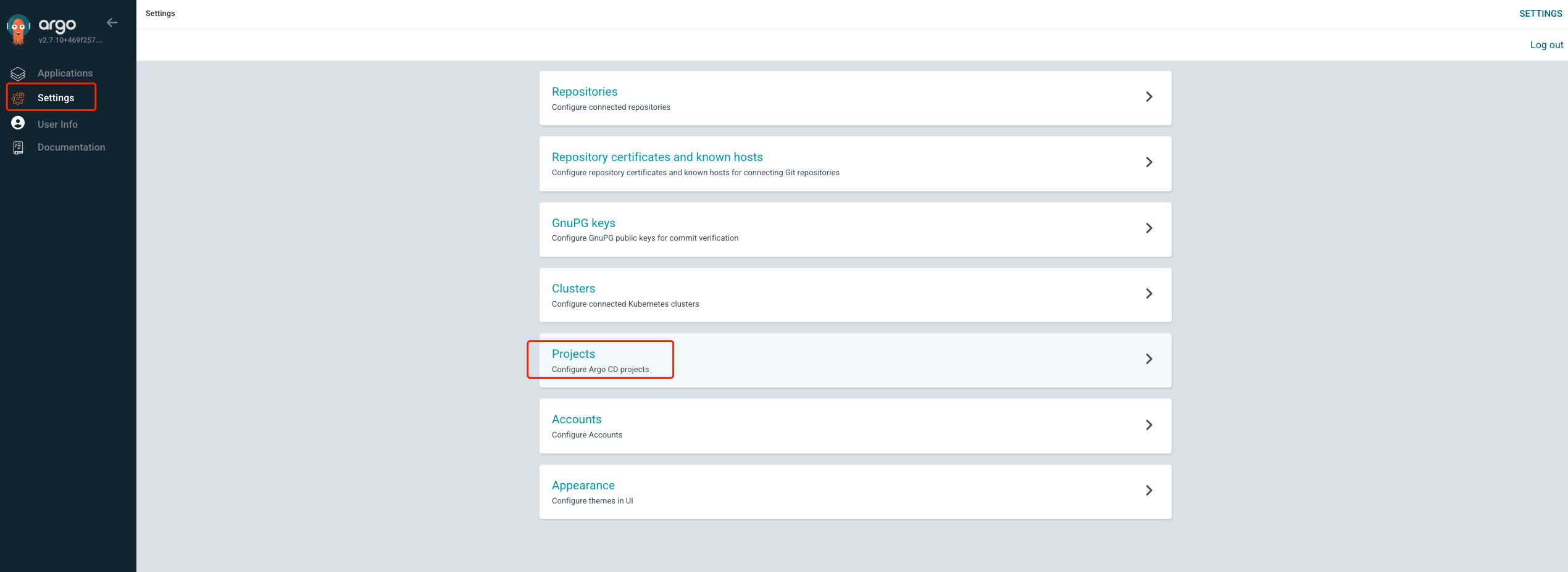
点击 NEW PROJECT

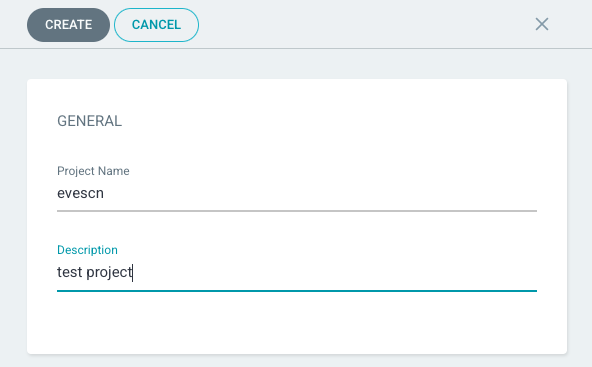
输入新项目的项目名称和描述信息,并点击保存,自动跳转进入项目详细配置
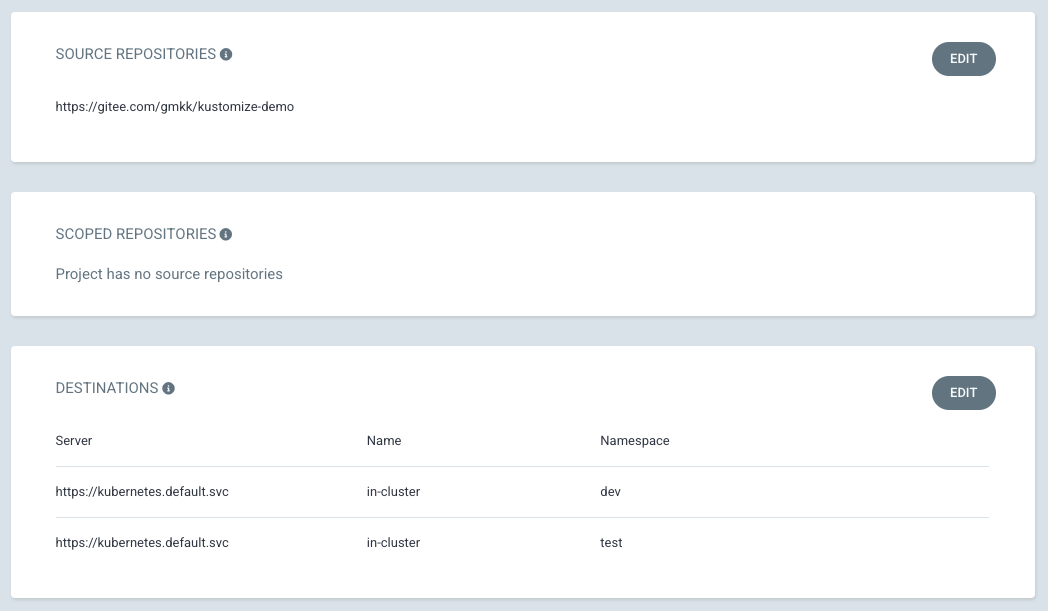
配置 Project 使用的仓库信息,和 APP 部署的目标集群 namespace 等信息
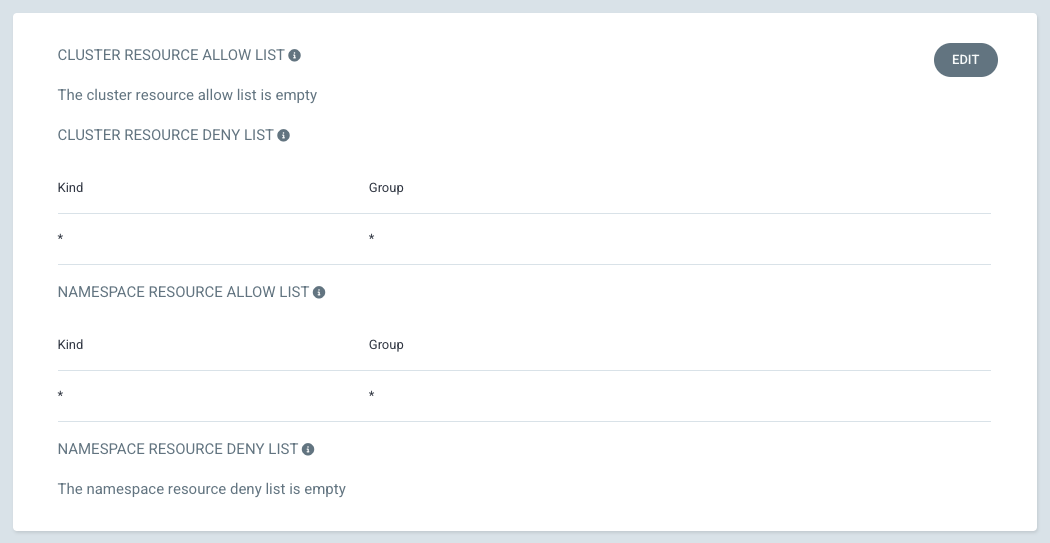
配置 Project 权限
Argo CLI
## argocd CLI
# login
[root@node argocd]# argocd login argocd.evescn.com:20080 --insecure

# list
[root@node argocd]# argocd proj list
NAME     DESCRIPTION   DESTINATIONS    SOURCES                                CLUSTER-RESOURCE-WHITELIST  NAMESPACE-RESOURCE-BLACKLIST  SIGNATURE-KEYS  ORPHANED-RESOURCES
default                *,*             *                                      */*                         <none>                        <none>          disabled
evescn   test project  2 destinations  https://gitee.com/evescn/kustomize-demo  <none>                      <none>                        <none>          disabled

# remove
[root@node argocd]# argocd proj remove PROJECT_NAME
- create
[root@node argocd]# argocd proj create --help
Create a project

Usage:
  argocd proj create PROJECT [flags]

Flags:
      --allow-cluster-resource stringArray      List of allowed cluster level resources
      --allow-namespaced-resource stringArray   List of allowed namespaced resources
      --deny-cluster-resource stringArray       List of denied cluster level resources
      --deny-namespaced-resource stringArray    List of denied namespaced resources
      --description string                      Project description
  -d, --dest stringArray                        Permitted destination server and namespace (e.g.  https://192.168.99.100:8443 ,default)
  -f, --file string                             Filename or URL to Kubernetes manifests for the project
  -h, --help                                    help for create
      --orphaned-resources                      Enables orphaned resources monitoring
      --orphaned-resources-warn                 Specifies if applications should have a warning condition when orphaned resources detected
      --signature-keys strings                  GnuPG public key IDs for commit signature verification
      --source-namespaces strings               List of source namespaces for applications
  -s, --src stringArray                         Permitted source repository URL
      --upsert                                  Allows to override a project with the same name even if supplied project spec is different from existing spec

Global Flags:
      --auth-token string               Authentication token
      --client-crt string               Client certificate file
      --client-crt-key string           Client certificate key file
      --config string                   Path to Argo CD config (default "/root/.config/argocd/config")
      --core                            If set to true then CLI talks directly to Kubernetes instead of talking to Argo CD API server
      --grpc-web                        Enables gRPC-web protocol. Useful if Argo CD server is behind proxy which does not support HTTP2.
      --grpc-web-root-path string       Enables gRPC-web protocol. Useful if Argo CD server is behind proxy which does not support HTTP2. Set web root.
  -H, --header strings                  Sets additional header to all requests made by Argo CD CLI. (Can be repeated multiple times to add multiple headers, also supports comma separated headers)
      --http-retry-max int              Maximum number of retries to establish http connection to Argo CD server
      --insecure                        Skip server certificate and domain verification
      --kube-context string             Directs the command to the given kube-context
      --logformat string                Set the logging format. One of: text|json (default "text")
      --loglevel string                 Set the logging level. One of: debug|info|warn|error (default "info")
      --plaintext                       Disable TLS
      --port-forward                    Connect to a random argocd-server port using port forwarding
      --port-forward-namespace string   Namespace name which should be used for port forwarding
      --server string                   Argo CD server address
      --server-crt string               Server certificate file

[root@node argocd]# argocd proj create hlr
[root@node argocd]# argocd proj list
NAME     DESCRIPTION   DESTINATIONS    SOURCES                                CLUSTER-RESOURCE-WHITELIST  NAMESPACE-RESOURCE-BLACKLIST  SIGNATURE-KEYS  ORPHANED-RESOURCES
default                *,*             *                                      */*                         <none>                        <none>          disabled
evescn   test project  2 destinations  https://gitee.com/evescn/kustomize-demo  <none>                      <none>                        <none>          disabled
hlr                    <none>          <none>                                 <none>                      <none>                        <none>          disabled

[root@node argocd]# argocd proj add-source hlr https://gitee.com/evescn/kustomize-demo
[root@node argocd]# argocd proj list
NAME     DESCRIPTION   DESTINATIONS    SOURCES                                CLUSTER-RESOURCE-WHITELIST  NAMESPACE-RESOURCE-BLACKLIST  SIGNATURE-KEYS  ORPHANED-RESOURCES
default                *,*             *                                      */*                         <none>                        <none>          disabled
evescn   test project  2 destinations  https://gitee.com/evescn/kustomize-demo  <none>                      <none>                        <none>          disabled
hlr                    <none>          https://gitee.com/evescn/kustomize-demo  <none>                      <none>                        <none>          disabled
YAML
官方参考文档:https://argo-cd.readthedocs.io/en/stable/operator-manual/project.yaml
## project.yaml
apiVersion: argoproj.io/v1alpha1
kind: AppProject
metadata:
  name: gmkk
  namespace: argocd
  finalizers:
    - resources-finalizer.argocd.argoproj.io
spec:
  description: Example Project
  sourceRepos:
  - 'https://gitee.com/evescn/kustomize-demo'
  destinations:
  - namespace: uat
    server: https://kubernetes.default.svc
    name: in-cluster
  # Deny all cluster-scoped resources from being created, except for Namespace
  clusterResourceWhitelist:
  - group: ''
    kind: Namespace

  # Allow all namespaced-scoped resources to be created, except for ResourceQuota, LimitRange, NetworkPolicy
  namespaceResourceBlacklist:
  - group: ''
    kind: ResourceQuota
  - group: ''
    kind: LimitRange
  - group: ''
    kind: NetworkPolicy

  # Deny all namespaced-scoped resources from being created, except for Deployment and StatefulSet
  namespaceResourceWhitelist:
  - group: 'apps'
    kind: Deployment
  - group: 'apps'
    kind: StatefulSet
[root@node argocd]# kubectl apply -f project.yaml
appproject.argoproj.io/gmkk created

[root@node argocd]# kubectl -n argocd get appprojects.argoproj.io
NAME      AGE
default   5d16h
evescn    17h
gmkk      13s
hlr       110s

[root@node argocd]# argocd proj list
NAME     DESCRIPTION      DESTINATIONS                        SOURCES                                CLUSTER-RESOURCE-WHITELIST  NAMESPACE-RESOURCE-BLACKLIST  SIGNATURE-KEYS  ORPHANED-RESOURCES
default                   *,*                                 *                                      */*                         <none>                        <none>          disabled
evescn   test project     2 destinations                      https://gitee.com/evescn/kustomize-demo  <none>                      <none>                        <none>          disabled
gmkk     Example Project   https://kubernetes.default.svc ,uat  https://gitee.com/evescn/kustomize-demo  /Namespace                  3 resources                   <none>          disabled
hlr                       <none>                              https://gitee.com/evescn/kustomize-demo  <none>                      <none>                        <none>          disabled
ProjectRole
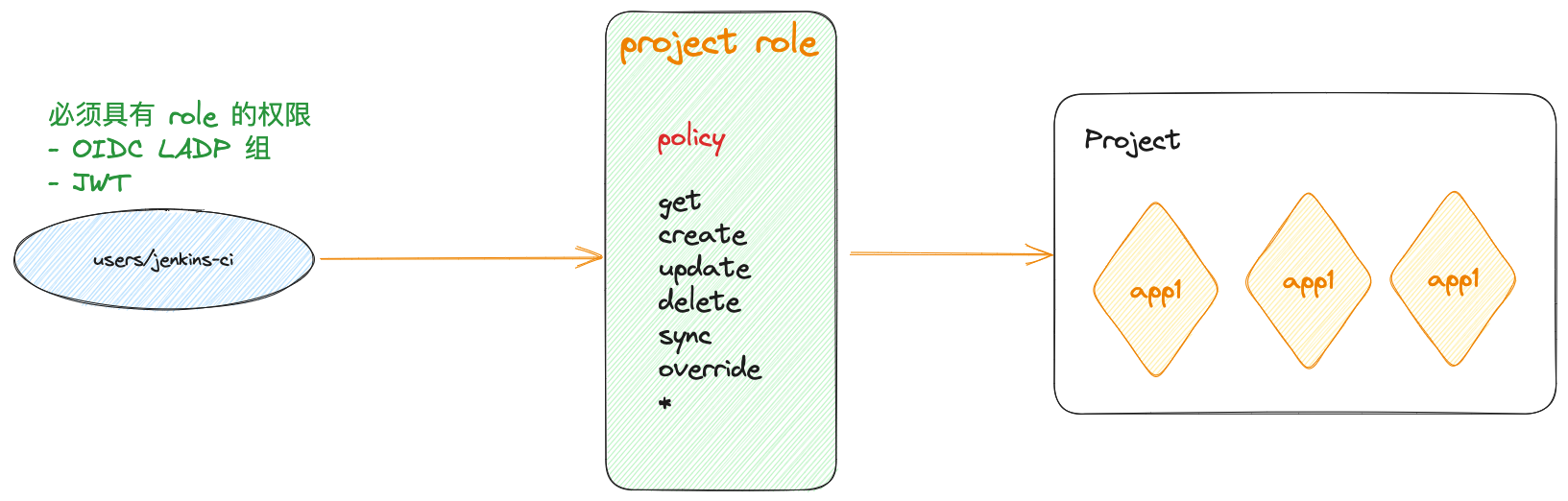
ArgoCD 项目角色(ProjectRole)是 ArgoCD 中用于定义项目级别访问权限的一种资源。它允许您精确控制哪些用户或团队可以访问特定项目中的应用。通过项目角色,您可以定义不同的角色和权限级别,以便根据需求来限制或授权用户的访问。
项目角色在 ArgoCD 中是一种自定义资源(Custom Resource),它的定义通常存储在 Kubernetes 集群中。每个项目角色定义了一组权限规则,这些规则指定了用户或组可以执行的操作,例如查看应用、同步应用、重新部署等。
以下是一些常见的 ArgoCD 项目角色:
Role:Role是一种最基本的项目角色,它定义了一组权限规则。可以将多个Role分配给用户或团队,以满足不同的需求。RoleBinding:RoleBinding用于将Role分配给特定的用户、组或服务账户。通过创建RoleBinding,您可以将特定用户或团队与某个 Role 相关联,从而赋予他们相应的权限。Policy:Policy是一种更高级的项目角色,它允许您在一个资源上定义一组规则,并将这些规则应用于多个角色。这有助于简化权限管理,特别是在涉及多个角色和多个应用的情况下。
使用 ArgoCD 项目角色,您可以实现以下目标:
- 精确控制用户或团队可以访问哪些项目和应用。
- 定义不同的权限级别,以授权不同的操作,例如查看、同步、修改等。
- 将权限的分配和管理从集群级别推向项目级别,提高了安全性和可管理性。
创建和管理 ArgoCD 项目角色通常需要以下步骤:
- 创建
Role或Policy:使用ArgoCD的命令行工具或API创建新的Role或Policy,为其指定名称和相关权限规则。 - 创建
RoleBinding:使用RoleBinding将Role分配给特定的用户、组或服务账户,从而将权限分配给相应的实体。 - 配置项目访问控制:在项目中配置适当的
ProjectRole,将RoleBinding应用到项目,从而限制或授权特定用户或团队的访问。 - 测试和验证:确保创建的角色和权限按预期工作。您可以尝试以不同的用户身份访问项目和应用,以验证权限设置是否正确。
创建 Role 权限
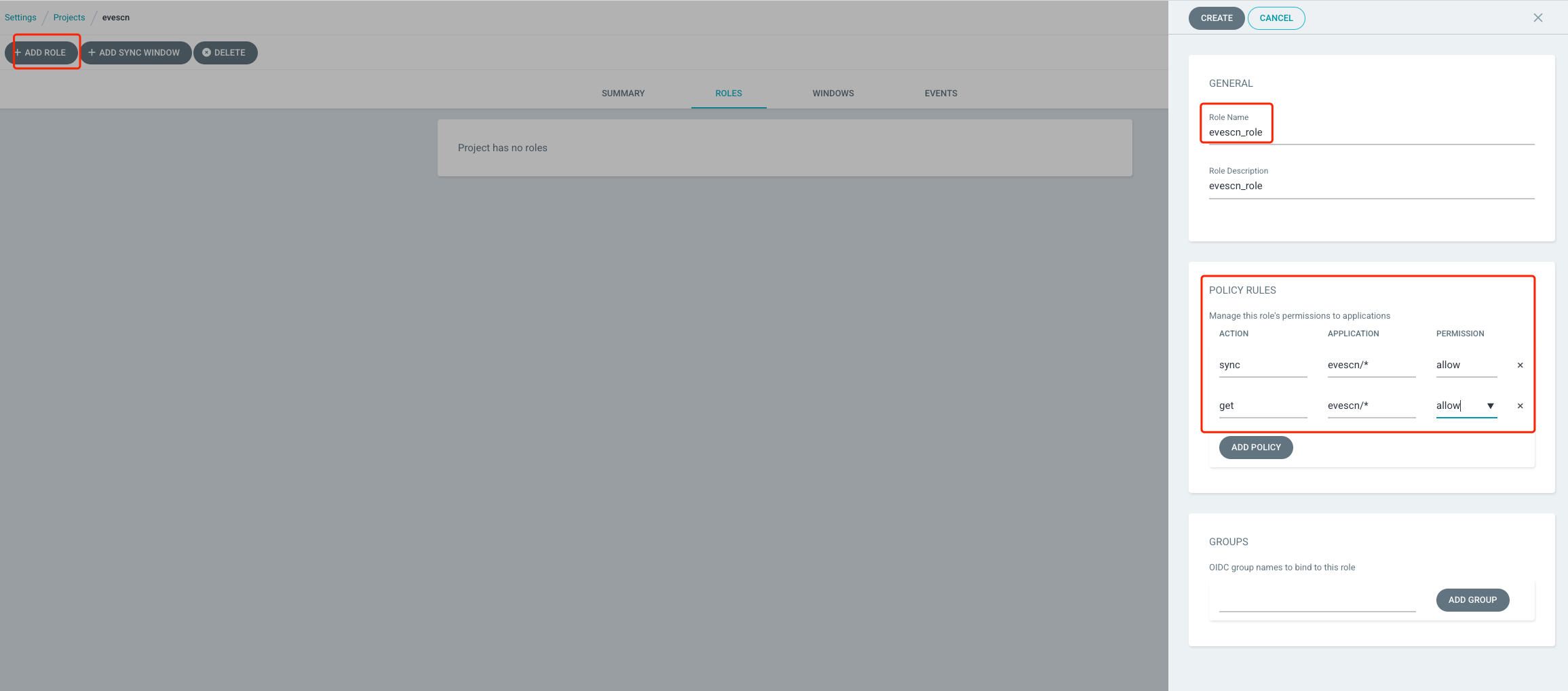
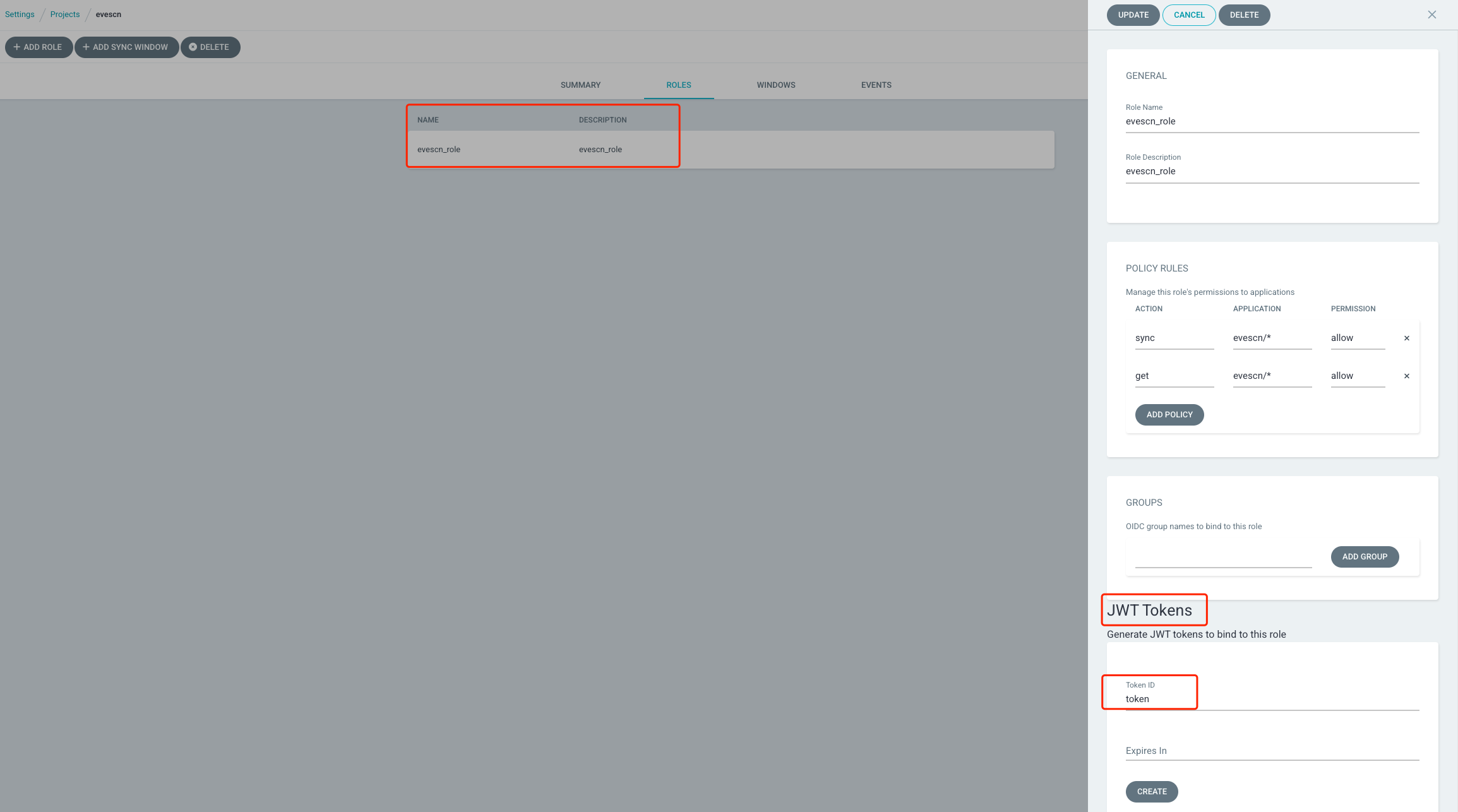
点击 ADD ROLE 按钮添加规则,配置规则名称和规则描述信息,配置 POLICY RULES 定义当前规则的 Application 权限。
测试 Role 权限,上面我们在定义 Project 时,指定了 Project 能部署的名称空间和 Git RUL 地址信息
创建 Appliction,先创建 Application 资源清单信息
## evescn-app.yaml
apiVersion: argoproj.io/v1alpha1
kind: Application
metadata:
  name: evescn-app
  namespace: argocd
spec:
  destination:
    namespace: dev1
    server: https://kubernetes.default.svc
  # 定义当前 app 的 Project 名称
  project: evescn
  source:
    path: base
    repoURL: https://github.com/argoproj/argocd-example-apps.git
    targetRevision: main
  syncPolicy:
    syncOptions:
      - CreateNamespace=true
[root@node argocd]# kubectl apply -f evescn-app.yaml
application.argoproj.io/evescn-app created

[root@node argocd]# argocd app list
NAME               CLUSTER                         NAMESPACE  PROJECT  STATUS   HEALTH   SYNCPOLICY  CONDITIONS           REPO                                                 PATH  TARGET
argocd/evescn-app  https://kubernetes.default.svc  dev1       evescn   Unknown  Unknown  <none>      InvalidSpecError(2)  https://github.com/argoproj/argocd-example-apps.git  base  main
[root@node argocd]# kubectl -n argocd get applications
NAME         SYNC STATUS   HEALTH STATUS
evescn-app   Unknown       Unknown
创建 Application 后,登录 web UI 查看服务报错,服务报了2个错误:
- 资源清单中定义的目标集群和
Project不一致 【没有权限】 - 资源清单中定义的
git地址和Project不一致 【没有权限】

解决思路:
- 修改资源清单中的目标集群的配置
- 修改资源清单中仓库地址配置
[root@node argocd]# cat evescn-app.yaml
apiVersion: argoproj.io/v1alpha1
kind: Application
metadata:
  name: evescn-app
  namespace: argocd
spec:
  destination:
    # 当前 evescn Project 没有 dev1 名称空间权限
    # namespace: dev1
    namespace: dev
    server: https://kubernetes.default.svc
  # 定义当前 app 的 Project
  project: evescn
  source:
    path: base
    # 当前 evescn Project 没有 https://github.com/argoproj/argocd-example-apps.git git 仓库权限
    # repoURL: https://github.com/argoproj/argocd-example-apps.git
    repoURL: https://gitee.com/evescn/kustomize-demo.git
    targetRevision: main
  syncPolicy:
    syncOptions:
      - CreateNamespace=true
重新执行 kubectl apply -f evescn-app.yaml
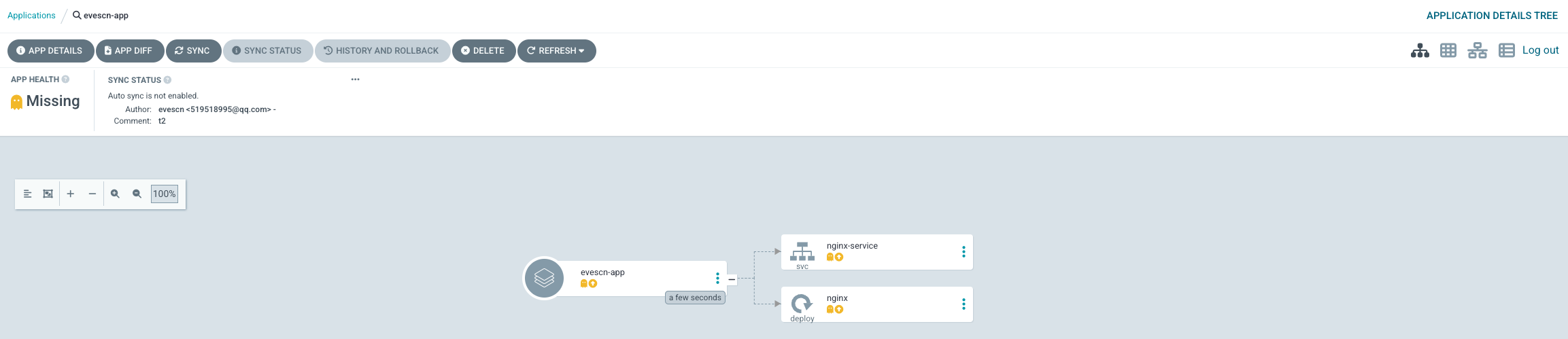
因为我们定义了 Project 没有 Cluster 权限,所以无法创建 namespace 集群,需要自己创建
[root@node argocd]# kubectl create ns dev
namespace/dev created

[root@node argocd]# kubectl get ns
NAME              STATUS   AGE
argocd            Active   5d18h
default           Active   9d
dev               Active   6s
devops            Active   9d
kube-node-lease   Active   9d
kube-public       Active   9d
kube-system       Active   9d
创建后 web UI点击 Sync 同步服务
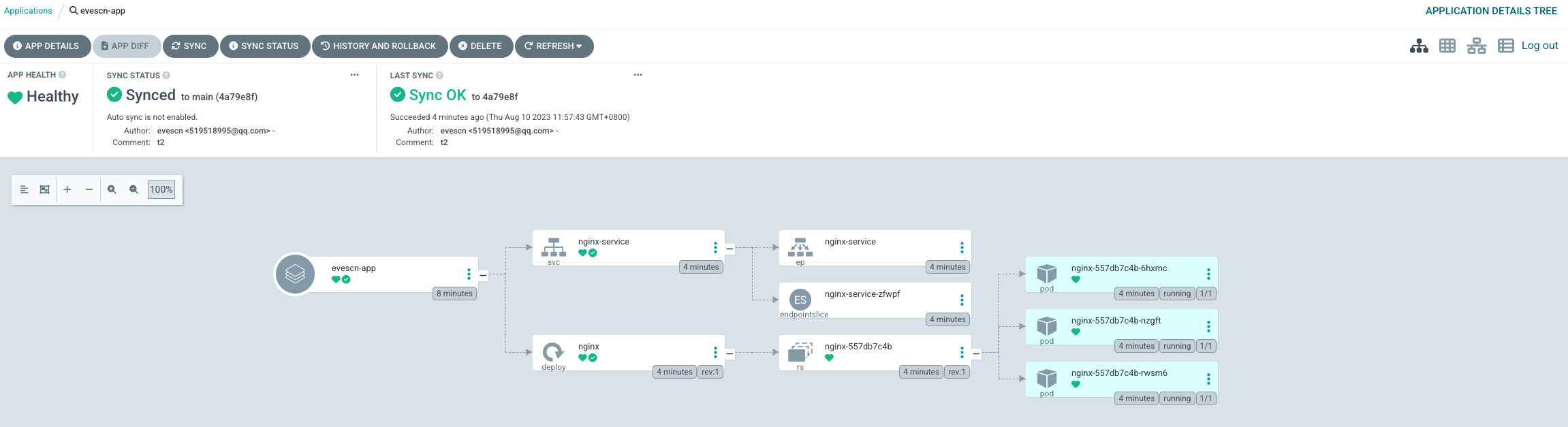
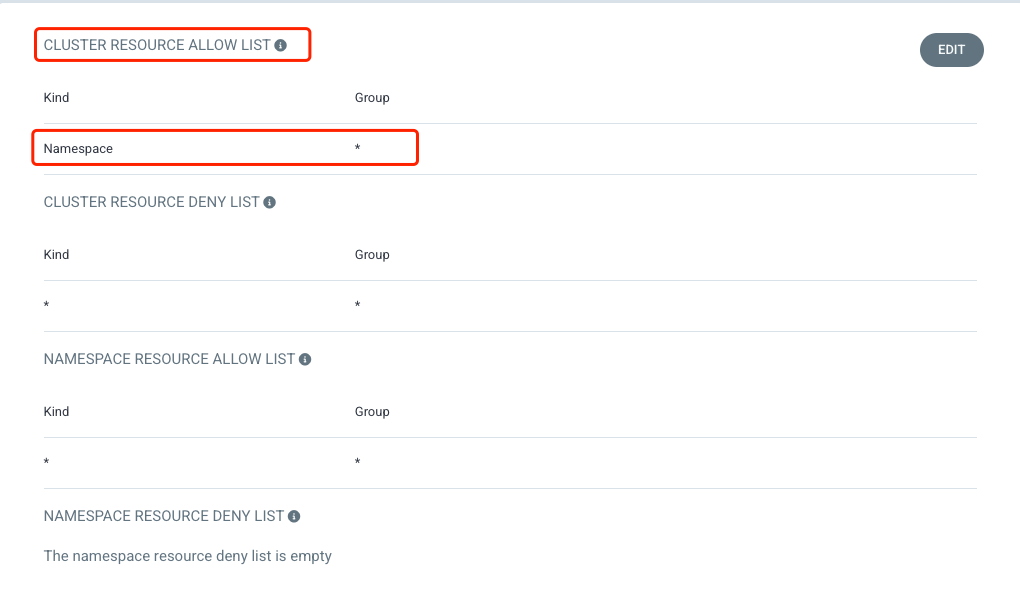
如果想自动创建 namespace ,需要给 Project 添加 Cluster 权限,详细如下
创建 JWT token
jenkins CI 可以使用 项目 JWT token 触发 APP 任务完成 Sync 同步
方法1: web UI 界面创建,Expires In 不填写表示永久有效
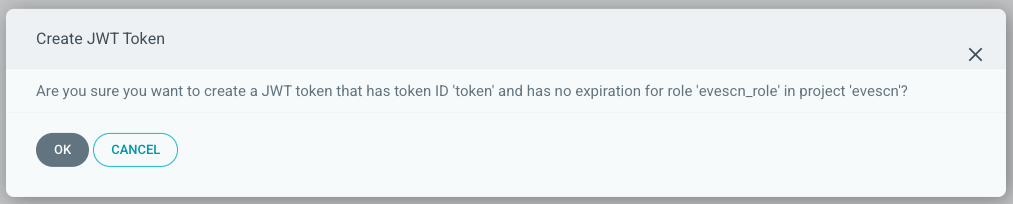
点击确定
右侧页面往下滚动,查看新生成的 token 信息,点击右上角
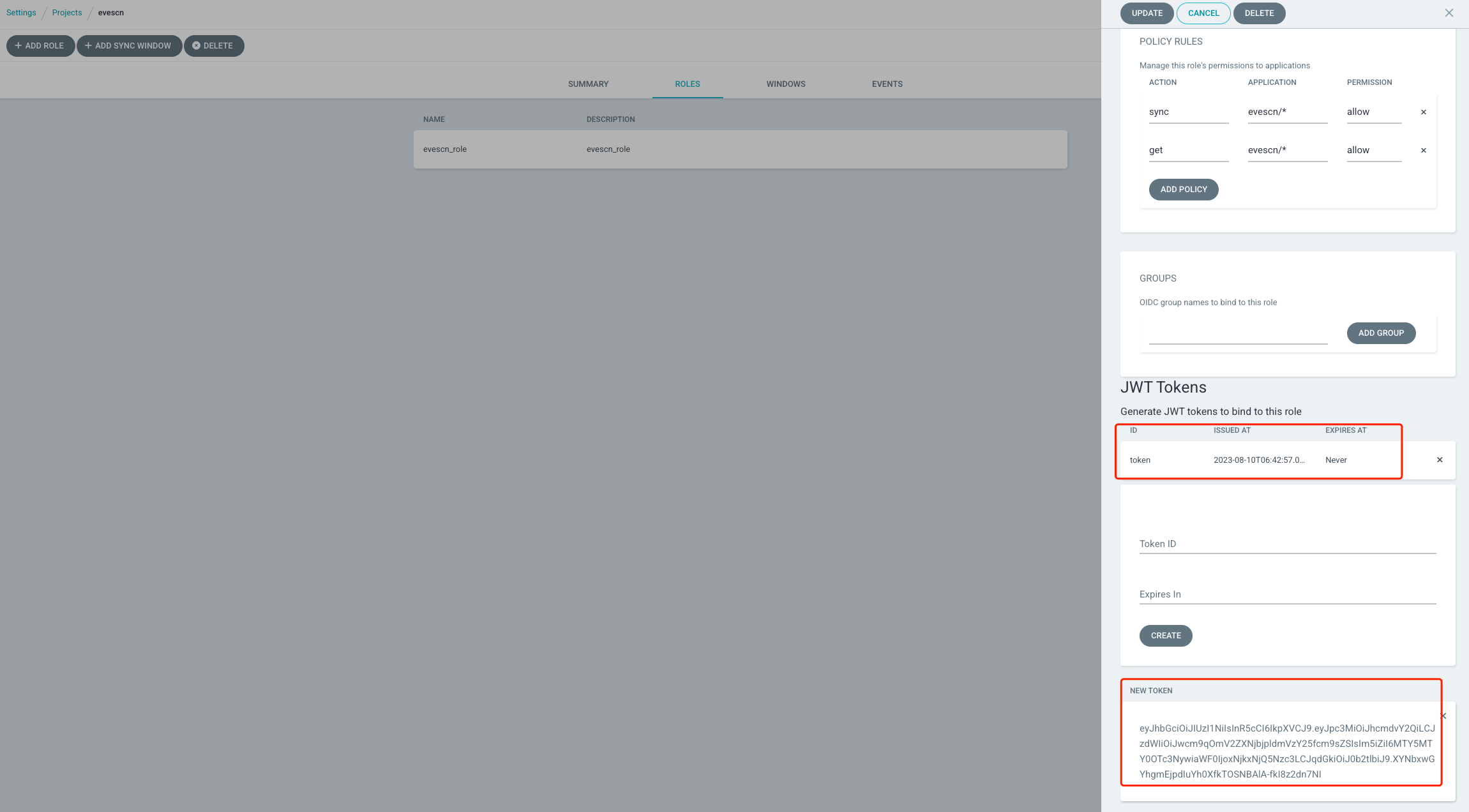
eyJhbGciOiJIUzI1NiIsInR5cCI6IkpXVCJ9.eyJpc3MiOiJhcmdvY2QiLCJzdWIiOiJwcm9qOmV2ZXNjbjpldmVzY25fcm9sZSIsIm5iZiI6MTY5MTY0OTc3NywiaWF0IjoxNjkxNjQ5Nzc3LCJqdGkiOiJ0b2tlbiJ9.XYNbxwGYhgmEjpdIuYh0XfkTOSNBAlA-fkI8z2dn7NI
方法2: 使用 argocd 命令行创建
[root@node argocd]# argocd proj role create-token -h
Create a project token

Usage:
  argocd proj role create-token PROJECT ROLE-NAME [flags]

Aliases:
  create-token, token-create

Flags:
  -e, --expires-in string   Duration before the token will expire, e.g. "12h", "7d". (Default: No expiration)
  -h, --help                help for create-token
  -i, --id string           Token unique identifier. (Default: Random UUID)
  -t, --token-only          Output token only - for use in scripts.

Global Flags:
      --auth-token string               Authentication token
      --client-crt string               Client certificate file
      --client-crt-key string           Client certificate key file
      --config string                   Path to Argo CD config (default "/root/.config/argocd/config")
      --core                            If set to true then CLI talks directly to Kubernetes instead of talking to Argo CD API server
      --grpc-web                        Enables gRPC-web protocol. Useful if Argo CD server is behind proxy which does not support HTTP2.
      --grpc-web-root-path string       Enables gRPC-web protocol. Useful if Argo CD server is behind proxy which does not support HTTP2. Set web root.
  -H, --header strings                  Sets additional header to all requests made by Argo CD CLI. (Can be repeated multiple times to add multiple headers, also supports comma separated headers)
      --http-retry-max int              Maximum number of retries to establish http connection to Argo CD server
      --insecure                        Skip server certificate and domain verification
      --kube-context string             Directs the command to the given kube-context
      --logformat string                Set the logging format. One of: text|json (default "text")
      --loglevel string                 Set the logging level. One of: debug|info|warn|error (default "info")
      --plaintext                       Disable TLS
      --port-forward                    Connect to a random argocd-server port using port forwarding
      --port-forward-namespace string   Namespace name which should be used for port forwarding
      --server string                   Argo CD server address
      --server-crt string               Server certificate file


## 创建 token
[root@node argocd]# argocd proj role create-token evescn evescn_role -i evescn_token
Create token succeeded for proj:evescn:evescn_role.
  ID: evescn_token
  Issued At: 2023-08-10T15:19:31+08:00
  Expires At: Never
  Token: eyJhbGciOiJIUzI1NiIsInR5cCI6IkpXVCJ9.eyJpc3MiOiJhcmdvY2QiLCJzdWIiOiJwcm9qOmV2ZXNjbjpldmVzY25fcm9sZSIsIm5iZiI6MTY5MTY1MTk3MSwiaWF0IjoxNjkxNjUxOTcxLCJqdGkiOiJldmVzY25fdG9rZW4ifQ.hLno49BYTSowifnbqRWkD2cmLb7hd_FBZNVhsm8-CbM

## 命令行查看 token
[root@node argocd]# argocd proj role get evescn evescn_role
Role Name:     evescn_role
Description:   evescn_role
Policies:
p, proj:evescn:evescn_role, projects, get, evescn, allow
p, proj:evescn:evescn_role, applications, sync, evescn/*, allow
p, proj:evescn:evescn_role, applications, get, evescn/*, allow
JWT Tokens:
ID          ISSUED-AT                                   EXPIRES-AT
1691651971  2023-08-10T15:19:31+08:00 (1 minutes ago)   <none>
1691649777  2023-08-10T14:42:57+08:00 (37 minutes ago)  <none>
web UI 界面查看新创建的 token
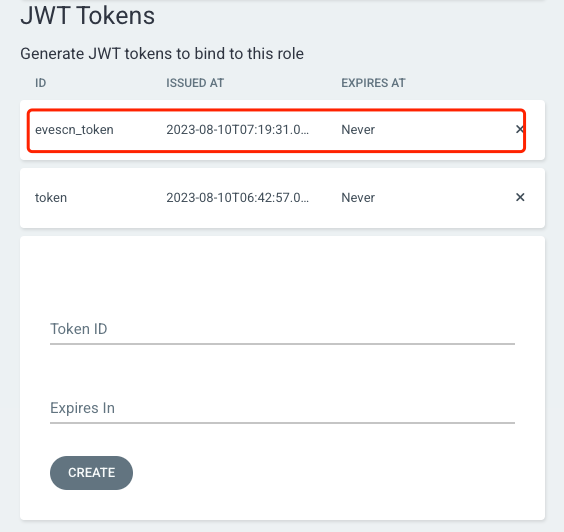
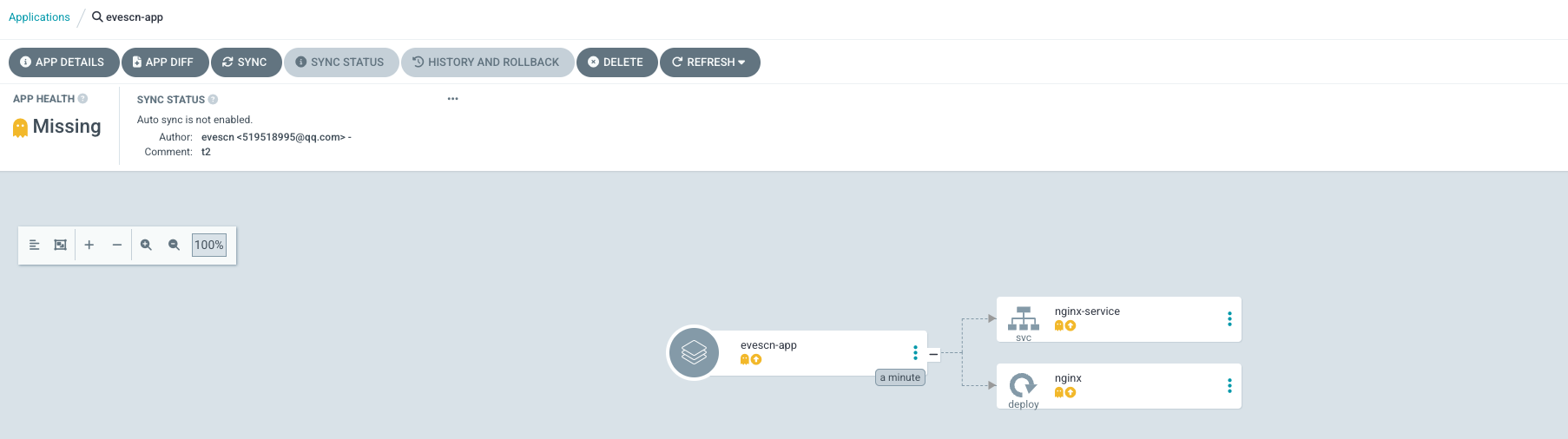
测试 token 同步任务,先删除上面部署的 evescn-app 任务,在重新创建
[root@node argocd]# kubectl delete -f evescn-app.yaml
application.argoproj.io "evescn-app" deleted

[root@node argocd]# kubectl apply -f evescn-app.yaml
application.argoproj.io/evescn-app created

[root@node argocd]# argocd app list
NAME               CLUSTER                         NAMESPACE  PROJECT  STATUS     HEALTH   SYNCPOLICY  CONDITIONS  REPO                                       PATH  TARGET
argocd/evescn-app  https://kubernetes.default.svc  dev        evescn   OutOfSync  Missing  <none>      <none>      https://gitee.com/evescn/kustomize-demo.git  base  main

[root@node argocd]# kubectl -n argocd get applications
NAME         SYNC STATUS   HEALTH STATUS
evescn-app   OutOfSync     Missing
## 测试之前注销admin账户登录
[root@node argocd]# argocd logout argocd.evescn.com
Logged out from 'argocd.evescn.com'

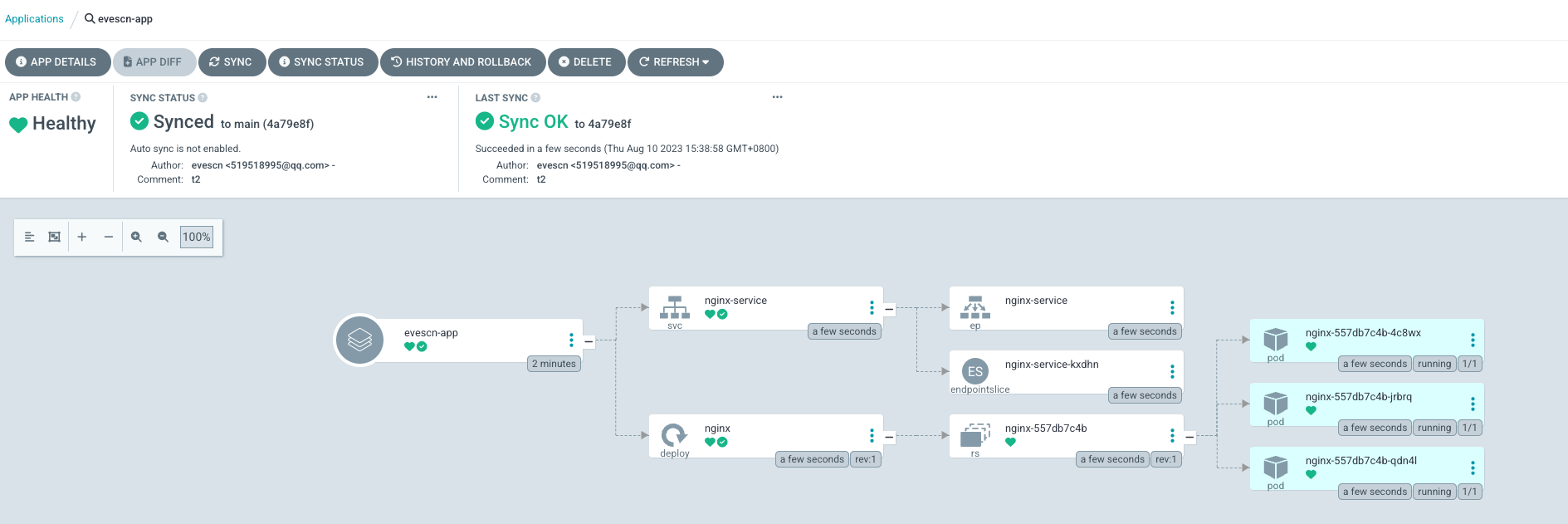
## 使用token 测试sync
[root@node argocd]# argocd app sync evescn-app --auth-token eyJhbGciOiJIUzI1NiIsInR5cCI6IkpXVCJ9.eyJpc3MiOiJhcmdvY2QiLCJzdWIiOiJwcm9qOmV2ZXNjbjpldmVzY25fcm9sZSIsIm5iZiI6MTY5MTY1MTk3MSwiaWF0IjoxNjkxNjUxOTcxLCJqdGkiOiJldmVzY25fdG9rZW4ifQ.hLno49BYTSowifnbqRWkD2cmLb7hd_FBZNVhsm8-CbM

TIMESTAMP                  GROUP        KIND   NAMESPACE                  NAME    STATUS    HEALTH        HOOK  MESSAGE
2023-08-10T15:38:58+08:00   apps  Deployment         dev                 nginx  OutOfSync  Missing
2023-08-10T15:38:58+08:00            Service         dev         nginx-service  OutOfSync  Missing
2023-08-10T15:38:58+08:00            Service         dev         nginx-service    Synced  Healthy
2023-08-10T15:38:58+08:00            Service         dev         nginx-service    Synced   Healthy              service/nginx-service created
2023-08-10T15:38:58+08:00   apps  Deployment         dev                 nginx  OutOfSync  Missing              deployment.apps/nginx created
2023-08-10T15:38:58+08:00   apps  Deployment         dev                 nginx    Synced  Progressing              deployment.apps/nginx created

Name:               argocd/evescn-app
Project:            evescn
Server:             https://kubernetes.default.svc
Namespace:          dev
URL:                https://argocd.evescn.com/applications/evescn-app
Repo:               https://gitee.com/evescn/kustomize-demo.git
Target:             main
Path:               base
SyncWindow:         Sync Allowed
Sync Policy:        <none>
Sync Status:        Synced to main (4a79e8f)
Health Status:      Progressing

Operation:          Sync
Sync Revision:      4a79e8f1877d4711f6633eed78e1444ae795a856
Phase:              Succeeded
Start:              2023-08-10 15:38:58 +0800 CST
Finished:           2023-08-10 15:38:58 +0800 CST
Duration:           0s
Message:            successfully synced (all tasks run)

GROUP  KIND        NAMESPACE  NAME           STATUS  HEALTH       HOOK  MESSAGE
       Service     dev        nginx-service  Synced  Healthy            service/nginx-service created
apps   Deployment  dev        nginx          Synced  Progressing        deployment.apps/nginx created
## 使用token 测试delete (提示失败正常,因为权限配置)
[root@node argocd]# argocd app delete evescn-app --auth-token eyJhbGciOiJIUzI1NiIsInR5cCI6IkpXVCJ9.eyJpc3MiOiJhcmdvY2QiLCJzdWIiOiJwcm9qOmV2ZXNjbjpldmVzY25fcm9sZSIsIm5iZiI6MTY5MTY1MTk3MSwiaWF0IjoxNjkxNjUxOTcxLCJqdGkiOiJldmVzY25fdG9rZW4ifQ.hLno49BYTSowifnbqRWkD2cmLb7hd_FBZNVhsm8-CbM

## 权限拒绝日志
Are you sure you want to delete 'evescn-app' and all its resources? [y/n] y
FATA[0002] rpc error: code = PermissionDenied desc = permission denied: applications, delete, evescn/evescn-app, sub: proj:evescn:evescn_role, iat: 2023-08-10T07:19:31Z
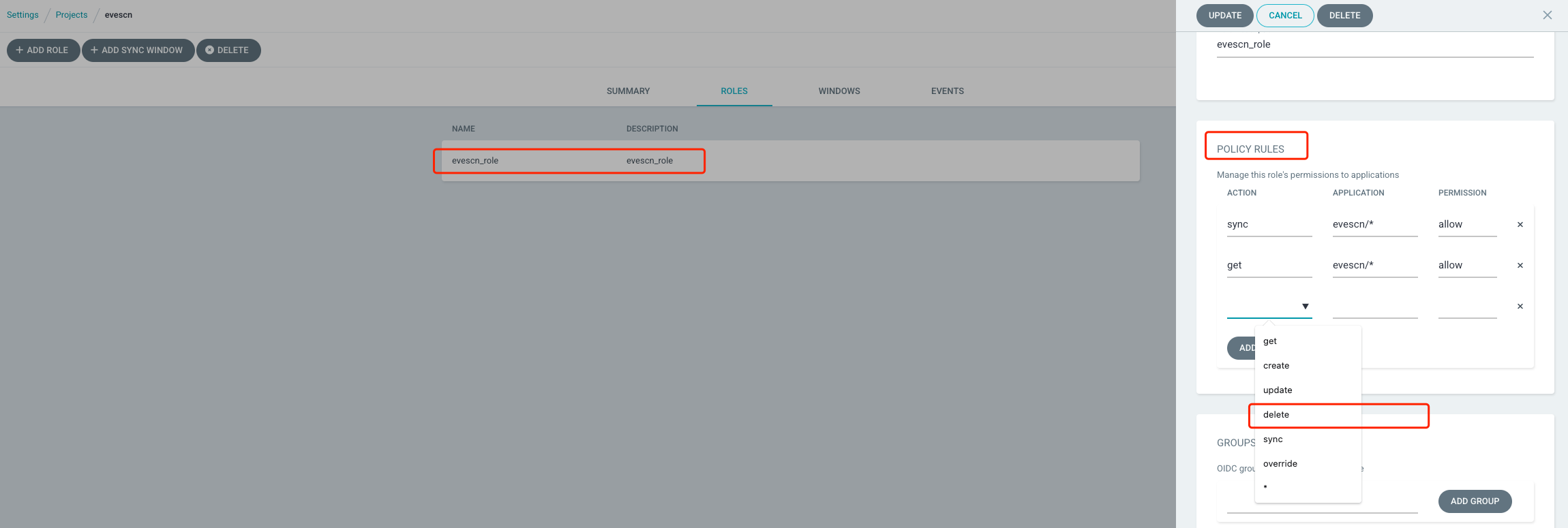
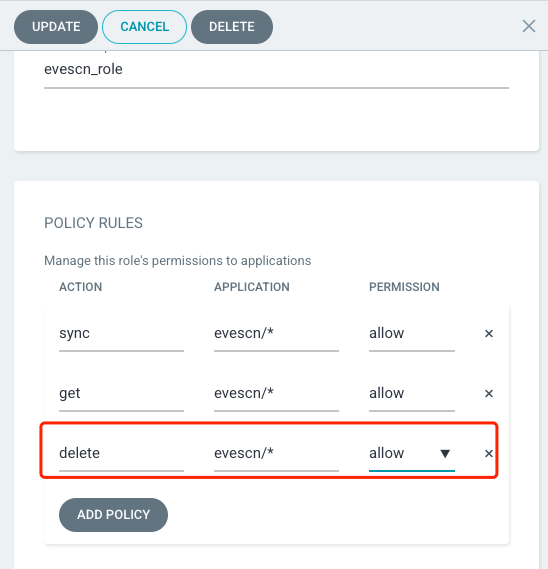
给 Project 的 Policy 添加上 delete 权限后,重新执行 delete 测试
[root@node argocd]# argocd app delete evescn-app --auth-token eyJhbGciOiJIUzI1NiIsInR5cCI6IkpXVCJ9.eyJpc3MiOiJhcmdvY2QiLCJzdWIiOiJwcm9qOmV2ZXNjbjpldmVzY25fcm9sZSIsIm5iZiI6MTY5MTY1MTk3MSwiaWF0IjoxNjkxNjUxOTcxLCJqdGkiOiJldmVzY25fdG9rZW4ifQ.hLno49BYTSowifnbqRWkD2cmLb7hd_FBZNVhsm8-CbM

Are you sure you want to delete 'evescn-app' and all its resources? [y/n] y
application 'evescn-app' deleted

[root@node argocd]# kubectl -n argocd get applications
No resources found in argocd namespace.
生产环境
delete权限非常危险,可以不给此权限,默认不配置的权限都是deny
资源清单创建 Project
[root@node argocd]# kubectl -n argocd get appprojects.argoproj.io  evescn  -o yaml
apiVersion: argoproj.io/v1alpha1
kind: AppProject
metadata:
  name: evescn
  namespace: argocd
spec:
  # cluster 权限黑名单
  clusterResourceBlacklist:
  - group: '*'
    kind: '*'
  # cluster 权限白名单
  clusterResourceWhitelist:
  - group: '*'
    kind: Namespace
  description: test project
  # 这个 Project 关联的 App 服务能够部署的 k8s 机器和 namespaces
  destinations:
  - name: in-cluster
    namespace: dev
    server: https://kubernetes.default.svc
  - name: in-cluster
    namespace: test
    server: https://kubernetes.default.svc
  # namspace 权限黑名单
  namespaceResourceWhitelist:
  - group: '*'
    kind: '*'
  roles:
  - description: evescn_role
    jwtTokens:
    - iat: 1691651971
      id: evescn_token
    - iat: 1691649777
      id: token
    name: evescn_role
    policies:
    - p, proj:evescn:evescn_role, applications, sync, evescn/*, allow
    - p, proj:evescn:evescn_role, applications, get, evescn/*, allow
    - p, proj:evescn:evescn_role, applications, delete, evescn/*, allow
  # 这个 Project 关联的 App 服务的仓库地址
  sourceRepos:
  - https://gitee.com/evescn/kustomize-demo

 浙公网安备 33010602011771号