
Struts2 JFreeChart 实例整合教程
Struts2 JFreeChart 实例整合 前言 关于Struts2入门以及提高等在这里就不介绍了,但是关于Struts2的学习有以下推荐:
-
- struts2-showcase-2.0.6.war:这个是官方自带的Demo(struts-2.0.6-all.zip/struts-2.0.6/apps目录下 ),非常全 面,直接部署就可以了(很多朋友Struts2能学很好我估计还是直接从这里学来的)。
- wiki-WebWork : 入了门的朋友应该都知道,strust2由webwork2和struts1.x合并起来的,但主要还是以webwork2为主,所以如果找不到 Struts2的资料可以找WebWork资料看看。
- Max On Java 的博客,他的博客的资料在中文的 Struts2算是比较全的了,写得很详细。
- The Code Project 、Google - CodeSearch 、Koders :这几个代码搜索网站在我找不到中 文资料甚至英文文章的时候帮了我大忙!
关于JFreeChart 入门等这里我也不打算介绍了,中文资料很多了。
正题 下面以边帖图片和代码的方式来讲解Struts2 与JFreeChart 的整合。 搭 建环境:首先帖一张工程的目录结构以及所需的jar包。注意:如果你不打算自己写ChartResult的话只需要引入struts2-jfreechart-plugin-2.0.6.jar(这个在struts-2.0.6-all.zip可以找到了 ):  1.依次帖web.xml、struts.xml、 struts.properties和struts-jfreechart.xml几个配置文件的代码: web.xml
struts.xml
< struts > < include file ="struts-jfreechart.xml" /> </ struts >
struts.properties
struts-jfreechart.xml
说明:这里只需要说明下struts-jfreechart.xml,这里直接调用已经写好的类ChartResult,这个类 是继承自com.opensymphony.xwork2.Result,传入生成图片大小的参数width和height就可以了。
2. 新建 JFreeChartAction 继承 ActionSupport,生成 JFreeChart对象并保存到chart中,注意这个名称是固定的。
import com.opensymphony.xwork2.ActionSupport; import org.jfree.chart.ChartFactory; import org.jfree.chart.JFreeChart; import org.jfree.data.general.DefaultPieDataset;
public class JFreeChartAction extends ActionSupport {
/** * */ private static final long serialVersionUID = 5752180822913527064L ;
// 供 ChartResult调用->ActionInvocation.getStack().findValue("chart") private JFreeChart chart; @Override public String execute() throws Exception { // 设置数据 DefaultPieDataset data = new DefaultPieDataset(); data.setValue( " Java " , new Double( 43.2 )); data.setValue( " Visual Basic " , new Double( 1.0 )); data.setValue( " C/C++ " , new Double( 17.5 )); data.setValue( " tangjun " , new Double( 60.0 )); // 生成 JFreeChart对象 chart = ChartFactory.createPieChart( " Pie Chart " , data, true , true , false ); return SUCCESS; } public JFreeChart getChart() { return chart; }
public void setChart(JFreeChart chart) { this .chart = chart; } }
OK! 至此代码已经全部贴完。 输入访问 http://localhost:8080/Struts2JFreeChart/jfreechart/JFreeChartAction.action 显 示结果如下: 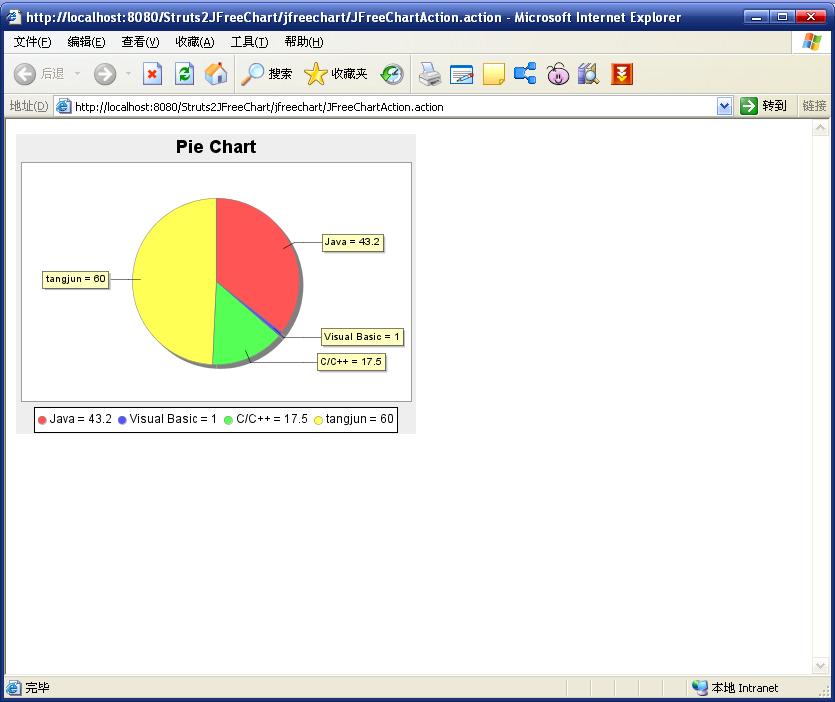
补充 以上生成的图片是PNG格式的图片,如果需要自定义图片格式的话(好像只能支持JPG和 PNG格式),那么自己写一个ChartResult继承自StrutsResultSupport, 见代码:
import java.io.OutputStream;
import javax.servlet.http.HttpServletResponse;
import org.apache.struts2.ServletActionContext; import org.apache.struts2.dispatcher.StrutsResultSupport; import org.jfree.chart.ChartUtilities; import org.jfree.chart.JFreeChart;
import com.opensymphony.xwork2.ActionInvocation;
public class ChartResult extends StrutsResultSupport {
/** * */ private static final long serialVersionUID = 4199494785336139337L ; // 图片宽度 private int width; // 图片高度 private int height; // 图片类型 jpg,png private String imageType; @Override protected void doExecute(String arg0, ActionInvocation invocation) throws Exception { JFreeChart chart = (JFreeChart) invocation.getStack().findValue( " chart " ); HttpServletResponse response = ServletActionContext.getResponse(); OutputStream os = response.getOutputStream(); if ( " jpeg " .equalsIgnoreCase(imageType) || " jpg " .equalsIgnoreCase(imageType)) ChartUtilities.writeChartAsJPEG(os, chart, width, height); else if ( " png " .equalsIgnoreCase(imageType)) ChartUtilities.writeChartAsPNG(os, chart, width, height); else ChartUtilities.writeChartAsJPEG(os, chart, width, height); os.flush();
} public void setHeight( int height) { this .height = height; }
public void setWidth( int width) { this .width = width; } public void setImageType(String imageType) { this .imageType