Day2-3 运算符
基本运算符
二元运算符:+ - * /
二元运算符例子
public class Demo01 {
public static void main(String[] args) {
int a = 10;
int b = 20;
int c = 25;
int d = 25;
System.out.println(a + b);
System.out.println(a - b);
System.out.println(c * d);
System.out.println(a / (double)b); //否则 int会四舍五入掉
  }
}
关于需要注意类型,运算中,只有一个有long类型,输出就是long,否则都是int
public class Demo01 {
public static void main(String[] args) {
long a = 121212121221212121L;
int b = 123;
short c = 10;
byte d = 8;

System.out.println(a + b + c + d);//long 只有一个有long类型,输出就是long,否则都是int
System.out.println(b + c + d);//int
System.out.println((double)c+ d );//int
  }
}
关系运算符: >, <, ==, !=, %(取余)
一般会和if一起运用,返回 ture false
点击查看代码
public class Demo01 {
public static void main(String[] args) {

        int a = 10;
        int b = 20;
        int c = 21;
        System.out.println(a > b);  //false
        System.out.println(a < b); //true
        System.out.println(a == b);  //false
        System.out.println(a != b); //ture
        System.out.println(c % a);// 1 取余,模运算

  }
}
一元运算符(易混淆点): --(自减), ++(自增)
主要是要区分两个写法的作用不同
1.先自增(减),再赋值
a++ , a--
自己本身用新值,另一个用旧值
点击查看代码
public class Demo01 {
public static void main(String[] args) {

     int a = 5;
     int b = a++;  // 先把a的值5给b,然后a自己变成6

    System.out.println(a); // 输出:6(吃完后剩6个)
   System.out.println(b); // 输出:5(拿到的是吃之前的5个)

  }
}
2.先赋值,再自增(减)
++a, --a
自己和另一个都用新值
点击查看代码
public class Demo01 {
public static void main(String[] args) {

     int a = 5;
     int b = a++;  // 先把a的值5给b,然后a自己变成6

    System.out.println(a); // 输出:6(吃完后剩6个)
   System.out.println(b); // 输出:5(拿到的是吃之前的5个)

  }
}
PS. 幂运算
用工具类,如下: 很多运算我们都会使用一些工具来操作
点击查看代码
public class Demo01 {
public static void main(String[] args) {

     double pow  = Math.pow(2, 3);
     System.out.println(pow);

  }
}
逻辑运算符:&&(and), ||(or), ! (非)
也是返回true or false
&&: 都真——真;
| | : 一真则真,都假才假
!如真则假,如假则真
点击查看代码
public class Demo01 {
public static void main(String[] args) {

    boolean a = true;
        boolean b = false;

        System.out.println("a && b:" + (a && b)); // 2个都真——真
        System.out.println("a || b:" + (a || b)); // 2个都假—— 假
        System.out.println("!(a && b:)" + !(a && b)); // 如真则假,如假则真

  }
}
短路运算
如果代码已经判断为false,则不会再进行后续的计算了
点击查看代码
public class Demo01 {
public static void main(String[] args) {

         int c = 5;
        boolean d = (c < 4) && (c++ < 4);
        System.out.println(d);
        System.out.println(c);// 依旧为5, 因为再c<4这里已经是false了,所以后续的东西就不执行了。


  }
}
位运算符:&, |, ^, ~, <<, >>
A = 0011 1100
B = 0000 1101
-
A&B 每位每位去比较,相同1才得1 : 0000 1100
-
A|B 都是0为0,否则为1: 0011 1101
-
A^B 如果相同为0 ,否则为1: 0011 0001
-
~B 和原来的完全相反:1111 0010
-
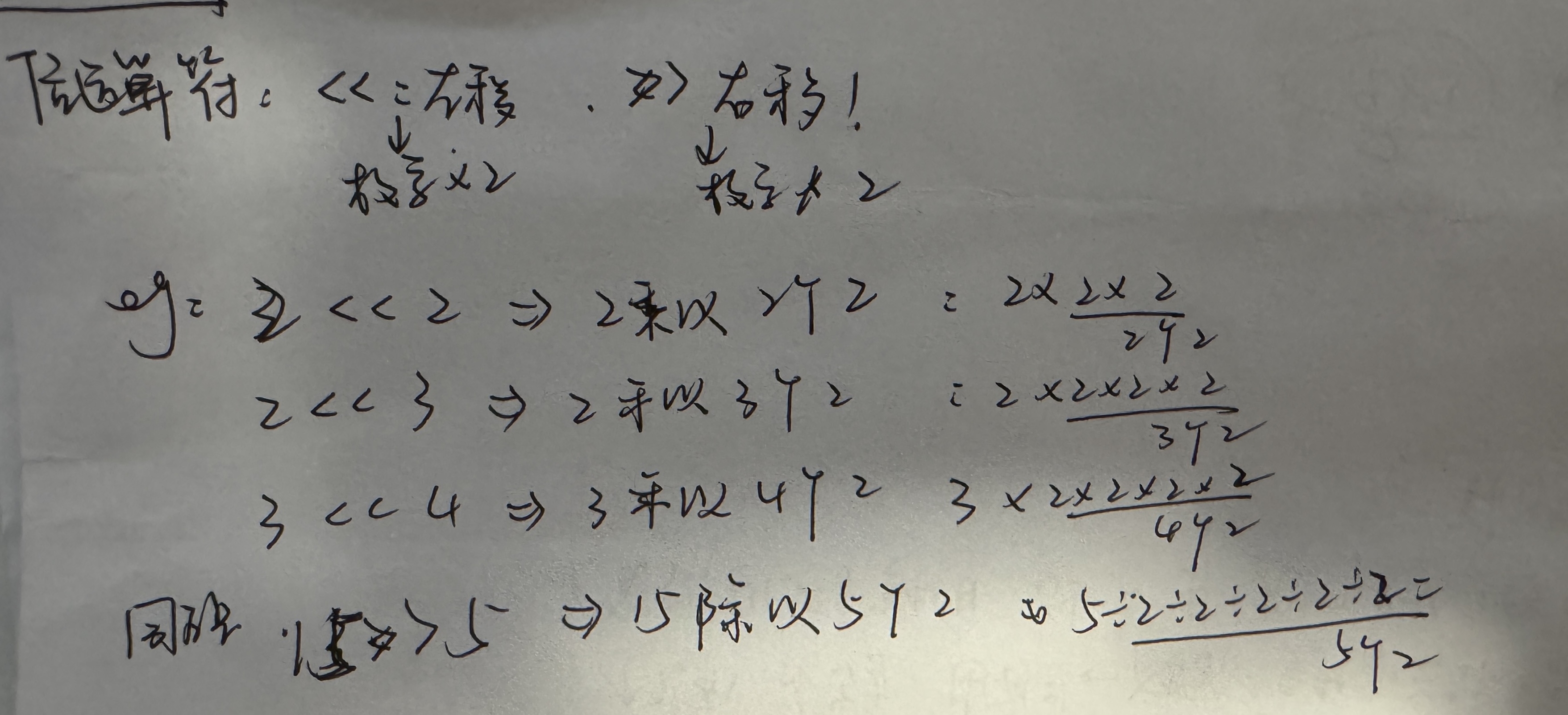
“>>”, “<<",用于二进制中的一些运算
“<<” 左移: 相当于把数字乘以2
“>>” 右移: 相当于把数字除以2
点击查看代码
public class Demo01 {
public static void main(String[] args) {

      /*
         * A = 0011 1100
         * B = 0000 1101
         * A&B 每位每位去比较,相同1才得1 : 0000 1100
         * A|B 都是0为0,否则为1: 0011 1101
         * A^B 如果相同为0 ,否则为1: 0011 0001
         * ~B 和原来的完全相反:1111 0010
         */

        // << :左移: 相当于把数字乘以2 >>: 右移 相当于把数字处于2
        System.out.println(16 >> 2);

  }
}
字符串链接符:+
- +=
a+=b equal a = a+b
- -=
a-=b equal a = a-b
- “+”
两侧出现string类型,则会把变量变string,
但是 “+” 后出现string类型 前面的数还是按照int来算
点击查看代码
public class Demo01 {
public static void main(String[] args) {

     int a = 10;
        int b = 20;
        a += b; // means: a = a+b
        a -= b; // means a = a-b
        System.out.println("" + a + b); //output: 1020

        // 字符串链接符: + 两侧出现string类型,则会把变量变成string
        // 但是 +后出现string类型 前面的数还是按照int来算
        System.out.println(a + b + "") // output: 30

  }
}
三元运算符:“ ?”, “:”
用于精简运算
** x ? y: z **: 如果x ==true, 则结果为y, 否则结果为z
点击查看代码
public class Demo01 {
public static void main(String[] args) {

     int score = 20;
        String type = score < 60 ? "不及格" : "及格"; // 必须掌握!!
        System.out.println(type); // 输出 “不及格”

  }
}
posted on 2025-09-08 01:14 escapedlili 阅读(27) 评论(0) 收藏 举报

 浙公网安备 33010602011771号