
作业三
1、拒绝所有主机ping当前的主机。
[root@centos7 ~]# iptables -A INPUT -p icmp -j REJECT
2、本机能够访问别的机器的HTTP服务,但是别的机器无法访问本机。
[root@centos7 ~]#iptables -A INPUT -d 10.0.0.7 -p tcp --dport 80 -j REJECT
[root@centos7 ~]#curl 10.0.0.8
come baby
[root@centos8 ~]#curl 10.0.0.7
curl: (7) Failed to connect to 10.0.0.7 port 80: Connection refused
3、当我们发现有 ip 恶意攻击我们得时候,我们可以通过对防火墙设定规则来进行控制。所以我们可以
添加connlimit模块来实现对最大并发得控制。请写出步骤
[root@centos7 ~]#iptables -AINPUT -m connlimit --connlimit-above 5 -j REJECT
4、实践题
实验前提需求
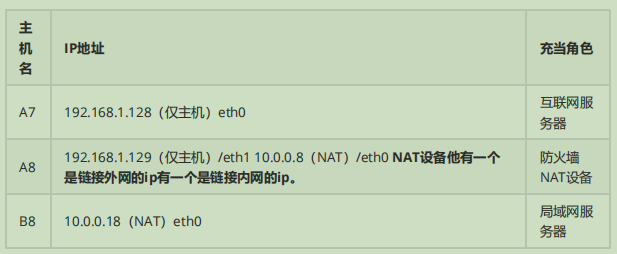
现在我在外地出差使用A8互联网主机,但是现在由于公司有业务需要我 ssh 链接到内网、这时候我就链接我们公司同事在防火墙上配置相关规则让我链接进公司内网,请写出实现过程:
#开启ip_forward
[root@a8 ~]#echo 1 > /proc/sys/net/ipv4/ip_forward
[root@a8 ~]#cat /proc/sys/net/ipv4/ip_forward
1
#添加防火墙规则
[root@a8 ~]#iptables -t nat -A PREROUTING -d 192.168.1.129 -p tcp --dport 22 -j DNAT --to-destination 10.0.0.18
#查看规则是否生成
[root@a8 ~]#iptables -t nat -vnL
Chain PREROUTING (policy ACCEPT 0 packets, 0 bytes)
 pkts bytes target     prot opt in     out     source               destination
    0     0 DNAT       tcp  --  *      *       0.0.0.0/0            192.168.1.129        tcp dpt:22 to:10.0.0.18

Chain INPUT (policy ACCEPT 0 packets, 0 bytes)
 pkts bytes target     prot opt in     out     source               destination

Chain POSTROUTING (policy ACCEPT 0 packets, 0 bytes)
 pkts bytes target     prot opt in     out     source               destination

Chain OUTPUT (policy ACCEPT 0 packets, 0 bytes)
 pkts bytes target     prot opt in     out     source               destination
 #验证结果
 [root@a7 ~]#ssh 192.168.1.129
The authenticity of host '192.168.1.129 (192.168.1.129)' can't be established.
ECDSA key fingerprint is SHA256:5eoeSfe7MG9GAM/hM89xh8EMkyC7K8fgiWD+jVofiGo.
ECDSA key fingerprint is MD5:94:49:1a:f1:68:59:52:83:e3:e2:cd:a9:ca:c4:fd:b2.
Are you sure you want to continue connecting (yes/no)? dfbgvnjidfaifgb vdea
Please type 'yes' or 'no': yes
Warning: Permanently added '192.168.1.129' (ECDSA) to the list of known hosts.
root@192.168.1.129's password:
[root@b8 ~]#hostname
b8

 浙公网安备 33010602011771号