
2.4、表单插件,赋值SetValue,点击某个按钮才触发
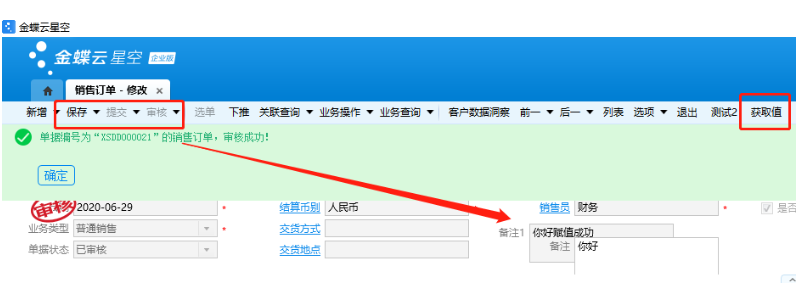
之前点任意按钮,都会赋值,现在设置点击某个按钮,才赋值
1、找到之前新增的按钮,标识,YDIE_tbGetSetValue

2、加一个判断条件,当按钮=新增的按钮时候,才触发
if (e.BarItemKey == "YDIE_tbGetSetValue")
3、重新生成dll
4、最终效果,打开销售订单,只是点新增的按钮会自动赋值,点保存、提交、审核按钮不会触发;

using System;
using System.Collections.Generic;
using System.Linq;
using System.Text;
//引用
using Kingdee.BOS.Core.Bill.PlugIn;
//热启动,不用重启IIS,引用
using Kingdee.BOS;
//插件名字
using System.ComponentModel;


namespace Kingdee.Bos.ObjectName.Bill.Plugln
{
    //插件名字
    [Description("表单插件获取和设置值")]
    //热启动,不用重启IIS
    [Kingdee.BOS.Util.HotUpdate]
    //继承函数:AbstractBillPlugIn


    public class ClassName:AbstractBillPlugIn
    {
        //重写点击按钮函数
        public override void BarItemClick(BOS.Core.DynamicForm.PlugIn.Args.BarItemClickEventArgs e)
        {
            base.BarItemClick(e);


            //加一个判断条件,当按钮=新增的按钮时候,才触发
            if (e.BarItemKey == "YDIE_tbGetSetValue")
            {

            //给单据头,备注赋值,你好
            this.View.Model.SetValue("FNote", "你好");

            //获取备注FNote的值,并强制转换成字符串.ToString()
            string FNote = this.View.Model.GetValue("FNote").ToString();

            //把获取的值,给新增的字段,备注1,FNote1
            this.View.Model.SetValue("FNote1", FNote + "赋值成功");

            //把客户FcustId,赋值内码300638
            this.View.Model.SetValue("FcustId", 300638);


            //定义数组,多个客户
            object[] custs = new object[] { "300638", "322070", "454978" };

            //给数组赋值
            this.View.Model.SetValue("F_YDIE_CustS", custs);


            //刷新字段
            this.View.UpdateView("FNote");
            this.View.UpdateView("FNote1");
            this.View.UpdateView("FcustId");
            this.View.UpdateView("F_YDIE_CustS");
            //全部刷新
            this.View.UpdateView();
            }
        }
    }
}

 浙公网安备 33010602011771号