
注册了博客园这么多年,第一次写东西,写下来,记下来,为了自己以后查阅,同时也分享给gnet的初学者,golang的爱好者。
下面开始记笔记:
gnet 在CSDN上的介绍如下:https://blog.csdn.net/qq_31967569/article/details/103107707
github v1版本的开源地址为:https://github.com/panjf2000/gnet
详细介绍是英文版的,各个模块的介绍较详细,--->:https://pkg.go.dev/github.com/panjf2000/gnet?GOOS=windows#Option
gnet作者潘少是国内一枚年轻大帅哥^_^.在知乎上有部分人对gnet这个框架有不同的观点,说什么的也有,有不同的声音,是好事,百家争鸣,喜欢就用,不喜欢就不用,但需要尊重开源作者。开源作者对go社区的贡献有目共睹。下面记录一下我在使用中的一些笔记。
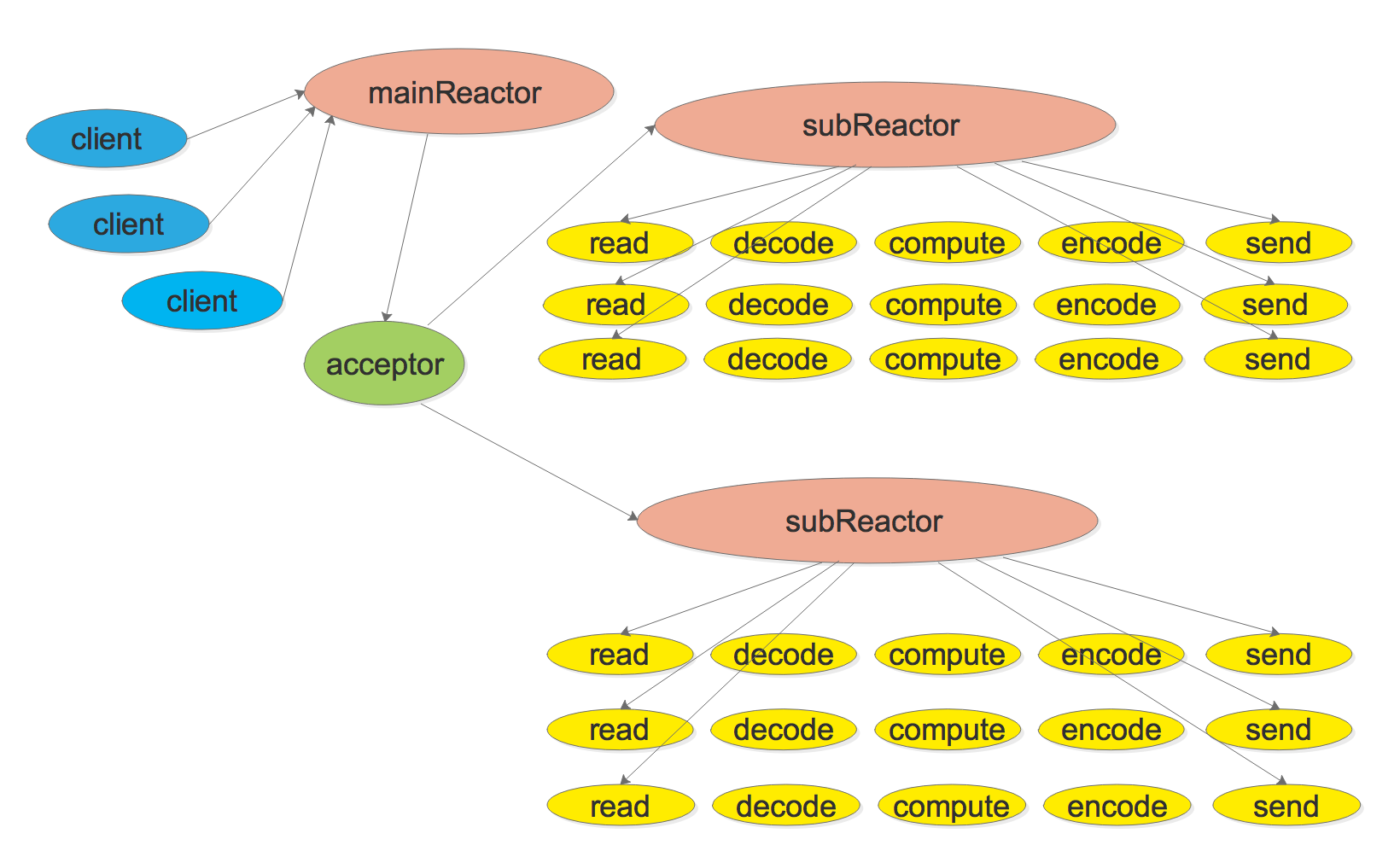
有必要先贴一下 gnet的架构图
主从多 Reactors + 线程/Go 程池
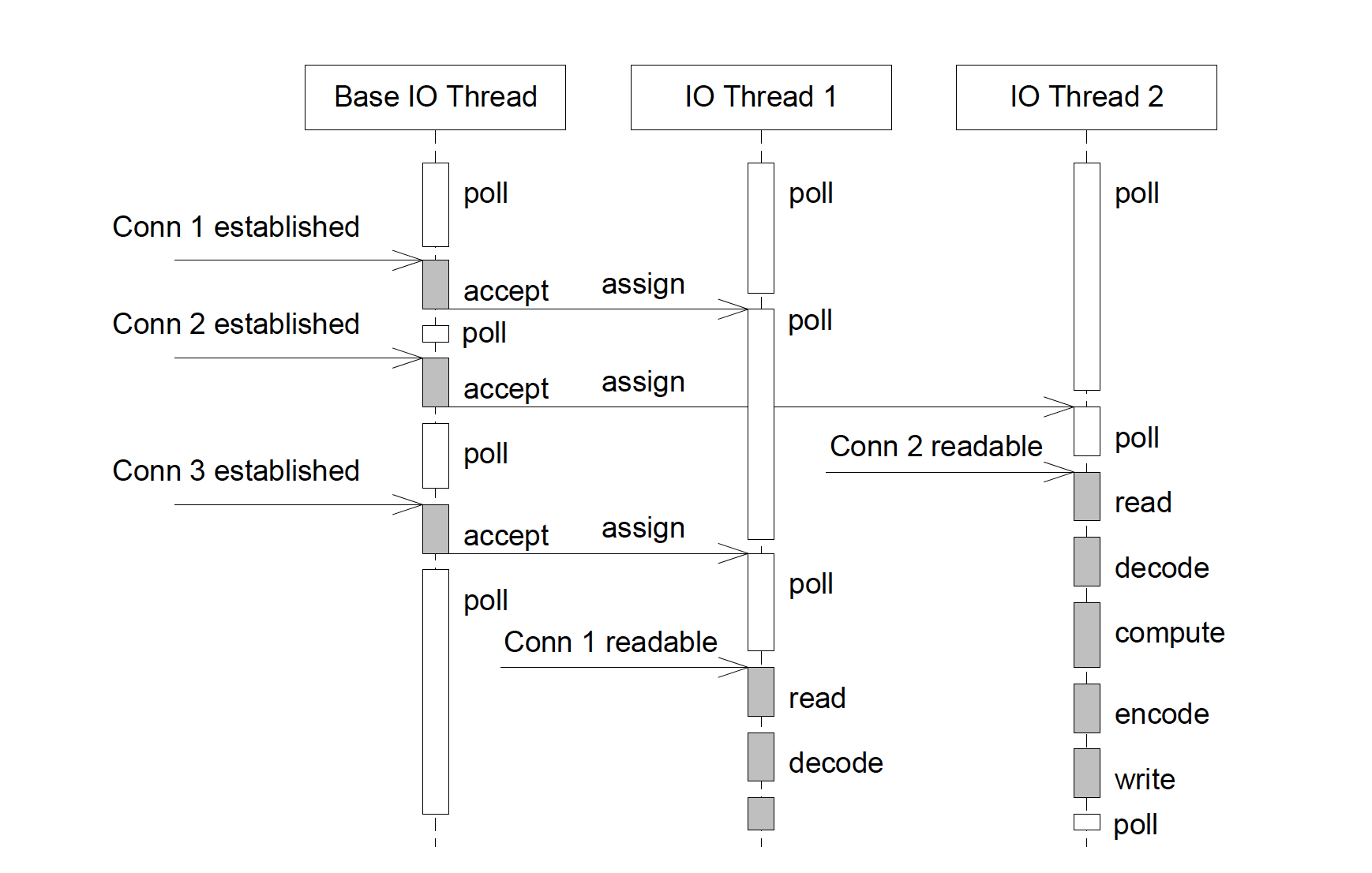
它的运行流程如下面的时序图
先记录一下Options,为便于查询,保留原始英文备注
type Options                                      struct {

    // Multicore indicates whether the server will be effectively created with multi-cores, if so,
    // then you must take care with synchronizing memory between all event callbacks, otherwise,
    // it will run the server with single thread. The number of threads in the server will be automatically
    // assigned to the value of logical CPUs usable by the current process.
    // Multicore 表示服务器是否将有效地使用多核创建,如果是,则必须注意在所有事件回调之间同步内存,否则它将以单线程运行服务器。
    // 服务器中的线程数将自动分配给当前进程可用的逻辑 CPU 的值。
    // 作者推荐用该方式,设置该值为true即可,这样的话,以后服务器CPU的扩/减容,都会自动适配
    Multicore bool

    // NumEventLoop is set up to start the given number of event-loop goroutine.
    // NumEventLoop 设置为启动给定数量的event-loop goroutine,也就是 sub-reactor的数量(具体看结构图)----这个参数的说明我特意私下请教过潘少
    // Note: Setting up NumEventLoop will override Multicore.
    // 这个要注意,如果设置了NumEventLoop的值,那么Multicored 的参数将会被覆盖
    // 一般情况请使用Multicore=true即可,不需要设置NumEventLoop
    NumEventLoop int

    // LB represents the load-balancing algorithm used when assigning new connections.
    LB LoadBalancing

    // ReuseAddr indicates whether to set up the SO_REUSEADDR socket option.
    ReuseAddr bool

    // ReusePort indicates whether to set up the SO_REUSEPORT socket option.
    ReusePort bool

    // ReadBufferCap is the maximum number of bytes that can be read from the peer when the readable event comes.
    // The default value is 64KB, it can be reduced to avoid starving the subsequent connections.
    // Note that ReadBufferCap will always be converted to the least power of two integer value greater than
    // or equal to its real amount.
    // 注意:这个值是每个event-loop的缓存大小,不是每个客户端的缓存大小,默认64k
    ReadBufferCap int

    // LockOSThread is used to determine whether each I/O event-loop is associated to an OS thread, it is useful when you
    // need some kind of mechanisms like thread local storage, or invoke certain C libraries (such as graphics lib: GLib)
    // that require thread-level manipulation via cgo, or want all I/O event-loops to actually run in parallel for a
    // potential higher performance.
    // LockOSThread 用于确定每个 I/O event-loop是否与一个 操作系统线程相关联,
    // 当您需要某种机制(如线程本地存储)或调用某些C语言的动态库(例如图形库:GLib)时,该参数很有用
    // 或者通过 cgo 进行线程级操作,或者希望所有 I/O event-loop 并行运行以获得潜在的更高性能
    LockOSThread bool

    // Ticker indicates whether the ticker has been set up.
    // 如果需要使用EventHandler.Tick,则需要将该值置为true,
    // EventHandler.Tick 会在服务器启动的时候会调用一次,之后就以给定的时间间隔定时调用一次,是一个定时器方法。
    Ticker bool

    // TCPKeepAlive sets up a duration for (SO_KEEPALIVE) socket option.
    // 该值是设置TCP 保活的时间间隔,目的是避免因长时间无数据传输而被强制关闭链路
    // 在局域网内部通信的时候,一般没问题。多见于与物联网通信时,移动运营商为节省网络资源会定期将空闲一段时间的连接关闭
    // 所以如果需要长连接,需要根据现场情况调整该值,比如有的国家的基站容量有限,他们甚至会将空闲超过5分钟、甚至2分钟的连接关闭,以缓解基站的压力
    // 这种情况下,您就需要将该值调整为小于运营商关闭连接的阀值,那么这个值是不是越小越好呢?不是的
    // 请注意,该值若是太小,产生的流量若超出了包月流量,可能要收取费用,请切记。因为我在某国家踩过这个坑
    // 某些行业会在应用层隔一段时间发送一帧短数据,以便维持连接,我们叫做心跳(hearbeat)
    // 如果自行收发数据维持连接,请将该值设置的大一些,减少流量消耗
    TCPKeepAlive time.Duration

    // TCPNoDelay controls whether the operating system should delay
    // packet transmission in hopes of sending fewer packets (Nagle's algorithm).
    // The default is true (no delay), meaning that data is sent
    // as soon as possible after a write operation.
    TCPNoDelay TCPSocketOpt

    // SocketRecvBuffer sets the maximum socket receive buffer in bytes.
    SocketRecvBuffer int

    // SocketSendBuffer sets the maximum socket send buffer in bytes.
    SocketSendBuffer int

    // ICodec encodes and decodes TCP stream.
    Codec ICodec

    // LogPath the local path where logs will be written, this is the easiest way to set up logging,
    // gnet instantiates a default uber-go/zap logger with this given log path, you are also allowed to employ
    // you own logger during the lifetime by implementing the following log.Logger interface.
    // Note that this option can be overridden by the option Logger.
    LogPath string

    // LogLevel indicates the logging level, it should be used along with LogPath.
    LogLevel logging.Level

    // Logger is the customized logger for logging info, if it is not set,
    // then gnet will use the default logger powered by go.uber.org/zap.
    Logger logging.Logger
}
再看一下EventHandler
type EventHandler                                    interface {
    // OnInitComplete fires when the server is ready for accepting connections.
    // The parameter server has information and various utilities.
    // 初始化完成的时候,触发该事件,注意该事件的入参server,可以将该参数赋值给您的自己结构内的Server成员
    // Server还有几个其他方法,比如,gnet当前的连接数 func (s Server) CountConnections() (count int) 等,详见官方说明
    OnInitComplete(server Server) (action Action)

    // OnShutdown fires when the server is being shut down, it is called right after
    // all event-loops and connections are closed.
    // 当gnet server 被关闭时触发,我们可以在此处根据业务需求做一下操作
    OnShutdown(server Server)

    // OnOpened fires when a new connection has been opened.
    // The Conn c has information about the connection such as it's local and remote address.
    // The parameter out is the return value which is going to be sent back to the peer.
    // It is usually not recommended to send large amounts of data back to the peer in OnOpened.
    // Note that the bytes returned by OnOpened will be sent back to the peer without being encoded.
    // 当有客户端连接到gnet server的时候触发,我们可以在此处根据业务需求做一下操作
    // 比如将所有客户端连接(c Conn)保存到一个map中,以备后面业务上使用
    OnOpened(c Conn) (out []byte, action Action)

    // OnClosed fires when a connection has been closed.
    // The parameter err is the last known connection error.
    // 当客户端被关闭时触发该事件,比如,客户端主动关闭连接会触发该事件
    // gnet server端主动调用Conn.Close()时也会触发该事件,
    // 请注意业务上跟关闭连接有关的操作不要重复操作,以免出现操作空对象的异常
    OnClosed(c Conn, err error) (action Action)

    // PreWrite fires just before a packet is written to the peer socket, this event function is usually where
    // you put some code of logging/counting/reporting or any fore operations before writing data to the peer.
    // 写数据之前的事件,请根据业务需要自行使用
    PreWrite(c Conn)

    // AfterWrite fires right after a packet is written to the peer socket, this event function is usually where
    // you put the []byte returned from React() back to your memory pool.
    // 写数据之后的事件,请根据业务需要自行使用
    AfterWrite(c Conn, b []byte)

    // React fires when a socket receives data from the peer.
    // Call c.Read() or c.ReadN(n) of Conn c to read incoming data from the peer.
    // The parameter out is the return value which is going to be sent back to the peer.
    // Note that the parameter packet returned from React() is not allowed to be passed to a new goroutine,
    // as this []byte will be reused within event-loop after React() returns.
    // If you have to use packet in a new goroutine, then you need to make a copy of buf and pass this copy
    // to that new goroutine.
    // 我们的业务处理应该就是对packet中数据的处理
    // 需要注意的是,如果业务处理放在新的goroutine中执行,那么需要将packet的副本传递到goroutine中
    // 具体为什么,作者没说,我猜测可能是因为切片属于引用类型,新的gorountine的生命周期会影响整个gnet的性能
    React(packet []byte, c Conn) (out []byte, action Action)

    // Tick fires immediately after the server starts and will fire again
    // following the duration specified by the delay return value.
    // 定时事件,如果需要使用,需要在启动gnet的时候,指定option参数中的gnet.WithTicker(true)
    Tick() (delay time.Duration, action Action)
}
下面是官方给的带阻塞的使用方法
package main

import (
    "log"
    "time"

    "github.com/panjf2000/gnet"
    "github.com/panjf2000/gnet/pool"
)

type echoServer                                  struct {
    *gnet.EventServer
    pool *pool.WorkerPool
}

func (es *echoServer) React(c gnet.Conn) (out []byte, action gnet.Action) {
    data := append([]byte{}, c.Read()...)
    c.ResetBuffer()

    // Use ants pool to unblock the event-loop.
    _ = es.pool.Submit(                                 func () {
        time.Sleep(1 * time.Second)
        c.AsyncWrite(data)
    })

    return
}

func main() {
    p := pool.NewWorkerPool()
    defer p.Release()

    echo := &echoServer{pool: p}
    log.Fatal(gnet.Serve(echo,                                  "tcp://:9000" , gnet.WithMulticore(true)))
}
在Ubuntu上压测过,单台连接过6万结点,很轻松,当然,这个连接是没有任何业务处理的。仅仅是将客户端发过来的心跳数据,根据客户端的要求回复相应的心跳帧。注意,在Ubuntu/CentOS上测试的时候 需要修改 ulimite 的值,默认1024太小。修改 ulimit 值的方法自行搜索。
之前在压力测试的时候,因为将每个客户端与gnet server通讯的数据保存到日志文件(一个连接一个日志文件,这就是为什么ulimit 1024不够的原因),导致我使用的日志框架(github.com/sirupsen/logrus)创建线程太多,最后整个应用crash。今天重新测试一下
作者说,因为对windows平台支持的不是很好,所以windows平台下仅用于开发调试,不能用于生产,不过我还是测试了一下:
压测代码很简单,如下:
查看代码
type GnetServer struct {
	*gnet.EventServer
	svr gnet.Server
}

func NewGonetServer() (a *GnetServer) {
	a = &GnetServer{}
	return
}

//main 函数调用此函数
func (a *GnetServer) OpenDevice(port string) bool {
	defer func() {
		if p := recover(); p != nil {
			s := fmt.Sprintf("%s", debug.Stack())
			fmt.Println("recover-->\r\n" + p.(error).Error() + "\r\nStack-->\r\n" + s)
		}
	}()
	go func() {
		err := gnet.Serve(a, "tcp://:"+port,
			gnet.WithMulticore(true),
			gnet.WithLockOSThread(true),
			gnet.WithTCPKeepAlive(15*time.Minute))
		if err != nil {
			fmt.Println("Error while open device by gnet")
		}
	}()

	return true
}

func (a *GnetServer) OnOpened(c gnet.Conn) (out []byte, action gnet.Action) {
	defer func() {
		if p := recover(); p != nil {
			s := fmt.Sprintf("%s", debug.Stack())
			fmt.Println("recover-->\r\n" + p.(error).Error() + "\r\nStack-->\r\n" + s)
		}
	}()
	fmt.Println("Total client connection is "+strconv.Itoa(a.svr.CountConnections()))
	return
}

func (a *GnetServer) React(packet []byte, c gnet.Conn) (out []byte, action gnet.Action) {
	defer func() {
		if p := recover(); p != nil {
			s := fmt.Sprintf("%s", debug.Stack())
			fmt.Println("recover-->\r\n", p.(error).Error(), "\r\nStack-->\r\n", s)
		}
	}()

	data := make([]byte, len(packet))
	copy(data, packet)

	go func() {
		listAddress := data[10 : 10+data[9]]
		DCUAddress := string(listAddress)
		DCUAddress = strings.TrimLeft(DCUAddress, "0")
		if strings.Trim(DCUAddress, " ") == "" {
			fmt.Println("------Address is null----")
			return
		}
		fmt.Println(DCUAddress, "Receive from device["+DCUAddress+"] "+"Total Device:"+
			strconv.Itoa(a.svr.CountConnections()),
			Logger.ShowHexMessage(data, 0, len(data)))
		frameSend := make([]byte, len(data))
		copy(frameSend, data)
		frameSend[2] = data[4]
		frameSend[3] = data[5]
		frameSend[4] = data[2]
		frameSend[5] = data[3] //交换IEC62056-47 规约源地址目标地址
		frameSend[8] = 0x00    //因客户端规约需要,需要将该字节重新赋值
		frameSend[10] = 0
		frameSend[11] = 0
		//这里主要测试gnet.Conn的异步发送功能,因为我们的业务大部分是使用异步发送去操作的,很少将发送的数据直接返回给out []byte
		err := c.AsyncWrite(frameSend)
		if err != nil {
			fmt.Println(err.Error())
		}
		fmt.Println(DCUAddress, "Send to device1["+DCUAddress+"] ", Logger.ShowHexMessage(frameSend, 0, len(frameSend)))
	}()
	return
}

func (a *GnetServer) OnClosed(c gnet.Conn, err error) (action gnet.Action) {
	defer func() {
		if p := recover(); p != nil {
			s := fmt.Sprintf("%s", debug.Stack())
			fmt.Println("recover-->\r\n" + p.(error).Error() + "\r\nStack-->\r\n" + s)
		}
	}()
	fmt.Println(c.RemoteAddr().String() + " is disconnected.")
	action = gnet.Close
	return
}

func (a *GnetServer) OnInitComplete(svr gnet.Server) (action gnet.Action) {
	a.svr = svr
	action = gnet.None
	return
}
Windows下压力测试
客户端电脑,共10台,每台建立1万个客户端连接,共计10万个连接,消耗内存7G+,windows 平台下共创建了36个线程
windows 配置如下:

gnet启动后,没有任何客户端连接时
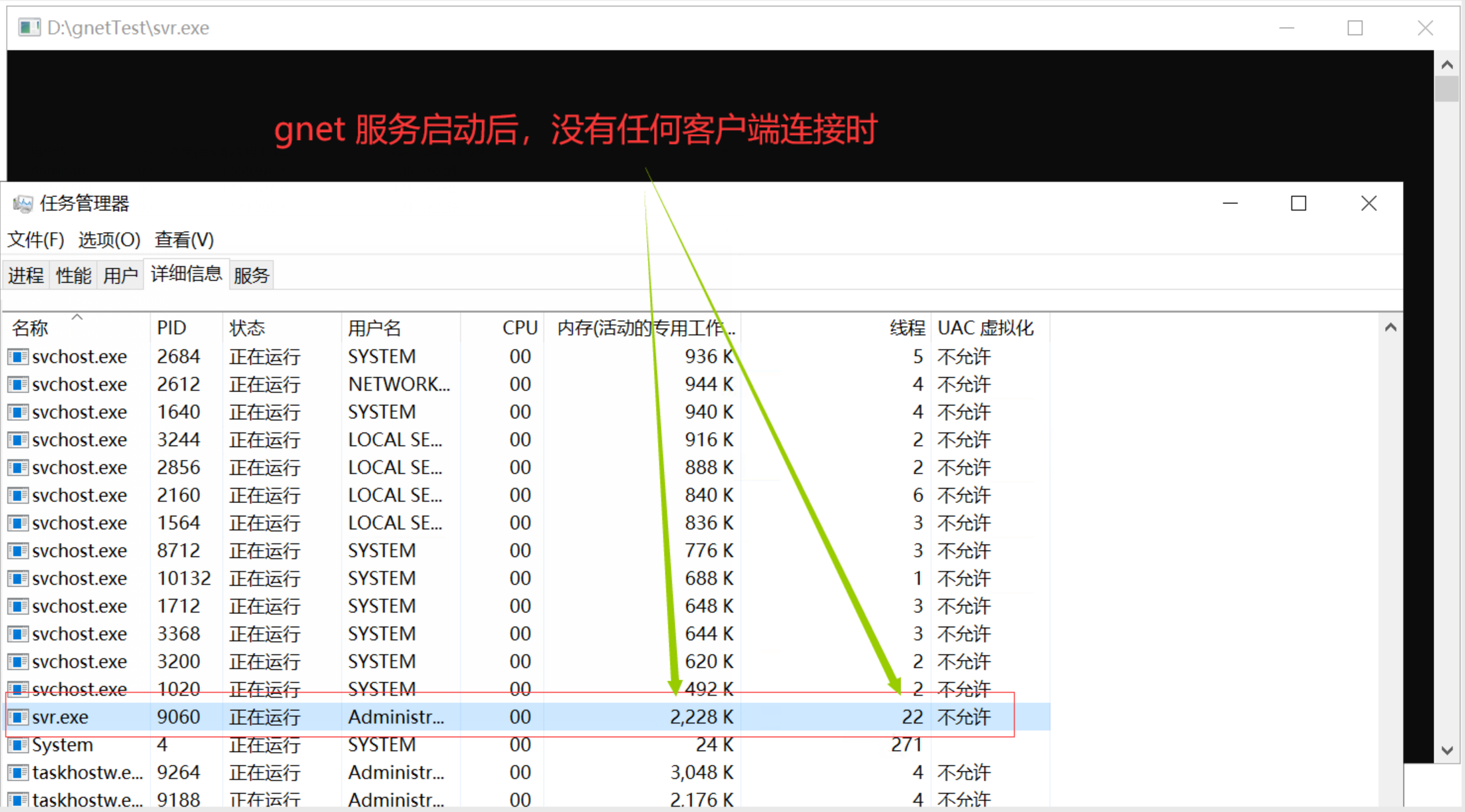
20000个客户端连接时的内存情况

40000个客户端连接时的内存情况

70000个客户端连接时的内存情况

100000个客户端连接时的内存情况

总结:咨询过作者,作者给的回复是:Windows 平台仅用于代码调试,不可用于生产。经过我测试,就是内存耗的比Linux下多点,无非是多牺牲点内存,收发速度还是可以的,我也用正式的业务程序压测过,整体效率比Linux平台下差很多,但这个应该不是gnet对windows平台支持不好。Windows 平台下,运行正式业务程序,同时接入了5万台设备(TCP/IP结点),每隔一个小时采集40万条数据入库,耗时15分钟。
我感觉应该是go程序在linux下运行的效率比windows下高!且看linux下的压测。
Linux下压力测试
gnet server 配置减少为 6核 8G内存
客户端PC的配置同上,在Linux下的性能,简直是起飞了!
10万个客户端,仅用10几秒,消耗97M内存,就全部建立好连接了,10万个客户端创建了16个线程
服务器配置如下:

10万个连接不到100M内存!!!!

10万个客户端 16个线程
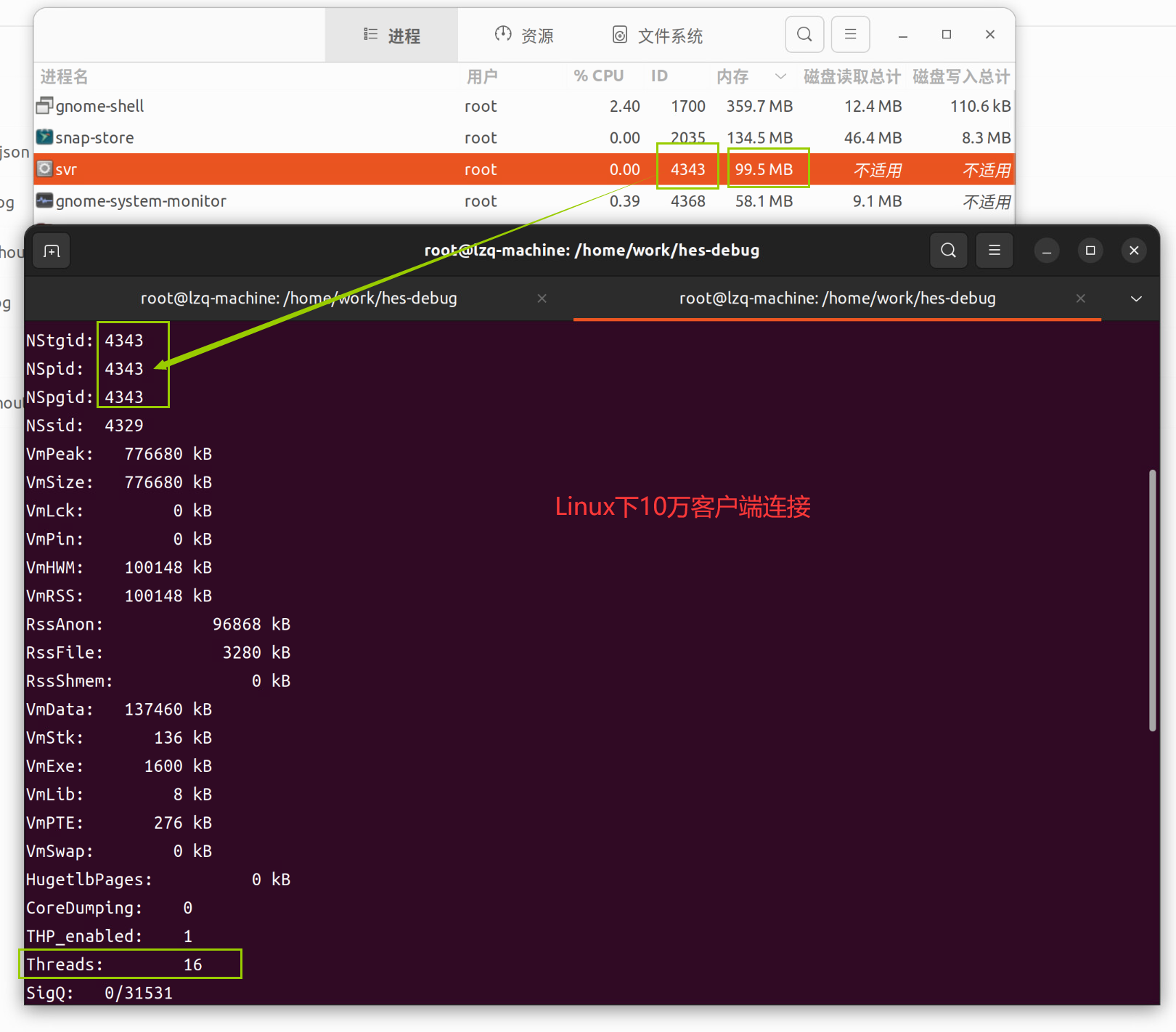
总结:Linux下的性能非常好
测试完gnet在linux下的表现之后,开始我的业务程序测试-----一个完整的数据采集系统,之前用Java(netty),c#(原生sokect)开发的版本在windows或者linux下,一台server仅能接入1万个设备(TCP/IP结点),用了Go+gnet之后在linux下能接入10万设备(TCP/IP结点),每隔一个小时采集80万条数据入库,耗时10分钟!这性能的提升充分体现了go语言在高并发下的优势,当然更离不开gnet这样优秀的开源框架。
个人感觉:后端或者其他服务程序如果用go开发,在Linux上的运行效率要比windows下效率高很多很多。
经过在两个不同平台下对业务程序的测试,完全被go的高并发所折服!goroutine所需要的内存通常只有2kb,而其他语言的线程则需要1Mb(500倍),Java,c# 完全没法比,根本不是一个数量级。

 浙公网安备 33010602011771号