


第二部分:前端开发 vue 基础
第二部分:前端开发
关于vue.js的版本
-
vue2,经典版本,现在绝大部分的企业项目都是用vue2版本开发。
-
vue3,新版本,未来的趋势。
https://cn.vuejs.org/guide/quick-start.html
1.vue.js 初体验
基于vue.js框架来编写项目需要以下几个步骤:
-
导入vue.js包(CDN)
<!-- 开发环境版本,包含了有帮助的命令行警告 -->
<script src="https://cdn.jsdelivr.net/npm/vue@2/dist/vue.js"></script>
<!-- 生产环境版本,优化了尺寸和速度 -->
<script src="https://cdn.jsdelivr.net/npm/vue@2"></script>
# 当然,也可以将文件下载下来再通过本地导入。 -
应用
-
![]() View Code
View Code1 <!DOCTYPE html> 2 <html lang="en"> 3 <head> 4 <meta charset="UTF-8"> 5 <title>Title</title> 6 <!-- 1.引入vue.js文件 (也可以下载到本地导入)--> 7 <script src="https://cdn.jsdelivr.net/npm/vue@2/dist/vue.js"></script> 8 </head> 9 <body> 10 11 <!-- 2.指定区域 id="app",该div区域的内容希望由vue.js来接管。 --> 12 <div id="app"> 13 <h1>欢迎学习Vue.js</h1> 14 <div>我叫{{name}},微信{{wechat}}</div> 15 16 <input type="button" value="点我" v-on:click="clickMe"> 17 </div> 18 19 20 <script> 21 // 3.创建Vue对象,并关联指定HTML区域 字典 。 22 var app = new Vue({ 23 el: '#app', 24 data: { 25 name: '武沛齐', 26 wechat: 'wupeiqi888' 27 }, 28 methods: { 29 clickMe: function () { 30 // 获取值this.name 31 // 修改值this.name = "xx" 32 this.name = "alex"; 33 this.wechat = "wupeiqi666"; 34 } 35 } 36 }) 37 </script> 38 </body> 39 </html>

后期编写前端代码使用IDE:WebStom (与Pycharm是一家子)【2020.1版本破解同Pycharm】
2.vue常见指令
想要使用vue.js来进行开发,就必须学会vue.js中提供的指令,明白每个指令是什么意思,才能更灵活的让他去显示我们想要的效果。
一大波vue指令来了。。。
2.1 插值表达式

1 2.1 插值表达式 2 一般在显示文本内容的标签中使用。(将js的某个值显示到html中) 3 4 <!DOCTYPE html> 5 <html lang="en"> 6 <head> 7 <meta charset="UTF-8"> 8 <title>Title</title> 9 <script src="https://cdn.jsdelivr.net/npm/vue@2/dist/vue.js"></script> 10 </head> 11 <body> 12 <div id="app"> 13 <div>我叫{{name}},我喜欢{{hobby}},邮箱:{{dataInfo.email}}</div> 14 <ul> 15 <li>{{'李杰'}}</li> // 可以直接写值 16 <li>{{'李杰' + "土鳖"}}</li> 17 <li>{{ base + 1 + 1 }}</li> // 可以加变量和值 18 <li>{{ 1===1 ?"李杰":"alex"}}</li> // js中的三元表达式 19 </ul> 20 <ul> 21 <li>{{ condition?"李杰":"alex"}}</li> 22 </ul> 23 <input type="button" value="点我" v-on:click="clickMe"> // 点击clickMe 改变相应变量值 24 </div> 25 26 27 <script> 28 var app = new Vue({ 29 el: '#app', 30 data: { 31 name: '武沛齐', 32 hobby: '篮球', 33 dataInfo: { 34 id: 1, 35 email: "xxx.com" 36 }, 37 condition: false, 38 base: 1 39 }, 40 methods: { 41 clickMe: function () { 42 this.name = "苑日天"; 43 this.condition = true; 44 this.dataInfo.email = "wupeiqi@live.com"; 45 this.base += 100; 46 } 47 } 48 }) 49 </script> 50 </body> 51 </html>
2.2 v-bind指令
一般用于对标签中的属性(src class)进行操作。
1 2.2 v-bind指令 2 一般用于对标签中的属性(src class)进行操作。 3 4 <!DOCTYPE html> 5 <html lang="en"> 6 <head> 7 <meta charset="UTF-8"> 8 <title>Title</title> 9 <script src="https://cdn.jsdelivr.net/npm/vue@2/dist/vue.js"></script> 10 <style> 11 .ig { 12 border: 2px solid red; 13 } 14 </style> 15 </head> 16 <body> 17 <div id="app"> 18 <img src='xx.png' class='c1' /> 19 20 <img alt="" v-bind:src="imageUrl" v-bind:class="cls"> // 将图片地址会放在这 21 22 </div> 23 24 25 <script> 26 var app = new Vue({ 27 el: '#app', 28 data: { 29 imageUrl: 'https://hcdn2.luffycity.com/media/frontend/public_class/PY1@2x_1566529821.1110113.png', 30 cls: "ig", 31 } 32 }) 33 </script> 34 </body> 35 </html> 36 37 38 <!DOCTYPE html> 39 <html lang="en"> 40 <head> 41 <meta charset="UTF-8"> 42 <title>Title</title> 43 <script src="https://cdn.jsdelivr.net/npm/vue@2/dist/vue.js"></script> 44 <style> 45 .ig { 46 border: 2px solid red; 47 } 48 49 .info { 50 color: red; 51 } 52 53 .danger { 54 font-size: 10px; 55 } 56 </style> 57 </head> 58 <body> 59 <div id="app"> 60 <img src='xx.png' class='c1'/> 61 62 <img alt="" v-bind:src="imageUrl" v-bind:class="cls"> 63 64 <h1 v-bind:class="{info:v1,danger:v2}">你好呀111</h1> // 只要变量等于true 就会显示 Flase不显示 65 <h1 v-bind:class="clsDict">你好呀</h1> // 这个全是Flase 不显示 66 67 <h2 v-bind:class="[a1,a2]"></h2> //读取data中的变量 将样式应用到这 68 <h2 v-bind:class="[1===1?a1:'y',a2]">111</h2> //也可以用三元运算 条件成立a1 条件不成立就是a2 69 70 <h3 v-bind:style="{ color:clr,fontSize:size+'px'}">222</h3> // 加bind的style 71 <h3 style="color: red;font-size: 19px">333</h3> //直接用style 72 73 <input type="button" value="点我" v-on:click="clickMe"> // 触发函数后 会影响到所有涉及的变量 74 </div> 75 76 77 <script> 78 var app = new Vue({ 79 el: '#app', 80 data: { 81 imageUrl: 'https://hcdn2.luffycity.com/media/frontend/public_class/PY1@2x_1566529821.1110113.png', 82 cls: "ig", 83 v1: true, 84 v2: true, 85 clsDict: { 86 info: false, 87 danger: false 88 }, 89 a1: "info", 90 a2: "danger", 91 clr: "red", 92 size: "19", 93 }, 94 methods:{ 95 clickMe:function () { 96 this.v1 = false; 97 } 98 } 99 }) 100 </script> 101 </body> 102 </html> 103 104 105 v-bind注意: 106 107 简写的格式: :属性名=xxx,例如: 108 109 <h1 v-bind:class="v1"></h1> 110 <h1 :class="v1"></h1> 111 <img :src="xx" /> 112 v-bind属于单向绑定( JS修改->HTML修改 )。v-model指令 --双向绑定
2.3 v-model指令
一般用于在交互的表中中使用,例如:input、select、textarea等。【双向绑定】
1 2.3 v-model指令 2 一般用于在交互的表中中使用,例如:input、select、textarea等。【双向绑定】 3 4 <!DOCTYPE html> 5 <html lang="en"> 6 <head> 7 <meta charset="UTF-8"> 8 <title>Title</title> 9 <script src="https://cdn.jsdelivr.net/npm/vue@2/dist/vue.js"></script> 10 </head> 11 <body> 12 <div id="app"> 13 <div> 14 用户名:<input type="text" v-model="user"> 15 </div> 16 <div> 17 密码:<input type="password" v-model="pwd"> 18 </div> 19 <input type="button" value="登录" v-on:click="clickMe"/> 20 <input type="button" value="重置" v-on:click="resetForm"/> 21 </div> 22 23 24 <script> 25 var app = new Vue({ 26 el: '#app', 27 data: { 28 user: "", 29 pwd: "", 30 }, 31 methods: { 32 clickMe: function () { 33 console.log(this.user, this.pwd) //因为v-model是双向绑定的 所以在这也可以获取到用户名密码 再搭配ajax请求向某个网站将用户名密码发过去校验是否成功 34 }, 35 resetForm: function () { // 重置函数 将用户名和密码置空 36 this.user = ""; 37 this.pwd = ""; 38 } 39 } 40 }) 41 </script> 42 </body> 43 </html> 44 45 46 更多相关标签示例:(input标签) 47 48 <!DOCTYPE html> 49 <html lang="en"> 50 <head> 51 <meta charset="UTF-8"> 52 <title>Title</title> 53 <script src="https://cdn.jsdelivr.net/npm/vue@2/dist/vue.js"></script> 54 </head> 55 <body> 56 <div id="app"> 57 <div> 58 用户名:<input type="text" v-model="user"> 59 </div> 60 <div> 61 密码:<input type="password" v-model="pwd"> 62 </div> 63 <div> 64 性别://单选框radio 65 <input type="radio" v-model="sex" value="1">男 66 <input type="radio" v-model="sex" value="2">女 67 </div> 68 <div> 69 爱好://复选框checkbox 70 <input type="checkbox" v-model="hobby" value="11">篮球 71 <input type="checkbox" v-model="hobby" value="22">足球 72 <input type="checkbox" v-model="hobby" value="33">评判求 73 </div> 74 <div> 75 城市: 76 <select v-model="city"> 77 <option value="sh">上海</option> 78 <option value="bj">北京</option> 79 <option value="sz">深圳</option> 80 </select> 81 </div> 82 <div> 83 擅长领域: 84 <select v-model="company" multiple> 85 <option value="11">技术</option> 86 <option value="22">销售</option> 87 <option value="33">运营</option> 88 </select> 89 </div> 90 <div> 91 其他:<textarea v-model="more"></textarea> 92 </div> 93 94 <input type="button" value="注 册" v-on:click="clickMe"/> 95 </div> 96 97 98 <script> 99 var app = new Vue({ 100 el: '#app', 101 data: { 102 user: "", 103 pwd: "", 104 sex: "2",// 默认是2 如果前端选择了1 这也会跟着变 105 hobby: ["22"], // 默认选中22 可以多选列表中存入多值 106 city: "sz", 107 company: ["22", "33"], 108 more: '...' 109 }, 110 methods: { 111 clickMe: function () { 112 console.log(this.user, this.pwd, this.sex, this.hobby, this.city, this.company, this.more); 113 }, 114 } 115 }) 116 </script> 117 </body> 118 </html> 119 120 121 122 123 124 <!DOCTYPE html> 125 <html lang="en"> 126 <head> 127 <meta charset="UTF-8"> 128 <title>Title</title> 129 <script src="https://cdn.jsdelivr.net/npm/vue@2/dist/vue.js"></script> 130 </head> 131 <body> 132 <div id="app"> 133 <div> 134 用户名:<input type="text" v-model="info.user"> 135 </div> 136 <div> 137 密码:<input type="password" v-model="info.pwd"> 138 </div> 139 <div> 140 性别: 141 <input type="radio" v-model="info.sex" value="1">男 142 <input type="radio" v-model="info.sex" value="2">女 143 </div> 144 <div> 145 爱好: 146 <input type="checkbox" v-model="info.hobby" value="11">篮球 147 <input type="checkbox" v-model="info.hobby" value="22">足球 148 <input type="checkbox" v-model="info.hobby" value="33">评判求 149 </div> 150 <div> 151 城市: 152 <select v-model="info.city"> 153 <option value="sh">上海</option> 154 <option value="bj">北京</option> 155 <option value="sz">深圳</option> 156 </select> 157 </div> 158 <div> 159 擅长领域: 160 <select v-model="info.company" multiple> 161 <option value="11">技术</option> 162 <option value="22">销售</option> 163 <option value="33">运营</option> 164 </select> 165 </div> 166 <div> 167 其他:<textarea v-model="info.more"></textarea> 168 </div> 169 170 <input type="button" value="注 册" v-on:click="clickMe"/> 171 </div> 172 173 174 <script> 175 var app = new Vue({ 176 el: '#app', 177 data: { 178 info: { // 和上边的差别再这多了一层info 注意调用 179 user: "", 180 pwd: "", 181 sex: "2", 182 hobby: ["22"], 183 city: "sz", 184 company: ["22", "33"], 185 more: '...' 186 } 187 }, 188 methods: { 189 clickMe: function () { 190 console.log(this.info); 191 }, 192 } 193 }) 194 </script> 195 </body> 196 </html>
2.4 v-for指令
用户数据进行循环并展示。
  1 2.4 v-for指令
  2 用户数据进行循环并展示。
  3
  4 示例1:
  5
  6 <div id="app">
  7     <ul>
  8         <li v-for="item in dataList">{{ item }}</li> // 循环出好多li标签 for再谁里面写着就循环谁
  9     </ul>
 10 </div>
 11 <script>
 12     var app = new Vue({
 13         el: '#app',
 14         data: {
 15             dataList: ["郭德纲", "于谦", "三哥"],
 16         }
 17     })
 18 </script>
 19
 20
 21 示例2:
 22
 23 <div id="app">
 24     <ul>
 25         <li v-for="(item,idx) in dataList">{{idx}} - {{ item }}</li> //循环过程中要得到索引值(item,idx)
 26     </ul>
 27 </div>
 28 <script>
 29     var app = new Vue({
 30         el: '#app',
 31         data: {
 32             dataList: ["郭德纲", "于谦", "三哥"],
 33         }
 34     })
 35 </script>
 36
 37
 38 示例3:
 39
 40 <div id="app">
 41     <ul>
 42         <li v-for="(value,key) in dataDict">{{key}} - {{ value }}</li>//循环字典
 43     </ul>
 44 </div>
 45 <script>
 46     var app = new Vue({
 47         el: '#app',
 48         data: {
 49             dataDict: {
 50                 id: 1,
 51                 age: 18,
 52                 name: "xxx"
 53             }
 54         }
 55     })
 56 </script>
 57
 58
 59 示例4:
 60
 61 <div id="app">
 62     <ul>
 63         <li v-for="(item,idx) in cityList">{{item.id}} - {{ item.text }}</li>//列表里面套字典
 64     </ul>
 65 </div>
 66 <script>
 67     var app = new Vue({
 68         el: '#app',
 69         data: {
 70             cityList: [
 71                 {id: 11, text: "上海"},
 72                 {id: 12, text: "北京"},
 73                 {id: 13, text: "深圳"},
 74             ]
 75         }
 76     })
 77 </script>
 78
 79
 80 示例5:
 81
 82 <ul>
 83     <li> <span>id 11</span>  <span>text 上海</span> </li>// 下面代码的执行一次循环的结果
 84     。。
 85     。。
 86 </ul>
 87
 88
 89 <div id="app">
 90     <ul>
 91         <li v-for="(item,idx) in cityList">// 先对外层进行循环
 92             <span v-for="(v,k) in item">{{k}} {{v}}</span>// 再对内层item进行循环
 93      </li>
 94
 95
 96         </li>
 97     </ul>
 98 </div>
 99 <script>
100     var app = new Vue({
101         el: '#app',
102         data: {
103             cityList: [
104                 {id: 11, text: "上海"},
105                 {id: 12, text: "北京"},
106                 {id: 13, text: "深圳"},
107             ]
108         }
109     })
110 </script>
2.5 v-on指令
事件相关的指令
1 2.5 v-on指令 2 事件相关的指令,例如: 3 4 v-on:click 5 v-on:dblclick 6 v-on:mouseover, 7 v-on:mouseout, 8 v-on:change 9 v-on:focus 10 ... 11 <!DOCTYPE html> 12 <html lang="en"> 13 <head> 14 <meta charset="UTF-8"> 15 <title>Title</title> 16 <script src="https://cdn.jsdelivr.net/npm/vue@2/dist/vue.js"></script> 17 </head> 18 <body> 19 <div id="app"> 20 <ul> 21 <li v-on:click="clickMe">点击</li> 22 <li @click="clickMe">点击</li> // 可以简写 @ 23 <li v-on:dblclick="doSomething('双击')">双击</li> 24 <li v-on:mouseover="doSomething('进入')" v-on:mouseout="doSomething('离开')">进入&离开</li> 25 </ul> 26 </div> 27 28 <script> 29 var app = new Vue({ 30 el: '#app', 31 data: {}, 32 methods: { 33 clickMe: function () { 34 alert("点击了") 35 }, 36 doSomething: function (msg) { 37 console.log(msg); 38 } 39 } 40 }) 41 </script> 42 </body> 43 </html> 44 45 46 注意:事件可以简写为 <div @click="xx">点击</div>
案例:数据管理
数据的管理包括对数据:展示、动态添加、删除、修改。
1 数据列表展示 2 3 <!DOCTYPE html> 4 <html lang="en"> 5 <head> 6 <meta charset="UTF-8"> 7 <title>Title</title> 8 <script src="https://cdn.jsdelivr.net/npm/vue@2/dist/vue.js"></script> 9 <style> 10 .penal { 11 border: 1px solid #dddddd; 12 margin: 20px 0 0 0; 13 padding: 10px; 14 border-bottom: 0; 15 background-color: #d9d9d9; 16 } 17 18 .table { 19 width: 100%; 20 border-collapse: collapse; 21 border-spacing: 0; 22 } 23 24 .table > tbody > tr > td, .table > tbody > tr > th, .table > tfoot > tr > td, .table > tfoot > tr > th, .table > thead > tr > td, .table > thead > tr > th { 25 padding: 8px; 26 vertical-align: top; 27 border: 1px solid #ddd; 28 text-align: left; 29 } 30 </style> 31 </head> 32 <body> 33 34 <div id="app"> 35 <h3 class="penal">数据列表</h3> 36 <table class="table"> 37 <thead> 38 <tr> 39 <td>姓名</td> 40 <td>年龄</td> 41 </tr> 42 </thead> 43 <tbody> 44 <tr v-for="item in dataList"> 45 <td>{{item.name}}</td> 46 <td>{{item.age}}</td> 47 </tr> 48 </tbody> 49 </table> 50 </div> 51 <script> 52 var app = new Vue({ 53 el: '#app', 54 data: { 55 dataList: [ 56 {"name": "武沛齐", "age": 19}, 57 {"name": "alex", "age": 89}, 58 ] 59 } 60 }) 61 </script> 62 </body> 63 </html> 64 数据添加 65 66 <!DOCTYPE html> 67 <html lang="en"> 68 <head> 69 <meta charset="UTF-8"> 70 <title>Title</title> 71 <script src="https://cdn.jsdelivr.net/npm/vue@2/dist/vue.js"></script> 72 <style> 73 .penal { 74 border: 1px solid #dddddd; 75 margin: 20px 0 0 0; 76 padding: 10px; 77 border-bottom: 0; 78 background-color: #d9d9d9; 79 } 80 81 .table { 82 width: 100%; 83 border-collapse: collapse; 84 border-spacing: 0; 85 } 86 87 .table > tbody > tr > td, .table > tbody > tr > th, .table > tfoot > tr > td, .table > tfoot > tr > th, .table > thead > tr > td, .table > thead > tr > th { 88 padding: 8px; 89 vertical-align: top; 90 border: 1px solid #ddd; 91 text-align: left; 92 } 93 </style> 94 </head> 95 <body> 96 97 <div id="app"> 98 <h3 class="penal">表单区域</h3> 99 <div> 100 <div> 101 <label>姓名</label> 102 <input type="text" v-model="user"> 103 </div> 104 <div> 105 <label>年龄</label> 106 <input type="text" v-model="age"> 107 <input type="button" value="新建" @click="addUser"> 108 </div> 109 </div> 110 111 <h3 class="penal">数据列表</h3> 112 <table class="table"> 113 <thead> 114 <tr> 115 <td>姓名</td> 116 <td>年龄</td> 117 </tr> 118 </thead> 119 <tbody> 120 <tr v-for="item in dataList"> 121 <td>{{item.name}}</td> 122 <td>{{item.age}}</td> 123 </tr> 124 </tbody> 125 </table> 126 </div> 127 <script> 128 var app = new Vue({ 129 el: '#app', 130 data: { 131 user: "", 132 age: "", 133 dataList: [ 134 {name: "武沛齐", age: 19}, 135 {name: "alex", age: 89}, 136 ] 137 }, 138 methods: { 139 addUser: function () { 140 let row = {name: this.user, age: this.age}; // 将用户输入的值构造成字典对象 141 this.dataList.push(row); // 增加数据 142 this.user = ""; // 添加完数据后 清空输入框 143 this.age = ""; 144 } 145 } 146 }) 147 </script> 148 </body> 149 </html> 150 删除数据 151 152 <!DOCTYPE html> 153 <html lang="en"> 154 <head> 155 <meta charset="UTF-8"> 156 <title>Title</title> 157 <script src="https://cdn.jsdelivr.net/npm/vue@2/dist/vue.js"></script> 158 <style> 159 .penal { 160 border: 1px solid #dddddd; 161 margin: 20px 0 0 0; 162 padding: 10px; 163 border-bottom: 0; 164 background-color: #d9d9d9; 165 } 166 167 .table { 168 width: 100%; 169 border-collapse: collapse; 170 border-spacing: 0; 171 } 172 173 .table > tbody > tr > td, .table > tbody > tr > th, .table > tfoot > tr > td, .table > tfoot > tr > th, .table > thead > tr > td, .table > thead > tr > th { 174 padding: 8px; 175 vertical-align: top; 176 border: 1px solid #ddd; 177 text-align: left; 178 } 179 </style> 180 </head> 181 <body> 182 183 <div id="app"> 184 <h3 class="penal">表单区域</h3> 185 <div> 186 <div> 187 <label>姓名</label> 188 <input type="text" v-model="user"> 189 </div> 190 <div> 191 <label>年龄</label> 192 <input type="text" v-model="age"> 193 <input type="button" value="新建" @click="addUser"> 194 </div> 195 </div> 196 197 <h3 class="penal">数据列表</h3> 198 <table class="table"> 199 <thead> 200 <tr> 201 <td>姓名</td> 202 <td>年龄</td> 203 <td>操作</td> 204 </tr> 205 </thead> 206 <tbody> 207 <tr v-for="(item,idx) in dataList"> // idx获取索引 208 <td>{{item.name}}</td> 209 <td>{{item.age}}</td> 210 <td> 211 <input type="button" value="删除" @click="deleteRow" :data-idx="idx"/> // : 代表v-band 把索引传给函数 data-xx=‘123’ 在执行的函数中会获取到对应的值的‘123’ 212 </td> 213 </tr> 214 </tbody> 215 </table> 216 </div> 217 <script> 218 var app = new Vue({ 219 el: '#app', 220 data: { 221 user: "", 222 age: "", 223 dataList: [ 224 {name: "武沛齐", age: 19}, 225 {name: "alex", age: 89}, 226 ] 227 }, 228 methods: { 229 addUser: function () { 230 let row = {name: this.user, age: this.age}; 231 this.dataList.push(row); 232 this.user = ""; 233 this.age = ""; 234 }, 235 deleteRow: function (event) { // 获取值 是会 默认触发event 236 // 根据索引删除dataList中的值 237 let idx = event.target.dataset.idx; 238 this.dataList.splice(idx, 1); // 1 删除的个数 239 } 240 } 241 }) 242 </script> 243 </body> 244 </html> 245 246 编辑修改数据 247 248 <!DOCTYPE html> 249 <html lang="en"> 250 <head> 251 <meta charset="UTF-8"> 252 <title>Title</title> 253 <script src="https://cdn.jsdelivr.net/npm/vue@2/dist/vue.js"></script> 254 <style> 255 .penal { 256 border: 1px solid #dddddd; 257 margin: 20px 0 0 0; 258 padding: 10px; 259 border-bottom: 0; 260 background-color: #d9d9d9; 261 } 262 263 .table { 264 width: 100%; 265 border-collapse: collapse; 266 border-spacing: 0; 267 } 268 269 .table > tbody > tr > td, .table > tbody > tr > th, .table > tfoot > tr > td, .table > tfoot > tr > th, .table > thead > tr > td, .table > thead > tr > th { 270 padding: 8px; 271 vertical-align: top; 272 border: 1px solid #ddd; 273 text-align: left; 274 } 275 </style> 276 </head> 277 <body> 278 279 <div id="app"> 280 <h3 class="penal">表单区域</h3> 281 <div> 282 <div> 283 <label>姓名</label> 284 <input type="text" v-model="user"> 285 </div> 286 <div> 287 <label>年龄</label> 288 <input type="text" v-model="age"> 289 <input type="button" :value="title" @click="addUser"> //value="title" 按钮动态可变的 290 </div> 291 </div> 292 293 <h3 class="penal">数据列表</h3> 294 <table class="table"> 295 <thead> 296 <tr> 297 <td>姓名</td> 298 <td>年龄</td> 299 <td>操作</td> 300 </tr> 301 </thead> 302 <tbody> 303 <tr v-for="(item,idx) in dataList"> 304 <td>{{item.name}}</td> 305 <td>{{item.age}}</td> 306 <td> 307 <input type="button" value="删除" @click="deleteRow" :data-idx="idx"/> 308 <input type="button" value="编辑" @click="editRow" :data-idx="idx"/> 309 </td> 310 </tr> 311 </tbody> 312 </table> 313 </div> 314 <script> 315 var app = new Vue({ 316 el: '#app', 317 data: { 318 editIndex: undefined, // 维护一个编辑数据的索引 默认没有 319 title: "新建", 320 user: "", 321 age: "", 322 dataList: [ 323 {name: "武沛齐", age: 19}, 324 {name: "alex", age: 89}, 325 ] 326 }, 327 methods: { 328 addUser: function () { 329 // 判断什么时候新增什么时候编辑 330 if (this.editIndex) { 331 // 修改 332 this.dataList[this.editIndex].name = this.user; 333 this.dataList[this.editIndex].age = this.age; 334 } else { 335 // 新增 336 let row = {name: this.user, age: this.age}; 337 this.dataList.push(row); 338 } 339 this.user = ""; 340 this.age = ""; 341 this.editIndex = undefined; 342 this.title = "新建"; 343 }, 344 deleteRow: function (event) { 345 // 根据索引删除dataList中的值 346 let idx = event.target.dataset.idx; 347 this.dataList.splice(idx, 1); 348 }, 349 editRow: function (event) { 350 let idx = event.target.dataset.idx; 351 // let name = this.dataList[idx].name; 352 // let age = this.dataList[idx].age; 353 // let {id, name} = {id: 1, name: "武沛齐"}; // es6有解包的功能 354 // console.log(id, name); 355 let {name, age} = this.dataList[idx];// 根据索引获取数据 es6有解包的功能 356 this.user = name; // 将输入框中内容赋值 357 this.age = age; // 将输入框中内容赋值 358 this.title = "编辑"; 359 this.editIndex = idx;// 传入要编辑内容的索引 360 } 361 } 362 }) 363 </script> 364 </body> 365 </html> 366
2.6 v-if指令 条件判断。
 1 <!DOCTYPE html>
 2 <html lang="en">
 3 <head>
 4     <meta charset="UTF-8">
 5     <title>Title</title>
 6     <script src="https://cdn.jsdelivr.net/npm/vue@2/dist/vue.js"></script>
 7 </head>
 8 <body>
 9 <div id="app">
10     <a v-if="isLogin">{{user}}</a> // 如果 isLogin是true就显示"武沛齐"
11     <a v-else>登录</a> // 否则 显示登陆
12 </div>
13
14 <script>
15     var app = new Vue({
16         el: '#app',
17         data: {
18             isLogin: false,
19             user: "武沛齐"
20         }
21     })
22 </script>
23 </body>
24 </html>
25
26
27
28
29
30 <!DOCTYPE html>
31 <html lang="en">
32 <head>
33     <meta charset="UTF-8">
34     <title>Title</title>
35     <script src="https://cdn.jsdelivr.net/npm/vue@2/dist/vue.js"></script>
36 </head>
37 <body>
38 <div id="app">
39     <h1 v-if="v1">阿里无人区</h1> // 条件成立显示  不成立就不显示了
40
41
42     <h1 v-if="v2">去西藏</h1>
43     <h1 v-else>去新疆</h1>
44
45
46     <div v-if="v3 === '北京'">
47         <h1>天安门</h1>
48     </div>
49     <div v-else-if="v3 === '新疆'">
50         <h1>乌鲁木齐</h1>
51     </div>
52     <div v-else-if="v3 ==='西藏'">
53         <h1>拉萨</h1>
54     </div>
55     <div v-else>
56         <h1>大理</h1>
57     </div>
58 </div>
59
60 <script>
61     var app = new Vue({
62         el: '#app',
63         data: {
64             v1: true,
65             v2: true,
66             v3: "新疆"
67         }
68     })
69 </script>
70 </body>
71 </html>
2.7 v-show指令
根据条件显示或隐藏(标签都会渲染到页面和 v-if区别就是条件不成立会不会将标签渲染到页面)。
1 2.7 v-show指令 2 根据条件显示或隐藏(标签都会渲染到页面和 v-if区别就是条件不成立会不会将标签渲染到页面)。 3 4 <!DOCTYPE html> 5 <html lang="en"> 6 <head> 7 <meta charset="UTF-8"> 8 <title>Title</title> 9 <script src="https://cdn.jsdelivr.net/npm/vue@2/dist/vue.js"></script> 10 </head> 11 <body> 12 <div id="app"> 13 <h1 v-show="v1">可可西里</h1> 14 <h1 v-show="!v1">罗布泊</h1> // 这是true 所以显示罗布泊 15 </div> 16 17 <script> 18 var app = new Vue({ 19 el: '#app', 20 data: { 21 v1: false, 22 } 23 }) 24 </script> 25 </body> 26 </html> 27 应用场景密码短信登录 28 29 <!DOCTYPE html> 30 <html lang="en"> 31 <head> 32 <meta charset="UTF-8"> 33 <title>Title</title> 34 <script src="https://cdn.jsdelivr.net/npm/vue@2/dist/vue.js"></script> 35 <style> 36 label { 37 width: 60px; 38 display: inline-block; 39 text-align: right; 40 margin-right: 8px; 41 } 42 </style> 43 </head> 44 <body> 45 <div id="app"> 46 <input type="button" value="密码登录" @click="isSms=false"/> 47 <input type="button" value="短信登录" @click="isSms=true"/> 48 49 <div v-show="isSms"> 50 <p> 51 <label>手机号</label> 52 <input type="text" placeholder="手机号"> 53 </p> 54 <p> 55 <label>验证码</label> 56 <input type="text" placeholder="验证码"> 57 </p> 58 </div> 59 <div v-show="!isSms"> 60 <p> 61 <label>用户名</label> 62 <input type="text" placeholder="用户名"> 63 </p> 64 <p> 65 <label>密码</label> 66 <input type="password" placeholder="密码"> 67 </p> 68 </div> 69 70 </div> 71 72 <script> 73 var app = new Vue({ 74 el: '#app', 75 data: { 76 isSms: false, 77 } 78 }) 79 </script> 80 </body> 81 </html> 82
案例:用户登录
在编写案例之前,现在来学下axios,他是一个HTTP 库,可以发送Http请求。
1 <script src="https://unpkg.com/axios/dist/axios.min.js"></script> 2 <script> 3 axios({ // 通过axios发送http请求 4 method: "post", 5 url: 'https://api.luf...ord/login/', 6 params: { 7 v1:123, 8 v2:456 9 }, 10 data: { // 请求体 11 name:"武沛齐", 12 pwd:"123" 13 }, 14 headers: { // 请求头 15 "Content-Type": "application/json" 16 } 17 }).then(function (res) { 18 console.log(res.data); 19 }).catch(function (error) { 20 console.log(error); 21 }) 22 </script> 23 <!DOCTYPE html> 24 <html lang="en"> 25 <head> 26 <meta charset="UTF-8"> 27 <title>Title</title> 28 <script src="https://cdn.jsdelivr.net/npm/vue@2/dist/vue.js"></script> 29 <script src="https://unpkg.com/axios/dist/axios.min.js"></script> 30 <style> 31 label { 32 width: 60px; 33 display: inline-block; 34 text-align: right; 35 margin-right: 8px; 36 } 37 </style> 38 </head> 39 <body> 40 <div id="app"> 41 <input type="button" value="密码登录" @click="isSms=false"/> 42 <input type="button" value="短信登录" @click="isSms=true"/> 43 44 <div v-show="isSms"> 45 <p> 46 <label>手机号</label> 47 <input type="text" placeholder="手机号" v-model="sms.mobile"> 48 </p> 49 <p> 50 <label>验证码</label> 51 <input type="text" placeholder="验证码" v-model="sms.code"> 52 </p> 53 </div> 54 <div v-show="!isSms"> 55 <p> 56 <label>用户名</label> 57 <input type="text" placeholder="用户名" v-model="info.username"> 58 </p> 59 <p> 60 <label>密码</label> 61 <input type="password" placeholder="密码" v-model="info.password"> 62 </p> 63 </div> 64 65 <input type="button" value="登 录" @click="loginForm"/> 66 </div> 67 68 <script> 69 var app = new Vue({ 70 el: '#app', 71 data: { 72 isSms: false, 73 info: { // 密码登录 74 username: "", 75 password: "", 76 }, 77 sms: { // 验证码登录 78 mobile: "", 79 code: "" 80 } 81 }, 82 methods: { // 登录触发 83 loginForm: function () { 84 // 1.获取用户输入的值 85 let dataDict = this.isSms ? this.sms : this.info; 86 87 let url;// 区分密码登录和验证码登录区别 88 if (this.isSms) { 89 url = "https://api.luffycity.com/api/v1/auth/mobile/login/?loginWay=mobile"; 90 } else { 91 url = "https://api.luffycity.com/api/v1/auth/password/login/?loginWay=password"; 92 } 93 94 // 2.想某个地址发送网络请求 axios 95 // https://api.luffycity.com/api/v1/auth/password/login/?loginWay=password 96 // {"username":"alex123","password":"999"} 97 98 // https://api.luffycity.com/api/v1/auth/mobile/login/?loginWay=mobile 99 // {"mobile":"18630087660","code":"123123"} 100 axios({ 101 method: "post", 102 url: url, 103 data: dataDict, 104 headers: { 105 "Content-Type": "application/json" 106 } 107 }).then(function (res) { 108 if (res.data.code === -1) { 109 alert(res.data.msg); 110 return; 111 } 112 // 登录成功后跳转 113 window.location.href = "https://www.luffycity.com" 114 }).catch(function (error) { 115 alert("请求异常,请重新操作。") 116 }) 117 } 118 } 119 }) 120 </script> 121 </body> 122 </html>
在开发过程中,我们可以将页面中 某一部分 的功能编写成一个组件,然后再在页面上进行引用。
-
有利于划分功能模块的开发(HTML、CSS、JavaScript等相关代码都集成到组件中)。
-
有利于重用
3.1 局部组件
1 3.1 局部组件 2 <!DOCTYPE html> 3 <html lang="en"> 4 <head> 5 <meta charset="UTF-8"> 6 <title>Title</title> 7 <script src="https://cdn.jsdelivr.net/npm/vue@2/dist/vue.js"></script> 8 </head> 9 <body> 10 <div id="app"> 11 <h1>=======当前页面=======</h1> 12 {{name}} 13 14 <h1>=======引入子组件=======</h1> 15 <Demo></Demo> 16 <Demo></Demo> 17 <Bb></Bb> 18 <Bb></Bb> 19 <hr/> 20 <Bb></Bb> 21 </div> 22 <script> 23 //创建子组件 24 const Demo = {// 这是一个对象 25 data:function() { 26 return { //返回值 模板中显示 27 msg: '哈哈哈哈哈' 28 } 29 }, 30 template: ` // 模板 31 <div> 32 <h1>{{msg}}</h1> 33 <input type="text" v-model="msg"/> 34 <input type="button" @click="showMeg" value="点我呀"> 35 </div> 36 `, 37 methods: { 38 showMeg: function () { 39 alert(this.msg); 40 } 41 } 42 } 43 44 //创建子组件 45 const Bili = { 46 // 组件中的data是一个方法,并返回值(与Vue对象创建不同) 47 data:function() { 48 return { 49 dataList: [ 50 {"id": 1, "title": "路飞学城倒闭了"}, 51 {"id": 2, "title": "老板和保洁阿姨跑了"}, 52 ] 53 } 54 }, 55 template: ` 56 <div> 57 <h1>数据列表</h1> 58 <table border="1"> 59 <thead> 60 <tr> 61 <th>ID</th> 62 <th>标题</th> 63 </tr> 64 </thead> 65 <tbody> 66 <tr v-for="item in dataList"> 67 <td>{{item.id}}</td> 68 <td>{{item.title}}</td> 69 </tr> 70 </tbody> 71 </table> 72 </div> 73 ` 74 } 75 76 var app = new Vue({ 77 el: '#app', 78 data: { 79 name: "武沛齐", 80 }, 81 components: {// 局部组件 只有在这挂载 组件 在html中才可以使用 82 Demo, //组件名 83 Bb: Bili // 别名 84 }, 85 methods: {} 86 }) 87 </script> 88 </body> 89 </html>
3.2 全局组件
1 3.2 全局组件 2 <!DOCTYPE html> 3 <html lang="en"> 4 <head> 5 <meta charset="UTF-8"> 6 <title>Title</title> 7 <script src="https://cdn.jsdelivr.net/npm/vue@2/dist/vue.js"></script> 8 </head> 9 <body> 10 <div id="app"> 11 <h1>=======当前页面=======</h1> 12 {{name}} 13 14 <h1>=======引入子组件=======</h1> 15 <Demo></Demo> 16 <Demo></Demo> 17 <Bili></Bili> 18 <Bili></Bili> 19 </div> 20 <script> 21 //创建子组件(全局组件 component('Demo')) 22 Vue.component('Demo', { 23 data: function () { 24 return { 25 msg: '哈哈哈哈哈' 26 } 27 }, 28 template: ` 29 <div> 30 <h1>{{msg}}</h1> 31 <input type="text" v-model="msg"/> 32 <input type="button" @click="showMeg" value="点我呀"> 33 </div> 34 `, 35 methods: { 36 showMeg: function () { 37 alert(this.msg); 38 } 39 } 40 }); 41 42 //创建子组件 43 Vue.component('Bili', { 44 // 组件中的data是一个方法,并返回值(与Vue对象创建不同) 45 data: function () { 46 return { 47 dataList: [ 48 {"id": 1, "title": "路飞学城倒闭了"}, 49 {"id": 2, "title": "老板和保洁阿姨跑了"}, 50 ] 51 } 52 }, 53 template: ` 54 <div> 55 <h1>数据列表</h1> 56 <table border="1"> 57 <thead> 58 <tr> 59 <th>ID</th> 60 <th>标题</th> 61 </tr> 62 </thead> 63 <tbody> 64 <tr v-for="item in dataList"> 65 <td>{{item.id}}</td> 66 <td>{{item.title}}</td> 67 </tr> 68 </tbody> 69 </table> 70 </div> 71 ` 72 }); 73 // 全局组件不用挂载 74 var app = new Vue({ 75 el: '#app', 76 data: { 77 name: "武沛齐", 78 }, 79 methods: {} 80 }) 81 </script> 82 </body> 83 </html> 84
4.vue-router组件
vue + vue-router组件 可以实现 SPA(single Page Application),即:单页面应用。
单页面应用,简而言之就是项目只有一个页面。
一个页面如何呈现多种界面的效果呢?
-
基于vue开发多个组件,例如:活动组件、课程组件、咨询组件
-
在页面上 vue-router (第三方组件)用来管理这些组件,用户点击某个按钮,就显示特定的组件(数据基于Ajax获取)。
4.1 下载和引用
官方地址:https://router.vuejs.org/zh/ 下载地址:https://unpkg.com/vue-router@4 <!DOCTYPE html> <html lang="en"> <head> <meta charset="UTF-8"> <title>Title</title> <!-- vue-router.js 依赖 vue.js --> <script src="vue.js"></script> <script src="vue-router.js"></script> </head> <body> ... </body> </html> 注意:后期用脚手架开发时,可以直接使用npm下载和引用。
4.2快速上手

1 <!DOCTYPE html> 2 <html lang="en"> 3 <head> 4 <meta charset="UTF-8"> 5 <title>Title</title> 6 <style> 7 body { 8 margin: 0; 9 } 10 11 .container { 12 width: 980px; 13 margin: 0 auto; 14 } 15 16 .menu { 17 height: 48px; 18 background-color: #499ef3; 19 line-height: 48px; 20 21 } 22 23 .menu a { 24 color: white; 25 text-decoration: none; 26 padding: 0 10px; 27 } 28 </style> 29 30 <script src="vue.js"></script> 31 <script src="vue-router.js"></script> 32 </head> 33 <body> 34 <div id="app"> 35 <div class="menu"> 36 <div class="container"> // router-link 37 <router-link to="/">Logo</router-link> 38 <router-link to="/home">首页</router-link> 39 <router-link to="/course">课程</router-link> 40 <router-link to="/news">资讯</router-link> 41 </div> 42 </div> 43 <div class="container"> 44 <router-view></router-view> // router-view放在哪就会 组件加载到哪 45 </div> 46 47 </div> 48 49 <script> 50 // 定义了三个组件 期望 点击不同菜单呈现不同组件和内容 51 const Home = {template: '<div>首页内容...</div>'} 52 const Course = {template: '<div>课程内容..</div>'} 53 const News = {template: '<div>资讯内容..</div>'} 54 55 const router = new VueRouter({ // 声明vue-router 统管三个组件 56 routes: [ 57 { 58 path: '/', 59 component: Home 60 }, 61 { 62 path: '/home', 63 component: Home 64 }, 65 {path: '/course', component: Course}, 66 {path: '/news', component: News} 67 ], 68 }) 69 70 var app = new Vue({ //创建vue对象 71 el: '#app', 72 data: { 73 name: "武沛齐", 74 }, 75 methods: {}, 76 router: router // 把router加上vue中 77 }) 78 </script> 79 </body> 80 </html>
案例:路飞学城(第1版)
![]()
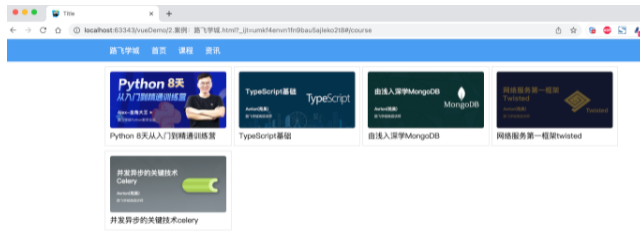
1 <!DOCTYPE html> 2 <html lang="en"> 3 <head> 4 <meta charset="UTF-8"> 5 <title>Title</title> 6 <style> 7 body { 8 margin: 0; 9 } 10 11 .container { 12 width: 1100px; 13 margin: 0 auto; 14 } 15 16 .menu { 17 height: 48px; 18 background-color: #499ef3; 19 line-height: 48px; 20 21 } 22 23 .menu a { 24 color: white; 25 text-decoration: none; 26 padding: 0 10px; 27 } 28 29 .course-list { 30 display: flex; 31 flex-wrap: wrap; 32 justify-content: flex-start; 33 } 34 35 .course-list .item { 36 width: 248px; 37 padding: 10px; 38 border: 1px solid #dddddd; 39 margin-right: 5px; 40 margin-top: 10px; 41 } 42 43 .course-list .item img { 44 width: 100%; 45 height: 120px; 46 } 47 </style> 48 49 <script src="vue.js"></script> 50 <script src="vue-router.js"></script> 51 <script src="axios.min.js"></script> // 发送请求 52 </head> 53 <body> 54 <div id="app"> 55 <div class="menu"> 56 <div class="container"> 57 <router-link to="/">路飞学城</router-link> 58 <router-link to="/home">首页</router-link> 59 <router-link to="/course">课程</router-link> 60 <router-link to="/news">资讯</router-link> 61 </div> 62 </div> 63 <div class="container"> 64 <router-view></router-view> 65 </div> 66 67 </div> 68 69 <script> 70 71 const Home = { //组件 72 data: function () { 73 return { 74 title: "欢迎使用路飞学城" 75 } 76 }, 77 template: `<h2>{{title}}</h2>` 78 } 79 const Course = { 80 data: function () { 81 return { 82 courseList: [] 83 } 84 }, 85 created: function () { 86 /* 组件创建完成之后自动触发【此时组件的对象已创建,但还未将页面先关的DOM创建并显示在页面上】 87 - 可以去操作组件对象,例如:this.courseList = [11,22,33] 88 - 不可以去操作DOM,例如:document.getElementById (因为还未创建) 89 */ 90 axios({ 91 method: "get", 92 url: 'https://api.luffycity.com/api/v1/course/actual/?limit=5&offset=0', 93 headers: { 94 "Content-Type": "application/json" 95 } 96 }).then((res) => { 97 this.courseList = res.data.data.result; //这个this作用域在created 代表vue对象 98 }) 99 100 }, 101 mounted: function () { 102 /* DOM对象已在页面上生成,此时就可以 操作DOM了*/ 103 }, 104 template: ` 105 <div class="course-list"> 106 <div class="item" v-for="item in courseList"> 107 <img :src="item.cover" alt=""> 108 <a>{{item.name}}</a> 109 </div> 110 </div>` 111 } 112 const News = { 113 data: function () { 114 return { 115 dataList: [] 116 } 117 }, 118 created: function () { 119 /* 组件创建完成之后自动触发【此时组件的对象已创建,但还未将页面先关的DOM创建并显示在页面上】 120 - 可以去操作组件对象,例如:this.courseList = [11,22,33] 121 - 不可以去操作DOM,例如:document.getElementById (未创建) 122 */ 123 axios({ 124 method: "get", 125 url: 'https://api.luffycity.com/api/v1/course/actual/?limit=5&offset=10', 126 headers: { 127 "Content-Type": "application/json" 128 } 129 }).then((res) => { 130 this.dataList = res.data.data.result; 131 }) 132 133 }, 134 template: `<ul><li v-for="item in dataList">{{item.name}}</li></ul>` 135 } 136 137 const router = new VueRouter({ 138 routes: [ 139 {path: '/', component: Home}, 140 {path: '/home', component: Home}, 141 {path: '/course', component: Course}, 142 {path: '/news', component: News} 143 ], 144 //mode: 'history' 145 }) 146 147 var app = new Vue({ 148 el: '#app', 149 data: {}, 150 methods: {}, 151 router: router 152 }) 153 </script> 154 </body> 155 </html> 156
4.3 路由和传值
当某个组件可以根据某些参数值的不同,展示不同效果时,需要用到动态路由。
例如:访问网站看到课程列表,点击某个课程,就可以跳转到课程详细页面(根据课程ID不同展示不同数据)。
如何来设置动态路由呢? 定义路由 const router = new VueRouter({ routes: [ { path: '/', component: Home}, { path: '/course', component: Course, name: "Course"} { path: '/detail/:id', component: Detail, name: "Detail"} ], }) HTML展示 <div> // to 直接写死路由 <router-link to="/">首页</router-link> <router-link to="/course">课程</router-link> <router-link to="/detail/123">课程</router-link> // 通过path找路由 <router-link :to="{path:'/course'}">课程</router-link> // :to 绑定 可以动态 <router-link :to="{path:'/course?size=19&page=2'}">课程</router-link> <router-link :to="{path:'/course', query:{size:19,page:2}">课程</router-link> // query:{size:19,page:2} 自动添加参数 size=19&page=2 // 通过name找路由 <router-link :to="{name:'Course'}">课程</router-link> <router-link :to="{name:'Course', query:{size:19,page:2} }">课程</router-link> <router-link :to="{path:'/detail/22',query:{size:123}}">Linux</router-link> <router-link :to="{name:'Detail',params:{id:3}, query:{size:29}}">网络安全</router-link> // params:{id:3} 就是path: '/detail/:id'的 :id </div> <h1>内容区域</h1> <router-view></router-view> 组件获取URL传值和GET参数 const Detail = { data: function () { return { title: "详细页面", paramDict: null, queryDict: null, } }, created: function () { this.paramDict = this.$route.params; // 读取的是'/detail/:id' :id this.queryDict = this.$route.query; // 读取的是问号后面course?size=19&page=2 // 发送axios请求 }, template: `<div><h2>{{title}}</h2><div>当前请求的数据 {{paramDict}} {{queryDict}}</div></div>` }
案例:路飞学城(第2版)
点击课程,查看课程详细页面。

1 <!DOCTYPE html> 2 <html lang="en"> 3 <head> 4 <meta charset="UTF-8"> 5 <title>Title</title> 6 7 // CSS 8 <style> 9 body { 10 margin: 0; 11 } 12 13 .container { 14 width: 1100px; 15 margin: 0 auto; 16 } 17 18 .menu { 19 height: 48px; 20 background-color: #499ef3; 21 line-height: 48px; 22 23 } 24 25 .menu a { 26 color: white; 27 text-decoration: none; 28 padding: 0 10px; 29 } 30 31 .course-list { 32 display: flex; 33 flex-wrap: wrap; 34 justify-content: flex-start; 35 } 36 37 .course-list .item { 38 width: 248px; 39 padding: 10px; 40 border: 1px solid #dddddd; 41 margin-right: 5px; 42 margin-top: 10px; 43 } 44 45 .course-list .item img { 46 width: 100%; 47 height: 120px; 48 } 49 50 </style> 51 52 // 引入相关JS 53 <script src="vue.js"></script> 54 <script src="vue-router.js"></script> 55 <script src="axios.min.js"></script> 56 </head> 57 <body> 58 // router组件 59 <div id="app"> 60 <div class="menu"> 61 <div class="container"> 62 // to= 是写死的 找相关路由 加载组件 63 <router-link to="/">路飞学城</router-link> 64 <router-link to="/home">首页</router-link> 65 <router-link to="/course">课程</router-link> 66 <router-link to="/news">资讯</router-link> 67 </div> 68 </div> 69 <div class="container"> 70 <router-view></router-view> 71 </div> 72 73 </div> 74 75 <script> 76 77 const Home = { 78 data: function () { 79 return { 80 title: "欢迎使用路飞学城" 81 } 82 }, 83 template: `<h2>{{title}}</h2>` 84 } 85 const Course = { 86 data: function () { 87 return { 88 courseList: [] 89 } 90 }, 91 created: function () { 92 /* 组件创建完成之后自动触发【此时组件的对象已创建,但还未将页面先关的DOM创建并显示在页面上】 93 - 可以去操作组件对象,例如:this.courseList = [11,22,33] 94 - 不可以去操作DOM,例如:document.getElementById (未创建) 95 */ 96 axios({ 97 method: "get", 98 url: 'https://api.luffycity.com/api/v1/course/actual/?limit=5&offset=0', 99 headers: { 100 "Content-Type": "application/json" 101 } 102 }).then((res) => { 103 this.courseList = res.data.data.result; 104 }) 105 106 }, 107 mounted: function () { 108 /* DOM对象已在页面上生成,此时就可以 */ 109 }, 110 template: ` 111 <div class="course-list"> 112 113 <div class="item" v-for="item in courseList"> 114 // 可点击 加载相应组件 115 <router-link :to="{name:'Detail',params:{id:item.id}}"> 116 <img :src="item.cover" alt=""> 117 <a>{{item.name}}</a> 118 </router-link> 119 </div> 120 121 </div>` 122 } 123 const News = { 124 data: function () { 125 return { 126 dataList: [] 127 } 128 }, 129 created: function () { 130 /* 组件创建完成之后自动触发【此时组件的对象已创建,但还未将页面先关的DOM创建并显示在页面上】 131 - 可以去操作组件对象,例如:this.courseList = [11,22,33] 132 - 不可以去操作DOM,例如:document.getElementById (未创建) 133 */ 134 axios({ 135 method: "get", 136 url: 'https://api.luffycity.com/api/v1/course/actual/?limit=5&offset=10', 137 headers: { 138 "Content-Type": "application/json" 139 } 140 }).then((res) => { 141 this.dataList = res.data.data.result; 142 }) 143 144 }, 145 template: `<ul><li v-for="item in dataList">{{item.name}}</li></ul>` 146 } 147 148 const Detail = { 149 data: function () { 150 return { 151 title: "详细页面", 152 courseId: null 153 } 154 }, 155 created: function () { 156 // 获取params.id 根据路由'/detail/:id' 157 this.courseId = this.$route.params.id; 158 // 此处可以根据课程ID,发送ajax请求获取课程详细信息 159 }, 160 template: `<div><h2>课程详细页面</h2><div>当前课程ID为:{{courseId}}</div></div>` 161 } 162 163 const router = new VueRouter({ 164 routes: [ 165 {path: '/', component: Home}, 166 {path: '/home', component: Home}, 167 {path: '/course', component: Course}, 168 {path: '/news', component: News}, 169 {path: '/detail/:id', component: Detail, name: 'Detail'} 170 ], 171 //mode: 'history' 172 }) 173 174 var app = new Vue({ 175 el: '#app', 176 data: {}, 177 methods: {}, 178 router: router 179 }) 180 </script> 181 </body> 182 </html> 183
### 4.5 无法刷新 上述编写案例是没有问题,但如果在开发中会涉及到 同一个路由的跳转(默认不会重新加载页面,数据无法获取)。
例如:在详细页面再出现一个课程推荐,即:在课程详细,点击推荐的课程后跳转到课程详细页面(课程ID不同),此时课程的ID还是原来加载的ID,无法获取推荐课程的ID。
**如何解决呢?** 在课程详细的组件中设置watch属性(监测vue对象里的值是否发生变化)即可,watch会监测`$route` 值(路由),一旦发生变化,就执行触发相应的函数。
```javascript
const Detail = {
    data: function () {
        return {
            title: "详细页面",
            courseId: null,

        }
    },
    created: function () {
        this.courseId = this.$route.params.id;
        // 此处可以根据课程    ID 发送ajax请求获取课程详细信息
        this.getCourseDetail();
    },
    watch: {
        $route:function(to, from) {//to(表示要跳转的值), from(表示原来的值)
            this.courseId = to.params.id;
            // 此处可以根据课程    ID 发送ajax请求获取课程详细信息
            // this.getCourseDetail();
        }
    },
    methods: {
        getCourseDetail: function () {
            // 根据this.courseId获取课程详细信息
        }
    },
    template: `<div><h2>{{title}}</h2><div>当前请求的数据 {{paramDict}}  {{queryDict}}</div></div>`
}
```
#### 案例:路飞学城(第3版)

> 在详细页面实现推荐课程
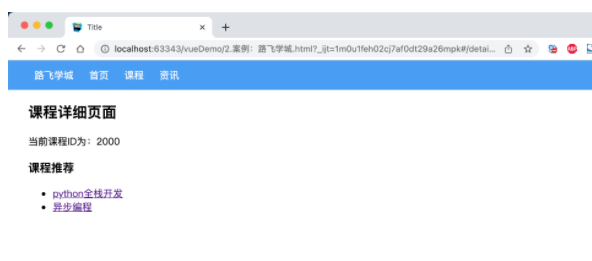
  1 ```html
  2 <!DOCTYPE html>
  3 <html lang="en">
  4 <head>
  5     <meta charset="UTF-8">
  6     <title>Title</title>
  7     <style>
  8         body {
  9             margin: 0;
 10         }
 11
 12         .container {
 13             width: 1100px;
 14             margin: 0 auto;
 15         }
 16
 17         .menu {
 18             height: 48px;
 19             background-color: #499ef3;
 20             line-height: 48px;
 21
 22         }
 23
 24         .menu a {
 25             color: white;
 26             text-decoration: none;
 27             padding: 0 10px;
 28         }
 29
 30         .course-list {
 31             display: flex;
 32             flex-wrap: wrap;
 33             justify-content: flex-start;
 34         }
 35
 36         .course-list .item {
 37             width: 248px;
 38             padding: 10px;
 39             border: 1px solid #dddddd;
 40             margin-right: 5px;
 41             margin-top: 10px;
 42         }
 43
 44         .course-list .item img {
 45             width: 100%;
 46             height: 120px;
 47         }
 48     </style>
 49
 50     <script src="vue.js"></script>
 51     <script src="vue-router.js"></script>
 52     <script src="axios.min.js"></script>
 53 </head>
 54 <body>
 55 <div id="app">
 56     <div class="menu">
 57         <div class="container">
 58             <router-link to="/">路飞学城</router-link>
 59             <router-link to="/home">首页</router-link>
 60             <router-link to="/course">课程</router-link>
 61             <router-link to="/news">资讯</router-link>
 62         </div>
 63     </div>
 64     <div class="container">
 65         <router-view></router-view>
 66     </div>
 67
 68 </div>
 69
 70 <script>
 71
 72     const Home = {
 73         data: function () {
 74             return {
 75                 title: "欢迎使用路飞学城"
 76             }
 77         },
 78         template: `<h2>{{title}}</h2>`
 79     }
 80     const Course = {
 81         data: function () {
 82             return {
 83                 courseList: []
 84             }
 85         },
 86         created: function () {
 87             /* 组件创建完成之后自动触发【此时组件的对象已创建,但还未将页面先关的DOM创建并显示在页面上】
 88                  - 可以去操作组件对象,例如:this.courseList = [11,22,33]
 89                  - 不可以去操作DOM,例如:document.getElementById (未创建)
 90              */
 91             axios({
 92                 method: "get",
 93                 url: 'https://api.luffycity.com/api/v1/course/actual/?limit=5&offset=0',
 94                 headers: {
 95                     "Content-Type": "application/json"
 96                 }
 97             }).then((res) => {
 98                 this.courseList = res.data.data.result;
 99             })
100
101         },
102         mounted: function () {
103             /* DOM对象已在页面上生成,此时就可以 */
104         },
105         template: `
106             <div class="course-list">
107
108                 <div class="item" v-for="item in courseList">
109                     <router-link :to="{name:'Detail',params:{id:item.id}}">
110                         <img :src="item.cover" alt="">
111                         <a>{{item.name}}</a>
112                      </router-link>
113                 </div>
114
115             </div>`
116     }
117     const News = {
118         data: function () {
119             return {
120                 dataList: []
121             }
122         },
123         created: function () {
124             /* 组件创建完成之后自动触发【此时组件的对象已创建,但还未将页面先关的DOM创建并显示在页面上】
125                  - 可以去操作组件对象,例如:this.courseList = [11,22,33]
126                  - 不可以去操作DOM,例如:document.getElementById (未创建)
127              */
128             axios({
129                 method: "get",
130                 url: 'https://api.luffycity.com/api/v1/course/actual/?limit=5&offset=10',
131                 headers: {
132                     "Content-Type": "application/json"
133                 }
134             }).then((res) => {
135                 this.dataList = res.data.data.result;
136             })
137
138         },
139         template: `<ul><li v-for="item in dataList">{{item.name}}</li></ul>`
140     }
141
142     const Detail = {
143         data: function () {
144             return {
145                 title: "详细页面",
146                 courseId: null,
147                 hotCourseList: [ // 详细页面实现 热门课程推荐
148                     {id: 1000, title: "python全栈开发"},
149                     {id: 2000, title: "异步编程"},
150                 ],
151             }
152         },
153         created: function () { // 当前组件跳转到当前组件 没有更新courseId 所以需要watch
154             this.courseId = this.$route.params.id;
155             // 此处可以根据课程ID,发送ajax请求获取课程详细信息
156             this.getCourseDetail();
157         },
158         watch: {
159             $route: function (to, from) { // to(表示要跳转的值), from(表示原来的值)
160                 this.courseId = to.params.id;
161                 this.getCourseDetail();
162             }
163         },
164         methods: {
165             getCourseDetail: function () {
166                 // 根据this.courseId获取课程详细信息
167             }
168         },
169         template: `
170                 <div>
171                     <h2>课程详细页面</h2>
172                     <div>当前课程ID为:{{courseId}}</div>
173                     <h3>课程推荐</h3>
174                     <ul>
175                         <li v-for="item in hotCourseList">
176                             <router-link :to="{name:'Detail', params:{id:item.id}}">{{item.title}}</router-link>
177                         </li>
178                     </ul>
179                 </div>`
180     }
181
182     const router = new VueRouter({
183         routes: [
184             {path: '/', component: Home},
185             {path: '/home', component: Home},
186             {path: '/course', component: Course},
187             {path: '/news', component: News},
188             {path: '/detail:id', component: Detail, name: 'Detail'}
189         ],
190         //mode: 'history'
191     })
192
193     var app = new Vue({
194         el: '#app',
195         data: {},
196         methods: {},
197         router: router
198     })
199 </script>
200 </body>
201 </html>
202 ```
### 4.6 路由嵌套 点击标题下的子标题时只有局部会发生变化、
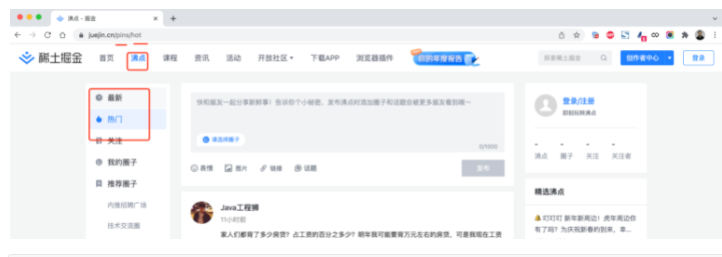
```javascript
const router = new VueRouter({
  routes: [
    {
      path: '/pins/', // 路由
      component: Pins, // 组件
      children: [ // 子路由
        {
          // 当 /pins/hot 匹配成功,
          // Hot子组件 会被渲染在 这个父组件Pins 的 <router-view> 中 而不是整体的<router-view> 中
          path: 'hot',// 子路由 会拼接到父路由上去
          component: Hot // 子组件
        },
        {
          // 当 /pins/following 匹配成功,
          // Following组件 会被渲染在 Pins 的 <router-view> 中
          path: 'following',
          component: Following
        }
      ]
    }
  ]
})
```
#### 案例:路飞学城(第4版)
  1 #### 案例:路飞学城(第4版)
  2
  3 ```html
  4 <!DOCTYPE html>
  5 <html lang="en">
  6 <head>
  7     <meta charset="UTF-8">
  8     <title>Title</title>
  9     <style>
 10         body {
 11             margin: 0;
 12         }
 13
 14         .container {
 15             width: 1100px;
 16             margin: 0 auto;
 17         }
 18
 19         .menu {
 20             height: 48px;
 21             background-color: #499ef3;
 22             line-height: 48px;
 23
 24         }
 25
 26         .menu a {
 27             color: white;
 28             text-decoration: none;
 29             padding: 0 10px;
 30         }
 31
 32         .course-list {
 33             display: flex;
 34             flex-wrap: wrap;
 35             justify-content: flex-start;
 36         }
 37
 38         .course-list .item {
 39             width: 248px;
 40             padding: 10px;
 41             border: 1px solid #dddddd;
 42             margin-right: 5px;
 43             margin-top: 10px;
 44         }
 45
 46         .course-list .item img {
 47             width: 100%;
 48             height: 120px;
 49         }
 50     </style>
 51
 52     <script src="vue.js"></script>
 53     <script src="vue-router.js"></script>
 54     <script src="axios.min.js"></script>
 55 </head>
 56 <body>
 57 <div id="app">
 58     <div class="menu">
 59         <div class="container">
 60             <router-link to="/">路飞学城</router-link>
 61             <router-link to="/pins">沸点</router-link>
 62             <router-link to="/home">首页</router-link>
 63             <router-link to="/course">课程</router-link>
 64             <router-link to="/news">资讯</router-link>
 65         </div>
 66     </div>
 67     <div class="container"> // 上面的这些组件加载到router-view中 找到沸点组件里还有router-link
 68         <router-view></router-view>
 69     </div>
 70
 71 </div>
 72
 73 <script>
 74
 75     const Home = {
 76         data: function () {
 77             return {
 78                 title: "欢迎使用路飞学城"
 79             }
 80         },
 81         template: `<h2>{{title}}</h2>`
 82     }
 83     const Course = {
 84         data: function () {
 85             return {
 86                 courseList: []
 87             }
 88         },
 89         created: function () {
 90             /* 组件创建完成之后自动触发【此时组件的对象已创建,但还未将页面先关的DOM创建并显示在页面上】
 91                  - 可以去操作组件对象,例如:this.courseList = [11,22,33]
 92                  - 不可以去操作DOM,例如:document.getElementById (未创建)
 93              */
 94             axios({
 95                 method: "get",
 96                 url: 'https://api.luffycity.com/api/v1/course/actual/?limit=5&offset=0',
 97                 headers: {
 98                     "Content-Type": "application/json"
 99                 }
100             }).then((res) => {
101                 this.courseList = res.data.data.result;
102             })
103
104         },
105         mounted: function () {
106             /* DOM对象已在页面上生成,此时就可以 */
107         },
108         template: `
109             <div class="course-list">
110
111                 <div class="item" v-for="item in courseList">
112                     <router-link :to="{name:'Detail',params:{id:item.id}}">
113                         <img :src="item.cover" alt="">
114                         <a>{{item.name}}</a>
115                      </router-link>
116                 </div>
117
118             </div>`
119     }
120     const News = {
121         data: function () {
122             return {
123                 dataList: []
124             }
125         },
126         created: function () {
127             /* 组件创建完成之后自动触发【此时组件的对象已创建,但还未将页面先关的DOM创建并显示在页面上】
128                  - 可以去操作组件对象,例如:this.courseList = [11,22,33]
129                  - 不可以去操作DOM,例如:document.getElementById (未创建)
130              */
131             axios({
132                 method: "get",
133                 url: 'https://api.luffycity.com/api/v1/course/actual/?limit=5&offset=10',
134                 headers: {
135                     "Content-Type": "application/json"
136                 }
137             }).then((res) => {
138                 this.dataList = res.data.data.result;
139             })
140
141         },
142         template: `<ul><li v-for="item in dataList">{{item.name}}</li></ul>`
143     }
144     const Detail = {
145         data: function () {
146             return {
147                 title: "详细页面",
148                 courseId: null,
149                 hotCourseList: [
150                     {id: 1000, title: "python全栈开发"},
151                     {id: 2000, title: "异步编程"},
152                 ],
153             }
154         },
155         created: function () {
156             this.courseId = this.$route.params.id;
157             // 此处可以根据课程ID,发送ajax请求获取课程详细信息
158             this.getCourseDetail();
159         },
160         watch: {
161             $route: function (to, from) {
162                 this.courseId = to.params.id;
163                 this.getCourseDetail();
164             }
165         },
166         methods: {
167             getCourseDetail: function () {
168                 // 根据this.courseId获取课程详细信息
169             }
170         },
171         template: `
172                 <div>
173                     <h2>课程详细页面</h2>
174                     <div>当前课程ID为:{{courseId}}</div>
175                     <h3>课程推荐</h3>
176                     <ul>
177                         <li v-for="item in hotCourseList">
178                             <router-link :to="{name:'Detail', params:{id:item.id}}">{{item.title}}</router-link>
179                         </li>
180                     </ul>
181                 </div>`
182     }
183
184     const Pins = { // 沸点组件里还有router-link和router-view
185         data: function () {
186             return {}
187         },
188         template: `
189             <div>
190                 <h2>沸点专区</h2>
191                 // 组件的嵌套
192                 <router-link :to="{name:'Hot'}">热点</router-link>
193                 <router-link :to="{name:'Following'}">关注</router-link>
194                 <router-view></router-view>
195             </div>
196          `
197     };
198
199     const Hot = {template: `<div><h2>Hot页面</h2></div>`};
200     const Following = {template: `<div><h2>Following页面</h2></div>`};
201
202     const router = new VueRouter({
203         routes: [
204             {path: '/', component: Home},
205             {path: '/home', component: Home},
206             {path: '/course', component: Course},
207             {path: '/news', component: News},
208             {path: '/detail:id', component: Detail, name: 'Detail'},
209             {
210                 path: '/pins',
211                 component: Pins,
212                 name: 'Pins',
213                 children: [
214                     {
215                         // 当 /pins/hot 匹配成功,
216                         // Hot组件 会被渲染在 Pins 的 <router-view> 中
217                         path: 'hot',
218                         component: Hot,
219                         name:'Hot'
220                     },
221                     {
222                         // 当 /pins/following 匹配成功,
223                         // Following组件 会被渲染在 Pins 的 <router-view> 中
224                         path: 'following',
225                         component: Following,
226                         name:'Following'
227                     }
228                 ]
229             }
230         ],
231         //mode: 'history'
232     })
233
234     var app = new Vue({
235         el: '#app',
236         data: {},
237         methods: {},
238         router: router
239     })
240 </script>
241 </body>
242 </html>
243 ```
#### 案例:后台分类菜单
![]()
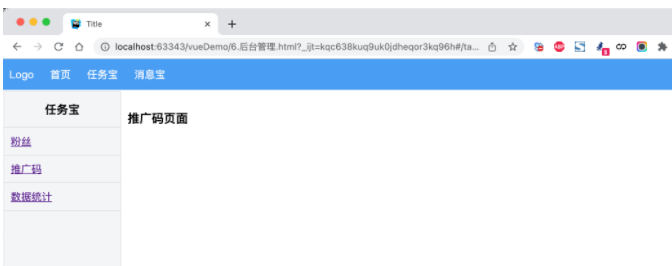
  1 ```html
  2 <!DOCTYPE html>
  3 <html lang="en">
  4 <head>
  5     <meta charset="UTF-8">
  6     <title>Title</title>
  7     <style>
  8         body {
  9             margin: 0;
 10         }
 11
 12         .header {
 13             height: 48px;
 14             background-color: #499ef3;
 15             line-height: 48px;
 16
 17         }
 18
 19         .header a {
 20             color: white;
 21             text-decoration: none;
 22             padding: 0 10px;
 23         }
 24
 25         .body .left-menu {
 26             width: 180px;
 27             border: 1px solid #dddddd;
 28             border-bottom: 0;
 29             position: absolute;
 30             left: 1px;
 31             top: 50px;
 32             bottom: 0;
 33             overflow: auto;
 34             background-color: #f3f5f7;
 35         }
 36
 37         .body .left-menu .head {
 38             border-bottom: 1px solid #dddddd;
 39             text-align: center;
 40             font-size: 18px;
 41             font-weight: bold;
 42             padding: 15px;
 43         }
 44
 45         .body .left-menu a {
 46             display: block;
 47             padding: 10px;
 48             border-bottom: 1px solid #dddddd;
 49         }
 50
 51         .body .right-body {
 52             position: absolute;
 53             left: 183px;
 54             top: 50px;
 55             right: 0;
 56             bottom: 0;
 57             overflow: auto;
 58             padding: 10px;
 59
 60         }
 61     </style>
 62
 63     <script src="vue.js"></script>
 64     <script src="vue-router.js"></script>
 65     <script src="axios.min.js"></script>
 66 </head>
 67 <body>
 68 <div id="app">
 69     <div class="header">
 70         <router-link to="/">Logo</router-link>
 71         <router-link to="/home">首页</router-link>
 72         <router-link to="/task">任务宝</router-link>
 73         <router-link to="/message">消息宝</router-link>
 74     </div>
 75     <div class="body">
 76         <router-view></router-view>
 77     </div>
 78
 79 </div>
 80
 81 <script>
 82
 83     const Home = {
 84         data: function () {
 85             return {
 86                 title: "欢迎使用xx系统"
 87             }
 88         },
 89         template: `<h2>{{title}}</h2>`
 90     };
 91
 92     const Task = {
 93         data: function () {
 94             return {}
 95         },
 96         template: `
 97             <div>
 98                 <div class="left-menu">
 99                     <div class="head">任务宝</div>
100                     <router-link :to="{name:'Fans'}">粉丝</router-link>
101                     <router-link :to="{name:'Spread'}">推广码</router-link>
102                     <router-link :to="{name:'Statistics'}">数据统计</router-link>
103                 </div>
104                 <div class="right-body">
105                     <router-view></router-view>
106                 </div>
107
108             </div>`
109     };
110
111     const Fans = {template: `<h3>粉丝页面</h3>`};
112     const Spread = {template: `<h3>推广码页面</h3>`};
113     const Statistics = {template: `<h3>数据统计页面</h3>`};
114
115     const Message = {
116         data: function () {
117             return {}
118         },
119         template: `
120             <div>
121                 <div class="left-menu">
122                     <div class="head">消息宝</div>
123                     <router-link :to="{name:'Sop'}">SOP</router-link>
124                     <router-link :to="{name:'Send'}">推送管理</router-link>
125                 </div>
126                 <div class="right-body">
127                     <router-view></router-view>
128                 </div>
129
130             </div>`
131     };
132
133     const Sop = {template: `<h3>SOP页面</h3>`};
134     const Send = {template: `<h3>推送管理页面</h3>`};
135
136     const router = new VueRouter({
137         routes: [
138             {path: '/', component: Home},
139             {path: '/home', component: Home},
140             {
141                 path: '/task',
142                 component: Task,
143                 name: 'Task',
144                 children: [
145                     {
146                         path: '',
147                         // component: Fans,
148                         // redirect:'/task/fans'
149                         redirect: {name: 'Fans'} // 默认跳转到那个页面
150                     },
151                     {
152                         path: 'fans',
153                         component: Fans,
154                         name: 'Fans'
155                     },
156                     {
157                         path: 'spread',
158                         component: Spread,
159                         name: 'Spread'
160                     },
161                     {
162                         path: 'statistics',
163                         component: Statistics,
164                         name: 'Statistics'
165                     }
166                 ]
167             },
168             {
169                 path: '/message',
170                 component: Message,
171                 name: 'Message',
172                 children: [
173                     {
174                         path: 'sop',
175                         component: Sop,
176                         name: 'Sop'
177                     },
178                     {
179                         path: 'send',
180                         component: Send,
181                         name: 'Send'
182                     }
183                 ]
184             }
185         ]
186     })
187
188     var app = new Vue({
189         el: '#app',
190         data: {},
191         methods: {},
192         router: router
193     })
194 </script>
195 </body>
196 </html>
197 ```
### 4.7 编程式导航(组件之间的跳转)
除了使用 `<router-link>` 编译完会创建 a 标签来定义导航链接,我们还可以借助 router 的实例方法,通过编写代码来实现。 想要导航到不同的 URL,则使用 `router.push` 方法。
这个方法会向 浏览器的一个栈history 栈添加一个新的记录,所以,当用户点击浏览器后退按钮时,则回到之前的 URL。 - router.push(主要用 会把记录都保留着 可以回退)
 ```javascript
  // 字符串
  router.push('home')

  // 对象
  router.push({ path: 'home' })

  // 命名的路由(更多用这个)
  router.push({ name: 'user', params: { userId: '123' }}) //

  // 带查询参数,变成 /register?plan=private
  router.push({ path: 'register', query: { plan: 'private' }})
  ```

- router.replace (替换掉当前页面地址 无法回退了)

  ```javascript
  // 字符串
  router.replace('home')

  // 对象
  router.replace({ path: 'home' })

  // 命名的路由
  router.replace({ name: 'user', params: { userId: '123' }})

  // 带查询参数,变成 /register?plan=private
  router.replace({ path: 'register', query: { plan: 'private' }})

  # 跟 router.push 很像,唯一的不同就是,它不会向 history 添加新记录,而是跟它的方法名一样 —— 替换掉当前的 history 记录。
  ```

- router.go  这个方法的参数是一个整数,意思是在 history 记录中向前或者后退多少步

  ```javascript
  // 在浏览器记录中前进一步,等同于 history.forward()
  router.go(1)

  // 后退一步记录,等同于 history.back()
  router.go(-1)

  // 前进 3 步记录
  router.go(3)

  // 如果 history 记录不够用,那就默默地失败呗
  router.go(-100)
  router.go(100)
  ```
#### 案例:登录跳转(含顶部)
![]()
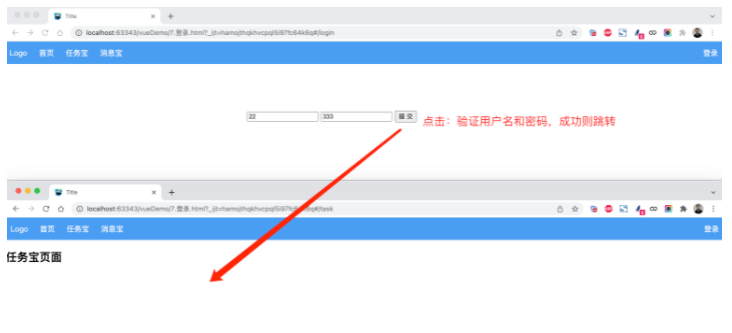
  1 ```html
  2 <!DOCTYPE html>
  3 <html lang="en">
  4 <head>
  5     <meta charset="UTF-8">
  6     <title>Title</title>
  7     <style>
  8         body {
  9             margin: 0;
 10         }
 11
 12         .header {
 13             height: 48px;
 14             background-color: #499ef3;
 15             line-height: 48px;
 16
 17         }
 18
 19         .header a {
 20             color: white;
 21             text-decoration: none;
 22             padding: 0 10px;
 23         }
 24
 25
 26     </style>
 27     <script src="vue.js"></script>
 28     <script src="vue-router.js"></script>
 29 </head>
 30 <body>
 31 <div id="app">
 32     <div class="header">
 33         <router-link to="/">Logo</router-link>
 34         <router-link to="/home">首页</router-link>
 35         <router-link to="/task">任务宝</router-link>
 36         <router-link to="/message">消息宝</router-link>
 37
 38         <div style="float: right;">
 39             <router-link to="/login">登录</router-link>
 40         </div>
 41     </div>
 42     <div class="body">
 43         <router-view></router-view>
 44     </div>
 45
 46 </div>
 47
 48 <script>
 49
 50     const Home = {
 51         data: function () {
 52             return {
 53                 title: "欢迎使用xx系统"
 54             }
 55         },
 56         template: `<h2>{{title}}</h2>`
 57     };
 58
 59     const Task = {
 60         data: function () {
 61             return {}
 62         },
 63         template: `
 64             <div>
 65                 <h2>任务宝页面</h2>
 66             </div>`
 67     };
 68
 69     const Message = {
 70         data: function () {
 71             return {}
 72         },
 73         template: `
 74             <div>
 75                 <h2>消息宝页面</h2>
 76             </div>`
 77     };
 78
 79     const Login = {
 80         data: function () {
 81             return {
 82                 user: '',
 83                 pwd: ''
 84             }
 85         },
 86         methods: {
 87             doLogin: function () {
 88                 if (this.user.length > 0 && this.pwd.length > 0) {
 89                     this.$router.push({name: 'Task'}); // 登录成功后 跳转到Task 页
 90                     // this.$router.replace({name: 'Task'});
 91                 }
 92             }
 93         },
 94         template: `
 95             <div style="width: 500px;margin: 100px auto">
 96                 <input type="text" placeholder="用户名" v-model="user"/>
 97                 <input type="text" placeholder="密码" v-model="pwd" />
 98                 <input type="button" value="提 交"  @click="doLogin" />
 99             </div>
100          `
101     };
102     const router = new VueRouter({
103         routes: [
104             {path: '/', component: Home},
105             {path: '/home', component: Home},
106             {path: '/login', component: Login, name: 'Login'},
107             {path: '/task', component: Task, name: 'Task'},
108             {path: '/message', component: Message, name: 'Message'}
109         ]
110     })
111
112     var app = new Vue({
113         el: '#app',
114         data: {},
115         methods: {},
116         router: router
117     })
118 </script>
119 </body>
120 </html>
121 ```
####

#### 案例:登录跳转(不含顶部)

登录页 不应该有导航 就是独立的登录页(设计到路由间的嵌套了)
![]()
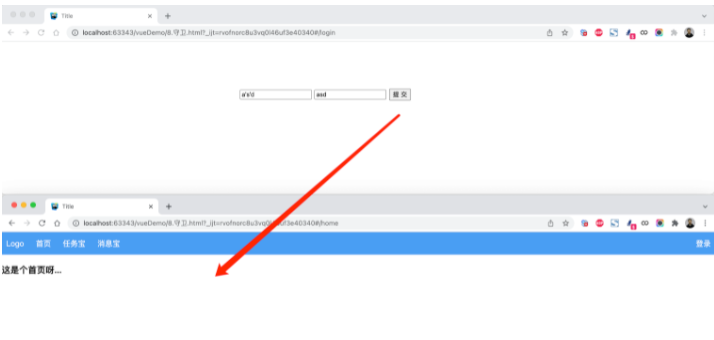
  1 ```html
  2 <!DOCTYPE html>
  3 <html lang="en">
  4 <head>
  5     <meta charset="UTF-8">
  6     <title>Title</title>
  7     <style>
  8         body {
  9             margin: 0;
 10         }
 11
 12         .header {
 13             height: 48px;
 14             background-color: #499ef3;
 15             line-height: 48px;
 16
 17         }
 18
 19         .header a {
 20             color: white;
 21             text-decoration: none;
 22             padding: 0 10px;
 23         }
 24
 25         .body .left-menu {
 26             width: 180px;
 27             border: 1px solid #dddddd;
 28             border-bottom: 0;
 29             position: absolute;
 30             left: 1px;
 31             top: 50px;
 32             bottom: 0;
 33             overflow: auto;
 34             background-color: #f3f5f7;
 35         }
 36
 37         .body .left-menu .head {
 38             border-bottom: 1px solid #dddddd;
 39             text-align: center;
 40             font-size: 18px;
 41             font-weight: bold;
 42             padding: 15px;
 43         }
 44
 45         .body .left-menu a {
 46             display: block;
 47             padding: 10px;
 48             border-bottom: 1px solid #dddddd;
 49         }
 50
 51         .body .right-body {
 52             position: absolute;
 53             left: 183px;
 54             top: 50px;
 55             right: 0;
 56             bottom: 0;
 57             overflow: auto;
 58             padding: 10px;
 59
 60         }
 61     </style>
 62     <script src="vue.js"></script>
 63     <script src="vue-router.js"></script>
 64 </head>
 65 <body>
 66 <div id="app">// 一般是有router-link点击直接进来 进行展示的(这块就是用户点一个url后自动进来一个组件)
 67     <router-view></router-view>
 68 </div>
 69
 70 <script>
 71
 72     const Home = {
 73         data: function () {
 74             return {
 75                 title: "欢迎使用xx系统"
 76             }
 77         },
 78         template: `
 79             <div>
 80                 <div class="header">
 81                     <router-link to="/">Logo</router-link>
 82                     <router-link to="/home">首页</router-link>
 83                     <router-link :to="{name:'Task'}">任务宝</router-link>
 84                     <router-link :to="{name:'Message'}">消息宝</router-link>
 85
 86                     <div style="float: right;">
 87                         <router-link to="/login">登录</router-link>
 88                     </div>
 89                 </div>
 90                 <div class="body">
 91                     <router-view></router-view>
 92                 </div>
 93
 94             </div>
 95         `
 96     };
 97
 98     const Index = {template: '<h3>这是个首页呀...</h3>'}
 99
100     const Task = {
101         data: function () {
102             return {}
103         },
104         template: `
105             <div>
106                 <div class="left-menu">
107                     <div class="head">任务宝</div>
108                     <router-link :to="{name:'Fans'}">粉丝</router-link>
109                     <router-link :to="{name:'Spread'}">推广码</router-link>
110                     <router-link :to="{name:'Statistics'}">数据统计</router-link>
111                 </div>
112                 <div class="right-body">
113                     <router-view></router-view>
114                 </div>
115
116             </div>`
117     };
118
119     const Fans = {template: `<h3>粉丝页面</h3>`};
120     const Spread = {template: `<h3>推广码页面</h3>`};
121     const Statistics = {template: `<h3>数据统计页面</h3>`};
122
123     const Message = {
124         data: function () {
125             return {}
126         },
127         template: `
128             <div>
129                 <div class="left-menu">
130                     <div class="head">消息宝</div>
131                     <router-link :to="{name:'Sop'}">SOP</router-link>
132                     <router-link :to="{name:'Send'}">推送管理</router-link>
133                 </div>
134                 <div class="right-body">
135                     <router-view></router-view>
136                 </div>
137
138             </div>`
139     };
140
141     const Sop = {template: `<h3>SOP页面</h3>`};
142     const Send = {template: `<h3>推送管理页面</h3>`};
143     const Login = {
144         data: function () {
145             return {
146                 user: '',
147                 pwd: ''
148             }
149         },
150         methods: {
151             doLogin: function () {
152                 if (this.user.length > 0 && this.pwd.length > 0) {
153                     this.$router.push({name: 'Index'});
154                     // this.$router.replace({name: 'Task'});
155                 }
156             }
157         },
158         template: `
159             <div style="width: 500px;margin: 100px auto">
160                 <input type="text" placeholder="用户名" v-model="user"/>
161                 <input type="text" placeholder="密码" v-model="pwd" />
162                 <input type="button" value="提 交"  @click="doLogin" />
163             </div>
164          `
165     };
166
167
168
169     const router = new VueRouter({ //routes里有很多路由
170         routes: [
171             {
172                 path: '/',
173                 // component: Home,
174                 redirect: '/login'  // 当访问 '/'这个url后默认进入login这个组件
175             },
176             {path: '/login', component: Login, name: 'Login'},
177             {
178                 path: '/home',
179                 component: Home,//home组件里有自己的router-link和router-views
180                 children: [
181                     {
182                         path: '',// 空 进入home组件后默认展示出Index组件
183                         component: Index,
184                         name: "Index"
185                     },
186                     {
187                         path: 'task',// 点击task 会进入Task组件 里面嵌套了自己的组件
188                         component: Task,
189                         name: 'Task',
190                         children: [
191                             {
192                                 path: 'fans',
193                                 component: Fans,
194                                 name: 'Fans'
195                             },
196                             {
197                                 path: 'spread',
198                                 component: Spread,
199                                 name: 'Spread'
200                             },
201                             {
202                                 path: 'statistics',
203                                 component: Statistics,
204                                 name: 'Statistics'
205                             }
206                         ]
207                     },
208                     {
209                         path: 'message',
210                         component: Message,
211                         name: 'Message',
212                         children: [
213                             {
214                                 path: 'sop',
215                                 component: Sop,
216                                 name: 'Sop'
217                             },
218                             {
219                                 path: 'send',
220                                 component: Send,
221                                 name: 'Send'
222                             }
223                         ]
224                     }
225                 ],
226             },
227
228         ]
229     })
230
231     var app = new Vue({
232         el: '#app',
233         data: {},
234         methods: {},
235         router: router
236     })
237 </script>
238 </body>
239 </html>
240 ```
### ### 4.8 导航守卫(一个拦截器)
在基于vue-router实现访问跳转时,都会执行一个钩子。
```javascript
const router = new VueRouter({ ... })

router.beforeEach((to, from, next) => {// 可以基于它做后台登录
    // to: Route: 即将要进入的目标 路由对象
    // from: Route: 当前导航正要离开的路由
    // next() 通过这个函数决定是否继续向后执行
        // next(false) 中断导航,保持当前所在的页面。
        // next('/')   next({path:'/'}) next({name:'Login'})  跳转到指定页面
})
```

注意:可以基于他实现未登录跳转登录页面。
#### 案例:登录拦截(全局)

> 未登录时,访问后台管理页面,自动跳转到登录页面。
![]()
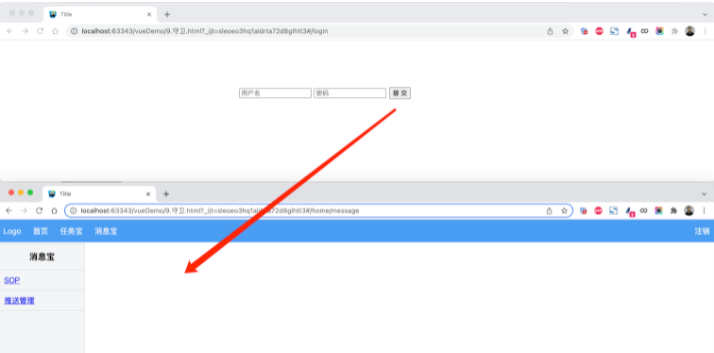
1 ```html 2 <!DOCTYPE html> 3 <html lang="en"> 4 <head> 5 <meta charset="UTF-8"> 6 <title>Title</title> 7 <style> 8 body { 9 margin: 0; 10 } 11 12 .header { 13 height: 48px; 14 background-color: #499ef3; 15 line-height: 48px; 16 17 } 18 19 .header a { 20 color: white; 21 text-decoration: none; 22 padding: 0 10px; 23 } 24 25 .body .left-menu { 26 width: 180px; 27 border: 1px solid #dddddd; 28 border-bottom: 0; 29 position: absolute; 30 left: 1px; 31 top: 50px; 32 bottom: 0; 33 overflow: auto; 34 background-color: #f3f5f7; 35 } 36 37 .body .left-menu .head { 38 border-bottom: 1px solid #dddddd; 39 text-align: center; 40 font-size: 18px; 41 font-weight: bold; 42 padding: 15px; 43 } 44 45 .body .left-menu a { 46 display: block; 47 padding: 10px; 48 border-bottom: 1px solid #dddddd; 49 } 50 51 .body .right-body { 52 position: absolute; 53 left: 183px; 54 top: 50px; 55 right: 0; 56 bottom: 0; 57 overflow: auto; 58 padding: 10px; 59 60 } 61 </style> 62 <script src="vue.js"></script> 63 <script src="vue-router.js"></script> 64 </head> 65 <body> 66 <div id="app"> 67 <router-view></router-view> 68 </div> 69 70 <script> 71 72 const Home = { 73 data: function () { 74 return { 75 title: "欢迎使用xx系统" 76 } 77 }, 78 methods: { 79 doLogout: function () { 80 sessionStorage.clear(); 81 this.$router.push({name: "Login"}); 82 } 83 }, 84 template: ` 85 <div> 86 <div class="header"> 87 <router-link to="/">Logo</router-link> 88 <router-link to="/home">首页</router-link> 89 <router-link :to="{name:'Task'}">任务宝</router-link> 90 <router-link :to="{name:'Message'}">消息宝</router-link> 91 92 <div style="float: right;"> 93 <a @click="doLogout">注销</a> 94 </div> 95 </div> 96 <div class="body"> 97 <router-view></router-view> 98 </div> 99 100 </div> 101 ` 102 }; 103 104 const Index = {template: '<h3>这是个首页呀...</h3>'} 105 106 const Task = { 107 data: function () { 108 return {} 109 }, 110 template: ` 111 <div> 112 <div class="left-menu"> 113 <div class="head">任务宝</div> 114 <router-link :to="{name:'Fans'}">粉丝</router-link> 115 <router-link :to="{name:'Spread'}">推广码</router-link> 116 <router-link :to="{name:'Statistics'}">数据统计</router-link> 117 </div> 118 <div class="right-body"> 119 <router-view></router-view> 120 </div> 121 122 </div>` 123 }; 124 125 const Fans = {template: `<h3>粉丝页面</h3>`}; 126 const Spread = {template: `<h3>推广码页面</h3>`}; 127 const Statistics = {template: `<h3>数据统计页面</h3>`}; 128 129 const Message = { 130 data: function () { 131 return {} 132 }, 133 template: ` 134 <div> 135 <div class="left-menu"> 136 <div class="head">消息宝</div> 137 <router-link :to="{name:'Sop'}">SOP</router-link> 138 <router-link :to="{name:'Send'}">推送管理</router-link> 139 </div> 140 <div class="right-body"> 141 <router-view></router-view> 142 </div> 143 144 </div>` 145 }; 146 147 const Sop = {template: `<h3>SOP页面</h3>`}; 148 const Send = {template: `<h3>推送管理页面</h3>`}; 149 const Login = { 150 data: function () { 151 return { 152 user: '', 153 pwd: '' 154 } 155 }, 156 methods: { 157 doLogin: function () { 158 if (this.user.length > 0 && this.pwd.length > 0) { 159 sessionStorage.setItem("isLogin", true);// 符合要求将参数存到浏览器上 160 this.$router.push({name: 'Index'}); // 跳转到index 161 } 162 } 163 }, 164 template: ` 165 <div style="width: 500px;margin: 100px auto"> 166 <input type="text" placeholder="用户名" v-model="user"/> 167 <input type="text" placeholder="密码" v-model="pwd" /> 168 <input type="button" value="提 交" @click="doLogin" /> 169 </div> 170 ` 171 }; 172 const router = new VueRouter({ 173 routes: [ 174 { 175 path: '/', 176 component: Home, 177 redirect: '/home' 178 }, 179 { 180 path: '/home', 181 component: Home, 182 name: "Home", 183 children: [ 184 { 185 path: '', 186 component: Index, 187 name: "Index" 188 }, 189 { 190 path: 'task', 191 component: Task, 192 name: 'Task', 193 children: [ 194 { 195 path: 'fans', 196 component: Fans, 197 name: 'Fans' 198 }, 199 { 200 path: 'spread', 201 component: Spread, 202 name: 'Spread' 203 }, 204 { 205 path: 'statistics', 206 component: Statistics, 207 name: 'Statistics' 208 } 209 ] 210 }, 211 { 212 path: 'message', 213 component: Message, 214 name: 'Message', 215 children: [ 216 { 217 path: 'sop', 218 component: Sop, 219 name: 'Sop' 220 }, 221 { 222 path: 'send', 223 component: Send, 224 name: 'Send' 225 } 226 ] 227 } 228 ], 229 }, 230 {path: '/login', component: Login, name: 'Login'}, 231 ] 232 }) 233 // 这种拦截是放在了全局 直接给router添加的 代表所有的请求 234 router.beforeEach((to, from, next) => { // 拦截器 235 // 如果已登录,则可以继续访问目标地址 236 // 看 doLogin函数 如果浏览器中sessionStorage有值就继续往下走 237 if (sessionStorage.getItem('isLogin')) { 238 next(); 239 return; 240 } 241 // 未登录,访问登录页面 242 if (to.name === "Login") { 243 next(); 244 return; 245 } 246 // 未登录,跳转登录页面 247 // next(false); 保持当前所在页面,不跳转 248 next({name: 'Login'}); 249 }) 250 251 var app = new Vue({ 252 el: '#app', 253 data: {}, 254 methods: {}, 255 router: router 256 }) 257 </script> 258 </body> 259 </html> 260 ``` 261 262 263 264 #### 案例:登录拦截(路由) 265 266 ```html 267 <!DOCTYPE html> 268 <html lang="en"> 269 <head> 270 <meta charset="UTF-8"> 271 <title>Title</title> 272 <style> 273 body { 274 margin: 0; 275 } 276 277 .header { 278 height: 48px; 279 background-color: #499ef3; 280 line-height: 48px; 281 282 } 283 284 .header a { 285 color: white; 286 text-decoration: none; 287 padding: 0 10px; 288 } 289 290 .body .left-menu { 291 width: 180px; 292 border: 1px solid #dddddd; 293 border-bottom: 0; 294 position: absolute; 295 left: 1px; 296 top: 50px; 297 bottom: 0; 298 overflow: auto; 299 background-color: #f3f5f7; 300 } 301 302 .body .left-menu .head { 303 border-bottom: 1px solid #dddddd; 304 text-align: center; 305 font-size: 18px; 306 font-weight: bold; 307 padding: 15px; 308 } 309 310 .body .left-menu a { 311 display: block; 312 padding: 10px; 313 border-bottom: 1px solid #dddddd; 314 } 315 316 .body .right-body { 317 position: absolute; 318 left: 183px; 319 top: 50px; 320 right: 0; 321 bottom: 0; 322 overflow: auto; 323 padding: 10px; 324 325 } 326 </style> 327 <script src="vue.js"></script> 328 <script src="vue-router.js"></script> 329 </head> 330 <body> 331 <div id="app"> 332 <router-view></router-view> 333 </div> 334 335 <script> 336 337 const Home = { 338 data: function () { 339 return { 340 title: "欢迎使用xx系统" 341 } 342 }, 343 methods: { 344 doLogout: function () { 345 sessionStorage.clear(); 346 this.$router.push({name: "Login"}); 347 } 348 }, 349 template: ` 350 <div> 351 <div class="header"> 352 <router-link to="/">Logo</router-link> 353 <router-link to="/home">首页</router-link> 354 <router-link :to="{name:'Task'}">任务宝</router-link> 355 <router-link :to="{name:'Message'}">消息宝</router-link> 356 357 <div style="float: right;"> 358 <a @click="doLogout">注销</a> 359 </div> 360 </div> 361 <div class="body"> 362 <router-view></router-view> 363 </div> 364 365 </div> 366 ` 367 }; 368 369 const Index = {template: '<h3>这是个首页呀...</h3>'} 370 371 const Task = { 372 data: function () { 373 return {} 374 }, 375 template: ` 376 <div> 377 <div class="left-menu"> 378 <div class="head">任务宝</div> 379 <router-link :to="{name:'Fans'}">粉丝</router-link> 380 <router-link :to="{name:'Spread'}">推广码</router-link> 381 <router-link :to="{name:'Statistics'}">数据统计</router-link> 382 </div> 383 <div class="right-body"> 384 <router-view></router-view> 385 </div> 386 387 </div>` 388 }; 389 390 const Fans = {template: `<h3>粉丝页面</h3>`}; 391 const Spread = {template: `<h3>推广码页面</h3>`}; 392 const Statistics = {template: `<h3>数据统计页面</h3>`}; 393 394 const Message = { 395 data: function () { 396 return {} 397 }, 398 template: ` 399 <div> 400 <div class="left-menu"> 401 <div class="head">消息宝</div> 402 <router-link :to="{name:'Sop'}">SOP</router-link> 403 <router-link :to="{name:'Send'}">推送管理</router-link> 404 </div> 405 <div class="right-body"> 406 <router-view></router-view> 407 </div> 408 409 </div>` 410 }; 411 412 const Sop = {template: `<h3>SOP页面</h3>`}; 413 const Send = {template: `<h3>推送管理页面</h3>`}; 414 const Login = { 415 data: function () { 416 return { 417 user: '', 418 pwd: '' 419 } 420 }, 421 methods: { 422 doLogin: function () { 423 if (this.user.length > 0 && this.pwd.length > 0) { 424 sessionStorage.setItem("isLogin", true); 425 this.$router.push({name: 'Index'}); 426 } 427 } 428 }, 429 template: ` 430 <div style="width: 500px;margin: 100px auto"> 431 <input type="text" placeholder="用户名" v-model="user"/> 432 <input type="text" placeholder="密码" v-model="pwd" /> 433 <input type="button" value="提 交" @click="doLogin" /> 434 </div> 435 ` 436 }; 437 const router = new VueRouter({ 438 routes: [ 439 { 440 path: '/', 441 component: Home, 442 redirect: '/home' 443 }, 444 { 445 path: '/home', 446 component: Home, 447 name: "Home", 448 children: [ 449 { 450 path: '', 451 component: Index, 452 name: "Index" 453 }, 454 { 455 path: 'task', 456 component: Task, 457 name: 'Task', 458 children: [ 459 { 460 path: 'fans', 461 component: Fans, 462 name: 'Fans' 463 }, 464 { 465 path: 'spread', 466 component: Spread, 467 name: 'Spread' 468 }, 469 { 470 path: 'statistics', 471 component: Statistics, 472 name: 'Statistics' 473 } 474 ] 475 }, 476 { 477 path: 'message', 478 component: Message, 479 name: 'Message', 480 children: [ 481 { 482 path: 'sop', 483 component: Sop, 484 name: 'Sop' 485 }, 486 { 487 path: 'send', 488 component: Send, 489 name: 'Send' 490 } 491 ] 492 } 493 ], 494 // 这种应用的范围没有上面那种大 上面那种是针对所有的url都会捕获到拦截 495 // 这个在home组件里加的拦截器 针对home里的路由(所以就不用判断用户访问的是不是登录页面) 496 beforeEnter: (to, from, next) => { //这里只针对某些路由也可以做相应的拦截 497 if (sessionStorage.getItem('isLogin')) { 498 next(); 499 return; 500 } 501 // 未登录,跳转登录页面 502 // next(false); 保持当前所在页面,不跳转 503 next({name: 'Login'}); 504 } 505 }, 506 {path: '/login', component: Login, name: 'Login'}, 507 ] 508 }) 509 510 var app = new Vue({ 511 el: '#app', 512 data: {}, 513 methods: {}, 514 router: router 515 }) 516 </script> 517 </body> 518 </html> 519 ``` 520 521 522 523 **补充:** 524 525 - cookie 526 527 - localStorage(会一直存储着) 528 529 ``` 530 这些都是localStorage和sessionStorage的方法 531 setItem (key, value) 532 getItem (key) 533 removeItem (key) 534 clear () 535 key (index) 536 ``` 537 538 - sessionStorage(生命周期很短 关闭页面就没有了) 539 540 都是用来在浏览器中存储数据的

 浙公网安备 33010602011771号