
全志T527/A527 Linux系统镜像的编译与生成-盈鹏飞嵌入式
公司最近评估T527,使用的是盈鹏飞嵌入式的T527开发板-AHD-X527,该开发板支持4路AHD摄像头输入,也可以支持6路,不过需要增加一个转换板。恰好符合我们的应用。以下操作都是在该开发板上操作,该产品介绍如下:
AHD-X527产品特性:
-
采用Allwinner公司Cortex-A55八核A527/T527处理器,运行最高速度为2.0GHZ(T527最高1.8GHZ);
-
支持Mali-G57 MC1 GPU,支持OpenGL ES 3.2/2.0/1.0, Valkan 1.1,OpenCL 2.0
-
支持4K/25fps H.264视频编码,支持4K/15fps MJPEG编码;
-
多格式4K/60fps视频解码 (H.265,H.264,VC-1, MPEG-1/2/4, VP8) ;
-
支持双屏异显;支持HDMI 2.0B, 分辨率最高4K@60fps;支持LVDS,分辨率最高1920x1080@60fps;支持MIPI DSI,分辨率最高2.5K@60fps(与LVDS复用);
-
支持1-4G Bytes LPDDR4X SDRAM;
-
支持EMMC 8G-64G大容量电子盘,可启动;
-
支持1路USB 3.0;支持3路USB2.0 HOST和一路OTG(TYPE-C接口);
-
支持2路I2C(其中一路支持掉电唤醒)、2路PWM(应用于背光);
-
支持双路千兆以太网;
-
支持3G/4G通信;
-
支持2路UART(TTL)、支持1路RS485、支持双路CAN BUS(2.0B,仅T527支持);
-
支持4路AHD摄像头输入,最高分辨率为1080p;支持MIPI CSI接口-1x4-lane/2x2-lane;
-
操作系统的支持,可预装Android13/LINUX 5.15/Ubuntu 22.04;
-
尺寸为146X119MM
AHD-X527产品功能:
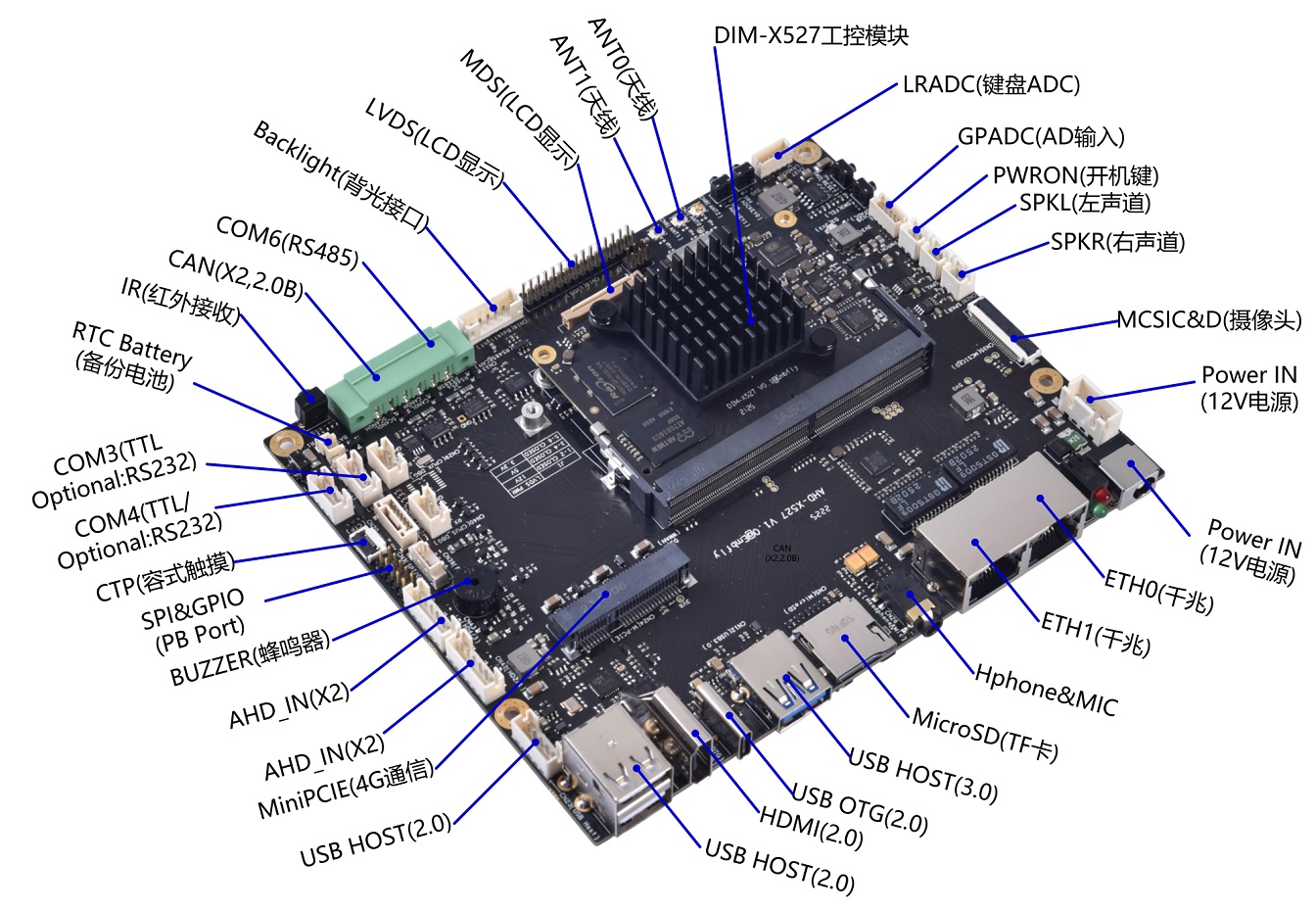
Linux系统镜像编译与生成
2.1、配置编译选项
在LinuxSDK根目录下,执行如下命令,进行编译环境配置。配置完后,根据提示可以使用快捷键命令进行目录切换。
Host# source ./build/envsetup.sh
点击查看代码
ping@embfly-server:~/work/a527_t527/TinaLinux$ source build/envsetup.sh
NOTE: The SDK(/home/ping/work/a527_t527/TinaLinux) was successfully loaded
load buildroot,dragonboard,bsp...ok
Invoke . build/quick.sh from your shell to add the following functions to your environment:
    croot / cl                     - Changes directory to the top of the tree
    cbrandy                        - Changes directory to the brandy
    cspl / cboot0                  - Changes directory to the spl
    csbi[10|14] / copensbi[10|14]  - Changes directory to the opensbi
    cu / cuboot / cboot            - Changes directory to the uboot
    cubsp / cubootbsp / cbootbsp   - Changes directory to the uboot-bsp
    carisc                         - Changes directory to the arisc
    ck / ckernel                   - Changes directory to the kernel
    cbsp                           - Changes directory to the bsp
    cbsptest                       - Changes directory to the bsptest
    cdts                           - Changes directory to the kernel's dts
    cchip / cchips                 - Changes directory to the chip
    cbin                           - Changes directory to the chip's bin
    cboard / cconfigs / cbd        - Changes directory to the board
    crootfs                        - Changes directory to the rootfs
    cdsp                           - Changes directory to the dsp
    crtos                          - Changes directory to the rtos
    crtoshal / crtos-hal           - Changes directory to the rtos-hal
    cbuild                         - Changes directory to the build
    cbr                            - Changes directory to the buildroot
    copenssl                       - Changes directory to the product's openssl-1.0.0
    cout                           - Changes directory to the product's output
    ckout / ckernelout             - Changes directory to the kernel output
Usage: build.sh [args]
    build.sh                       - default build all
    build.sh bootloader            - only build bootloader
    build.sh kernel                - only build kernel
    build.sh buildroot_rootfs      - only build buildroot
    build.sh uboot_menuconfig       - edit uboot menuconfig
    build.sh uboot_saveconfig       - save uboot menuconfig
    build.sh menuconfig            - edit kernel menuconfig
    build.sh saveconfig            - save kernel menuconfig
    build.sh recovery_menuconfig   - edit recovery menuconfig
    build.sh recovery_saveconfig   - save recovery menuconfig
    build.sh buildroot_menuconfig  - edit buildroot menuconfig
    build.sh buildroot_saveconfig  - save buildroot menuconfig
    build.sh clean                 - clean all
    build.sh distclean             - distclean all
    build.sh pack                  - pack firmware
    build.sh pack_debug            - pack firmware with debug info output to card0
    build.sh pack_secure           - pack firmware with secureboot
Usage: pack [args]
    pack                           - pack firmware
    pack -d                        - pack firmware with debug info output to card0
    pack -s                        - pack firmware with secureboot
    pack -sd                       - pack firmware with secureboot and debug info output to card0
ping@embfly-server:~/work/a527_t527/TinaLinux$
点击查看代码
ping@embfly-server:~/work/a527_t527/TinaLinux$ ./build.sh config
========ACTION List: mk_config ;========
options :
All available platform:
   0. android
   1. linux
Choice [linux]: 1
All available linux_dev:
   0. bsp
   1. dragonboard
   2. buildroot
   3. debian
Choice [buildroot]: 2
All available ic:
   0. a523
   1. a527
   2. t527
Choice [t527]: 2
All available board:
   0. ahd_t527
   1. demo_linux_aiot
   2. demo_linux_aiot_nand
   3. demo_linux_aiot_spinand
Choice [ahd_t527]: 0
All available flash:
   0. default
   1. nor
Choice [default]: 0
All available kern_name:
   0. linux-5.10
   1. linux-5.15
Choice [linux-5.15]: 1
Setup BSP files
INFO: kernel relative recovery defconfig: ../../../../../device/config/chips/t527/configs/ahd_t527/linux-5.15/bsp_recovery_defconfig
INFO: kernel absolute recovery defconfig: /home/ping/work/a527_t527/TinaLinux/device/config/chips/t527/configs/ahd_t527/linux-5.15/bsp_recovery_defconfig
INFO: Prepare toolchain ...
INFO: kernel defconfig: generate /home/ping/work/a527_t527/TinaLinux/out/t527/kernel/build/.config by /home/ping/work/a527_t527/TinaLinux/device/config/chips/t527/configs/ahd_t527/linux-5.15/bsp_defconfig
INFO: Prepare toolchain ...
make: Entering directory '/home/ping/work/a527_t527/TinaLinux/kernel/linux-5.15'
make[1]: Entering directory '/home/ping/work/a527_t527/TinaLinux/out/t527/kernel/build'
  GEN     Makefile
*** Default configuration is based on '../../../../../device/config/chips/t527/configs/ahd_t527/linux-5.15/bsp_defconfig'
#
# No change to .config
#
make[1]: Leaving directory '/home/ping/work/a527_t527/TinaLinux/out/t527/kernel/build'
make: Leaving directory '/home/ping/work/a527_t527/TinaLinux/kernel/linux-5.15'
make: Entering directory '/home/ping/work/a527_t527/TinaLinux/buildroot/buildroot-202205'
  GEN     /home/ping/work/a527_t527/TinaLinux/out/t527/ahd_t527/buildroot/buildroot/Makefile
Config.in.legacy:232:warning: choice value used outside its choice group
#
# configuration written to /home/ping/work/a527_t527/TinaLinux/out/t527/ahd_t527/buildroot/buildroot/.config
#
make: Leaving directory '/home/ping/work/a527_t527/TinaLinux/buildroot/buildroot-202205'
INFO: buildroot defconfig is sun55iw3p1_aiot_t527_defconfig
INFO: clean buildserver
INFO: prepare_buildserver
备注(1):
All available linux_dev:
- bsp
- dragonboard
- buildroot
- debian
Choice [buildroot]: 2
本处是选择根文件系统,可以选择使用debian根文件系统,也可以使用buildroot的根文件系统,还可以选择dragonboard根文件系统(测试主板用的根文件系统)。因为我们是要使用buildroot的根文件系统,因此选择2;
备注(2):
All available ic:
- a523
- a527
- t527
Choice [t527]: 2
本处是处理器,A527和T527是PIN TO PIN兼容的,如果您购买的产品是基于A527处理器的,那么请选择A527;
备注(3):
All available board:
- ahd_t527
- demo_linux_aiot
- demo_linux_aiot_nand
- demo_linux_aiot_spinand
这个步骤是选择您的板型,例如我司的板型是AHD_T527(基于T527的板子)。选择了板型,也就选择了板型对应的相关配置文件,例如dts文件等。ahd_t527的相关配置文件目录在
点击查看代码
ping@embfly-server:~/work/x527_aiot_v14/TinaLinux/device/config/chips/t527/configs/ahd_t527$ tree  -L 1
.
├── arisc.config
├── bin
├── BoardConfig_c906.mk
├── BoardConfig.mk
├── board.dts -> linux-5.15/board.dts
├── boottone.fex
├── buildroot
├── debian
├── dragonboard
├── dtbo
├── linux-5.10
├── linux-5.15
├── sys_config_ddr_2GB.fex
├── sys_config.fex
└── uboot-board.dts
备注(4):
如过程中出现提示"Python:python: command not found",表示系统没有找到Python,参考如下步骤解决:
(1)检查是否安装了Python:
Host# python --version
如果没有安装,可以执行如下命令进行安装Python(推荐安装Python3)。
Host# sudo apt update
Host# sudo apt install python3 -y
(2)执行如下命令,创建一个符号链接使系统将python指向python3。
Host# sudo ln -s /usr/bin/python3 /usr/bin/python
备注(5):
配置完成后,在
sun55iw3p1_aiot_a527_defconfig;指定了u-boot的编译配置是buildroot的编译配置是sun55iw3p1_a527_axp717b_defconfig ,见
LICHEE_BRANDY_DEFCONF=sun55iw3p1_a527_axp717b_defconfig
点击查看代码
export LICHEE_PLATFORM=linux
export LICHEE_LINUX_DEV=buildroot
export LICHEE_IC=a527
export LICHEE_BOARD=ahd_a527
export LICHEE_FLASH=default
export LICHEE_KERN_NAME=linux-5.15
export LICHEE_KERNEL_ARCH=arm64
export LICHEE_ARCH=arm64
export LICHEE_KERN_VER=linux-5.15
export LICHEE_KERNEL_VERSION=5.15.147
export LICHEE_KERN_DEFCONF=bsp_defconfig
export LICHEE_KERN_DEFCONF_RT=
export LICHEE_BUILDING_SYSTEM=buildroot
export LICHEE_BR_VER=202205
export LICHEE_BR_DEFCONF=sun55iw3p1_aiot_a527_defconfig
export LICHEE_DEFCONFIG_FRAGMENT=
export LICHEE_PRODUCT=
export LICHEE_BRANDY_VER=2.0
export LICHEE_BRANDY_DEFCONF=sun55iw3p1_a527_axp717b_defconfig
export LICHEE_BRANDY_UBOOT_VER=
export LICHEE_BRANDY_BUILD_OPTION=
export LICHEE_COMPILER_TAR=aarch64/gcc-arm-10.3-2021.07-x86_64-aarch64-none-linux-gnu.tar.xz
export LICHEE_ROOTFS=target-arm64-10.3
export LICHEE_RAMFS=
export LICHEE_BUSSINESS=
export LICHEE_BR_RAMFS_CONF=
export LICHEE_CHIP=sun55iw3p1
export LICHEE_RTOS_PROJECT_NAME=
export LICHEE_DSP_PROJECT_NAME=
export LICHEE_PACK_HOOK=
export LICHEE_PACK_SECURE_TYPE=
export LICHEE_REDUNDANT_ENV_SIZE=
export LICHEE_BRANDY_SPL=
export LICHEE_COMPRESS=
export LICHEE_NO_RAMDISK_NEEDED=
export LICHEE_RAMDISK_PATH=
export LICHEE_KERN_DEFCONF_RECOVERY=bsp_recovery_defconfig
export LICHEE_USE_INDEPENDENT_BSP=true
export LICHEE_INDEPENDENT_PACK=
export LICHEE_BOOT0_BIN_NAME=
export LICHEE_EFEX_BIN_NAME=
export LICHEE_EFEX_DEFCONF=
export ANDROID_CLANG_PATH=
export ANDROID_TOOLCHAIN_PATH=
export ANDROID_CLANG_ARGS=
export LICHEE_BSP_STAGING=
export LICHEE_GEN_BOOT0_DTS_INFO=
export LICHEE_KERN_SYSTEM=
export LICHEE_KERN_DEFCONF_RELATIVE=../../../../../device/config/chips/a527/configs/ahd_a527/linux-5.15/bsp_defconfig
export LICHEE_KERN_DEFCONF_ABSOLUTE=/home/ping/work/x527_aiot_v14/TinaLinux/device/config/chips/a527/configs/ahd_a527/linux-5.15/bsp_defconfig
export LICHEE_KERN_DEFCONF_RECOVERY_RELATIVE=../../../../../device/config/chips/a527/configs/ahd_a527/linux-5.15/bsp_recovery_defconfig
export LICHEE_KERN_DEFCONF_RECOVERY_ABSOLUTE=/home/ping/work/x527_aiot_v14/TinaLinux/device/config/chips/a527/configs/ahd_a527/linux-5.15/bsp_recovery_defconfig
export LICHEE_CROSS_COMPILER=aarch64-none-linux-gnu
export LICHEE_TOP_DIR=/home/ping/work/x527_aiot_v14/TinaLinux
export LICHEE_CBBPKG_DIR=/home/ping/work/x527_aiot_v14/TinaLinux/platform
export LICHEE_BRANDY_DIR=/home/ping/work/x527_aiot_v14/TinaLinux/brandy/brandy-2.0
export LICHEE_BUILD_DIR=/home/ping/work/x527_aiot_v14/TinaLinux/build
export LICHEE_BR_DIR=/home/ping/work/x527_aiot_v14/TinaLinux/buildroot/buildroot-202205
export LICHEE_DEVICE_DIR=/home/ping/work/x527_aiot_v14/TinaLinux/device
export LICHEE_KERN_DIR=/home/ping/work/x527_aiot_v14/TinaLinux/kernel/linux-5.15
export LICHEE_BSP_DIR=/home/ping/work/x527_aiot_v14/TinaLinux/bsp
export BSP_TOP=
export LICHEE_PLATFORM_DIR=/home/ping/work/x527_aiot_v14/TinaLinux/platform
export LICHEE_SATA_DIR=/home/ping/work/x527_aiot_v14/TinaLinux/test/SATA
export LICHEE_DRAGONABTS_DIR=/home/ping/work/x527_aiot_v14/TinaLinux/test/dragonabts
export LICHEE_DRAGONBAORD_DIR=/home/ping/work/x527_aiot_v14/TinaLinux/test/dragonboard
export LICHEE_TOOLS_DIR=/home/ping/work/x527_aiot_v14/TinaLinux/tools
export LICHEE_COMMON_CONFIG_DIR=/home/ping/work/x527_aiot_v14/TinaLinux/device/config/common
export LICHEE_CHIP_CONFIG_DIR=/home/ping/work/x527_aiot_v14/TinaLinux/device/config/chips/a527
export LICHEE_BOARD_CONFIG_DIR=/home/ping/work/x527_aiot_v14/TinaLinux/device/config/chips/a527/configs/ahd_a527
export LICHEE_PRODUCT_CONFIG_DIR=/home/ping/work/x527_aiot_v14/TinaLinux/device/target/
export LICHEE_OUT_DIR=/home/ping/work/x527_aiot_v14/TinaLinux/out
export LICHEE_BRANDY_OUT_DIR=/home/ping/work/x527_aiot_v14/TinaLinux/device/config/chips/a527/bin
export LICHEE_BR_OUT=/home/ping/work/x527_aiot_v14/TinaLinux/out/a527/ahd_a527/buildroot/buildroot
export LICHEE_PACK_OUT_DIR=/home/ping/work/x527_aiot_v14/TinaLinux/out/a527/ahd_a527/pack_out
export LICHEE_TOOLCHAIN_PATH=/home/ping/work/x527_aiot_v14/TinaLinux/out/toolchain/gcc-arm-10.3-2021.07-x86_64-aarch64-none-linux-gnu
export LICHEE_PLAT_OUT=/home/ping/work/x527_aiot_v14/TinaLinux/out/a527/ahd_a527/buildroot
export LICHEE_BOARDCONFIG_PATH="/home/ping/work/x527_aiot_v14/TinaLinux/device/config/chips/a527/configs/default/BoardConfig.mk /home/ping/work/x527_aiot_v14/TinaLinux/device/config/chips/a527/configs/ahd_a527/BoardConfig.mk /home/ping/work/x527_aiot_v14/TinaLinux/device/config/chips/a527/configs/ahd_a527/buildroot/BoardConfig.mk /home/ping/work/x527_aiot_v14/TinaLinux/out/BoardConfig-select.mk /home/ping/work/x527_aiot_v14/TinaLinux/device/config/chips/a527/configs/default/BoardConfig-conditions.mk"
export LICHEE_ARISC_PATH=/home/ping/work/x527_aiot_v14/TinaLinux/brandy/arisc
export LICHEE_DRAMLIB_PATH=/home/ping/work/x527_aiot_v14/TinaLinux/brandy/dramlib
export LICHEE_KERN_TYPE=
export LICHEE_POSSIBLE_BIN_PATH="bin /bin configs/ahd_a527/bin configs/ahd_a527//bin configs/ahd_a527/buildroot/bin configs/ahd_a527/buildroot//bin"
export QT_INSTALL_DIR=/home/ping/work/x527_aiot_v14/TinaLinux/out/a527/ahd_a527/buildroot/buildroot/host/usr/bin
2.2、编译LinuxSDK
2.2.1、全局编译LinuxSDK
根据实际项目需要,配置完内核选项以及文件系统选项。在LinuxSDK根目录下执行如下命令,可一键编译SPL、U-Boot、Linux内核和文件系统。
Host# ./build.sh
等待编译完成,完成界面如下所示:
点击查看代码
……
Created filesystem with 9199/131072 inodes and 245346/524288 blocks
/home/ping/work/x527_aiot_v14/TinaLinux/build/bin/make_ext4fs -s -l 2147483648 /home/ping/work/x527_aiot_v14/TinaLinux/out/a527/ahd_a527/buildroot/rootfs.ext4  /home/ping/work/x527_aiot_v14/TinaLinux/out/a527/ahd_a527/buildroot/buildroot/target
Error: max_leb_cnt too low (2544 needed)
Parallel mksquashfs: Using 32 processors
Creating 4.0 filesystem on /home/ping/work/x527_aiot_v14/TinaLinux/out/a527/ahd_a527/buildroot/rootfs.squashfs, block size 131072.

Exportable Squashfs 4.0 filesystem, xz compressed, data block size 131072
        compressed data, compressed metadata, compressed fragments, no xattrs
        duplicates are removed
Filesystem size 215811.70 Kbytes (210.75 Mbytes)
        35.76% of uncompressed filesystem size (603444.42 Kbytes)
Inode table size 79730 bytes (77.86 Kbytes)
        25.45% of uncompressed inode table size (313282 bytes)
Directory table size 87710 bytes (85.65 Kbytes)
        43.01% of uncompressed directory table size (203953 bytes)
Number of duplicate files found 90
Number of inodes 8727
Number of files 6982
Number of fragments 795
Number of symbolic links  1142
Number of device nodes 0
Number of fifo nodes 0
Number of socket nodes 0
Number of directories 603
Number of ids (unique uids + gids) 1
Number of uids 1
        root (0)
Number of gids 1
        root (0)
INFO: pack rootfs ok ...
INFO: ----------------------------------------
INFO: build OK.
INFO: ----------------------------------------
执行如下命令,打包生成Linux系统镜像文件。将新生成的系统镜像固化至核心板即可更新系统。
Host# ./build.sh pack
点击查看代码
……
Begin Parse sys_partion.fex

AddPartion boot-resource.fex BOOT-RESOURCE_FEX
AddPartion very boot-resource.fex BOOT-RESOURCE_FEX
FilePath: boot-resource.fex
FileLength=b75400
AddPartion env.fex ENV_FEX000000000
AddPartion very env.fex ENV_FEX000000000
FilePath: env.fex
FileLength=20000
AddPartion boot.fex BOOT_FEX00000000
AddPartion very boot.fex BOOT_FEX00000000
FilePath: boot.fex
FileLength=19e0800
AddPartion rootfs.fex ROOTFS_FEX000000
AddPartion very rootfs.fex ROOTFS_FEX000000
FilePath: rootfs.fex
FileLength=39ffeb78
BuildImg0
Dragon execute image.cfg SUCCESS !
----------image is at----------

1.1G    /home/ping/work/x527_aiot_v14/TinaLinux/out/a527_linux_ahd_a527_uart0.img
最后生成的镜像位于目录
2.2.2、编译某buildroot组件报错的解决办法
如编译过程中出现某个buildroot组件报错,按照如下办法进行处理。编译buildroot某个组件时,都会在对应组件目录生成如下几个文件,例如:以编译ahd_a527板型(a527的处理器)产品时bluez5_utils-5.54的组件为例(编译该组件的目录是
2.2.3、清除编译生成文件
如如果生成一个新板型的固件,需要执行如下命令清除所有之前生成的文件,重新进行编译。
Host# ./build.sh distclean
Host# ./build.sh
2.2.4、单独编译u-boot或者内核等
如需单独编译U-Boot、Linux内核或文件系统,可参照本章节内容进行局部编译。
(1)U-Boot编译
在LinuxSDK根目录下执行如下命令,单独编译U-Boot,并打包生成新的Linux系统镜像。
Host# ./build.sh bootloader
Host# ./build.sh pack
(2)内核编译
在LinuxSDK根目录下执行如下命令,单独编译Linux内核,并打包生成新的Linux系统镜像。
Host# ./build.sh kernel
Host# ./build.sh pack
(3)文件系统编译
在LinuxSDK安装目录下执行如下命令,单独编译文件系统,并打包生成新的Linux系统镜像。
Host# ./build.sh buildroot
Host# ./build.sh pack

 浙公网安备 33010602011771号