10.HTML测试报告(run_all_and_mail)
1.导入文件 HTMLTestRunner_cn.py 到工程下的common文件夹(用于生成html报告)
2.工程下的testcase文件夹,新建用例 testqq.py


 1 #  cording:utf-8
 2 import requests
 3 import unittest
 4
 5 class QQ(unittest.TestCase):
 6     '''测试qq接口'''
 7     def testqq1(self):
 8         '''qq号:12345678, 正确的Key'''
 9         url ='http://japi.juhe.cn/qqevaluate/qq'
10         par = {
11             "key":"86adc45",
12             "qq":"12345678"
13         }
14         r = requests.get(url, params=par, verify = False)
15         x = r.content.decode("utf-8")
16         #print(r.content.decode("utf-8"))
17         y = r.json()
18         self.assertTrue(y["reason"]=="success")
19
20 if __name__ == '__main__':
21     unittest.main()
3.工程下新建:run_all_and_mail.py。查找用例
discover = unittest.defaultTestLoader.discover(start_dir=case_path,pattern=pattern)
start_dir: 查看用例的文件夹,绝对路径 start_dir=r”E:\XXXX\testcase” (r:raw原型,不转义)
pattern:匹配规则 pattern=”test*.py”
4.run_all_and_mail.py文件中,执行用例,生成报告
runner=HTMLTestRunner_cn.HTMLTestRunner(stream=fp, verbosity=2)
stream=sys.stdout 输出报告文件的路径
verbosity=2 TestSuit/TestCase的备注,为1不显示,为2显示在html测试报告中
title 测试报告的标题
description 测试报告的描述
retry 失败重跑,为0不重跑
5.run_all_and_mail.py文件中,发送报告
上述3--5参考实例:run_all_and_mail.py(查找用例/执行用例生成报告/发送报告到邮箱)
 1 工程下,新建run_all_and_mail.py:
 2
 3 #  cording:utf-8
 4 import unittest
 5 import os
 6 from common import HTMLTestRunner_cn
 7 import smtplib
 8 from email.mime.multipart import MIMEMultipart
 9 from email.mime.text import MIMEText
10
11 class QQTest():
12     def all_testcase(self):
13         '''加载用例'''
14         #os.path.dirname: 获取当前文件所在的文件夹路径。  os.path.realpath(__file__):根据不同的系统自动获取绝对路径,包含文件名
15         self.cur_path = os.path.dirname(os.path.realpath(__file__))
16         # print(cur_path)
17         case_path = os.path.join(self.cur_path, "testcase")
18         # print(case_path)
19         pattern = "test*.py"
20         #加载用例(start_dir为用例路径,pattern匹配用例)
21         discover = unittest.defaultTestLoader.discover(start_dir=case_path,pattern=pattern)
22         return discover
23
24     def run_testcase(self, all_testcase):
25         '''执行用例,生成html报告'''
26         #报告的目录不存在会报错,此处判读报告的目录是否存在,不存在则创建
27         report_path = os.path.exists(os.path.join(cur_path, "report"))
28         if not report_path:
29             os.mkdir(os.path.join(cur_path, "report"))
30         reportpath = os.path.join(self.cur_path, "report", "report.html")
31         fp = open(reportpath, "wb")
32         #运行用例,生成HTML报告(stream为报告的保存路径; verbosity=1报告中不展示注释,=2展示注释)
33         runner = HTMLTestRunner_cn.HTMLTestRunner(stream=fp, verbosity=2, title="qq测吉凶自动化测试报告", description="qq测吉凶自动化测试报告")
34         runner.run(all_testcase)
35         return reportpath
36
37     def send_mail(self, sender, psw, receiver, smtpserver, reportpath, port):
38         '''将生成的报告发送到邮箱'''
39         with open(reportpath, "rb") as f:
40             mail_body = f.read()
41         msg = MIMEMultipart()
42         body = MIMEText(mail_body, _subtype='html', _charset='utf-8')
43         msg['Subject'] = u'自动化测试报告'
44         msg['from'] = sender
45         msg['to'] = ",".join(receiver)
46         msg.attach(body)
47         #添加附件
48         att = MIMEText(open(reportpath, "rb").read(), "base64", "utf-8")
49         att["Content-Type"]= "application/octet-stream"
50         att["Content-Disposition"] = 'attachment; filename= "report.html"'
51         msg.attach(att)
52         try:
53             smtp = smtplib.SMTP()
54             smtp.connect(smtpserver)
55             smtp.login(sender, psw)
56         except:
57             smtp = smtplib.SMTP_SSL(smtpserver, port)
58             smtp.login(sender, psw)
59         smtp.sendmail(sender, receiver, msg.as_string())
60         smtp.quit()
61         print("test report has been send out")
62
63 if __name__ == ("__main__"):
64     qqtest = QQTest()
65     all_testcase = qqtest.all_testcase()
66     reportpath = qqtest.run_testcase(all_testcase)
67     sender = "12345678@qq.com"
68     psw = "qdttnefbl1222"  #qq邮箱用授权码(登录邮箱,设置中POP3/SMTP授权),其他邮箱用密码
69     smtp_server = "smtp.qq.com"
70     port = 465
71     receiver = ["12345678@qq.com", "12345678@126.com"]
72     qqtest.send_mail(sender, psw, receiver, smtp_server, reportpath, port)
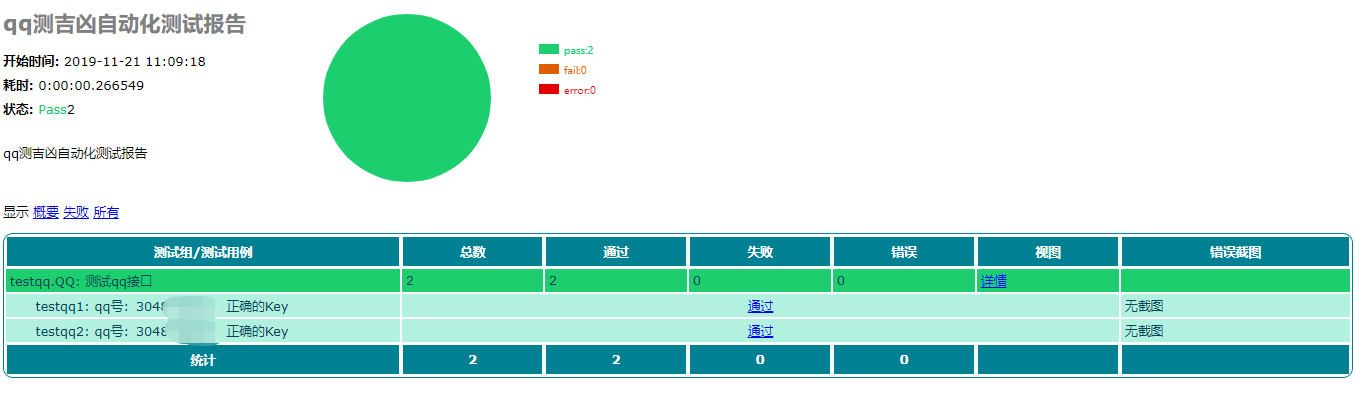
6.报告样式如图:

 浙公网安备 33010602011771号