
码云
Gitee仓库
创建仓库
在 Gitee 上创建一个仓库 dotnetcore-in-action
这里,使用 Gitee 企业版,
https://e.gitee.com/majianggongfang
创建一个企业私有仓库
https://e.gitee.com/majianggongfang/repos/majianggongfang/dotnetcore-in-action
https://gitee.com/majianggongfang/dotnetcore-in-action
SSH
https://gitee.com/help/articles/4181
生成新的 SSH 密钥并将其添加到 ssh 代理 - GitHub Docs
为什么使用 SSH
使用SSH公钥可以让你在你的电脑和 码云/GitHub 通讯的时候使用安全连接(Git的Remote要使用SSH地址),不用在提交代码的时候,都得输入Git管理平台的账号和密码。
先查看有没有 SSH 公钥和私钥对
$ ls -al ~/.ssh
ls: cannot access '/c/Users/wei/.ssh': No such file or directory

## 如果您收到~/.ssh不存在的错误,则默认位置中没有现有的 SSH 密钥对。
## 您可以在下一步中创建新的 SSH 公钥和私钥对
输入如下命令,查看 SSH 公钥对:
```powershell
$ ls -al ~/.ssh
total 39
drwxr-xr-x 1 wei 197121    0 Dec 29 15:24 ./
drwxr-xr-x 1 wei 197121    0 Jan  1 06:59 ../
-rw-r--r-- 1 wei 197121  411 Dec 29 12:49 id_ed25519  #私钥
-rw-r--r-- 1 wei 197121   98 Dec 29 12:49 id_ed25519.pub  #公钥
-rw-r--r-- 1 wei 197121 3381 Dec 29 13:10 id_rsa      #私钥
-rw-r--r-- 1 wei 197121  742 Dec 29 13:10 id_rsa.pub  #公钥
-rw-r--r-- 1 wei 197121  187 Dec 29 15:24 known_hosts
有后缀‘.pub’的是公钥,没有的是私钥。
生成 SSH 公钥和私钥对
如果已经有了公钥和私钥对,跳过这一步
执行如下命令用来生成 SSH 公钥和私钥对:
$ ssh-keygen -t ed25519 -C "your_email@example.com"
注意:如果您使用的是不支持 Ed25519 算法的旧系统,请使用:
$ ssh-keygen -t rsa -b 4096 -C "your_email@example.com"
注意:
- 将
your_email@example.com替换成你自己的电子邮件地址。- 这里的
your_email@example.com只是生成的 sshkey 的名称,并不约束或要求具体命名为某个邮箱。
现网的大部分教程均讲解的使用邮箱生成,其一开始的初衷仅仅是为了便于辨识所以使用了邮箱。
执行如下命令,生成 SSH 公钥和私钥对
# 生成公钥和私钥对,有后缀‘.pub’的是公钥
ssh-keygen -t ed25519 -C "277xxx@qq.com"
ssh-keygen -t rsa -b 4096 -C "277xxx@qq.com"
执行上述命令后,会生成 SSH 公钥和私钥对,如下图所示:
ls ~/.ssh
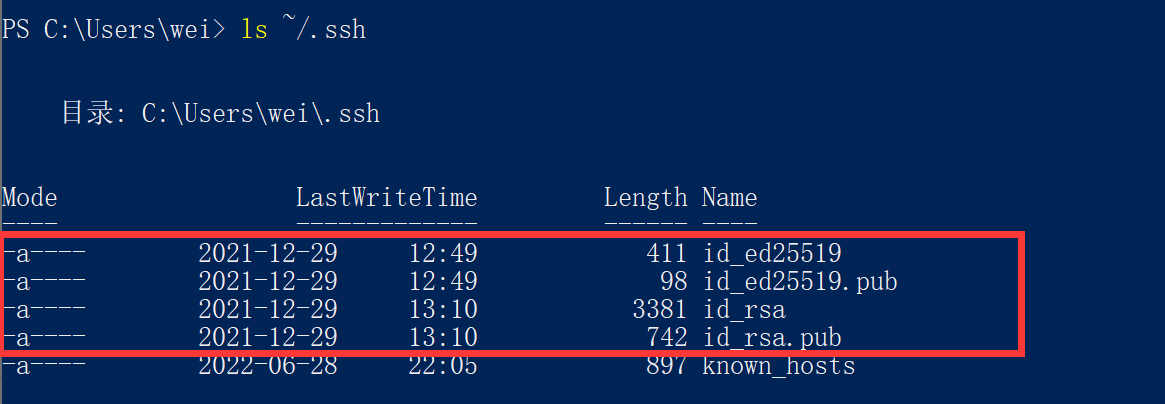
如果之前已经存在公钥和私钥对,但是基于邮箱''836xxx@qq.com' 生成的 , 碰到这种情况,就会问要不要覆盖:
$ ssh-keygen -t rsa -b 4096 -C "277xxx@qq.com"
Generating public/private rsa key pair.
Enter file in which to save the key (/c/Users/wei/.ssh/id_rsa):
/c/Users/wei/.ssh/id_rsa already exists.
Overwrite (y/n)?
查看公钥和私钥对
执行如下代码, 打开 SSH 公钥并查看内容:
$ cat ~/.ssh/id_ed25519.pub
ssh-ed25519 AAAAC3NxxxxxxxnmyzNbXFa/10hCSxxxxxxxxxFE8/ksxxxxxxxxxxxJ 836xxx@qq.com

或者 rsa 算法公钥
$ cat ~/.ssh/id_rsa.pub

ssh-rsa AAAAB3NzaC1y...9Z2GC/4Y5/BnQm8tz0Eaoe/mptZMXAQKZdwR0h22joTwWL8Ynul7B/Lp05H43X2VSPjVeb/zqYJlOfRw6Wsi9RTF56Uzik6Zt....
9tIxEExJCPdrMFtSWxUHFX3NrN1ddE4zXMrQePlVw== 836xxxx@qq.com
在Git管理平台添加公钥
GitHub
打开github账户头像--Settings->SSH and GPG keys
点击【New SSH Key】
码云
https://gitee.com/help/articles/4191#article-header0
这里我们设置的是账号的 SSH key,
Gitee设置账户SSH公钥
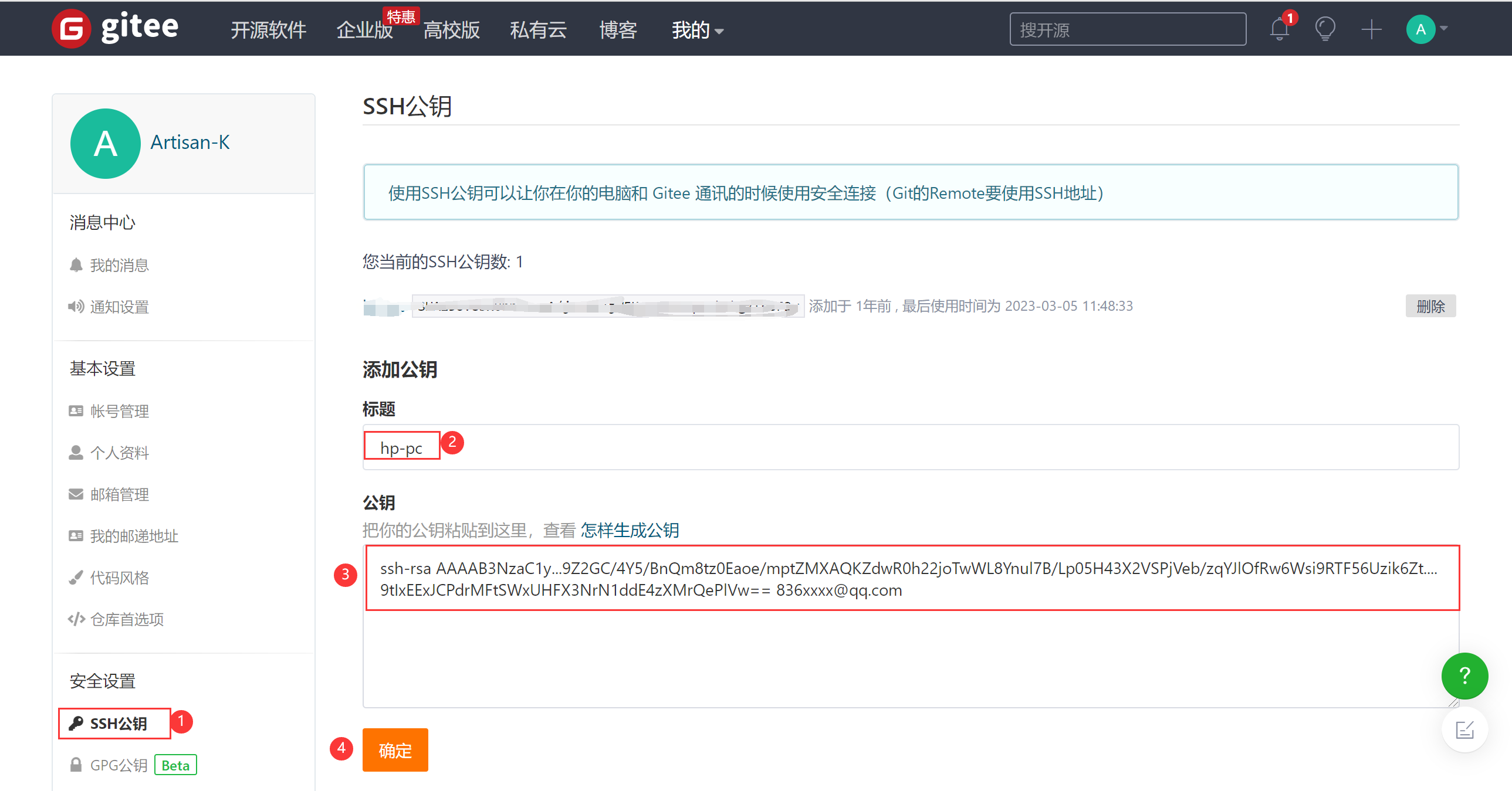
用户可以通过主页右上角 「个人设置」->「安全设置」->「SSH公钥」->「添加公钥」 ,
将上一步生成的 public key 添加到当前账户中。
# 打开 SSH 公钥,查看内容
$ cat ~/.ssh/id_ed25519.pub #公钥内容
ssh-ed25519 AAAAC3NxxxxxxxnmyzNbXFa/10hCSxxxxxxxxxFE8/ksxxxxxxxxxxxJ 836xxx@qq.com

或者 rsa 算法公钥
$ cat ~/.ssh/id_rsa.pub

ssh-rsa AAAAB3NzaC1y...9Z2GC/4Y5/BnQm8tz0Eaoe/mptZMXAQKZdwR0h22joTwWL8Ynul7B/Lp05H43X2VSPjVeb/zqYJlOfRw6Wsi9RTF56Uzik6Zt....
9tIxEExJCPdrMFtSWxUHFX3NrN1ddE4zXMrQePlVw== 836xxxx@qq.com
如下图所示,使用的 rsa 算法的公钥
添加成功后,会显示新增的SSH公钥,如下图所示:
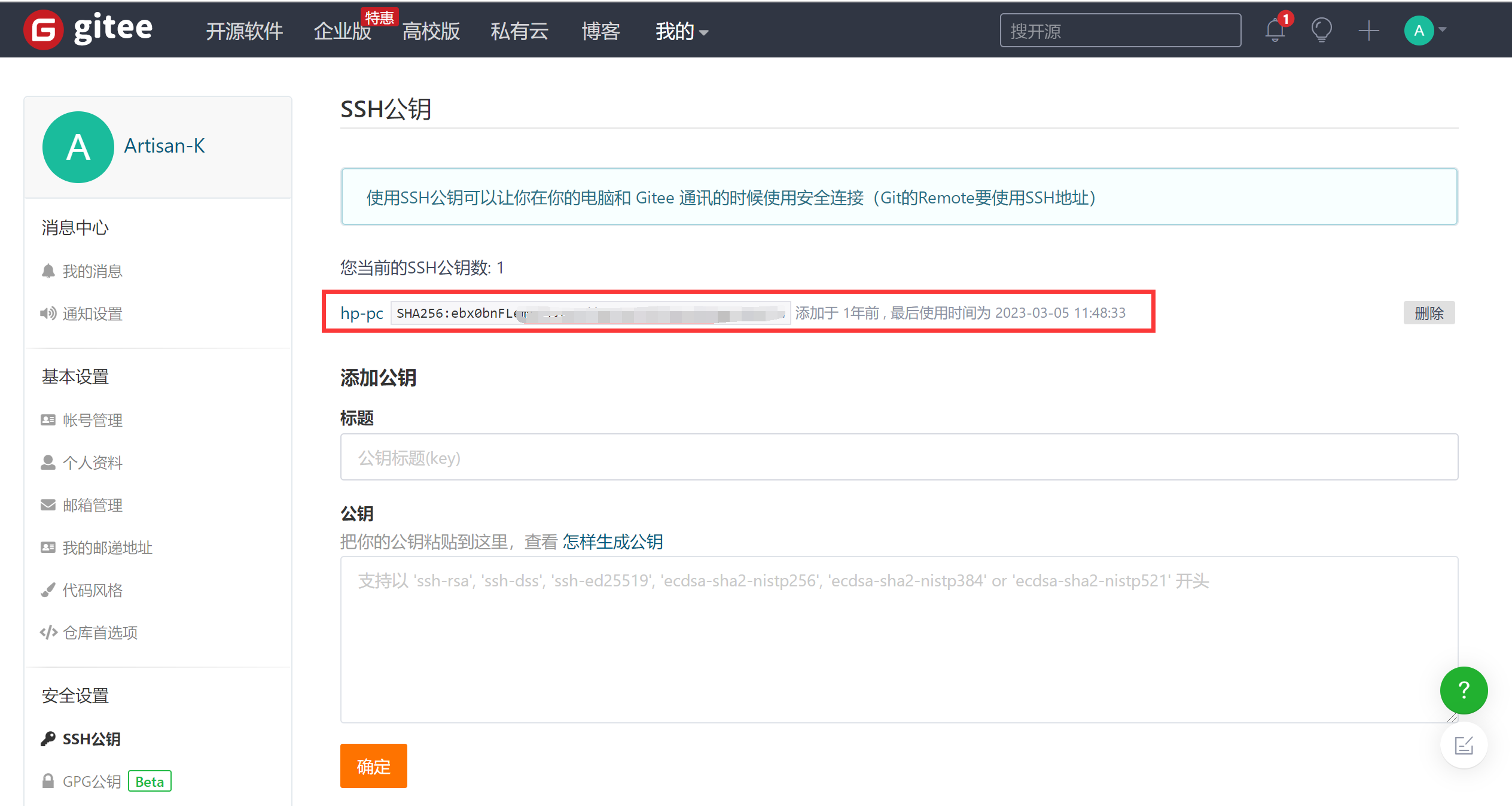
需要注意: 添加公钥需要验证用户密码
Gitee仓库的 SSH Key 和账户 SSH Key 的区别?
和仓库"只读"权限的 SSH Key 相比,账户的 SSH Key 同时具备推送/拉取的权限,对用户创建/参与的仓库均能使用,使用起来更加方便。
仓库的 sshkey 只针对仓库,且我们仅对仓库提供了部署公钥,即
仓库下的公钥仅能拉取仓库,这通常用于生产服务器拉取仓库的代码。
而用户的 key 则是针对用户的,用户添加了 key 就对用户名下的仓库和用户参加了的仓库具有权限,一般而言,用户的key具有推送和拉取的权限,而仓库的 key 则只具有拉取权限。
Clone
$ git clone git@gitee.com:majianggongfang/dotnetcore-in-action.git
Cloning into 'dotnetcore-in-action'...
The authenticity of host 'gitee.com (212.64.62.183)' can't be established.
ECDSA key fingerprint is SHA256:FQGC9Kn/eye1W8icdBgrQp+KkGYoFgbVr17bmjey0Wc.
Are you sure you want to continue connecting (yes/no/[fingerprint])? yes
Warning: Permanently added 'gitee.com,212.64.62.183' (ECDSA) to the list of known hosts.
remote: Enumerating objects: 8, done.
remote: Counting objects: 100% (8/8), done.
remote: Compressing objects: 100% (8/8), done.
remote: Total 8 (delta 0), reused 0 (delta 0), pack-reused 0
Receiving objects: 100% (8/8), 4.95 KiB | 1.65 MiB/s, done.

$ cd dotnetcore-in-action/

$ git branch
* master
把新建的文件、代码拷贝到文件夹 dotnetcore-in-action 内
Commit and Push
$ git add .

$ git status
On branch master
Your branch is up to date with 'origin/master'.

Changes to be committed:
  (use "git restore --staged <file>..." to unstage)
        new file:   docs/DotNetCore-In-Action.md
        new file:   original/NET-Core

$ git commit -m 'first commit'
[master f5a8b6b] first commit
 2 files changed, 160 insertions(+)
 create mode 100644 docs/DotNetCore-In-Action.md
 create mode 160000 original/NET-Core

$ git push
Enumerating objects: 6, done.
Counting objects: 100% (6/6), done.
Delta compression using up to 8 threads
Compressing objects: 100% (4/4), done.
Writing objects: 100% (5/5), 2.78 KiB | 1.39 MiB/s, done.
Total 5 (delta 1), reused 0 (delta 0), pack-reused 0
remote: Powered by GITEE.COM [GNK-6.2]
To gitee.com:majianggongfang/dotnetcore-in-action.git
   bda07dd..f5a8b6b  master -> master

$ git branch -av
* master                f5a8b6b first commit
  remotes/origin/HEAD   -> origin/master
  remotes/origin/master f5a8b6b first commit

 浙公网安备 33010602011771号