
第三人称——战斗系统
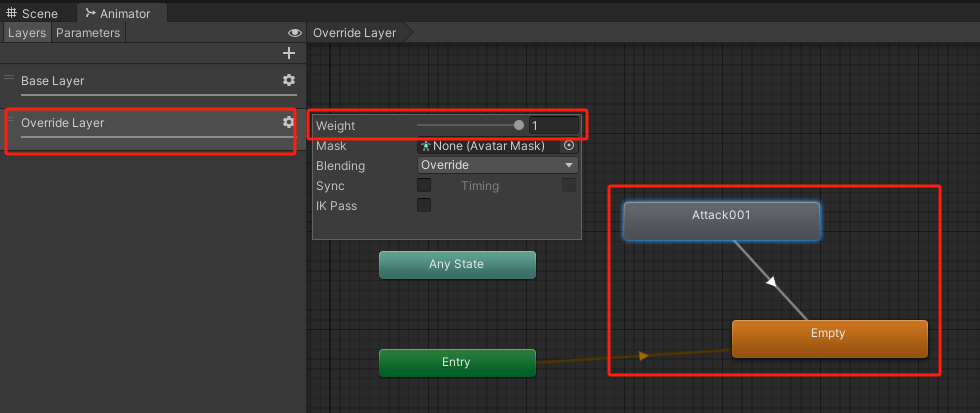
为Animator加入Combat anim
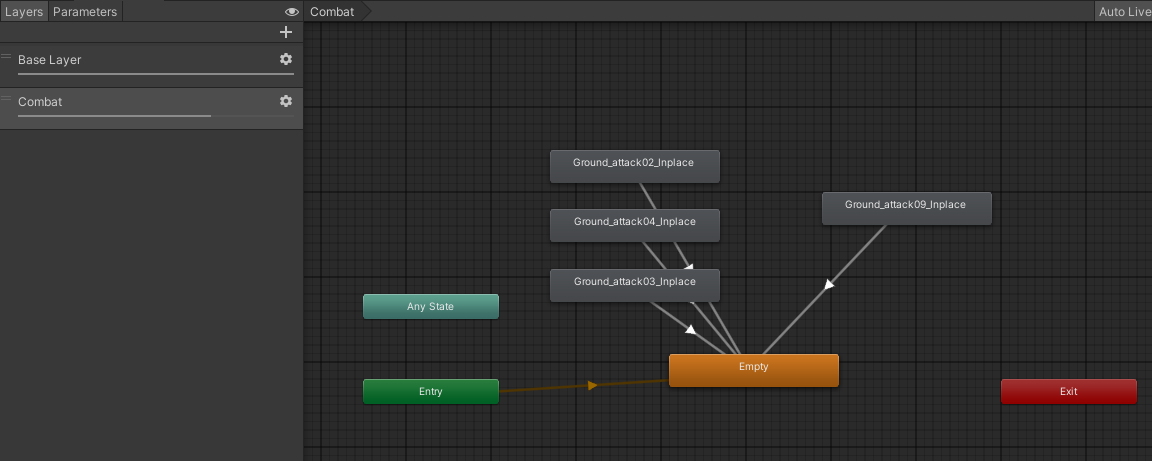
- 在Base Layer 下面新建一个Override Layer,权重设置为1
- 在Layer层新建一个Empty,Combat动画指向Empty
Player和Enemy的脚本结构
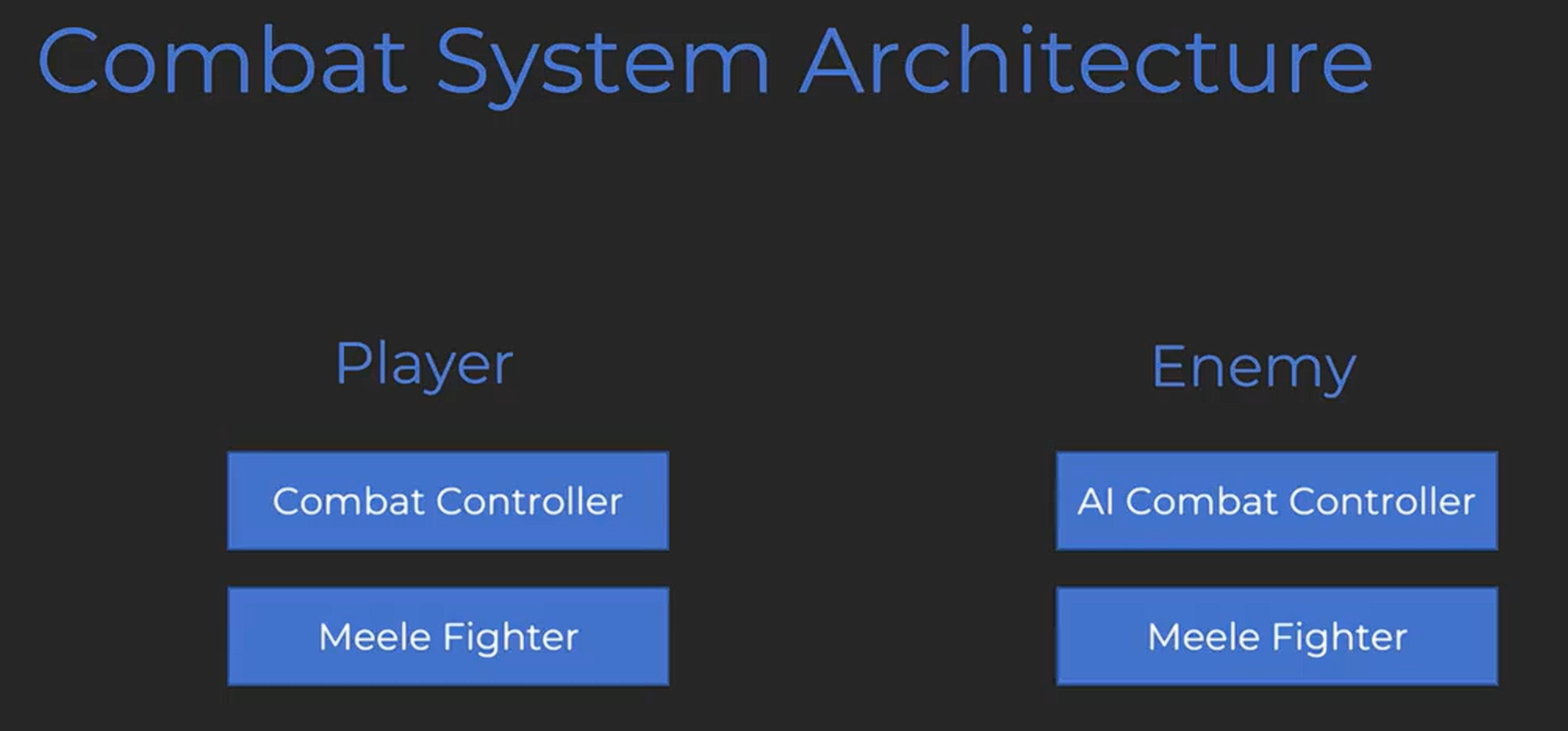
MeleeFighter将是玩家和敌人共用的近战战斗机制脚本
MeleeFighter
using System.Collections;
using System.Collections.Generic;
using System.Linq;
using UnityEngine;

public class MeleeFighter : MonoBehaviour
{
    Animator animator;
    AnimationClip attackClip;

    private void Awake()
    {
        animator = GetComponent<Animator>();
        // 获取 AnimatorController 中名为 "Attack001" 的动画片段
        var clips = animator.runtimeAnimatorController.animationClips;
        attackClip = clips.FirstOrDefault(c => c.name == "Attack001");
    }

    bool inAction = false;

    public void TryToAttack(){
        if(!inAction)
        {
            StartCoroutine(Attack());

        }


    }

    /// <summary>
    /// Attack animation
    /// </summary>
    /// <returns></returns>
    IEnumerator Attack()
    {
        inAction = true;

        animator.CrossFade("Attack001", 0.2f);
        yield return null;

        float attackAnimTime = attackClip.length;
        yield return new WaitForSeconds(attackAnimTime);

        inAction = false;
    }

}
CombatController
using System.Collections;
using System.Collections.Generic;
using UnityEngine;

public class CombatController : MonoBehaviour
{
    MeleeFighter meleeFighter;
    private void Awake()
    {
        meleeFighter = GetComponent<MeleeFighter>();
    }
    private void Update()
    {
        if (Input.GetButtonDown("Attack"))
        {
            meleeFighter.TryToAttack();
        }
    }
}
把fire1重命名为Attack
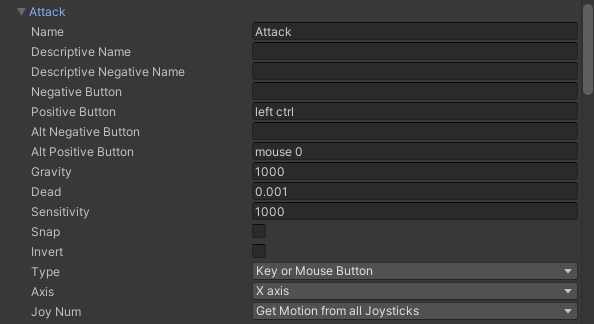

为了后面调用inAction
这里的inAction改成属性
MeleeFighter
public bool InAction { get; private set; } = false;
修复和其他控制脚本的冲突bug
PlayerController
        //如果在动作中,不执行后面的运动逻辑并且不播放走路动画
        if (IsHanging || InAction || meleeFighter.InAtkAction)
        {
            animator.SetFloat("moveAmount", 0);
            return;
        }
CombatController
    private void Update()
    {
        if (playerController.IsHanging || !playerController.IsGrounded)
            return;
        if (Input.GetButtonDown("Attack"))
        {
            meleeFighter.TryToAttack();
        }
    }
给奎爷搞把斧子
如果遇到材质显示错误的预制体的解决方法:
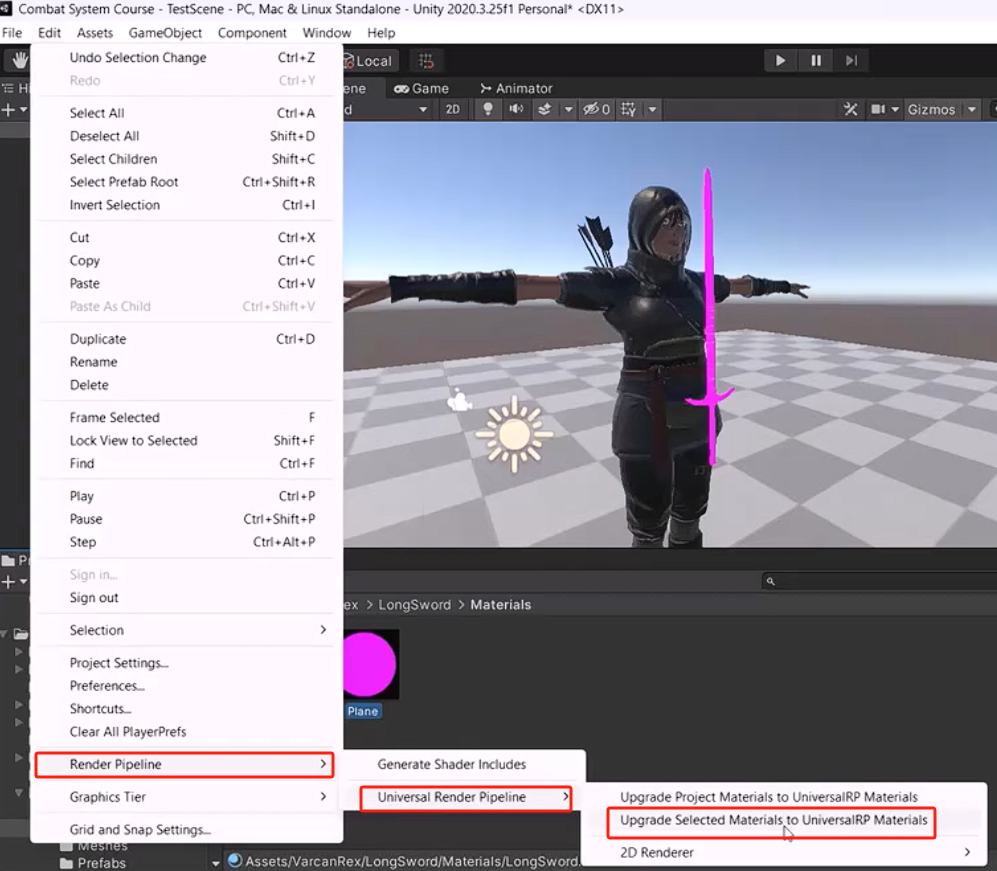
斧头:
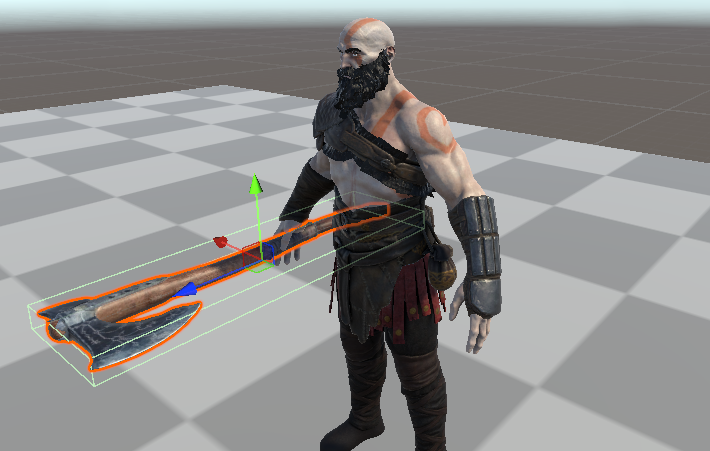
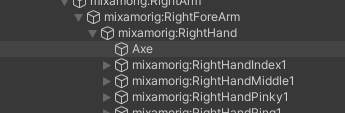
放在奎爷的RightHand的子级
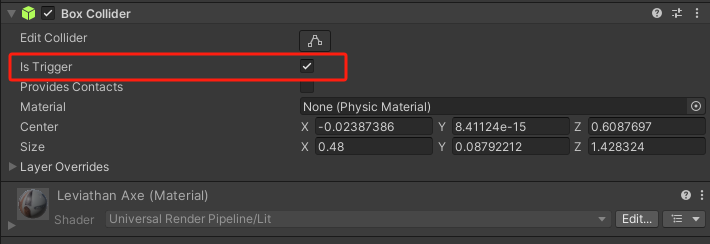
新建box碰撞体,勾上Trigger

加入Enemy
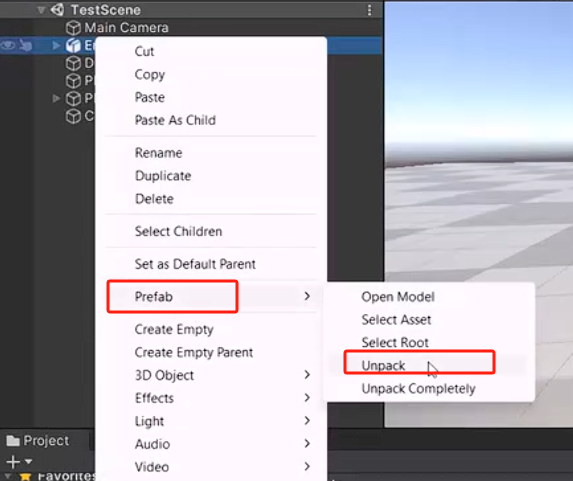
玩家和敌人都unpack预制体,使其独立
加入以下组件
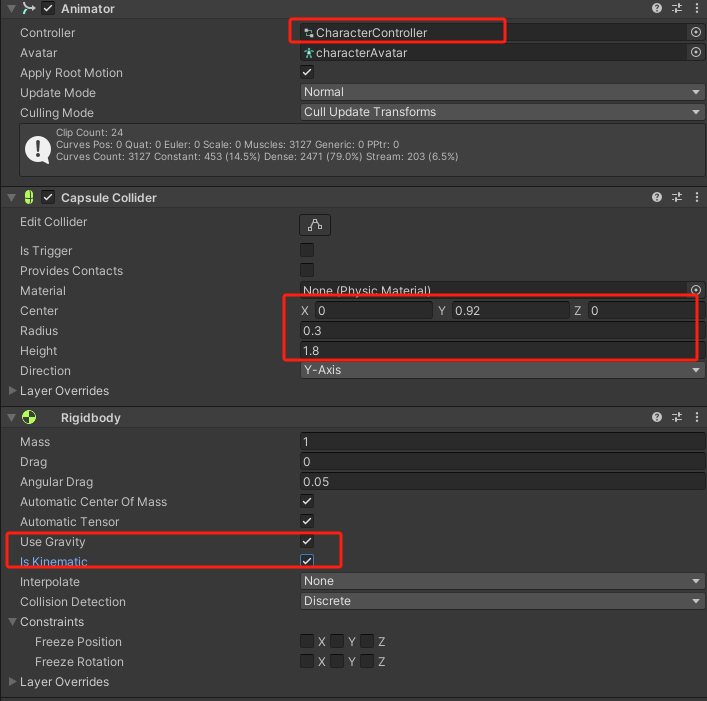
新建Layer

为玩家和敌人选上各自的Layer,但是其子对象不需要也选上
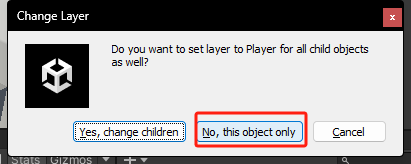
对武器选上对应的Layer

在 Project Settings - Physics 中设置碰撞矩阵
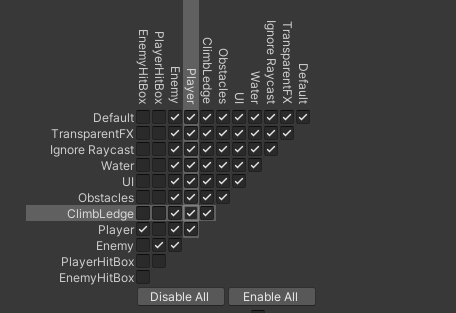
下面在MeleeFighter脚本中为角色编写武器部分
武器
连招系统
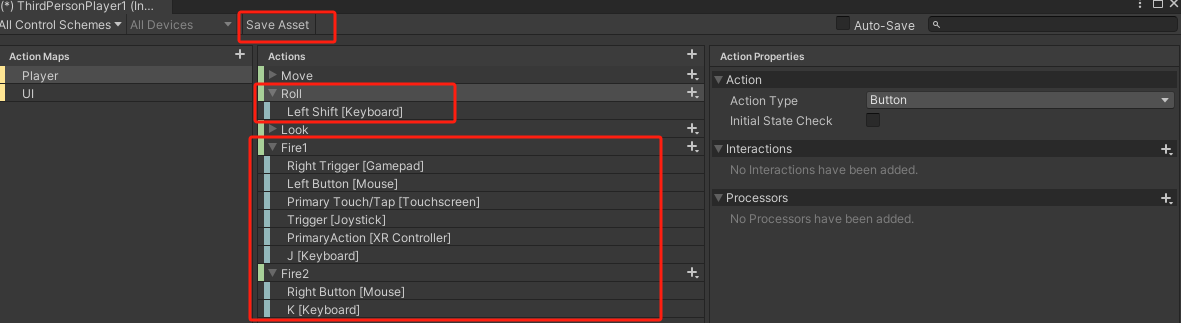
使用new Input
选择both
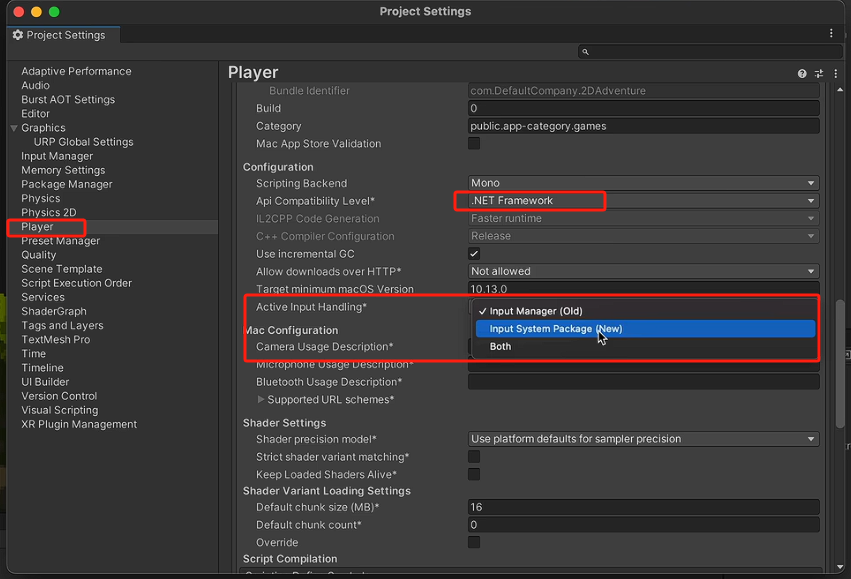
按键表配置
现在在PlayerInput可以看到SendMessage函数
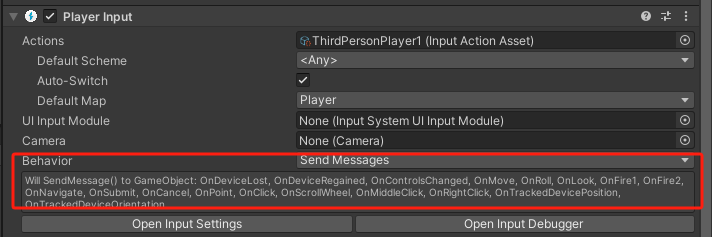
下面调用这个函数就能做到按键响应
1.改造一下翻滚代码
ThirdPersonRoll
using System.Collections;
using System.Collections.Generic;
using UnityEngine;
using UnityEngine.InputSystem;

public class ThirdPersonRoll : MonoBehaviour
{
    Animator animator;

    void Awake()
    {
        animator = GetComponent<Animator>();
    }


    public void OnRoll(InputValue value)
    {
        if(value.isPressed)
            animator.SetTrigger("roll");

    }
}
功能正常
2.删去之前的攻击脚本播放攻击动画脚本
using System.Collections;
using System.Collections.Generic;
using UnityEngine;
using UnityEngine.InputSystem;

public class ThirdPersonAttack : MonoBehaviour
{
    [Header("轻击动画列表")]
    [SerializeField] private AnimationClip[] Attack1Clips;
    [Header("重击动画列表")]
    [SerializeField] private AnimationClip[] Attack2Clips;

    PlayerController playerController;
    Animator animator;

    void Awake()
    {
        playerController = GetComponent<PlayerController>();
        animator = GetComponent<Animator>();
    }

    //攻击类输入存储值,会被新的输入值覆盖
    int inputAttackType = 0;

    //轻击
    void OnFire1(InputValue value)
    {
        if (value.isPressed)
        {
            inputAttackType = 1;

        }
    }

    //重击
    void OnFire2(InputValue value)
    {
        if (value.isPressed)
        {
            inputAttackType = 2;
        }
    }

    //连招数
    public int currentAttack = 0;
    //当前攻击的动画时长计时器
    float animTimer = 0;
    /// <summary>
    /// 攻击动画加载逻辑
    /// </summary>
    /// <param name="index"></param>
    /// <param name="inputAttackType"></param>
    void PlayerAttack(int index,int inputAttackType)
    {
        //攻击时取消输入
        playerController.inputEnabled = false;
        AnimationClip animationclip;
        if (inputAttackType == 1)
        {
            //轻击
            //动画载入
            animationclip = Attack1Clips[index];
            //连招数加1
            currentAttack++;
        }
        else
        {
            //重击
            //动画载入
            animationclip = Attack2Clips[index];
            //连招数归零
            currentAttack = 0;
        }
        animator.CrossFade(animationclip.name, 0.2f);
        animTimer = animationclip.length;
    }

    void Update()
    {
        if (playerController.IsHanging || !playerController.IsGrounded)
            return;
        //动画时长计时器帧自减
        animTimer -= Time.deltaTime;
        if(animTimer <= 0)
        {
            //动画播放完毕
            //恢复输入
            playerController.inputEnabled = true;
            //连招数归零
            currentAttack = 0;
        }
        //预输入逻辑
        if(inputAttackType != 0)
        {
            //如果有攻击键输入
            //在当前攻击动画播放结束前0.4s,(并且当前的连招数<攻击动画列表的长度)
            //播放对应索引的攻击动画
            if(animTimer <= 0.4f && currentAttack < Attack1Clips.Length)
            {
                PlayerAttack(currentAttack, inputAttackType);
            }
            //攻击类输入存储值归零
            inputAttackType = 0;
        }

    }

    //外部调用的属性
    public int InputAttackType => inputAttackType;

}
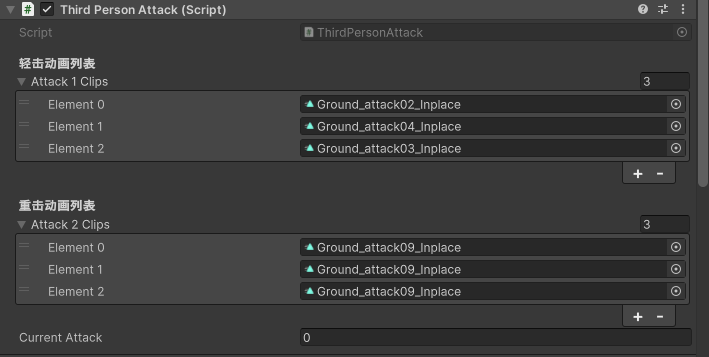
拖入脚本,分配轻重击动画

 浙公网安备 33010602011771号