
thinkphp6---log日志
在进行开发的时候,对于第三方接口的开发,很多时候是没有返回结果的,使用日志记录是一种比较好的方式:
1、引入模块
use think\facade\Log;
2、使用
Log::alert(json_encode($result,JSON_UNESCAPED_UNICODE));
Log::critical(json_encode($result,JSON_UNESCAPED_UNICODE));
Log::error(json_encode($result,JSON_UNESCAPED_UNICODE));
Log::warning(json_encode($result,JSON_UNESCAPED_UNICODE));
Log::notice(json_encode($result,JSON_UNESCAPED_UNICODE));
Log::info(json_encode($result,JSON_UNESCAPED_UNICODE));
常使用:
Log::info(json_encode($result,JSON_UNESCAPED_UNICODE));
Log::error(json_encode($result,JSON_UNESCAPED_UNICODE));
3、写入的日志在哪里?
配置文件:config/log.php
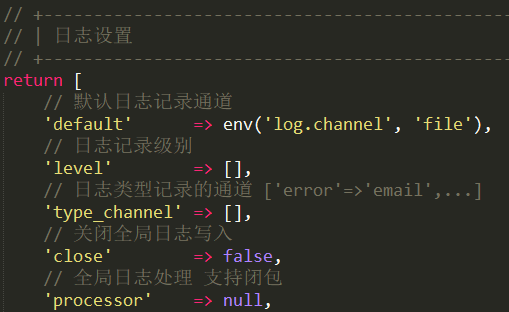
日志位置:runtime/模块/log/年月/日.log
比如这个:可以看到是 index 模块下的 2025年03月30日的日志文件。
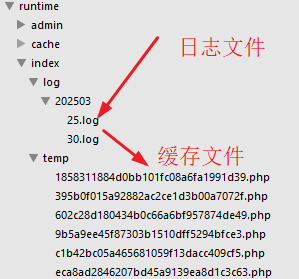
下面的【temp】是生成的缓存文件。
打完收工!

 浙公网安备 33010602011771号