
数据采集第五次作业
作业①:
要求:
熟练掌握 Selenium 查找HTML元素、爬取Ajax网页数据、等待HTML元素等内容。
使用Selenium框架爬取京东商城某类商品信息及图片。
候选网站:http://www.jd.com/
关键词:手机
实践代码:
import datetime
from selenium import webdriver
from selenium.webdriver import Chrome
from selenium.webdriver.chrome.options import Options
from selenium.webdriver.common.keys import Keys
import urllib.request
import threading
import sqlite3
import os
import time


class MySpider:
    headers = {
        "User-Agent": "Mozilla/5.0 (Windows NT 10.0; Win64; x64) AppleWebKit/537.36 (KHTML, like Gecko) Chrome/86.0.4240.198 Safari/537.36"}

    imagePath = "download"

    def startUp(self, url, key):
        chrome_options = Options()
        self.driver = webdriver.Chrome(options=chrome_options)
        self.threads = []
        self.No = 0
        self.imgNo = 0
        try:
            self.con = sqlite3.connect("phones.db")
            self.cursor = self.con.cursor()
            try:
                self.cursor.execute("drop table phones")
            except:
                pass
            try:
                sql = "create  table  phones  (mNo  varchar(32) primary key, mMark varchar(256),mPrice varchar(32),mNote varchar(1024),mFile varchar(256))"
                self.cursor.execute(sql)
            except:
                pass
        except Exception as err:
            print("err0")

        try:
            if not os.path.exists(MySpider.imagePath):
                os.mkdir(MySpider.imagePath)
            images = os.listdir(MySpider.imagePath)
            for img in images:
                s = os.path.join(MySpider.imagePath, img)
                os.remove(s)
        except Exception as err:
            print("err")
        self.driver.get(url)
        keyInput = self.driver.find_element_by_id("key")
        keyInput.send_keys(key)
        keyInput.send_keys(Keys.ENTER)

    def closeUp(self):
        try:
            self.con.commit()
            self.con.close()
            self.driver.close()
        except Exception as err:
            print("err")

    def insertDB(self, mNo, mMark, mPrice, mNote, mFile):
        try:
            sql = "insert into phones (mNo,mMark,mPrice,mNote,mFile) values (?,?,?,?,?)"
            self.cursor.execute(sql, (mNo, mMark, mPrice, mNote, mFile))
        except Exception as err:
            print("err")

    def showDB(self):
        try:
            con = sqlite3.connect("phones.db")
            cursor = con.cursor()
            print("%-8s%-16s%-8s%-16s%s" % ("No", "Mark", "Price", "Image", "Note"))
            cursor.execute("select mNo,mMark,mPrice,mFile,mNote from phones  order by mNo")

            rows = cursor.fetchall()
            for row in rows:
                print("%-8s %-16s %-8s %-16s %s" % (row[0], row[1], row[2], row[3], row[4]))

            con.close()
        except Exception as err:
            print(err)

    def download(self, src1, src2, mFile):
        data = None
        if src1:
            try:
                req = urllib.request.Request(src1, headers=MySpider.headers)
                resp = urllib.request.urlopen(req, timeout=10)
                data = resp.read()
            except:
                pass
        if not data and src2:
            try:
                req = urllib.request.Request(src2, headers=MySpider.headers)
                resp = urllib.request.urlopen(req, timeout=10)
                data = resp.read()
            except:
                pass
        if data:
            print("download begin", mFile)
            fobj = open(MySpider.imagePath + "\\" + mFile, "wb")
            fobj.write(data)
            fobj.close()
            print("download finish", mFile)

    def processSpider(self):
        try:
            time.sleep(1)
            print(self.driver.current_url)
            lis = self.driver.find_elements_by_xpath("//div[@id='J_goodsList']//li[@class='gl-item']")
            for li in lis:
                # We find that the image is either in src or in data-lazy-img attribute
                try:
                    src1 = li.find_element_by_xpath(".//div[@class='p-img']//a//img").get_attribute("src")
                except:
                    src1 = ""
                try:
                    src2 = li.find_element_by_xpath(".//div[@class='p-img']//a//img").get_attribute("data-lazy-img")
                except:
                    src2 = ""
                try:
                    price = li.find_element_by_xpath(".//div[@class='p-price']//i").text
                except:
                    price = "0"

                try:
                    note = li.find_element_by_xpath(".//div[@class='p-name p-name-type-2']//em").text
                    mark = note.split(" ")[0]
                    mark = mark.replace("爱心东东\n", "")
                    mark = mark.replace(",", "")
                    note = note.replace("爱心东东\n", "")
                    note = note.replace(",", "")
                except:
                    note = ""
                    mark = ""
                self.No = self.No + 1
                no = str(self.No)
                while len(no) < 6:
                    no = "0" + no
                print(no, mark, price)
                if src1:
                    src1 = urllib.request.urljoin(self.driver.current_url, src1)
                    p = src1.rfind(".")
                    mFile = no + src1[p:]
                elif src2:
                    src2 = urllib.request.urljoin(self.driver.current_url, src2)
                    p = src2.rfind(".")
                    mFile = no + src2[p:]
                if src1 or src2:
                    T = threading.Thread(target=self.download, args=(src1, src2, mFile))
                    T.setDaemon(False)
                    T.start()
                    self.threads.append(T)
                else:
                    mFile = ""
                self.insertDB(no, mark, price, note, mFile)
            try:
                self.driver.find_element_by_xpath("//span[@class='p-num']//a[@class='pn-next disabled']")
            except:
                nextPage = self.driver.find_element_by_xpath("//span[@class='p-num']//a[@class='pn-next']")
                time.sleep(10)
                nextPage.click()
                self.processSpider()
        except Exception as err:
            print(err)

    def executeSpider(self, url, key):
        starttime = datetime.datetime.now()
        print("Spider starting......")
        self.startUp(url, key)
        print("Spider processing......")
        self.processSpider()
        print("Spider closing......")
        self.closeUp()
        for t in self.threads:
            t.join()
        print("Spider completed......")
        endtime = datetime.datetime.now()
        elapsed = (endtime - starttime).seconds
        print("Total ", elapsed, " seconds elapsed")

url = "http://www.jd.com"
spider = MySpider()
while True:
    print("1.爬取")
    print("2.显示")
    print("3.退出")
    s = input("请选择(1,2,3):")
    if s == "1":
        spider.executeSpider(url, "手机")
        continue
    elif s == "2":
        spider.showDB()
        continue
    elif s == "3":
        break
实践结果:
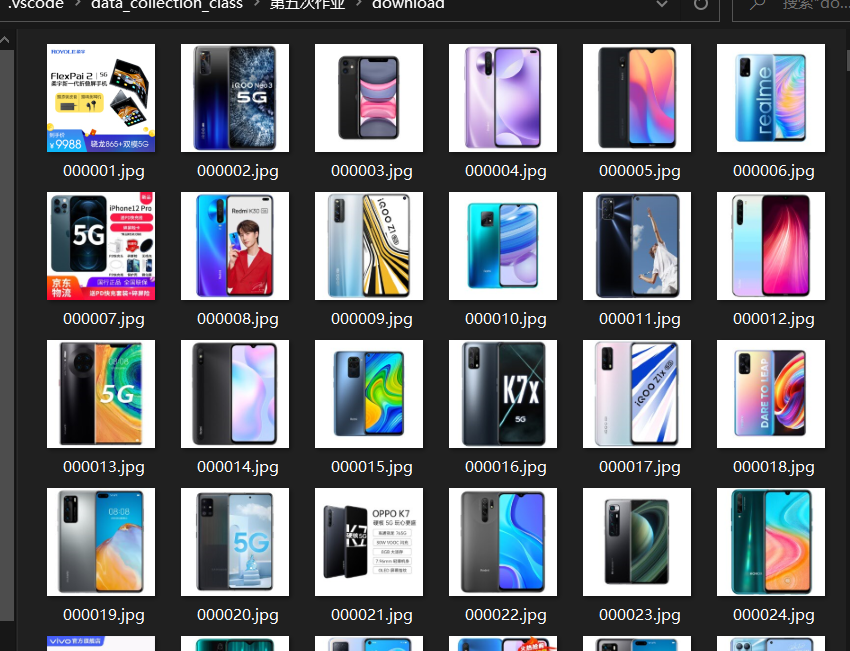
实践心得:
这个是爬取京东商城的完全复现,算是比较长的代码,打完及理解这个比较长的代码都是非常需要耐心的。虽说是复现,貌似没什么技术含量,但是处理缩进真的要跺脚
作业②
要求:
熟练掌握 Selenium 查找HTML元素、爬取Ajax网页数据、等待HTML元素等内容。
使用Selenium框架+ MySQL数据库存储技术路线爬取“沪深A股”、“上证A股”、“深证A股”3个板块的股票数据信息。
候选网站:东方财富网:http://quote.eastmoney.com/center/gridlist.html#hs_a_board
实践代码:
import datetime
from bs4 import BeautifulSoup
from selenium import webdriver
from selenium.webdriver.support.ui import WebDriverWait
from selenium.webdriver.chrome.options import Options
import time
import pymysql

class MySpider:

    def insertDB(self, Snumber,Code,Name,Latest_price, UD_range,UD_price,Deal_num , Deal_price,Amplitude,Up_est,Down_est,Today,Yesterday):
        try:
            self.cursor.execute(
                "insert into stocks('id','id_stock','name','new_price','ud_range','ud_num','deal_count','turnover','amplitude','high','low','today','yesterday') values(%s,%s,%s,%s,%s,%s,%s,%s,%s,%s,%s,%s,%s)",
                (Snumber,Code,Name,Latest_price, UD_range,UD_price,Deal_num , Deal_price,Amplitude,Up_est,Down_est,Today,Yesterda))
        except Exception as err:
            print(err)
            print("数据插入失败")


    def closeUp(self):
        try:
            self.con.commit()
            self.driver.close()
        except Exception as err:
            print(err)

    def startspider(self,url):
        chrome_options = Options()
        # chrome_options.add_argument('--headless')
        # chrome_options.add_argument('--disable-gpu')
        # chrome_options.add_argument('--no-sandbox')
        self.driver = webdriver.Chrome(chrome_options=chrome_options)
        #self.driver = webdriver.Chrome()
        print("正在打开网页...")
        self.driver.get(url)
        try:
            self.con=pymysql.connect(host="127.0.0.1",port=3306,user="root",passwd="20180901du",db="mydb",charset="utf8")
            self.cursor=self.con.cursor(pymysql.cursors.DictCursor)
            self.cursor.execute("delete from stocks1")
        except Exception as err:
            print("数据库连接失败")
            exit()
        print("等待网页响应...")
        self.page=1
        time.sleep(1)
        self.getdata()
        self.closeUp()

    def getdata(self):
        try:
            print("正在获取网页数据...")
            print("正在爬取第页")
            print(str(self.page))
            trs=self.driver.find_elements_by_xpath("//table[@class='table_wrapper-table']/tbody/tr")
            for tr in trs:
                td=tr.find_elements_by_xpath("./td")
                Snumber=td[0].text
                Code=td[1].text
                Name=td[2].text
                Latest_price=td[4].text
                UD_range=td[5].text
                UD_price=td[6].text
                Deal_num=td[7].text
                Deal_price=td[8].text
                Amplitude=td[9].text
                Up_est=td[10].text
                Down_est=td[11].text
                Today=td[12].text
                Yesterday=td[13].text
                print(Snumber+"  "+Code+ '  ' + Name+ '  ' + Latest_price + '  ' + UD_range + '  ' + UD_price + '  ' + Deal_num + '  ' + Deal_price + '  ' +Amplitude + '  ' + Up_est + '  ' + Down_est + '  ' + Today + '  ' + Yesterday)
                self.insertDB(Snumber,Code,Name,Latest_price, UD_range,UD_price,Deal_num , Deal_price,Amplitude,Up_est,Down_est,Today,Yesterday)
            if(self.page<2):
                self.page +=1
                nextpage=self.driver.find_element_by_xpath("//div[@class='dataTables_wrapper']/div//a[@class='next paginate_button']").click()
                time.sleep(1)
                self.getdata()
        except:
            pass

s = MySpider()
s.startspider("http://quote.eastmoney.com/center/gridlist.html")
实践结果:
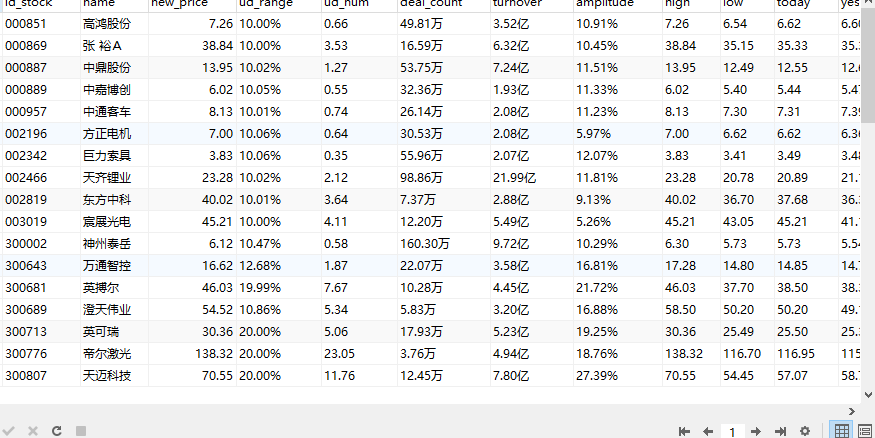
实践心得:
额这次作业完成的不是很好,最近心情起伏比较大,感觉不在状态,写出的代码就更不在状态了,马马虎虎把作业完成了叭,我后面再好好看看吧。
作业③:
要求:
熟练掌握 Selenium 查找HTML元素、实现用户模拟登录、爬取Ajax网页数据、等待HTML元素等内容。
使用Selenium框架+MySQL爬取中国mooc网课程资源信息(课程号、课程名称、学校名称、主讲教师、团队成员、参加人数、课程进度、课程简介)
候选网站:中国mooc网:https://www.icourse163.org
实践代码:
import datetime
from selenium import webdriver
from selenium.webdriver import Chrome
from selenium.webdriver.chrome.options import Options
from selenium.webdriver.common.keys import Keys
from selenium.webdriver.common.action_chains import ActionChains
import urllib.request
import sqlite3
import os
import time


class MySpider:
    headers = {
        "User-Agent": "Mozilla/5.0 (Windows NT 10.0; Win64; x64) AppleWebKit/537.36 (KHTML, like Gecko) Chrome/86.0.4240.198 Safari/537.36"}

    def insertDB(self,id,cCourse,cCollege,cTeacher,cTeam,cCount,cProcess, cBrief):
        try:
            self.cursor.execute(
                "insert into selenium_mooc('id','cCourse','cCollege','cTeacher','cTeam','cCount','cProcess', 'cBrief') values(%s,%s,%s,%s,%s,%s,%s,%s)",
                (id,cCourse,cCollege,cTeacher,cTeam,cCount,cProcess, cBrief))
        except Exception as err:
            print(err)
            print("数据插入失败")
    def closeUp(self):
        try:
            self.con.commit()
            self.driver.close()
        except Exception as err:
            print(err)


    def startUp(self, url):
        chrome_options = Options()
        self.page=1
        self.driver = webdriver.Chrome(options=chrome_options)
        time.sleep(2)
        self.driver.get(url)
        time.sleep(2)
        try:
            self.con=pymysql.connect(host="127.0.0.1",port=3306,user="root",passwd="20180901du",db="mydb",charset="utf8")
            self.cursor=self.con.cursor(pymysql.cursors.DictCursor)
            self.cursor.execute("delete from selenium_mooc")
        except Exception as err:
            print("数据库连接失败")
            exit()
        print("等待网页响应...")


    def processSpider(self):
        try:
            time.sleep(1)
            print(self.driver.current_url)
            divs = self.driver.find_elements_by_xpath("//div[@class='_1gBJC']//div[@class='_2mbYw']")
            count=0
            for div in divs:
                try:
                    count +=1
                    try:
                        cCourse = div.find_element_by_xpath(".//div[@class='WFpCn']/h3").text
                        cCollege=div.find_element_by_xpath(".//div[@class='WFpCn']/p").text
                        cTeacher= div.find_element_by_xpath(".//div[@class='WFpCn']/div[@class='_1Zkj9']").text
                    except:
                        cCourse = "-"
                        cCollege="-"
                        cTeacher="-"
                    print(cCourse,cCollege,cTeacher)
                    #element_item=div.find_element_by_xpath("./div")
                    self.driver.execute_script("arguments[0].click();", div.find_element_by_xpath("./div[@class='_3KiL7']"))
                    #ActionChains(self.driver).move_to_element(element_item).click().perform()
                    #time.sleep(2)
                    current_window = self.driver.window_handles[-1]
                    self.driver.switch_to.window(current_window)
                    time.sleep(2)
                    print(self.driver.current_url)
                    try:
                        cCount=self.driver.find_element_by_xpath("//span[@class='course-enroll-info_course-enroll_price-enroll_enroll-count']").text
                        print(cCount)
                        cTeam=self.driver.find_element_by_xpath("//div[@class='um-list-slider_con_item']//h3[@class='f-fc3']").text
                        cProcess=self.driver.find_element_by_xpath("//div[@class='course-enroll-info_course-info_term-info_term-time']/span[2]").text
                        cBrief=self.driver.find_element_by_xpath("//div[@class='course-heading-intro_intro']").text
                    except:
                        cTeam="-"
                        cCount="-"
                        cProcess="-"
                        cBrief="-"
                    print(cTeam,cCount,cProcess,cBrief)
                    self.insertDB(str(count),cCourse,cCollege,cTeacher,cTeam,cCount,cProcess, cBrief)
                    self.driver.close()
                    backwindow = self.driver.window_handles[0]
                    time.sleep(2)
                    self.driver.switch_to.window(backwindow)
                    time.sleep(2)
                    if (count>4):
                        break
                except:
                    pass

            try:
                nextpage = self.driver.find_element_by_xpath("//div[@id='app']/div/div/div[2]/div[2]/div/div[2]/div[2]/div/a[10]")
                time.sleep(3)
                nextpage.click()
                self.processSpider()
            except:
                self.driver.find_element_by_xpath("//a[@class='_3YiUU _1BSqy']")
        except:
            pass


    def executeSpider(self,url):
        starttime = datetime.datetime.now()
        print("Spider starting......")
        self.startUp(url)
        print("Spider processing......")
        self.processSpider()
        print("Spider completed......")
        self.closeUp()
        endtime = datetime.datetime.now()
        elapsed = (endtime - starttime).seconds
        print("Total ", elapsed, " seconds elapsed")

url = "https://www.icourse163.org/channel/3002.htm"
spider = MySpider()
spider.executeSpider(url)
实践结果:
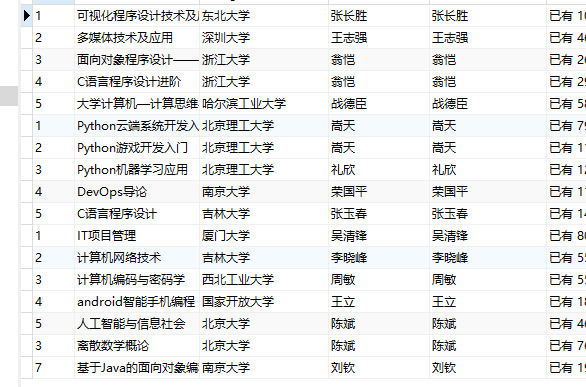
实践心得:
踩了很多坑,跳转页面,定位元素,包括之前没遇到的数据库连接,长了不少的教训吧。

 浙公网安备 33010602011771号