
数据采集第二次作业
作业①:
要求:在中国气象网(http://www.weather.com.cn)给定城市集的7日天气预报,并保存在数据库。
代码:
from bs4 import BeautifulSoup
from bs4 import UnicodeDammit
import urllib.request
import sqlite3

class WeatherDB:
    def openDB(self):
        self.con=sqlite3.connect("weathers.db")
        self.cursor=self.con.cursor()
        try:
            self.cursor.execute("create table weathers (wCity varchar(16),wDate varchar(16),wWeather varchar(64),wTemp varchar(32),constraint pk_weather primary key (wCity,wDate))")
        except:
            self.cursor.execute("delete from weathers")
    def closeDB(self):
        self.con.commit()
        self.con.close()
    def insert(self,city,date,weather,temp):
        try:
            self.cursor.execute("insert into weathers (wCity,wDate,wWeather,wTemp) values (?,?,?,?)" ,(city,date,weather,temp))
        except Exception as err:
            print(err)
    def show(self):
        self.cursor.execute("select * from weathers")
        rows=self.cursor.fetchall()
        print("%-16s%-16s%-32s%-16s" % ("city","date","weather","temp"))
        for row in rows:
            print("%-16s%-16s%-32s%-16s" % (row[0],row[1],row[2],row[3]))

class WeatherForecast:
    def __init__(self):
        self.headers = {

            "User-Agent": "Mozilla/5.0 (Windows NT 10.0; Win64; x64) AppleWebKit/537.36 (KHTML, like Gecko) Chrome/70.0.3538.102 Safari/537.36 Edge/18.18362"}
            #"User-Agent": "Mozilla/5.0 (Windows; U; Windows NT 6.0 x64; en-US; rv:1.9pre) Gecko/2008072421 Minefield/3.0.2pre"}
        self.cityCode={"北京":"101010100","上海":"101020100","广州":"101280101","深圳":"101280601"}
    def forecastCity(self,city):
        if city not in self.cityCode.keys():
            print(city+" code cannot be found")
            return
        url="http://www.weather.com.cn/weather/"+self.cityCode[city]+".shtml"
        try:
            req=urllib.request.Request(url,headers=self.headers)
            data=urllib.request.urlopen(req)
            data=data.read()
            dammit=UnicodeDammit(data,["utf-8","gbk"])
            data=dammit.unicode_markup
            soup=BeautifulSoup(data,"lxml")
            lis=soup.select("ul[class='t clearfix'] li")
            for li in lis:
                try:
                    date=li.select('h1')[0].text
                    weather=li.select('p[class="wea"]')[0].text
                    temp=li.select('p[class="tem"] span')[0].text+"/"+li.select('p[class="tem"] i')[0].text
                    print(city,date,weather,temp)
                    self.db.insert(city,date,weather,temp)
                except Exception as err:
                    print(err)
        except Exception as err:
            print(err)
    def process(self,cities):
        self.db=WeatherDB()
        self.db.openDB()
        for city in cities:
            self.forecastCity(city)
        #self.db.show()
        self.db.closeDB()

ws=WeatherForecast()
ws.process(["北京","上海","广州","深圳"])
print("completed")
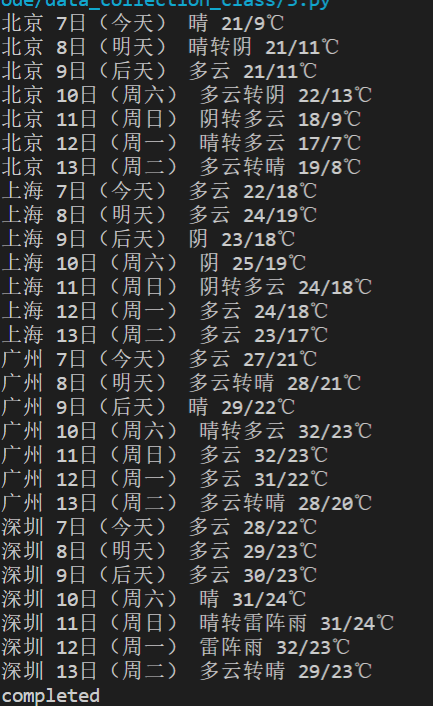
实践结果:
实验心得:
此题是书上例题的复现,有时光看觉得没什么,跟着打一遍,理解都要更深刻点。
作业②
要求:用requests和BeautifulSoup库方法定向爬取股票相关信息。
候选网站:东方财富网:https://www.eastmoney.com/
技巧:在谷歌浏览器中进入F12调试模式进行抓包,查找股票列表加载使用的url,并分析api返回的值,并根据所要求的参数可适当更改api的请求参数。根据URL可观察请求的参数f1、f2可获取不同的数###值,根据情况可删减请求的参数。
参考链接:https://zhuanlan.zhihu.com/p/50099084
分析:
之前作业爬取的都是静态页面,而此次爬虫作业是爬取股票信息,属于动态页面的爬取。与是所有的爬虫一样,第一步是进行网页的分析,然后对json文件的追踪查询,然后是文本匹配,提取信息,保存到excel文档中。
反爬虫套路····headers伪装

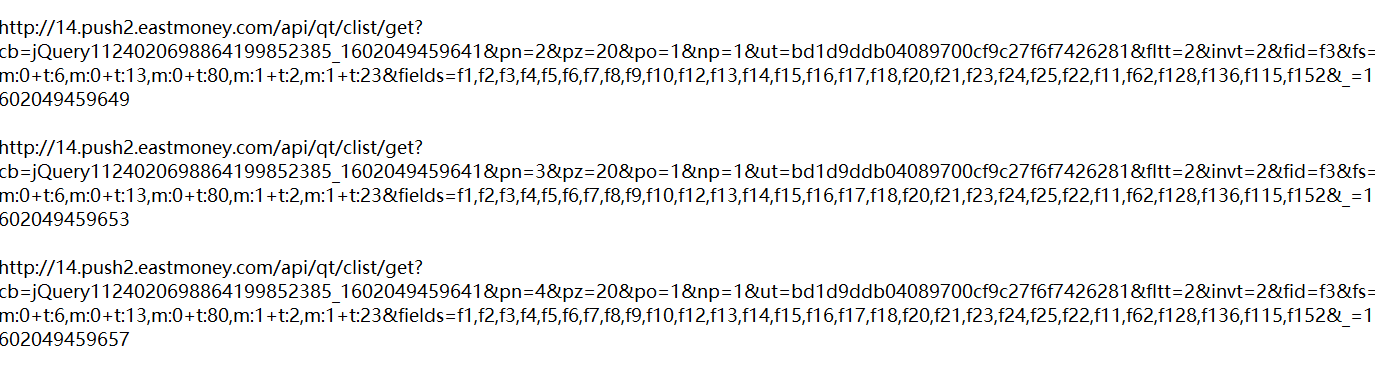
得到url地址,此次连续爬取4页,所以要注意url中的不同
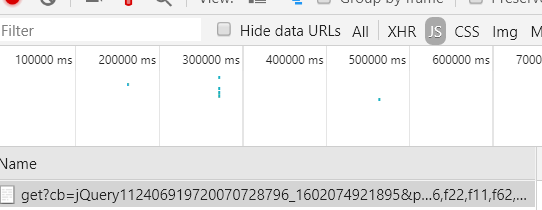
追踪json文件,分析json文件
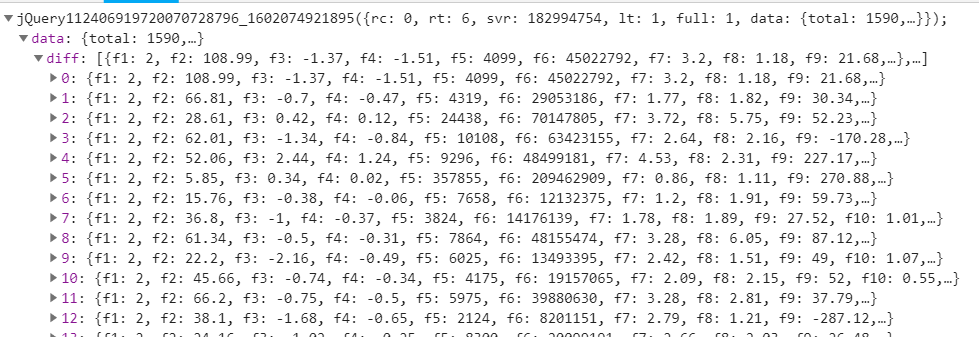
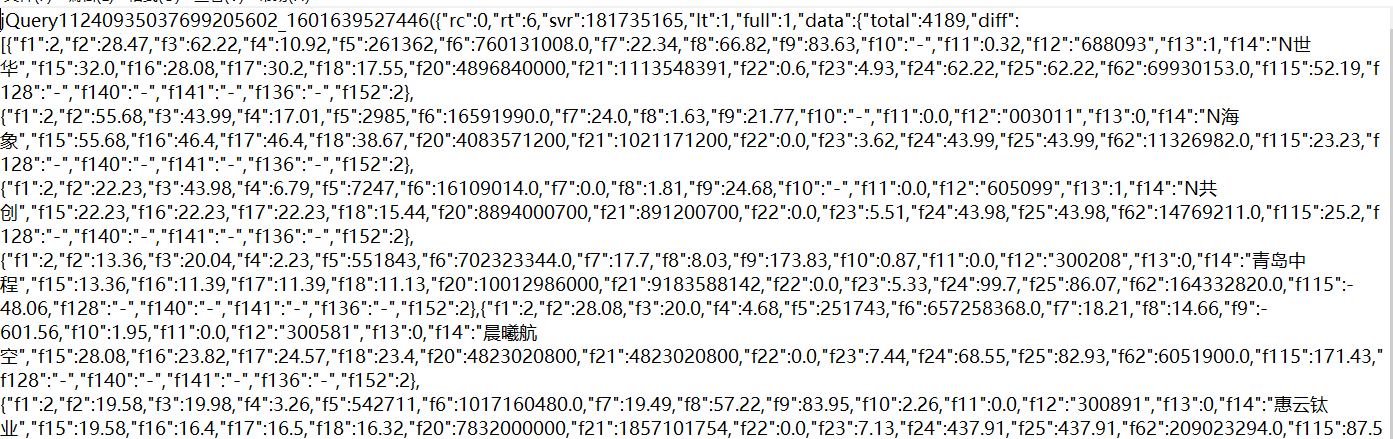
然后就是对于json文件文本信息的分析了,利用正则表达式等提取出所需的信息,具体看代码
代码:
import requests
import re
import pandas as pd
from bs4 import BeautifulSoup
import openpyxl


headers={"User-Agent":"Mozilla/5.0 (Windows NT 10.0; WOW64) AppleWebKit/537.36 (KHTML, like Gecko) Chrome/70.0.3538.25 Safari/537.36 Core/1.70.3775.400 QQBrowser/10.6.4209.400"}
def getHtml(page):
    url = "http://2.push2.eastmoney.com/api/qt/clist/get?cb=jQuery11240935037699205602_1601639527446&pn="+str(page)+"&pz=20&po=1&np=1&ut=bd1d9ddb04089700cf9c27f6f7426281&fltt=2&invt=2&fid=f3&fs=m:0+t:6,m:0+t:13,m:0+t:80,m:1+t:2,m:1+t:23&fields=f1,f2,f3,f4,f5,f6,f7,f8,f9,f10,f12,f13,f14,f15,f16,f17,f18,f20,f21,f23,f24,f25,f22,f11,f62,f128,f136,f115,f152"
    r = requests.get(url,headers=headers).text
    #data = BeautifulSoup(datas, "html.parser")
    pat0='"diff":\[\{(.*?)\}\]'
    data=re.compile(pat0,re.S).findall(r)
    return data
#print(data)
#爬取单页股票数据
def getOnePageStock(page):
    data=getHtml(page)
    datas=data[0].split('},{')
    #print(datas)
    stocks=[]
    for i in range(len(datas)):
        str1=r'"(\w)+":'
        stock=re.sub(str1," ",datas[i])
        stock =stock.split(",")
        stocks.append(stock)
    return stocks


page=1
stocks=getOnePageStock(page)
#print(stocks)
while page<=30:
    page+=1
    if getHtml(page)!=getHtml(page-1):
        stocks.extend(getOnePageStock(page))
        #print(pd.DataFrame(stocks))
        print("已经加载第"+str(page)+"页")
    else:
        break
df=pd.DataFrame(stocks)
#print(df)
#提取主要数据
df.drop([0,7,8,9,10,12,18,19,20,21,22,23,24,25,26,27,28,29,30],axis=1,inplace=True)
#print(df)
df.index = range(1,len(df) + 1)
df=df[[11,13,1,2,3,4,5,6,14,15,16,17]]
columns = {11:"股票代码",13:"股票名称",1:"最新报价",2:"涨跌幅",3:"涨跌额",4:"成交量",5:"成交额",6:"振幅",14:"最高",15:"最低",16:"今开",17:"昨收"}
df=df.rename(columns=columns)
print(df)

df.to_excel("D:/python+vscode/vscode homework/.vscode/data_collection_class/股票.xlsx")
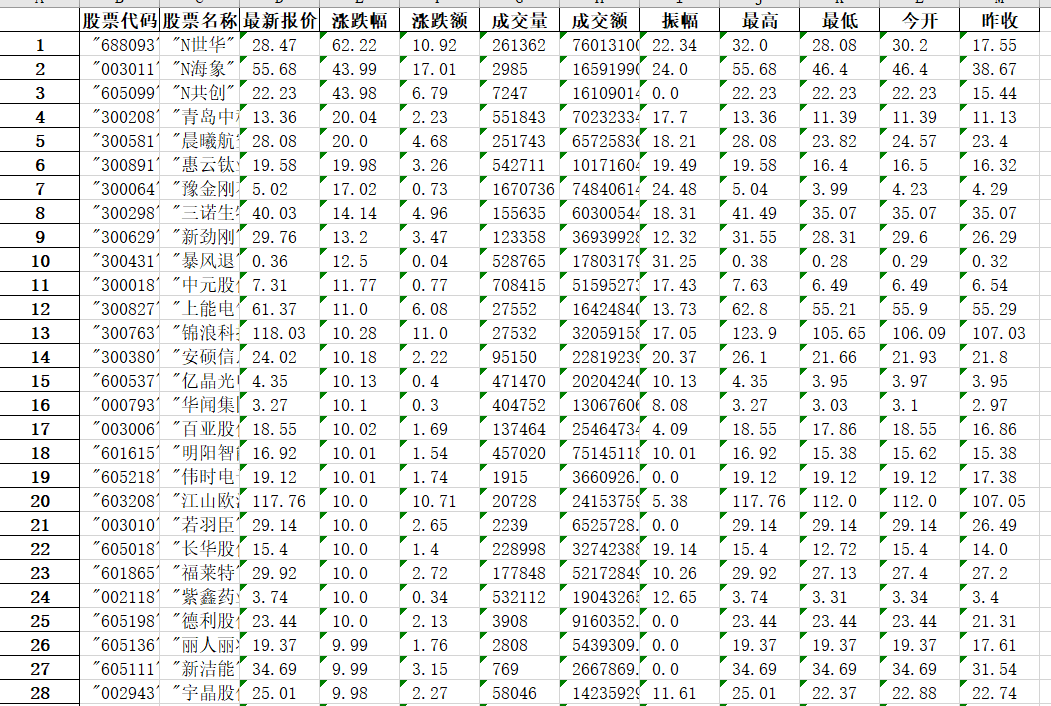
实践结果:
实验心得:
初看这道题时,本以为和之前都一样,做了,还是有些不同的,爬虫套路都一样,但这次爬取的是动态页面,对于json文件的追踪分析提取就比较重要了,这次实验主要就这一题,耗时较长,主要在json文件分析提取这部分刚开始有点懵,别的就没什么。
作业③: 加分题10分
要求:根据自选3位数+学号后3位选取股票,获取印股票信息。抓包方法同作②。
代码:
import requests
import re
import pandas as pd
from bs4 import BeautifulSoup
import openpyxl

headers={"User-Agent":"Mozilla/5.0 (Linux; Android 6.0; Nexus 5 Build/MRA58N) AppleWebKit/537.36 (KHTML, like Gecko) Chrome/70.0.3538.25 Mobile Safari/537.36"}
def getHtml(page):
    url = "http://48.push2.eastmoney.com/api/qt/clist/get?cb=jQuery112406919720070728796_1602074921895&pn="+str(page)+"&pz=20&po=1&np=1&ut=bd1d9ddb04089700cf9c27f6f7426281&fltt=2&invt=2&fid=f26&fs=m:0+f:8,m:1+f:8&fields=f1,f2,f3,f4,f5,f6,f7,f8,f9,f10,f12,f13,f14,f15,f16,f17,f18,f20,f21,f23,f24,f25,f26,f22,f11,f62,f128,f136,f115,f152"
    r = requests.get(url,headers=headers).text
    #data = BeautifulSoup(datas, "html.parser")
    pat0='"diff":\[\{(.*?)\}\]'
    data=re.compile(pat0,re.S).findall(r)
    return data
#print(data)
final=''
page=1
while page<=15:
    data=getHtml(page)
    datas=data[0].split('},{')
#print(datas)
    for i in range(len(datas)):
        stock=datas[i]
        if '603109' in stock:
            str1=r'"(\w)+":'
            stock=re.sub(str1," ",datas[i])
            page=16
            break
    page+=1
stock =stock.split(",")
print("股票代码  股票名称  今开  今日最高  今日最低")
print(stock[11],stock[13],stock[16],stock[14],stock[15])
实践结果:

实验心得:
问题三和问题二差不多,对于问题二删删减减就可以了,本身问题不复杂,就直接遍历了。

 浙公网安备 33010602011771号