
富文本编辑器Ueditor的使用及注意事项
//添加引用,在分部视图 使用Ueditor时,只需在主页面引用,分部视图无需再引用,避免不必要的冲突
<script src="~/utf8-net/ueditor.config.js"></script>
<script src="~/utf8-net/ueditor.all.js"></script>
<script src="~/utf8-net/lang/zh-cn/zh-cn.js"></script>
<script>
    var ue = window.UE.getEditor('editor');
</script>
  <div>
    <h1>完整demo</h1>
    <script id="editor" name="Content" type="text/plain" style="width:500px;height:500px;">
    </script>
</div>
Rozar显示语法
@Html.Raw(item.Content)//Content为富文本字段名
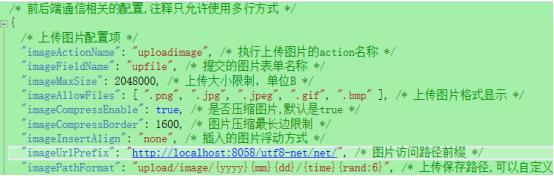
显示图片的话要将config.json中路径更改
添加动态百度地图
要在ueditor.config.js 中
搜索: whitList 然后增加下面第二行即可
,whitList:{

iframe: ['frameborder','border','marginwidth','marginheight','width','height','src','id'],//增加这一行

a:      ['target', 'href', 'title', 'class', 'style'],
Rozar修改语法
@Html.TextAreaFor(m=>m.Content,new { id = "editor", type = "text/plain" ,style = "width:500px;height:500px;" })
Ueditor不编码的话会报“从客户端(txtContent="<p>1</p>")中检测到有潜在危险的 Request.Form 值”错
//解决方法:在修改方法上加上特性 或者 用ajax传输进行编码,读取时解码
[ValidateInput(false)]

 浙公网安备 33010602011771号