
Spring Boot整合ES8.x实战
1、简介
Spring Data Elasticsearch 基于 spring data API 简化 Elasticsearch 操作,将原始操作Elasticsearch 的客户端 API 进行封装 。Spring Data 为 Elasticsearch 项目提供集成搜索引擎。Spring Data Elasticsearch POJO 的关键功能区域为中心的模型与 Elastichsearch 交互文档和轻松地编写一个存储索引库数据访问层。
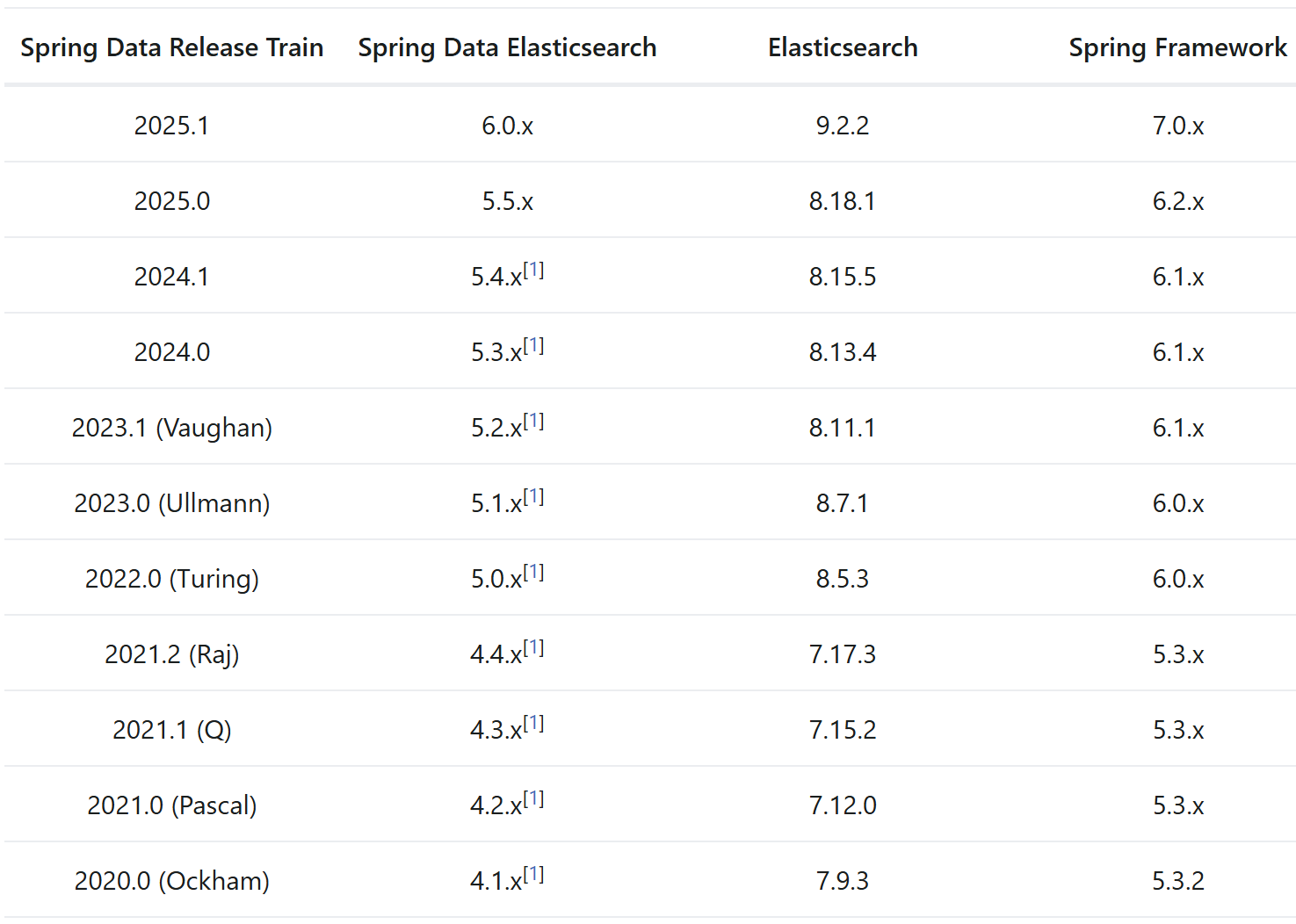
Elasticsearch 8.14.x 对应依赖 Spring Data Elasticsearch 5.3.x,对应Spring6.1.x,Spring Boot版本可以选择3.3.x
2、引入依赖
<dependency>
    <groupId>org.springframework.boot</groupId>
    <artifactId>spring-boot-starter-data-elasticsearch</artifactId>
</dependency>
yml方式配置ElasticSearch
# application.yml
spring:
  elasticsearch:
    # 连接配置(Spring Boot 3.x+)
    uris: http://localhost:9200  # 单节点
    # 多节点配置
    # uris: http://node1:9200,http://node2:9200,http://node3:9200

    # 连接超时配置
    connection-timeout: 2s  # 连接建立超时
    socket-timeout: 30s     # 读取超时

    # 用户名密码(如果启用了安全认证)
    username: ${ELASTIC_USERNAME:elastic}
    password: ${ELASTIC_PASSWORD:password}
3、代码实现
方式1:使用ElasticsearchRepository
ElasticsearchRepository 是Spring Data Elasticsearch项目中的一个接口,用于简化对Elasticsearch集群的CRUD操作以及其他高级搜索功能的集成。这个接口允许开发者通过声明式编程模型来执行数据持久化操作,从而避免直接编写复杂的REST API调用代码
创建实体类:
package org.tuling.vip_es_demo.bean;

import com.fasterxml.jackson.annotation.JsonIgnoreProperties;
import lombok.AllArgsConstructor;
import lombok.Data;
import lombok.NoArgsConstructor;
import org.springframework.data.annotation.Id;
import org.springframework.data.elasticsearch.annotations.*;
import org.springframework.data.elasticsearch.core.geo.GeoPoint;
import org.springframework.data.elasticsearch.core.join.JoinField;

import java.math.BigDecimal;
import java.time.LocalDateTime;
import java.util.List;
import java.util.Map;

/**
 * @Author dw
 * @Description
 * @Date 2026/1/9 14:45
 */
@Data
@Document(indexName = "products")  // 启动时自动创建索引)
@JsonIgnoreProperties(ignoreUnknown=true)
public class Product {

    @Id
    private String id;

    @Field(type = FieldType.Text, analyzer = "ik_max_word", searchAnalyzer = "ik_smart")
    private String name;

    @Field(type = FieldType.Double)
    private BigDecimal price;

    @Field(type = FieldType.Keyword)
    private List<String> tags;

    @Field(type = FieldType.Boolean)
    private Boolean isActive;

    @Field(type = FieldType.Date, format = DateFormat.date_hour_minute_second)
    private LocalDateTime createTime;

    @Field(type = FieldType.Nested)
    private List<Review> reviews;

    @JoinTypeRelations(
            relations = {
                    @JoinTypeRelation(parent = "product", children = {"store"}),
//                    @JoinTypeRelation(parent = "employee", children = "contract")
            }
    )
    private JoinField<String> relation;

    @Field(type = FieldType.Object)
    private Map<String, Object> attributes;

    @GeoPointField
    private GeoPoint location;

    // 复合字段
    @MultiField(
            mainField = @Field(type = FieldType.Text, analyzer = "ik_max_word"),
            otherFields = {
                    @InnerField(suffix = "keyword", type = FieldType.Keyword),
                    @InnerField(suffix = "english", type = FieldType.Text, analyzer = "english")
            }
    )
    private String title;

    @Data
    @AllArgsConstructor
    @NoArgsConstructor
    public static class Review {
        @Field(type = FieldType.Text)
        private String content;

        @Field(type = FieldType.Integer)
        private Integer rating;
    }
}
Repository 配置
import org.springframework.data.domain.Page;
import org.springframework.data.domain.Pageable;
import org.springframework.data.elasticsearch.annotations.Query;
import org.springframework.data.elasticsearch.repository.ElasticsearchRepository;
import org.springframework.data.repository.query.Param;
import org.springframework.stereotype.Repository;

import java.math.BigDecimal;
import java.time.LocalDateTime;
import java.util.List;

@Repository
public interface ProductRepository extends ElasticsearchRepository<Product, String> {

    // 1. 自动查询方法
    List<Product> findByName(String name);
    List<Product> findByNameContaining(String keyword);
    List<Product> findByNameLike(String keyword);
    List<Product> findByNameAndCategory(String name, String category);
    List<Product> findByPriceBetween(BigDecimal minPrice, BigDecimal maxPrice);
    List<Product> findByCategoryIn(List<String> categories);
    List<Product> findByIsActiveTrue();
    Page<Product> findByCategory(String category, Pageable pageable);

    // 2. 排序和分页
    List<Product> findByCategoryOrderByPriceDesc(String category);
    List<Product> findByNameContaining(String keyword, Pageable pageable);

    // 3. 计数
    long countByCategory(String category);
    long countByPriceGreaterThan(BigDecimal price);

    // 4. 删除
    long deleteByCategory(String category);
    List<Product> removeByIsActiveFalse();

    // 5. 自定义查询(@Query 注解)
    @Query("""
        {
          "bool": {
            "must": [
              {
                "match": {
                  "name": "?0"
                }
              },
              {
                "range": {
                  "price": {
                    "gte": "?1",
                    "lte": "?2"
                  }
                }
              }
            ]
          }
        }
        """)
    List<Product> findByNameAndPriceRange(String name, BigDecimal minPrice, BigDecimal maxPrice);

    // 6. 原生 JSON 查询
    @Query("{\"match\": {\"name\": {\"query\": \"?0\"}}}")
    Page<Product> findByNameCustom(String name, Pageable pageable);

    // 7. 聚合查询
    @Query("""
        {
          "size": 0,
          "aggs": {
            "category_stats": {
              "terms": {
                "field": "category.keyword",
                "size": 10
              },
              "aggs": {
                "avg_price": {
                  "avg": {
                    "field": "price"
                  }
                }
              }
            }
          }
        }
        """)
    Map<String, Object> getCategoryStats();

    // 8. 使用 @Param 注解
    @Query("""
        {
          "bool": {
            "must": [
              {"match": {"name": "?#{[0]}"}},
              {"term": {"category": ":#{#category}"}}
            ]
          }
        }
        """)
    List<Product> searchByNameAndCategory(
        @Param("name") String name,
        @Param("category") String category
    );

    // 9. 时间范围查询
    List<Product> findByCreateTimeBetween(
        LocalDateTime startTime,
        LocalDateTime endTime
    );

    // 10. 地理位置查询
    @Query("""
        {
          "bool": {
            "filter": {
              "geo_distance": {
                "distance": "?2km",
                "location": {
                  "lat": ?0,
                  "lon": ?1
                }
              }
            }
          }
        }
        """)
    List<Product> findByLocationNear(
        double lat, double lon, double distance
    );
}
方式二:使用ElasticsearchTemplate
ElasticsearchTemplate模板类,封装了便捷操作Elasticsearch的模板方法,包括 索引 / 映射 / 文档CRUD 等底层操作和高级操作。
@Autowired
ElasticsearchTemplate elasticsearchTemplate;
从 Java Rest Client 7.15.0 版本开始,Elasticsearch 官方决定将 RestHighLevelClient 标记为废弃的,并推荐使用新的 Java API Client,即 ElasticsearchClient. Spring Data ElasticSearch对ElasticsearchClient做了进一步的封装,成了新的客户端 ElasticsearchTemplate。
测试:
@Slf4j
public class ElasticsearchClientTest extends VipEsDemoApplicationTests{

    @Autowired
    ElasticsearchTemplate elasticsearchTemplate;


    @Test
    public void testCreateIndex(){

        //索引是否存在
        boolean exist = elasticsearchTemplate.indexOps(Employee.class).exists();
        if(exist){
            //删除索引
            elasticsearchTemplate.indexOps(Employee.class).delete();
        }
        //创建索引
        //1)配置settings
        Map<String, Object> settings = new HashMap<>();
        //"number_of_shards": 1,
        //"number_of_replicas": 1
        settings.put("number_of_shards",1);
        settings.put("number_of_replicas",1);
        //2) 配置mapping
        String json = "{\n" +
                "      \"properties\": {\n" +
                "        \"_class\": {\n" +
                "          \"type\": \"text\",\n" +
                "          \"fields\": {\n" +
                "            \"keyword\": {\n" +
                "              \"type\": \"keyword\",\n" +
                "              \"ignore_above\": 256\n" +
                "            }\n" +
                "          }\n" +
                "        },\n" +
                "        \"address\": {\n" +
                "          \"type\": \"text\",\n" +
                "          \"fields\": {\n" +
                "            \"keyword\": {\n" +
                "              \"type\": \"keyword\"\n" +
                "            }\n" +
                "          },\n" +
                "          \"analyzer\": \"ik_max_word\"\n" +
                "        },\n" +
                "        \"age\": {\n" +
                "          \"type\": \"integer\"\n" +
                "        },\n" +
                "        \"id\": {\n" +
                "          \"type\": \"long\"\n" +
                "        },\n" +
                "        \"name\": {\n" +
                "          \"type\": \"keyword\"\n" +
                "        },\n" +
                "        \"remark\": {\n" +
                "          \"type\": \"text\",\n" +
                "          \"fields\": {\n" +
                "            \"keyword\": {\n" +
                "              \"type\": \"keyword\"\n" +
                "            }\n" +
                "          },\n" +
                "          \"analyzer\": \"ik_smart\"\n" +
                "        },\n" +
                "        \"sex\": {\n" +
                "          \"type\": \"integer\"\n" +
                "        }\n" +
                "      }\n" +
                "    }";
        Document mapping = Document.parse(json);
        //3)创建索引
        elasticsearchTemplate.indexOps(Employee.class)
                .create(settings,mapping);

        //查看索引mappings信息
        Map<String, Object> mappings = elasticsearchTemplate.indexOps(Employee.class).getMapping();
        log.info(mappings.toString());


    }


    @Test
    public void testBulkBatchInsert(){
        List<Employee> employees = new ArrayList<>();
        employees.add(new Employee(2L,"张三",1,25,"广州天河公园","java developer"));
        employees.add(new Employee(3L,"李四",1,28,"广州荔湾大厦","java assistant"));
        employees.add(new Employee(4L,"小红",0,26,"广州白云山公园","php developer"));

        List<IndexQuery> bulkInsert = new ArrayList<>();
        for (Employee employee : employees) {
            IndexQuery indexQuery = new IndexQuery();
            indexQuery.setId(String.valueOf(employee.getId()));
            String json = JSONObject.toJSONString(employee);
            indexQuery.setSource(json);
            bulkInsert.add(indexQuery);
        }
        //bulk批量插入文档
        elasticsearchTemplate.bulkIndex(bulkInsert,Employee.class);
    }


    @Test
    public void testDocument(){

        //根据id删除文档
        //对应: DELETE /employee/_doc/12
        elasticsearchTemplate.delete(String.valueOf(12L),Employee.class);

        Employee employee = new Employee(12L,"张三三",1,25,"广州天河公园","java developer");
        //插入文档
        elasticsearchTemplate.save(employee);

        //根据id查询文档
        //对应:GET /employee/_doc/12
        Employee emp = elasticsearchTemplate.get(String.valueOf(12L),Employee.class);
        log.info(String.valueOf(emp));

    }


    @Test
    public void testQueryDocument(){
        //条件查询
        /* 查询姓名为张三的员工信息
        GET /employee/_search
        {
            "query": {
            "term": {
                "name": {
                    "value": "张三"
                }
            }
        }
        }*/

        //第一步:构建查询语句
        //方式1:StringQuery
//        Query query = new StringQuery("{\n" +
//                "            \"term\": {\n" +
//                "                \"name\": {\n" +
//                "                    \"value\": \"张三\"\n" +
//                "                }\n" +
//                "            }\n" +
//                "        }");
        //方式2:NativeQuery
        Query query = NativeQuery.builder()
                .withQuery(q -> q.term(
                        t -> t.field("name").value("张三")))
                .build();


        //第二步:调用search查询
        SearchHits<Employee> search = elasticsearchTemplate.search(query, Employee.class);
        //第三步:解析返回结果
        List<SearchHit<Employee>> searchHits = search.getSearchHits();
        for (SearchHit hit: searchHits){
            log.info("返回结果:"+hit.toString());
        }


    }


    @Test
    public void testMatchQueryDocument(){
        //条件查询
        /*最少匹配广州,公园两个词
        GET /employee/_search
        {
            "query": {
            "match": {
                "address": {
                    "query": "广州公园",
                     "minimum_should_match": 2
                }
            }
        }
        }*/

        //第一步:构建查询语句
        //方式1:StringQuery
//        Query query = new StringQuery("{\n" +
//                "            \"match\": {\n" +
//                "                \"address\": {\n" +
//                "                    \"query\": \"广州公园\",\n" +
//                "                     \"minimum_should_match\": 2\n" +
//                "                }\n" +
//                "            }\n" +
//                "        }");
        //方式2:NativeQuery
        Query query = NativeQuery.builder()
                .withQuery(q -> q.match(
                        m -> m.field("address").query("广州公园")
                                .minimumShouldMatch("2")))
                .build();


        //第二步:调用search查询
        SearchHits<Employee> search = elasticsearchTemplate.search(query, Employee.class);
        //第三步:解析返回结果
        List<SearchHit<Employee>> searchHits = search.getSearchHits();
        for (SearchHit hit: searchHits){
            log.info("返回结果:"+hit.toString());
        }

    }

    @Test
    public void testQueryDocument3(){
        // 分页排序高亮
        /*
        GET /employee/_search
        {
          "from": 0,
          "size": 3,
          "query": {
            "match": {
              "remark": {
                "query": "JAVA"
              }
            }
          },
          "highlight": {
            "pre_tags": ["<font color='red'>"],
            "post_tags": ["<font/>"],
            "require_field_match": "false",
            "fields": {
              "*":{}
            }
          },
          "sort": [
            {
              "age": {
                "order": "desc"
              }
            }
          ]
        }*/
        //第一步:构建查询语句
        Query query = new StringQuery("{\n" +
                "        \"match\": {\n" +
                "          \"remark\": {\n" +
                "            \"query\": \"JAVA\"\n" +
                "          }\n" +
                "        }\n" +
                "      }");
        //分页  注意:from = pageNumber(页码,从0开始,) * pageSize(每页的记录数)
        query.setPageable(PageRequest.of(0, 3));
        //排序
        query.addSort(Sort.by(Order.desc("age")));
        //高亮
        HighlightField highlightField = new HighlightField("*");
        HighlightParameters highlightParameters = new HighlightParameters.HighlightParametersBuilder()
                .withPreTags("<font color='red'>")
                .withPostTags("<font/>")
                .withRequireFieldMatch(false)
                .build();
        Highlight highlight = new Highlight(highlightParameters,Arrays.asList(highlightField));
        HighlightQuery highlightQuery = new HighlightQuery(highlight,Employee.class);

        query.setHighlightQuery(highlightQuery);


        //第二步:调用search查询
        SearchHits<Employee> search = elasticsearchTemplate.search(query, Employee.class);
        //第三步:解析返回结果
        List<SearchHit<Employee>> searchHits = search.getSearchHits();
        for (SearchHit hit: searchHits){
            log.info("返回结果:"+hit.toString());
        }
    }


    @Test
    public void testBoolQueryDocument(){
        //条件查询
        /*
        GET /employee/_search
        {
          "query": {
            "bool": {
              "must": [
                {
                  "match": {
                    "address": "广州"
                  }
                },{
                  "match": {
                    "remark": "java"
                  }
                }
              ]
            }
          }
        }
         */

        //第一步:构建查询语句
        //方式1:StringQuery
//        Query query = new StringQuery("{\n" +
//                "            \"bool\": {\n" +
//                "              \"must\": [\n" +
//                "                {\n" +
//                "                  \"match\": {\n" +
//                "                    \"address\": \"广州\"\n" +
//                "                  }\n" +
//                "                },{\n" +
//                "                  \"match\": {\n" +
//                "                    \"remark\": \"java\"\n" +
//                "                  }\n" +
//                "                }\n" +
//                "              ]\n" +
//                "            }\n" +
//                "          }");
        //方式2:NativeQuery
        Query query = NativeQuery.builder()
                .withQuery(q -> q.bool(
                        m -> m.must(
                          QueryBuilders.match( q1 -> q1.field("address").query("广州")),
                          QueryBuilders.match( q2 -> q2.field("remark").query("java"))
                        )))
                .build();

        //第二步:调用search查询
        SearchHits<Employee> search = elasticsearchTemplate.search(query, Employee.class);
        //第三步:解析返回结果
        List<SearchHit<Employee>> searchHits = search.getSearchHits();
        for (SearchHit hit: searchHits){
            log.info("返回结果:"+hit.toString());
        }

    }

}
方式3:使用ElasticsearchClient
从 Java Rest Client 7.15.0 版本开始,Elasticsearch 官方决定将 RestHighLevelClient 标记为废弃的,并推荐使用新的 Java API Client,即 ElasticsearchClient.
官网文档:https://www.elastic.co/guide/en/elasticsearch/client/java-api-client/8.14/getting-started-java.html
测试:
@Autowired
ElasticsearchClient elasticsearchClient;

String indexName = "employee_demo";

@Test
public void testCreateIndex() throws IOException {

    //索引是否存在
    BooleanResponse exist = elasticsearchClient.indices()
            .exists(e->e.index(indexName));
    if(exist.value()){
        //删除索引
        elasticsearchClient.indices().delete(d->d.index(indexName));
    }
    //创建索引
    elasticsearchClient.indices().create(c->c.index(indexName)
            .settings(s->s.numberOfShards("1").numberOfReplicas("1"))
            .mappings(m-> m.properties("name",p->p.keyword(k->k))
                    .properties("sex",p->p.long_(l->l))
                    .properties("address",p->p.text(t->t.analyzer("ik_max_word")))
            )
    );

    //查询索引
    GetIndexResponse getIndexResponse = elasticsearchClient.indices().get(g -> g.index(indexName));
    log.info(getIndexResponse.result().toString());

}


@Test
public void testBulkBatchInsert() throws IOException {
    List<Employee> employees = new ArrayList<>();
    employees.add(new Employee(2L,"张三",1,25,"广州天河公园","java developer"));
    employees.add(new Employee(3L,"李四",1,28,"广州荔湾大厦","java assistant"));
    employees.add(new Employee(4L,"小红",0,26,"广州白云山公园","php developer"));

    List<IndexQuery> bulkInsert = new ArrayList<>();
    for (Employee employee : employees) {
        IndexQuery indexQuery = new IndexQuery();
        indexQuery.setId(String.valueOf(employee.getId()));
        String json = JSONObject.toJSONString(employee);
        indexQuery.setSource(json);
        bulkInsert.add(indexQuery);
    }
    List<BulkOperation> list = new ArrayList<>();
    for (Employee employee : employees) {
        BulkOperation bulkOperation = new BulkOperation.Builder()
                .create(c->c.id(String.valueOf(employee.getId()))
                        .document(employee)
                )
                .build();

        list.add(bulkOperation);
    }

    //bulk批量插入文档
    elasticsearchClient.bulk(b->b.index(indexName).operations(list));
}

@Test
public void testDocument() throws IOException {
    Employee employee = new Employee(12L,"张三三",1,25,"广州天河公园","java developer");

    IndexRequest<Employee> request = IndexRequest.of(i -> i
            .index(indexName)
            .id(employee.getId().toString())
            .document(employee)
    );

    IndexResponse response = elasticsearchClient.index(request);

    log.info("response:"+response);
}


@Test
public void testQuery() throws IOException {
    SearchRequest searchRequest = SearchRequest.of(s -> s
            .index(indexName)
            .query(q -> q.match(m -> m.field("name").query("张三三"))
     ));

    log.info("构建的DSL语句:"+ searchRequest.toString());

    SearchResponse<Employee> searchResponse = elasticsearchClient.search(searchRequest, Employee.class);

    List<Hit<Employee>> hits = searchResponse.hits().hits();
    hits.stream().map(Hit::source).forEach(employee -> {
        log.info("员工信息:"+employee);
    });

}

@Test
public void testBoolQueryDocument() throws IOException {
    //条件查询
    /*
    GET /employee/_search
    {
      "query": {
        "bool": {
          "must": [
            {
              "match": {
                "address": "广州"
              }
            },{
              "match": {
                "remark": "java"
              }
            }
          ]
        }
      }
    }
     */

    //第一步:构建查询语句
    BoolQuery.Builder boolQueryBuilder = new BoolQuery.Builder();
    boolQueryBuilder.must(m->m.match(q->q.field("address").query("广州")))
            .must(m->m.match(q->q.field("remark").query("java")));

    SearchRequest searchRequest = new SearchRequest.Builder()
            .index("employee")
            .query(q->q.bool(boolQueryBuilder.build()))
            .build();

    //第二步:调用search查询
    SearchResponse<Employee> searchResponse = elasticsearchClient.search(searchRequest, Employee.class);
    //第三步:解析返回结果
    List<Hit<Employee>> list = searchResponse.hits().hits();
    for(Hit<Employee> hit: list){
        //返回source
        log.info(String.valueOf(hit.source()));
    }

}

 浙公网安备 33010602011771号