
ElasticSearch基础数据管理-2-索引操作详解
1、简介
2、索引的基本操作
PUT /index_name
{
  "settings": {
    // 索引设置
  },
  "mappings": {
    "properties": {
      // 字段映射
    }
  }
}
索引名称 (index_name): 索引名称必须是小写字母,可以包含数字和下划线。
索引设置 (settings):
"number_of_shards": 1
2、副本数量 (number_of_replicas):副本提高了数据的可用性和容错能力。示例:
"number_of_replicas": 1
映射 (mappings): 字段属性 (properties)定义索引中文档的字段及其类型。
mappings默认最大字段数是1000,可以设置index.mapping.total_fields.limit限定最大字段数。生产环境中,尽量不要打开 Dynamic,可以使用Strict控制新增字段的加入。
- - true :未知字段会被自动加入,默认值。
- - false :新字段不会被索引,但是会保存在_source。
- - strict :新增字段不会被索引,文档写入失败。
{
  "mappings": {
    "dynamic": "strict",

    "properties": {
      "new_field": {
        "type": "keyword"
      },
      "description": {
        "type": "text",          # 主字段类型:用于全文搜索
        "fields": {              # 子字段配置(同时支持全文搜索和精确匹配)
          "keyword": {           # 子字段名称(自定义):description.keyword
            "type": "keyword",   # 子字段类型:用于精确匹配
            "ignore_above": 256  # 限制:超过256字符不索引
          }
         // ...
        }
      }
      // ...
    }
  }
}
常用字段类型包括:
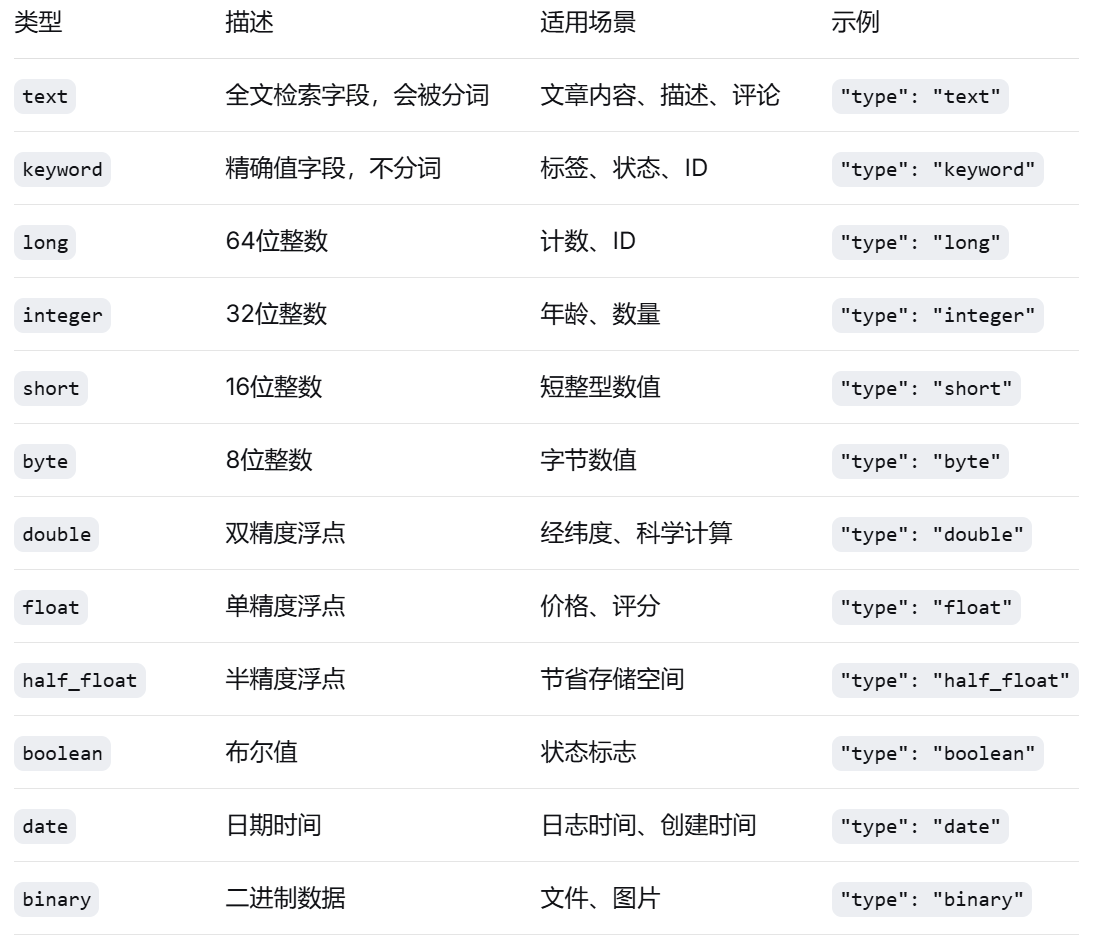
也可以只定义索引名,而settings、mappings取默认值。示例:
#创建索引
PUT /myindex

#查看索引
GET /myindex
实践练习:创建一个名为 student_index 的索引,并设置一些自定义字段
name(学生姓名):text 类型、age(年龄):integer 类型、enrolled_date(入学日期):date 类型
PUT /student_index
{
  "settings": {
    "number_of_shards": 1,
    "number_of_replicas": 1
  },
  "mappings": {
    "properties": {
      "name": {
        "type": "text"
      },
      "age": {
        "type": "integer"
      },
      "enrolled_date": {
        "type": "date"
      },
     "address": {          # 对象字段
      "type": "object",   # 类型为object(可省略,默认就是object)
      "properties": {     # 定义对象的属性
        "street": {
          "type": "text"
        },
        "city": {
          "type": "keyword"
        },
        "zipcode": {
          "type": "keyword"
        }
      }
    },
    # 字符串数组,ES没有专门的数组类型,任何字段都可以包含零个或多个值
      "tags": {
        "type": "keyword"  # 这是keyword数组
      },
  }
}
2、查询索引
GET /index_name

# 示例:获取名为 myindex的索引的信息:
GET myindex
GET /index_name/_search
{
  "query": {
    // 查询条件
  }
}

示例:
# 搜索 name 字段包含 John 的文档
GET /student_index/_search
{
  "query": {
    "match": {
      "name": "John"
    }
  }
}
3、修改索引
PUT /index_name/_settings
{
  "index": {
   # 更新副本数量
    "number_of_replicas": 2,
    "refresh_interval": "30s",         # 修改刷新间隔
    "max_result_window": 10000,  # 修改最大返回结果数
    "blocks.read_only": false          # 解除只读状态
  }
}
PUT /index_name/_mapping
{
  "properties": {
    "new_field": {
      "type": "field_type"
    }
  }
}

# 示例:向 student_index 添加一个名为 grade 的新字段,类型为 integer:
PUT /student_index/_mapping
{
  "properties": {
    "grade": {
      "type": "integer"
    }
  }
}
4、重建索引(Reindex)
如果必须修改索引的结构(例如更改字段类型)或分片数量,那么需要重建索引。使用Reindex API将数据从旧索引复制到新索引(新索引具有新的映射或设置)。
步骤:
-
创建新索引,并定义新的映射和设置。
-
使用Reindex API将旧索引的数据复制到新索引。
-
删除旧索引,并将旧索引的别名指向新索引(如果有别名的话)。
使用Reindex API复制数据:
POST /_reindex
{
  "source": {
    "index": "my_index"
  },
  "dest": {
    "index": "my_index_new"
  }
}
5、删除索引
我们想要删除Elasticsearch中的索引。删除索引是一个危险操作,因为数据将永久丢失。因此,在执行删除操作之前,请确保你已经备份了重要数据或确认该索引不再需要。
1、删除索引的基本语法
DELETE /索引名称
2、删除多个索引(使用逗号分隔)
DELETE /index1,index2,index3
3、使用通配符删除多个索引
注意:这可能很危险,因为可能会匹配到意外的索引,因此,在生产环境中,建议先使用通配符查询一下要删除的索引列表,确认无误后再删除。)另外,Elasticsearch也提供了通过API来禁用通配符删除的操作,可以在配置中设置action.destructive_requires_name为true,这样就不能使用通配符删除索引了,只能显式指定索引名称。
DELETE /logs_2020_*
4、使用别名间接删除(推荐生产环境使用)
# 4.1 通过别名找到实际索引
GET /*/_alias/current_logs

# 4.2 先移除别名,再删除索引
POST /_aliases
{
  "actions": [
    {
      "remove": {
        "index": "logs_old_version",
        "alias": "current_logs"
      }
    }
  ]
}

# 4.3 再删除旧索引
DELETE /logs_old_version
5、删除被锁定的索引
# 查看索引是否被锁定(只读状态)
GET /my_index/_settings?filter_path=**.blocks

# 如果 blocks.write 为 true,需要先解锁
PUT /my_index/_settings
{
  "index.blocks.write": false
}

# 删除索引
DELETE /my_index
6、索引生命周期管理(ILM)自动删除
# 创建生命周期策略
PUT /_ilm/policy/logs_retention_policy
{
  "policy": {
    "phases": {
      "hot": {
        "min_age": "0ms",
        "actions": {
          "rollover": {
            "max_size": "50gb",
            "max_age": "30d"
          }
        }
      },
      "delete": {
        "min_age": "90d",
        "actions": {
          "delete": {
            "delete_searchable_snapshot": true
          }
        }
      }
    }
  }
}

# 将策略应用到索引模板
PUT /_index_template/logs_template
{
  "index_patterns": ["logs-*"],
  "template": {
    "settings": {
      "index.lifecycle.name": "logs_retention_policy",
      "index.lifecycle.rollover_alias": "logs"
    }
  }
}
防止误删除配置
# elasticsearch.yml 配置
# 禁止通配符删除
action.destructive_requires_name: true

# 设置索引为只读
PUT /important_index/_settings
{
  "index.blocks.write": true,
  "index.blocks.read_only": true
}
6、索引别名详解
而在很多业务场景下,单一索引可能无法满足要求,举例如下。
- 场景1:面对PB级别的增量数据,对外提供服务的是基于日期切分的n个不同索引,每次检索都要指定数十个甚至数百个索引,非常麻烦。
- 场景2:线上提供服务的某个索引设计不合理,比如某字段分词定义不准确,那么如何保证对外提供服务不停止,也就是在不更改业务代码的前提下更换索引?
创建索引的时候可以指定别名
PUT myindex
{
  "aliases": {
    "myindex_alias": {}
  },
  "settings": {
    "refresh_interval": "30s",
    "number_of_shards": 1,
    "number_of_replicas": 0
  }
}
为已有索引添加别名。
POST /_aliases
{
  "actions": [
    {
      "add": {
        "index": "index_name",
        "alias": "alias_name"
      }
    },
    {
      "add": {
        "index": "index_name2",
        "alias": "alias_name2"
      }
    }
  ]
}
7、多索引检索的实现方案
POST tlmall_logs_202401,tlmall_logs_202402,tlmall_logs_202403/_search
2、使用通配符进行多索引检索
POST tlmall_logs_*/_search
3、使用别名进行检索
POST tlmall_logs_2024/_search

 浙公网安备 33010602011771号