idea归纳总结
1. gradle 打包成可执行jar
Tasks -> build -> buildDependents
2. project 'org.springframework.boot:spring-boot-starter-parent:XXX' not found 解决
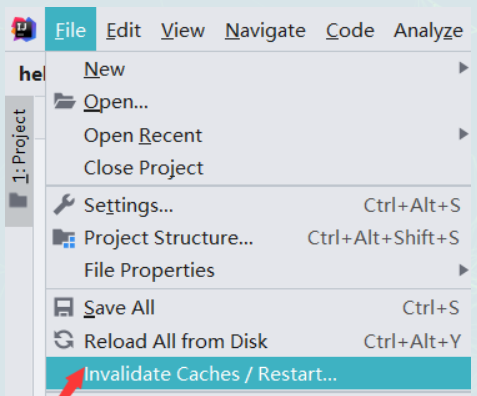
因为idea会默认缓存Maven本地仓库已存在的中的依赖项。只是我们引入的的父依赖版本 本地仓库中不存在,所以就报错了,解决方案就是我们清除一下缓存重新启动,使用 Invalidate Caches/Restart
3. idea community 安装spring Assistant插件
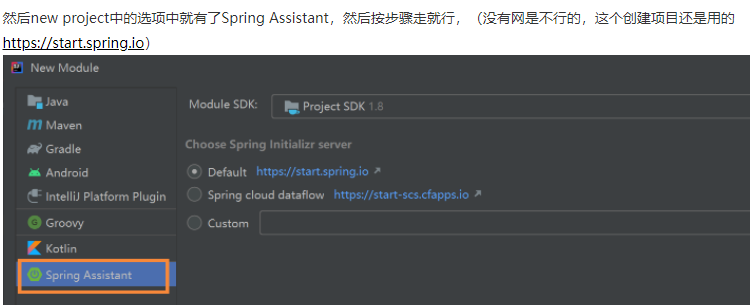
4. 创建多Module
如果module配置依赖正确,但是编译不行,可以先编译root一下,然后再回来编译就可以了。
5. Could not find artifact org.example:demo:1.0-SNAPSHOT
原因是本地仓库缺少了demo:pom:0.0.1-SNAPSHOT, 原来是忘记了将父工程打包到本地仓库 ,运行聚合工程前记得先将依赖的工程都先Maven install到本地仓库
6. idea update indexing 一直很慢:
将很大的node_modules排除:Mark Directory As -> Exclude
7. idea打可执行jar包:
1. 推荐勾选copy to the output directory and link via manifest,选择该项,执行jar出错起码会有些提示,选择打包成一个jar包,出错则基本上就只会提示找不到主类。。。
2. 按步骤生成jar,然后到jar包目录,运行java -jar XXX.jar
javax.persistence.PersistenceException: Unable to resolve persistence unit root
可能是模块依赖造成的,如果我跑一个没有模块依赖的module打成的jar,没有这个问题
   <build>
        <plugins>
            <plugin>
                <groupId>org.apache.maven.plugins</groupId>
                <artifactId>maven-compiler-plugin</artifactId>
            </plugin>
        </plugins>
        <pluginManagement>
            <plugins>
                <plugin>
                    <groupId>org.springframework.boot</groupId>
                    <artifactId>spring-boot-maven-plugin</artifactId>
                    <version>2.3.2.RELEASE</version>
                </plugin>
            </plugins>
        </pluginManagement>
    </build>
在子模块指定打包:
   <build>
        <plugins>
            <plugin>
                <groupId>org.springframework.boot</groupId>
                <artifactId>spring-boot-maven-plugin</artifactId>
                <executions>
                    <execution>
                        <goals>
                            <goal>repackage</goal>
                        </goals>
                    </execution>
                </executions>
            </plugin>
        </plugins>
    </build>
需要有粗体部分,这样打出来的包才会包含所有依赖的可执行包
8. idea添加jdbc驱动
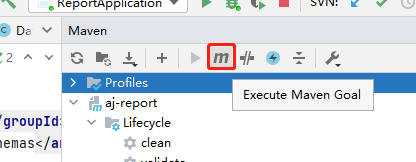
输入命令:
mvn install:install-file -Dfile=E:\aj-report\report-core\lib\mssqlserver\sqljdbc4-4.0.jar -Dpackaging=jar -DgroupId=com.microsoft.sqlserver -DartifactId=sqljdbc4 -Dversion=4.0

在pom中添加依赖:
       <dependency>
            <groupId>com.microsoft.sqlserver</groupId>
            <artifactId>sqljdbc4</artifactId>
            <version>4.0</version>
        </dependency>

 浙公网安备 33010602011771号