
Mybatis入门-05-一对多
一、 前言
一切当以官方文档为基准。
参考视频:
一对多和多对一其实依旧是解决属性名和字段不一致的问题。
在我学习MySQL的时候,老师告诉我尽量不要使用外键,而是在JDBC代码中用逻辑代码去替代他。
至于原话,似乎是下面这句:
不得使用外键与级联,一切外键概念必须在应用层解决。
秉承这样的概念,在下面的演示中数据库只有一个“概念上”的外键,实质上是多表查询。
二、准备工作
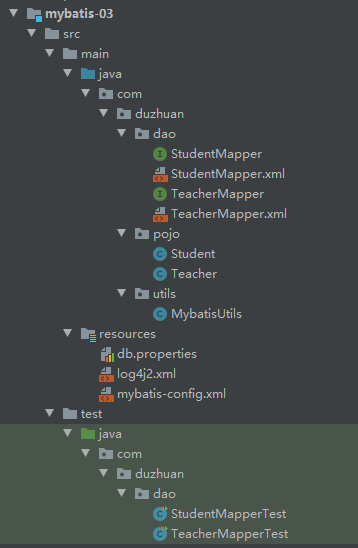
2.0 依赖、路径
为了方便,这里使用前面留下来的配置:
本文之前的操作步骤:
上面是我喜欢的一些配置,主要是父pom的配制,大部分是SJF4J+LOG4J2的配置,一般来说按自己配置来并不会太影响。
2.1 创建数据库
就是之前在Mybatis入门-04-多对一中创建的数据库,没有创建数据库意义上的外键:
create database if not exists `mybatis`;

use `mybatis`;

create table if not exists `User`(
    `id` INT(20) not null primary key,
    `name` VARCHAR(20) default null,
    `pwd` varchar(20) default null
)ENGINE=INNODB default CHARSET = UTF8;

insert into `User`(`id`,`name`,`pwd`)
values (1,'admin','123456'),
       (2,'Jax','123456'),
       (3,'Jinx','123455'),
       (4,'Query','123456'),
       (5,'biubiu','123456');

select `id`,`name` from mybatis.user;

CREATE TABLE `teacher` (
                           `id` INT(10) NOT NULL,
                           `name` VARCHAR(30) DEFAULT NULL,
                           PRIMARY KEY (`id`)
) ENGINE=INNODB DEFAULT CHARSET=utf8;

INSERT INTO teacher(`id`, `name`) VALUES (1, '秦老师');

CREATE TABLE `student` (
                           `id` INT(10) NOT NULL,
                           `name` VARCHAR(30) DEFAULT NULL,
                           `tid` INT(10) DEFAULT NULL,
                           PRIMARY KEY (`id`)
) ENGINE=INNODB DEFAULT CHARSET=utf8;
INSERT INTO `student` (`id`, `name`, `tid`) VALUES ('1', '小明', '1');
INSERT INTO `student` (`id`, `name`, `tid`) VALUES ('2', '小红', '1');
INSERT INTO `student` (`id`, `name`, `tid`) VALUES ('3', '小张', '1');
INSERT INTO `student` (`id`, `name`, `tid`) VALUES ('4', '小李', '1');
INSERT INTO `student` (`id`, `name`, `tid`) VALUES ('5', '小王', '1');
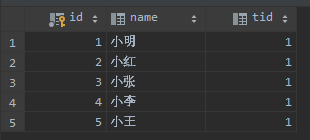
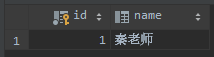
大致效果:
2.2 创建实体类
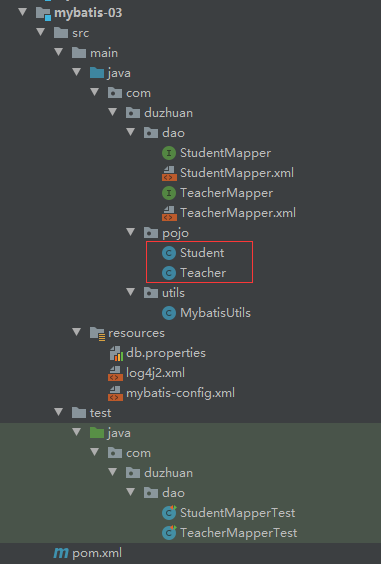
由于是多对一的关系,这个实体类比Mybatis入门-04-多对一里的实体类略有修改:
Student.java:
package com.duzhuan.pojo;

/**
 * @Autord: HuangDekai
 * @Date: 2020/9/16 14:45
 * @Version: 1.0
 * @since: jdk11
 */
public class Student {
    private int id;
    private String name;
    private int tid;

    public Student() {
    }

    public Student(int id, String name, int tid) {
        this.id = id;
        this.name = name;
        this.tid = tid;
    }

    public int getId() {
        return id;
    }

    public void setId(int id) {
        this.id = id;
    }

    public String getName() {
        return name;
    }

    public void setName(String name) {
        this.name = name;
    }

    public int getTid() {
        return tid;
    }

    public void setTid(int tid) {
        this.tid = tid;
    }

    @Override
    public String toString() {
        return "Student{" +
                "id=" + id +
                ", name='" + name + '\'' +
                ", tid=" + tid +
                '}';
    }
}
Teacher.java
package com.duzhuan.pojo;

import java.util.List;

/**
 * @Autord: HuangDekai
 * @Date: 2020/9/16 14:42
 * @Version: 1.0
 * @since: jdk11
 */
public class Teacher {
    private int id;
    private String name;

    private List<Student> students;

    public Teacher() {
    }

    public Teacher(int id, String name, List<Student> students) {
        this.id = id;
        this.name = name;
        this.students = students;
    }

    public int getId() {
        return id;
    }

    public void setId(int id) {
        this.id = id;
    }

    public String getName() {
        return name;
    }

    public void setName(String name) {
        this.name = name;
    }

    public List<Student> getStudents() {
        return students;
    }

    public void setStudents(List<Student> students) {
        this.students = students;
    }

    @Override
    public String toString() {
        return "Teacher{" +
                "id=" + id +
                ", name='" + name + '\'' +
                ", students=" + students +
                '}';
    }
}
2.3 MyBatis配置文件
与Mybatis入门-04-多对一并无区别:
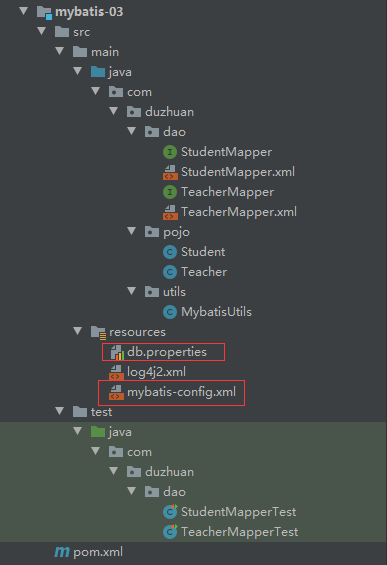
db.properties:
driver = com.mysql.jdbc.Driver
url = jdbc:mysql://localhost:3306/mybatis?useSSL=true&useUnicode=true&characterEncoding=UTF8&serverTimezone=UTC
username = root
password = qq123456
mybatis-config.xml
<?xml version="1.0" encoding="UTF-8" ?>
<!DOCTYPE configuration
        PUBLIC "-//mybatis.org//DTD Config 3.0//EN"
        "http://mybatis.org/dtd/mybatis-3-config.dtd">
<configuration>

    <properties resource="db.properties"></properties>

    <settings>
        <setting name="logImpl" value="SLF4J"/>
    </settings>

    <typeAliases>
        <package name="com.duzhuan.pojo"/>
    </typeAliases>


    <environments default="development">
        <environment id="development">
            <transactionManager type="JDBC"/>
            <dataSource type="POOLED">
                <property name="driver" value="${driver}"/>
                <property name="url" value="${url}"/>
                <property name="username" value="${username}"/>
                <property name="password" value="${password}"/>
            </dataSource>
        </environment>
    </environments>

    <mappers>
        <mapper class="com.duzhuan.dao.TeacherMapper"></mapper>
        <mapper class="com.duzhuan.dao.StudentMapper"></mapper>
    </mappers>
</configuration>
注意:
-
此处使用了日志,不使用日志
删除,或修改为相应日志,我这里的配置具体可看Mybatis入门-03-日志工厂:<settings> <setting name="logImpl" value="SLF4J"/> </settings> -
此处命名了别名,可以看出是使用了pojo包里的所有实体类的名称作为别名。按照规定别名应为全小写,但是由于mybatis不区分大小写,之后再Mapper.xml中一般写时候都是完全使用实体类的类名,如
Teacher:<typeAliases> <package name="com.duzhuan.pojo"/> </typeAliases> -
此处为写Mapper之后添加:
    <mappers>
        <mapper class="com.duzhuan.dao.TeacherMapper"></mapper>
        <mapper class="com.duzhuan.dao.StudentMapper"></mapper>
    </mappers>
2.4 工具类
与Mybatis入门-04-多对一并无区别:
在一整个程序里,只需要有一个sqlSessionFactory。
MybatisUtils.java:
package com.duzhuan.utils;

import org.apache.ibatis.io.Resources;
import org.apache.ibatis.session.SqlSession;
import org.apache.ibatis.session.SqlSessionFactory;
import org.apache.ibatis.session.SqlSessionFactoryBuilder;

import java.io.IOException;
import java.io.InputStream;

/**
 * @Autord: HuangDekai
 * @Date: 2020/9/16 12:32
 * @Version: 1.0
 * @since: jdk11
 */
public class MybatisUtils {

   private static SqlSessionFactory sqlSessionFactory;

   static {
       try {
           String configuration = "mybatis-config.xml";
           InputStream inputStream = Resources.getResourceAsStream(configuration);
           sqlSessionFactory = new SqlSessionFactoryBuilder().build(inputStream);
       } catch (IOException e) {
           e.printStackTrace();
       }
   }

    public static SqlSession getSqlSession(){
       return sqlSessionFactory.openSession();
    }

}
三、Mapper
其中StudentMapper和StudentMapper.xml并未用到,只是出于顺手随便写的,没有使用到(但是测试时候里面的内容可能会被使用到,请注释掉里面内容以防止出现错误)。
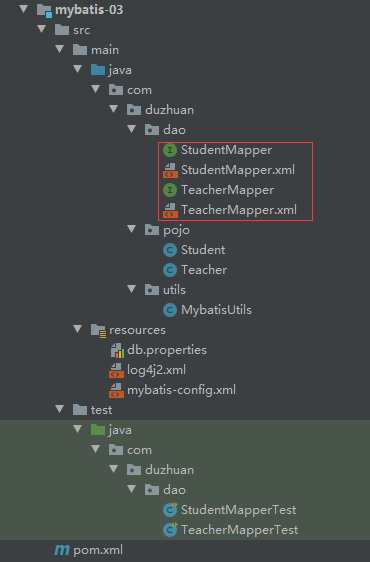
TeacherMapper:
package com.duzhuan.dao;

import com.duzhuan.pojo.Teacher;

import java.util.List;

/**
 * @Autord: HuangDekai
 * @Date: 2020/9/16 14:56
 * @Version: 1.0
 * @since: jdk11
 */
public interface TeacherMapper {
    List<Teacher> getTeacherList();
}
TeacherMapper.xml(关键):
<?xml version="1.0" encoding="UTF-8" ?>
<!DOCTYPE mapper
        PUBLIC "-//mybatis.org//DTD Mapper 3.0//EN"
        "http://mybatis.org/dtd/mybatis-3-mapper.dtd">

<mapper namespace="com.duzhuan.dao.TeacherMapper">

    <select id="getTeacherList" resultMap="TeacherStudent">
        select t.id id,t.name tname,s.id sid, s.name sname,s.tid stid
        from mybatis.teacher t, mybatis.student s
        where t.id = s.tid
    </select>

    <resultMap id="TeacherStudent" type="Teacher">
        <result property="id" column="id"/>
        <result property="name" column="tname"/>
        <collection property="students" ofType="Student">
            <result property="id" column="sid"/>
            <result property="name" column="sname"/>
            <result property="tid" column="stid"/>
        </collection>
    </resultMap>
</mapper>
-
由于Student与Teacher都有id,且字段名都为
id,因此不得不使用别名。select t.id id,t.name tname,s.id sid, s.name sname,s.tid stid from mybatis.teacher t, mybatis.student s where t.id = s.tid这也方便映射
-
<resultMap id="TeacherStudent" type="Teacher">显然,Teacher就是使用了之前在mybatis-config.xml中设定好的别名,而不是使用全限定名. -
由于返回的不是一个属性、对象,而是一个列表(返回一个学生列表),因此使用
<collection>,且按照其泛型的类型设置ofType为Student。如果理解了前面多对一,其实一对多很好理解。一对多、多对一都是将其转化为一对一而已。 -
在这里,
property的属性是实体类中对应的属性名,column对应的是SQL查询语句查询的字段名(应该是数据库中的字段名,由于有重名,因此使用了查询语句中设好的别名,Mybatis会自动映射)由于ofType的值是Student,即可以视为返回一个(多个)Student对象。<result property="id" column="sid"/> <result property="name" column="sname"/> <result property="tid" column="stid"/>
四、测试类
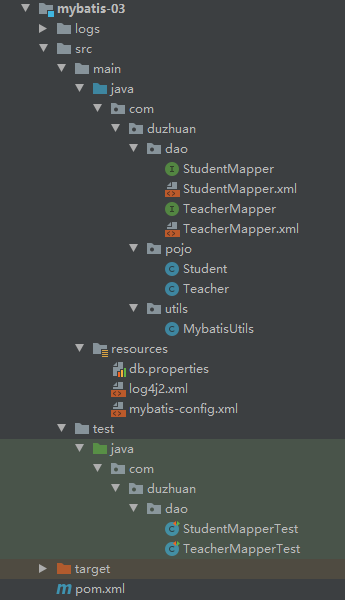
其中StudentMapperTest为空。
TeacherMapper.xml
package com.duzhuan.dao;

import com.duzhuan.pojo.Teacher;
import com.duzhuan.utils.MybatisUtils;
import org.apache.ibatis.session.SqlSession;
import org.junit.Test;

import java.util.List;

/**
 * @Autord: HuangDekai
 * @Date: 2020/9/16 21:32
 * @Version: 1.0
 * @since: jdk11
 */
public class TeacherMapperTest {
    @Test
    public void getTeacherListTest(){
        SqlSession sqlSession = MybatisUtils.getSqlSession();

        TeacherMapper mapper = sqlSession.getMapper(TeacherMapper.class);
        List<Teacher> teacherList = mapper.getTeacherList();
        for (Teacher teacher : teacherList) {
            System.out.println(teacher);
        }

        sqlSession.close();
    }
}
五、结果
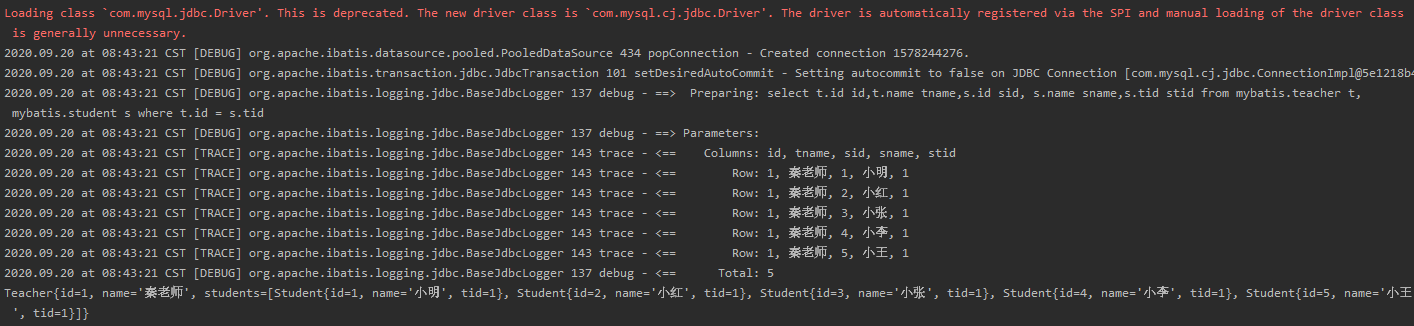

 浙公网安备 33010602011771号