
cesium实现3d文字
利用wall贴图可以生成3d文字效果:
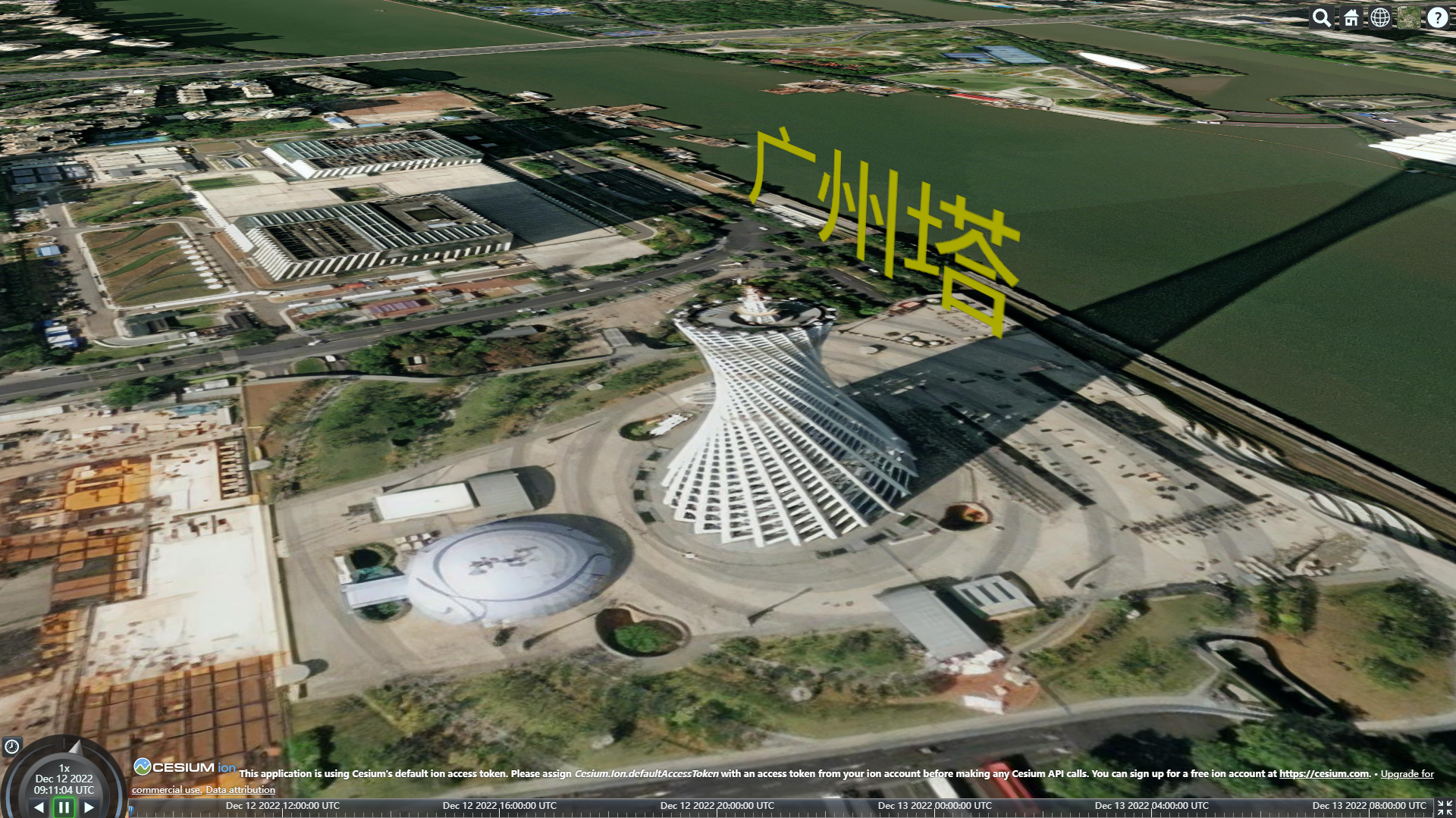
const viewer = new Cesium.Viewer("cesiumContainer");
viewer.scene.postProcessStages.fxaa.enabled = false;
const canvas = document.createElement('canvas')
const ctx = canvas.getContext('2d')

class TextGraphic {
  /**
   * 3d文字 Wall
   * @param {*} viewer 视图
   * @param {*} option 参数
   */
  constructor(viewer, option = {}) {
    const {
      txt = '广州塔',
      color = 'rgb(255,255,0)',
      fontSize = 80,
      position = [113.31915131, 23.10916101, 50.0], // 中心坐标
      rotation = 0 // 旋转角度°(顺时针)
    } = option
    this.viewer = viewer
    this.option = { txt, color, fontSize, position, rotation }
    this.txtWall = null
    this.addWall()
  }
  createImage() {
    ctx.clearRect(0, 0, ctx.width, ctx.height)
    const txt = this.option.txt
    const chineseLength = txt.match(/[^\u0000-\u00ff]/g)?.length || 0
    const txtLength = (txt.length - chineseLength) / 2 + chineseLength
    const fontSize = this.option.fontSize
    const padding = fontSize / 4
    const canvasHeight = fontSize + padding
    const canvasWidth = txtLength * fontSize + padding * 2
    canvas.height = canvasHeight
    canvas.width = canvasWidth

    ctx.font = fontSize + 'px Arial'
    ctx.fillStyle = this.option.color
    ctx.fillText(txt, padding, fontSize)
    return { canvasWidth, canvasHeight }
  }
  addWall() {
    const unitWidth = 0.000005
    const unitHeight = 6 / 20
    const coods = this.option.position
    const { canvasWidth, canvasHeight } = this.createImage()
    const w = unitWidth * canvasWidth / 2
    const h = unitHeight * canvasHeight

    const ry = Math.sin(this.option.rotation / 180 * Math.PI) * w
    const rx = Math.cos(this.option.rotation / 180 * Math.PI) * w
    this.txtWall = this.viewer.entities.add({
      name: 'WallTxt',
      wall: {
        positions: Cesium.Cartesian3.fromDegreesArrayHeights([
          coods[0] - rx,
          coods[1] - ry,
          coods[2],
          coods[0] + rx,
          coods[1] + ry,
          coods[2]
        ]),
        minimumHeights: [coods[2], coods[2]],
        maximumHeights: [coods[2] + h, coods[2] + h],
        material: new Cesium.ImageMaterialProperty({
          image: canvas.toDataURL('image/png'),
          transparent: true
        })
      }
    })
  }
  zoomTo() {
    this.viewer.zoomTo(this.txtWall)
  }
  // 销毁
  dispose() {
    this.viewer.entities.remove(this.txtWall)
    this.txtWall = null
    this.viewer = null
  }
}


const t1 = new TextGraphic(viewer, {fontSize: 80})
t1.zoomTo()
当字体设置较小时,如16px,会存在模糊的问题。

 浙公网安备 33010602011771号