dbus基础
dbus架构
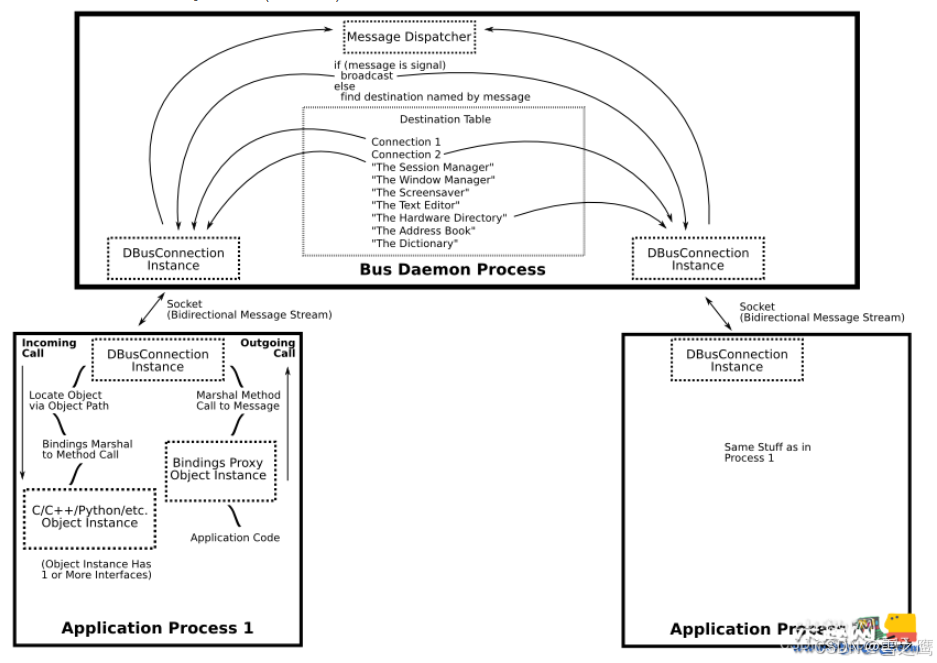
D-Bus进程间通信主要有三层架构:
-
底层接口层:主要是通过libdbus这个函数库,给予系统使用DBus的能力。
-
总线层:主 要Message bus daemon这个总线守护进程提供的,在Linux系统启动时运行,负责进程间的消息路由和传递,其中包括Linux内核和Linux桌面环境的消息传递。总线守护进程可同时与多个应用程序相连,并能把来自一个应用程序的消息路由到0或者多个其他程序。
-
应用封装层:通过一系列基于特定应用程序框架将DBus的底层接口封装成友好的Wrapper库,供不同开发人员使用。比如libdbus-glib, libdbus-python.
dbus重要概念
address
使用d-bus的应用程序既可以是server也可以是client,server监听到来的连接,client连接到 server,一旦连接建立,消息就可以流转。点对点通信时就是一个 server 和 一个 client;如果使用dbus daemon,所有的应用程序都是client,bus daemon 是server,daemon监听所有的连接,应用程序初始化连接到daemon。
dbus地址指明server将要监听的地方,client将要连接的地方,例如,地址:unix:path=/tmp/abcdef表明 server将在/tmp/abcdef路径下监听unix域的socket,client也将连接到这个socket。一个地址也可以指明是 TCP/IP的socket,或者是其他的。
当使用bus daemon时,libdbus会从环境变量中(DBUS_SESSION_BUS_ADDRESS)自动认识“会话daemon”的地址。如果是系统 daemon,它会检查指定的socket路径获得地址,也可以使用环境变量(DBUS_SYSTEM_BUS_ADDRESS)进行设定。
bus name
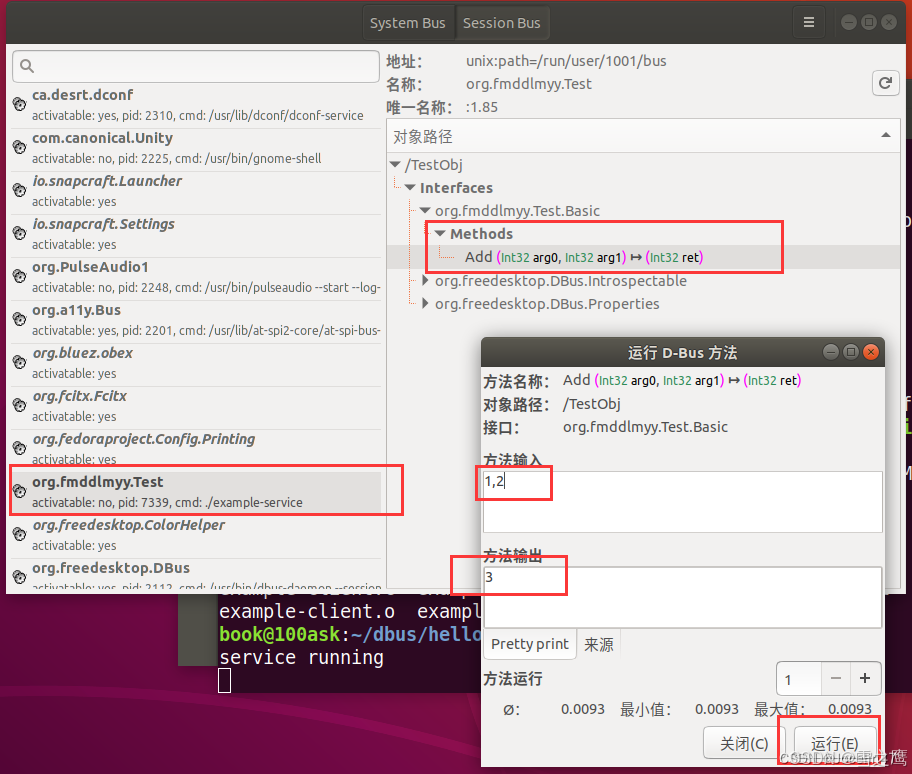
当一个应用连接到 bus daemon,daemon 立即会分配一个名字给这个连接,称为 Unique Connection Name, 这个唯一标识的名字以冒号 “:” 开头,例如 :1.2,这个名字在 daemon 的整个生命周期是唯一的。
但是这种名字总是临时分配,无法确定的,也难以记忆,因此应用可以要求有另外一个公共名 well-known name 来对应这个唯一标识,就像我们使用域名来映射 IP地址一样。例如可以使用 org.fmddlmyy.Test 来映射 :1.2。这样我们就可以使用公共名连接到 DBus 服务。
object path
d-bus 的底层接口是没有这些对象的概念的,它提供的是一种叫对象路径(object path),用于让高层接口绑定到各个对象中去,允许远端应用程序指向它们。object path就像是一个文件路径,可以叫做 /org/kde/kspread/sheets/3/cells/4/5 等。
interface
接口是一组方法和信号,每一个对象支持一个或者多个接口,接口定义一个对象实体的类型。 D-Bus使用简单的命名空间字符串来表示接口,例如org.freedesktop.Introspectable。
methods和signals
每一个对象有两类成员:方法和信号:
- 方法就是一个函数,具有有输入和输出;
- 信号会被广播,感兴趣的对象可以处理这个信号,同时信号中也可以带有相关的数据。
在 D-BUS 中有四种类型的消息:
- 方法调用(method call) # 在对象上执行一个方法
- 方法返回(method return) # 返回方法执行的结果
- 信号(signal) # 调用方法产生的异常
- 错误(error)# 通知指定的信号发生了,可以想象成“事件”。
要执行D-BUS对象的方法,您需要向对象发送一个方法调用消息。 它将完成一些处理(就是执行了对象中的Method,Method是可以带有输入参数的)并返回,返回消息或者错误消息。 信号的不同之处在于它们不返回任何内容:既没有“信号返回”消息,也没有任何类型的错误消息。
dbus配置
使用strace -e open dbus-daemon --system命令查看dbus启动时读取了哪些配置文件:

分别解析这些文件的作用:
/etc/dbus-1/system.conf
<!-- This configuration file controls the systemwide message bus.
     Add a system-local.conf and edit that rather than changing this
     file directly. -->

<!-- Note that there are any number of ways you can hose yourself
     security-wise by screwing up this file; in particular, you
     probably don't want to listen on any more addresses, add any more
     auth mechanisms, run as a different user, etc. -->

<!DOCTYPE busconfig PUBLIC "-//freedesktop//DTD D-Bus Bus Configuration 1.0//EN"
 "http://www.freedesktop.org/standards/dbus/1.0/busconfig.dtd">
<busconfig>

  <!-- Our well-known bus type, do not change this -->
  <type>system</type>

  <!-- Run as special user -->
  <user>messagebus</user>

  <!-- Fork into daemon mode -->
  <fork/>

  <!-- We use system service launching using a helper -->
root@immu3:/etc/dbus-1# cat /share/dbus-1/system.conf
<!-- This configuration file controls the systemwide message bus.
     Add a system-local.conf and edit that rather than changing this
     file directly. -->

<!-- Note that there are any number of ways you can hose yourself
     security-wise by screwing up this file; in particular, you
     probably don't want to listen on any more addresses, add any more
     auth mechanisms, run as a different user, etc. -->

<!DOCTYPE busconfig PUBLIC "-//freedesktop//DTD D-Bus Bus Configuration 1.0//EN"
 "http://www.freedesktop.org/standards/dbus/1.0/busconfig.dtd">
<busconfig>

  <!-- Our well-known bus type, do not change this -->
  <type>system</type>

  <!-- Run as special user -->
  <user>messagebus</user>

  <!-- Fork into daemon mode -->
  <fork/>

  <!-- We use system service launching using a helper -->
  <standard_system_servicedirs/>

  <!-- This is a setuid helper that is used to launch system services -->
  <servicehelper>/libexec/dbus-daemon-launch-helper</servicehelper>

  <!-- Write a pid file -->
  <pidfile>/var/run/dbus/pid</pidfile>

  <!-- Enable logging to syslog -->
  <syslog/>

  <!-- Only allow socket-credentials-based authentication -->
  <auth>EXTERNAL</auth>

  <!-- Only listen on a local socket. (abstract=/path/to/socket
       means use abstract namespace, don't really create filesystem
       file; only Linux supports this. Use path=/whatever on other
       systems.) -->
  <listen>unix:path=/var/run/dbus/system_bus_socket</listen>

  <policy context="default">
    <!-- All users can connect to system bus -->
    <allow user="*"/>

    <!-- Holes must be punched in service configuration files for
         name ownership and sending method calls -->
    <deny own="*"/>
    <deny send_type="method_call"/>

    <!-- Signals and reply messages (method returns, errors) are allowed
         by default -->
    <allow send_type="signal"/>
    <allow send_requested_reply="true" send_type="method_return"/>
    <allow send_requested_reply="true" send_type="error"/>

    <!-- All messages may be received by default -->
    <allow receive_type="method_call"/>
    <allow receive_type="method_return"/>
    <allow receive_type="error"/>
    <allow receive_type="signal"/>

    <!-- Allow anyone to talk to the message bus -->
    <allow send_destination="org.freedesktop.DBus"
           send_interface="org.freedesktop.DBus" />
    <allow send_destination="org.freedesktop.DBus"
           send_interface="org.freedesktop.DBus.Introspectable"/>
    <allow send_destination="org.freedesktop.DBus"
           send_interface="org.freedesktop.DBus.Properties"/>
    <!-- But disallow some specific bus services -->
    <deny send_destination="org.freedesktop.DBus"
          send_interface="org.freedesktop.DBus"
          send_member="UpdateActivationEnvironment"/>
    <deny send_destination="org.freedesktop.DBus"
          send_interface="org.freedesktop.DBus.Debug.Stats"/>
    <deny send_destination="org.freedesktop.DBus"
          send_interface="org.freedesktop.systemd1.Activator"/>
  </policy>

  <!-- Only systemd, which runs as root, may report activation failures. -->
  <policy user="root">
    <allow send_destination="org.freedesktop.DBus"
           send_interface="org.freedesktop.systemd1.Activator"/>
  </policy>

  <!-- root may monitor the system bus. -->
  <policy user="root">
    <allow send_destination="org.freedesktop.DBus"
           send_interface="org.freedesktop.DBus.Monitoring"/>
  </policy>

  <!-- If the Stats interface was enabled at compile-time, root may use it.
       Copy this into system.local.conf or system.d/*.conf if you want to
       enable other privileged users to view statistics and debug info -->
  <policy user="root">
    <allow send_destination="org.freedesktop.DBus"
           send_interface="org.freedesktop.DBus.Debug.Stats"/>
  </policy>

  <!-- Include legacy configuration location -->
  <include ignore_missing="yes">/etc/dbus-1/system.conf</include>

  <!-- The defaults for these limits are hard-coded in dbus-daemon.
       Some clarifications:
       Times are in milliseconds (ms); 1000ms = 1 second
       133169152 bytes = 127 MiB
       33554432 bytes = 32 MiB
       150000ms = 2.5 minutes -->
  <!-- <limit name="max_incoming_bytes">133169152</limit> -->
  <!-- <limit name="max_incoming_unix_fds">64</limit> -->
  <!-- <limit name="max_outgoing_bytes">133169152</limit> -->
  <!-- <limit name="max_outgoing_unix_fds">64</limit> -->
  <!-- <limit name="max_message_size">33554432</limit> -->
  <!-- <limit name="max_message_unix_fds">16</limit> -->
  <!-- <limit name="service_start_timeout">25000</limit> -->
  <!-- <limit name="auth_timeout">5000</limit> -->
  <!-- <limit name="pending_fd_timeout">150000</limit> -->
  <!-- <limit name="max_completed_connections">2048</limit> -->
  <!-- <limit name="max_incomplete_connections">64</limit> -->
  <!-- <limit name="max_connections_per_user">256</limit> -->
  <!-- <limit name="max_pending_service_starts">512</limit> -->
  <!-- <limit name="max_names_per_connection">512</limit> -->
  <!-- <limit name="max_match_rules_per_connection">512</limit> -->
  <!-- <limit name="max_replies_per_connection">128</limit> -->

  <!-- Config files are placed here that among other things, punch
       holes in the above policy for specific services. -->
  <includedir>system.d</includedir>

  <includedir>/etc/dbus-1/system.d</includedir>

  <!-- This is included last so local configuration can override what's
       in this standard file -->
  <include ignore_missing="yes">/etc/dbus-1/system-local.conf</include>

  <include if_selinux_enabled="yes" selinux_root_relative="yes">contexts/dbus_contexts</include>

</busconfig>
文件开头说明(重要提醒)
<!-- This configuration file controls the systemwide message bus.
     Add a system-local.conf and edit that rather than changing this
     file directly. -->
<!-- Note that there are any number of ways you can hose yourself
     security-wise by screwing up this file; in particular, you
     probably don't want to listen on any more addresses, add any more
     auth mechanisms, run as a different user, etc. -->
- 作用范围:该文件专门控制「系统级总线」(System Bus),所有系统级进程(如蓝牙服务
bluetoothd、网络服务、电源管理服务等)的 D-Bus 通信均受其约束; - 修改警告:严禁直接修改此文件!错误修改可能导致系统进程通信失败、权限泄露等严重问题。如需自定义规则,应创建
/etc/dbus-1/system-local.conf文件或在system.d目录下添加专项配置(后加载的配置会覆盖默认规则); - 安全提示:文件明确警示不要随意扩展监听地址、添加认证机制或修改运行用户,避免引入安全风险。
基础运行配置(D-Bus 守护进程启动参数)
这部分定义 dbus-daemon(D-Bus 核心守护进程)的基础运行属性,确保其稳定、安全地后台运行:
<!-- Our well-known bus type, do not change this -->
<type>system</type>
- 解读:总线类型标识,固定为
system(系统总线),不可修改,用于区分用户级总线(Session Bus);
<!-- Run as special user -->
<user>messagebus</user>
- 解读:指定 D-Bus 守护进程以专用的
messagebus用户身份运行,而非 root 用户。该设计通过权限隔离降低安全风险,避免守护进程被劫持后获取系统最高权限;
<!-- Fork into daemon mode -->
<fork/>
- 解读:启用守护进程模式(后台运行),启动后脱离终端,不占用交互界面资源;
<!-- We use system service launching using a helper -->
<standard_system_servicedirs/>
- 解读:启用系统标准服务目录扫描,自动从
/usr/share/dbus-1/system-services/等默认目录加载服务配置文件,支持服务自动发现;
<!-- This is a setuid helper that is used to launch system services -->
<servicehelper>/libexec/dbus-daemon-launch-helper</servicehelper>
- 解读:指定服务启动辅助程序路径,该程序具备 setuid 权限,可帮助 D-Bus 守护进程以正确的用户权限启动系统服务(如自动启动
bluetoothd服务);
<!-- Write a pid file -->
<pidfile>/var/run/dbus/pid</pidfile>
- 解读:指定 PID 文件存储路径,记录 D-Bus 守护进程的进程 ID,方便系统管理工具(如
systemctl)监控和控制进程状态;
<!-- Enable logging to syslog -->
<syslog/>
- 解读:启用系统日志输出功能,D-Bus 通信日志(如方法调用、错误信息、权限拒绝事件)会写入
/var/log/syslog,调试时可通过日志排查蓝牙 D-Bus 调用失败等问题。
通信安全配置(访问控制与认证机制)
这部分是安全核心,控制谁能连接 D-Bus 总线、如何认证以及通信方式:
<!-- Only allow socket-credentials-based authentication -->
<auth>EXTERNAL</auth>
- 解读:指定认证方式为
EXTERNAL(外部凭证认证),基于 Linux 系统的进程 UID/GID(用户/组 ID)进行身份验证。简单说,D-Bus 会通过进程的所有者身份判断是否允许其接入总线,避免匿名访问;
<!-- Only listen on a local socket. (abstract=/path/to/socket
     means use abstract namespace, don't really create filesystem
     file; only Linux supports this. Use path=/whatever on other
     systems.) -->
<listen>unix:path=/var/run/dbus/system_bus_socket</listen>
- 解读:限定 D-Bus 仅通过本地 Unix 套接字通信,套接字路径为
/var/run/dbus/system_bus_socket; - 安全意义:不监听任何网络端口,彻底杜绝远程网络访问,仅允许本地进程通信,大幅降低网络攻击风险;
- 实际影响:
bluetoothctl与bluetoothd必须在同一台设备上,通过该本地套接字完成 D-Bus 通信。
核心权限策略(进程操作权限控制)
<policy> 标签组定义进程在 D-Bus 总线上的操作权限,遵循「默认禁止、按需允许」的安全原则,是配置文件的核心部分。
默认策略(所有用户/进程通用规则)
<policy context="default">
  <!-- All users can connect to system bus -->
  <allow user="*"/>
- 解读:允许所有用户的进程连接到系统总线(如普通用户运行的
bluetoothctl可接入总线);
  <!-- Holes must be punched in service configuration files for
       name ownership and sending method calls -->
  <deny own="*"/>
  <deny send_type="method_call"/>
- 解读:
<deny own="*"/>:禁止所有进程默认注册 D-Bus 服务名(如不能随意注册org.bluez服务,避免冒充系统服务);<deny send_type="method_call"/>:禁止所有进程默认发送方法调用(如bluetoothctl不能直接调用bluetoothd的RegisterApplication方法);- 关键说明:这两条是核心安全限制,后续需通过专项配置为特定服务「打孔放行」(如
bluetoothd的权限配置);
  <!-- Signals and reply messages (method returns, errors) are allowed
       by default -->
  <allow send_type="signal"/>
  <allow send_requested_reply="true" send_type="method_return"/>
  <allow send_requested_reply="true" send_type="error"/>
- 解读:默认允许三类操作:
- 发送信号(
signal):如bluetoothd设备连接成功后广播DeviceConnected事件; - 发送方法返回结果(
method_return):如bluetoothd执行完方法后返回成功结果; - 发送错误信息(
error):如register-application失败时返回错误码;
- 发送信号(
  <!-- All messages may be received by default -->
  <allow receive_type="method_call"/>
  <allow receive_type="method_return"/>
  <allow receive_type="error"/>
  <allow receive_type="signal"/>
- 解读:允许所有进程接收任意类型的 D-Bus 消息(方法调用、返回结果、错误、信号),确保通信双向可达;
  <!-- Allow anyone to talk to the message bus -->
  <allow send_destination="org.freedesktop.DBus"
         send_interface="org.freedesktop.DBus" />
  <allow send_destination="org.freedesktop.DBus"
         send_interface="org.freedesktop.DBus.Introspectable"/>
  <allow send_destination="org.freedesktop.DBus"
         send_interface="org.freedesktop.DBus.Properties"/>
- 解读:允许所有进程与 D-Bus 守护进程本身通信,包括:
- 查询总线状态、服务列表(
org.freedesktop.DBus接口); - 查看接口元数据(
Introspectable接口); - 获取/设置总线属性(
Properties接口);
- 查询总线状态、服务列表(
  <!-- But disallow some specific bus services -->
  <deny send_destination="org.freedesktop.DBus"
        send_interface="org.freedesktop.DBus"
        send_member="UpdateActivationEnvironment"/>
  <deny send_destination="org.freedesktop.DBus"
        send_interface="org.freedesktop.DBus.Debug.Stats"/>
  <deny send_destination="org.freedesktop.DBus"
        send_interface="org.freedesktop.systemd1.Activator"/>
</policy>
- 解读:禁止调用 D-Bus 守护进程的高风险接口:
UpdateActivationEnvironment:避免修改系统环境变量;Debug.Stats:默认禁止查看调试统计信息(仅 root 可例外);systemd1.Activator:禁止调用 systemd 服务激活器(仅 root 可例外)。
root 用户特殊权限
<!-- Only systemd, which runs as root, may report activation failures. -->
<policy user="root">
  <allow send_destination="org.freedesktop.DBus"
         send_interface="org.freedesktop.systemd1.Activator"/>
</policy>
- 解读:允许 root 用户调用
systemd1.Activator接口,用于报告服务激活失败;
<!-- root may monitor the system bus. -->
<policy user="root">
  <allow send_destination="org.freedesktop.DBus"
         send_interface="org.freedesktop.DBus.Monitoring"/>
</policy>
- 解读:允许 root 用户监控系统总线,调试时可通过
sudo dbus-monitor --system抓包,查看bluetoothctl与bluetoothd的通信数据;
<!-- If the Stats interface was enabled at compile-time, root may use it.
     Copy this into system.local.conf or system.d/*.conf if you want to
     enable other privileged users to view statistics and debug info -->
<policy user="root">
  <allow send_destination="org.freedesktop.DBus"
         send_interface="org.freedesktop.DBus.Debug.Stats"/>
</policy>
- 解读:允许 root 用户访问调试统计接口,查看总线通信量、连接数等指标,辅助排查性能问题。
配置文件包含规则(扩展与覆盖机制)
<!-- Include legacy configuration location -->
<include ignore_missing="yes">/etc/dbus-1/system.conf</include>
- 解读:兼容旧版本配置路径,忽略不存在的文件,避免配置加载失败;
<!-- Config files are placed here that among other things, punch
     holes in the above policy for specific services. -->
<includedir>system.d</includedir>
<includedir>/etc/dbus-1/system.d</includedir>
- 解读:
- 加载系统服务专项配置目录,用于为特定服务(如
bluetoothd)设置权限例外; - 例如
bluetoothd的权限配置文件org.bluez.conf通常位于/usr/share/dbus-1/system.d/,该文件会覆盖默认的deny send_type="method_call"规则,允许进程调用org.bluez服务的方法;
- 加载系统服务专项配置目录,用于为特定服务(如
<!-- This is included last so local configuration can override what's
     in this standard file -->
<include ignore_missing="yes">/etc/dbus-1/system-local.conf</include>
- 解读:最后加载本地自定义配置文件,优先级最高,可覆盖所有默认规则和服务专项配置,适合用户自定义全局规则;
<include if_selinux_enabled="yes" selinux_root_relative="yes">contexts/dbus_contexts</include>
- 解读:若系统启用了 SELinux 安全机制,加载 SELinux 专用配置,进一步强化访问控制。
可选资源限制配置(默认注释)
<!-- The defaults for these limits are hard-coded in dbus-daemon.
     Some clarifications:
     Times are in milliseconds (ms); 1000ms = 1 second
     133169152 bytes = 127 MiB
     33554432 bytes = 32 MiB
     150000ms = 2.5 minutes -->
<!-- <limit name="max_incoming_bytes">133169152</limit> -->
<!-- <limit name="max_message_size">33554432</limit> -->
<!-- 其他限制项省略 -->
- 解读:
- 这些配置用于限制 D-Bus 通信的资源占用(如最大消息大小、最大连接数、超时时间等);
- 默认被注释,使用
dbus-daemon内置的默认值(如最大消息大小 32MiB); - 仅在遇到特殊场景(如大消息传输失败、连接数超限)时,才需要取消注释并调整数值。
/etc/dbus-1/system.d/bluetooth.conf
<!-- This configuration file specifies the required security policies
     for Bluetooth core daemon to work. -->

<!DOCTYPE busconfig PUBLIC "-//freedesktop//DTD D-BUS Bus Configuration 1.0//EN"
 "http://www.freedesktop.org/standards/dbus/1.0/busconfig.dtd">
<busconfig>

  <!-- ../system.conf have denied everything, so we just punch some holes -->

  <policy user="root">
    <allow own="org.bluez"/>
    <allow send_destination="org.bluez"/>
    <allow send_interface="org.bluez.AdvertisementMonitor1"/>
    <allow send_interface="org.bluez.Agent1"/>
    <allow send_interface="org.bluez.MediaEndpoint1"/>
    <allow send_interface="org.bluez.MediaPlayer1"/>
    <allow send_interface="org.bluez.Profile1"/>
    <allow send_interface="org.bluez.GattCharacteristic1"/>
    <allow send_interface="org.bluez.GattDescriptor1"/>
    <allow send_interface="org.bluez.LEAdvertisement1"/>
    <allow send_interface="org.freedesktop.DBus.ObjectManager"/>
    <allow send_interface="org.bluez.GattManager1"/> <!-- 补充常见缺失项,实际文件可能包含 -->
    <allow send_interface="org.freedesktop.DBus.Properties"/>
    <allow send_interface="org.mpris.MediaPlayer2.Player"/>
  </policy>

  <policy context="default">
    <allow send_destination="org.bluez"/>
  </policy>

</busconfig>
在之前解析的 system.conf 中,默认权限策略是「严格限制」:
<deny own="*"/>:禁止所有进程默认注册 D-Bus 服务名;<deny send_type="method_call"/>:禁止所有进程默认发送 D-Bus 方法调用。
而 bluetoothd 作为蓝牙服务的服务端,需要:
- 在 D-Bus 上注册唯一服务名
org.bluez(让bluetoothctl等客户端能找到它); - 接收客户端发送的方法调用(如
RegisterApplication、Connect等蓝牙操作)。
因此,bluetooth.conf 的核心使命就是「打破 system.conf 的默认限制」,为 org.bluez 服务单独配置权限例外——这也是文件注释中「punch some holes」(打孔放行)的含义。
文件开头说明
<!-- This configuration file specifies the required security policies
     for Bluetooth core daemon to work. -->
- 核心解读:明确该文件的作用是为蓝牙核心守护进程(
bluetoothd)配置必需的安全策略,确保蓝牙服务能正常通过 D-Bus 通信。
根节点与文档声明
<!DOCTYPE busconfig PUBLIC "-//freedesktop//DTD D-BUS Bus Configuration 1.0//EN"
 "http://www.freedesktop.org/standards/dbus/1.0/busconfig.dtd">
<busconfig>
- 解读:遵循 D-Bus 配置文件的标准DTD(文档类型定义),确保配置格式被
dbus-daemon正确解析,<busconfig>是所有配置规则的根节点。
root 用户专属权限策略(<policy user="root">)
该节点定义「以 root 用户身份运行的进程」(如 root 权限的 bluetoothctl、系统服务)与 bluetoothd 通信的权限,是最核心的权限配置:
允许注册 org.bluez 服务名
<allow own="org.bluez"/>
- 作用:允许 root 用户运行的
bluetoothd进程,在 D-Bus 上注册服务名org.bluez(这是bluetoothd的唯一标识,客户端通过该名称找到蓝牙服务); - 为什么需要:
system.conf默认禁止所有进程「拥有服务名」(<deny own="*"/>),此规则专门为bluetoothd放行,确保其能被客户端发现。
允许向 org.bluez 服务发送任意消息
<allow send_destination="org.bluez"/>
- 作用:允许 root 用户运行的进程,向
org.bluez服务(即bluetoothd)发送任意类型的 D-Bus 消息(包括方法调用、信号订阅等); - 实际影响:root 权限的
bluetoothctl可调用bluetoothd的所有方法(如RegisterApplication、Disconnect等),无额外限制。
允许调用特定 D-Bus 接口
<allow send_interface="org.bluez.AdvertisementMonitor1"/>
<allow send_interface="org.bluez.Agent1"/>
<allow send_interface="org.bluez.MediaEndpoint1"/>
<allow send_interface="org.bluez.MediaPlayer1"/>
<allow send_interface="org.bluez.Profile1"/>
<allow send_interface="org.bluez.GattCharacteristic1"/>
<allow send_interface="org.bluez.GattDescriptor1"/>
<allow send_interface="org.bluez.LEAdvertisement1"/>
<allow send_interface="org.freedesktop.DBus.ObjectManager"/>
<allow send_interface="org.freedesktop.DBus.Properties"/>
<allow send_interface="org.mpris.MediaPlayer2.Player"/>
- 核心概念:
send_interface限定「允许发送的 D-Bus 接口」——接口是bluetoothd提供的功能分组(类似 API 模块),每个接口包含多个可调用的方法; - 关键接口解读(结合你的调试场景):
接口名称 功能用途 关联操作 org.bluez.GattManager1GATT 服务管理(核心接口) 调用 RegisterApplication方法注册 GATT 应用org.bluez.GattCharacteristic1GATT 特征值管理 读写蓝牙设备的特征值、设置通知等 org.bluez.GattDescriptor1GATT 描述符管理 配置特征值的描述信息(如权限、格式) org.bluez.Profile1蓝牙协议剖面管理 注册自定义蓝牙剖面(如串口服务、音频服务) org.freedesktop.DBus.ObjectManager对象管理接口 枚举 bluetoothd提供的所有 D-Bus 对象(如适配器、设备)org.freedesktop.DBus.Properties属性管理接口 获取/设置蓝牙对象的属性(如设备名称、连接状态)
默认权限策略(<policy context="default">)
<policy context="default">
  <allow send_destination="org.bluez"/>
</policy>
- 作用:为「所有用户(包括普通用户)运行的进程」配置默认权限,允许它们向
org.bluez服务发送 D-Bus 消息; - 实际影响:普通用户运行的
bluetoothctl也能调用bluetoothd的基础方法(如扫描设备、连接设备、注册 GATT 应用),无需切换 root 权限; - 安全说明:该规则仅允许「发送消息到
org.bluez」,不允许普通用户「注册org.bluez服务名」(避免冒充bluetoothd),兼顾易用性和安全性。
dbus调试技巧
dbus-send
dbus-send 是 Linux 系统中用于通过 D-Bus 消息总线发送消息的命令行工具,可与运行在 D-Bus 上的服务进程通信,调用其方法、获取属性或发送信号,相当于客户端程序。
基本语法
dbus-send [选项] <总线地址/类型> <服务名> <对象路径> <接口名>.<方法名> [参数类型 参数值]...
核心参数说明
| 参数 | 作用 |
|---|---|
--system | 使用系统总线(访问系统服务,如 org.freedesktop.NetworkManager) |
--session | 使用会话总线(访问用户桌面服务,如 org.gnome.Shell) |
--dest=<服务名> | 指定目标服务的总线名(可省略,直接跟在总线类型后) |
--type=<消息类型> | 指定消息类型:method_call(调用方法,默认)/signal(发送信号) |
--print-reply | 打印服务的返回结果(调用有返回值的方法时必加) |
--print-reply=literal | 以更易读的字面量形式打印返回结果 |
<对象路径> | 服务提供的对象路径(如 /org/freedesktop/NetworkManager) |
<接口名>.<方法名> | 要调用的接口和方法(如 org.freedesktop.NetworkManager.GetState) |
[参数类型 参数值] | 方法的入参,需指定类型标识和对应值(如 string "hello") |
D-Bus 数据类型标识
传递参数时必须先指定类型,常用类型标识如下:
| 类型标识 | 对应数据类型 | 示例 |
|---|---|---|
string | 字符串 | string "test" |
int32 | 32位整数 | int32 100 |
uint32 | 无符号32位整数 | uint32 200 |
bool | 布尔值 | bool true |
double | 双精度浮点数 | double 3.14 |
array | 数组(需嵌套类型) | array:string ["a","b"] |
dict | 字典(键值对) | dict:string:int32 {{"key1",1},{"key2",2}} |
常用示例
- 调用无参数的方法(获取返回值)
示例:通过系统总线调用 NetworkManager 的GetState方法,获取网络状态。
dbus-send --system --print-reply org.freedesktop.NetworkManager /org/freedesktop/NetworkManager org.freedesktop.NetworkManager.GetState
- 解析:
--system:使用系统总线;--print-reply:打印返回结果;org.freedesktop.NetworkManager:目标服务名;/org/freedesktop/NetworkManager:对象路径;org.freedesktop.NetworkManager.GetState:要调用的接口+方法。
- 调用带参数的方法
示例:通过会话总线调用桌面通知服务,弹出一个桌面提示(需libnotify服务)。
dbus-send --session --print-reply \
  org.freedesktop.Notifications \
  /org/freedesktop/Notifications \
  org.freedesktop.Notifications.Notify \
  string:"myapp" \       # 应用程序名(标识)
  uint32:0 \             # 替换已有通知的ID(0为新通知)
  string:"dialog-information" \  # 图标名(可留空)
  string:"标题" \        # 通知标题
  string:"这是dbus-send发送的通知内容" \  # 通知正文
  array:string:[] \      # 动作列表(空数组)
  dict:string:variant:{} \ # 额外参数(空字典)
  int32:5000            # 通知显示时长(毫秒,-1为永久)
- 访问对象的属性
D-Bus 服务的属性通过属性接口org.freedesktop.DBus.Properties访问,核心方法:
Get(接口名, 属性名):获取单个属性;Set(接口名, 属性名, 属性值):设置属性;GetAll(接口名):获取接口下所有属性。
示例:获取 NetworkManager 的 NetworkingEnabled 属性(网络是否启用)。
dbus-send --system --print-reply \
  org.freedesktop.NetworkManager \
  /org/freedesktop/NetworkManager \
  org.freedesktop.DBus.Properties.Get \
  string:"org.freedesktop.NetworkManager" \  # 目标接口
  string:"NetworkingEnabled"                 # 目标属性
- 查看dbus总线上所有服务
- ListActivatableNames:所有可激活的服务
- ListNames:所有运行的服务
dbus-send --system --type=method_call --print-reply --dest=org.freedesktop.DBus / org.freedesktop.DBus.ListActivatableNames
- 查看服务下所有接口及方法
Introspect方法:用于自查服务下的接口及方法,并以xml文件的形式输出
dbus-send --system --type=method_call --print-reply --dest=org.freedesktop.DBus / org.freedesktop.DBus.Introspectable.Introspect
dbus-send --system --type=method_call --print-reply --dest=org.bluez /org/bluez/hci0 org.freedesktop.DBus.Introspectable.Introspect
dbus-bluez案例分析
获取蓝牙自省数据:
dbus-send --system --type=method_call --print-reply --dest=org.bluez / org.freedesktop.DBus.Introspectable.Introspect
- 自省数据整体结构解析
首先,先把格式化后的自省 XML 数据贴出来(方便阅读),再分模块解析:
<!DOCTYPE node PUBLIC "-//freedesktop//DTD D-BUS Object Introspection 1.0//EN"
"http://www.freedesktop.org/standards/dbus/1.0/introspect.dtd">
<node>
  <!-- 1. 标准自省接口 -->
  <interface name="org.freedesktop.DBus.Introspectable">
    <method name="Introspect">
      <arg name="xml" type="s" direction="out"/>
    </method>
  </interface>

  <!-- 2. 对象管理器接口(BlueZ 核心接口) -->
  <interface name="org.freedesktop.DBus.ObjectManager">
    <method name="GetManagedObjects">
      <arg name="objects" type="a{oa{sa{sv}}}" direction="out"/>
    </method>
    <signal name="InterfacesAdded">
      <arg name="object" type="o"/>
      <arg name="interfaces" type="a{sa{sv}}"/>
    </signal>
    <signal name="InterfacesRemoved">
      <arg name="object" type="o"/>
      <arg name="interfaces" type="as"/>
    </signal>
  </interface>

  <!-- 3. 子节点 -->
  <node name="org"/>
</node>
模块1:标准自省接口 org.freedesktop.DBus.Introspectable
这是 D-Bus 强制要求所有对象实现的接口,仅包含一个 Introspect 方法:
- 作用:返回当前对象的自省 XML 数据(就是你现在看到的内容);
- 参数:
out方向的s类型参数(字符串),即 XML 数据。
模块2:对象管理器接口 org.freedesktop.DBus.ObjectManager
这是 BlueZ 蓝牙服务的核心接口,几乎所有蓝牙设备/适配器的操作都依赖这个接口,也是 D-Bus 用于管理“动态对象”(如蓝牙设备连接/断开时的对象创建/销毁)的标准接口。
(1)方法:GetManagedObjects
- 作用:获取蓝牙服务当前管理的所有对象(包括蓝牙适配器、已配对/已连接的蓝牙设备、GATT 服务等);
- 返回值类型:
a{oa{sa{sv}}}(D-Bus 复合类型,拆解后):a{...}:字典(键值对);o:键是对象路径(如/org/bluez/hci0是蓝牙主适配器);a{sa{sv}}:值是“接口名-属性字典”的字典,即每个对象下的所有接口,以及接口的属性键值对。
- 核心价值:这是嵌入式系统中查找蓝牙设备/适配器对象路径的关键方法。
(2)信号:InterfacesAdded
- 作用:当蓝牙服务新增一个对象(如发现新蓝牙设备、连接新设备)或对象新增接口时,发送该信号;
- 参数:
object(o类型):新增接口的对象路径;interfaces(a{sa{sv}}类型):新增的接口及对应的属性。
(3)信号:InterfacesRemoved
- 作用:当蓝牙对象被移除(如蓝牙设备断开连接)或对象的接口被移除时,发送该信号;
- 参数:
object(o类型):被移除接口的对象路径;interfaces(as类型):被移除的接口名列表(字符串数组)。
模块3:子节点 <node name="org"/>
表示蓝牙服务的根对象(/)下有一个子对象路径 /org,这是 BlueZ 蓝牙对象的命名空间根节点,所有蓝牙相关的对象(如适配器 /org/bluez/hci0、设备 /org/bluez/hci0/dev_XX_XX_XX_XX_XX_XX)都在这个子节点下。
基于自省数据的核心操作
这份自省数据的核心价值是告诉你:蓝牙服务的根对象提供了 GetManagedObjects 方法,通过它可以获取所有蓝牙相关的对象路径和属性。
- 调用
GetManagedObjects获取所有蓝牙对象
执行以下命令,获取蓝牙服务管理的所有对象(适配器、设备等):
./dbus-send --system --print-reply --dest=org.bluez / org.freedesktop.DBus.ObjectManager.GetManagedObjects
输出关键信息:
- 会返回一个大的复合字典,其中能找到类似
/org/bluez/hci0的蓝牙适配器对象路径(这是蓝牙操作的核心入口); - 每个对象下会包含接口如
org.bluez.Adapter1(适配器接口)、org.bluez.Device1(设备接口),以及对应的属性(如适配器名称、设备 MAC 地址等)。
- 进一步查询蓝牙适配器的详细接口
找到适配器对象路径(如/org/bluez/hci0)后,对其执行自省命令,查看适配器支持的方法(如扫描、开启/关闭蓝牙):
# 替换为实际的适配器对象路径
./dbus-send --system --print-reply --dest=org.bluez /org/bluez/hci0 org.freedesktop.DBus.Introspectable.Introspect
适配器接口 org.bluez.Adapter1 包含的核心方法:
StartDiscovery:启动蓝牙扫描;StopDiscovery:停止蓝牙扫描;SetPowered:开启/关闭蓝牙适配器(通过属性设置)。
- 示例:开启蓝牙扫描
通过 D-Bus 调用适配器的StartDiscovery方法(需先替换为实际的适配器对象路径):
./dbus-send --system --print-reply --dest=org.bluez /org/bluez/hci0 org.bluez.Adapter1.StartDiscovery
参考:DBUS入门与C编程


 浙公网安备 33010602011771号