
VS2017配置OpenGL
-
下载依赖
https://www.opengl.org/resources/libraries/glut/glut_downloads.php#windows -
找到VS的安装路径创建gl目录将glut.h复制其中
D:\develop\VS2017\VC\Tools\MSVC\14.16.27023\include\glD:\develop\VS2017\VC\Tools\MSVC\14.16.27023\include\gl

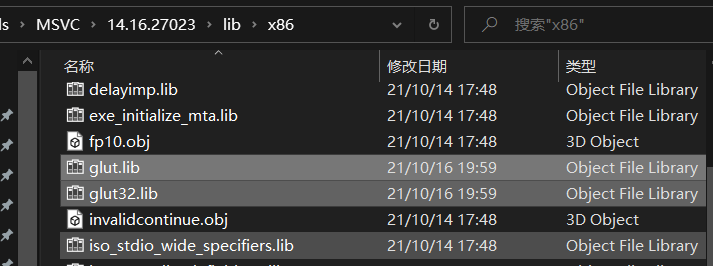
D:\develop\VS2017\VC\Tools\MSVC\14.16.27023\lib\x86将glut.lib,glut32.lib复制其中
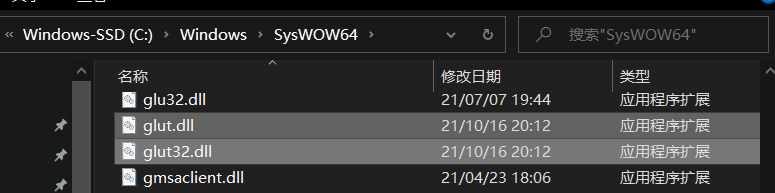
C:\Windows\SysWOW64将glut.dll,glut32.dll复制其中
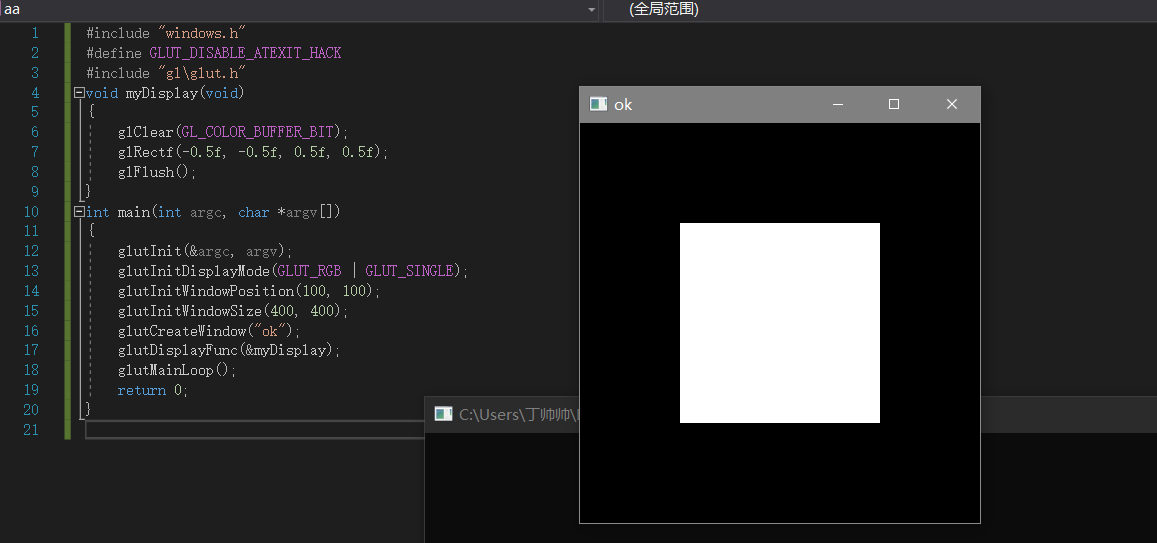
- 测试
#include "windows.h"
#define GLUT_DISABLE_ATEXIT_HACK
#include "gl\glut.h"
void myDisplay(void)
{
glClear(GL_COLOR_BUFFER_BIT);
glRectf(-0.5f, -0.5f, 0.5f, 0.5f);
glFlush();
}
int main(int argc, char *argv[])
{
glutInit(&argc, argv);
glutInitDisplayMode(GLUT_RGB | GLUT_SINGLE);
glutInitWindowPosition(100, 100);
glutInitWindowSize(400, 400);
glutCreateWindow("ok");
glutDisplayFunc(&myDisplay);
glutMainLoop();
return 0;
}
道阻且长,行则将至

 浙公网安备 33010602011771号