
chrony时间同步
简介
从centos7开始,默认的时钟同步服务进程为chronyd,chronyd相比ntpd,配置几乎没变,优点是时间调整速度更快。
chronyc查看ntp服务器状态
[root@testdsq ~]# chronyc  tracking
#时钟服务器名称
Reference ID    : 192.168.1.3 (testntp)
#当前服务器testdsq与原子时钟的距离(经过了8个时钟服务器)
Stratum         : 9
Ref time (UTC)  : Tue Apr  2 00:42:46 2024
#与时钟服务器的时间差
System time     : 0.000035612 seconds fast of NTP time
Last offset     : +0.000049723 seconds
RMS offset      : 0.000049723 seconds
#每过1秒钟,本地时间相对正确时间的偏移,这里是慢15.533微秒
Frequency       : 15.533 ppm slow
Residual freq   : +0.314 ppm
Skew            : 0.040 ppm
#与时间服务器之间的网络延迟,可以ping测试对比一下
Root delay      : 0.000537 seconds
Root dispersion : 0.000034 seconds
#前面两次时间更新的间隔
Update interval : 64.5 seconds
Leap status     : Normal
[root@testdsq ~]# chronyc  sources -v
210 Number of sources = 1

  .-- Source mode  '^' = server, '=' = peer, '#' = local clock.
 / .- Source state '*' = current synced, '+' = combined , '-' = not combined,
| /   '?' = unreachable, 'x' = time may be in error, '~' = time too variable.
||                                                 .- xxxx [ yyyy ] +/- zzzz
||      Reachability register (octal) -.           |  xxxx = adjusted offset,
||      Log2(Polling interval) --.      |          |  yyyy = measured offset,
||                                \     |          |  zzzz = estimated error.
||                                 |    |           \
MS Name/IP address         Stratum Poll Reach LastRx Last sample
===============================================================================
^* 192.168.1.3                  8  10   377   970    +25us[  +56us] +/-  180us
- *表示当前同步的时间服务器
- x表示存在问题,在centos7.2上,chrony.conf中配置2个server时,会导致无法判断哪个时钟服务器时间是准确的(需要配置奇数个server,使用大多数原则进行判断)。
- Reach表示和时间服务器通信次数,如果是0,表示可能网络不通。
chrony.conf
chronyd的配置文件为/etc/chrony.conf
#配置上游时间服务器
server  192.169.1.3 iburst
#chronyd如果想作为时间服务器,必需配置下面这个,表示与原子时间服务器的距离(经过了多少跳)
local stratum 10
同步互联网时间
由于互联网环境复杂,为了增加时钟同步的准确性,可以python脚本进行综合判断和再决定时间同步,逻辑:
- 先获取多个ntp时钟源和本地时间的差异
- 选取时间差异最小的ntp服务器进行时间同步
- 如果时间差异大于0.1,就不同步(经验值,第一次还是要先手动同步一下互联网时间)
#适用于python2  centos7.2
import commands
import logging
import re
import time
import sys

logger = logging.getLogger(__name__)
logging.basicConfig(filename='/root/logs/ntp.log', level=logging.INFO, format='%(asctime)s :: %(levelname)s :: %(message)s')


# ntp server list
nslist=['cn.ntp.org.cn','ntp.aliyun.com','ntp.tencent.com']
infolist={}
minav=10000
#为了避免互联网时钟服务器异常的问题,避免大幅度更新本地时间
#如果时间服务器与本地时间差异大于0.1,不会自动进行同步,需要手工同步
MAX=0.1
cs=''

def updatetime(cs):
        logger.info('')
        logger.info('---------update time now-----------')
        clist=['systemctl stop chronyd','/sbin/ntpdate -4 '+cs,"systemctl start chronyd"]

        c='systemctl stop chronyd'
        logger.info(c)
        status=commands.getstatusoutput(c)
        logger.info("command return "+str(status[0]))
        logger.info(status[1])

        c='/sbin/ntpdate -4 '+cs
					 #有时候一次同步失败,需要多试几次
        for i in range(5):
                if i == 3 :
                        logger.error("ntpupdate update failed, check it by yourself")
                        commands.getstatusoutput('systemctl start chronyd')
                        sys.exit(-1)
                logger.info(c)
                status=commands.getstatusoutput(c)
                logger.info("command return "+str(status[0]))
                logger.info(status[1])
                if(status[0]!=0):
                        logger.warn("ntpdate update fail, wait 10 seconds and retry again")
                        time.sleep(10)
                        continue
                else:
                        logger.info("ntpdate update success")
                        break

        c='systemctl start chronyd'
        logger.info(c)
        status=commands.getstatusoutput(c)
        logger.info("command return "+str(status[0]))
        logger.info(status[1])
        if(status[0]!=0):
                sys.exit(-1)


logger.info('---------------get ntp  server time now----------------------')
for ns in nslist:
        cm="/sbin/ntpdate -q -4 "+ns
        logger.info("get time from "+ns)
        logger.info(cm)
        res=commands.getstatusoutput(cm)
        if "no server suitable for synchronization found" in res[1]:
                logger.warn("query wrong, return status="+str(res[0]))
                logger.warn(res[1])
                continue
        if  res[0] == 0 :
                logger.info(res[1])
                offset=re.findall(r"offset ([-+]*[\.0-9]*),",res[1])
                sum=0.0
                maxdiff=0.0
                mindiff=100000
                for f in offset:
                        v=abs(float(f))
                        maxdiff= v if v>maxdiff  else maxdiff
                        mindiff= v if v<mindiff  else mindiff
                        sum=sum+v
                avage=sum/len(offset)
                # minava record the min avage time, cs recored the server
                if avage<minav:
                        minav=avage
                        cs=ns
										  #记录时间服务器的时间与本地时间差异
                infolist[ns]=[avage,maxdiff,mindiff]
                logger.info("server %s :: avage=%f maxdiff=%f mindiff=%f"%(ns,avage,maxdiff,mindiff))
        else:
                logger.warn("query wrong, return status="+str(res[0]))
                logger.warn(res[1])

logger.info("")
for ns in infolist:
        v = infolist[ns]
        logger.info("server %s :: avage=%f maxdiff=%f mindiff=%f"%(ns,v[0],v[1],v[2]))

#check if there suitable server
if len(infolist)==0:
        logger.error("no suitable server found")
        logger.error("check it by yourself now")
        sys.exit(-1)

if minav>MAX:
        logger.error("time server diff with local time execed MAX ,will not update local time")
        logger.error("check it by yourself now")
        sys.exit(-1)

#update time now
#选取与本地时间差异最小的时钟源进行同步
logger.info("choose min diff server:%s, avage:%f"%(cs,minav))
updatetime(cs)
将脚本加入到定时任务中。
vmware虚拟机时间同步问题
vmware虚拟机的物理主机时间可能影响到运行的虚拟机的时间。
现象:虚拟机时间与互联网时间做同步后,发现虚拟机时间还是会时间不准。
#查看chronyd.service日志,发现可疑日志
journalctl -u  chronyd.service
Apr 15 05:53:30 oneNginxOUT1 chronyd[32738]: Forward time jump detected!

#在vcenter查看虚拟机的事件,发现在上面这个时间点有快照移除,应该是由虚拟机备份任务发生过
网上查找发现vm-tools可以配置虚拟机与主机时间进行同步,每次移除快照的时候,会将物理机的时间同步到虚拟机
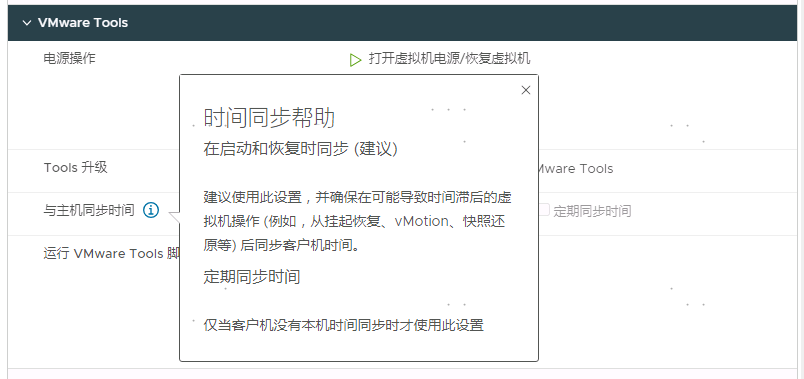
解决上面这个问题可以编辑虚拟机配置关闭虚拟机与主机同步时间,或者修改主机的时间同步源。

 浙公网安备 33010602011771号