
root密码
恢复root密码
root密码忘了怎么办?
1.停止MySQL服务程序
2.跳过授权表启动MySQL服务程序
3.修改root密码
4.以正常方式重启MySQL服务程序
主要操作过程]# vim /etc/my.cnf
[mysqld]
……
skip-grant-tables //跳过授权表,不验证用户名和密码了
:wq
]#t systemctl restart mysqld
]# mysql
[mysql> update mysql.user set authentication_string=password(“密码”)
-> where
-> user="root" and host="localhost";
mysql> flush privileges;
mysql> quit ;
重置root密码
在Shell命令行修改登陆密码-需要验证旧密码
[root@localhost ~]# mysqladmin -uroot -p password "新密码"
Enter password://输入旧密码
mysqladmin: [Warning] Using a password on the command lineinterface can be insecure.
Warning: Since password will be sent to server in plain text, use sslconnection to ensure password safety.
[root@localhost ~]#
==================================================================================
root明密码重置
[root@192 ~]# mysqladmin -hlocalhost -uroot -p123456 password "abc123...A"
mysqladmin: [Warning] Using a password on the command line interface can be insecure.
Warning: Since password will be sent to server in plain text, use ssl connection to ensure password safety.
[root@192 ~]# mysql -uroot -pabc123...A
mysql: [Warning] Using a password on the command line interface can be insecure.
Welcome to the MySQL monitor. Commands end with ; or \g.
Your MySQL connection id is 6
Server version: 5.7.17 MySQL Community Server (GPL)
Copyright (c) 2000, 2016, Oracle and/or its affiliates. All rights reserved.
Oracle is a registered trademark of Oracle Corporation and/or its
affiliates. Other names may be trademarks of their respective
owners.
Type 'help;' or '\h' for help. Type '\c' to clear the current input statement.
mysql>
root非明密码重置
[root@192 ~]# mysqladmin -hlocalhost -uroot -p password "123qqq...A"
Enter password:
mysqladmin: connect to server at 'localhost' failed
error: 'Access denied for user 'root'@'localhost' (using password: YES)'
[root@192 ~]# mysqladmin -hlocalhost -uroot -p password "123qqq...A"
Enter password:
mysqladmin: [Warning] Using a password on the command line interface can be insecure.
Warning: Since password will be sent to server in plain text, use ssl connection to ensure password safety.
[root@192 ~]# MYSQL -uroot -p123qqq...A
bash: MYSQL: 未找到命令...
相似命令是: 'mysql'
[root@192 ~]# mysql -uroot -p123qqq...A
mysql: [Warning] Using a password on the command line interface can be insecure.
Welcome to the MySQL monitor. Commands end with ; or \g.
Your MySQL connection id is 9
Server version: 5.7.17 MySQL Community Server (GPL)
Copyright (c) 2000, 2016, Oracle and/or its affiliates. All rights reserved.
Oracle is a registered trademark of Oracle Corporation and/or its
affiliates. Other names may be trademarks of their respective
owners.
Type 'help;' or '\h' for help. Type '\c' to clear the current input statement.
mysql>
=================================================================================================
远程恢复root密码
[root@192 ~]# ssh root@192.168.148.104
[root@192 ~]# systemctl stop mysqld.service
[root@192 ~]# vim /etc/my.cnf
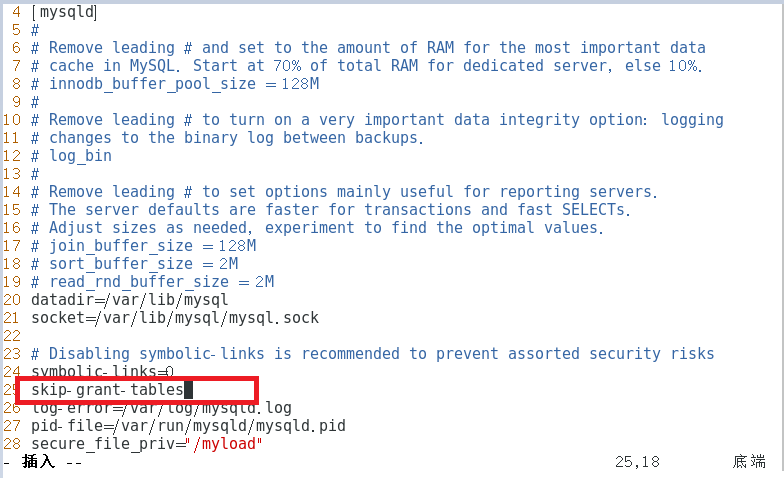
(有密码策略要注释掉)
:wq
[root@192 ~]# systemctl start mysqld
[root@192 ~]# systemctl status mysqld.service
[root@192 ~]# mysql
Welcome to the MySQL monitor. Commands end with ; or \g.
Your MySQL connection id is 3
Server version: 5.7.17 MySQL Community Server (GPL)
Copyright (c) 2000, 2016, Oracle and/or its affiliates. All rights reserved.
Oracle is a registered trademark of Oracle Corporation and/or its
affiliates. Other names may be trademarks of their respective
owners.
Type 'help;' or '\h' for help. Type '\c' to clear the current input statement.
mysql>
mysql> select host,user,authentication_string from mysql.user;
+---------------+-----------+-------------------------------------------+
| host | user | authentication_string |
+---------------+-----------+-------------------------------------------+
| localhost | root | *F19C699342FA5C91EBCF8E0182FB71470EB2AF30 |
| localhost | mysql.sys | *THISISNOTAVALIDPASSWORDTHATCANBEUSEDHERE |
| % | yaya | *F19C699342FA5C91EBCF8E0182FB71470EB2AF30 |
| % | mydba | *F19C699342FA5C91EBCF8E0182FB71470EB2AF30 |
| 192.168.148.% | admin | *F19C699342FA5C91EBCF8E0182FB71470EB2AF30 |
| localhost | admin2 | *F19C699342FA5C91EBCF8E0182FB71470EB2AF30 |
+---------------+-----------+-------------------------------------------+
6 rows in set (0.00 sec)
mysql> update mysql.user set authentication_string=password("123qqq...A")
-> where
-> host="localhost" and user="root";
Query OK, 0 rows affected, 1 warning (0.00 sec)
Rows matched: 1 Changed: 0 Warnings: 1
mysql> flush privileges;
Query OK, 0 rows affected (0.03 sec)
mysql> exit
[root@192 ~]# vim /etc/my.cnf

有密码策略恢复
================================================================================================

 浙公网安备 33010602011771号