
构建MySQL服务器
准备工作:
下载软件mysql安装包
https://dev.mysql.com/downloads/
关闭防火墙(如果有的话)
systemctl status firewalld
systemctl stop firewalld
关闭SELinux(如果有的话)
A 临时不需要重启Linux:
setenforce 0
B 永久需要重启Linux:
vi /etc/selinux/config 将SELINUX=enforcing 改成SELINUX=disabled
===================================
步骤一:准备工作
1)如果之前有mariadb,则需要先卸载,并删除对应的配置与数据:
[root@192 ~]# systemctl status mariadb
[root@192 ~]# systemctl stop mariadb
2)删除/etc/my.cnf配置文件
此配置文件由RHEL自带的mariadb-libs库提供:
[root@192 ~]# rm -rf /etc/my.cnf
3)删除数据
[root@192 ~]# rm -rf /var/lib/mysql/*
4)卸载软件包(没有会显示未安装软件包)
[root@192 ~]# rpm -e --nodeps mariadb-server mariadb
警告:/var/log/mariadb/mariadb.log 已另存为/var/log/mariadb/mariadb.log.rpmsave
步骤二:安装mysql软件包
1)解压mysql-5.7.17.tar 软件包

2)安装MySQL软件包
[root@192 ~]# yum -y install mysql-community-*.rpm //yum安装自动解决依赖
3)启动MySQL数据库服务并设置开机自启
提示:第一次启动,需要初始化数据,会比较慢
[root@192 ~]# systemctl start mysqld //启动mysql服务
[root@192 ~]# systemctl enable mysqld //设置开机自启
[root@192 ~]# systemctl status mysqld //查看mysql服务状态

步骤三:连接MySQL服务器,修改密码
1)查看初始密码
[root@192 ~]# grep -i 'password' /var/log/mysqld.log
2022-02-13T07:09:28.848693Z 1 [Note] A temporary password is generated for root@localhost: sAoCWByTc3_y //随机生成的管理密码为 sAoCWByTc3_y
2)使用初始密码连接mysql服务
[root@192 ~]# mysql -u root -p'sAoCWByTc3_y' //初始密码登录
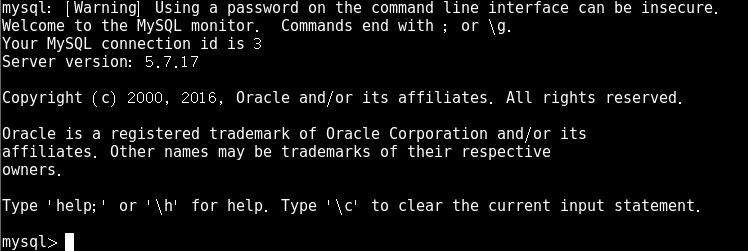
3)重置数据库管理员roo本机登录密码
mysql> show databases;
ERROR 1820 (HY000): You must reset your password using ALTER USER statement before executing this statement. //提示修改密码
错误 1820 (HY000):在执行此语句之前,您必须使用 ALTER USER 语句重置密码。
3)重置数据库管理员roo本机登录密码
mysql> alter user root@"localhost" identified by "123qqq...A";
Query OK, 0 rows affected (0.00 sec)
mysql> exit //断开连接
4)修改密码策略
[root@192 ~]# mysql -uroot -p123qqq...A
mysql>set global validate_password_policy=0; //只验证长度
Query OK, 0 rows affected (0.00 sec)
mysql>set global validate_password_length=6; //修改密码长度,默认值是8个字符
Query OK, 0 rows affected (0.00 sec)
mysql> alter user root@”localhost” identified by "123456"; //修改登陆密码
Query OK, 0 rows affected (0.00 sec)
mysql>exit
5)使用修改后的密码登录
[root@192 ~]# mysql -uroot -p123456
mysql: [Warning] Using a password on the command line interface can be insecure.
Welcome to the MySQL monitor. Commands end with ; or \g.
Your MySQL connection id is 5
Server version: 5.7.17 MySQL Community Server (GPL)
Copyright (c) 2000, 2016, Oracle and/or its affiliates. All rights reserved.
Oracle is a registered trademark of Oracle Corporation and/or its
affiliates. Other names may be trademarks of their respective
owners.
Type 'help;' or '\h' for help. Type '\c' to clear the current input statement.
mysql> show databases;
+--------------------+
| Database |
+--------------------+
| information_schema |
| mysql |
| performance_schema |
| sys |
+--------------------+
4 rows in set (0.00 sec)

 浙公网安备 33010602011771号