


MariaDB Galera Cluster 部署
MariaDB作为Mysql的一个分支,在开源项目中已经广泛使用,例如大热的openstack,所以,为了保证服务的高可用性,同时提高系统的负载能力,集群部署是必不可少的。
MariaDB Galera Cluster 介绍
Galera Cluster是由第三方公司Codership所研发的一套免费开源的集群高可用方案,实现了数据零丢失,官网地址为http://galeracluster.com/。其在MySQLInnoDB存储引擎基础上打了wrep(虚拟全同步复制),Percona/MariaDB已捆绑在各自的发行版本中。
MariaDB Galera Cluster是MariaDB同步多主机集群。它仅支持XtraDB/InnoDB存储引擎(虽然有对MyISAM实验支持,具体看wsrep_replicate_myisam系统变量)。
MariaDB Galera Cluster主要功能:
l 同步复制
l 真正的multi-master,即所有节点可以同时读写数据库
l 自动的节点成员控制,失效节点自动被清除
l 新节点加入数据自动复制
l 真正的并行复制,行级
l 用户可以直接连接集群,使用感受上与MySQL完全一致
优势:
l 因为是多主,所以不存在Slavelag(延迟)
l 不存在丢失事务的情况
l 同时具有读和写的扩展能力
l 更小的客户端延迟
l 节点间数据是同步的,而Master/Slave模式是异步的,不同slave上的binlog可能是不同的
缺点:
l 加入新节点时开销大,需要复制完整的数据
l 不能有效地解决写扩展的问题,所有的写操作都发生在所有的节点
l 有多少个节点,就有多少份重复的数据
l 由于事务提交需要跨节点通信,即涉及分布式事务操作,因此写入会比主从复制慢很多,节点越多,写入越慢,死锁和回滚也会更加频繁
l 对网络要求比较高,如果网络出现波动不稳定,则可能会造成两个节点失联,Galera Cluster集群会发生脑裂,服务将不可用
还有一些地方存在局限:
l 仅支持InnoDB/XtraDB存储引擎,任何写入其他引擎的表,包括mysql.*表都不会被复制。但是DDL语句可以复制,但是insert into mysql.user(MyISAM存储引擎)之类的插入数据不会被复制
l Delete操作不支持没有主键的表,因为没有主键的表在不同的节点上的顺序不同,如果执行select … limit …将出现不同的结果集
l LOCK/UNLOCK TABLES/FLUSH TABLES WITH READ LOCKS不支持单表所锁,以及锁函数GET_LOCK()、RELEASE_LOCK(),但FLUSH TABLES WITH READ LOCK支持全局表锁
l General Query Log日志不能保存在表中,如果开始查询日志,则只能保存到文件中
l 不能有大事务写入,不能操作wsrep_max_ws_rows=131072(行),且写入集不能超过wsrep_max_ws_size=1073741824(1GB),否则客户端直接报错
l 由于集群是乐观锁并发控制,因此,在commit阶段会有事务冲突发生。如果两个事务在集群中的不同节点上对同一行写入并提交,则失败的节点将回滚,客户端返回死锁报错
l XA分布式事务不支持Codership Galera Cluster,在提交时可能会回滚
l 整个集群的写入吞吐量取决于最弱的节点限制,集群要使用同一的配置
技术:
Galera集群的复制功能是基于认证的复制,其流程如下:

当客户端发出一个commit的指令,在事务被提交之前,所有对数据库的更改都会被write-set收集起来,并且将write-set 记录的内容发送给其他节点。
write-set 将在每个节点上使用搜索到的主键进行确认性认证测试,测试结果决定着节点是否应用write-set更改数据。如果认证测试失败,节点将丢弃 write-set ;如果认证测试成功,则事务提交,工作原理如下图:

关于新节点的加入,流程如下:

新加入的节点叫做Joiner,给Joiner提供复制的节点叫Donor。在该过程中首先会检查本地grastate.dat文件的seqno事务号是否在远端donor节点galera.cache文件里,如果存在,那么进行Incremental State Transfer(IST)增量同步复制,将剩余的事务发送过去;如果不存在那么进行State Snapshot Transfer(SST)全量同步复制。SST有三种全量拷贝方式:mysqldump、rsync和xtrabackup。SST的方法可以通过wsrep_sst_method这个参数来设置。

备注:
SST是指从donor到joiner的数据全量拷贝,它通常使用在一个新的节点加入时,为了与集群同步,新的节点不得不去一个已经在集群中的节点上拷贝数据,在PXC(Percona Xtradb Cluster)中,有三种SST的方法,mysqldump,rsync,Xtrabackup。
建议使用XtraBackup,另外对XtraBackup补充说明:
在XtraBackup 2.1.x版本里,使用innobackupex备份时,备份流程如下:
1. 备份InnoDB表数据
2. 执行全局表读锁FLUSH TABLES WITH READ LOCKS
3. 拷贝.frm和MyISAM表数据
4. 得到当前的binlog文件名和position点
5. 完成redo log事务日志的后台复制
6. 解锁UNLOCK TABLES
由上面可以看出如果备份好几张MyISAM存储的大表时,将会进行锁表。
二、环境准备
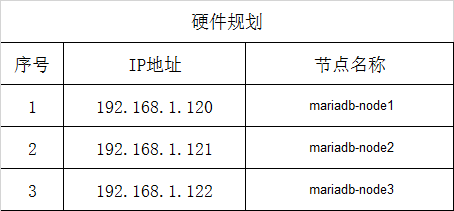
环境说明:安装MariaDB集群至少需要3台服务器(如果只有两台的话需要特殊配置,请参照官方文档)
1、硬件规划
2、系统版本
root@mariadb-node1 ~]# cat /etc/redhat-release
CentOS Linux release 7.2.1511 (Core)
3、关闭防火墙
[root@mariadb-node1 ~]# sed -i 's/SELINUX=enforcing/SELINUX=disabled/g' /etc/selinux/config
[root@mariadb-node1 ~]# setenforce 0
setenforce: SELinux is disabled
4、selinux
[root@mariadb-node1 ~]# systemctl stop firewalld.service
[root@mariadb-node1 ~]# systemctl disable firewalld.service
5、配置域名解析
[root@mariadb-node1 ~]# cat /etc/hosts
127.0.0.1 localhost localhost.localdomain localhost4 localhost4.localdomain4
::1 localhost localhost.localdomain localhost6 localhost6.localdomain6
192.168.1.120 mariadb-node1
192.168.1.121 mariadb-node2
192.168.1.122 mariadb-node3
6、加大文件描述符
vi /etc/security/limits.conf
* soft nofile 65536 * hard nofile 65536 |
vi /etc/sysctl.conf
fs.file-max=655350 net.ipv4.ip_local_port_range = 1025 65000 net.ipv4.tcp_tw_recycle = 1 |
最后执行:
# sysctl -p
安装Percona XtraBackup热备份工具
下载地址:
tar -zxvf percona-xtrabackup-2.4.6-Linux-x86_64.tar.gz cd percona-xtrabackup-2.4.6-Linux-x86_64/bin/ cp -a * /usr/bin/ |
创建XtraBackup备份时用的用户名和密码:
MariaDB [(none)]> grant all on *.* to 'galera'@'localhost' identified by '123456'; |
5、配置mariadb源
备注:从MariaDB 10.1.20 版本开始,Galera Cluster就已经包含在MariaDB包里面了,不需要单独部署MariaDB-Galera-server 和galera 包。
使用YUM方式部署MariaDB Galera Cluster。
#三台机器同时配置mariadb源
|
1
2
3
4
5
6
7
8
9
10
11
12
13
14
15
16
17
18
19
20
21
|
#这里用的是openstack-newton的源,里面包含了mariadbyum install centos-release-openstack-newton -y#查看openstack-newton源是否存在[root@mariadb-node1 ~]# cd /etc/yum.repos.d/[root@mariadb-node1 yum.repos.d]# lltotal 52-rw-r--r--. 1 root root 2573 Nov 21 2014 CentOS-Base.repo #阿里云国内yum源-rw-r--r--. 1 root root 1664 Dec 9 2015 CentOS-Base.repo.backup-rw-r--r-- 1 root root 1056 Sep 6 2016 CentOS-Ceph-Jewel.repo-rw-r--r--. 1 root root 1309 Dec 9 2015 CentOS-CR.repo-rw-r--r--. 1 root root 649 Dec 9 2015 CentOS-Debuginfo.repo-rw-r--r--. 1 root root 290 Dec 9 2015 CentOS-fasttrack.repo-rw-r--r--. 1 root root 630 Dec 9 2015 CentOS-Media.repo-rw-r--r-- 1 root root 1113 Jun 23 2017 CentOS-OpenStack-newton.repo-rw-r--r-- 1 root root 509 Sep 12 22:11 CentOS-QEMU-EV.repo-rw-r--r--. 1 root root 1331 Dec 9 2015 CentOS-Sources.repo-rw-r--r--. 1 root root 1952 Dec 9 2015 CentOS-Vault.repo-rw-r--r--. 1 root root 951 Oct 3 01:44 epel.repo #阿里云国内epel源-rw-r--r--. 1 root root 1050 Oct 3 01:44 epel-testing.repo |
#更新缓存
|
1
2
|
yum clean allyum makecache |
三、安装 MariaDB Galera Cluster (#备注:三台机器同时操作,并把yum源改成国内阿里源)
yum install mariadb mariadb-galera-server mariadb-galera-common galera rsync -y |
#配置mariadb
下面我们开始配置MariaDB Galera Cluster,分别修改MariaDB Galera集群的每个节点上的/etc/my.cnf.d/server.cnf文件,具体每个节点的内容如下:
1、192.168.1.120节点的/etc/my.cnf.d/server.cnf文件内容:
[root@mariadb-node1 ~]# cat /etc/my.cnf.d/server.cnf
[server]
[mysqld]
server_id=129
datadir=/app/galera
user=mysql
skip-external-locking
skip-name-resolve
character-set-server=utf8
[galera]
wsrep_causal_reads=ON
wsrep_provider_options="gcache.size=4G"
wsrep_certify_nonPK=ON
query_cache_size=0
wsrep_on=ON
wsrep_provider=/usr/lib64/galera/libgalera_smm.so
wsrep_cluster_name=MariaDB-Galera-Cluster
wsrep_cluster_address="gcomm://192.168.1.120,192.168.1.121,192.168.1.122"
wsrep_node_name=mariadb-a04
wsrep_node_address=192.168.1.120
binlog_format=row
default_storage_engine=InnoDB
innodb_autoinc_lock_mode=2
wsrep_slave_threads=8
innodb_flush_log_at_trx_commit=0
innodb_buffer_pool_size=2G
wsrep_sst_method=rsync
[embedded]
[mariadb]
[mariadb-10.1]
# 上面配置使用的是rsync方式同步数据,如果要使用xtrabackup方式(建议使用),需要设置:
wsrep_sst_auth=galera:123456
wsrep_sst_method=xtrabackup-v2 #默认是rsync全量拷贝,但是需要在donor节点上执行全局读锁(flushtables with read lock),建议采用xtrabackup热备份方式,只有在备份.frm表结构文件才会锁表
2、192.168.1.121节点的/etc/my.cnf.d/server.cnf文件内容:
[root@mariadb-node2 ~]# vi /etc/my.cnf.d/server.cnf[server] [mysqld] server_id=129 datadir=/app/galera user=mysql skip-external-locking skip-name-resolve character-set-server=utf8 [galera] wsrep_causal_reads=ON wsrep_provider_options="gcache.size=4G" wsrep_certify_nonPK=ON query_cache_size=0 wsrep_on=ON wsrep_provider=/usr/lib64/galera/libgalera_smm.so wsrep_cluster_name=MariaDB-Galera-Cluster wsrep_cluster_address="gcomm://192.168.1.120,192.168.1.121,192.168.1.122" wsrep_node_name=mariadb-a04 wsrep_node_address=192.168.1.121 binlog_format=row default_storage_engine=InnoDB innodb_autoinc_lock_mode=2 wsrep_slave_threads=8 innodb_flush_log_at_trx_commit=0 innodb_buffer_pool_size=2G wsrep_sst_method=rsync [embedded] [mariadb] [mariadb-10.1] |
3、192.168.1.122节点的/etc/my.cnf.d/server.cnf文件内容:
[root@mariadb-node3 ~]# vi /etc/my.cnf.d/server.cnf[server] [mysqld] server_id=130 datadir=/app/galera user=mysql skip-external-locking skip-name-resolve character-set-server=utf8 [galera] wsrep_causal_reads=ON wsrep_provider_options="gcache.size=4G" wsrep_certify_nonPK=ON query_cache_size=0 wsrep_on=ON wsrep_provider=/usr/lib64/galera/libgalera_smm.so wsrep_cluster_name=MariaDB-Galera-Cluster wsrep_cluster_address="gcomm://192.168.1.120,192.168.1.121,192.168.1.122" wsrep_node_name=mariadb-a05 wsrep_node_address=192.168.1.122 binlog_format=row default_storage_engine=InnoDB innodb_autoinc_lock_mode=2 wsrep_slave_threads=8 innodb_flush_log_at_trx_commit=0 innodb_buffer_pool_size=2G wsrep_sst_method=rsync [embedded] [mariadb] [mariadb-10.1] |
4、MariaDB一个节点初始化安装(192.168.1.120):
mysql_install_db --defaults-file=/etc/my.cnf.d/server.cnf --user=mysql |
5、在192.168.1.120节点上通过bootstrap启动(第一次启动一定要使用--wsrep-new-cluster,再次启动就不需要)
mysqld_safe --defaults-file=/etc/my.cnf.d/server.cnf --user=mysql --wsrep-new-cluster & |
6、初始化Mariadb,设置root密码与安全设置 (在192.168.1.120节点上面操作)
[root@mariadb-node1 ~]# mysql_install_db --defaults-file=/etc/my.cnf.d/server.cnf --user=mysqlInstalling MariaDB/MySQL system tables in '/app/galera' ...2017-12-24 3:42:27 139950307854528 [Note] /usr/libexec/mysqld (mysqld 10.1.20-MariaDB) starting as process 22527 ...2017-12-24 3:42:27 139950307854528 [Note] WSREP: Read nil XID from storage engines, skipping position init2017-12-24 3:42:27 139950307854528 [Note] WSREP: wsrep_load(): loading provider library 'none'2017-12-24 3:42:28 139950307854528 [Note] InnoDB: Using mutexes to ref count buffer pool pages2017-12-24 3:42:28 139950307854528 [Note] InnoDB: The InnoDB memory heap is disabled2017-12-24 3:42:28 139950307854528 [Note] InnoDB: Mutexes and rw_locks use GCC atomic builtins2017-12-24 3:42:28 139950307854528 [Note] InnoDB: GCC builtin __atomic_thread_fence() is used for memory barrier2017-12-24 3:42:28 139950307854528 [Note] InnoDB: Compressed tables use zlib 1.2.72017-12-24 3:42:28 139950307854528 [Note] InnoDB: Using Linux native AIO2017-12-24 3:42:28 139950307854528 [Note] InnoDB: Using SSE crc32 instructions2017-12-24 3:42:28 139950307854528 [Note] InnoDB: Initializing buffer pool, size = 2.0G2017-12-24 3:42:29 139950307854528 [Note] InnoDB: Completed initialization of buffer pool2017-12-24 3:42:30 139950307854528 [Note] InnoDB: The first specified data file ./ibdata1 did not exist: a new database to be created!2017-12-24 3:42:30 139950307854528 [Note] InnoDB: Setting file ./ibdata1 size to 12 MB2017-12-24 3:42:30 139950307854528 [Note] InnoDB: Database physically writes the file full: wait...2017-12-24 3:42:30 139950307854528 [Note] InnoDB: Setting log file ./ib_logfile101 size to 48 MB2017-12-24 3:42:30 139950307854528 [Note] InnoDB: Setting log file ./ib_logfile1 size to 48 MB2017-12-24 3:42:30 139950307854528 [Note] InnoDB: Renaming log file ./ib_logfile101 to ./ib_logfile02017-12-24 3:42:30 139950307854528 [Warning] InnoDB: New log files created, LSN=458832017-12-24 3:42:30 139950307854528 [Note] InnoDB: Doublewrite buffer not found: creating new2017-12-24 3:42:30 139950307854528 [Note] InnoDB: Doublewrite buffer created2017-12-24 3:42:30 139950307854528 [Note] InnoDB: 128 rollback segment(s) are active.2017-12-24 3:42:30 139950307854528 [Warning] InnoDB: Creating foreign key constraint system tables.2017-12-24 3:42:30 139950307854528 [Note] InnoDB: Foreign key constraint system tables created2017-12-24 3:42:30 139950307854528 [Note] InnoDB: Creating tablespace and datafile system tables.2017-12-24 3:42:30 139950307854528 [Note] InnoDB: Tablespace and datafile system tables created.2017-12-24 3:42:30 139950307854528 [Note] InnoDB: Creating zip_dict and zip_dict_cols system tables.2017-12-24 3:42:30 139950307854528 [Note] InnoDB: zip_dict and zip_dict_cols system tables created.2017-12-24 3:42:30 139950307854528 [Note] InnoDB: Waiting for purge to start2017-12-24 3:42:30 139950307854528 [Note] InnoDB: Percona XtraDB (http://www.percona.com) 5.6.34-79.1 started; log sequence number 02017-12-24 3:42:30 139947298572032 [Note] InnoDB: Dumping buffer pool(s) not yet startedOKFilling help tables...2017-12-24 3:42:34 139725903902912 [Note] /usr/libexec/mysqld (mysqld 10.1.20-MariaDB) starting as process 22557 ...2017-12-24 3:42:34 139725903902912 [Note] WSREP: Read nil XID from storage engines, skipping position init2017-12-24 3:42:34 139725903902912 [Note] WSREP: wsrep_load(): loading provider library 'none'2017-12-24 3:42:34 139725903902912 [Note] InnoDB: Using mutexes to ref count buffer pool pages2017-12-24 3:42:34 139725903902912 [Note] InnoDB: The InnoDB memory heap is disabled2017-12-24 3:42:34 139725903902912 [Note] InnoDB: Mutexes and rw_locks use GCC atomic builtins2017-12-24 3:42:34 139725903902912 [Note] InnoDB: GCC builtin __atomic_thread_fence() is used for memory barrier2017-12-24 3:42:34 139725903902912 [Note] InnoDB: Compressed tables use zlib 1.2.72017-12-24 3:42:34 139725903902912 [Note] InnoDB: Using Linux native AIO2017-12-24 3:42:34 139725903902912 [Note] InnoDB: Using SSE crc32 instructions2017-12-24 3:42:34 139725903902912 [Note] InnoDB: Initializing buffer pool, size = 2.0G2017-12-24 3:42:34 139725903902912 [Note] InnoDB: Completed initialization of buffer pool2017-12-24 3:42:34 139725903902912 [Note] InnoDB: Highest supported file format is Barracuda.2017-12-24 3:42:34 139725903902912 [Note] InnoDB: 128 rollback segment(s) are active.2017-12-24 3:42:34 139725903902912 [Note] InnoDB: Waiting for purge to start2017-12-24 3:42:34 139725903902912 [Note] InnoDB: Percona XtraDB (http://www.percona.com) 5.6.34-79.1 started; log sequence number 16228182017-12-24 3:42:34 139722923599616 [Note] InnoDB: Dumping buffer pool(s) not yet startedOKCreating OpenGIS required SP-s...2017-12-24 3:42:38 139838952904896 [Note] /usr/libexec/mysqld (mysqld 10.1.20-MariaDB) starting as process 22587 ...2017-12-24 3:42:38 139838952904896 [Note] WSREP: Read nil XID from storage engines, skipping position init2017-12-24 3:42:38 139838952904896 [Note] WSREP: wsrep_load(): loading provider library 'none'2017-12-24 3:42:38 139838952904896 [Note] InnoDB: Using mutexes to ref count buffer pool pages2017-12-24 3:42:38 139838952904896 [Note] InnoDB: The InnoDB memory heap is disabled2017-12-24 3:42:38 139838952904896 [Note] InnoDB: Mutexes and rw_locks use GCC atomic builtins2017-12-24 3:42:38 139838952904896 [Note] InnoDB: GCC builtin __atomic_thread_fence() is used for memory barrier2017-12-24 3:42:38 139838952904896 [Note] InnoDB: Compressed tables use zlib 1.2.72017-12-24 3:42:38 139838952904896 [Note] InnoDB: Using Linux native AIO2017-12-24 3:42:38 139838952904896 [Note] InnoDB: Using SSE crc32 instructions2017-12-24 3:42:38 139838952904896 [Note] InnoDB: Initializing buffer pool, size = 2.0G2017-12-24 3:42:39 139838952904896 [Note] InnoDB: Completed initialization of buffer pool2017-12-24 3:42:39 139838952904896 [Note] InnoDB: Highest supported file format is Barracuda.2017-12-24 3:42:39 139838952904896 [Note] InnoDB: 128 rollback segment(s) are active.2017-12-24 3:42:39 139838952904896 [Note] InnoDB: Waiting for purge to start2017-12-24 3:42:39 139838952904896 [Note] InnoDB: Percona XtraDB (http://www.percona.com) 5.6.34-79.1 started; log sequence number 16228282017-12-24 3:42:39 139835976857344 [Note] InnoDB: Dumping buffer pool(s) not yet startedOKTo start mysqld at boot time you have to copysupport-files/mysql.server to the right place for your systemPLEASE REMEMBER TO SET A PASSWORD FOR THE MariaDB root USER !To do so, start the server, then issue the following commands:'/usr/bin/mysqladmin' -u root password 'new-password''/usr/bin/mysqladmin' -u root -h 192.168.1.120 password 'new-password'Alternatively you can run:'/usr/bin/mysql_secure_installation'which will also give you the option of removing the testdatabases and anonymous user created by default. This isstrongly recommended for production servers.See the MariaDB Knowledgebase at http://mariadb.com/kb or theMySQL manual for more instructions.You can start the MariaDB daemon with:cd '/usr' ; /usr/bin/mysqld_safe --datadir='/app/galera'You can test the MariaDB daemon with mysql-test-run.plcd '/usr/mysql-test' ; perl mysql-test-run.plPlease report any problems at http://mariadb.org/jiraThe latest information about MariaDB is available at http://mariadb.org/.You can find additional information about the MySQL part at:http://dev.mysql.comConsider joining MariaDB's strong and vibrant community:https://mariadb.org/get-involved/ |
#192.168.1.120 节点启动MariaDB
[root@mariadb-node1 ~]# mysqld_safe --defaults-file=/etc/my.cnf.d/server.cnf --user=mysql --wsrep-new-cluster &[1] 22614[root@mariadb-node1 ~]# 171224 03:43:26 mysqld_safe Logging to '/app/galera/mariadb-node1.err'.171224 03:43:26 mysqld_safe Starting mysqld daemon with databases from /app/galera171224 03:43:26 mysqld_safe WSREP: Running position recovery with --log_error='/app/galera/wsrep_recovery.vISRp0' --pid-file='/app/galera/mariadb-node1-recover.pid'171224 03:43:29 mysqld_safe WSREP: Recovered position 00000000-0000-0000-0000-000000000000:-1[root@mariadb-node1 ~]# |
#检查mysqld是否启动
[root@mariadb-node1 ~]# netstat -lntupActive Internet connections (only servers)Proto Recv-Q Send-Q Local Address Foreign Address State PID/Program name tcp 0 0 0.0.0.0:22 0.0.0.0:* LISTEN 1080/sshd tcp 0 0 0.0.0.0:4567 0.0.0.0:* LISTEN 22806/mysqld tcp 0 0 127.0.0.1:25 0.0.0.0:* LISTEN 1179/master tcp6 0 0 :::3306 :::* LISTEN 22806/mysqld tcp6 0 0 :::22 :::* LISTEN 1080/sshd tcp6 0 0 ::1:25 :::* LISTEN 1179/master |
7、其它两个节点, 初始化MariaDB(备注:192.168.1.121,192.168.1.122)
mysql_install_db --defaults-file=/etc/my.cnf.d/server.cnf --user=mysql |
8、启动MariaDB(备注:192.168.1.121,192.168.1.122)
|
1
|
mysqld_safe --defaults-file=/etc/my.cnf.d/server.cnf --user=mysql & |
四、验证操作(备注:三个节点,相同操作)
1、查看集群节点
[root@mariadb-node1 ~]# mysql -uroot -pEnter password: Welcome to the MariaDB monitor. Commands end with ; or \g.Your MariaDB connection id is 12Server version: 10.1.20-MariaDB MariaDB ServerCopyright (c) 2000, 2016, Oracle, MariaDB Corporation Ab and others.Type 'help;' or '\h' for help. Type '\c' to clear the current input statement.MariaDB [(none)]> show databases;+--------------------+| Database |+--------------------+| information_schema || mysql || performance_schema |+--------------------+3 rows in set (0.00 sec)#查看几个集群节点MariaDB [(none)]> SHOW STATUS LIKE 'wsrep_cluster_size'; +--------------------+-------+| Variable_name | Value |+--------------------+-------+| wsrep_cluster_size | 3 |+--------------------+-------+1 row in set (0.00 sec)#查看集群节点MariaDB [(none)]> show global status like 'ws%'; +------------------------------+----------------------------------------------------------+| Variable_name | Value |+------------------------------+----------------------------------------------------------+| wsrep_apply_oooe | 0.000000 || wsrep_apply_oool | 0.000000 || wsrep_apply_window | 0.000000 || wsrep_causal_reads | 8 || wsrep_cert_deps_distance | 0.000000 || wsrep_cert_index_size | 0 || wsrep_cert_interval | 0.000000 || wsrep_cluster_conf_id | 2 || wsrep_cluster_size | 3 || wsrep_cluster_state_uuid | 8d1b5d98-e819-11e7-96c9-9a239fd041bf || wsrep_cluster_status | Primary || wsrep_commit_oooe | 0.000000 || wsrep_commit_oool | 0.000000 || wsrep_commit_window | 0.000000 || wsrep_connected | ON || wsrep_desync_count | 0 || wsrep_evs_delayed | || wsrep_evs_evict_list | || wsrep_evs_repl_latency | 0/0/0/0/0 || wsrep_evs_state | OPERATIONAL || wsrep_flow_control_paused | 0.000000 || wsrep_flow_control_paused_ns | 0 || wsrep_flow_control_recv | 0 || wsrep_flow_control_sent | 0 || wsrep_gcomm_uuid | 8d1a9b25-e819-11e7-8d07-62fb3ba88975 || wsrep_incoming_addresses | 192.168.1.122:3306,192.168.1.121:3306,192.168.1.120:3306 || wsrep_last_committed | 3 || wsrep_local_bf_aborts | 0 || wsrep_local_cached_downto | 18446744073709551615 || wsrep_local_cert_failures | 0 || wsrep_local_commits | 0 || wsrep_local_index | 2 || wsrep_local_recv_queue | 0 || wsrep_local_recv_queue_avg | 0.375000 || wsrep_local_recv_queue_max | 3 || wsrep_local_recv_queue_min | 0 || wsrep_local_replays | 0 || wsrep_local_send_queue | 0 || wsrep_local_send_queue_avg | 0.000000 || wsrep_local_send_queue_max | 1 || wsrep_local_send_queue_min | 0 || wsrep_local_state | 4 || wsrep_local_state_comment | Synced || wsrep_local_state_uuid | 8d1b5d98-e819-11e7-96c9-9a239fd041bf || wsrep_protocol_version | 7 || wsrep_provider_name | Galera || wsrep_provider_vendor | Codership Oy <info@codership.com> || wsrep_provider_version | 3.16(r5c765eb) || wsrep_ready | ON || wsrep_received | 8 || wsrep_received_bytes | 861 || wsrep_repl_data_bytes | 0 || wsrep_repl_keys | 0 || wsrep_repl_keys_bytes | 0 || wsrep_repl_other_bytes | 0 || wsrep_replicated | 0 || wsrep_replicated_bytes | 0 || wsrep_thread_count | 9 |+------------------------------+----------------------------------------------------------+58 rows in set (0.00 sec) |
可以看到集群正常使用。
注释:
wsrep_cluster_status为Primary,表示节点为主节点,正常读写。
wsrep_ready为ON,表示集群正常运行。
wsrep_cluster_size为3,表示集群有三个节点。
2、创建MyISAM表测试 (备注:192.168.1.120)
[root@mariadb-node1 ~]# mysql -uroot -pEnter password: Welcome to the MariaDB monitor. Commands end with ; or \g.Your MariaDB connection id is 13Server version: 10.1.20-MariaDB MariaDB ServerCopyright (c) 2000, 2016, Oracle, MariaDB Corporation Ab and others.Type 'help;' or '\h' for help. Type '\c' to clear the current input statement.<br><br>#创建数据库MariaDB [(none)]> create database crm character set=utf8;Query OK, 1 row affected (0.00 sec)MariaDB [(none)]> show databases;+--------------------+| Database |+--------------------+| crm || information_schema || mysql || performance_schema |+--------------------+4 rows in set (0.00 sec)MariaDB [(none)]> use crmDatabase changed<br>#创建MyISAM表MariaDB [crm]> create table myisam_tbl (id int,name text) ENGINE MyISAM;Query OK, 0 rows affected (0.00 sec)MariaDB [crm]> insert into myisam_tbl values(1,'jojo');Query OK, 1 row affected (0.00 sec)MariaDB [crm]> insert into myisam_tbl values(1,'nulige');Query OK, 1 row affected (0.00 sec)MariaDB [crm]> show tables;+---------------+| Tables_in_crm |+---------------+| myisam_tbl |+---------------+ |
#查看表内容 (备注:在192.168.1.120上面操作)
MariaDB [crm]> select * from myisam_tbl;+------+--------+| id | name |+------+--------+| 1 | jojo || 1 | nulige |+------+--------+2 rows in set (0.00 sec) |
#其它节点查看数据库(备注:192.168.1.121,192.168.1.122)
[root@mariadb-node2 ~]# mysql -uroot -pEnter password: Welcome to the MariaDB monitor. Commands end with ; or \g.Your MariaDB connection id is 14Server version: 10.1.20-MariaDB MariaDB ServerCopyright (c) 2000, 2016, Oracle, MariaDB Corporation Ab and others.Type 'help;' or '\h' for help. Type '\c' to clear the current input statement.MariaDB [(none)]> show databases;+--------------------+| Database |+--------------------+| crm || information_schema || mysql || performance_schema |+--------------------+4 rows in set (0.00 sec)MariaDB [(none)]> use crm;Reading table information for completion of table and column namesYou can turn off this feature to get a quicker startup with -ADatabase changedMariaDB [crm]> show tables;+---------------+| Tables_in_crm |+---------------+| myisam_tbl |+---------------+1 row in set (0.00 sec)#查看表内容,没有同步过来MariaDB [crm]> select * from myisam_tbl;Empty set (0.00 sec) |
备注:可以看到MyISAM存储的表,Galera不支持同步。它仅支持XtraDB/ InnoDB存储引擎(虽然有对MyISAM实验支持,具体看wsrep_replicate_myisam系统变量)。
3、验证InnoDB存储的表
[root@mariadb-node1 ~]# mysql -uroot -pEnter password: Welcome to the MariaDB monitor. Commands end with ; or \g.Your MariaDB connection id is 14Server version: 10.1.20-MariaDB MariaDB ServerCopyright (c) 2000, 2016, Oracle, MariaDB Corporation Ab and others.Type 'help;' or '\h' for help. Type '\c' to clear the current input statement.#创建数据库MariaDB [crm]> create database kuaiwei character set=utf8;Query OK, 1 row affected (0.01 sec)MariaDB [(none)]> show databases;+--------------------+| Database |+--------------------+| crm || information_schema || kuaiwei || mysql || performance_schema |+--------------------+5 rows in set (0.00 sec)MariaDB [(none)]> use kuaiweiDatabase changed#创建表MariaDB [kuaiwei]> create table innodb_tbl(id int,name text) ENGINE InnoDB; Query OK, 0 rows affected (0.01 sec)MariaDB [kuaiwei]> insert into innodb_tbl values(1,'jojo');Query OK, 1 row affected (0.00 sec)MariaDB [kuaiwei]> insert into innodb_tbl values(1,'nulige');Query OK, 1 row affected (0.01 sec)MariaDB [kuaiwei]> show tables;+-------------------+| Tables_in_kuaiwei |+-------------------+| innodb_tbl |+-------------------+1 row in set (0.00 sec)MariaDB [kuaiwei]> select * from innodb_tbl; +------+--------+| id | name |+------+--------+| 1 | jojo || 1 | nulige |+------+--------+2 rows in set (0.01 sec)MariaDB [kuaiwei]> exitBye |
#登录其它节点查看数据库,表中内容(备注:192.168.1.121,192.168.1.122)
[root@mariadb-node2 ~]# mysql -uroot -pEnter password: Welcome to the MariaDB monitor. Commands end with ; or \g.Your MariaDB connection id is 15Server version: 10.1.20-MariaDB MariaDB ServerCopyright (c) 2000, 2016, Oracle, MariaDB Corporation Ab and others.Type 'help;' or '\h' for help. Type '\c' to clear the current input statement.MariaDB [(none)]> show databases;+--------------------+| Database |+--------------------+| crm || information_schema || kuaiwei || mysql || performance_schema |+--------------------+5 rows in set (0.00 sec)MariaDB [(none)]> use kuaiwei;Reading table information for completion of table and column namesYou can turn off this feature to get a quicker startup with -ADatabase changedMariaDB [kuaiwei]> show tables;+-------------------+| Tables_in_kuaiwei |+-------------------+| innodb_tbl |+-------------------+1 row in set (0.00 sec)MariaDB [kuaiwei]> select * from innodb_tbl;+------+--------+| id | name |+------+--------+| 1 | jojo || 1 | nulige |+------+--------+2 rows in set (0.00 sec)MariaDB [kuaiwei]> exitBye |
4、模拟故障:
停掉192.168.1.120 服务器上面的mariadb
[root@mariadb-node1 ~]# mysqladmin -uroot -p "shutdown"Enter password: #输入数据库密码#检查数据库是否启动[root@mariadb-node1 ~]# netstat -lntupActive Internet connections (only servers)Proto Recv-Q Send-Q Local Address Foreign Address State PID/Program name tcp 0 0 0.0.0.0:22 0.0.0.0:* LISTEN 1080/sshd tcp 0 0 127.0.0.1:25 0.0.0.0:* LISTEN 1179/master tcp6 0 0 :::22 :::* LISTEN 1080/sshd tcp6 0 0 ::1:25 :::* LISTEN 1179/master |
然后在其他节点(192.168.1.121,192.168.1.122)上面执行:
[root@mariadb-node2 ~]# mysql -uroot -pEnter password: Welcome to the MariaDB monitor. Commands end with ; or \g.Your MariaDB connection id is 16Server version: 10.1.20-MariaDB MariaDB ServerCopyright (c) 2000, 2016, Oracle, MariaDB Corporation Ab and others.Type 'help;' or '\h' for help. Type '\c' to clear the current input statement.MariaDB [(none)]> show global status like 'wsrep%';+------------------------------+---------------------------------------+| Variable_name | Value |+------------------------------+---------------------------------------+| wsrep_apply_oooe | 0.000000 || wsrep_apply_oool | 0.000000 || wsrep_apply_window | 1.000000 || wsrep_causal_reads | 24 || wsrep_cert_deps_distance | 1.166667 || wsrep_cert_index_size | 6 || wsrep_cert_interval | 0.000000 || wsrep_cluster_conf_id | 3 || wsrep_cluster_size | 2 || wsrep_cluster_state_uuid | 8d1b5d98-e819-11e7-96c9-9a239fd041bf || wsrep_cluster_status | Primary || wsrep_commit_oooe | 0.000000 || wsrep_commit_oool | 0.000000 || wsrep_commit_window | 1.000000 || wsrep_connected | ON || wsrep_desync_count | 0 || wsrep_evs_delayed | || wsrep_evs_evict_list | || wsrep_evs_repl_latency | 0/0/0/0/0 || wsrep_evs_state | OPERATIONAL || wsrep_flow_control_paused | 0.000000 || wsrep_flow_control_paused_ns | 0 || wsrep_flow_control_recv | 0 || wsrep_flow_control_sent | 0 || wsrep_gcomm_uuid | 71aa0335-e81b-11e7-a8bc-dbee4f046e45 || wsrep_incoming_addresses | 192.168.1.122:3306,192.168.1.121:3306 || wsrep_last_committed | 9 || wsrep_local_bf_aborts | 0 || wsrep_local_cached_downto | 4 || wsrep_local_cert_failures | 0 || wsrep_local_commits | 0 || wsrep_local_index | 1 || wsrep_local_recv_queue | 0 || wsrep_local_recv_queue_avg | 0.000000 || wsrep_local_recv_queue_max | 1 || wsrep_local_recv_queue_min | 0 || wsrep_local_replays | 0 || wsrep_local_send_queue | 0 || wsrep_local_send_queue_avg | 0.000000 || wsrep_local_send_queue_max | 1 || wsrep_local_send_queue_min | 0 || wsrep_local_state | 4 || wsrep_local_state_comment | Synced || wsrep_local_state_uuid | 8d1b5d98-e819-11e7-96c9-9a239fd041bf || wsrep_protocol_version | 7 || wsrep_provider_name | Galera || wsrep_provider_vendor | Codership Oy <info@codership.com> || wsrep_provider_version | 3.16(r5c765eb) || wsrep_ready | ON || wsrep_received | 10 || wsrep_received_bytes | 2894 || wsrep_repl_data_bytes | 0 || wsrep_repl_keys | 0 || wsrep_repl_keys_bytes | 0 || wsrep_repl_other_bytes | 0 || wsrep_replicated | 0 || wsrep_replicated_bytes | 0 || wsrep_thread_count | 9 |+------------------------------+---------------------------------------+58 rows in set (0.00 sec)MariaDB [(none)]> exitBye |
此时集群为自动将192.168.1.120故障节点剔除掉,并且正常提供服务。
最后我们恢复失败的节点(192.168.1.120):
[root@mariadb-node1 ~]# mysqld_safe --defaults-file=/etc/my.cnf.d/server.cnf --user=mysql & |
再查看集群环境:
[root@mariadb-node2 ~]# mysql -uroot -pEnter password: Welcome to the MariaDB monitor. Commands end with ; or \g.Your MariaDB connection id is 17Server version: 10.1.20-MariaDB MariaDB ServerCopyright (c) 2000, 2016, Oracle, MariaDB Corporation Ab and others.Type 'help;' or '\h' for help. Type '\c' to clear the current input statement.#又恢复成了三个节点MariaDB [(none)]> SHOW STATUS LIKE 'wsrep_cluster_size'; +--------------------+-------+| Variable_name | Value |+--------------------+-------+| wsrep_cluster_size | 3 |+--------------------+-------+1 row in set (0.00 sec)MariaDB [(none)]> exitBye |
5、模拟脑裂后的处理
下面模拟在网络抖动发生丢包的情况下,两个节点失联导致脑裂。首先,在192.168.1.121和192.168.1.122两个节点上分别执行:
iptables -A INPUT -p tcp --sport 4567 -j DROP
iptables -A INPUT -p tcp --dport 4567 -j DROP
以上命令用来禁止wsrep全同步复制4567端口通信。
然后我们在192.168.1.120节点查看:
MariaDB [(none)]> show global statuslike 'ws%'; 可以看到下面的几个值: wsrep_cluster_size 1 wsrep_cluster_status non-Primary wsrep_ready OFF MariaDB [(none)]> use test_db; ERROR 1047 (08S01): WSREP has not yetprepared node for application use MariaDB [(none)]> select@@wsrep_node_name; ERROR 1205 (HY000): Lock wait timeoutexceeded; try restarting transaction |
现在已经出现脑裂的情况,并且集群无法执行任何命令。
为了解决这个问题,可以执行:
set global wsrep_provider_options="pc.bootstrap=true";
通过这个命令来强制恢复出现脑裂的节点。
下面我们来验证一下:
MariaDB [(none)]> select @@wsrep_node_name; ERROR 1205 (HY000): Lock wait timeout exceeded; try restarting transaction MariaDB [(none)]> set global wsrep_provider_options="pc.bootstrap=true"; Query OK, 0 rows affected (0.00 sec) MariaDB [(none)]> select @@wsrep_node_name; +-------------------+ | @@wsrep_node_name | +-------------------+ | mariadb-a03 | +-------------------+ 1 row in set (0.27 sec) MariaDB [(none)]> use test_db; Reading table information for completion oft able and column names You can turn off this feature to get a quicker startup with -A Database changed MariaDB [test_db]> show tables; +-------------------+ | Tables_in_test_db | +-------------------+ | innodb_tbl | | myisam_tbl | +-------------------+ |
最后我们将节点192.168.1.121和192.168.1.122恢复一下,只要清理一下iptables表即可(因为我的是测试环境,生产环境需要删除上面的规则即可):
iptables –F
各个节点验证一下:
192.168.1.120: MariaDB [test_db]> SHOW STATUS LIKE 'wsrep_cluster_size'; +--------------------+-------+ | Variable_name | Value | +--------------------+-------+ | wsrep_cluster_size | 3 | +--------------------+-------+ 1 row in set (0.00 sec) 192.168.1.121: MariaDB [(none)]> select @@wsrep_node_name; +-------------------+ | @@wsrep_node_name | +-------------------+ | mariadb-node2 | +-------------------+ |
6、避免脏读
Galera Cluster不是真正意义上的全同步复制,存在延迟。我们可以在一个节点上面执行FLUSH TABLES WITH READ LOCK;全局读锁。
然后在其他节点执行写操作,观察延迟情况。
比如我们在192.168.1.122节点执行全局读锁设置:
[root@mariadb-node3 ~]# mysql -uroot -pEnter password: Welcome to the MariaDB monitor. Commands end with ; or \g.Your MariaDB connection id is 13Server version: 10.1.20-MariaDB MariaDB ServerCopyright (c) 2000, 2016, Oracle, MariaDB Corporation Ab and others.Type 'help;' or '\h' for help. Type '\c' to clear the current input statement.MariaDB [(none)]> show databases;+--------------------+| Database |+--------------------+| crm || information_schema || kuaiwei || mysql || performance_schema |+--------------------+5 rows in set (0.00 sec)MariaDB [(none)]> use kuaiwei;Reading table information for completion of table and column namesYou can turn off this feature to get a quicker startup with -ADatabase changed#执行全局读锁设置MariaDB [kuaiwei]> flush tables with read lock;Query OK, 0 rows affected (0.00 sec)MariaDB [kuaiwei]> select * from innodb_tbl;+------+--------+| id | name |+------+--------+| 1 | jojo || 1 | nulige |+------+--------+2 rows in set (0.00 sec) |
然后在192.168.1.120节点插入操作
[root@mariadb-node1 ~]# mysql -uroot -pEnter password: Welcome to the MariaDB monitor. Commands end with ; or \g.Your MariaDB connection id is 11Server version: 10.1.20-MariaDB MariaDB ServerCopyright (c) 2000, 2016, Oracle, MariaDB Corporation Ab and others.Type 'help;' or '\h' for help. Type '\c' to clear the current input statement.MariaDB [(none)]> show databases;+--------------------+| Database |+--------------------+| crm || information_schema || kuaiwei || mysql || performance_schema |+--------------------+5 rows in set (0.00 sec)MariaDB [(none)]> use kuaiwei;Reading table information for completion of table and column namesYou can turn off this feature to get a quicker startup with -ADatabase changedMariaDB [kuaiwei]> select @@wsrep_node_name; +-------------------+| @@wsrep_node_name |+-------------------+| mariadb-a04 |+-------------------+1 row in set (0.00 sec)MariaDB [kuaiwei]> insert into innodb_tbl values(2,'li men');Query OK, 1 row affected (0.00 sec)MariaDB [kuaiwei]> select * from innodb_tb1;ERROR 1146 (42S02): Table 'kuaiwei.innodb_tb1' doesn't existMariaDB [kuaiwei]> insert into innodb_tbl values(2,'hbase'); Query OK, 1 row affected (0.00 sec)MariaDB [kuaiwei]> select * from innodb_tbl; +------+--------+| id | name |+------+--------+| 1 | jojo || 1 | nulige || 2 | li men || 2 | hbase |+------+--------+4 rows in set (0.00 sec) |
在节点192.168.1.122上测试查询操作:
MariaDB [kuaiwei]> select * from innodb_tbl;ERROR 1205 (HY000): Lock wait timeout exceeded; try restarting transaction |
这里之所以没有读取到脏数据,是因为我在MariaDB配置文件中设置了wsrep_causal_reads=ON;
我们将wsrep_causal_reads修改为0或OFF来看一下效果:
MariaDB [kuaiwei]> set wsrep_causal_reads=0; ERROR 2006 (HY000): MySQL server has gone awayNo connection. Trying to reconnect...Connection id: 16Current database: kuaiweiQuery OK, 0 rows affected, 1 warning (13.43 sec)MariaDB [kuaiwei]> select * from innodb_tbl;+------+--------+| id | name |+------+--------+| 1 | jojo || 1 | nulige || 2 | li men || 2 | hbase |+------+--------+4 rows in set (0.00 sec)MariaDB [kuaiwei]> exitBye |
通过上面的一系列测试,最后总结一下:
1、在生产环境下应该避免使用大事务,不建议在高并发写入场景下使用Galera Cluster架构,会导致集群限流,从而引起整个集群hang住,出现生产故障。针对这种情况可以考虑主从,实现读写分离等手段。
2、对数据一致性要求较高,并且数据写入不频繁,数据库容量也不大(50GB左右),网络状况良好的情况下,可以考虑使用Galera方案。

 浙公网安备 33010602011771号