Promethues回炉(1)
Prometheus 简介
演变
Prometheus受启发于Google的Brogmon监控系统(相似的Kubernetes是从Google的Brog系统演变而来),从2012年开始由前Google工程师在Soundcloud以开源软件的形式进行研发,并且于2015年早期对外发布早期版本。2016年5月继Kubernetes之后成为第二个正式加入CNCF基金会的项目,同年6月正式发布1.0版本。2017年底发布了基于全新存储层的2.0版本,能更好地与容器平台、云平台配合。
优势
- 易于管理
- 核心模块二进制文件
- Pull模型架构
- 服务发现
- 监控服务的内部运行状态
- 强大的数据模型
- metrics
- name
- labels
- value
- TSDB
- metrics
- 查询语言PromQL
- 查询、聚合
- 分布
- 预测
- 过滤
Prometheus核心组件
Prometheus的基本架构:
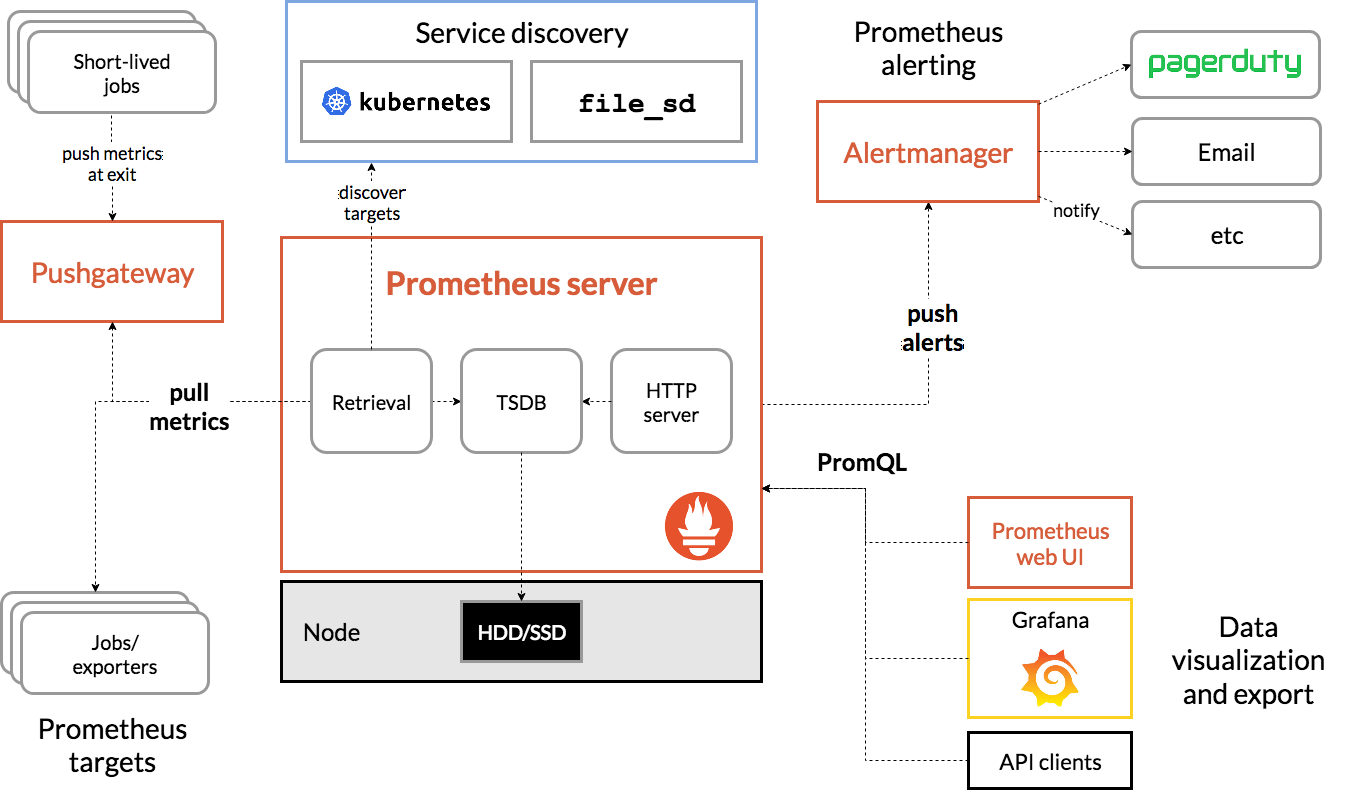
Prometheus Server
Prometheus Server是Prometheus组件中的核心部分,负责实现对监控数据的获取,存储以及查询。
Prometheus Server可以通过静态配置管理监控目标,也可以配合使用Service Discovery的方式动态管理监控目标,并从这些监控目标中获取数据。其次Prometheus Server需要对采集到的监控数据进行存储,Prometheus Server本身就是一个时序数据库,将采集到的监控数据按照时间序列的方式存储在本地磁盘当中。最后Prometheus Server对外提供了自定义的PromQL语言,实现对数据的查询以及分析。
Prometheus Server内置的Express Browser UI,通过这个UI可以直接通过PromQL实现数据的查询以及可视化。
Prometheus Server的联邦集群能力可以使其从其他的Prometheus Server实例中获取数据,因此在大规模监控的情况下,可以通过联邦集群以及功能分区的方式对Prometheus Server进行扩展。
Exporters
Exporter将监控数据采集的端点通过HTTP服务的形式暴露给Prometheus Server,Prometheus Server通过访问该Exporter提供的Endpoint端点,即可获取到需要采集的监控数据。
AlertManager
在Prometheus Server中支持基于PromQL创建告警规则,如果满足PromQL定义的规则,则会产生一条告警,而告警的后续处理流程则由AlertManager进行管理。
PushGateway
由于Prometheus数据采集基于Pull模型进行设计,因此在网络环境的配置上必须要让Prometheus Server能够直接与Exporter进行通信。 当这种网络需求无法直接满足时,就可以利用PushGateway来进行中转。可以通过PushGateway将内部网络的监控数据主动Push到Gateway当中。而Prometheus Server则可以采用同样Pull的方式从PushGateway中获取到监控数据。
简单实战
本节内容:
- 安装prometheus
- 二进制
- 容器方式
- 部署node exporter采集主机指标
- 简单的PromQl查询
- 对接grafana数据可视化
安装prometheus
prometheus 主要组件下载地址https://prometheus.io/download/
二进制
下载解压
wget https://github.com/prometheus/prometheus/releases/download/v2.20.0/prometheus-2.20.0.linux-amd64.tar.gz
tar xzvf prometheus-2.20.0.linux-amd64.tar.gz -C /opt/
prometheus默认配置文件prometheus.yml
# my global config
global:
  scrape_interval:     15s # Set the scrape interval to every 15 seconds. Default is every 1 minute.
  evaluation_interval: 15s # Evaluate rules every 15 seconds. The default is every 1 minute.
  # scrape_timeout is set to the global default (10s).

# Alertmanager configuration
alerting:
  alertmanagers:
  - static_configs:
    - targets:
      # - alertmanager:9093

# Load rules once and periodically evaluate them according to the global 'evaluation_interval'.
rule_files:
  # - "first_rules.yml"
  # - "second_rules.yml"

# A scrape configuration containing exactly one endpoint to scrape:
# Here it's Prometheus itself.
scrape_configs:
  # The job name is added as a label `job=<job_name>` to any timeseries scraped from this config.
  - job_name: 'prometheus'

    # metrics_path defaults to '/metrics'
    # scheme defaults to 'http'.

    static_configs:
    - targets: ['localhost:9090']
prometheus启动参数:
usage: prometheus [<flags>]

The Prometheus monitoring server

Flags:
  -h, --help                     Show context-sensitive help (also try --help-long and --help-man).
      --version                  Show application version.
      --config.file="prometheus.yml"
                                 Prometheus configuration file path.
      --web.listen-address="0.0.0.0:9090"
                                 Address to listen on for UI, API, and telemetry.
      --web.read-timeout=5m      Maximum duration before timing out read of the request, and closing idle connections.
      --web.max-connections=512  Maximum number of simultaneous connections.
      --web.external-url=<URL>   The URL under which Prometheus is externally reachable (for example, if Prometheus is served via a reverse proxy). Used for generating relative and absolute links back to Prometheus itself. If
                                 the URL has a path portion, it will be used to prefix all HTTP endpoints served by Prometheus. If omitted, relevant URL components will be derived automatically.
      --web.route-prefix=<path>  Prefix for the internal routes of web endpoints. Defaults to path of --web.external-url.
      --web.user-assets=<path>   Path to static asset directory, available at /user.
      --web.enable-lifecycle     Enable shutdown and reload via HTTP request.
      --web.enable-admin-api     Enable API endpoints for admin control actions.
      --web.console.templates="consoles"
                                 Path to the console template directory, available at /consoles.
      --web.console.libraries="console_libraries"
                                 Path to the console library directory.
      --web.page-title="Prometheus Time Series Collection and Processing Server"
                                 Document title of Prometheus instance.
      --web.cors.origin=".*"     Regex for CORS origin. It is fully anchored. Example: 'https?://(domain1|domain2)\.com'
      --storage.tsdb.path="data/"
                                 Base path for metrics storage.
      --storage.tsdb.retention=STORAGE.TSDB.RETENTION
                                 [DEPRECATED] How long to retain samples in storage. This flag has been deprecated, use "storage.tsdb.retention.time" instead.
      --storage.tsdb.retention.time=STORAGE.TSDB.RETENTION.TIME
                                 How long to retain samples in storage. When this flag is set it overrides "storage.tsdb.retention". If neither this flag nor "storage.tsdb.retention" nor "storage.tsdb.retention.size" is set, the
                                 retention time defaults to 15d. Units Supported: y, w, d, h, m, s, ms.
      --storage.tsdb.retention.size=STORAGE.TSDB.RETENTION.SIZE
                                 [EXPERIMENTAL] Maximum number of bytes that can be stored for blocks. A unit is required, supported units: B, KB, MB, GB, TB, PB, EB. Ex: "512MB". This flag is experimental and can be changed in
                                 future releases.
      --storage.tsdb.no-lockfile
                                 Do not create lockfile in data directory.
      --storage.tsdb.allow-overlapping-blocks
                                 [EXPERIMENTAL] Allow overlapping blocks, which in turn enables vertical compaction and vertical query merge.
      --storage.tsdb.wal-compression
                                 Compress the tsdb WAL.
      --storage.remote.flush-deadline=<duration>
                                 How long to wait flushing sample on shutdown or config reload.
      --storage.remote.read-sample-limit=5e7
                                 Maximum overall number of samples to return via the remote read interface, in a single query. 0 means no limit. This limit is ignored for streamed response types.
      --storage.remote.read-concurrent-limit=10
                                 Maximum number of concurrent remote read calls. 0 means no limit.
      --storage.remote.read-max-bytes-in-frame=1048576
                                 Maximum number of bytes in a single frame for streaming remote read response types before marshalling. Note that client might have limit on frame size as well. 1MB as recommended by protobuf by
                                 default.
      --rules.alert.for-outage-tolerance=1h
                                 Max time to tolerate prometheus outage for restoring "for" state of alert.
      --rules.alert.for-grace-period=10m
                                 Minimum duration between alert and restored "for" state. This is maintained only for alerts with configured "for" time greater than grace period.
      --rules.alert.resend-delay=1m
                                 Minimum amount of time to wait before resending an alert to Alertmanager.
      --alertmanager.notification-queue-capacity=10000
                                 The capacity of the queue for pending Alertmanager notifications.
      --alertmanager.timeout=10s
                                 Timeout for sending alerts to Alertmanager.
      --query.lookback-delta=5m  The maximum lookback duration for retrieving metrics during expression evaluations and federation.
      --query.timeout=2m         Maximum time a query may take before being aborted.
      --query.max-concurrency=20
                                 Maximum number of queries executed concurrently.
      --query.max-samples=50000000
                                 Maximum number of samples a single query can load into memory. Note that queries will fail if they try to load more samples than this into memory, so this also limits the number of samples a
                                 query can return.
      --log.level=info           Only log messages with the given severity or above. One of: [debug, info, warn, error]
      --log.format=logfmt        Output format of log messages. One of: [logfmt, json]
启动服务:
mkdir /etc/prometheus
cp /opt/prometheus-2.20.0.linux-amd64/prometheus.yml /etc/prometheus/
ln -s /opt/prometheus-2.20.0.linux-amd64 /opt/prometheus
echo 'PATH=$PATH:/opt/prometheus' >> /etc/profile
source /etc/profile
prometheus --config.file /etc/prometheus/prometheus.yml --web.enable-lifecycle --storage.tsdb.path="data/" --storage.tsdb.retention.size 10GB &
添加--web.enable-lifecycle启动参数之后可以使用命令curl -X POST http://localhost:9090/-/reload重新加载配置
容器
docker run -p 9090:9090 -v /etc/prometheus/prometheus.yml:/etc/prometheus/prometheus.yml prom/prometheus
部署node exporter采集主机指标
安装node exporter
tar xzvf node_exporter-1.0.1.linux-amd64.tar.gz -C /opt/node_exporter
ln -s /opt/node_exporter-1.0.1.linux-amd64 /opt/node_exporter
echo 'PATH=$PATH:/opt/node_exporter' >> /etc/profile
source /etc/profile

# 配置textfile采集器
mkdir -p /var/lib/node_exporter/textfile_collector
echo 'metadata{role="docker_server",datacenter="SZ"} 1' | sudo tee /var/lib/node_exporter/textfile_collector/metadata.prom

nohup node_exporter --collector.textfile.directory /var/lib/node_exporter/textfile_collector --collector.systemd --collector.systemd.unit-whitelist="(docker|sshd|rsyslog).service" > node_exporter.out 2>&1 &
配置prometheus静态采集任务
# /etc/prometheus/prometheus.yml
...

scrape_configs:
  - job_name: 'node'
    static_configs:
    - targets: ['localhost:9100', ]
    params:
      collect[]:
        - cpu
        - meminfo
        - diskstats
        - netdev
        - netstat
        - filefd
        - filesystem
        - xfs
        - systemd
检查prometheus配置文件语法promtool check config /etc/prometheus/prometheus.yml
使用命令curl -X POST http://localhost:9090/-/reload重新加载配置文件使配置生效
浏览器访问‘http://localhost:9090/targets’查看采集任务目标
测试采集指标 curl -g -X GET http://localhost:9100/metrics?collect[]=cpu
简单的PromQl查询
登录http://localhost:9090/graph
-
rate()函数,可以计算在单位时间内样本数据的变化情况即增长率,因此通过该函数我们可以近似的通过CPU使用时间计算CPU的利用率rate(node_cpu_seconds_total[2m]) -
这时如果要忽略是哪一个CPU的,只需要使用without表达式,将标签CPU去除后聚合数据即可
avg without(cpu) (rate(node_cpu_seconds_total[2m])) -
需要计算系统CPU的总体使用率,通过排除系统闲置的CPU使用率即可获得:
1 - avg without(cpu) (rate(node_cpu_seconds_total{mode="idle"}[2m]))
(可选)时区及时间同步
当用外部浏览器访问时如果浏览器时间和prometheus时间不一致,会导致无数据源的情况
timedatectl list-timezones | grep Shanghai
timedatectl set-timezone Asia/shanghai
systemctl start chronyd
systemctl status chronyd
systemctl enable chronyd
对接grafana数据可视化
yum install docker
systemctl start docker && systemctl enable docker
docker run -d -p 3000:3000 grafana/grafana

 浙公网安备 33010602011771号