

JAVA连接MYSQL数据库的两种方法
1、原始操作方法
Class.forName("com.mysql.jdbc.Driver");
        //获取数据库链接对象
        Connection conn = DriverManager.getConnection("jdbc:mysql://localhost:3306/asd?useSSL=false","root","123456");
        //定义SQL语句
        String sql="update user set name = 'ylth' where id=1";
        //获取执行SQL的对象
        Statement statement = conn.createStatement();
        //执行SQL,并接受返回结果
        int count =statement.executeUpdate(sql);
        //处理结果
        System.out.println(count);
        //释放资源
        statement.close();
        conn.close();
要注意Connection中的链接要写完整,不然就会出错。
2、通过配置文件进行操作
1、首先创建一个.properties 将MYSQL数据库的配置存放在里面
url=jdbc:mysql://localhost:3306/asd?useSSL=false
user=root
password=123456
driver=com.mysql.jdbc.Driver
2、可以创建一个工具类,将重复的数据库操作都放在里面进行封装
private static  String url;
private static  String user;
private static  String password;
private static  String driver;

    //读文件,只读一次
    static {
        try {
            //创建Properties集合类
            Properties pro=new Properties();
            ClassLoader classLoader=JDBCutils.class.getClassLoader();
            URL res =classLoader.getResource("jdbc.properties");
            String path=res.getPath();
            System.out.println(path);
            //加载文件
            try {
                pro.load(new FileReader(path));
            } catch (IOException e) {
                e.printStackTrace();
            }
            //获取数值
            url =pro.getProperty("url");
            user=pro.getProperty("user");
            password=pro.getProperty("password");
            driver=pro.getProperty("driver");

            Class.forName(driver);
        } catch (ClassNotFoundException e) {
            e.printStackTrace();
        }
    }

    //获取链接
    public  static Connection getConnection() throws SQLException {
        return DriverManager.getConnection(url,user,password);
    }
    //释放资源
    public  static  void close(ResultSet rs, Statement stmt,Connection conn)
    {
        if (rs!=null)
        {
            try {
                rs.close();
            } catch (SQLException throwables) {
                throwables.printStackTrace();
            }
        }
        if (stmt!=null)
        {
            try {
                stmt.close();
            } catch (SQLException throwables) {
                throwables.printStackTrace();
            }
        }
        if (conn!=null)
        {
            try {
                conn.close();
            } catch (SQLException throwables) {
                throwables.printStackTrace();
            }
        }
    }
3、创建进行测试的类
public boolean login(String username,String password)
    {
        if (username==null||password==null)
        {
            return false;
        }
        Connection connection=null;
        Statement statement=null;
        ResultSet resultSet=null;
        try {
            connection=JDBCutils.getConnection();
            //定义SQL
            String sql="select * from user where name = '"+username+"' and password = '"+password+"'";
            //获取执行SQL对象
            statement=connection.createStatement();
            resultSet=statement.executeQuery(sql);
            return resultSet.next();
        } catch (SQLException throwables) {
            throwables.printStackTrace();
        }finally {
            JDBCutils.close(resultSet,statement,connection);
        }
        return false;
    }
4、进行初步测试的语句
        Scanner sc=new Scanner(System.in);
        System.out.println("请输入用户名");
        String username=sc.nextLine();
        System.out.println("请输入密码");
        String password=sc.nextLine();

        boolean loginFlag=new  jdbc_test().login(username,password);
        if (loginFlag)
        {
            System.out.println("登录成功");
        }else
        {
            System.out.println("失败");
        }
5、结果返回
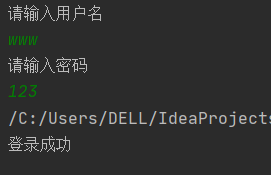
注:要特别注意单词的拼写,很多报错就是因为拼写错误导致的!!

 浙公网安备 33010602011771号